

If you are weighing Govee vs Nanoleaf for a gaming room wall, you are really choosing between two different kinds of glow. The Govee RGBIC Floor Lamp Basic is a tall corner lamp that washes your wall with segmented color, while Nanoleaf wall panels mount directly on the wall to create a shaped light canvas above or beside your desk. One fills a corner from the floor up, the other turns the wall itself into decor.
In this comparison, researched for 2026 and updated for November, we evaluated how each option fits common gaming setups, from compact bedrooms to dedicated battlestations with ultrawide monitors. You will see how coverage, color control, music response, and daily setup compare, so you can match the light to your room, your desk layout, and whether you rent or own. Both can look strong on camera for streams, but they suit different walls and different habits.
This article contains affiliate links. If you buy through one of our links, CustomPCGaming may earn a commission at no extra cost to you. Commissions never influence which products we recommend or how we rank them. Read our Affiliate Disclosure for details.
Quick Picks at a Glance
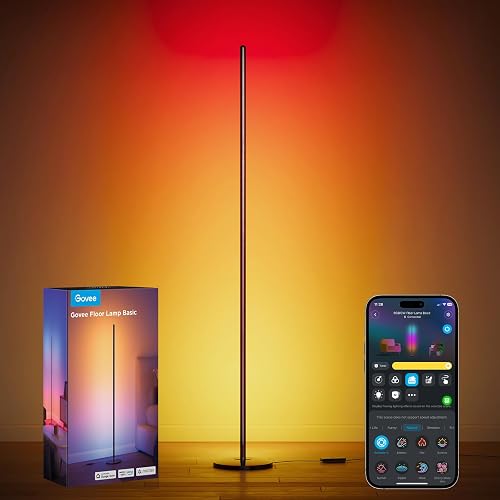
Govee RGBIC Floor Lamp Basic
As an Amazon Associate we earn from qualifying purchases. Product prices and availability are accurate as of the date/time indicated.
Pros
- Vibrant multicolor RGBIC effects with deep per segment customization
- Fast assembly and simple app pairing with reliable voice control
- Music sync mode adds fun energy for movies, parties and gaming
- Slim black modern profile fits neatly into corners without bulk
- Flexible placement for bedrooms, kids rooms, playrooms and study rooms
Cons
- 1000 lumen output works as accent light only, not a main room light
- Supports 2.4GHz WiFi only and no remote control is included
- Indoor use only with no water resistance
The Govee RGBIC Floor Lamp Basic H6076A is a tall smart corner lamp built for mood and accent lighting. It suits gamers, kids rooms, dorms and renters who want big atmosphere from a small footprint.
Its standout feature is RGBIC segment control, so different sections can show different colors at the same time. With 16 million colors, 85 scene modes and music sync, reviewers say it transforms movie nights, gaming sessions and parties.
The design is slim, modern and freestanding at 53.7 inches tall in matte black. Assembly is quick and tool free, and the weighted base keeps it stable while still easy to move between rooms.
It is not a replacement for overhead lighting, as 1000 lumens is best for corners and ambient glow. You will also need 2.4GHz WiFi and the Govee Home app for full control, since no remote is included.
For shoppers who want customizable ambience with voice control, this is an easy recommendation. If you need a bright reading or primary light, pair it with a stronger white lamp instead.
Model: Govee H6076A RGBIC Floor Lamp Basic, Black, freestanding floor mount
Light Performance: 1000 lumens max, 24W LED, adjustable color changing with 16 million colors and 85 scene modes
Control and Connectivity: App, voice, Alexa, Google Assistant and SmartThings over Bluetooth and 2.4GHz WiFi, music sync supported
Build and Use: 53.7 inches tall, corded electric 24V DC, indoor use only, not water resistant, includes lamp, adapter, manual and quick start guide
How They Compare
Placement and Wall Coverage for a Gaming Setup
The Govee RGBIC Floor Lamp Basic stands 53.7 inches tall and puts out up to 1,000 lumens, which per the spec sheet makes it best suited for corners and small spaces. You place the Govee RGBIC Floor Lamp Basic in a corner behind your desk, chair, or shelving, and it throws a tall gradient up the adjoining walls for soft peripheral color. Nanoleaf wall panels work in the opposite way, since Nanoleaf panels sit flat on the wall where you arrange them and provide direct patterned light rather than indirect wash.
If your gaming wall is already crowded with a monitor, shelves, and posters, the Govee RGBIC Floor Lamp Basic keeps your wall surface free while Nanoleaf wall panels demand clear wall space and careful planning. The Govee RGBIC Floor Lamp Basic is easier when you have a tight rental bedroom with little open wall, while Nanoleaf panels can be perfect for a feature wall behind your PC but tricky where space is limited. For ideas on how case size and desk clearance affect wall space, check this guide to mid tower cases for long GPU builds before you commit to a layout.
Color Control, Scenes and RGBIC Effects
The Govee RGBIC Floor Lamp Basic is rated for 16 million colors and 85 dynamic scene modes, with RGBIC technology that lets different segments show different colors at once. That means the Govee RGBIC Floor Lamp Basic can run a sunset fade, a gaming palette, or a split color look up the pole without needing multiple lights. Nanoleaf wall panels also offer multi-zone color, but the Nanoleaf effect reads as distinct tiles or shapes that change individually, which looks more graphic and less like a smooth vertical wash.
For daily control, the Govee RGBIC Floor Lamp Basic uses the Govee Home app with scene picks like Cheerful and Romantic, plus voice control through Alexa and Google Assistant, while Nanoleaf wall panels rely on their own app and voice platforms with more time spent arranging layouts. Setup for the Govee RGBIC Floor Lamp Basic relies on a QR code on the package for the genuine app, and it supports 2.4GHz network only with no remote included, so phone or voice is your path. Nanoleaf control can feel more visual because you design the wall shape, but the Govee RGBIC Floor Lamp Basic gives you faster scene swaps and an AI lighting bot 2.0 option that turns voice, text, or snap input into personalized effects.
Music Sync and Gaming Immersion
When you want light that reacts to play, the Govee RGBIC Floor Lamp Basic includes a music sync mode where color and brightness shift with music or gaming audio, while Nanoleaf wall panels use their own rhythm response to pulse with sound. In a dark room, that Govee RGBIC Floor Lamp Basic corner wash pulses around your peripheral vision and adds energy to party sessions or story games without sitting directly in your eyeline. It is ambient rather than focused bias lighting, so the Govee RGBIC Floor Lamp Basic sets mood more than it balances monitor brightness.
Nanoleaf wall panels also respond to sound with rhythm features that owners commonly report as fun for streams and background visuals, while the Govee RGBIC Floor Lamp Basic keeps the reactive glow in the corner where your camera can catch it. The difference is placement, since Nanoleaf panels behind or beside you will not show up on your webcam the way a front-facing wash might, while a corner lamp can color the wall your camera sees. If you play competitive shooters at high refresh on a setup like this 1440p gaming PC build, you may prefer a steady static color for focus and save reactive modes for casual play and viewing parties.
Installation, Power and Everyday Practicality
The Govee RGBIC Floor Lamp Basic is designed to be moved freely between a gaming room, living room, or bedroom, and owners give the Govee RGBIC Floor Lamp Basic 4.4 out of 5 from 11762 reviews, which suggests straightforward assembly and daily use for many buyers. You assemble the pole for the Govee RGBIC Floor Lamp Basic, plug it in, connect to the app, and slide it into a corner, with no drilling or adhesive strips. Nanoleaf wall panels avoid floor clutter but introduce wall work, and the trade-off for the Govee RGBIC Floor Lamp Basic is a power cable on the floor and a footprint you must keep clear from chairs, pets, and vacuum cleaners.
Nanoleaf panels need a clean surface, leveling templates, linked panels, and a controller and power supply on the wall, while the Govee RGBIC Floor Lamp Basic needs floor space and a nearby outlet with app setup on 2.4GHz only. That Nanoleaf approach can look clean once done, yet renters may worry about adhesive marks and owners may tire of dusting between shapes. To see how ambient light fits into a broader battlestation plan, browse the Bias Lighting and Ambient RGB archive alongside your case and airflow choices, like this airflow case guide for hot GPUs, and follow the manufacturer mounting instructions for either system.
Which One Should You Get
Choose Govee RGBIC Floor Lamp Basic if you want simple corner glow for a bedroom or small gaming room with a 1440p monitor setup and limited free wall space. You get a tall wash that frames your desk on camera, easy moves between rooms, and app plus voice control without drilling, which suits renters and anyone who rearranges often. It is also the more practical pick if you want one light to serve gaming, movies, and background mood with 85 scene choices and music response that you can tone down for focused play.
Choose Nanoleaf wall panels if your priority is a bold wall centerpiece behind your desk that reads as art even when dimmed and stays fixed as part of your battlestation design. You will need a clear stretch of wall, patience for layout and mounting, and a desire for tile-by-tile patterns for streaming backdrops or themed builds. This path suits dedicated gaming rooms where the PC, desk, and wall design stay put and you want the wall itself to be the visual focus rather than a soft wash from the corner.
Who Should Skip Both
If you need true monitor bias lighting to reduce eye strain or accurate color for creative work, this pair is not ideal for your main goal. A corner lamp throws mood light around the room and wall panels create decorative zones, but neither sits directly behind your display to balance screen brightness in a dark room. You should also skip both if you dislike apps and voice setup, need a completely cable-free wall, or want lighting that follows on-screen colors frame by frame, since you would be better served by a dedicated monitor strip or bar.
Frequently Asked Questions
Is the Govee RGBIC Floor Lamp Basic bright enough to light a gaming room wall?
Per the spec sheet, the Govee RGBIC Floor Lamp Basic offers up to 1,000 lumens from a 53.7-inch pole and is described as best suited for corners and small spaces. That is enough for a soft to medium wash that shows well in a dark or dim room, but it will not replace ceiling light in a large room. If your wall is far from the corner or painted dark, expect a mood glow rather than full illumination.
Which is better behind a monitor, Govee corner lamp or Nanoleaf wall panels?
Neither sits directly behind a monitor like a light bar or strip, so think of them as room ambiance rather than dedicated bias light. The Govee RGBIC Floor Lamp Basic adds indirect color from the side that can soften a dark room, while Nanoleaf panels add patterned light on the wall around your setup. If your monitor wall is tight, the corner lamp keeps desk space clear, while panels need open wall area to look balanced.
Can I use Govee and Nanoleaf together in the same gaming room?
Yes, many setups pair a corner wash with wall art, using one for base mood and the other for accent. You would control the Govee RGBIC Floor Lamp Basic in the Govee Home app with Alexa or Google Assistant, and run Nanoleaf panels in their own app, so expect two control points rather than one unified system. Keep color palettes coordinated and avoid running competing music modes at once to prevent a busy look on camera.





Write Your Review
No reviews yet. Be the first to share your experience!