

Figuring out how many lumens you need for a gaming desk lamp comes down to matching light output to your room, your monitors, and how you play. Too little light leaves you squinting at your keyboard and notes, while too much light washes out your display and adds eye fatigue during long evening sessions.
Your ideal pick depends on your resolution and refresh target, since a bright reflective display shows glare more easily, plus your platform and socket choice which often dictates tower placement and desk layout. You also need to weigh case size and clearance for clamp space, your power budget for accessories, and whether you are lighting a current single monitor setup or planning a next upgrade to dual screens. If you are also planning atmosphere behind your display, browse our Bias Lighting & Ambient RGB coverage alongside this task lighting guide.
What Actually Matters
Lumen Output And Usable Coverage, Not Just Peak Brightness
Lumens tell you total light output, but coverage tells you where that light actually lands on your desk. For reference from researched specs, a compact head that delivers 500 lumens is often described as enough to illuminate a 60-inch computer desk or workbench when positioned well, while a wide bar that delivers up to 1800 lumens is aimed at up to 80 inches of workspace for dual monitors and large desks.
You should choose based on desk width and distance, not peak numbers alone. If your room is dark, owners commonly report that a lower dimmed level feels more comfortable than full blast, so look for smooth adjustment such as 10% to 100% or 20% to 100% rather than only a few fixed steps. A very bright bar without good dimming can feel harsh in a small bedroom, while a modest head without enough spread can leave the edges of a wide setup dim.
Light Angle And Glare Control For Screens
For gaming, angle matters as much as lumens because direct light bouncing off your screen kills contrast. Look for designs that use an angled away layout, such as a 45-degree angled main light with side lighting that pushes illumination toward your desk and keyboard rather than toward your eyes and panels. Another approach is a 60-degree lighting angle that keeps direct light out of your line of sight.
You want soft, even, flicker-free illumination that reduces strain without creating hot spots. Adjustable panels that fold inward for focused task light or rotate outward for wide coverage help you aim around monitors. If you play in the dark, upward facing auxiliary lights can work as gentle ambient fill, which many players find easier on the eyes than a single harsh downlight.
Color Temperature, Dimming Steps And Controls
Color temperature changes how alert or relaxed your space feels. Warm light around 3000K or 3200K suits relaxed evening play and reading, natural white around 4500K suits mixed use, and cool daylight around 6000K to 6500K suits detailed work, crafting, and daytime focus. Options that offer 5 color temperatures and 5 brightness levels give you 25 combinations to tune for day and night.
Think about how you will actually adjust it from your chair. Touch controls on the head are quick to reach, while an infrared remote plus built-in buttons lets you change brightness, color, timers, and modes without standing up. Useful extras include 1, 2, and 4-hour timers, preset modes such as Work, Game, Study, Relax, Night, and Mother and Baby, stepless dimming and tempering, and a memory function that restores your last setting. For more on fitting accessories around a tower, see our guide to 7 mid tower cases for 360mm AIO and long GPU builds.
Mounting, Reach And Color Quality
A gaming lamp has to clamp securely and reach where you need it without blocking your monitors. Check that the heavy-duty metal clamp fits your desktop, with some designs fitting desks up to 2.75 inches thick and using anti-slip pads plus silicone protection to avoid scratches. Then compare reach: a 27.7-inch flexible support arm that bends up to 180-degrees, a 360-degree adjustable gooseneck with up to 29 inches of height, or a multi joint architect arm with 7 strongly damped joints all solve different desk layouts.
Head size and color rendering also shape your choice. A 16-inch long head with 54 LED chips suits a focused zone, while a 42-inch 4-panel bar suits a wide battlestation. For color sensitive tasks like art, design, or judging RGB gear, look for high color rendering LEDs with CRI over 90 for soft light that stays close to natural light with less blue light harshness. A built-in light sensor that auto adjusts brightness to surrounding light can also help if your room lighting changes through the day.
To see how these ideas look in real hardware, here are a few options that show the range from compact single heads to wide multi panel bars:
This article contains affiliate links. If you buy through one of our links, CustomPCGaming may earn a commission at no extra cost to you. Commissions never influence which products we recommend or how we rank them. Read our Affiliate Disclosure for details.
Quick Picks at a Glance

Micomlan LED Desk Lamp with Clamp

Prime SUPERDANNY Clamp LED Desk Lamp with Gooseneck
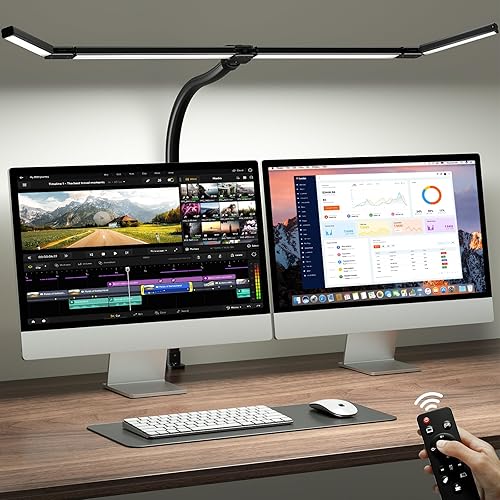
ONEMIX 42-Inch LED Desk Lamp with Clamp
As an Amazon Associate we earn from qualifying purchases. Product prices and availability are accurate as of the date/time indicated.
Pros
- Ultra bright 24W output easily covers large desks and dual monitor setups without shadows
- Highly flexible 7 joint arms and rotating light bars allow precise vertical and horizontal aiming
- Five step plus stepless brightness and color temperature controls with helpful memory function
- Eye comfort design with anti glare, no flicker and high color accuracy for long work hours
- Solid clamp base saves desk space and feels stable without bulk
Cons
- Main and auxiliary lights must be switched on and off separately, which takes getting used to
- Runs warm on maximum brightness according to some users
- Corded power only with no battery option, and indoor use only with no water resistance
The Micomlan FDDL03 is a clamp mount architect desk lamp designed for home offices, study rooms, workshops and creative spaces. It suits remote workers with dual monitors, students, artists, sewers and anyone who needs wide, shadow free task lighting.
Its standout feature is the three bar head with a 24W main light plus two adjustable side bars for task or ambient use. In real use, it floods a full desk evenly, and you can flip the side bars down for intense close up light or up for soft background illumination.
Build quality centers on a painted metal clamp, aluminum arms and seven strongly damped joints for stable positioning. The touch panel offers 5 step and stepless control of brightness and color temperature from warm 3000K to daylight 6500K, with auto dimming via the built in sensor.
It is not perfect. The main and side lights share brightness controls but need separate on and off presses, and the head can feel warm at full power. It is also corded only, so you will need an outlet nearby, and it is strictly for indoor use.
Overall, this is one of the most versatile clamp lamps for productivity and crafts thanks to its coverage, glare control and eye comfort features. If you want a space saving, highly adjustable light for work, study or detailed hobbies, it is an excellent pick.
Model: FDDL03 by Micomlan, Color: Black, Style: Utility architect lamp for office, study and craft rooms.
Power: 24W corded electric via USB cable, 24V, 3 LED light sources with highly efficient output.
Lighting: Stepless dimming 20 to 100 percent, 3000K to 6500K tuning, CRI over 90, flicker free and anti glare with smart light sensor.
Design: Tabletop clamp mount, 7 rotatable joints, metal and ABS construction, touch control, indoor use only.
Pros
- Wide 16 inch coverage lights an entire workstation evenly
- Eye-friendly, flicker-free LEDs with anti-glare angle for comfort
- Highly adjustable gooseneck and dimmable color modes for any task
- Sturdy clamp design saves desk space and prevents scratches
Cons
- Clamp-only installation, no freestanding base option for desks without an edge
- Requires a constant power connection, no cordless or rechargeable operation
- Touch buttons on the lamp head can be hard to reach when mounted high
The SUPERDANNY clamp LED desk lamp is a space saving task light designed for home offices, study desks and craft stations. It is best for anyone who needs bright, wide coverage without giving up desk space to a bulky base.
Its 16 inch bar with 54 LEDs puts out 500 lumens of even, flicker-free light across large surfaces. With 3000K, 4500K and 6000K modes plus smooth 10 to 100 percent dimming, it adapts well from detailed work like drawing and diamond painting to relaxed evening reading.
The 360 degree gooseneck extends up to 29 inches and stays where you put it for targeted lighting. The metal and silicone build feels durable, while the padded clamp grips firmly and the head mounted touch controls keep operation simple and cord free.
The clamp-only design will not suit glass, extra thick or edgeless desks, and placement options are limited to edges and shelves. It also needs continuous plug-in power, so it is not portable, and the high mounted controls may require reaching.
Overall, this is a practical, eye comfort focused lamp for workers, students and hobbyists who want broad, customizable light on a budget footprint. If you need flexible positioning and glare reduced illumination for long sessions, it is an easy fit for most indoor workspaces.
Light Source: Integrated LED, 12 watts, 54 chips, 500 lumens
Light Head: 16 inch bar with 60 degree anti-glare angle
Color Temperature: 3000K warm white, 4500K natural white, 6000K cool white
Dimming: Stepless 10 percent to 100 percent, touch control on lamp head
Adjustability: 360 degree gooseneck, up to 29 inches high
Mounting: Side clamp with silicone anti-scratch pad for tabletop use
Color and Style: Black, modern coated finish, indoor use only
Pros
- Ultra-wide coverage ideal for dual monitors, drafting tables and sewing stations
- Highly customizable lighting with presets, brightness levels and 1, 2 and 4-hour timers
- Space-saving clamp mount frees up valuable desk surface
- Remote and button controls allow easy adjustment from your chair
- Energy-efficient 24W LED with soft, even, flicker-free distribution
Cons
- Corded power and IR remote require a nearby outlet and line of sight
- Large 42-inch bar may overwhelm small desks or compact nightstands
- Clamp only fits desks up to 2.75 inches thick and is for indoor use only
The ONEMIX LED Desk Lamp with Clamp is a 42-inch, four panel light bar designed for dual monitors, large desks and creative stations. It is built for remote workers, students, gamers and crafters who need bright, even coverage without desk clutter.
With up to 1800 lumens, five color temperatures from 3200K to 6500K and five brightness levels, it offers 25 lighting combinations for any task. Six preset modes for Work, Game, Study, Relax, Night and Mother and Baby plus 1, 2 and 4 hour timers make daily use simple and convenient.
The 27.7-inch flexible arm bends up to 180 degrees while each light panel rotates independently to focus or spread light up to 80 inches wide. A heavy duty metal clamp with anti-slip pads grips desks up to 2.75 inches thick, and both remote and onboard buttons give flexible control.
Its large footprint is overkill for small nightstands or compact dorm desks, and the corded design needs a nearby outlet. The infrared remote also needs line of sight to work, and the clamp will not fit extra thick tabletops.
For anyone lighting a dual monitor setup, drafting table or sewing station, this lamp delivers exceptional coverage, customization and value in one space saving package. If you want wide, flicker-free light you can adjust from your chair, it is an excellent upgrade for productivity and comfort.
Light Bar: 42-inch 4-panel rotatable design, 112 LEDs, up to 1800 lumens, expands to 80 inches coverage.
Lighting Control: 5 color temperatures from 3200K to 6500K, 5 brightness levels, 6 preset modes, 1, 2 and 4-hour timers.
Mounting and Adjustability: 27.7-inch flexible arm with 180-degree bend, clamp fits desks up to 2.75 inches thick.
Power and Operation: 24W corded electric, 24V DC adapter, push button and IR remote control, indoor use only.
Matching a Part to Your Build
If you play on a single monitor at a 60-inch desk in a dim bedroom, focus on controlled brightness and easy aiming rather than peak output. The SUPERDANNY Eye-Caring LED Desk Lamp Work Lamp is a clear example of this approach, with 500 lumens from a 16-inch head, three colors at 3000K, 4500K, and 6000K, 10% to 100% dimming, and a 360-degree gooseneck that reaches up to 29 inches. You can pull it close for homework or crafting, then push it back and dim it warm for late night queues without lighting up the whole room.
If you run dual monitors or a very wide desk that needs up to 80 inches of even coverage, prioritize a long bar and independent panels. The ONEMIX LED Desk Lamp with Clamp shows that layout, with a 42-inch light bar, four independently adjustable panels, up to 1800 lumens, 5 color temperatures from 3200K to 6500K, and 5 brightness levels for 25 combinations. Its 27.7-inch arm, secure clamp for desks up to 2.75 inches thick, remote control, and 1, 2, and 4-hour timers make it easier to live with when you need to switch between Work, Game, Study, and Night moods. Pair a wide light like this with a thoughtful layout, and review ideas from how to choose an airflow case for a hot GPU so your tower, monitors, and light arm do not fight for space.
If you stream, study, sew, draw, or do color sensitive work at the same desk where you game, prioritize flexibility and color quality plus ambient fill. The Micomlan Led Desk Lamp with Clamp illustrates that hybrid style with a 24W design, 7 rotatable joints, 3 light bars, a 45-degree angled away main light, upward facing auxiliary lights for ambient use, CRI over 90, and stepless dimming from 20% to 100% with tempering from 3000K to 6500K. You should not buy this style if you want a simple set and forget bar, because the main and auxiliary lights turn on separately and take a little learning, but it rewards you if you like to rotate panels up for room glow or down for a bright task zone.
Common Mistakes
Chasing peak lumens without checking dimming. A very high output bar can be uncomfortable in a dark room if you cannot dim it smoothly. Look for wide dimming such as 10% to 100% or 20% to 100%, plus warm color options, so you can drop from detailed work brightness to relaxed night lighting without harsh steps.
Ignoring clamp fit and arm reach. Measure your desktop thickness and rear clearance before you order, and follow the manufacturer mounting instructions so the clamp stays secure. A clamp that fits up to 2.75 inches thick is great only if your desk qualifies, and a long 42-inch bar or 27.7-inch arm needs room to swing without hitting your monitor arms, wall, or a large tower like those covered in our ryzen 7 7700 RTX 5070 gaming PC build.
Lighting your screen instead of your desk. Placing a bright head too low or aiming it straight at reflective panels creates glare that makes you raise in-game brightness and strain your eyes. Choose an angled design, raise the head higher, fold panels outward for wider spread, and use cooler 6000K to 6500K light for focus tasks and warmer 3000K light for wind down play.
Who Should Wait or Buy Differently
If you already use rear bias lighting and play mostly with room lights on, a large task bar is not ideal for you and may add clutter without much benefit. You are not a good fit for a wide multi panel lamp if your desk is narrow, your monitors sit close to the wall, or you rarely do desk work beyond gaming, since a compact dimmable head or a simple ambient strip from our Bias Lighting & Ambient RGB section is often the more comfortable choice until you move to a larger dual monitor layout.
Frequently Asked Questions
How many lumens do you need for a gaming desk lamp?
It depends on desk size and room darkness, but use researched examples as anchors. Around 500 lumens with good aiming can cover a 60-inch desk for single monitor play, while up to 1800 lumens suits a very wide dual monitor area up to 80 inches. In both cases, wide dimming matters more than the peak, so you can tune down for night sessions.
What color temperature is best for gaming?
There is no single best setting, so match it to the moment. Many players prefer warmer 3000K light for relaxed evening gaming and cooler 6000K to 6500K daylight for study, work, or detailed crafting, with 4500K natural white as a balanced middle. If you share the desk for school or office work, 5 color options with memory make switching easier.
How do you avoid screen glare from a desk lamp?
Mount the lamp higher and to the side, then aim light at your keyboard and desk surface rather than at your panels. Angled designs, adjustable panels, and flicker-free diffusion help reduce reflected glare and eye strain. If glare persists, dim the lamp, switch to a warmer temperature, and add soft ambient light behind or around the desk instead of more direct downlight.





Write Your Review
No reviews yet. Be the first to share your experience!