

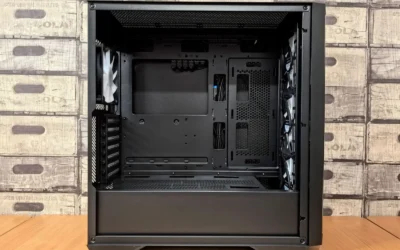
Fractal Pop Air GPU clearance and radiator support explained is the kind of topic that saves you from a frustrating return. If you are planning a new build around a long graphics card or a front or top mounted AIO, the case you pick determines whether everything fits, breathes, and stays easy to service.
In this buying guide for November 2026, you will learn how to choose any airflow focused case using the same decision framework. You will weigh your resolution and refresh target, your platform and socket, your case size and clearance needs, your power budget, and whether you are building for today or for a larger GPU or cooler next year. The goal is to match the case to your parts, not the other way around. For a broader look at case options, browse the Cases & Airflow archive.
What Actually Matters
GPU Clearance Is More Than Length
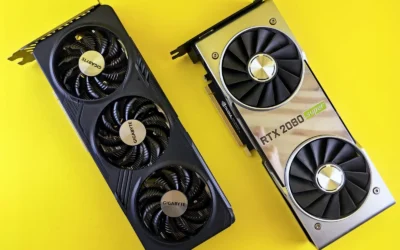
When you compare cases, start with the graphics card envelope. Length is the headline number on every spec sheet, but thickness and height matter just as much. A triple slot card can conflict with side panels, bottom fans, or front radiator tubing, and a tall card with a large cooler shroud may sit close to the side glass. Always check the manufacturer spec sheet for maximum GPU length with and without a front radiator or fans installed, since a radiator can subtract a lot of usable depth.
You should also think about how you will support that card. Heavy modern cards can sag over time, which stresses the PCIe slot and can affect the look of your build. Plan for a support solution that fits your case layout, and confirm that you have mounting points or clearance at the bottom of the case for a bracket or stand. If you use a vertical mount, verify that it does not push the card too close to the side panel and choke airflow.
Radiator Support Depends on Location and Thickness
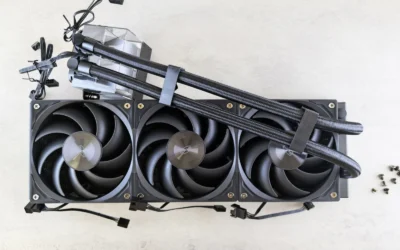
Radiator support is not just about the size label. A case may list support for a large front radiator, but the usable thickness with fans, the offset from the motherboard tray, and the clearance for RAM and top VRM heatsinks will decide if your specific AIO or custom loop fits. For front mounts, check whether a thick radiator plus fans will reduce GPU length. For top mounts, check clearance above the motherboard, especially with tall memory or a large air cooler alternative.
Before you buy, check cooler height or radiator clearance against your case, and follow the manufacturer mounting instructions for both the case and the cooler. That includes fan orientation, screw length, and radiator port position. You want tubes to route without kinking and without pressing against the GPU backplate. Owners commonly report that careful measurement of radiator plus fan thickness avoids most fit issues, so compare the combined thickness to the case manual rather than relying on the radiator size alone.
Airflow Layout and Practical Build Comfort
Airflow cases live or die on their fan layout and dust management. Look for a clear front to back or bottom to top path, with enough fan mounts to create balanced intake and exhaust. Mesh fronts help intake, but you also want filtered intakes and easy access for cleaning. Consider how many 120mm or 140mm mounts are available, where they are, and whether using them blocks other components like long GPUs or thick radiators.
Build comfort matters for future upgrades. Removable brackets, a PSU shroud with cable routing space, and cutouts for radiator installation make the build and later maintenance easier. If you plan to add more storage or upgrade your Graphics Cards later, choose a layout that leaves room for longer cards and extra fans without forcing you to disassemble the whole system. A case that is easy to work in is also easier to keep cool and quiet over time.
Platform, Power, and Upgrade Path
Your platform influences case choice more than you might expect. ATX, microATX, and mini ITX boards have different mounting patterns and often different cooler and GPU combinations. A compact board in a mid tower can leave more room for radiators and cable management, while a full ATX board with a large air cooler may limit top radiator options. Match the case form factor to your motherboard and to the CPU cooler you intend to use, not just the board size.
Think about power and thermals as a system. A high refresh 1440p build that pairs a power hungry GPU with a high core count CPU needs headroom for airflow and for the PSU. Recommend wattage headroom over the combined GPU and CPU draw and follow the GPU maker recommended wattage, never assume a PSU handles any card. If you are choosing between building now or waiting, consider whether your next GPU will be longer or thicker and whether your next cooler will be larger, then pick a case that already accommodates that growth.
The examples below show the range of solutions you might pair with an airflow case, from simple support hardware to more complete cooling setups. Think of them as illustrations of how to solve specific fit and stability problems:
This article contains affiliate links. If you buy through one of our links, CustomPCGaming may earn a commission at no extra cost to you. Commissions never influence which products we recommend or how we rank them. Read our Affiliate Disclosure for details.
Quick Picks at a Glance

Prime JOYJOM Dual Brace GPU Support Bracket
As an Amazon Associate we earn from qualifying purchases. Product prices and availability are accurate as of the date/time indicated.
Pros
- Sturdy dual-brace aluminum construction effectively eliminates sag on heavy triple-fan GPUs
- Highly adjustable height and sliding base fits a wide range of cases and card sizes
- Mounts directly to case fans to save space and maintain ventilation
- Easy installation with included tools and rubber pads to prevent card damage
- Minimalist transparent look does not cover RGB lighting or case aesthetics
Cons
- No printed instructions included, assembly requires some trial and error
- Relies on screw mounting or wedging pressure, may shift if case is bumped and not screwed down
- Height adjustment can be fiddly inside crowded or compact cases
The JOYJOM GSB-128 is a dual-brace GPU support bracket designed to prevent sag in heavy, modern graphics cards. It is ideal for gamers and builders using large triple-fan GPUs who want to protect their motherboard and PCIe slot over time.
In real world use, the dual arm design provides noticeably better stability than single post stands, with users reporting a night and day difference in sag. The sliding base and height adjustment up to 128mm let you position it precisely, and the fan mount option keeps it secure without blocking airflow.
Build quality is a clear highlight, with anodized aluminum alloy and CNC machining that feels rugged and corrosion resistant. Non-slip rubber pads on the support arms prevent scratches, while the transparent finish keeps the look clean and minimalist inside the case.
There are a few tradeoffs to consider. The kit does not include printed instructions, so first time assembly takes some trial and error, and adjusting height inside a crowded case can be fiddly. If you do not screw it to a fan, the bracket relies on wedging pressure and may shift if the case is bumped.
Overall, this is a strong value pick for anyone needing reliable, long term GPU support without adding bulk or blocking aesthetics. It is especially recommended for heavy cards where sag is a real concern and you want a durable, adjustable solution that stays out of the way.
Model: JOYJOM-GSB-128, Manufacturer Part Number JOYJOM-GSB-128
Material and Finish: Anodized Aluminum Alloy with CNC Process, Transparent color
Adjustability: Height adjustable up to 128mm with slidable base for flexible placement
Compatibility: Universal for ATX, MATX and ITX chassis, mounts to 120mm and 140mm fans
Mounting Type: Chassis and fan mount without blocking vents, includes non-slip rubber pads
Package Includes: 1x Dual Brace Graphics Card Bracket, 1x Mini Bubble Spirit Level, 1x Screwdriver, Screws
Matching a Part to Your Build
If you are building a 1440p high refresh system with a long but air cooled GPU, prioritize GPU length with front fans installed and clear intake. You want a mesh front, room for two or three front fans, and no conflict between the card and front mounted hardware. In this scenario, a support accessory like the top RTX 5070 ti cards for 1440p gaming guide can help you gauge card size trends, and a bracket such as the GPU Support Bracket Dual Brace can address sag without blocking airflow, since it can mount to a bottom 12 or 14cm fan position and offers adjustable height up to 128mm with a sliding base.
If you plan to use a front mounted AIO, map the radiator plus fan thickness against GPU length first. Many builders choose a case that supports a large front radiator and then discover the GPU no longer fits. Check the case manual for GPU clearance with a front radiator, and consider whether a top mount would preserve length for the card. The GPU Support Bracket Dual Brace is useful here as well because its aluminum construction and dual brace design add stability for heavy cards that sit close to radiator tubing, and the non slip rubber pads help avoid scratching the card during installation.
If your priority is a quiet build with a very heavy triple slot card, focus on vertical clearance, bottom fan compatibility, and bracket options. Look for a case with solid bottom fan mounts and enough height adjustment range for a stand. The GPU Support Bracket Dual Brace, which is rated 4.2 out of 5 from owners and is designed for ATX, MATX and ITX chassis, shows what to look for: an adjustable, slidable base, the ability to fix to bottom fans without blocking vents, and included tools like a small level and screwdriver for easier setup. Pair that thinking with a balanced fan plan from a build breakdown like the ryzen 5 7600 RX 7700 XT 1000 dollar gaming PC amazon build to keep intake and exhaust balanced.
Common Mistakes
Choosing a case by radiator size alone without checking thickness and GPU interference. A case may advertise support for a large front radiator, but once you add fans the remaining GPU length can be too short for your card. Always compare the combined radiator and fan thickness to the case spec for GPU clearance with a front radiator installed, and consider a top mount if you need the extra length.
Forgetting to verify CPU cooler height, RAM height, and top radiator clearance together. A tall air cooler or high profile memory can conflict with a top mounted radiator or fans, even if each part fits on its own. Check the case manual for cooler height limits and top clearance, and follow the cooler maker mounting instructions. This is also where anti static handling and careful cable routing help avoid damage during installation.
Overlooking support and airflow for heavy GPUs. A long, heavy card without support can sag and put stress on the slot, and a bracket that blocks bottom vents can hurt thermals. Look for a bracket that is adjustable, mounts without blocking vents, and uses protective pads. Also avoid buying more VRAM or a larger radiator than your platform can use effectively; match memory speed and capacity to your CPU and motherboard, and match radiator size to your actual thermal needs and case airflow.
Who Should Wait or Buy Differently
This type of airflow case is not ideal for you if you need the smallest possible footprint, plan to move the system often, or already know your next GPU will be significantly longer than current spec sheets allow. If you are on a very tight budget, a simpler case plus careful fan placement may be a better value than paying for extensive radiator support you will not use, and you can explore alternative layouts in Budget Build Guides. If your build is focused on a compact living room setup or a portable LAN rig, a smaller chassis that is not designed for large radiators and long cards is not a good fit for this buying guide, and waiting for a case that matches that specific form factor is the smarter move.
Frequently Asked Questions
How do I know if my GPU will fit with a front radiator?
Check the case spec sheet for maximum GPU length both with and without a front radiator or front fans. Then compare that to your card length and the combined thickness of your radiator plus fans. If the numbers are close, consider a top mounted radiator or a shorter card to avoid tubing pressure on the GPU.
Do I need a GPU support bracket in an airflow case?
You do not always need one, but heavy cards benefit from extra support to reduce sag and slot stress. Look for an adjustable aluminum bracket with a sliding base and protective pads, like the GPU Support Bracket Dual Brace, that can mount to bottom fan positions without blocking vents. Make sure the bracket height range matches the distance from the case floor or fan to the GPU.
What radiator location is best for Fractal Pop Air style cases?
There is no single best location, it depends on your GPU length and memory height. Front mounts often offer the most radiator space but can reduce GPU clearance, while top mounts preserve GPU length but need clearance above the motherboard. Review the case manual for supported radiator sizes per location and confirm fan thickness, RAM height, and VRM heatsink clearance before you decide.

Write Your Review
No reviews yet. Be the first to share your experience!