

Fractal North GPU clearance and radiator support explained is the search you make when you want that wood-front case without guessing whether your graphics card or cooling will actually fit. You are balancing looks, thermals, and future upgrades, and the North makes those choices very visible because its compact mid-tower layout rewards careful planning.
In this buying guide you will learn how to choose based on what matters for your build, not just a spec sheet. Think about your resolution and refresh target, your platform and socket, your case size and clearance limits, your power budget, and whether this is your final GPU or a stepping stone to a larger card in 2026 and beyond. If you get those variables right, you can pick a GPU and radiator combo that fits cleanly and cools well, as of November 2026.
What Actually Matters
GPU Length, Thickness, and How It Interacts With Front Cooling
Start with length. The Fractal North has a generous GPU chamber, but that length changes when you add a front radiator and fans. A thick radiator plus fans in the front will eat into the space available for your graphics card, so you need to evaluate them together. Always check the manufacturer spec sheet for maximum GPU length with and without a front radiator, and compare it to the card you plan to buy.
Thickness matters just as much. Modern cards are often 2.5 to 3.5 slots wide, and that can crowd the bottom clearance, front fan airflow, and your ability to add a support bracket. If you plan to use a heavy triple-fan card, also plan how you will support it and whether that support will block airflow. Owners commonly report that sag becomes an issue faster with longer, heavier cards.
Radiator Support: Position, Size, and Thickness Headroom
The North typically supports radiators in the front and top, but not every size fits in every position with every motherboard and RAM combination. Front mounts usually offer the most flexibility for larger radiators, while top mounts are limited by RAM height, motherboard heatsinks, and overall case height. Before you buy, check cooler height or radiator clearance against your case, and follow the manufacturer mounting instructions for your specific AIO or custom loop.
Pay attention to total thickness, not just radiator length. A radiator plus standard 25mm fans is thicker than the radiator alone, and push-pull or extra-thick radiators add more. If you are considering a front radiator with a long GPU, confirm both can coexist on the spec sheet and leave room for cables at the bottom. For top radiators, verify that your RAM and VRM heatsinks will not interfere.
Airflow Path and Why Ducts and Brackets Change It
The North uses a fairly traditional front-to-back airflow path, with intake through the front panel and mesh side. That works well for air cooling, but long GPUs and PSU shrouds can create dead zones where cool air never reaches the card. This is where small accessories change the equation, and where many builders get surprised after assembly.
A dedicated airflow duct that channels front intake directly toward the GPU can help, especially if you run a lower front fan that would otherwise blow into the PSU shroud. Similarly, a GPU support bracket prevents sag but can also affect airflow if it is bulky or blocks a bottom fan mount. Look for low-profile designs that sit flush and do not interfere with fans, and prefer tool-free or magnet-mounted options if you want to adjust placement without disassembly.
Case Size, PSU Shroud, Cables, and Upgrade Room
The North is a compact mid-tower, so cable management around the PSU shroud and front fans affects both looks and thermals. Thick power cables or unused drive cages can block the lower intake path, which is exactly the air your GPU wants. If you value a clean build, consider how a shroud cover or duct that hides that cable gap will affect your ability to route and service cables later.
Finally, think about your upgrade path. If you are buying a mid-range card now and plan to move to a larger high-end card later, leave headroom for length and thickness. If you are building around a specific high-end GPU today, you can optimize more tightly for radiator placement and support. Your choice should also align with your power budget, so review your power supply headroom over combined GPU and CPU draw and follow the GPU maker recommended wattage.
This article contains affiliate links. If you buy through one of our links, CustomPCGaming may earn a commission at no extra cost to you. Commissions never influence which products we recommend or how we rank them. Read our Affiliate Disclosure for details.
Quick Picks at a Glance
Prime nkomax GPU Brace Support

Prime upHere G276ARGB GPU Support Bracket

Prime JOYJOM Dual Brace GPU Support Bracket

Prime Magnetic Airflow Duct for Fractal North

Prime GPU Air Duct for Fractal North Case
As an Amazon Associate we earn from qualifying purchases. Product prices and availability are accurate as of the date/time indicated.
Pros
- Strong and durable all aluminum build lasts longer than plastic alternatives
- Wide adjustable range covers most ATX cases and GPU heights
- Magnetic base provides stable, easy placement without tools or case modifications
- Small footprint and cushioned pad protect GPU and maintain clean interior aesthetics
Cons
- Single point support may not fully stabilize extra long or ultra heavy flagship cards
- L size 74-120mm range is not suitable for compact cases with lower clearance
- Only available in Black and lacks height markings for precise adjustment
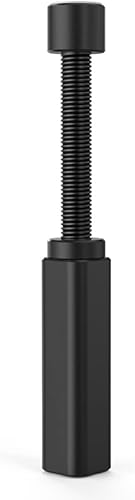
The nkomax NKMAX-GPUL is a compact telescoping GPU support stand built to stop graphics card sag in desktop gaming and workstation builds. It is ideal for anyone running a large, heavy card that puts stress on the PCIe slot and motherboard.
Its screw adjustment extends from 74mm to 120mm, covering most standard and long power supply layouts without needing extra tools. The hidden magnet in the base anchors it firmly to the case floor, while the cushioned top pad holds the card steady without scratching.
Build quality is a clear step above plastic alternatives, with a full aluminum body finished in polished and sandblasted anodizing. CNC high speed edge washing gives it clean, high gloss edges that look premium inside a tempered glass case and resist aging over time.
As a single post stand, it supports one contact point, so very long or ultra heavy GPUs may still show slight flex at the far end. The L size range also means small form factor cases under 74mm clearance will need a different model.
Overall, this is a simple, effective and durable fix for GPU sag that installs in seconds and stays put. For builders who want long term peace of mind without a bulky bracket, it is an excellent value and a smart addition to any modern build.
Brand: nkomax
Model: NKMAX-GPUL (Manufacturer Part: SSZJ-L)
Material: All Aluminum with Polished and Sandblasted Anodized Finish
Adjustable Height: 74 to 120mm (L Size)
Base: Hidden Magnetic Design for Tool Free Installation
Top Support: Cushioned Anti Scratch Pad
Dimensions: 0.6 x 0.6 x 2.9 inches | Weight: 0.03 kg
Color: Black | Finish: Polished
Pros
- Sturdy iron construction provides strong, reliable anti sag support
- Dual axis slide adjustment for flexible fit across different GPUs and cases
- Integrated 5V 3-pin ARGB syncs smoothly with compatible motherboards
- Compact and discreet design does not block airflow or aesthetics
- Highly rated for ease of use and effective sag prevention
Cons
- Requires a 5V 3-pin ARGB header, connecting to a 12V 4-pin header will damage the LEDs
- Not ideal for small form factor cases or vertical GPU mount configurations
- ARGB cable needs careful routing to keep the interior tidy
The upHere G276ARGB is a dedicated GPU support brace designed to stop graphics card sag in desktop gaming PCs. It is built for anyone using a large, heavy card that puts strain on the motherboard PCIe slot over time.
Its standout feature is the combination of practical support and integrated 5V 3-pin ARGB lighting. The brace holds the card level and stable while syncing with your motherboard for smooth, customizable RGB effects through your case.
Built around a sturdy iron main structure, the holder feels solid and durable without adding bulk. The slide type mechanism lets you adjust both height and length quickly, so it adapts cleanly to different card lengths and mounting positions.
The ARGB function requires a compatible 5V 3-pin header and will be damaged if connected to a 12V 4-pin header. Like most vertical braces, it also offers limited use in compact SFF cases or with vertical GPU mounts.
Overall, the G276ARGB delivers reliable anti sag protection with attractive, syncable lighting in a simple, affordable package. It is a smart, low cost upgrade for gamers who want to protect their GPU and brighten their build at the same time.
Model: upHere G276ARGB GPU Brace Support
Material: Sturdy iron and steel main structure
Lighting: Integrated 5V 3-pin addressable RGB strip, motherboard sync compatible
Adjustment: Two way slide structure for height and length
Compatibility: Fits most ATX and mid tower cases and full length graphics cards
Installation: Vertical stand support, adjustable support point placement
Pros
- Sturdy dual-brace aluminum construction effectively eliminates sag on heavy triple-fan GPUs
- Highly adjustable height and sliding base fits a wide range of cases and card sizes
- Mounts directly to case fans to save space and maintain ventilation
- Easy installation with included tools and rubber pads to prevent card damage
- Minimalist transparent look does not cover RGB lighting or case aesthetics
Cons
- No printed instructions included, assembly requires some trial and error
- Relies on screw mounting or wedging pressure, may shift if case is bumped and not screwed down
- Height adjustment can be fiddly inside crowded or compact cases
The JOYJOM GSB-128 is a dual-brace GPU support bracket designed to prevent sag in heavy, modern graphics cards. It is ideal for gamers and builders using large triple-fan GPUs who want to protect their motherboard and PCIe slot over time.
In real world use, the dual arm design provides noticeably better stability than single post stands, with users reporting a night and day difference in sag. The sliding base and height adjustment up to 128mm let you position it precisely, and the fan mount option keeps it secure without blocking airflow.
Build quality is a clear highlight, with anodized aluminum alloy and CNC machining that feels rugged and corrosion resistant. Non-slip rubber pads on the support arms prevent scratches, while the transparent finish keeps the look clean and minimalist inside the case.
There are a few tradeoffs to consider. The kit does not include printed instructions, so first time assembly takes some trial and error, and adjusting height inside a crowded case can be fiddly. If you do not screw it to a fan, the bracket relies on wedging pressure and may shift if the case is bumped.
Overall, this is a strong value pick for anyone needing reliable, long term GPU support without adding bulk or blocking aesthetics. It is especially recommended for heavy cards where sag is a real concern and you want a durable, adjustable solution that stays out of the way.
Model: JOYJOM-GSB-128, Manufacturer Part Number JOYJOM-GSB-128
Material and Finish: Anodized Aluminum Alloy with CNC Process, Transparent color
Adjustability: Height adjustable up to 128mm with slidable base for flexible placement
Compatibility: Universal for ATX, MATX and ITX chassis, mounts to 120mm and 140mm fans
Mounting Type: Chassis and fan mount without blocking vents, includes non-slip rubber pads
Package Includes: 1x Dual Brace Graphics Card Bracket, 1x Mini Bubble Spirit Level, 1x Screwdriver, Screws
Pros
- Extremely easy tool-free installation with strong magnetic hold
- Improves GPU cooling by focusing airflow where it is needed most
- Hides cable clutter without zip ties or cable management
- Seamless low-profile integration designed specifically for Fractal North
- Does not require removing fans, cables or fittings
Cons
- Compatible only with the Fractal North case, not universal
- Third-party accessory not manufactured or endorsed by Fractal
- Plastic construction feels less premium than the case materials
This magnetic airflow duct is a purpose-built aftermarket upgrade for the Fractal North chassis. It is designed for builders who want to improve GPU thermals and tidy up visible cable clutter without disassembling their system.
Its core function is to redirect fresh front intake air upward toward the graphics card and upper components, instead of letting it get lost around the PSU shroud. In real world use this focused airflow helps the GPU run cooler under load, while the cover simultaneously hides the messy cable section for a much cleaner presentation.
Build quality is lightweight black plastic molded to match the North interior contours. The low-profile shape sits flush and avoids interference with existing fans or hardware, and the integrated magnets provide a firm, rattle-free hold with no tools required.
The main limitation is its narrow compatibility, as it only fits the Fractal North and offers no benefit for other cases. Being a third-party part it lacks official Fractal endorsement, and the plastic finish does not quite match the premium wood and metal aesthetic of the case itself.
Overall, this is a smart, simple and effective mod for Fractal North owners who care about both cooling and looks. If you want a quick, non-invasive way to direct airflow to your GPU and clean up your build, this snap-in shroud delivers excellent value.
Manufacturer: Generic
Part Number / Model: fszj001
Material: Plastic, Color: Black
Dimensions: 6 x 6 x 6 inches, Weight: 1 pound
Compatibility: Designed to be compatible with Fractal North case, mounts to front fan area
Installation: Tool-free magnetic attachment, no screws or brackets required
Included Components: Airflow guide duct
Pros
- Directs all airflow from the front intake straight to the GPU for more efficient cooling
- Tool-free, drop-in installation takes seconds with no permanent modifications
- Custom molded for the Fractal North to ensure a snug, rattle-free fit
- Helps maintain stable GPU temperatures and boost clocks under heavy load
- Compact design improves thermal performance without blocking aesthetics
Cons
- Only compatible with the lowest front 140mm fan position in the Fractal North
- Third-party accessory not manufactured or endorsed by Fractal Design
- Limited independent data available to verify exact temperature improvements
The Front Mount Airflow Guide is a simple but clever third-party accessory designed exclusively for the Fractal North case. It fits over a standard 140mm fan in the lowest front position to funnel cool outside air directly onto your graphics card. It is ideal for gamers, creators and anyone pushing their GPU hard in this popular airflow focused chassis.
In real world use, this duct solves a common issue where front intake air disperses inside the case before reaching the GPU. By creating a sealed channel, it ensures your graphics card receives a consistent stream of fresh air to help stabilize temperatures and sustain boost clocks. The result is more efficient cooling and potentially quieter fan operation during long gaming sessions.
Design wise, the duct is compact and purpose built to integrate seamlessly with the North's front panel and interior layout. It installs without tools and requires no permanent modifications, so you can add or remove it in seconds. The precise molding minimizes air leakage and turbulence, allowing your 140mm fan to operate at peak efficiency while keeping the build clean.
There are a few limitations to consider before buying. Compatibility is strictly limited to the Fractal North and a single fan location, so it will not work in other cases or fan positions. As a third-party part, it lacks official Fractal endorsement, so fit and finish may vary slightly from factory components.
Overall, this GPU air duct is a smart, low cost thermal upgrade for Fractal North owners who want targeted cooling without complexity. If you use a powerful GPU and want to maximize the potential of your front intake, this tool-free guide is an easy and effective addition to your build.
Model Name: Air Duct
Model Number: SGLDB12261 / Mfr Part DLB02
Compatibility: Fractal North, lowest front 140mm fan position
Fan Support: Any standard 140mm fan
Cooling Method: Air, passive airflow guide
Installation: Tool-free, no case modification required
Case Type: Desktop
Warranty: 1 Year
Matching a Part to Your Build
Here are a few common Fractal North scenarios to help you apply the framework above. The example products show the range of small additions that solve clearance and airflow issues without changing your core components. For more context on pairing GPUs with the rest of your system, see our top RTX 5070 ti cards for 1440p gaming and our PC cases category archive.
Scenario 1: Air-Cooled 1440p Build With a Heavy GPU
You want strong 1440p performance with air cooling and a large triple-fan card that may sag over time. Your priority is GPU length clearance with front intake fans, plus a reliable anti-sag solution that does not block airflow. The Graphics Card GPU Brace Support with its 74 to 120mm screw adjustment and hidden magnet base is a good illustration of a low-profile, all-aluminum option that fits traditional and long PSU bays. The GPU Support Bracket Dual Brace shows the next step up, with a dual-brace design and up to 128mm height adjustment that can mount to a bottom 120mm or 140mm fan position without blocking vents, which is useful if you already use bottom fans for GPU airflow.
Scenario 2: Front Radiator Build Where Every Millimeter Counts
You plan to mount an AIO in the front and still want a long GPU. This is the tightest fit case for the North, because radiator plus fans directly reduce GPU length headroom. In this scenario, measure total front thickness first, then choose the shortest GPU that meets your performance target, or consider a top-mounted radiator if your RAM and motherboard allow it. If you keep the front radiator, an airflow guide like the Front Mount Airflow Guide for Fractal North designed for a 140mm fan in the lowest front position illustrates how to reclaim cooling efficiency by directing all of that lower fan air straight to the GPU instead of letting it spill into the shroud.
Scenario 3: Clean Showcase Build That Prioritizes Looks and Thermals
You care about a tidy interior and stable GPU temperatures under load, perhaps for a living room or office showcase. You may not need maximum radiator size, but you do want unobstructed airflow and hidden cables. The Magnetic Airflow Duct Compatible with Fractal is an example of a tool-free, magnet-mounted duct that snaps onto the front fan mount area, redirects intake upward toward the graphics card, and covers the messy cable section between the front fans and PSU shroud. For lighting-focused builds, the upHere 5V 3PIN Addressable RGB Graphics Card GPU shows how a support bracket can add adjustable length and height support with a built-in 5V 3PIN ARGB strip that syncs to your motherboard, though you must never connect it to a 12V RGB header. Compare these approaches in our ryzen 5 7600 RX 7700 XT 1000 dollar gaming PC amazon build to see how small case accessories affect overall build balance.
Common Mistakes
Mistake 1: Buying a GPU and front radiator separately without checking combined clearance. Many builders check GPU length and radiator support as independent specs, then discover the card and radiator cannot coexist. Always verify maximum GPU length with a front radiator installed, including fan thickness, and leave a small gap for cables and vibration.
Mistake 2: Choosing a cooler or bracket that does not clear RAM, fans, or the case. Top radiators can conflict with tall RAM or VRM heatsinks, and bulky GPU supports can block bottom fans or sit at the wrong height. Check cooler height or radiator clearance against your case, confirm RAM height, and prefer adjustable supports like those with 74 to 120mm or up to 128mm ranges that let you fine-tune placement.
Mistake 3: Overlooking power and airflow while chasing aesthetics. A larger card or thicker radiator needs more power headroom and more directed airflow, not just physical space. Follow the GPU maker recommended wattage, keep headroom over combined CPU and GPU draw, and do not assume a duct or extra fan fixes an undersized power supply or a blocked intake. Handle all components with anti-static precautions and follow manufacturer instructions for mounting.
Who Should Wait or Buy Differently
If you know you will need the longest available GPUs and a thick front radiator at the same time, or you need extensive custom loop hardware with multiple thick radiators, the Fractal North is not ideal for that extreme combination and you may want a larger airflow-focused case with more radiator headroom. This guidance is also not a good fit if you are trying to reuse a very large existing GPU without measuring, as owners commonly report tight fits when front cooling is already installed. In those cases, wait to buy until you have confirmed exact clearance from the official spec sheet, or choose a case that explicitly lists support for your GPU length plus your intended radiator and fan stack.
Frequently Asked Questions
Can I fit a long GPU and a front radiator in the Fractal North at the same time?
Sometimes, but you must check them as a pair. Front radiator thickness plus fan thickness reduces the usable GPU length, so a card that fits with air cooling may not fit with a front AIO. Review the case spec sheet for GPU length with and without a front radiator, and measure your specific card and cooler stack before you buy.
Do I need a GPU support bracket or airflow duct for the North?
You do not strictly need either, but both solve common issues. A support bracket helps prevent sag on heavy, long cards, with adjustable options ranging from 74 to 120mm up to 128mm max height. An airflow duct helps if your lower front fan air is wasted in the PSU shroud area, by channeling that 140mm fan airflow directly to the GPU and hiding cables.
What should I check before choosing a top-mounted radiator?
Check top radiator clearance against your motherboard, RAM height, and case interior. Tall RAM or large VRM heatsinks can interfere with a top radiator and fans, even if the case lists top support. Also confirm that your power and fan cables can still be routed cleanly, and follow the cooler manufacturer mounting instructions.
Browse more picks in our Cases & Airflow category.

Write Your Review
No reviews yet. Be the first to share your experience!