

Picking the best motherboard and RAM to pair with the Core Ultra 5 245K is less about chasing the most expensive board and more about matching the platform to how you actually game and build. This chip uses the Intel LGA 1851 socket and is part of the Core Ultra Series 2 family, so your motherboard and DDR5 choice will shape your upgrade path, your case compatibility, and your daily experience as much as your frame rates.
In November 2026, you have a clear range of options from compact mATX boards to full ATX Z890 platforms, all with DDR5 support but with very different power delivery, storage, and connectivity. Before you compare specific models, it helps to think through your main variables: your target resolution and refresh rate, your case size and clearance, your power budget and cooler choice, and whether you are building to keep for years or to upgrade soon. If you are still weighing CPU options, browse the Gaming CPUs archive to see how this platform fits your goals.
What Actually Matters
Chipset and Socket: H810 vs B860 vs Z890
For the Core Ultra 5 245K you must use an LGA 1851 motherboard, and the chipset determines what you can adjust and what you get out of the box. H810 is the entry level option for this socket. It supports Core Ultra Series 2 processors and DDR5, but it is designed for value builds with fewer M.2 slots, fewer USB options, and no CPU overclocking support. If your priority is a smaller budget and you do not plan to tune performance, H810 keeps you on the right socket without paying for features you will not use.
B860 sits in the middle and is often the sweet spot for a 14 core chip like the 245K, which per the spec sheet has 6 P-cores plus 8 E-cores, 14 threads, and boost up to 5.2 GHz with 26M cache. Boards like those built on B860 typically offer four DIMM slots, PCIe 5.0 support for your graphics card, and two or more M.2 slots for fast storage. Z890 is the higher-end pick for enthusiasts who want the most connectivity, the strongest power delivery, and full tuning flexibility, including support for memory overclocking and more PCIe 5.0 storage. Choose your chipset based on whether you value low cost, balanced features, or maximum expandability.
Power Delivery and Thermals
Power design tells you how comfortably a board can sustain a multi-core processor under load. Look at the VRM phase count and current rating in the spec sheet. For example, you will see designs listed as 4+1+2 phases on entry boards, 5+1+2+1 or 8+1+2+1 phases with 50A PPAK stages on mid-range B860 boards, and 16+1+2+1 with 80A DrMOS or 24+1+2+1 with 110A SPS on premium Z890 boards. Higher phase counts and higher amperage stages generally provide steadier voltage and better thermal headroom, which matters if you plan to run long gaming sessions or productivity tasks.
Thermals matter just as much. Look for boards that list MOSFET heatsinks, extended PWM heatsinks, M.2 Thermal Guard or similar heatsinks for your SSDs, and an 8-layer PCB for stable delivery. A compact mATX case can trap heat, so a board with robust heatsinks is more important there than in a large airflow case. Also check cooler clearance before you buy. Always compare your cooler height or radiator length against your case spec sheet, and follow the manufacturer mounting instructions with proper anti-static handling. A great VRM means little if your cooler cannot fit or your case cannot exhaust the heat.
DDR5 Memory: Capacity, Speed, and XMP
All LGA 1851 boards for this generation use DDR5, but they differ in how many DIMMs they support and how far you can push memory speed. Most mATX and ATX boards offer four DIMM slots with dual channel support, while some compact H810 boards use two DIMMs to save space. For gaming in 2026, 32GB (2x16GB) is a comfortable baseline that leaves room to upgrade to 64GB later, and boards that support up to 256GB give you headroom if you also do content creation.
Speed is where you need to read carefully. One B860 board in this range is rated for DDR5 up to 9066MHz with overclocking, while other boards simply list DDR5 compatibility with Intel XMP Memory Module Support. XMP lets you run a kit at its advertised speed with one BIOS setting, but that speed is considered an overclock and results vary by board and CPU. Owners commonly report that DDR5 6000 to 7200 offers a good blend of performance and stability for gaming, while very high rates above that are more sensitive to board quality and BIOS maturity. Buy a kit that is on your motherboard QVL if possible, and note that BIOS updates and memory overclocking are done at your own risk and may affect warranty.
Connectivity, Storage, and Future Upgrades
Connectivity shapes your daily use more than you expect. Count your M.2 slots and their generation. Entry boards may offer a single PCIe 4.0 M.2 slot, mid-range B860 boards often provide one PCIe 5.0 plus one PCIe 4.0 slot, and premium Z890 boards can offer four M.2 connectors with one or more PCIe 5.0 slots and included heatsinks. If you plan to add a fast PCIe 5.0 SSD later or keep multiple drives, prioritize a board with more slots and thermal guards. All of these boards include PCIe 5.0 x16 for your graphics card, which is useful if you pair the 245K with a modern GPU. For ideas on how GPU choice affects your board and power needs, see our breakdown of top RTX 5070 ti cards for 1440p gaming.
Networking and ports are the other decision point. Look for Wi-Fi 6, Wi-Fi 6E, or Wi-Fi 7 and whether the board includes an easy antenna install like WIFI EZ-Plug or Q-Antenna, plus Bluetooth 5.4 for controllers and headsets. Check wired LAN speed as well, you will see 2.5GbE on many boards, 5Gbps on some Tomahawk class boards, and 10Gbps on the most premium ACE class boards. USB matters too, including USB 3.2 Gen 1, Gen 2, front panel USB-C 5Gb/s or 20Gbps, and Thunderbolt 4 on Z890. If you love small builds, mATX saves space but gives you fewer slots. If you want maximum expansion for streaming gear, extra SSDs, and future GPUs, ATX gives you more breathing room. Our Budget Build Guides can help you balance these features against total system cost.
To see how the range looks in practice, here are a few options that show the range from value mATX to premium ATX:
This article contains affiliate links. If you buy through one of our links, CustomPCGaming may earn a commission at no extra cost to you. Commissions never influence which products we recommend or how we rank them. Read our Affiliate Disclosure for details.
Quick Picks at a Glance

Intel Core Ultra 5 Bundle with Gigabyte B860M

MSI MEG Z890 ACE Gaming Motherboard

Prime GIGABYTE B860M DS3H WIFI6E Motherboard – LGA 1851

ASUS TUF Gaming Z890-PRO WiFi ATX Motherboard

Prime MSI MAG Z890 Tomahawk WiFi ATX Motherboard
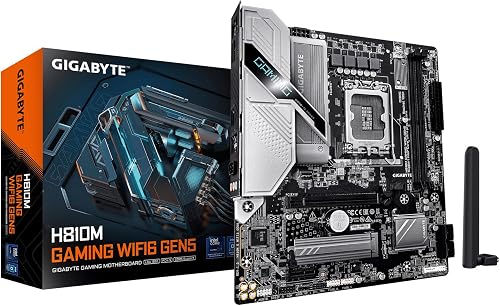
GIGABYTE H810M Gaming WIFI6 GEN5 mATX Motherboard
As an Amazon Associate we earn from qualifying purchases. Product prices and availability are accurate as of the date/time indicated.
Pros
- Efficient 14-core, 14-thread design balances performance and power for gaming and creation
- DDR5 and PCIe 5.0 plus dual M.2 slots enable faster memory and storage speeds
- Integrated WIFI6E and USB-C provide strong wireless and wired connectivity
- Upgraded power design with dedicated heatsink helps maintain stability under load
- LGA 1851 platform with B860 chipset supports latest Intel features and standards
Cons
- No CPU cooler included, so you must purchase a compatible thermal solution separately
- mATX form factor offers fewer expansion slots than full ATX boards
- DDR5 only, not compatible with DDR4 memory kits you may already own
This Micro Center bundle combines the Intel Core Ultra 5 processor with the Gigabyte B860M EAGLE PLUS WIFI6E motherboard for a complete LGA 1851 foundation. It is designed for gamers, creators and first time builders who want a modern DDR5 system without worrying about compatibility.
The 14-core hybrid layout with 6 Performance cores and 8 Efficiency cores reaches up to 5.2GHz with Turbo Boost Max 3.0. In real world use, it handles gaming, multitasking and light content creation smoothly while PCIe 5.0 and DDR5 keep load times and bandwidth high.
Build quality is solid for the mATX class, with an 8+1+2+1 50A VRM design and MOSFET heatsink for stable power delivery. The board offers 4 DIMM slots, dual M.2 slots, USB-C and integrated WIFI6E, all on the efficient B860 chipset.
There are trade offs to consider. No thermal solution is included, so an LGA 1851 cooler is required, and the compact mATX layout limits future expansion compared to ATX. It also requires DDR5 memory, which adds cost if you are upgrading from DDR4.
Overall, this is a convenient, performance focused combo that delivers modern features and efficient power in a compact package. It is an excellent value for anyone building a new DDR5 system who wants proven compatibility and room for next generation upgrades.
Processor: Intel Core Ultra 5, 14 cores (6 P-cores + 8 E-cores), 14 threads, up to 5.2GHz, 26MB Cache, unlocked
Socket and Chipset: LGA 1851, Intel B860, supports Intel Core 12th and 13th Gen listed compatible
Motherboard: Gigabyte B860M EAGLE PLUS WIFI6E, mATX, 24-pin main power, integrated graphics support
Memory: DDR5, 4 DIMM slots
Storage and Expansion: PCIe 5.0 and 4.0 support, 2x M.2 slots, 6x SATA ports, 4 expansion ports
Power and Thermals: 8+1+2+1 50A PPAK VRM, MOSFET heatsink, no thermal solution included
Connectivity: WIFI6E, USB-C, PCIe 5.0, Intel Optane Memory support
Pros
- Outstanding power delivery for stable overclocking and sustained performance
- Complete next gen connectivity including Wi-Fi 7, 10Gb Ethernet and Thunderbolt 4
- Supports up to 256GB DDR5 at 9200MHz for creators and heavy multitasking
- Excellent build quality and user friendly BIOS praised in reviews
- Plentiful high speed USB and I/O for complex gaming and workstation builds
Cons
- Premium flagship pricing compared to mainstream Z890 options
- Only one CPU fan header and some unconventional layout choices
- M.2 heatsink thermal pads may need adjustment for optimal SSD contact
The MSI MEG Z890 ACE is MSI's flagship ATX motherboard for Intel Core Ultra Series 2 processors, built on the Intel Z890 chipset with the LGA 1851 socket. It is designed for enthusiasts, gamers and creators who want uncompromised performance, extensive expandability and cutting edge connectivity in a premium build.
In real world use, it excels at pushing high end CPUs like the Core Ultra 9 285K to their limits thanks to its 24+1+2+1 DRPS power design with 110A SPS and OC Engine. Users report stable overclocking, fast DDR5 performance up to 9200MHz, and excellent throughput for large file transfers via 10Gb LAN and Thunderbolt 4, which is ideal for video rendering workflows.
Build quality is phenomenal, with a sleek MEG aesthetic, robust heatsinks, and thoughtful features like dual BIOS for added security. The board offers PCIe 5.0, multiple M.2 and SATA ports, and a generous selection of high speed USB ports with no legacy low speed bottlenecks. The BIOS is also noted for being intuitive and easy to navigate.
There are a few drawbacks to consider. The layout includes only a single CPU fan connector, which may require splitters for some coolers, and a few users noted the M.2 thermal pads do not make firm contact without adjustment. Its large ATX size and premium feature set also mean it needs a spacious case and a higher budget.
Overall, the MEG Z890 ACE is a no compromise motherboard that delivers on performance, connectivity and elegance. If you want a future proof foundation for a top tier Intel build and value Wi-Fi 7, 10Gb networking and Thunderbolt 4, it is one of the best Z890 options available.
The MEG Z890 ACE supports Intel Core Ultra Series 2 processors on LGA 1851 with the Intel Z890 chipset and Windows 11. It features four DDR5 slots supporting dual channel memory up to 256GB at 9200MHz, plus PCIe 5.0 and PCIe 4.0 expansion.
Connectivity includes Wi-Fi 7 with 320MHz channels up to 5.8Gbps, Bluetooth 5.4, 10G Super LAN, Thunderbolt 4, USB Type-C, HDMI, and a total of 18 ports with 7 USB ports. Storage options include multiple M.2 slots and 4 SATA ports.
The board uses a 24-pin main power connector, measures 13.9 x 11.5 x 3.7 inches, weighs 5 pounds, and comes in ATX form factor with model number MEG Z890 ACE. It is backed by a 3 year manufacturer warranty.
Pros
- Supports next gen Intel Core Ultra CPUs with PCIe 5.0 and high speed DDR5
- Built in WiFi 6E and 2.5GbE LAN eliminates need for separate add in cards
- EZ-Latch, Thermal Guard and Q-Flash Plus make building and updating simple
- Compact micro-ATX design fits most cases while retaining four memory slots and dual M.2
Cons
- B860 chipset lacks full CPU overclocking support found on Z890 boards
- Micro-ATX form factor offers fewer PCIe expansion slots than standard ATX
- Only a single HDMI port for integrated graphics display output
The GIGABYTE B860M DS3H WIFI6E is a micro-ATX motherboard designed for Intel Core Ultra Series 1 processors on the LGA 1851 socket. It is ideal for gamers, content creators and compact PC builders who want modern DDR5 and PCIe 5.0 features without the cost of a premium Z890 platform.
In real world use it delivers impressive memory headroom up to 9066MHz and 256GB across four DIMMs for demanding games and creative workloads. The PCIe 5.0 x16 slot provides full bandwidth for next gen GPUs, while PCIe 5.0 and 4.0 M.2 slots with Thermal Guard keep NVMe drives fast and cool under load.
Build quality stands out with a Hybrid 5+1+2+1 phase 50A VRM and full MOSFET and PCH heatsinks for stable, efficient power. GIGABYTE adds builder friendly details like the reinforced UD Slot, EZ-Latch Click for tool free M.2 installation, and WIFI EZ-Plug for quick antenna setup.
There are a few limitations to consider. The B860 chipset does not support full CPU overclocking, so enthusiasts wanting maximum tuning should look at Z890. The compact 9.61 inch square layout also means less room for additional expansion cards compared to full ATX boards.
Overall the B860M DS3H WIFI6E is a well balanced and future proof choice for an Intel Core Ultra build. If you want strong power delivery, fast connectivity and next gen storage in a reliable micro-ATX package, it offers excellent value and modern features.
Socket: LGA 1851 for Intel Core Ultra Series 1, Chipset: Intel B860M, Form Factor: Micro-ATX 9.61 x 9.61 inches
Memory: 4x DDR5 DIMMs, Dual Channel, up to 9066MHz OC, Max 256GB, Platform Support: Windows 10 and Windows 11
Expansion: 1x PCIe 5.0 x16 UD Slot with EZ-Latch, Total 6 PCIe ports, Graphics Interface: PCI Express
Storage: 1x PCIe 5.0 M.2 and 1x PCIe 4.0 M.2 with Thermal Guard, 4x SATA Ports
Networking: WiFi 6E with EZ-Plug, 1x 2.5GbE LAN, Display: 1x HDMI, USB: 6x Total including USB 3.2 Gen 2 Type-A
Power: 24-Pin Main Connector, VRM: Hybrid 5+1+2+1 Phases 50A PPAK, Features: Q-Flash Plus, MOSFET and PCH Heatsinks
Pros
- Proven stability even with demanding 4 stick 128GB DDR5 configurations
- Excellent future proof connectivity including Wi-Fi 7 and dual Thunderbolt 4
- Robust power delivery and thermal design for overclocking and sustained loads
- Thoughtful DIY features simplify building and upgrades
- Four M.2 slots including PCIe 5.0 for flexible high speed storage
Cons
- Limited to 2.5Gb Ethernet with no 5Gb or 10Gb option
- Armory Crate software can fail to detect the board and support can be slow
- Wi-Fi 7 requires manual driver installation before it will work
The ASUS TUF Gaming Z890-PRO WiFi is an ATX motherboard for Intel LGA 1851 and Core Ultra Series 2 processors, built for gamers, creators and users planning an Advanced AI PC. It combines the full Z890 feature set with TUF durability, offering a reliable and future proof foundation for a high performance build.
In real world testing, users highlight outstanding memory stability, including flawless operation with four sticks of DDR5 totaling 128GB where other boards struggle. Performance is backed by a PCIe 5.0 x16 slot and one PCIe 5.0 M.2 plus three PCIe 4.0 M.2 slots, plus AI Cooling II and AI Networking II that help optimize thermals and connectivity automatically.
Design and build quality reflect the TUF Gaming pedigree, with a 16+1+2+1 80A DrMOS power solution, ProCool connectors, 8-layer PCB and large heatsinks for the VRM, M.2 and PCH. DIY friendly touches like PCIe Q-Release Slim, M.2 Q-Latch and Q-Release, Q-Antenna, Q-Dashboard, Q-LED and a pre-mounted I/O shield make installation faster and less stressful.
There are a few drawbacks to consider. Networking tops out at 2.5Gb Ethernet, which feels limiting when some new boards offer faster wired options. Several reviewers also note that Wi-Fi needs drivers installed manually at first boot, and the Armory Crate software can be unreliable with inconsistent support.
Verdict: For its blend of rock solid stability, comprehensive expansion and modern connectivity, the Z890-PRO WiFi is a standout value in the Z890 lineup. If you want a durable, feature rich board for gaming, creation or AI workloads that will stay relevant for years, it is an easy recommendation.
Socket: Intel LGA 1851 for Core Ultra Series 2 | Chipset: Intel Z890 | Form Factor: ATX
Memory: 4x DDR5 slots, up to 256GB, DDR5 technology | Storage: 4x M.2 slots (1x PCIe 5.0, 3x PCIe 4.0) + 4x SATA ports
Expansion: PCIe 5.0 x16 SafeSlot with Q-Release Slim, 6 total PCIe ports | Networking: Wi-Fi 7 with Q-Antenna, Intel 2.5Gb Ethernet
Connectivity: Dual Thunderbolt 4 USB Type-C, USB 20Gbps Type-C front panel, 12 total USB ports, HDMI, DisplayPort | Features: AI Cooling II, AI Networking II, Aura Sync RGB, BIOS FlashBack
Pros
- Supports latest Intel Core Ultra Series 2 processors on LGA 1851
- Future proof connectivity with Wi-Fi 7, Bluetooth 5.4 and Thunderbolt 4
- Quad M.2 slots and PCIe 5.0 enable top tier storage and GPU performance
- Robust extended heatsink design for stable performance under heavy loads
- High DDR5 capacity up to 256GB and 7800MHz speed
Cons
- Full ATX size requires a mid or full tower case, not ideal for compact builds
- DDR5 only, no backward compatibility with DDR4 memory
- Feature rich Z890 platform may be more than casual users need
The MSI MAG Z890 Tomahawk WiFi is a full size ATX motherboard designed for Intel Core Ultra Series 2 processors on the LGA 1851 socket. It is built for gamers, creators and enthusiasts who want a durable, future ready foundation for a high performance Windows 11 PC.
In real world use it delivers excellent speed and responsiveness thanks to dual channel DDR5 support up to 256GB at 7800MHz and PCIe 5.0 for graphics and storage. Quad M.2 connectors provide massive, lightning fast storage options, while Wi-Fi 7 with 320MHz channels up to 5.8Gbps, Bluetooth 5.4 and 5Gbps LAN keep connectivity fast and stable.
Build quality reflects the MAG series military inspired focus on sturdiness and durability. The extended PWM heatsink and enhanced circuit design keep even high end processors running at full speed under load, and the ATX layout offers plenty of expansion with three PCIe slots, four SATA ports and Thunderbolt 4 plus USB Type-C.
There are a few tradeoffs to consider. The ATX form factor needs a mid or full tower case, so it is not suited for compact builds. As a Z890 DDR5 only board it also requires newer memory and may offer more features than casual or budget focused users need.
Overall the MAG Z890 Tomahawk WiFi is a powerful, well balanced choice for anyone building a next generation Intel system. If you want top tier connectivity, strong thermals and extensive upgrade headroom in a reliable package, it is an excellent investment for gaming and demanding workloads.
Platform: Intel Z890, Socket LGA 1851, supports Intel Core Ultra Processors Series 2, Windows 11, ATX form factor
Memory: 4x DDR5 slots, dual channel, up to 256GB, up to 7800MHz
Storage and Expansion: 4x M.2 connectors, 4x SATA ports, 3x PCIe slots with PCIe 5.0 and PCIe 4.0 support
Connectivity: Wi-Fi 7, Bluetooth 5.4, 5Gbps LAN, Thunderbolt 4, USB Type-C, 7x USB ports, 1x HDMI, 18 total ports
Physical and Warranty: 13.4 x 10.7 x 2.9 inches, 4.6 pounds, 24-pin main power, 3 year warranty
Pros
- Affordable entry point to Intel Arrow Lake and Core Ultra Series 2 platform
- PCIe 5.0 x16 slot future proofs the system for upcoming GPUs
- Integrated WiFi 6, Bluetooth 5.4 and 2.5GbE saves cost on add-in cards
- EZ-Latch, EZ-Plug and EZ-Debug Zone simplify building and troubleshooting
- Compact mATX 9.6 inch form factor fits most mid tower and small cases
Cons
- Only 2 DDR5 DIMM slots and a single M.2 slot limits memory and storage expansion
- H810 chipset does not support CPU overclocking and offers fewer ports than B860 or Z890
- Single PCIe x16 slot with no additional expansion slots for multi-GPU or capture cards
The GIGABYTE H810M Gaming WIFI6 GEN5 is a micro ATX motherboard built for Intel LGA 1851 and Core Ultra Series 2 Arrow Lake processors. It is designed for budget conscious gamers and first time builders who want a modern DDR5 platform with PCIe 5.0 without the cost of higher end chipsets.
In real world use it delivers solid next gen essentials, including PCIe 5.0 x16 for future GPUs, a PCIe 4.0 M.2 slot for fast NVMe storage, and DDR5 support up to 128GB with XMP profiles. Built in WiFi 6 with speeds up to 2.4Gbps, Bluetooth 5.4 and 2.5GbE LAN provide smooth online gaming and streaming without extra adapters.
Build quality is strong for the price, with a 4+1+2 Hybrid VRM using premium chokes and capacitors plus an advanced VRM heatsink for stable power delivery. GIGABYTE adds thoughtful DIY touches like PCIe EZ-Latch, M.2 EZ-Latch, WiFi EZ-Plug and an integrated I/O shield that make assembly faster and cleaner.
Trade offs come with the H810 platform. You get only two DIMM slots, one M.2 slot, four SATA ports and limited rear USB, so expansion is more constrained than on B860 or Z890 boards. It also lacks CPU overclocking support, which may matter for enthusiasts seeking maximum tuning headroom.
Overall, this board is an excellent value choice for an affordable Intel Core Ultra Series 2 build with modern connectivity. If you want a compact, easy to build and future ready foundation for gaming or everyday productivity, it delivers where it counts.
Platform: Intel H810 Chipset, Socket LGA 1851, supports Intel Core Ultra Series 2 Arrow Lake, mATX 9.6 x 9.6 inches
Memory: 2x DDR5 DIMM slots, up to 128GB, up to 5600MHz, Intel XMP supported
Expansion and Storage: 1x PCIe 5.0 x16 slot, 1x PCIe 4.0 M.2 slot, 4x SATA 6Gb/s ports
Connectivity: WiFi 6, Bluetooth 5.4, 2.5GbE LAN, 1x HDMI, Front USB-C 5Gb/s, USB 3.2 Gen 1 Type-A
Features: 4+1+2 Hybrid VRM, Advanced VRM heatsink, Integrated I/O shield, EZ-Latch, EZ-Plug, EZ-Debug Zone, Q-Flash
Matching a Part to Your Build
If you want the simplest path to a compact gaming PC without hunting for separate parts, the bundle built around the ryzen 5 7600 RX 7700 XT 1000 dollar gaming PC amazon build concept but executed on Intel is instructive. The Micro Center CPU Motherboard Combo DDR5 mATX pairs the 14 core 245K with a B860M EAGLE PLUS WIFI6E board that has a 8+1+2+1 50A PPAK VRM, four DIMM slots, PCIe 5.0, and two M.2 slots. That combination fits well in an mATX case, gives you Wi-Fi 6E and USB-C, and keeps memory flexibility high. It is a balanced choice if you want to install 32GB of DDR5 now and still have room for more storage and memory later without moving to full ATX.
If you are building the most affordable LGA 1851 system and you know you will run a single SSD and a mainstream graphics card, consider the GIGABYTE H810M Gaming WIFI6 GEN5 Intel LGA 1851. With its 4+1+2 power design, two DIMM slots, one PCIe 4.0 M.2 slot, and PCIe 5.0 x16 for your GPU, it covers the essentials with Wi-Fi 6, 2.5GbE, and Bluetooth 5.4. The trade off is clear: you get fewer M.2 slots, fewer USB 3.2 Gen 1 Type-A ports, and less power headroom for sustained loads, so it is not the right choice if you plan to add multiple fast drives or push memory to very high rates. For a clean budget build with 32GB DDR5 and one 1TB or 2TB drive, it keeps wiring simple and leaves budget for your Graphics Cards choice.
If you want a mid-range board that balances expandability and features, the GIGABYTE B860M DS3H WIFI6E Motherboard is a strong illustration. It offers a 5+1+2+1 50A VRM, four DIMMs with support up to 9066MHz DDR5 when overclocked, a PCIe 5.0 x16 slot with reinforced UD Slot and EZ-Latch, plus one PCIe 5.0 and one PCIe 4.0 M.2 with Thermal Guard. You also get Wi-Fi 6E, 2.5GbE, and USB 3.2 Gen 2. This is a good match if you game at 1440p, want two fast SSDs, and prefer mATX without giving up memory tuning. For maximum expandability and connectivity, the ATX options like the ASUS TUF Gaming Z890-PRO WiFi Z890 LGA 1851 ATX with 16+1+2+1 80A stages and four M.2 slots, the MSI MAG Z890 Tomahawk WiFi Gaming Motherboard with quadruple M.2 and Wi-Fi 7, or the higher-end MSI MEG Z890 ACE Gaming Motherboard with 24+1+2+1 110A SPS and 10G LAN make sense if you need Thunderbolt 4, Wi-Fi 7 with 320MHz channels, and the most robust power for long term overclocking experiments.
Common Mistakes
Buying RAM that does not match your board layout. A two DIMM H810 board is easier to stabilize at higher DDR5 speeds, but it limits you to two sticks. If you buy four sticks for a two DIMM board they will not fit, and if you buy a 4x8GB kit for a four DIMM board you may limit future upgrades. Decide on 2x16GB versus 2x32GB first, then confirm your board supports that configuration on its QVL.
Underestimating power and cooling needs. The 245K can run efficiently, but pairing it with a high end GPU and a weak power supply or a cooler that does not clear your case creates throttling and noise. Add up your CPU and GPU draw, follow the GPU maker recommended wattage, and leave headroom for transients and future drives. Check cooler height or radiator support against your exact case model, and ensure your case has airflow over the VRM and M.2 heatsinks.
Chasing the highest DDR5 number on the box. A rating like up to 9066MHz is an overclocking ceiling, not a guarantee with every kit and CPU. Owners commonly report better stability and value around DDR5 6000 to 7200 with tight timings for gaming. If you buy a very high speed kit for an entry board with a modest VRM and limited BIOS tuning, you may end up running it slower anyway. Match the kit to what your board and CPU can realistically support.
Who Should Wait or Buy Differently
This platform is not ideal for you if you already own a recent DDR4 system and want to reuse your memory, since LGA 1851 for Core Ultra Series 2 is DDR5 only and will require a new kit. It is also not a good fit if you need a very small mini ITX build with minimal power delivery or if you plan to stay on a tight budget with only one M.2 drive and no need for PCIe 5.0 storage or Wi-Fi 7. In those cases you may be better served by a more modest B860 mATX board or by waiting for a sale on a DDR5 kit that is validated for your chosen board, rather than paying the premium for a Z890 ACE class board whose extra LAN speed, Thunderbolt 4, and massive VRM you will not use.
Frequently Asked Questions
Do I need a Z890 board for the Core Ultra 5 245K? No. Z890 is the higher-end pick with the most M.2 slots, Thunderbolt 4, and strong VRMs like 16+1+2+1 80A or 24+1+2+1 110A, but B860 boards with 5+1+2+1 or 8+1+2+1 50A designs handle the 245K well for most gaming builds. Choose Z890 only if you need its extra connectivity or plan to tune memory and power extensively.
What DDR5 kit should I pair with LGA 1851? Start with a 32GB kit (2x16GB) with Intel XMP support that appears on your motherboard QVL. Boards in this guide list DDR5 compatibility from standard speeds up to 9066MHz with overclocking, but owners commonly report the best balance around 6000 to 7200. Four DIMM boards give you more upgrade flexibility, while two DIMM boards can be simpler to stabilize.
Will my cooler and case fit these boards? Most of these boards are mATX or ATX, so check your case spec for motherboard support and cooler clearance. Compare your air cooler height or your radiator length to the case limits, confirm RAM clearance under the cooler, and follow the manufacturer instructions for mounting pressure and thermal paste application. Good case airflow over the VRM and M.2 heatsinks helps sustain performance.

Write Your Review
No reviews yet. Be the first to share your experience!