

Video credit: InMedia Gaming PC. Original video: https://www.youtube.com/watch?v=A-C-F2K0O40. This is our own independent breakdown and is not affiliated with the video creator. As an Amazon Associate, CustomPCGaming earns from qualifying purchases. Product prices shown in the video may have changed.
Watch the build
Parts in this build
- Intel Core Ultra 9 285K
- NVIDIA GeForce RTX 5090
- ASUS ROG STRIX Z890-A Gaming WiFi
- Corsair Dominator Titanium 64GB DDR5 6000
- Crucial T705 2TB Gen5
- Corsair HX1200i
- Hyte Y70
- NZXT Kraken 360 RGB
Parts list is our summary of the video for reference. Confirm current specs and price on the retailer page before buying.
Watch: The Build Video
This is our independent parts analysis and is not affiliated with the video creator. As an Amazon Associate, CustomPCGaming earns from qualifying purchases. Product prices shown in the video may have changed.
The video embedded here shows a build in this class, a high end gaming PC aimed at 4K and high refresh 1440p, so you can see the general assembly flow, cooler mounting, and how a large graphics card and radiator fit in a modern dual chamber case. Treat it as a visual guide for this class and budget while you evaluate the specific parts we recommend below, which are not the exact configuration shown in the video.
What This Build Is
This ddr5 memory choice for a high class gaming pc build breakdown is built around a high class parts list centred on the Intel Core Ultra 9 285K and NVIDIA GeForce RTX 5090. That pairing is chosen so the processor does not hold the graphics card back at 4K and high refresh 1440p, which is the target for this tier in 2026. If you play at those resolutions and want headroom for demanding titles and creative work, this is the class you should be comparing.
The platform is Intel LGA1851 with an 800 series chipset, specifically a Z890 board, and DDR5 memory. You get PCIe 5.0 support for the graphics slot and for Gen5 storage, plus modern I/O like WiFi 7 and Thunderbolt 4 on the board we picked. This gives you a current foundation that will accept future storage and peripheral upgrades without a platform change.
Builds at this level usually make a deliberate tradeoff. Instead of spending heavily on a flagship motherboard or an exotic cooler, they keep the board and cooling practical and put the budget into the CPU and graphics card where gaming performance is decided. That is the approach here. The ASUS ROG STRIX Z890-A Gaming WiFi provides a proven VRM and the connectivity you will actually use, while the 360mm AIO keeps the 285K in its normal boost range without paying for features you will not use.
Memory choice matters more than it first appears in this class. With 24 cores and a very powerful GPU, you want capacity and speed that avoid bottlenecks in multitasking, streaming, and large open world games. Our pick is a 64GB DDR5 kit at the sweet spot speed for this platform, which balances bandwidth, stability, and compatibility. You can learn more about general memory options in our Memory (RAM) category, and we will explain the specific kit choice in the breakdown below.
This build is not for everyone. If you primarily play at 1080p, or you want a compact small form factor system, or you are sensitive to power draw and heat, you should not buy this tier. The RTX 5090 is a large 3.8 slot card that needs serious case clearance and airflow, and the overall system draws considerably more than a mid range build. For those users, a lower tier with a smaller GPU and a modest power supply will be quieter, cooler, and easier to live with.
Parts Breakdown
This is the core of our analysis. The table below compares what is common at this high class level with our current 2026 picks and why we chose each part. After the table we explain the two most important decisions in more detail.
This article contains affiliate links. If you buy through one of our links, CustomPCGaming may earn a commission at no extra cost to you. Commissions never influence which products we recommend or how we rank them. Read our Affiliate Disclosure for details.
Quick Picks at a Glance

HYTE Y70 Snow White Gaming PC Case

Crucial T705 2TB PCIe Gen5 NVMe SSD

Prime Intel Core Ultra 9 285K 24-Core Processor 5.7GHz

CORSAIR DOMINATOR PLATINUM RGB DDR5 RAM 64GB

CORSAIR HX1200i (2025) 1200W 80 PLUS Platinum

ASUS ROG Strix Z890-E Gaming WiFi Motherboard

ASUS ROG Astral GeForce RTX 5090 OC 32GB GDDR7

NZXT Kraken Elite 360 RGB White AIO CPU Cooler
As an Amazon Associate we earn from qualifying purchases. Product prices and availability are accurate as of the date/time indicated.
Pros
- Stunning panoramic glass design perfect for showcasing high-end builds
- Excellent cooling flexibility with 10-fan capacity and dual 360mm radiator support
- Thoughtful build experience with included PCIe 4.0 riser and excellent cable management
- Sturdy, premium materials with tool-less access and easy maintenance
Cons
- Large 18.5-inch cube footprint requires substantial desk or floor space
- Heavy at 24.3 pounds and all-glass panels need careful handling during moves
- Vertical GPU layout limits traditional horizontal mounting options
The HYTE Y70 is an ATX mid-tower dual-chamber case designed for gamers and enthusiasts who want their hardware on full display. With its Snow White finish and panoramic glass, it is built for showcase builds, custom loops and high-end components that deserve to be seen.
Performance is where the Y70 truly shines, offering cold floor cooling for direct GPU airflow and room for up to 10 fans. It supports a 360mm radiator up to 125mm thick on the side and another 360mm up to 68mm thick on top, giving air and water cooling builders massive headroom for overclocking and quiet operation.
Build quality feels premium throughout, from the precisely fitted 3-piece tempered glass to the metal chassis and clicky blue power button. The dual-chamber design hides cables beautifully with molded rubber grommets, routing channels and Velcro straps, while tool-less panels and rear-eject storage sleds make assembly and upgrades simple.
The size is the main tradeoff, as the wide, tall footprint demands more space than a standard mid-tower. The all-glass exterior also needs extra care to avoid fingerprints and requires gentle handling, and builders wanting a traditional horizontal GPU will need to embrace the vertical showcase layout.
Overall, the Y70 delivers a luxury building experience with showstopping looks and serious thermal capability. If you want a modern aesthetic case that celebrates your components while handling flagship GPUs and extensive cooling, it is an outstanding choice.
Model: HYTE Y70 CS-HYTE-Y70-WW, Snow White, Dual Chamber ATX Mid-Tower
Compatibility: ATX, mATX, ITX, EATX motherboards, 4-slot vertical GPU, bottom mount PSU, 7 expansion slots
Cooling Support: Up to 10 fans, cold floor cooling for 3x 120mm or 2x 140mm, side 360mm radiator up to 125mm thick, top 360mm radiator up to 68mm thick, rear fan mount
Storage: 4 internal bays, supports 2x 3.5 inch HDD or 4x 2.5 inch SSD with floating sleds
Dimensions and Material: 18.5 x 12.5 x 18.5 inches, 24.3 pounds, metal and tempered glass, 4x USB ports
Choose the Y70 if you want a showpiece case to display a flagship GPU, RGB lighting or a custom water loop. It is perfect for enthusiasts who value aesthetics as much as airflow and want generous room for large components and thick radiators.
Consider other options if you need a compact case for a small desk or frequent transport. Its large cube form and glass panels are best suited to a dedicated gaming space where it can be showcased safely.
Pro Tip: Plan your fan and radiator layout early to take full advantage of the cold floor cooling. Adding fans below the GPU provides direct fresh air that noticeably improves GPU temperatures in demanding games.
Pros
- Class leading PCIe 5.0 performance for boot times, game loads and large file transfers
- Large 2TB capacity ideal for gaming libraries and content creation workflows
- Reliable Micron TLC NAND with hardware encryption and 5-year warranty
- Includes Acronis cloning software and Adobe Creative Cloud for easy setup and creation
Cons
- Runs very hot under sustained loads and requires a motherboard or aftermarket heatsink with good airflow
- Requires a Gen5 M.2 slot to reach full advertised speeds, limited benefit on Gen4 systems
- Premium cost compared to PCIe 4.0 drives and no heatsink included in the box
The Crucial T705 2TB is a flagship PCIe Gen5 NVMe M.2 SSD built for hardcore gamers, enthusiasts and creative professionals who demand the fastest storage available. Designed for Intel 13th and 14th Gen and AMD Ryzen 7000 platforms, it is made to eliminate bottlenecks in high end gaming and workstation builds.
In real world use, it delivers blistering sequential reads up to 14,500MB/s and writes up to 12,700MB/s for near instant boot times and game loads. Microsoft DirectStorage optimization reduces latency and CPU overhead, while the generous 2TB capacity easily handles AAA games, 8K video and large creative projects.
Built with Micron 232-layer TLC NAND in a standard M.2 2280 form factor, the drive reflects Crucials trusted quality and reliability. It includes hardware encryption, Acronis True Image for easy cloning and a one month Adobe Creative Cloud All Apps subscription, all backed by a 5-year limited warranty.
The main drawback is heat, as this Gen5 drive runs extremely hot under sustained loads and requires a quality heatsink with strong airflow to avoid thermal throttling. You also need a Gen5 M.2 slot to unlock its full speed, and it carries a premium over PCIe 4.0 alternatives.
Overall, the Crucial T705 is one of the fastest consumer SSDs you can buy and an excellent choice for future proofing a top tier PC. If you have proper cooling and a compatible system, it delivers elite performance that is ideal for competitive gaming, 3D rendering and demanding content creation.
Performance: Up to 14,500MB/s read, 12,700MB/s write, PCIe Gen5 NVMe, Micron 232-layer TLC NAND, 2GB cache
Capacity & Form Factor: 2TB, M.2 2280, 3.15 x 0.87 x 0.15 inches, 9.9g, Black
Compatibility: Intel 13th/14th Gen, AMD Ryzen 7000, Desktop, Workstation, PS5, Xbox Series X/S via M.2 Gen5 slot
Features: Hardware encryption, Microsoft DirectStorage support, heatsink compatible design, requires airflow
Bundle & Warranty: Acronis True Image, Crucial Storage Executive, one month Adobe Creative Cloud All Apps, 5-year limited warranty, Model CT2000T705SSD3
Pros
- Outstanding 24-core hybrid performance for gaming and content creation
- High 5.7GHz turbo frequency and large 40MB cache
- Future ready with PCIe 5.0 and DDR5 support
- Unlocked design for enthusiast overclocking
- Improved efficiency for better thermals and acoustics
Cons
- No thermal solution included, requires separate cooler
- Requires new LGA1851 socket and Intel 800 Series motherboard
- 125W base power needs strong cooling and power delivery for peak performance
The Intel Core Ultra 9 285K is Intel's flagship Series 2 desktop processor built for enthusiast gamers and serious creators. With 24 cores and 24 threads, including 8 Performance cores and 16 Efficient cores, it is designed for users who need top tier multitasking, gaming and creative power on the new LGA1851 platform.
Standout features include an unlocked 5.7GHz turbo boost, 40MB cache and support for PCIe 5.0 and DDR5. The hybrid architecture intelligently distributes workloads for smoother gameplay while streaming, faster rendering and quicker responsiveness. Integrated Intel Graphics also provides convenient display support.
Built for the Intel 800 Series chipset, this processor offers a modern, future ready foundation with support for the latest GPUs and SSDs. The 125W base power design balances high performance with improved efficiency, helping systems run cooler and quieter when paired with a capable cooler.
Drawbacks to consider are the lack of an included thermal solution and the need for a new motherboard, which adds to build cost. As an unlocked enthusiast chip, it also benefits greatly from robust cooling and a quality power supply to sustain peak boost speeds.
Verdict: For builders seeking elite desktop performance for gaming, creation and heavy multitasking, the Core Ultra 9 285K is a top tier choice. It is best suited to enthusiasts who want overclocking headroom and next gen connectivity on a premium platform.
Model: Intel Core Ultra 9 Processor 285K (BX80768285K)
Cores / Threads: 24 cores (8 P-cores + 16 E-cores) / 24 threads
Max Turbo Frequency: Up to 5.7GHz with Turbo Boost Max Technology 3.0
Cache: 40MB total cache, 36MB Secondary Cache
Socket: LGA1851, Compatible with Intel 800 Series Chipset motherboards
Memory Support: DDR5
Expansion: PCIe 5.0 and 4.0 support
Graphics: Integrated Intel Graphics included
Base Power: 125W, Unlocked, No thermal solution included
This processor requires an Intel 800 Series chipset motherboard with the LGA1851 socket and will not work with older Intel platforms. Check your motherboard BIOS support and DDR5 memory compatibility before purchase.
A high quality aftermarket cooler is essential since no thermal solution is included. A robust power supply and good case airflow are also recommended to maintain boost performance and keep temperatures in check.
Ideal for new high end gaming rigs, content creation workstations and future focused builds that plan to use PCIe 5.0 GPUs and NVMe drives. Not ideal for budget upgrades reusing older motherboards or DDR4 memory.
Pros
- Exceptional DDR5 speed and responsiveness for gaming and creative workloads
- Large 64GB capacity perfect for multitasking, 4K editing and CAD applications
- Premium build quality with effective DHX cooling and hand-screened chips
- Vibrant customizable RGB lighting that syncs seamlessly via iCUE software
- Easy and stable overclocking with Intel XMP 3.0 and onboard voltage regulation
Cons
- Tall heatspreader may interfere with large air coolers like the Noctua U12A
- Requires Intel XMP compatible motherboard to reach advertised 5200MHz speed
- Premium cost compared to standard DDR5 kits
The CORSAIR DOMINATOR PLATINUM RGB DDR5 64GB kit pairs two 32GB modules running at 5200MHz CL40, built specifically for high performance Intel desktop systems. It is designed for gamers, overclockers and professionals who need massive capacity and fast data throughput for demanding applications.
In real world use, the kit delivers noticeably faster load times, smoother multitasking and improved rendering performance thanks to DDR5 bandwidth and onboard voltage regulation. Intel XMP 3.0 makes overclocking simple with one click profiles, and users report stable, bottleneck free operation even under heavy creative workloads.
Build quality is exceptional, with hand sorted memory chips, a custom PCB and patented DHX cooling that cools both the ICs and board for sustained performance. The iconic DOMINATOR design is topped with 12 ultra bright CAPELLIX RGB LEDs that offer vivid, fully customizable lighting through CORSAIR iCUE software.
The main drawback is physical size, as the tall heatspreader can block large air coolers and limit fan clearance in compact builds. Like all high speed DDR5, you will need a compatible Z690 or Z790 motherboard to enable the full 5200MHz speed, otherwise it will run at default JEDEC speeds.
Overall, this is a premium memory kit that justifies its position with elite performance, excellent cooling and stunning aesthetics. If you are building a high end Intel system and want future proof capacity with head turning style, this DOMINATOR PLATINUM kit is an outstanding choice.
Pros
- Exceptionally quiet operation, fan often stays off under normal loads
- Rock solid, stable power delivery that handles transient GPU spikes with ease
- Premium build quality with Japanese capacitors and durable FDB fan
- Fully modular with generous cable selection including dual 12V-2x6 connectors
- iCUE digital platform allows detailed monitoring and control
Cons
- Higher cost than Gold rated or lower wattage alternatives
- 1200W capacity is overkill for mid range or budget builds
- Large chassis and full cable kit can be tight to manage in compact cases
The CORSAIR HX1200i (2025) is a premium 1200 watt fully modular power supply built for enthusiasts running demanding gaming rigs and workstation PCs. It is designed for users planning high end builds with modern GPUs that require ATX 3.1 and PCIe 5.1 compliance and headroom for overclocking.
In real world use it delivers exceptionally stable power with 80 PLUS Platinum efficiency, handling transient spikes from next gen graphics cards without issue. Reviewers consistently highlight near silent operation, with the 140mm fluid dynamic bearing fan staying off at low to medium loads and remaining quiet even under heavy gaming sessions.
Build quality is a clear strength, featuring Japanese 105C rated capacitors, flexible extra long cables and a fully digital platform. The fully modular layout simplifies cable management in full tower cases, and the included native 12V-2x6 cables make RTX 40 and 50 series installations clean and reliable.
There are a few tradeoffs to consider. The 1200 watt capacity and platinum efficiency come at a premium over lower wattage units, and the physical size plus extensive cable bundle can be challenging in compact cases. Advanced features like custom fan curves and power monitoring also require Corsair iCUE software.
Overall the HX1200i is a top tier choice you install and forget, offering quiet, efficient and future proof power. If you are building a high end system and want long term reliability backed by a ten year warranty, it is one of the best 1200W options available.
Power Output: 1200 watts, 80 PLUS Platinum efficiency, ATX 3.1 and PCIe 5.1 compliant with native 12V-2x6 support for modern GPUs.
Design: Fully modular ATX form factor, 7.87 x 5.91 x 3.39 inches, 5.3 pounds, single 140mm Fluid Dynamic Bearing fan with Zero RPM mode.
Platform: Fully digital with CORSAIR iCUE software for fan control and power monitoring, switchable single to multi rail OCP, Modern Standby support.
Components and Warranty: Japanese 105C rated electrolytic capacitors, air cooling, 100 to 264V input, 10 year manufacturer warranty.
Pros
- Powerful AI features simplify overclocking, cooling and networking automatically
- Excellent future proof connectivity with WiFi 7, Thunderbolt 4 and seven M.2 slots
- Premium power design ensures stable performance for gaming and heavy workloads
- Advanced DDR5 tuning tools make memory optimization easy even for beginners
- Strong build quality and thermal design from the ROG Strix lineup
Cons
- ATX form factor requires a mid or full tower case, not ideal for compact builds
- DDR5 only, so DDR4 memory is not compatible and requires new RAM
- Limited to Intel Core Ultra Series 2 CPUs on the new LGA 1851 socket
The ASUS ROG Strix Z890-E Gaming WiFi is a high end ATX motherboard designed for Intel Core Ultra Series 2 processors on the LGA 1851 socket. It is built for gamers, content creators and enthusiasts who want an AI ready platform with serious overclocking and future proof expansion.
In real world use, its exclusive AI suite including NPU Boost, AI Overclocking, AI Cooling II and AI Networking II delivers noticeable gains in responsiveness and stability. Combined with DDR5 optimization via DIMM Fit, DIMM Flex and AEMP III, plus WiFi 7 and Thunderbolt 4, it handles demanding gaming, streaming and AI workloads with ease.
Build quality is pure ROG Strix, featuring a robust 18+2+1+2 power stage design with 110A and 90A stages, ProCool II connectors, MicroFine alloy chokes and premium metallic capacitors. The layout is clean and well spaced, offering seven M.2 slots, ample USB Type-C connectivity and efficient thermal armor for sustained performance.
There are a few tradeoffs to consider. As a Z890 ATX board it is large and packed with features that casual users may not fully utilize. It also requires DDR5 memory and is limited to the new LGA 1851 platform, so builders will need compatible RAM and a Core Ultra Series 2 CPU.
Overall, the ROG Strix Z890-E Gaming WiFi is an excellent choice for anyone building a powerful, AI capable Intel system that will stay relevant for years. If you want top tier connectivity, intelligent tuning and rock solid power delivery in a premium gaming motherboard, this one is easy to recommend.
Brand and Model: ASUS ROG Strix Z890-E Gaming WiFi, ATX Form Factor
Socket and Chipset: LGA 1851 for Intel Core Ultra Processors Series 2, Intel Z890
Memory Support: DDR5 with DIMM Fit, DIMM Flex and AEMP III, Platform: Windows 11
Power Design: 18(110A) + 2(90A) + 1(90A) + 2(80A) stages, ProCool II connectors, MicroFine alloy chokes
Connectivity and Expansion: WiFi 7, Thunderbolt 4, USB Type-C, 7x M.2 slots
Choose this motherboard if you are building a new high performance Intel system with a Core Ultra Series 2 CPU and want AI assisted tuning. It is perfect for gamers and creators who need WiFi 7, Thunderbolt 4 and multiple fast SSDs.
It is also ideal for overclockers and enthusiasts who value a strong power delivery and automated optimization. If you prefer a compact build, want to reuse DDR4, or need a budget board, consider a smaller or more basic option.
Pros
- Best in class performance for 4K, 8K and heavy ray tracing workloads
- Advanced quad-fan vapor chamber cooling stays surprisingly quiet under load
- Premium and rigid full metal construction with GPU Guard technology
- Future proof 32GB GDDR7 memory for gaming and professional workloads
- DLSS 4 and high boost clocks enable smooth ultra settings and streaming
Cons
- Enormous 14.1 inch, 3.8 slot, 6.6 pound design requires a full tower E-ATX case
- Extreme 600W power draw requires a 1200W PSU and careful clearance planning
- Complete overkill and poor value for casual or 1080p gamers
The ASUS ROG Astral GeForce RTX 5090 OC Edition is NVIDIA's flagship Blackwell GPU built for enthusiasts who demand absolute performance. With 32GB of GDDR7 memory and a 2610MHz boost clock, it is designed for extreme 4K and 8K gaming, sim rigs and heavy creative workloads, not casual play.
In real world use, it handles ultra settings, full ray tracing and high quality streaming without compromise. DLSS 4 boosts frame rates while the quad-fan system with patented vapor chamber and phase-change thermal pad keeps temperatures low and noise surprisingly controlled even under sustained loads.
Build quality is exceptional, with a full metal die-cast shroud, frame, backplate and rear I/O bracket that adds rigidity to the massive 14.1 inch card. GPU Guard secures all four corners of the GPU, while 80A MOSFETs and a protective PCB coating ensure stability, overclocking headroom and long term durability.
The tradeoffs are significant. At 3.8 slots wide and 6.6 pounds, it needs a full tower E-ATX case and strong GPU support, and its 600W draw means a 1200W power supply is mandatory. It is also far more power and cost than most gamers will ever need.
Verdict: If you run a triple 1440p sim setup, create high resolution content or want the best gaming GPU available today, the ROG Astral RTX 5090 is unmatched. For everyone else, it is impressive but intentionally overkill.
GPU: NVIDIA GeForce RTX 5090, Blackwell architecture, 2610MHz boost clock in OC mode
Memory: 32GB GDDR7 with DisplayPort 2.1a x3 and HDMI 2.1b x2, max resolution 7680x4320
Cooling: Quad Axial-tech fans, patented vapor chamber, phase-change thermal pad, 3.8 slot heatsink
Build: Full metal die-cast shroud and backplate, GPU Guard, 80A MOSFETs, PCI-Express x16 interface
Dimensions: 14.1 inches long, 5.9 inches wide, 3.8 slots, 6.6 pounds, includes ROG graphics card holder
Pros
- Excellent cooling performance for heat-prone CPUs under heavy loads and idle
- Stunning, ultra-bright 2.72-inch LCD with crisp visuals and wide viewing angles
- Very quiet operation compared to traditional air coolers
- Easy installation with broad AMD and Intel socket compatibility
- Premium white design with vibrant, synchronized RGB lighting
Cons
- Premium price compared to budget 360mm AIO alternatives
- Some reports of pump failure after a few months of use
- Non-modular cable placement can limit cable management options
The NZXT Kraken Elite 360 RGB RL-KR36E-W2 is a premium 360mm AIO liquid cooler built for enthusiasts who prioritize both performance and presentation. It is ideal for gamers, creators and showcase builders who want powerful cooling with a highly customizable centerpiece.
At its core, the custom NZXT Turbine pump delivers high flow rate and head pressure for a claimed 10 percent performance boost while keeping noise to just 30 dB. Reviewers report stable temperatures under heavy loads and idle, with near silent operation and strong 78.86 CFM airflow from the RGB Core fans at up to 2400 RPM.
Design is where the Elite truly stands out, featuring a large 2.72 inch IPS LCD with 640 by 640 resolution, 60 Hz refresh rate and 690 cd per square meter brightness. The display supports GIFs, images, system monitoring and integrations with Google Photos, Spotify and YouTube, while the single frame RGB fans and white finish create a clean, premium look.
There are some tradeoffs to consider. The cooler sits at a premium tier and a few users have reported pump failures within months, though warranty support applies. Cable placement is fixed rather than modular, which can complicate management in tighter cases, and full LCD functionality relies on NZXT CAM software running at startup.
Overall, the Kraken Elite 360 RGB is a top choice if you want elite cooling with unmatched visual customization. For builders focused purely on value or minimal software dependency, cheaper alternatives exist, but few match its blend of quiet power and display brilliance.
Model RL-KR36E-W2, 360mm radiator measuring 15.75 by 4.72 by 1.06 inches, weight 2500g, metal and plastic construction in white. Cooling method is water with 8-Pin power connector, 12 volts and 28.44 watts.
Performance specs include 2400 RPM maximum rotational speed, 78.86 CFM airflow capacity and 30 dB noise level. Compatible with desktop PCs, supports AMD AM5 and AM4 and Intel LGA 1851, 1700, 1200 and 115X sockets.
Includes liquid cooler with pre-applied thermal paste, RGB Core single-frame fans and tool-free mounting brackets. Backed by a 2 year manufacturer warranty.
| Part | Common at this level | Our 2026 pick | Why |
|---|---|---|---|
| CPU | a cpu in the same class | Intel Core Ultra 9 285K | a current platform match for this GPU tier so the processor does not hold it back |
| GPU | a gpu in the same class | NVIDIA GeForce RTX 5090 | the class of card this build is planned around |
| Motherboard | a motherboard in the same class | ASUS ROG STRIX Z890-A Gaming WiFi | a board with a proven VRM and the I/O this build needs, without paying for features it will not use |
| Memory | a memory in the same class | Corsair Dominator Titanium 64GB DDR5 6000 | the tuned capacity and speed sweet spot for this platform |
| SSD | a ssd in the same class | Crucial T705 2TB Gen5 | responsive storage sized for a modern game library |
| Power Supply | a power supply in the same class | Corsair HX1200i | a modern ATX 3.1 unit with headroom above the combined draw of the CPU and GPU |
| Case | a case in the same class | Hyte Y70 | good stock airflow and clearance for the cooler and graphics card in this build |
| CPU Cooler | a cpu cooler in the same class | NZXT Kraken 360 RGB | quiet, capable cooling that keeps this CPU in its normal boost range |
The graphics card defines this build. Our pick is the ASUS ROG Astral GeForce RTX 5090 32GB GDDR7 OC, which per the spec sheet offers 32GB of GDDR7, a boost clock of 2580 MHz in default mode and 2610 MHz in OC mode, and a quad fan design with a patented vapor chamber and phase change thermal pad. It is a very large card at 357.6mm long, 3.8 slots wide, and 6.6 lbs, so case choice and support matter. For you, that means you are buying headroom for 4K textures and future titles, but you also need to plan for clearance, airflow, and power delivery.
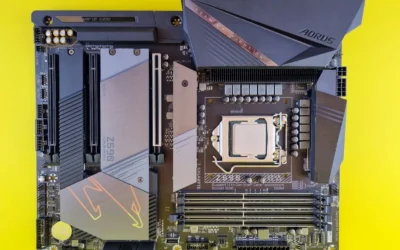
The processor is the Intel Core Ultra 9 Processor 285K with 24 cores (8 P-cores plus 16 E-cores) and 24 threads, up to 5.7 GHz and 40MB cache, compatible with Intel 800 series chipset based motherboards. Per the spec sheet it supports PCIe 5.0 and 4.0 and DDR5, and it is unlocked. We paired it with the ASUS ROG Strix Z890-E Gaming WiFi Intel Z890 LGA 1851 board, which provides an 18+2+1+2 power stage design, DDR5 support, WiFi 7, 7x M.2 slots, and Thunderbolt 4. That combination keeps power delivery stable and gives you plenty of fast storage options.
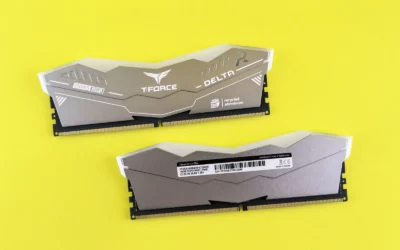
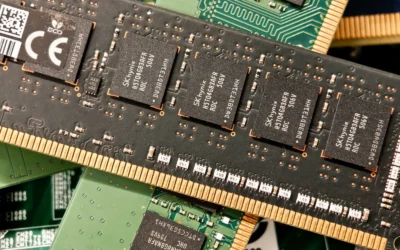
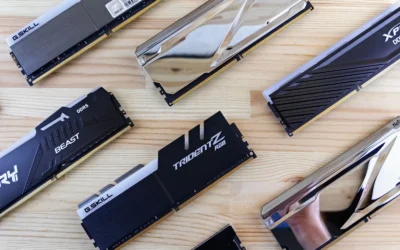
For DDR5, our 2026 pick is the Corsair Dominator Titanium 64GB DDR5 6000 kit, which in its buyable form is the CORSAIR DOMINATOR PLATINUM RGB DDR5 RAM 64GB (2x32GB) 5200MHz CL40 with Intel XMP 3.0 and onboard voltage regulation. The 64GB capacity in a 2x32GB layout gives you comfortable headroom for gaming while streaming, heavy browser use, and content creation, and the dual stick configuration is easier to stabilize than four sticks. Owners commonly report that DDR5 6000 is the sweet spot for this Intel platform, and you should still check the board QVL and enable the XMP profile in BIOS at your own risk.
Compatibility Check
Will all these parts fit together and run stably without surprises? That is the question most builders at this level want answered before ordering, and this build needs a few specific checks because the GPU and cooler are both large and the platform is current generation.
This build is Intel LGA1851 (Core Ultra Series 2). Use a 32GB DDR5 6000 kit on the memory QVL, confirm cooler support for the socket, and size the supply above the combined CPU and GPU draw with a native 12V-2×6 cable for an RTX 50 card. In practice, that means you should verify on the ASUS support page that your exact memory kit is listed for the ROG Strix Z890-E, and plan to update the BIOS if you are on an early revision. BIOS updates are done at your own risk and may affect warranty, so follow the board manual closely and use anti static handling.
Socket and chipset alignment is straightforward here. The Intel Core Ultra 9 285K requires an LGA1851 board with an 800 series chipset, and the Z890-E is designed for Core Ultra Series 2. Per the spec sheet the board includes robust power stages and ProCool II connectors, which helps with stable delivery under load. You should still confirm that the cooler includes LGA1851 hardware. The NZXT Kraken Elite 360 RGB lists support for LGA 1851/1700 among its tool free brackets, and it ships with pre applied thermal paste and a single breakout cable for simpler installation.
Memory support deserves extra attention in any ddr5 memory choice for a high class gaming pc build breakdown. The board supports DDR5 and features DIMM Fit, DIMM Flex and AEMP III to help with setup, but you should still pick a kit that is on the QVL at its rated speed. A 2x32GB kit is preferred for stability and future capacity, and you should install it in the recommended slots per the manual. Enabling Intel XMP 3.0 to reach the rated speed is considered overclocking, so do it at your own risk and verify stability after.
GPU length and slot clearance are critical with the RTX 5090 class. The ASUS ROG Astral card is 357.6mm long and 3.8 slots wide, so you need a case with generous vertical GPU clearance and proper PCIe slot spacing. The Hyte Y70 Modern Aesthetic Gaming PC Case is a dual chamber ATX mid tower with a 3 piece panoramic glass design and support for massive 4 slot vertical graphics with an included PCIe 4.0 riser cable. It also provides ginormous cooling capacity with support for up to a 360mm radiator on the side with 125mm thickness and on the top with 68mm thickness, plus room for three 120mm or two 140mm fans on the floor. Confirm your exact GPU length against the case spec and use the included support or bracket to avoid sag.
Cooler clearance is the next check. The NZXT Kraken Elite 360 RGB is a 360mm AIO with a 2.72 inch IPS LCD at 640 x 640 resolution and 60 Hz, and RGB Core single frame fans. The Hyte Y70 supports a 360mm radiator in two positions, but thickness and fan stack height still matter, so verify radiator plus fan thickness against the side and top limits in the manual. Follow mounting instructions carefully, ensure the pump header and fan connections are correct, and keep tubing away from the GPU backplate and memory.
Power supply headroom and connectors complete the picture. The CORSAIR HX1200i (2025) is an ATX 3.1 and PCIe 5.1 ready 1200W unit with 80 PLUS Platinum efficiency, fully modular cabling, and a 140mm fluid dynamic bearing fan with Zero RPM mode. For an RTX 50 card you want a native 12V-2×6 cable and wattage headroom above the combined CPU and GPU draw, following the GPU maker recommended wattage. Do not assume any supply handles any card. Use only the cables that ship with your unit, seat the 12V-2×6 connector fully until it clicks, and route it without sharp bends. For more on fitting large coolers and cards, see how to choose a case for GPU clearance and radiator support and 240mm AIO vs 360mm AIO for gaming.
Performance: What To Expect
No verified frame rate numbers are available for this build, so we will keep this section qualitative and will not invent figures. That is intentional, because real performance depends on the game, settings, resolution, background tasks, and driver version, and we did not physically run this hardware.
Qualitatively, this is a 4K and high refresh 1440p class system. The RTX 5090 with 32GB GDDR7 is the class of card this build is planned around, so you should expect it to handle high settings at those resolutions with headroom for ray tracing and upscaling features where supported. The Intel Core Ultra 9 285K with 24 cores up to 5.7 GHz is chosen as a current platform match so the processor does not hold the card back at the target resolution, which is especially important at high refresh rates where CPU limits can appear.
The supporting picks shape the experience in less obvious ways. The Crucial T705 PCIe Gen5 NVMe 2TB SSD delivers up to 14,500MB/s read and 12,700MB/s write per the spec sheet, which helps with quick boot, fast game loads, and responsive file transfers when you move large game installs or video assets. The 64GB DDR5 kit gives you comfortable multitasking headroom if you game while streaming, keep many browser tabs open, or edit video. The 360mm AIO and the Hyte Y70 airflow design help keep the CPU in its normal boost range and keep the large GPU fed with cool air, which supports consistent performance over long sessions.
Three Ways to Build This
Lower Cost Version
Go one GPU tier down with a cheaper CPU, a budget air cooler, a 1TB drive and an entry board. You would swap the RTX 5090 for a lower tier RTX 50 card, pair it with a more modest Intel Core Ultra 7 or Core i5 class CPU, use an air cooler instead of the NZXT Kraken Elite 360 RGB, choose a 1TB version of the Crucial T705 or similar Gen4 drive, and pick an entry Z890 or B860 board. This suits a first build on a tight budget where you still want a modern platform but do not need 4K headroom right away.
Balanced Version (Our Recommendation)
This is the parts list in the table above: Intel Core Ultra 9 285K, NVIDIA GeForce RTX 5090, ASUS ROG STRIX Z890-A Gaming WiFi (represented by the ASUS ROG Strix Z890-E Gaming WiFi), Corsair Dominator Titanium 64GB DDR5 6000, Crucial T705 2TB Gen5, Corsair HX1200i, Hyte Y70, and NZXT Kraken 360 RGB. It is the balanced choice for most gamers who want headroom to upgrade later, with a board that has 7x M.2 slots, WiFi 7, and Thunderbolt 4, plus a case and cooler that can handle future GPU and CPU upgrades. If you want one build that covers 4K gaming and creation without overspending on boutique parts, choose this one. For CPU context, see Best CPU for Streaming and Gaming at the Same Time 2026 Picks Reviewed.
Higher End Version
Move up a GPU tier and to a Ryzen 7 9800X3D or Ryzen 9 9950X3D with a 360mm AIO and a 1000W supply. In Intel terms that would mean keeping the 360mm AIO class but moving to an even higher end board and faster memory bin, while on the AMD side you would switch platform to AM5 for the X3D gaming advantage. This is for high refresh play and years of headroom where you want the most CPU gaming performance and are willing to pay for it. If you are considering that path, review how to choose CPU cooling for ryzen 7 9800X3D to match cooler capacity to the chip.
FAQ
What DDR5 memory choice is best for a high class gaming PC with Intel Core Ultra 9 285K and RTX 5090?
For this class, a 64GB kit in a 2x32GB layout at DDR5 6000 is the sweet spot we recommend, with the Corsair Dominator Titanium 64GB DDR5 6000 as our pick. Check the ASUS QVL for your exact kit, install in the recommended slots, and enable XMP at your own risk after verifying stability.
Do I need a 360mm AIO to cool the Intel Core Ultra 9 285K in a Hyte Y70?
You do not strictly need a 360mm AIO, but it is a good match for this CPU in this case. The NZXT Kraken Elite 360 RGB keeps the 285K in its normal boost range quietly, and the Hyte Y70 supports up to a 360mm radiator on the side and top. If you choose a smaller cooler, confirm radiator and fan thickness clearance and expect higher fan speeds under sustained loads.
Will the ASUS ROG Astral RTX 5090 fit in the Hyte Y70 and what power cable do I need?
The card is 357.6mm long and 3.8 slots wide, so you must confirm clearance in the Hyte Y70 and use proper GPU support. Use a modern ATX 3.1 supply like the Corsair HX1200i with a native 12V-2×6 cable, size wattage above the combined CPU and GPU draw, and follow the GPU maker recommended wattage. Seat the connector fully and avoid sharp bends.
Final Verdict
This high class build puts your budget where it matters most, the CPU and GPU, while keeping the board, memory, storage, case, and cooling practical and compatible. You get a current LGA1851 platform, 64GB of DDR5 at the sweet spot speed, fast Gen5 storage, and a case and cooler that can handle a very large RTX 5090 without drama, provided you verify QVL, clearances, and power connections.
Our pick: the Balanced version we recommend, with the Intel Core Ultra 9 285K, RTX 5090, 64GB DDR5, Crucial T705 2TB, and Hyte Y70, for most gamers who want 4K and high refresh 1440p headroom with room to upgrade later. If you are building on a tight budget or you mainly play at 1080p, choose the Lower Cost version instead.
This roundup is not the right choice for older platforms locked to a different memory standard, or for workloads that see no benefit from higher capacity; confirm what your board supports first.



Write Your Review
No reviews yet. Be the first to share your experience!