

Choosing between a 240mm AIO vs 360mm AIO for gaming comes down to more than just size. You are deciding how much thermal headroom you want for your CPU, how much space your case can spare, and how you want your system to sound under load.
If you play at 1440p or 4K with a modern high core count CPU, the cooler choice affects boost behavior and fan noise more than raw FPS. This comparison evaluates the compact 240mm AIO against the larger 360mm class, represented here by the CORSAIR Nautilus 360 RS ARGB Liquid CPU Cooler, so you can match radiator size to your build, resolution and platform.
This article contains affiliate links. If you buy through one of our links, CustomPCGaming may earn a commission at no extra cost to you. Commissions never influence which products we recommend or how we rank them. Read our Affiliate Disclosure for details.
Quick Picks at a Glance

Prime CORSAIR Nautilus 360 RS ARGB 360mm AIO Liquid CPU
As an Amazon Associate we earn from qualifying purchases. Product prices and availability are accurate as of the date/time indicated.
Pros
- Excellent 360mm cooling performance with efficient low-noise operation
- Very easy installation thanks to pre-applied thermal paste and daisy-chained fans
- Vibrant ARGB lighting controlled directly through compatible motherboards
- High-quality aluminum and copper construction with durable Magnetic Dome bearings
- Wide socket support for latest Intel and AMD platforms
Cons
- Large 360mm radiator requires a case with 360mm mounting support
- No dedicated controller included, relies entirely on motherboard headers for PWM and ARGB
- Fan noise can reach 36 dB at maximum 2100 RPM under full load
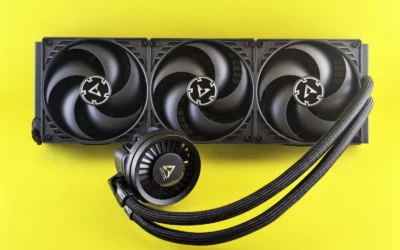
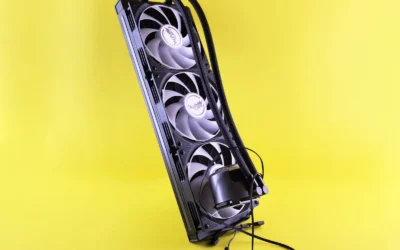
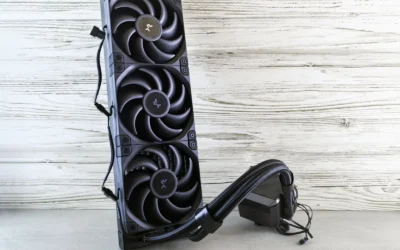
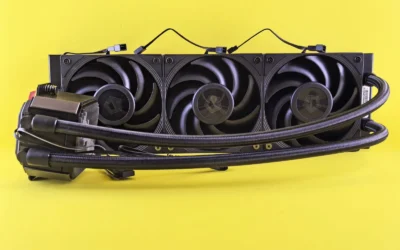
The CORSAIR Nautilus 360 RS ARGB is a 360mm all-in-one liquid CPU cooler designed for gamers, content creators and PC builders who need reliable thermal performance without complexity. It is ideal for high-performance Intel and AMD systems where air cooling is not enough and clean aesthetics matter.
In real world use, the efficient low-noise pump circulates coolant at high flow while staying whisper quiet at just 20 dBA, and the three RS120 ARGB fans deliver strong airflow and static pressure. CORSAIR AirGuide technology and Magnetic Dome bearings keep temperatures low during gaming and heavy workloads while maintaining impressively quiet operation.
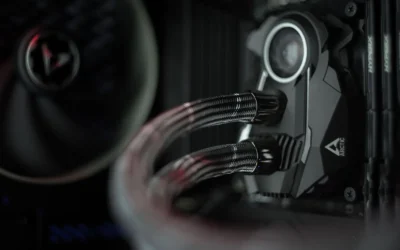
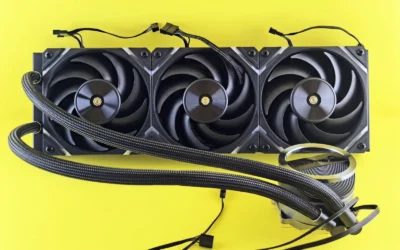
Build quality is excellent with an aluminum and copper construction, a convex copper cold plate for optimal CPU contact and pre-applied thermal paste for quick installation. The daisy-chain fan design is a standout, letting you connect all three fans to a single 4-pin PWM header and one 5V ARGB header for a much cleaner build with direct motherboard control.
There are a few tradeoffs to consider. The large 360mm radiator needs a case that supports full-size AIO mounting, so compact builds may not be compatible. Since it relies on motherboard headers for lighting and speed control, users wanting dedicated CORSAIR iCUE software control will need a separate controller.
Overall, the Nautilus 360 RS ARGB offers outstanding cooling, quiet performance and simple installation in the competitive 360mm AIO market. For anyone building a modern Intel LGA 1851/1700 or AMD AM5/AM4 system who wants powerful cooling with vibrant ARGB and minimal wiring, it is an easy recommendation.
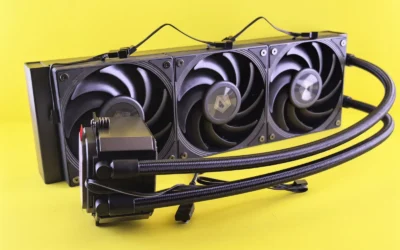
Radiator Size: 360mm with three RS120 ARGB fans, maximum speed 2100 RPM
Compatibility: Intel LGA 1851, LGA 1700 and AMD AM5, AM4 with included mounting hardware
Cooling Details: Copper convex cold plate with pre-applied thermal paste, aluminum radiator, water cooling method
Connectivity: Daisy-chain design, single 4-pin PWM header and single 5V ARGB header, 12V power, direct motherboard connection
Dimensions and Acoustics: 15.59 x 4.72 x 1.06 inches, pump noise 20 dBA, maximum fan noise 36 dB, 10 watt power draw
How They Compare
Radiator Size and Cooling Headroom
The CORSAIR Nautilus 360 RS ARGB Liquid CPU Cooler uses a 360mm radiator paired with 3X RS120 ARGB fans included in the box. Per the spec sheet it combines a high flow rate pump with a convex cold plate and pre-applied thermal paste in an optimised pattern, which helps ensure maximum contact with your CPU integrated heat spreader. That larger surface area gives you more thermal headroom for sustained gaming sessions and for CPUs that boost aggressively.
A 240mm AIO offers a smaller radiator that fits in a more compact footprint. Owners commonly report that a 240mm unit handles mainstream gaming CPUs well, especially when you prioritize 1440p or 4K where the graphics card is often the limiter, but it has less surface area to dissipate heat during long all core loads. If you run a high TDP chip or like to keep fan speeds low, the extra headroom of a 360mm radiator is easier to appreciate. For context on how CPU and GPU pairings affect your build balance, see this Ryzen 5 7600 RX 7700 XT build breakdown which shows how cooler choice interacts with component selection.
Noise, Airflow and Fan Behavior
Noise is where radiator size changes the experience. The CORSAIR Nautilus 360 RS ARGB Liquid CPU Cooler is rated for an efficient, low noise pump that generates a whisper quiet 20 dBA while keeping coolant circulating at a high flow rate. Its RS120 ARGB fans are designed for strong airflow and high static pressure, with CORSAIR AirGuide technology and Magnetic Dome bearings that help maintain cooling performance at lower noise levels.
With a 240mm AIO, owners commonly report needing slightly higher fan speeds to match the same heat dissipation, which can raise perceived noise under sustained loads. That does not mean a 240mm unit is loud, it just has less surface area to work with, so the fans do more of the work. If low noise during long gaming sessions is a priority and your case can fit the larger radiator, the 360mm class tends to run its fans at more relaxed speeds. You can explore more options and fan strategies in our CPU Cooling category, where we assess different cooler designs for noise and airflow.
Case Compatibility and Clearance
Fit is often the deciding factor. A 360mm radiator requires a case that explicitly supports a 360mm mount, usually on the front or top panel, and you should check radiator clearance against your case manual, including thickness, fan clearance and RAM or motherboard heatsink interference. The CORSAIR Nautilus 360 RS ARGB Liquid CPU Cooler needs room for three 120mm fans in a row, so compact mid towers and some older cases may not accommodate it without compromises.
A 240mm AIO is more forgiving. Owners commonly report easier fitment in mainstream mid towers, compact ATX and even some micro ATX cases that list 240mm or 280mm support but not 360mm. It also leaves more room for cable routing and top mounted memory with tall heat spreaders. Before you buy either size, check your case spec sheet for supported radiator sizes and mounting locations, and follow the manufacturer mounting instructions for proper orientation and airflow. If you are planning a smaller or budget focused build, our Budget Build Guides can help you match case choice to cooler size.
Installation, Wiring and Platform Support
Installation and daily use matter as much as cooling. The CORSAIR Nautilus 360 RS ARGB Liquid CPU Cooler supports Intel LGA 1851, LGA 1700, and AMD AM5 and AM4, which covers the current mainstream gaming platforms. It includes a convex cold plate with pre-applied thermal paste to speed up installation, and it simplifies wiring by letting you daisy chain the RS ARGB fans and connect them to just one 4 pin PWM fan header and one plus 5V ARGB header for control via a compatible motherboard.
A 240mm AIO typically offers similar platform support and a simpler wiring run because there are fewer fans to chain, which can make cable management a bit cleaner in tight cases. Regardless of size, handle components with anti-static precautions, mount the cold plate evenly, and follow the manufacturer instructions for bracket selection and tightening sequence. BIOS updates and any tuning are done at your own risk and may void warranty, so keep your motherboard firmware and fan curves conservative unless you are comfortable with manual adjustments. Pairing your cooler with the right graphics card also matters for overall thermals, so consider how your GPU choice affects case airflow as shown in our top RTX 5070 ti cards for 1440p gaming guide.
Which One Should You Get
Choose the 240mm AIO if you have a mainstream gaming CPU, a mid tower or compact case with limited radiator support, or you want simpler installation and easier cable routing. It is a good fit for 1080p and 1440p gaming builds where the GPU carries most of the load, and for builders who want solid cooling without committing to a large radiator. You will still want to set a balanced fan curve and verify that your case lists 240mm support on the panel where you plan to mount it.
Choose the 360mm AIO, like the CORSAIR Nautilus 360 RS ARGB Liquid CPU Cooler, if your case supports a 360mm radiator and you want maximum headroom with lower fan speeds. It is the more premium choice for high core count CPUs, sustained all core gaming or streaming workloads, and for users who prefer quiet operation with extra thermal buffer. The included 3X RS120 ARGB fans, AirGuide design, Magnetic Dome bearings and daisy chained connection to a single PWM and ARGB header make it a clean, high performance option when you have the space.
Who Should Skip Both
Both AIO sizes are not ideal for builders who cannot fit a radiator or who prefer minimal maintenance and maximum simplicity. If you have a small form factor case with no 240mm or 360mm mount, low profile clearance, or you want to avoid any risk of pump noise or eventual coolant permeation, a quality air cooler that fits your case height limit is not a good fit for this comparison and may be the more practical path. This is also not the right choice if you are not comfortable following the manufacturer mounting instructions or checking radiator clearance against your case and RAM height before purchase.
Frequently Asked Questions
Do I need a 360mm AIO for gaming or is 240mm enough?
For many gaming builds, especially at 1440p and 4K where the GPU is the limiter, a 240mm AIO is enough for mainstream CPUs when paired with good case airflow. A 360mm AIO, such as the CORSAIR Nautilus 360 RS ARGB Liquid CPU Cooler, provides more headroom and can run fans at lower speeds, which helps with noise and sustained boost during long sessions or streaming.
Will a 360mm AIO fit in any mid tower case?
No, not every mid tower supports a 360mm radiator. Check your case spec sheet for supported radiator sizes and mounting locations, and confirm clearance for radiator thickness plus fans. If your case only lists 240mm or 280mm support, a 240mm AIO is the safer fit.
Is a 360mm AIO louder than a 240mm AIO?
Not necessarily. The CORSAIR Nautilus 360 RS ARGB Liquid CPU Cooler is rated with a low noise pump at 20 dBA and uses AirGuide and Magnetic Dome bearings to keep fan noise down. Because a 360mm radiator has more surface area, it can often achieve the same cooling at lower fan speeds than a 240mm unit, which owners commonly report as quieter under sustained gaming loads.

Write Your Review
No reviews yet. Be the first to share your experience!