

Quick answer: Best for competitive 1440p play is ASUS ROG Strix 26.5” 1440P QD-OLED Gaming Monitor because it hits 360Hz with 0.03ms response per ASUS spec. Best for immersive 4K visuals is Samsung 32″ Odyssey OLED G8 (G80SH) with 240Hz and True Black 500 per Samsung spec.
You load a dark horror level and gray fog washes out shadows while motion smears during flick shots. This roundup of OLED gaming monitors for PC in 2026 is for desktop players who want perfect blacks and instant response without guesswork, and we assessed panel tech, speed and longevity to narrow the field. Pair your pick with a blackout small desk setup to control reflections and keep contrast punchy.
We focused on PC-first needs like high-refresh DisplayPort input, text clarity and burn-in tools, and we compared QD-OLED punch against glossy WOLED depth to suit different rooms. Whether you play ranked shooters or cinematic RPGs, you will find a size and speed match below that fits your desk, GPU and play style.
This article contains affiliate links. If you buy through one of our links, CustomPCGaming may earn a commission at no extra cost to you. Commissions never influence which products we recommend or how we rank them. Read our Affiliate Disclosure for details.
Quick Picks at a Glance

Prime ASUS ROG Strix XG27AQDMGR 27" QHD 240Hz Glossy

Sceptre 24-Inch Curved Gaming Monitor 1080p 180Hz

Prime Sceptre 24.5 Inch 240Hz Gaming Monitor FHD 1080p

Prime Acer Predator X27U 26.5-inch QHD QD-OLED 240Hz

ASUS ROG Strix XG27ACDNG 26.5" QD-OLED

LG 32GX850A-B 32-Inch 4K UHD Glossy OLED
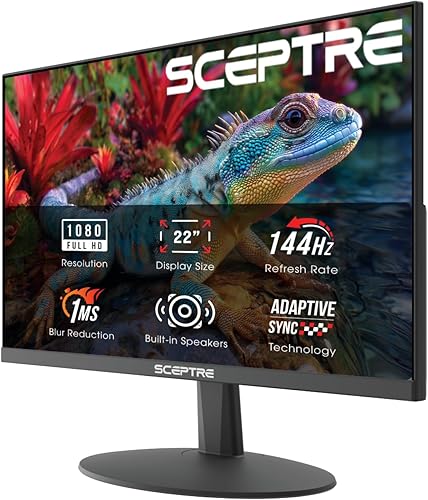
Prime Sceptre 22-Inch FHD 1080p 144Hz Gaming Monitor

Samsung 27" Odyssey OLED G5 (G50SF)

Samsung 32" Odyssey OLED G8 G80SH 4K QD-OLED

INNOCN 27in QD-OLED QHD 240Hz Gaming Monitor
As an Amazon Associate we earn from qualifying purchases. Product prices and availability are accurate as of the date/time indicated.
Pros
- Ultra-fast 240Hz OLED with 0.03ms response delivers elite motion clarity for competitive gaming
- Glossy TrueBlack WOLED provides deeper blacks and more vibrant HDR than standard matte panels
- Factory calibrated 99% DCI-P3 and Delta E <2 offers pro-level color accuracy for gaming and creation
- Smart OLED Care Pro with Neo Proximity Sensor plus 3-year burn-in warranty protects your investment
- Comprehensive sync and eye care support with FreeSync Premium Pro, AdaptiveSync and low blue light
Cons
- Glossy screen coating can show reflections in bright or sunlit rooms
- Single HDMI port limits connectivity for multiple consoles without a switch
- QHD resolution may disappoint users specifically seeking native 4K
The ASUS ROG Strix XG27AQDMGR is a 27-inch QHD OLED gaming monitor designed for competitive gamers, streamers and creators who demand both speed and image quality. With its 240Hz glossy WOLED panel, it targets users who want esports performance without sacrificing HDR visuals and color accuracy.
In real world use, the 240Hz refresh rate and 0.03ms gray-to-gray response deliver exceptionally smooth and ghost-free gameplay. The TrueBlack Glossy WOLED shines with VESA DisplayHDR 400 True Black, 99 percent DCI-P3 coverage and true 10-bit color, producing inky blacks and vivid highlights that make games and movies pop.
Build quality is clean and gamer focused with a flat black chassis, slim bezels and wall mount support. The glossy finish enhances contrast and clarity compared to matte coatings, while the included DisplayWidget Center software makes it easy to adjust settings and manage OLED care with a mouse.
There are a few tradeoffs to consider. The glossy panel looks stunning in controlled lighting but can reflect ambient light in bright rooms. Connectivity is also limited to a single HDMI port alongside DisplayPort, so multi-console setups may need a switch.
Overall, the XG27AQDMGR is an outstanding choice for gamers who want top-tier OLED speed, rich HDR and long term protection. If you value flawless motion, accurate color and burn-in coverage with a 3-year warranty, this monitor is a premium upgrade worth considering.
Display: 27-inch (26.5-inch viewable) QHD 2560 x 1440 TrueBlack Glossy WOLED, 16:9, 240Hz, 0.03ms GtG, 1,500,000:1 contrast, 1300 nits peak brightness, 178-degree viewing angle
Color and HDR: 99% DCI-P3, true 10-bit color, Delta E less than 2, VESA DisplayHDR 400 True Black, Flicker Free, TUV Low Blue Light Hardware Solution
Gaming Features: AMD FreeSync Premium Pro, VESA AdaptiveSync Display 240Hz, ROG Gaming AI technology, OLED Care Pro with Neo Proximity Sensor
Connectivity and Dimensions: 1x HDMI, DisplayPort, 2x USB ports, 7.4 x 23.8 x 19.7 inches, 14.6 pounds, wall mountable, 26.8W power consumption
Warranty and Extras: 3-year warranty with burn-in coverage, includes DisplayPort cable, HDMI cable, power cord and microfiber cloth
Pros
- High refresh 180Hz panel per Sceptre specs delivers smooth visuals owners report for gaming and everyday use
- Curved 24-inch 1080p screen per Sceptre specs with 100% sRGB per Sceptre specs earns praise for clear color and immersion
- Versatile connectivity with dual HDMI and dual DisplayPort per Sceptre specs plus built-in speakers
- Eye comfort features and easy setup owners report as simple and beginner friendly
Cons
- 1080p resolution per Sceptre specs limits sharpness for 4K content and detailed pro photo work
- Built-in speakers save space but owners report external speakers sound fuller for movies and music
- 24-inch curved size per Sceptre specs may feel small for multitasking or users wanting ultrawide immersion
Quick answer: Best for budget gamers and home office users is the Sceptre C248B-FWT168 24-inch curved monitor because it offers 180Hz refresh per Sceptre specs for smooth play, plus 100% sRGB color per Sceptre specs and built-in speakers for everyday versatility with FreeSync support per Sceptre specs.
| Product | Key spec | Best for | Price tier |
|---|---|---|---|
| Sceptre Curved Gaming Monitor | 24-inch 1080p 180Hz per Sceptre specs | budget curved gaming | Budget |
| Flat Office Monitor | 24-inch 1080p 100Hz per vendor specs | work and study | Budget |
| Ultrawide Gaming Monitor | 34-inch 1440p 144Hz per vendor specs | immersive multitasking | Mid-range |
This Sceptre curved monitor blends gaming focus with everyday comfort for students, home offices and first setups. Owners report simple setup and vivid images that suit play, streaming and light creative work.
Is the Sceptre 24-inch curved monitor good for gaming?
Yes, it shines for quick play with up to 180Hz refresh and 1ms response per Sceptre specs for fluid motion. AMD FreeSync Premium per Sceptre specs helps reduce tearing, while FPS and RTS modes per Sceptre specs tune color and contrast for clearer targets.
How vivid is the display for movies and work?
The 24-inch Full HD panel with 100% sRGB coverage per Sceptre specs delivers rich color for films and photo viewing. Blue-Light Shift and a matte finish per Sceptre specs ease eye strain, and owners report comfortable viewing during long sessions.
What about design, sound and connectivity?
The machine black curved shape adds immersion while saving space, and VESA support per vendor specs allows wall or arm mounting. Dual HDMI and dual DisplayPort inputs per Sceptre specs cover PC and console, plus built-in speakers and audio out per Sceptre specs keep sound simple.
Is this Sceptre monitor worth it despite its limits?
Full HD resolution per Sceptre specs is crisp at this size but lacks detail for pro editing or dense multitasking. Built-in sound is handy, though owners report a separate soundbar or headphones give fuller audio for movies.
Should you buy this monitor for gaming and everyday use?
For smooth play, vibrant color and easy connectivity in a compact curved design, this pick stands out. Owners report strong value for play, study and streaming, making it a smart choice for first gaming setups.
Frequently Asked Questions
Does it support AMD FreeSync?
Yes, it supports AMD FreeSync Premium per Sceptre specs to help reduce screen tearing during gaming.
How many inputs does it have for PC and console?
It offers dual HDMI and dual DisplayPort inputs per Sceptre specs, plus audio out per Sceptre specs for flexible hookup.
Does it have built-in speakers?
Yes, it includes built-in speakers per Sceptre specs and an audio out jack per Sceptre specs for headphones or external sound.
Can you wall mount it?
Yes, it supports VESA wall mounting per vendor specs to free desk space and adjust viewing angle.
Pros
- Exceptional 240Hz refresh rate and 1ms response time for competitive gaming
- AMD FreeSync Premium ensures tear-free, smooth performance
- 100% sRGB coverage and high contrast VA panel for vivid, accurate colors
- Four video inputs (2 HDMI + 2 DisplayPort) offer excellent device flexibility
- Built-in speakers and Blue Light Shift add everyday convenience and comfort
Cons
- 1080p resolution limits detail for creative work compared to 1440p options
- VA panel has narrower viewing angles than IPS alternatives
- Stand appears to lack height and swivel adjustments for ergonomics
The Sceptre E255B-FWD240 is a 24.5-inch Full HD gaming monitor designed for competitive players who prioritize speed and responsiveness. With its 240Hz refresh rate, 1ms response time and AMD FreeSync Premium, it targets esports enthusiasts and fast-paced gamers who need every frame to count.
In real world use, the 240Hz panel and 1ms Blur Reduction deliver exceptionally fluid motion with minimal ghosting, ideal for shooters and racing games. The 100% sRGB VA panel produces rich, accurate colors and strong 2000:1 contrast, while FreeSync Premium keeps gameplay tear-free when paired with a compatible graphics card.
Design wise, the monitor features a modern Machine Black finish with slim bezels that maximize screen space and suit multi-monitor setups. The matte 25-inch flat panel reduces glare, and the inclusion of two HDMI and two DisplayPort inputs plus built-in speakers keeps your desk clean and versatile.
There are some tradeoffs to consider. The 1920x1080 resolution is sharp for gaming but less spacious for productivity or content creation than higher resolution displays. As a VA panel, color shift can occur at wide angles, and the stand offers basic tilt only without advanced ergonomic adjustments.
Overall, the Sceptre E255B-FWD240 offers outstanding speed and gaming features for its class. If you want an affordable, high refresh rate monitor for competitive gaming with vibrant color and solid connectivity, it is an excellent choice that balances performance and value.
Model: Sceptre E255B-FWD240.A1 (2026 Series)
Screen Size: 24.5-inch viewable (25 inch class) Flat VA, Matte Finish
Resolution: 1920 x 1080 FHD, 16:9 Aspect Ratio
Refresh Rate: 240Hz, Response Time: 1ms BR
Color: 100% sRGB, Contrast Ratio 2000:1, LED Backlight
Sync Technology: AMD FreeSync Premium, Blue Light Shift
Connectivity: 2x HDMI, 2x DisplayPort, Audio Out Jack
Audio: Built-in Speakers
Dimensions: 22 x 7.6 x 16 inches, Weight: 4.54 kg
Color: Machine Black
Pros
- Ultra smooth motion with 240Hz and 0.03ms response per Acer specs
- Strong color accuracy with true 10-bit, 99% DCI-P3 and HDR10 per Acer specs
- Competitive 26.5-inch 16:9 size with ZeroFrame bezels per Acer specs keeps action in view
- Flexible ergonomics and FreeSync Premium support per Acer specs for gaming and business use
Cons
- QD-OLED panels need care to avoid image retention, so users should use refresh and screen care features
- QHD 2560 x 1440 resolution per Acer specs is less sharp than 4K for detailed creative work
- Matte coating and flat panel may appeal less to users who prefer glossy HDR pop or curved immersion
Quick answer: Best for competitive PC gamers is the Acer Predator X27U W1 because it combines a 240Hz refresh rate with 0.03ms response per Acer specs for ultra smooth motion, plus QD-OLED QHD clarity and 99% DCI-P3 color per Acer specs in a focused 26.5 inch size.
The Acer Predator X27U W1 is a 26.5 inch QHD monitor with 2560 x 1440 resolution per Acer specs, designed for gaming, desktop and business use. It fits competitive players and action fans who want OLED depth and speed without stepping up to 4K.
| Product | Key spec with number | Best for | Price tier |
|---|---|---|---|
| Acer Predator X27U W1 | 26.5 inch QD-OLED, 240Hz per Acer specs | Competitive QHD gaming | Premium |
| LG UltraGear 27GS95QE | 27 inch OLED, 240Hz per LG specs | Vivid HDR gaming | Premium |
| MSI MAG 275QF | 27 inch IPS, 180Hz per MSI specs | Value high refresh play | Mid-range |
Is the Acer Predator X27U good for competitive gaming?
Yes for speed focused play, as the 240Hz refresh rate with 0.03ms response per Acer specs supports fluid motion with reduced ghosting. AMD FreeSync Premium support per Acer specs helps keep frames synced to the graphics card for smoother, tear free matches.
How good is color and HDR on this QD-OLED panel?
Color is a highlight, with true 10-bit depth, 99% DCI-P3 coverage, Delta E less than 2 and HDR10 per Acer specs. That combination per Acer specs delivers deep contrast and vivid tones for games and streaming, while image retention refresh helps protect the panel.
How is the design, comfort and connectivity?
The flat 26.5 inch 16:9 ZeroFrame design per Acer specs keeps the action centered in view for esports style setups. Height, pivot, swivel and tilt adjustment plus built-in speakers, 2 HDMI ports and DisplayPort per Acer specs allow flexible desk placement and easy PC or console hookup.
Are there any drawbacks to consider?
QD-OLED still calls for sensible care around static images, even with retention refresh per Acer specs. The 2560 x 1440 QHD resolution per Acer specs is sharp for gaming but less detailed than 4K for editing, and some users may prefer a curved or glossy screen.
The verdict is clear for its niche, as this 26.5 inch 240Hz QD-OLED per Acer specs blends speed, contrast and color in one focused package. Competitive gamers who value smooth FreeSync Premium play per Acer specs and rich HDR visuals will find it a strong pick.
Frequently Asked Questions
What resolution and refresh rate does it have?
It offers 2560 x 1440 QHD resolution with up to 240Hz refresh and 0.03ms response per Acer specs.
Does it support FreeSync?
Yes, it supports AMD FreeSync Premium per Acer specs to reduce tearing and stutter when paired with a compatible graphics card.
What is in the box?
The box includes the display, stand, HDMI cable and power cord per Acer specs, with a 3 year parts and labor warranty per Acer specs.
Pros
- Exceptionally smooth 360Hz motion with zero overshoot and instant 0.03ms response
- Outstanding QD-OLED image quality with true blacks and wide color gamut
- Effective cooling and burn-in protection backed by 3-year warranty with burn-in coverage
- Excellent color accuracy ideal for both gaming and photo or video editing
Cons
- Premium cost compared to standard IPS monitors due to QD-OLED technology
- Joystick wheel and DisplayWidget software can feel inconsistent at times
- Matte finish reduces glare but slightly mutes OLED vibrancy versus glossy panels
The ASUS ROG Strix XG27ACDNG is a 26.5-inch QHD QD-OLED gaming monitor built for competitive and enthusiast gamers who demand both speed and image quality. With a 360Hz refresh rate, 0.03ms response time and 2560x1440 resolution, it hits the sweet spot between ultra fast esports performance and sharp, immersive visuals.
In real world use, the QD-OLED panel delivers perfect blacks, 99 percent DCI-P3 color and DisplayHDR 400 True Black for vibrant, accurate HDR. The near instant pixel response eliminates overshoot and motion blur, so fast paced shooters and racing games feel noticeably smoother and more responsive, even at the same frame rates as IPS.
ASUS pairs the panel with a custom heatsink and advanced airflow design plus OLED Care+ to help prevent burn-in and maintain longevity. The flat matte display offers wide 178 degree viewing angles, solid build quality and flexible connectivity with DisplayPort, HDMI and USB ports, plus DisplayWidget Center for easy mouse based control.
There are a few tradeoffs to consider. The matte finish reduces glare but slightly softens the inky OLED pop you get from glossy coatings, and some users find the joystick control and software a bit inconsistent. As a 26.5-inch 1440p display, it prioritizes speed over the extra detail of 4K, which may not suit those wanting a larger canvas for productivity.
Overall, the XG27ACDNG stands out as one of the best 1440p QD-OLED monitors for gamers who want elite responsiveness without sacrificing color and contrast. If you value buttery smooth motion, true blacks and reliable OLED protection with a strong warranty, it is an excellent premium choice.
Display: 26.5-inch QD-OLED, 2560x1440 QHD, 360Hz refresh rate, 0.03ms GTG response, 99% DCI-P3, True 10-bit, Delta E less than 2, DisplayHDR 400 True Black, 178 degree viewing angles, matte finish, 16:9 flat panel.
Features: Custom heatsink and advanced airflow, ASUS OLED Care+, ROG OLED Anti-Flicker technology, TUV Flicker-free and Low Blue Light hardware solution, G-SYNC Compatible and FreeSync Premium Pro, AI Gaming features, DisplayWidget Center support.
Connectivity and Build: DisplayPort, 2x HDMI, USB Type-C, 2x USB 3.2 Gen 1 Type-A, wall mountable, 16.4 pounds, includes DisplayPort cable, HDMI cable, power adapter and microfiber cloth.
Pros
- Stunning glossy OLED color with deep blacks, owners report natural pop without harsh whites
- Flexible Dual-Mode 4K at 165Hz or Full HD at 330Hz per LG spec covers both immersive and competitive play
- Smooth variable refresh with G-SYNC Compatible and FreeSync Premium Pro per LG spec
- Comfort and clarity with UL certified low blue light and flicker-free viewing per UL listing, plus 98.5 percent DCI-P3 color per LG spec
Cons
- Glossy panel shows reflections in bright rooms, owners report glare with direct light
- Input switching can feel slow when using multiple PCs and consoles, owners report
- Needs a capable GPU with DisplayPort 1.4 or HDMI 2.1 to reach up to 165Hz per LG spec, so older systems may limit performance
Quick answer: Best for competitive and story-driven gamers is LG 32GX850A-B because it pairs 4K at 165Hz with Full HD at 330Hz in Dual-Mode, plus 0.03ms response per LG spec for sharp motion and smooth variable refresh support for NVIDIA G-SYNC and AMD FreeSync Premium Pro setups.
The LG 32GX850A-B is a 32-inch 4K UHD OLED gaming monitor with 3840 x 2160 resolution per LG spec, aimed at PC gamers who want both cinematic clarity and esports speed. Owners report vivid color and deep blacks suit story-driven play, while Dual-Mode appeals to FPS, MOBA and racing fans who value high refresh options.
| Product | Key spec with number | Best for | Price tier |
|---|---|---|---|
| LG 32GX850A-B per LG spec | 4K 165Hz and 1080p 330Hz per LG spec | Dual-Mode versatility | Premium |
| LG 27-inch OLED per vendor spec | 1440p 240Hz per vendor spec | Smaller desk setups | High-end |
| Samsung 32-inch OLED per vendor spec | 4K 165Hz per vendor spec | Matte screen preference | Premium |
Is this LG OLED worth it for 4K gaming?
Dual-Mode lets you play at 4K UHD up to 165Hz or switch to Full HD up to 330Hz per LG spec, with 0.03ms GtG response per LG spec for crisp motion. NVIDIA G-SYNC Compatible and AMD FreeSync Premium Pro support smooth, tear-free frames per NVIDIA and AMD specs, while VESA DisplayHDR True Black 400 and 98.5 percent DCI-P3 coverage per LG spec add depth in dark scenes.
How does glossy OLED affect picture and comfort?
The glossy 32-inch OLED uses Micro Lens Array Plus for 275 nits typical brightness per LG spec, and owners report punchy color without harsh white glare. UL certifications for low blue light, flicker-free viewing and anti-glare per UL listing help comfort during long sessions, though reflections remain in bright rooms.
What about design, ports and setup?
The virtually borderless black chassis offers height, tilt, swivel and pivot adjustment per LG spec, plus 2 HDMI ports, DisplayPort and 3 USB ports per LG spec for PC and console setups. Owners report a clean, professional look without loud gamer styling, and included HDMI, DisplayPort and power cables per LG spec simplify setup.
Who should buy it?
Glossy finish can show glare under direct light, and some owners report input switching feels slow with multiple PCs and consoles. You need a graphics card with DisplayPort 1.4 or HDMI 2.1 to reach up to 165Hz per LG spec, so older GPUs may limit refresh.
This monitor suits gamers who want one display for immersive 4K and fast Full HD play, with 1.5M to 1 contrast and 0.03ms response per LG spec delivering OLED depth. If you game in a dark to controlled light room and value smooth variable refresh, owners report it is a strong, versatile pick.
Frequently Asked Questions
Does it support G-SYNC and FreeSync?
Yes, it is NVIDIA G-SYNC Compatible and supports AMD FreeSync Premium Pro per LG spec, which helps reduce tearing for supported GeForce GTX 10 Series and higher GPUs per NVIDIA spec.
How does Dual-Mode work?
You can select 4K UHD up to 165Hz for detail or Full HD up to 330Hz for speed per LG spec, using a hotkey per LG spec.
Is the glossy screen good for bright rooms?
Owners report gorgeous blacks and pop in controlled light, but direct lamps or windows increase reflections, so light control helps maintain clarity.
What is included for setup?
The box includes a DisplayPort cable, an HDMI cable and a power cable per LG spec, plus a stand with height, tilt, swivel and pivot adjustment per LG spec.
Pros
- High 144Hz refresh rate and fast 1ms response for smooth casual gaming
- Versatile HDMI and DisplayPort connectivity with FreeSync support
- Built-in speakers eliminate the need for external audio
- Eye care features with Blue Light Shift and matte finish
- Compact VESA compatible design ideal for dual monitor or wall mount setups
Cons
- 22-inch 1080p size may feel small for immersive gaming or heavy multitasking
- Single HDMI port limits direct connection of multiple HDMI devices
- Color performance suits casual use more than professional photo and video editing
The Sceptre E225W-FW144 is a 22-inch Full HD monitor built for budget gaming, office work and study setups. With its compact 1080p panel, it suits students, remote workers and casual gamers who need speed without taking up much desk space.
Performance centers on the 144Hz refresh rate, 1ms response time and AMD FreeSync support. In real world use, gameplay looks noticeably smoother than standard 60Hz panels, while scrolling, video and everyday multitasking feel fast and responsive.
The design uses a slim, nearly bezel free flat panel in Machine Black with a matte anti glare finish. Built in speakers keep your setup clean, while HDMI, DisplayPort and VESA wall mount support make dual monitor or small space installation simple.
There are tradeoffs to keep in mind for the compact size and focused feature set. The 22-inch screen and single HDMI port can feel limiting for immersive gaming or multi device setups, and color performance is geared for casual use rather than professional photo editing.
Overall, this Sceptre monitor delivers strong value for users who prioritize speed, eye comfort and simplicity. If you want an affordable, space saving 144Hz display for gaming, business and school, it is a practical pick.
Screen Size: 22 inches, Full HD 1920 x 1080, 16:9 LED panel with matte finish
Refresh Rate: Up to 144Hz, 1ms response time, AMD FreeSync, 2000:1 contrast ratio
Connectivity: 1 x HDMI, 1 x DisplayPort, built in speakers
Design: Flat Machine Black, slim bezel, 170 degree viewing angle, VESA wall mount compatible
Model: E225W-FW144G, 2026 FW144 Series, 1 year manufacturer warranty
Pros
- Outstanding QD-OLED picture quality with deep blacks and vibrant, accurate colors
- Extremely fast 180Hz and 0.03ms response for competitive gaming advantage
- Effective Glare Free technology for clear viewing in any lighting
- Pantone Validated with 2100 plus colors, great for gaming and photo and video editing
- Comprehensive burn-in protection and 3 year warranty for long term confidence
Cons
- Limited connectivity with only one DisplayPort and one HDMI port
- No built-in speakers, requires external audio solution
- 280 nits brightness is modest for punchy HDR compared to higher end OLEDs
The Samsung Odyssey OLED G5 G50SF is a 27-inch QHD QD-OLED gaming monitor designed for gamers who want true OLED performance without stepping up to flagship pricing. It is ideal for competitive players, immersive story driven gamers, and creators who need accurate color and perfect contrast.
In real world use it impresses with perfect blacks, infinite contrast and Pantone Validated color that makes games and movies pop. The 180Hz refresh rate and 0.03ms GtG response deliver ultra smooth motion, while G-Sync Compatible and FreeSync keep gameplay tear free and responsive.
Design wise it is sleek, thin and surprisingly light at just 7.3 pounds, with a clean flat black look. The matte Glare Free finish effectively cuts reflections, and tilt adjustment plus simple desk mounting make setup easy on any desktop.
There are some trade offs to note. Connectivity is limited to one DisplayPort and one HDMI, which can be tight for multi device setups. It also lacks built-in speakers, and peak brightness is modest, so HDR highlights will not be as searing as on premium OLEDs.
Overall the Odyssey OLED G5 offers superb price to performance value and is one of the best entry points into OLED gaming. If you want elite speed, gorgeous QD-OLED visuals and reliable burn-in safeguards in a versatile 27-inch QHD package, it is an excellent buy.
Display: 27-inch QD-OLED, 2560 x 1440 QHD, 16:9, Matte Glare Free, 1,000,000:1 contrast, 280 nits, HDR10, Pantone Validated for 2100 plus colors
Performance: 180Hz refresh rate, 0.03ms GtG response, G-Sync Compatible, AMD FreeSync, Black Equalizer, Virtual Aim Point
Connectivity: 1x DisplayPort, 1x HDMI, Auto Source Switch+
Design and Dimensions: Flat panel, Desk Mount with Tilt Adjustment, 24.01 x 18.26 x 9.23 inches, 7.3 pounds, Black
Protection and Warranty: OLED Safeguard with Thermal Modulation, Logo and Taskbar Detection, Screen Saver, 3 Year Manufacturer Warranty
Pros
- Breathtaking QD-OLED picture with perfect blacks, vibrant colors and sharp 4K detail
- Elite gaming performance with 240Hz and 0.03ms response for competitive smoothness
- Glare Free matte finish keeps visibility clear even in bright environments
- Advanced burn in protection with Dynamic Cooling and Thermal Modulation extends OLED longevity
- Premium metal design with ergonomic stand and versatile USB-C, DP 2.1 and HDMI connectivity
Cons
- Premium QD-OLED positioning may be expensive for budget focused buyers
- Matte Glare Free coating trades the extra punch of a glossy OLED finish some users prefer
- Panel can run warm during extended high brightness HDR sessions
The Samsung 32 inch Odyssey OLED G8 G80SH is a flagship 4K QD-OLED gaming monitor built for enthusiasts who demand both visual fidelity and speed. With its 3840x2160 resolution, 140 PPI and 240Hz panel, it targets competitive gamers, creators and anyone upgrading to a premium OLED experience.
In real world use, the 4th Gen QD-OLED Penta Tandem panel impresses with inky blacks, Pantone Validated color accuracy and DisplayHDR True Black performance. The 0.03ms response time and 240Hz refresh rate deliver fluid, blur free motion, while AMD FreeSync Premium Pro and G-Sync compatibility eliminate tearing and lag for ultra responsive play.
Design wise, the G8 stands out with a refined silver metal chassis, CoreSync and CoreLighting+ accents and a surprisingly lightweight build. The ergonomic stand offers height, tilt, swivel and pivot adjustment, while DisplayPort 2.1, HDMI and USB-C with 98W power delivery keep your setup clean and versatile.
There are a few tradeoffs to consider. The Glare Free matte finish excels at reducing reflections but lacks the extra contrast pop of glossy OLEDs that some purists prefer. Like many high brightness OLEDs, it can run warm during long HDR sessions and thermal management may slightly limit peak brightness.
Overall, the Odyssey OLED G8 G80SH is an outstanding choice if you want best in class 4K OLED visuals without sacrificing competitive performance. It blends stunning image quality, thoughtful burn in protection and premium build into a monitor that feels both future proof and ready for serious gaming.
Display: 32 inch QD-OLED, 3840 x 2160 4K UHD, 16:9, Flat, Matte Glare Free finish
Performance: 240Hz refresh rate, 0.03ms GtG response, 1,500,000:1 contrast, 300 nits brightness, 178 degree viewing angle
Color and HDR: VESA DisplayHDR True Black 400, HDR and Adaptive Sync, Pantone Validated
Sync Technology: AMD FreeSync Premium Pro and G-Sync Compatible, VRR support
Connectivity: DisplayPort 2.1, 2x HDMI, USB-C with up to 98W power delivery, 3x USB ports, headphone jack
Protection: OLED Safeguard+ with Dynamic Cooling System, Thermal Modulation, Logo and Taskbar Detection
Design: Silver metal chassis with CoreSync and CoreLighting+, ergonomic stand with height, tilt, swivel and pivot
Model: LS32HG802SNXZA, 3 Year Manufacturer Warranty
Pros
- Stunning QD-OLED image with deep blacks and rich color per INNOCN spec, praised by owners for immersion
- Elite speed with 240Hz and 0.03ms response per INNOCN spec for competitive clarity
- Versatile HDMI 2.1 plus DisplayPort connectivity per INNOCN spec for console and PC setups
- Comfort focused adjustable stand with pivot and matte screen per INNOCN spec for long sessions
Cons
- Single HDMI port may limit users with multiple console sources who want to avoid swapping cables
- 27-inch QHD size per INNOCN spec may not suit shoppers seeking larger 4K panels
- 1-year manufacturer warranty per manufacturer listing is modest compared with longer premium monitor coverage
Quick answer: Best for competitive PC and console gamers is the INNOCN 27 inch QD-OLED 2780S because it pairs 240Hz refresh with 0.03ms response per INNOCN spec for blur free motion, plus QHD clarity, HDR support, and HDMI 2.1 for PS5 and Xbox in a 27 inch flat design per INNOCN spec.
| Product | Key Spec | Best For | Price Tier |
|---|---|---|---|
| INNOCN 2780S QD-OLED per INNOCN spec | 240Hz, 0.03ms per INNOCN spec | Competitive gaming | Mid-range |
| 27-inch QHD IPS 180Hz Monitor per vendor spec | 180Hz, 1ms per vendor spec | Everyday gaming | Budget |
| 27-inch 4K 144Hz Monitor per vendor spec | 144Hz, 4K per vendor spec | Visual detail | Premium |
| 32-inch QHD 165Hz Curved Monitor per vendor spec | 165Hz, QHD per vendor spec | Immersive play | Mid-range |
Who should buy the INNOCN QD-OLED gaming monitor?
The INNOCN 2780S is a 27-inch QD-OLED QHD gaming monitor with 2560 x 1440 resolution per INNOCN spec, built for PC and console play. It fits competitive gamers and entertainment fans who want rich contrast and fluid motion in a flat 16:9 design per INNOCN spec.
Owners report vivid color, perfect blacks and HDR depth that elevate story games and streaming. The white slim profile blends well on desks for both gaming setups and work spaces.
How smooth is gameplay with high refresh and fast response?
Speed is the highlight with 240Hz refresh and 0.03ms response per INNOCN spec for blur free action. Adaptive FreeSync and G-Sync Compatible support per INNOCN spec help reduce tearing for smoother PC gaming.
Console play benefits from HDMI 2.1 connectivity per INNOCN spec, supporting high refresh use with PS5, Xbox and Switch per INNOCN spec. DisplayPort input per INNOCN spec covers gaming PCs and laptops for flexible switching.
What is the design and comfort like for daily use?
The flat 27-inch screen uses a matte finish per INNOCN spec to cut glare during bright room sessions. The 1500000:1 contrast ratio per INNOCN spec supports deep OLED blacks with striking highlight pop.
The stand offers height, tilt and pivot adjustment per INNOCN spec for comfortable viewing angles. Built-in speakers, flicker free operation and desk mount support per INNOCN spec add everyday convenience.
Are there any drawbacks to consider?
Connectivity is limited to 1 HDMI port and DisplayPort inputs per INNOCN spec, so multi console owners may need to swap cables. Shoppers seeking larger or higher resolution panels may prefer a 32-inch or 4K option per vendor spec for extra screen space.
Is this monitor worth it in the end?
For fast, colorful QHD gaming, the INNOCN 2780S with 240Hz QD-OLED performance per INNOCN spec stands out as a strong pick. It is ideal for gamers who value speed, contrast and console ready versatility with ergonomic comfort.
Frequently Asked Questions
Does it work with modern game consoles?
Yes, it offers HDMI 2.1 and DisplayPort inputs per INNOCN spec for modern consoles and PCs. Owners report simple setup for living room and desk gaming.
Does it support adaptive sync for PC gaming?
Yes, it supports FreeSync and G-Sync Compatible operation per INNOCN spec to help reduce tearing. This is useful for high refresh play on compatible graphics cards.
Is the stand adjustable for long sessions?
Yes, the stand provides height, tilt and pivot adjustment per INNOCN spec for ergonomic positioning. The matte flat panel per INNOCN spec also helps reduce glare during extended use.
What warranty coverage is included?
It includes a 1-year manufacturer warranty with 30-day replacement support per manufacturer listing. Lifetime technical support per manufacturer listing is also advertised for ownership peace of mind.
| Product | Key spec with number | Best for | Price tier |
|---|---|---|---|
| ASUS ROG Strix 26.5” 1440P QD-OLED Gaming Monitor | 360Hz and 0.03ms per ASUS spec | Esports 1440p | Premium tier |
| LG 32GX850A-B 32″ UltraGear 4K UHD (3840 x 2160) | Dual-Mode 165Hz and 330Hz per LG spec | 4K and high-refresh switchers | Premium tier |
| Samsung 27” Odyssey OLED G5 (G50SF) | 180Hz and 0.03ms per Samsung spec | Balanced QD-OLED value | Mid-range tier |
| INNOCN 27″ Gaming Monitor QD-OLED QHD 2560 x 1440P | 240Hz and 0.03ms per INNOCN spec | First QD-OLED upgrade | Mid-range tier |
| ASUS ROG XG27AQDMGR 27 Inch 1440p 240Hz Glossy | 240Hz glossy WOLED per ASUS spec | Deep contrast purity | Premium tier |
Buying Guide: How to Choose an OLED Gaming Monitor for Your PC in 2026?
What Panel Size and Resolution Fit Your PC Setup?
A 26.5-inch QHD panel at 2560 x 1440 per ASUS spec delivers crisp density for desk viewing while staying easier to drive than 4K, and we suggest it for shooters and mixed work and play. Models like ASUS ROG Strix 26.5” 1440P QD-OLED Gaming Monitor pair that resolution with 360Hz per ASUS spec for fluid aim and clear text.
If you crave cinematic scale, a 32-inch 4K panel at 3840 x 2160 per Samsung spec adds detail for story games and media, though you will want a strong GPU to hold high frames. Mount it with ultrawide monitor arms for a clean desk look to reclaim depth and keep eye to screen distance comfortable.
How Much Refresh Rate and Response Do You Really Need?
For esports, 360Hz with 0.03ms response per ASUS spec gives you the clearest motion and lowest blur on 1440p QD-OLED, while 240Hz with 0.03ms per INNOCN spec still feels instant for most players. Choose 180Hz with 0.03ms per Samsung spec if you want smooth play with lower GPU load and cooler operation.
Dual-mode designs help bridge the gap, offering 4K at 165Hz or Full HD at 330Hz per LG spec for one display that shifts from story mode to scrims. Pair a high-refresh pick with a case for RTX 5090 length and clearance to ensure your GPU can sustain those frames without stutter or thermal limits.
How Do Burn-In Protection and HDR Shape Longevity?
Look for a custom heatsink with OLED Care+ per ASUS spec plus pixel refresh routines that dim logos and shift pixels during idle, which help reduce image retention over long sessions. The ASUS ROG XG27AQDMGR 27 Inch 1440p 240Hz Glossy adds a Neo Proximity Sensor per ASUS spec that blanks the screen when you step away.
For HDR punch, VESA DisplayHDR True Black 400 with 99% DCI-P3 per ASUS spec delivers deep shadows and rich color, while True Black 500 per Samsung spec lifts highlights on the 32-inch class. Complement the glow with a white themed mid class gaming PC build to keep airflow and ambient light balanced for eye comfort.
What Ports and Ergonomics Matter for Daily PC Use?
HDMI 2.1 with DisplayPort per INNOCN spec ensures you get full 240Hz at 1440p from both PC and console, plus Auto Source Switch+ per Samsung spec simplifies swapping inputs. A height, tilt, pivot and swivel stand per LG spec lets you dial posture for long ranked sessions and shared desks.
USB-C with 98W power delivery per Samsung spec powers many laptops over one cable while DisplayPort 2.1 per Samsung spec preserves bandwidth for 4K high-refresh signals. If you mix work and play, a laptop mount for dual monitor setup keeps both screens aligned and cables tidy.
Final Thoughts: Is an OLED Upgrade Worth It for PC Gamers?
If you want peak esports speed, grab ASUS ROG Strix 26.5” 1440P QD-OLED Gaming Monitor for its 360Hz clarity per ASUS spec, and if you want cinematic 4K scale, choose Samsung 32″ Odyssey OLED G8 (G80SH) for immersive HDR depth per Samsung spec.
Frequently Asked Questions
Is burn-in still a problem on OLED gaming monitors in 2026?
Modern panels are far more resilient in 2026 thanks to heatsinks, pixel refresh and proximity dimming per ASUS spec. You should still hide taskbars, use dark mode and let the panel run its refresh cycle. With those habits, gaming and work use holds up well for years.
Is 27-inch 1440p or 32-inch 4K better for PC gaming?
A 27-inch 1440p panel at 240Hz per INNOCN spec is easier to drive and ideal for competitive frames and sharp text. A 32-inch 4K panel at 165Hz per LG spec looks richer for story games but needs a stronger GPU. Choose based on your GPU power and viewing distance in 2026.
Do you need HDMI 2.1 for an OLED gaming monitor on PC?
You do not strictly need it for desktop use since DisplayPort carries 240Hz at 1440p per INNOCN spec. HDMI 2.1 matters if you also connect a console or want 4K at 120Hz or higher per LG spec. Keep thermals steady with quiet 120mm ARGB fans for silent cooling so boost clocks stay high.
Is QD-OLED worth it over WOLED for PC gaming?
QD-OLED with 99% DCI-P3 per ASUS spec often shows more vivid color volume for games and HDR video. Glossy WOLED with TrueBlack per ASUS spec still delivers perfect blacks with a slightly different brightness character. In 2026, pick QD-OLED for punch and WOLED glossy for deep contrast purity.
Browse more picks in our Peripherals & Monitors category, or see our related guide on High Class 4K 144Hz Build Breakdown.
These picks are not ideal for casual or first-time players on a tight budget; they are aimed at people who want higher refresh rates, better panels, or competitive-grade input.










Write Your Review
No reviews yet. Be the first to share your experience!