

Quick answer: Best for competitive smoothness is Samsung 49” Odyssey G9 Series DQHD 1000R because it hits 240Hz with 1ms response per Samsung spec. Best for immersive HDR value is SAMSUNG 49-inch Odyssey G9 (G91F) DQHD, 144Hz because its 1000R curve and DisplayHDR 600 per Samsung spec fill peripheral vision.
You load into a battle royale or sim race and your current panel crops the edges while a dual screen bezel splits your crosshair. This guide to 49-Inch 240Hz Super Ultrawide Gaming Monitor options for 2026 per Samsung spec compares Samsung Odyssey G9 choices for sim racers, FPS players and multitaskers. If you are still debating scale, our guide to best monitor size for gaming helps you visualize desk fit.
We focused on real gaming needs like motion clarity, curve comfort, HDR depth and multitasking flexibility. Our team evaluated panel specs, stand adjustability and split screen features to match different play styles. You will see exactly where 240Hz speed matters and where 144Hz immersion makes more sense.
This article contains affiliate links. If you buy through one of our links, CustomPCGaming may earn a commission at no extra cost to you. Commissions never influence which products we recommend or how we rank them. Read our Affiliate Disclosure for details.
Quick Picks at a Glance
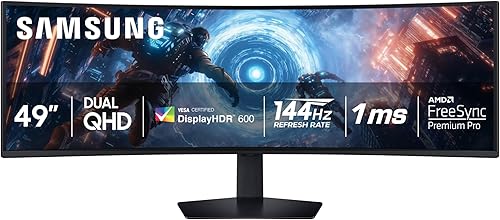
Samsung 49-inch Odyssey G9 G91F DQHD 144Hz

Samsung 49 Inch Odyssey G9 DQHD 1000R
As an Amazon Associate we earn from qualifying purchases. Product prices and availability are accurate as of the date/time indicated.
Pros
- Massive 32:9 ultra-wide screen replaces a dual monitor setup
- Smooth 144Hz performance with FreeSync Premium Pro for tear free gaming
- Immersive 1000R curve with wide 178 degree viewing angles
- Strong multitasking features including PbP, PiP and Auto Source Switch
- Matte VA panel with ergonomic stand and versatile DisplayPort, HDMI and USB connectivity
Cons
- Very large 45 inch wide footprint needs a deep, sturdy desk and is heavy at 34.4 pounds
- VA panel with 280 nits brightness is less vivid than OLED alternatives for HDR
- 144Hz refresh rate is lower than 240Hz flagship models for elite esports players
The Samsung 49-inch Odyssey G9 G91F is a 32:9 DQHD monitor designed to replace two side by side displays. It is built for PC gamers, sim racers, streamers and multitaskers who want panoramic views plus serious productivity space.
In real use, the 5120x1440 VA panel with 1000R curve pulls you into the action with a wider field of view. The 144Hz refresh rate, 1ms response and FreeSync Premium Pro with VRR keep fast games fluid with reduced tearing and lag.
Design is clean in Aluminum Silver with a matte finish to cut glare and wide 178 degree viewing. The ergonomic stand offers tilt and height adjustment, plus VESA mounting, DisplayPort, HDMI and USB for PC, console and laptop setups.
Drawbacks come down to size and panel tech. You will need a large deep desk for the 45 inch width and 34.4 pound body. Brightness is modest and contrast cannot match OLED, and competitive players may want 240Hz instead.
Verdict: if you want one immersive screen for gaming, content and multitasking without dual monitor bezels, the G91F is a strong pick. It is best for gamers and creators who value width, comfort and smooth everyday performance.
Screen Size: 49 inches, 32:9 ultra-wide curved VA panel with 1000R curvature and matte finish.
Resolution: 5120x1440 DQHD, Native 5120x1440, VESA DisplayHDR 600 with 1,000,000:1 contrast ratio.
Performance: 144Hz refresh rate, 1ms GtG response, AMD FreeSync Premium Pro with VRR support.
Connectivity and Design: DisplayPort, HDMI, USB, ergonomic tilt and height adjustment, VESA mount, Aluminum Silver.
In the Box: Monitor, DisplayPort cable, power cable, model LS49FG910ENXZA for desktop, gaming and photo video editing use.
Pros
- Enormous 32:9 curved screen boosts both gaming immersion and multitasking productivity
- Exceptionally smooth motion clarity at 240Hz with minimal ghosting, praised by gamers
- Outstanding brightness and contrast for a VA panel, with punchy HDR performance
- Versatile PBP and PIP multitasking plus ergonomic adjustability for work and play setups
Cons
- Very large and heavy at 34.4 pounds, requires a deep, sturdy desk and careful setup
- Some users report reliability concerns including dead pixels, vertical lines, or sudden power failure
- 32:9 ultrawide demands a powerful GPU and not all games fully support the aspect ratio
The Samsung 49-inch Odyssey G9 G95C is a 32:9 super ultrawide gaming monitor built for immersive PC gaming and heavy multitasking. It is best for gamers who want a cockpit style wrap and professionals who want two QHD screens in one seamless panel.
In real use, the 5120x1440 VA panel with 1000R curve fills peripheral vision in a way flat ultrawides cannot match. The 240Hz refresh rate, 1ms GtG response and AMD FreeSync Premium Pro keep fast action smooth and tear free, while 1000 nit peak brightness delivers punchy HDR highlights.
Design is bold and gamer focused with CoreSync rear lighting, a sturdy Hexa stand with height, tilt and swivel adjustment, plus VESA wall mount support. Connectivity includes dual HDMI, DisplayPort and USB ports, plus PBP, PIP and Auto Source Switch Plus for dual input setups.
It is not perfect. The footprint is massive at over 45 inches wide and 34 pounds, so you need a deep desk. A few owners also mention dead pixels, temporary vertical lines or reliability issues, and the extreme width demands a strong GPU and game support.
Overall, if you want maximum immersion, elite motion clarity and a true dual monitor replacement in one display, the Odyssey G9 G95C is hard to beat. It is a workstation and battlestation upgrade in one, provided you have the space and PC power to drive it.
Screen: 49 inch 1000R curved VA, 32:9 aspect, 5120 x 1440 DQHD resolution, 178 degree viewing angle.
Performance: 240Hz refresh rate, 1ms GtG response, AMD FreeSync Premium Pro, VESA DisplayHDR 1000 with 1000 nits peak and 1,000,000:1 contrast.
Comfort and extras: Eye Saver Mode, Flicker Free, Adaptive Picture, Black Equalizer, PBP, PIP, Auto Source Switch Plus, CoreSync lighting.
Build: 45.2 x 16.6 x 22.4 inches, 34.4 pounds, height, tilt and swivel stand, wall mount compatible, 2x HDMI, DisplayPort, USB ports.
| Product | Key spec with number | Best for | Price tier |
|---|---|---|---|
| SAMSUNG 49-inch Odyssey G9 (G91F) DQHD, 144Hz | 144Hz refresh with 1000R curve per Samsung spec | Immersive story games and multitasking | Mid-range tier |
| Samsung 49” Odyssey G9 Series DQHD 1000R | 240Hz refresh with DisplayHDR 1000 per Samsung spec | Competitive FPS and racing | Enthusiast tier |
| PBP split view on both models | 32:9 equals dual screen view per Samsung spec | Work plus play on one screen | Added-value tier |
What Should You Check Before You Buy a 49-Inch 240Hz Super Ultrawide Gaming Monitor?
How Much Do Refresh Rate and Response Matter on a 32:9 Screen?
Refresh rate defines how fluid motion looks across that massive 32:9 canvas per Samsung spec. The Samsung 49” Odyssey G9 Series DQHD 1000R reaches 240Hz with 1ms GtG response per Samsung spec, which keeps fast pans sharp and reduces ghosting. The SAMSUNG 49-inch Odyssey G9 (G91F) DQHD, 144Hz offers 144Hz with 1ms response per Samsung spec, which still feels ultra smooth for most players.
Both support AMD FreeSync Premium Pro with variable refresh rate per AMD spec to eliminate tearing and stutter. If you chase esports frames, pair the 240Hz model with a strong GPU like the system in our ryzen 7 9700X RTX 5070 gaming PC build. If you play cinematic RPGs and strategy, 144Hz saves GPU headroom while staying fluid.
Does 1000R Curve and Dual QHD Resolution Improve Immersion?
A 49-inch 32:9 panel with Dual QHD resolution of 5120 x 1440 per Samsung spec equals two QHD monitors without a center bezel. The aggressive 1000R curve per Samsung spec wraps the edges into your peripheral vision, so minimaps and side mirrors stay in view. You lean less and react faster because the entire battlefield curves toward you.
That width also transforms productivity with Picture by Picture and Picture in Picture per Samsung spec. You can run game plus Discord, guides or stream chat on one screen without a second monitor. Auto Source Switch Plus per Samsung spec jumps to a newly powered console or PC instantly, which keeps your setup frictionless.
Is DisplayHDR 600 Enough or Do You Need DisplayHDR 1000?
DisplayHDR 600 per VESA standard delivers stronger contrast with deeper blacks and brighter highlights than standard dynamic range. The G91F uses DisplayHDR 600 per Samsung spec to reveal shadow detail in dark scenes without washing out skies. It is ideal for immersive single player games where atmosphere matters more than peak flash.
The 240Hz Odyssey G9 steps up to DisplayHDR 1000 with 1000 nits peak brightness and 1,000,000:1 contrast per Samsung spec. That extra headroom makes sunlit tracks and muzzle flashes pop with depth. If you already love high contrast panels, explore our notes on 32-inch 1440p gaming monitors and budget 1080p 165Hz gaming monitors for contrast expectations.
What Comfort and Setup Features Should You Expect?
Both monitors offer tilt, swivel and height adjustment per Samsung spec plus VESA mount support for arms. The 240Hz model adds CoreSync and Core Lighting Plus per Samsung spec, which projects on-screen colors behind the display for extra ambience. That glow pairs well with bias lighting and reduces eye strain in dark rooms.
Consider your desk depth because 1000R immersion works best when you sit centered and close. For pure speed chasers, our roundup of 27-inch QD-OLED esports monitors shows the tradeoff between size and peak Hz. For color and OLED contrast fans, read our Samsung Odyssey OLED G7 vs MSI MPG QD-OLED comparison before you commit to VA versus OLED.
Final Thoughts
Choose Samsung 49” Odyssey G9 Series DQHD 1000R for maximum 240Hz speed and HDR punch, and choose SAMSUNG 49-inch Odyssey G9 (G91F) DQHD, 144Hz for smooth immersive play with excellent multitasking comfort.
Frequently Asked Questions
Is a 49-inch 240Hz super ultrawide worth it for gaming in 2026?
Yes, if you want one seamless 32:9 view per Samsung spec without dual monitor bezels. The 240Hz refresh per Samsung spec benefits FPS, racing and flight sim players who notice motion clarity. For slower paced games, the 144Hz G91F per Samsung spec still delivers huge immersion with lower GPU demand.
Can your GPU run Dual QHD at 240Hz?
Dual QHD at 5120 x 1440 per Samsung spec has about 7.3 million pixels per Samsung spec, which sits between QHD and 4K in load. You will need a high end graphics card and DisplayPort connection to approach 240Hz per VESA standard in demanding titles. Many players use FreeSync Premium Pro per AMD spec plus adjusted settings to hold high frame rates for 2026 releases.
Is a 1000R curve too aggressive for work and movies?
Most users adapt quickly because the 1000R radius per Samsung spec matches natural eye curvature at desk distance. Text stays readable once you center the display and set proper scaling. For mixed use, PBP mode per Samsung spec lets you treat the panel as two separate workspaces without distortion at the edges.
Do both Samsung Odyssey G9 models support FreeSync Premium Pro?
Yes, both models support AMD FreeSync Premium Pro with variable refresh rate per AMD spec. That syncs GPU and panel to reduce tearing at both 144Hz and 240Hz per Samsung spec. If you use NVIDIA hardware, confirm G-Sync compatibility in our best monitor size for gaming guide for 2026 to ensure smooth variable refresh performance.
Browse more picks in our Peripherals & Monitors category, or see our related guide on Budget 1080p 165Hz Gaming Monitors to Win in 2026.
These picks are not ideal for casual or first-time players on a tight budget; they are aimed at people who want higher refresh rates, better panels, or competitive-grade input.








Write Your Review
No reviews yet. Be the first to share your experience!