

Video credit: Grxvity. Original video: https://www.youtube.com/watch?v=-y7MwK_rMAI. This is our own independent breakdown and is not affiliated with the video creator. As an Amazon Associate, CustomPCGaming earns from qualifying purchases. Product prices shown in the video may have changed.
Watch the build
Parts in this build
- FLEXISPOT E7 Standing Desk
- Grovemade Wool Felt Desk Pad
- ODK Small Computer Desk
- Razer Fujin
- Govee Glide Wall Light
- Cubiker L-Shaped Gaming Desk
- VIVO Under Desk Cable Tray
- OIVO PS5 Controller Charging Station
- VIVO Dual Monitor Desk Mount
Parts list is our summary of the video for reference. Confirm current specs and price on the retailer page before buying.
Watch: The Setup Tour
The video above shows a real room built around a cozy battlestation look with warm surfaces, soft wall glow and a relaxed dual screen layout. It is there to show proportions and mood only, not a shopping list. If you want a space that feels calm for gaming, school work and winding down, this style tends to fit you.
What This Setup Is Going For
If you searched for an 800 dollar cozy gaming desk and chair setup guide, you probably want comfort first and flash second. You want wood tones, fabric texture and warm light that make your room feel inviting. You still want room for play, whether that is PC gaming, console gaming, or both on one desk.
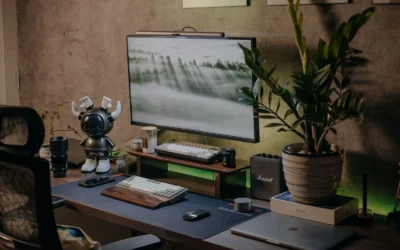
Visually, this style leans on a wood or walnut desk top, a large soft mat, and lighting that sits behind or beside you instead of in your eyes. Think felt or cloth under your keyboard and mouse, a wall light with warm scenes, and cables tucked out of sight. Nothing screams for attention, everything feels settled and personal.
For layout, most cozy builds use either a straight standing desk with dual monitors or an L shaped desk that wraps into a corner. A straight desk keeps your reach tight and works well in a bedroom. An L shape opens up space for a tower, a console, and controllers without crowding your main play area. You can learn more about sizing in our guide on how to choose gaming desk size for your setup.
This approach suits a bedroom, a small home office, or an apartment corner where you spend long evenings. It works well if you run warm and prefer breathable seating, or if you share a wall and want softer lighting instead of bright RGB. You can browse more ideas in our Gaming Desks & Chairs archive to compare shapes and seating styles.
There are tradeoffs you should know before you buy. A dual motor standing frame plus a quality mesh chair costs more than a basic fixed desk and office chair, and an L shaped top needs real floor space to feel cozy instead of cramped. Cable routing also takes time, especially with a standing desk that moves up and down. This style does NOT suit very small rooms with no wall clearance, renters who cannot use tools or wall anchors, tight budgets that need the lowest cost desk and chair, or people who move often and need a light and simple build.
The Gear Breakdown
This is the core of the article. The video is representative of the look and layout only. Our picks below are our own current recommendation for building a setup like this, and they are not affiliated with the video creator. Use them as a starting point, then adapt to your room size and the gear you already own.
This article contains affiliate links. If you buy through one of our links, CustomPCGaming may earn a commission at no extra cost to you. Commissions never influence which products we recommend or how we rank them. Read our Affiliate Disclosure for details.
Quick Picks at a Glance

Prime OIVO PS5 Controller Charger Station with AC

Prime VIVO Under Desk Cable Management Tray 16.5 Inch

VIVO Dual Monitor Desk Mount STAND-V002 for 13-30

Govee Glide Wall Lights H610A

Cubiker 63 Inch Reversible L-Shaped Electric

FLEXISPOT E6 Dual Motor Standing Desk Frame

Prime Razer Fujin Mesh Ergonomic Gaming Chair
As an Amazon Associate we earn from qualifying purchases. Product prices and availability are accurate as of the date/time indicated.
Pros
- Fast dual charging gets both controllers ready in about 2 hours
- Compatible with DualSense and Edge controllers
- Clear LED indicators for charging and full charge status
- Compact, tidy dock that matches PS5 styling
- Simple drop in operation with included AC adapter
Cons
- Requires a wall outlet and the included AC adapter, not USB powered
- Lightweight plastic body can move if bumped
- Controllers must be aligned precisely for reliable contact charging
The OIVO PS5 Controller Charger is a tabletop docking station that charges up to two controllers simultaneously. It is ideal for PS5 disc and digital owners, including Edge controller users, who want a dedicated home for their gamepads.
It pairs copper charging contacts with a dedicated AC adapter to deliver a full charge in about 2 hours. In daily use, you simply drop the controllers in place and check the front LEDs, with red for charging and blue for fully charged.
The dock uses a lightweight black plastic housing that matches the PS5 console aesthetic. A rear power switch lets you cut power when not in use, and the compact footprint keeps your gaming area neat without extra cables.
It does require its own wall outlet and the included adapter, so it is less travel friendly than a USB cable. The lightweight plastic build can shift if bumped, and you need to align the controllers correctly for the contacts to connect.
Overall, this OIVO charging station is a practical, user friendly alternative to the official dock. If you regularly rotate between two controllers, it offers fast charging, clear status lights and tidy storage in one simple package.
Model VG-P5334, compatible with PS5 DualSense and PS5 Edge controllers for dual charging and storage.
Power input 5V 3A via USB Type C with included AC adapter, output 5V 3A with fast charge support.
Tabletop docking station in black plastic, lightweight design with LED charging indicators and rear power switch.
Includes charging station, custom AC adapter and user manual with safety protection for daily use.
Pros
- Sturdy all-metal build supports up to 11 lbs without sagging
- Simple screw-in installation works with most wood desks
- Partially closed design hides clutter while keeping cables accessible
- Slim, minimalist black profile suits home and office decor
Cons
- Requires drilling into desk, not ideal for glass, metal or thin tops
- Single 16.5 inch tray may be tight for very large setups with multiple power strips
- No built-in cable clips or cover, so very thin cables may need extra ties
The VIVO DESK-AC06-1C is a 16.5-inch under-desk cable management tray designed to tame messy power strips and cords. It is built for remote workers, gamers and office users who want a cleaner, more productive setup without cables on the floor.
In daily use, it easily holds a full-size power strip plus chargers, ethernet and AV cables in one hidden spot. The open front makes it simple to plug in new devices or pull out a cable, so you do not have to remove the whole tray for small changes.
The tray features a low-profile steel body with a matte black finish that disappears under most desks. Its partially closed shape keeps bricks and wires concealed from view while still allowing airflow, and the metal frame feels solid and resistant to bending.
Installation requires screwing into a wood or particle board top, so it is not suited for glass or metal desks. The single tray size is perfect for standard setups, but users with extensive gear may need two units for full coverage.
Overall, this VIVO tray delivers a simple, durable and effective fix for under-desk clutter. If you want strong metal construction, easy access and a minimalist look, it is an excellent upgrade for any home or office workstation.
Model DESK-AC06-1C in Black with durable metal construction for indoor use. Measures 16.5 inches long by 3 inches wide with mounting holes spaced 11 inches apart.
Supports up to 11 lbs of power strips, adapters and cables with screw-in installation under wood or particle board desks. Includes mounting screws and 1 year warranty for peace of mind.
Pros
- Sturdy steel construction supports two monitors securely without wobble
- Highly adjustable tilt, swivel, rotation and height for ergonomic comfort
- Dual mounting options with C-clamp and grommet fit most desks
- Easy installation with detachable VESA brackets and included hardware
- Integrated cable management for cleaner desk setup
Cons
- Limited to 30 inch screens and 22 lbs per arm, not suitable for larger or heavy ultrawide monitors
- Requires VESA 75x75 or 100x100 mounting holes, non VESA monitors need separate adapter
- Shared center pole design offers less independent positioning than separate gas spring arms
The VIVO STAND-V002 is a dual monitor desk mount designed to hold two 13 to 30 inch computer screens up to 22 lbs each. It is built for office professionals, students, gamers and remote workers who want to free up desk space and improve ergonomics.
Each arm offers plus 90 to minus 90 degree tilt, 180 degree swivel and 360 degree rotation, so you can switch easily between landscape and portrait. Height slides along the center pole for comfortable eye level alignment, which helps reduce neck and back strain during long work sessions.
The stand uses heavy duty steel with a black finish and includes both a C-clamp for desks up to 3.25 inches thick and a grommet mount option. Cable management clips along the arms and pole help route cords neatly, while detachable VESA plates make attaching 75x75mm and 100x100mm monitors straightforward.
The shared center pole saves space but offers less independent movement than premium gas spring arms. It also has size and weight limits, so very large, curved ultrawide or non VESA monitors will need a different solution or adapter.
Overall, the STAND-V002 delivers strong stability, flexible adjustment and simple installation for standard dual monitor setups. If you need an affordable and reliable way to create a clean, ergonomic two screen workstation, it is an excellent choice.
Brand: VIVO, Model: STAND-V002, Color: Black, Material: Steel. Mounting type: tabletop with heavy duty C-clamp and optional grommet mount for desks up to 3.25 inches thick.
Compatibility: Fits two 13 to 30 inch screens up to 22 lbs each with VESA 75x75mm or 100x100mm patterns. Movement includes plus 90 to minus 90 degree tilt, 180 degree swivel, 360 degree rotation and height adjustment along center pole.
In the box: Dual monitor stand with center pole, two articulating arms, detachable VESA plates, C-clamp and grommet hardware, cable clips and instruction manual. Backed by 3 year manufacturer warranty.
Pros
- Vibrant, segmented multicolor lighting with smooth flowing effects
- Extensive smart control with app, voice, WiFi and Bluetooth
- Excellent for gaming setups, bedrooms and party ambiance with music sync
- Simple installation on smooth walls with no wiring or tools required
Cons
- Rigid bars are not flexible, so layouts are limited to straight line designs
- Requires a smooth surface and proper velcro curing time for secure mounting
- Indoor use only with no water resistance, and all segments must be connected before powering on
The Govee Glide H610A is a six piece smart wall light system designed for gamers, streamers and anyone wanting dynamic bedroom decor. Each set creates two linear light bars that mount to the wall for modern ambient lighting.
Standout performance comes from patented RGBIC tech that displays multiple colors on each bar at once, plus 64+ scenes and 11 music modes. In real use, effects are bright, fluid and highly responsive, while the AI Lighting Bot makes custom designs easy from a prompt or photo.
Build quality is solid with rigid brushed white housings that look clean on the wall day or night. The 14.8 inch segments feel sturdy, and app control over WiFi and Bluetooth plus Alexa and Google Assistant support is reliable and intuitive.
The rigid design means you cannot bend or curve the bars, so creativity is limited to angular layouts. Installation also requires a clean smooth surface and patience for the adhesive to set, and the set is indoor only.
Overall, the Glide delivers premium looking smart lighting with deep customization for gaming rooms and creative spaces. If you want vibrant, music reactive wall decor with strong app features, this is a top value pick.
Model: Govee H610A Glide Wall Lights, 6 segments for 2 panels
Lighting: RGBIC LED, 16 million colors, DIY mode, 64+ scenes, 11 music modes
Control: Govee Home App via WiFi and Bluetooth, Alexa, Google Assistant, SmartThings
Power: 36W corded electric, 24V with adapter and control box included
Design: Rigid white wall mount bars, indoor use only, not water resistant
Pros
- Huge corner workspace ideal for multitasking, gaming and dual monitor setups
- Reversible design adapts to left or right corner layouts
- Three programmable height presets make sit to stand changes fast and consistent
- Strong steel frame with 176 lb capacity and anti collision safety feature
- Attractive Black Walnut finish with thick, sturdy work surface
Cons
- Large 63 x 55 inch footprint requires a spacious corner and careful measuring
- Splice board top has visible seams that may not suit fans of single piece surfaces
- Heavy 84 lb frame makes initial assembly and repositioning best as a two person job
The Cubiker 63 x 55 inch Reversible L Shaped Standing Desk is an electric corner workstation designed for home office workers, gamers and multitaskers who need room for multiple screens. Its L shape creates separate zones for computing, writing and accessories while fitting neatly into a corner.
Standout features include three memory preset buttons for one touch height changes, plus an anti collision system for safer movement. In real world use, the 20mm per second lift speed feels smooth and stable, with quiet operation under 55dB that will not disrupt calls or gameplay.
Built with a 1 inch thick wood top in Modern Black Walnut and an industrial grade alloy steel frame, it supports up to 176 lbs with confidence. The splice board design, included headphone hook and corded control panel add practical function while keeping the look clean and professional.
The reversible left and right installation is flexible, but the large footprint demands ample floor space and careful measuring before purchase. At 84 pounds, assembly and moving are best done with two people, and users seeking a seamless single piece top may notice the board joints.
Overall, this is a strong value pick for anyone wanting a spacious, stable and easy to use electric L shaped desk for work and play. If you have the corner space and want programmable standing comfort with solid build quality, the Cubiker is easy to recommend.
Shape: L Shaped Reversible Corner Design, Size: 63 x 55 Inches, Color: Black Walnut, Style: Modern Standing Desk
Height Adjustment: Electric with 3 Memory Buttons, Anti Collision Protection, Speed 20mm per Second, Noise 55dB or Less
Capacity and Build: Supports up to 176 lbs, 1 Inch Thick Wood Top, Alloy Steel Frame, Product Weight 84 lbs
In the Box: Standing Desk with Headphone Hook, Assembly Instructions Included, 5 Year Limited Warranty, Model VCUK-SD0028-160DWA-01
Pros
- Extended 23.6 to 48.8 inch range offers 30 percent more adjustment than typical 2-stage frames
- Dual motors provide stronger, smoother and quieter lifting for heavy dual monitor setups
- Four memory presets make it easy to switch positions or share the desk
- Solid build quality backed by 5-year frame and motor coverage
Cons
- Desktop is not included, so total cost and assembly time increase with a separate top
- Dual motor steel frame is heavy and best assembled with two people
- Electronics and controller have a shorter 2-year warranty compared to the frame
The FLEXISPOT E6 is an electric standing desk frame only, designed for home office users who already have a desktop or want a fully custom setup. It suits remote workers, students and shared family spaces where different users need very different desk heights.
Its standout feature is the 3-stage lifting column with a range from 23.6 to 48.8 inches, giving noticeably more flexibility than basic 2-stage frames. In daily use, the dual motors lift up to 220 lbs smoothly at under 50 dB, so height changes feel quick, stable and quiet enough for calls or shared rooms.
The black steel frame with lite legs looks clean and modern while staying sturdy at full extension. Four memory presets on the programmable handset add real convenience, letting you save sitting, standing and per user heights for one touch recall.
As a frame only package, you will need to source and mount your own desktop, which adds cost and assembly time. The frame is also substantial to handle and position alone, so plan for a two person setup and check floor space before buying.
Overall, the E6 is a strong value for anyone prioritizing range, lifting power and quiet operation in a customizable base. If you want a flexible, durable foundation for a personalized sit stand desk, it is an excellent choice.
Model: FLEXISPOT E6 Dual Motor Standing Desk Frame, 3 Stage Lite Leg, Black
Height Range: 23.6 to 48.8 inches with 3-stage lifting columns
Lifting Capacity: Up to 220 lbs with quiet dual motors under 50 dB
Controls: Programmable handset with up to four memory presets
Dimensions: 43.3 x 23.6 x 23.6 inches, frame only, desktop not included
Warranty: 5-year coverage on frame and motor, 2-year on controller and electronics
Choose the E6 frame only if you want freedom to pick your desktop material, size and color. Measure your space and preferred top to ensure compatibility with the adjustable width steel base.
Prioritize cable management, monitor arms and an anti fatigue mat to get the most from sit stand switching. Use the four memory presets to lock in ergonomic sitting and standing heights for each user.
If you need a complete out of box desk or ultra compact folding design, consider a full desk bundle instead. For custom home offices and tall or shared users, this 3-stage frame is a smart long term base.
Pros
- Excellent airflow from full mesh design, ideal for warm rooms and long sessions
- Ergonomic Synchro-Tilt and adjustable lumbar promote better posture
- Highly adjustable 3D armrests and high seat height suit tall users
- Strong polycarbonate frame with 299 lb capacity feels stable and durable
- Rolls smoothly on multiple surfaces without scratching floors
Cons
- Mesh provides less plush cushioning than traditional padded gaming chairs
- Requires assembly and is relatively heavy at 44.1 pounds
- Solid black modern look offers limited color or style options
The Razer Fujin is Razer's first mesh gaming chair, designed for gamers who run hot and need all day airflow without giving up ergonomic support. It is aimed at adult PC and console gamers, especially taller users who want a weightless, upright posture for long sessions in a game room or office.
Standout performance comes from the breathable mesh combined with Synchro-Tilt Technology, where the backrest reclines while the seat base glides forward to match your lean. Height adjustable lumbar support and 3D padded armrests let you fine tune back and arm position, which helps reduce stiffness during extended play.
Design is modern and minimal in solid black with an oval profile, nylon mesh, and polycarbonate frame. The build feels robust with support for up to 299 lbs and users up to 6.6 ft, plus multi surface casters that roll smoothly on hard floors and carpet without marking.
The trade off for mesh is less plush cushioning than thick foam racing style chairs, so fans of soft seating may need time to adjust. Assembly is required and the 44.1 pound frame is not the lightest to move, though that weight adds to stability once built.
Overall, the Fujin is a smart pick for comfort focused gamers who prioritize cooling, posture support, and adjustability over flashy padding. If you want a durable, breathable chair for long hours that stays supportive when you recline, it delivers a clean and functional upgrade.
Model: Razer Fujin RZ38-04950100-R3U1 in Black with modern solid back design for indoor gaming use. Dimensions measure 27.97 x 28.96 x 38.42 inches with 20 inch seat depth and 44.1 pound weight.
Supports up to 299 lbs and users up to 6.6 ft tall with 130 degree recline, adjustable lumbar, 3D padded armrests, and polycarbonate frame with nylon mesh. Includes smooth multi-surface casters and requires assembly.
| Gear | Common in this style | Our 2026 pick | Why |
|---|---|---|---|
| Desk | a desk in this style | FLEXISPOT E7 Standing Desk | a stable dual-motor frame that handles a full tower and dual monitors |
| Desk mat | a desk mat in this style | Grovemade Wool Felt Desk Pad | a warm felt pad for a wood or Scandinavian look |
| Desk | a desk in this style | ODK Small Computer Desk | a compact desk that still fits a mid tower for a bedroom setup |
| Chair | a chair in this style | Razer Fujin | a mesh gaming chair for people who run warm |
| Bias light | a bias light in this style | Govee Glide Wall Light | a lower-cost take on modular wall lighting |
| Desk | a desk in this style | Cubiker L-Shaped Gaming Desk | an affordable corner desk that opens up a dual PC and console layout |
| Cable management | a cable management in this style | VIVO Under Desk Cable Tray | a screw-mount metal tray for a permanent clean install |
| Controller stand | a controller stand in this style | OIVO PS5 Controller Charging Station | a dock that charges two controllers and clears the desk |
| Monitor arm | a monitor arm in this style | VIVO Dual Monitor Desk Mount | a simple pole mount for two monitors on a tight budget |
The desk sets the tone more than any other piece. A dual motor standing frame gives you a steady base for two screens and a tower, while the L shaped option gives you corner wrap for PC plus console. If your room is narrow, the compact straight desk keeps walkways open and still leaves room for your tower on or under the top.
Lighting is the second piece that defines the cozy feel. A modular wall light lets you run warm white or soft color scenes behind your monitors, which reduces harsh contrast in a dark room. Per the spec sheet, the Govee set supports app and voice control with many scene modes, so you can keep it subtle for movies and a bit more playful for games.
Cable control is what makes the whole build feel settled. A metal under desk tray holds your power strip and bricks off the floor, which matters a lot when your desk moves. Pair it with a sleeve along your monitor arm pole and you remove most of the visual clutter without changing any of your core gear.
How To Adapt It To Your Room
How do you make a cozy dual screen setup fit your wall without crowding the room. Start there before you order anything. Measure your wall width, your outlet locations, and how far your chair needs to pull back. Adapt this to your space before buying.
Measure the wall or small room for the desk width first. A straight desk needs clearance on both sides for your chair arms and for a tower if it sits beside the desk. An L shaped desk needs extra floor depth on the return side, plus room to open a door or closet. Tape the footprint on the floor and sit in the space to confirm it still feels open.
A dual monitor layout needs more depth for a monitor arm to pull back. If your desk is shallow, your screens will sit close to your face and leave no room for a front edge mat. Give yourself depth for the pole base, the arm bend, and your keyboard position. If depth is tight, consider a single wide screen on one arm instead of two separate panels.
Check your monitor for a VESA pattern before choosing an arm, and confirm the desk edge thickness for a clamp. Look at the back of each monitor for square mounting holes and check the weight against the arm rating on the spec sheet. For the desk, check edge thickness and make sure the clamp has solid wood or board to grip, not a hollow edge or glass. Follow the mounting instructions closely and tighten in small steps.
If you rent, use no-drill cable trays and adhesive raceways rather than screwing into the desk or wall, and find a stud before any wall mount. Adhesive channels and hook and loop straps can route most cables neatly without damage. For wall lighting, use the included adhesive or hook strips and let them cure as directed. If you must mount anything heavy to drywall, find a stud first and never rely on adhesive alone. You can get more renter friendly ideas from our LED strip lights for gaming room baseboards guide.
A standing desk lists a weight capacity, keep the tower, monitors and arm under it. Add up your tower, both screens, the arm itself, and anything you store on the top. Keep power bricks in the under desk tray so the weight moves with the desk and cables do not snag. Follow the assembly instructions, route cables with slack for full lift travel, and keep power supplies ventilated. Do not overload a single outlet with your PC, console, chargers and lights on one strip.
Match the cozy look with the finish of the desk and mat first, then the lighting color, rather than buying every accessory in one brand. Pick a wood tone you like, then choose a felt or cloth mat that complements it. Set your wall light to a warm white that matches your bulb color in November and 2026 evenings. Small touches like matching your controller dock and headphone hook to your desk legs do more than buying a full set from one brand.
What Actually Changes The Feel
Bias and wall lighting changes the mood most in a cozy room. A soft glow behind your screens eases eye strain in a dark bedroom and makes wood surfaces look richer. You do not need many fixtures, one well placed bar or panel set with warm scenes is often enough.
Cable management is next in impact. When cords hang behind a standing desk, the whole setup feels busy even if your desk top is tidy. A tray under the top plus a sleeve down to one outlet point hides the mess and makes dusting easier. Owners commonly report that this one weekend project makes a budget room feel far more intentional.
A full desk mat is third. Felt adds warmth and softens keyboard sound, while stitched cloth gives you smooth mouse glide across the whole width. It also protects a wood top from scratches and cup rings. Choose size by your keyboard and mouse travel, not by brand hype.
Lower priority upgrades include a dedicated controller dock and a premium arm swap if your current mount already holds position. The dock is handy if you play on console daily and hate loose cables, but it does not change comfort. If your monitors stay where you put them and your neck feels fine, put your funds toward seating or lighting first. For seating context, see our best gaming chair for a short person roundup.
Build It At Three Budgets
You can reach the same cozy mood at different spend levels. The picks above are current. Use these three paths to match your room, your gear, and how long you plan to keep the build.
Budget Version
Go with a manual or single motor desk, an affordable ergonomic chair such as the SIHOO M57, a single VIVO Dual Monitor Desk Mount or single arm, one Govee light strip, a large cloth mat and a no-drill cable tray. This suits you if you want your first cozy setup on a tight budget in a bedroom or shared apartment.
Balanced Version, Our Recommendation
Choose a dual motor standing desk such as the FLEXISPOT frame or Cubiker L-Shaped Gaming Desk, a mid ergonomic chair such as the Razer Fujin, the VIVO Dual Monitor Desk Mount, a monitor light bar plus one strip, a stitched XL mat and a clamp-on cable tray with a sleeve. This suits most people who want it to last through PC and console upgrades without rebuilding the room.
Premium Version
Build around a Herman Miller or Steelcase chair, an Ergotron arm, a light bar plus Govee Glide Wall Lights wall panels, a Grovemade Wool Felt Desk Pad or leather pad and a fully sleeved cable run. This suits you if you plan to keep the setup for years and want seating and adjustability that hold up to daily long sessions.
FAQ
Can I fit a cozy dual monitor setup in a small bedroom. Yes, if you measure first and pick the right desk shape. A compact straight desk with a pole mount keeps depth use low, while an L shape needs a true corner to avoid blocking walkways.
Do I need a standing desk for a cozy gaming setup. No, you do not, but many people like the option to change posture during long days. If you go this route, keep the tower, monitors and arm under the listed weight capacity and leave slack in your cables for lift travel.
Will the VIVO Dual Monitor Desk Mount work with my monitors and desk. Check each monitor for a supported VESA pattern and compare its weight to the arm rating. Then check your desk edge thickness for the C clamp and follow the mounting instructions for a secure install.
Final Verdict
A cozy battlestation is about warm materials, soft light and cables out of sight, not about owning every accessory. Start with desk shape and seating comfort, then add glow and tidy routing to bring the room together. Your build will feel personal and calm without looking overdone.
Our pick: the Balanced Version for most people who want it to last, since a dual motor desk, breathable mesh seating and a simple dual arm give you comfort and flexibility you will use every day.







Write Your Review
No reviews yet. Be the first to share your experience!