

If you are weighing single arm vs dual arm for two monitors, you are really deciding how you want your screens to move day to day. A single crossbar design moves both displays as one aligned unit, while dual independent arms let you angle, stagger, or rotate each screen on its own.
While your resolution and refresh target affect which monitors you buy, the mount choice comes down to different variables. You need to weigh screen size and weight, VESA pattern, desk thickness and depth, desired tilt and swivel range, and whether you plan to keep your current pair or upgrade to larger displays later. For broader mounting ideas, you can also browse the full Monitor Arms & Mounting archive as you plan.
What Actually Matters
Arm Style and Daily Adjustability
Single arm mounts for two screens usually use one central pole or one arm with a horizontal crossbar. Both VESA plates slide along that bar, so your screens stay level with each other and you adjust height or position for the pair at once. That approach is simple to set up and keeps a matched pair looking clean.
Dual arm mounts give each screen its own articulated arm with separate tilt, swivel, and height control. Per the spec sheets you will see ranges such as +90 degrees to -90 degrees tilt, 180 degrees swivel, and 360 degrees rotation for portrait or landscape use. If you often pull one screen closer, turn one vertical for code or chat, or angle screens inward for a wrap around feel, independent arms give you that freedom.
Size, Weight Capacity and VESA Fit
Start with the spec sheet, not the look of the mount. The examples in this guide show how much this varies. One option fits 13 inch to 30 inch screens up to 22 lbs each, another fits 17 inch to 32 inch screens, and another supports up to 16.5 lbs per monitor and 33 lbs total. One mechanical spring design lists a working range of 4.4 lbs to 19.8 lbs per screen, which matters if your displays are very light.
You should confirm three things before you buy. First, check that your screen size falls inside the listed range. Second, check your monitor weight with the stand removed against the per arm limit and leave some headroom. Third, check the VESA holes on the back of your monitors, which are commonly 75x75mm or 100x100mm in these listings. If your monitors use a different pattern or need an adapter, address that first and always follow the manufacturer mounting instructions.
Desk Clamp, Grommet Fit and Space Savings
Your desk determines which mounting method you can use. Most dual mounts in this group offer a heavy duty C-clamp plus an optional grommet mount. Listed clamp ranges include up to 3.25 inch thick, up to 3.3 inch thick, 0.39 inch to 2.56 inch thick, and grommet use from 0.39 inch to 2.17 inch thick. Measure your desktop thickness at the back edge where the clamp will sit, and check for a lip, cable tray, or crossbar that could block it.
Think about depth and wall clearance as well. One design lists up to 17.5 inch extension outward and up to 17.5 inch height above the desktop, while pole style designs adjust height along the center pole. If your desk is shallow or pushed against a wall, you may not get full 180 degree swivel without hitting the wall. If you have a glass top, read the freestanding monitor stand for glass desk guide before you clamp, since glass needs special care and a freestanding base is often safer.
Build Material, Cable Control and Upgrade Path
Material and joints affect stability and how often you will want to readjust. You will see sturdy steel designs, aerospace-grade aluminum alloy, and industrial-grade aluminum with an integrated handle for moving both screens together. One higher-end pick notes recognition with the Red Dot Design Award and a listing for 10,000 plus motion cycles per the spec sheet. Cable clips along the arms and center pole or integrated cable routing also make a visible difference in a two screen setup.
Weigh your upgrade path before you lock in a size range. If you own smaller 16:9 screens now but plan to move to 32 inch flat or curved displays, choose a mount that already lists 32 inch support and enough per arm capacity. Spring assisted arms with adjustable tension are helpful here because you can increase tension for heavier monitors or decrease it for lighter ones to keep movement smooth. That planning avoids buying twice.
To see how these differences look in practice, here are a few options that show the range from simple center pole stands to fully articulated arms and crossbar designs:
This article contains affiliate links. If you buy through one of our links, CustomPCGaming may earn a commission at no extra cost to you. Commissions never influence which products we recommend or how we rank them. Read our Affiliate Disclosure for details.
Quick Picks at a Glance

VIVO Dual Monitor Desk Mount STAND-V002 for 13-30

HUANUO Dual Monitor Mount for 17-32 Inch Screens
VIVO Dual Monitor Mount 17-32 Inch

Modernsolid Dual Monitor Arm for 17-32 Inch
As an Amazon Associate we earn from qualifying purchases. Product prices and availability are accurate as of the date/time indicated.
Pros
- Sturdy steel construction supports two monitors securely without wobble
- Highly adjustable tilt, swivel, rotation and height for ergonomic comfort
- Dual mounting options with C-clamp and grommet fit most desks
- Easy installation with detachable VESA brackets and included hardware
- Integrated cable management for cleaner desk setup
Cons
- Limited to 30 inch screens and 22 lbs per arm, not suitable for larger or heavy ultrawide monitors
- Requires VESA 75x75 or 100x100 mounting holes, non VESA monitors need separate adapter
- Shared center pole design offers less independent positioning than separate gas spring arms
The VIVO STAND-V002 is a dual monitor desk mount designed to hold two 13 to 30 inch computer screens up to 22 lbs each. It is built for office professionals, students, gamers and remote workers who want to free up desk space and improve ergonomics.
Each arm offers plus 90 to minus 90 degree tilt, 180 degree swivel and 360 degree rotation, so you can switch easily between landscape and portrait. Height slides along the center pole for comfortable eye level alignment, which helps reduce neck and back strain during long work sessions.
The stand uses heavy duty steel with a black finish and includes both a C-clamp for desks up to 3.25 inches thick and a grommet mount option. Cable management clips along the arms and pole help route cords neatly, while detachable VESA plates make attaching 75x75mm and 100x100mm monitors straightforward.
The shared center pole saves space but offers less independent movement than premium gas spring arms. It also has size and weight limits, so very large, curved ultrawide or non VESA monitors will need a different solution or adapter.
Overall, the STAND-V002 delivers strong stability, flexible adjustment and simple installation for standard dual monitor setups. If you need an affordable and reliable way to create a clean, ergonomic two screen workstation, it is an excellent choice.
Brand: VIVO, Model: STAND-V002, Color: Black, Material: Steel. Mounting type: tabletop with heavy duty C-clamp and optional grommet mount for desks up to 3.25 inches thick.
Compatibility: Fits two 13 to 30 inch screens up to 22 lbs each with VESA 75x75mm or 100x100mm patterns. Movement includes plus 90 to minus 90 degree tilt, 180 degree swivel, 360 degree rotation and height adjustment along center pole.
In the box: Dual monitor stand with center pole, two articulating arms, detachable VESA plates, C-clamp and grommet hardware, cable clips and instruction manual. Backed by 3 year manufacturer warranty.
Pros
- Strong aluminum alloy construction supports large 32 inch monitors with stable, sag free holding
- Highly adjustable tilt, swivel, rotation and height for ergonomic comfort and glare reduction
- Compatible with flat and curved monitors with standard VESA 75 and 100 patterns
- Easy installation with both C-clamp and grommet mounting options and included tools
Cons
- Heavier monitors near the 22 lbs limit may need extra tension tuning to stay perfectly in place
- Needs a wide, sturdy desk within the supported thickness range, not ideal for thin or glass tops
- Two 32 inch monitors side by side need significant desk width to swivel freely
The HUANUO HNDS18 is a dual monitor mount designed for 17 to 32 inch flat or curved screens with VESA 75 or 100 patterns. It is built for remote workers, gamers and creators who want two screens at eye level without sacrificing desk space.
Each arm supports up to 22 lbs and offers tilt, swivel, 360 degree rotation and height adjustment up to 17.5 inches. In daily use, you can pull screens closer, switch to portrait mode for coding, or angle displays to cut glare with smooth motion.
Made from aerospace grade aluminum alloy, the stand feels solid and resists sag or wobble when properly tightened. The hang on VESA plate design with tightening knobs makes mounting straightforward, and both C-clamp and grommet options add flexibility.
Heavier monitors near the weight limit may need extra tension tuning to stay perfectly in place. You will also need a wide, sturdy desk to fully enjoy dual 32 inch screens, as full swivel requires clearance on both sides.
For users seeking an affordable, sturdy and highly adjustable dual monitor solution, this HUANUO mount delivers strong value. It improves ergonomics, reclaims desktop space and adapts easily to work, play and multitasking setups.
Brand: HUANUO, Model: HNDS18, Fits 17 to 32 inch monitors with VESA 75x75 or 100x100 patterns.
Weight capacity: 22 lbs per arm, Movement: Tilt, swivel, rotate and height adjustment up to 17.5 inches.
Mounting: C-clamp for 0.39 to 2.56 inch desks or grommet for 0.39 to 2.17 inch desks, Material: Aluminum alloy in Black.
Pros
- Sturdy steel and aluminum build holds heavy monitors securely
- Very smooth and flexible adjustment for ergonomic comfort
- Easy installation with clear instructions and included hardware
- Versatile clamp and grommet mounting options fit most desks
Cons
- Spring tension requires many turns to dial in, can be time consuming at first
- Large wingspan needs ample desk depth for full articulation
- Cable management could be better for a fully clean setup
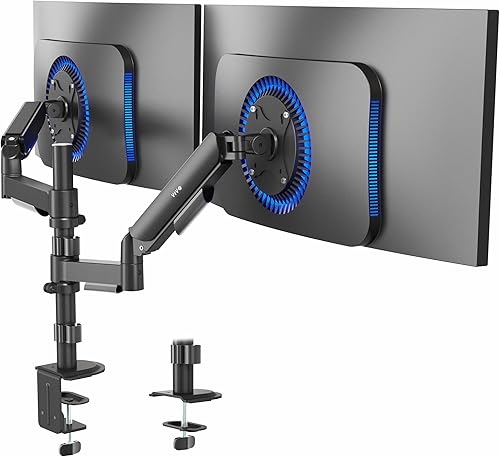
The VIVO STAND-V002K is a dual mechanical monitor mount built for 17 to 32 inch displays, ideal for productivity users, gamers, and home office setups. It lets you mount two screens on a single stand to reclaim desk space and improve posture.
Each arm supports tilt, swivel, and full rotation, so switching between landscape and portrait is quick and smooth. The mechanical spring system counterbalances monitor weight for easy height changes once tension is properly tuned.
Build quality stands out with heavy duty alloy steel and aluminum, a clean black powder coat finish, and precisely machined hardware. The heavy duty C-clamp or optional grommet mount grips desks up to 3.3 inches thick with excellent stability.
Setup is straightforward, but dialing in spring tension takes patience and multiple turns, especially for lighter or heavier monitors. The wide wingspan also demands decent desk depth to get the most from full articulation.
Overall, this is a sturdy, flexible, and installer friendly solution for dual monitor ergonomics. If you want smooth adjustability and solid construction for a dual screen workstation, it is a smart pick.
Compatibility: 17 to 32 inch monitors, 4.4 to 19.8 lbs each, VESA 75x75mm and 100x100mm
Movement: Tilt up to 90 degrees, swivel, full rotation, articulating height adjustment with mechanical springs
Mounting: Tabletop C-clamp or grommet mount for surfaces up to 3.3 inches thick
Materials and Model: Alloy steel and aluminum in black, Model STAND-V002K with 3 year warranty
Pros
- Supports both flat and curved 17 to 32 inch monitors for versatile multitasking setups
- One handed handle control makes repositioning fast and ergonomic
- Premium aluminum construction feels sturdy and stable with smooth articulation
- Quick release VESA plates simplify installation and monitor swaps
- Built in cable management reduces desktop clutter
Cons
- 19.6 pound mount is heavy and needs a solid, sturdy desk for safe tabletop installation
- 16.5 lbs per monitor limit may exclude heavier large curved or gaming displays
- Crossbar moves both screens as one unit, so fully independent positioning is limited
The Modernsolid Dual Monitor Arm is a crossbar style desk mount built for two 17 to 32 inch monitors, supporting flat and curved screens for productivity focused users. It is ideal for traders, programmers, designers and multitaskers who need two aligned screens with ergonomic flexibility.
In daily use, the integrated handle makes it simple to slide and reposition both displays together for shared viewing angles. Tilt, swivel and rotation adjustments plus quick release VESA 75x75 and 100x100 mounts allow smooth transitions between work, collaboration and portrait tasks.
Design is a clear highlight, with an industrial grade aluminum frame in matte black and clean cable routing along the arm. The Red Dot Design Award winning construction feels premium and stable, and it is tested for over 10,000 motion cycles for lasting performance.
The trade off is flexibility, since the single crossbar keeps screens balanced but limits fully independent adjustment. Heavier 32 inch monitors near the 16.5 lbs per screen limit and the substantial 19.6 pound mount weight also require a strong desk and careful compatibility checks.
Overall, this is a sturdy, well engineered choice for users who want a clean, aligned dual monitor setup with smooth joint control. If you value build quality and simple ergonomic adjustment over independent arm movement, it is a reliable upgrade for your workspace.
Compatibility: Two 17 to 32 inch flat or curved monitors
Weight Capacity: Up to 16.5 lbs per monitor, 33 lbs total
VESA Mount: 75x75mm and 100x100mm with quick release
Motion: Tilt up to 55 degrees, swivel and rotation with articulating arm
Material and Mounting: Aluminum construction, matte black finish, tabletop mount
Matching a Part to Your Build
If you run a matched pair for office work, trading, or school and you want a clean, level image across both screens, favor a crossbar or center pole style. The Modernsolid Dual Monitor Arm Desk Mount for Two uses a stable crossbar that keeps both screens balanced and moving together, which helps when you want to slide or reposition the pair with the integrated handle. The VIVO Dual Monitor Desk Mount takes a similar simple approach with a center pole, articulation for tilt and swivel, and detachable VESA plates, which many owners find quick to align.
If you mix gaming on one screen with Discord, streaming tools, or code on the other, favor dual independent arms. The HUANUO Dual Monitor Mount for 2 Monitors up to 32 fits most 17 inch to 32 inch flat or curved monitors with 75×75 or 100x100mm VESA patterns, and it lists plus or minus 90 degree swivel, plus 90 degree to minus 35 degree tilt, and 360 degree rotation. You can pull one screen out to 17.5 inch extension while leaving the other back, which is useful on a deeper desk.
If you want frequent portrait rotation or you have two different weight monitors, look closely at spring assisted dual arms. The VIVO 17 to 32 inch Dual Mechanical Monitor Mount supports 17 inch to 32 inch screens from 4.4 lbs to 19.8 lbs each, with dual mechanical springs that counterbalance the weight and tension you can tune. That tuning matters because a very light secondary display can feel stiff on an arm set for a heavy primary, and a heavy display can sag on an arm set too loose. Check your per screen weight first, then set tension gradually.
If your desk is thick, has a modesty panel, or sits in a shared room where cables show, prioritize mounting fit and cable control. Confirm C-clamp versus grommet limits such as up to 3.25 inch or up to 3.3 inch thick, and look for cable clips or hidden routing along the arm. A tidy route pairs well with lighting ideas from minimalist RGB desk setup, since clean cables make both screens easier to adjust without snags.
Common Mistakes
Mistake 1: Assuming any dual mount holds any two monitors. Owners commonly report sag or droop when a screen exceeds the per arm limit, even if the size looks right. Compare your actual display weight without the factory stand to figures such as up to 22 lbs each, 4.4 lbs to 19.8 lbs each, or up to 16.5 lbs per monitor, and do not exceed the total such as 33 lbs where listed.
Mistake 2: Forgetting to measure desk thickness and edge shape. A clamp rated up to 3.25 inch thick will not help if your back edge has a thick lip or a cable tray in the way, and a grommet mount rated 0.39 inch to 2.17 inch thick needs a real hole in the right spot. Measure twice, check for obstructions, and follow the manufacturer mounting instructions for torque and pad placement.
Mistake 3: Choosing the wrong movement style for your workflow. A crossbar that moves both screens together can frustrate you if you wanted one screen vertical and one angled toward a chair. Dual fully articulated arms can frustrate you if you wanted a locked, perfectly level video wall and you dislike frequent tweaking. Sketch your ideal layout first, including landscape versus portrait needs, then pick crossbar simplicity or independent control to match.
Who Should Wait or Buy Differently
A clamp on dual arm is not ideal for you if your monitors lack 75x75mm or 100x100mm VESA holes and you do not want to add an adapter, if your glass or hollow core desk cannot safely take a clamp load, or if you plan to add a third screen very soon. In those cases a freestanding base, a wall solution, or waiting until you finalize your monitor sizes will save you money and rework. You should also buy differently if your screens are already near the weight ceiling, since moving up to a higher capacity design or a single monitor arm per desk section is often the safer path.
Frequently Asked Questions
Is a single arm or dual arm better for two matching monitors?
For two identical screens used side by side, a single arm with a crossbar or center pole is often easier to keep level and move as a pair. Dual independent arms still work, but you will spend more time aligning height and angle. Pick the crossbar style if you value symmetry and simple adjustments.
Can I use one monitor in portrait and one in landscape?
Yes, if the mount lists 360 degree rotation and your screens have room to turn without hitting the desk or each other. Dual independent arms make this easier because you can set height and tilt per screen. Check the listed tilt and swivel as well, since portrait use often needs extra height and side clearance.
Will these mounts work with curved monitors and my desk?
Many listings state support for flat or curved screens, but you must still verify size range, per arm weight, and VESA pattern from the spec sheet. Then verify your desk with the clamp or grommet range, such as up to 3.3 inch thick or 0.39 inch to 2.56 inch thick. If you are unsure about desk strength, review ambient and desk setup tips like how to choose LED desk lighting for eye comfort while you plan cable paths, and do not force a clamp onto an unsuitable surface.







Write Your Review
No reviews yet. Be the first to share your experience!