

Video credit: RUBIX. Original video: https://www.youtube.com/watch?v=8PsiVBYF1BM. This is our own independent breakdown and is not affiliated with the video creator. As an Amazon Associate, CustomPCGaming earns from qualifying purchases. Product prices shown in the video may have changed.
Watch the build
Parts in this build
- North Bayou F80
- WALI Dual Monitor Arm
- Govee Glide Wall Light
- Grovemade Wool Felt Desk Pad
- Brainwavz Hengja Desk Hook
- SIHOO Doro C300
- MOUNTUP Single Monitor Arm
- FLEXISPOT E5 Standing Desk
- SimpleCord Cable Management Box
Parts list is our summary of the video for reference. Confirm current specs and price on the retailer page before buying.
Watch: The Setup Tour
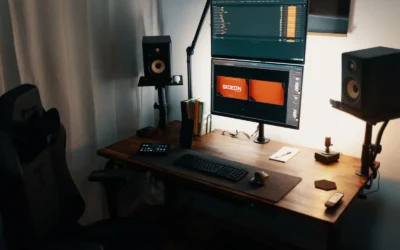
The embedded tour is there to show the proportions and mood of a warm wood floating monitor style, not to tell you what to buy. You will see how a lifted screen, wood tones and soft wall light can make a battlestation feel open and calm.
What This Setup Is Going For
You are building around contrast. A warm wood desk surface anchors the space while your monitor floats above it on an arm, which opens the desk for a keyboard, a mouse and a few personal items. The palette stays natural with tans, browns and soft white light, so your screen becomes the focal point.
Most versions of this style use a single ultrawide or a single large 16 by 9 panel, although a tidy dual setup can work if you have the width. A standing desk is common because it lets you adjust height for work and play, and it pairs well with an ergonomic chair that supports long sessions. Your layout should keep the tower off the desk when possible to protect that open feeling.
This look suits a bedroom, a small office or a living room corner where you want your gaming space to feel like furniture rather than equipment. It works best against a plain wall where bias lighting can wash evenly and where you can route cables down one side. If you want inspiration for the PC that will sit under or beside a desk like this, you can compare options in our ryzen 7 7700 plus RX 9070 1440p gaming PC build.
There are real tradeoffs to accept before you start. Wood finishes vary a lot between brands, so matching a desk, shelves and drawers takes patience. A floating monitor also demands careful cable routing, because every cable is visible once the stock stand is gone. You will spend more time on management than you expect.
This style does not suit everyone. It does not suit very small rooms where a deep desk and an extended arm cannot pull back far enough. It does not suit renters who cannot drill, tight budgets that cannot cover a quality arm and desk at once, or people who move often and need a setup that packs down fast. If that sounds like you, a simpler static desk may serve you better.
The Gear Breakdown
This is the core of our 2026 recommendation for building the look. We researched owner feedback and spec sheets to choose current parts that fit a warm wood theme. Use the table as your shopping reference, then read the notes on the pieces that shape the result most.
This article contains affiliate links. If you buy through one of our links, CustomPCGaming may earn a commission at no extra cost to you. Commissions never influence which products we recommend or how we rank them. Read our Affiliate Disclosure for details.
Quick Picks at a Glance

Govee Glide Wall Lights H610A
As an Amazon Associate we earn from qualifying purchases. Product prices and availability are accurate as of the date/time indicated.
Pros
- Vibrant, segmented multicolor lighting with smooth flowing effects
- Extensive smart control with app, voice, WiFi and Bluetooth
- Excellent for gaming setups, bedrooms and party ambiance with music sync
- Simple installation on smooth walls with no wiring or tools required
Cons
- Rigid bars are not flexible, so layouts are limited to straight line designs
- Requires a smooth surface and proper velcro curing time for secure mounting
- Indoor use only with no water resistance, and all segments must be connected before powering on
The Govee Glide H610A is a six piece smart wall light system designed for gamers, streamers and anyone wanting dynamic bedroom decor. Each set creates two linear light bars that mount to the wall for modern ambient lighting.
Standout performance comes from patented RGBIC tech that displays multiple colors on each bar at once, plus 64+ scenes and 11 music modes. In real use, effects are bright, fluid and highly responsive, while the AI Lighting Bot makes custom designs easy from a prompt or photo.
Build quality is solid with rigid brushed white housings that look clean on the wall day or night. The 14.8 inch segments feel sturdy, and app control over WiFi and Bluetooth plus Alexa and Google Assistant support is reliable and intuitive.
The rigid design means you cannot bend or curve the bars, so creativity is limited to angular layouts. Installation also requires a clean smooth surface and patience for the adhesive to set, and the set is indoor only.
Overall, the Glide delivers premium looking smart lighting with deep customization for gaming rooms and creative spaces. If you want vibrant, music reactive wall decor with strong app features, this is a top value pick.
Model: Govee H610A Glide Wall Lights, 6 segments for 2 panels
Lighting: RGBIC LED, 16 million colors, DIY mode, 64+ scenes, 11 music modes
Control: Govee Home App via WiFi and Bluetooth, Alexa, Google Assistant, SmartThings
Power: 36W corded electric, 24V with adapter and control box included
Design: Rigid white wall mount bars, indoor use only, not water resistant
| Gear | Common in this style | Our 2026 pick | Why |
|---|---|---|---|
| Monitor arm | a monitor arm in this style | North Bayou F80 | a long-time value pick for a single mid-weight monitor |
| Monitor arm | a monitor arm in this style | WALI Dual Monitor Arm | a sturdy dual arm for heavier panels |
| Bias light | a bias light in this style | Govee Glide Wall Light | a lower-cost take on modular wall lighting |
| Desk mat | a desk mat in this style | Grovemade Wool Felt Desk Pad | a warm felt pad for a wood or Scandinavian look |
| Headphone stand | a headphone stand in this style | Brainwavz Hengja Desk Hook | a clamp hook that keeps the headset under the desk edge |
| Chair | a chair in this style | SIHOO Doro C300 | an ergonomic chair with a dynamic lumbar system at a mid price |
| Monitor arm | a monitor arm in this style | MOUNTUP Single Monitor Arm | a low-cost gas-spring arm for a first upgrade |
| Desk | a desk in this style | FLEXISPOT E5 Standing Desk | a lower-cost standing frame with the range most people need |
| Cable management | a cable management in this style | SimpleCord Cable Management Box | a box that hides a surge protector on the floor or the desk |
The desk defines everything else. The FLEXISPOT E5 Standing Desk gives you a dual motor style frame that fits the floating idea because you can set the exact height where your arm articulates best. Keep the tower, monitors and arm under the listed weight capacity and follow the assembly instructions closely. A stable base matters more than any accessory.
Lighting shapes the warmth. The Govee Glide Wall Lights, Smart Gaming Light Bar is our current pick for modular wall lighting on a budget. Per the spec sheet it supports app and voice control through Alexa and Google Assistant, plus RGBIC color, music modes and dozens of scene modes. Owners commonly report that the bars work best on a smooth wall where you can plan the layout before you stick anything down.
Cable control protects the floating illusion. A box like the SimpleCord Cable Management Box hides your surge protector while a tray and sleeve guide monitor power and display cables down the arm. Do not overload a single outlet and keep power supplies ventilated. When cables drop in one tight bundle, your wood top stays visible and your monitor truly looks suspended.
How To Adapt It To Your Room
Will a floating monitor actually fit your wall, your desk and your monitor? That is the question to answer before you order anything. Start with the wall width and the space on each side for your chair to move. Then think about depth, because an arm needs room to pull back and tilt without hitting the wall.
Adapt this to your space before buying. Measure the wall or small room for the desk width, a triple monitor layout needs more depth for a monitor arm to pull back. If you plan dual screens with the WALI Dual Monitor Arm, allow extra side clearance and deeper desk space so both panels can angle toward you. A single ultrawide on the North Bayou F80 or MOUNTUP Single Monitor Arm is more forgiving in a narrow room.
Check your monitor for a VESA pattern before choosing an arm, and confirm the desk edge thickness for a clamp. Look at the back of your panel for the square hole pattern and compare it to the arm spec sheet. Then measure your desktop edge with a ruler, including any rounded or beveled lip that could reduce clamp grip. Confirm the monitor weight as well, including any added light bar or camera.
Follow safe mounting habits every time. Find a wall stud before any wall mount, follow the mounting instructions step by step, and tighten in stages rather than forcing hardware. For desk clamps, center the base on solid material and avoid particle board edges that are cracked or swollen. Never assume an arm holds any monitor, always match pattern and weight first.
If you rent, use no-drill cable trays and adhesive raceways rather than screwing into the desk or wall, and find a stud before any wall mount. Adhesive channels under the rear edge can carry power and display cables to one drop point. A clamp on tray with a fabric sleeve keeps the run together when you raise or lower a standing desk. You can learn more about arm friendly layouts in our Monitor Arms and Mounting hub.
Match the warm wood look with the finish of the desk and mat first, then the lighting color, rather than buying every accessory in one brand. Choose your desktop tone, then pick the Grovemade Wool Felt Desk Pad to either blend in or add soft contrast. Set your Govee Glide Wall Light to warm white or amber for evenings and save saturated color for gaming sessions. Wood plus felt plus warm light does more than a shelf full of matching logos.
A standing desk lists a weight capacity, keep the tower, monitors and arm under it. Place a heavy tower on the floor or on a dedicated stand when you can to save capacity for screens. Route slack in a service loop under the desk so raising the top does not tug plugs. If you are building on a budget, our Budget Build Guides can help you prioritize the desk and arm first.
Think about power and placement as of September 2026. Put your surge protector where you can reach the switch but where it stays out of photos. Keep the SimpleCord Cable Management Box ventilated and off carpet if possible. Leave one free outlet for a charger so you are not unplugging your PC setup daily.
What Actually Changes The Feel
Bias lighting changes the feel more than any other add on. A soft wash behind the monitor reduces eye strain in a dark room and makes wood grain look richer. The Govee Glide Wall Light gives you many scene and music options, so you can keep a calm warm glow for work and switch to color for movies.
Cable management is the second biggest shift. When you hide the surge protector and sleeve the arm cables, your desk depth feels larger and your monitor looks lighter. A clamp hook like the Brainwavz Hengja Desk Hook also helps because your headset disappears under the edge instead of sitting on the mat.
A full desk mat comes next. The Grovemade Wool Felt Desk Pad softens sound, protects the wood top and ties your keyboard zone together. Felt adds texture that photographs well and feels warm under your wrists. It is a subtle upgrade that you notice every time you sit down.
Lower priority items include extra shelves, small figurines and second light strips. They can be charming, but they do not fix glare, wobble or clutter. No verified frame rate numbers are available for this build, so keep expectations qualitative and focus on comfort, layout and lighting. For cooling context around the PC itself, see our guide on how to choose a CPU cooler for a gaming build.
Build It At Three Budgets
Budget: First Warm Wood Setup
Start with a manual or single motor desk, a value focused chair such as the SIHOO M57, a single VIVO arm, one Govee light strip, a large cloth mat and a no-drill cable tray. This path keeps your screen floating and your cables grouped without custom work. It suits students and first time builders who want the look in a rental.
You will give up some height range and arm smoothness, so set your chair and monitor height carefully once. Keep decor minimal until cables are handled. This is the smart way to recreate this warm wood floating monitor setup when funds are tight.
Balanced: The Setup We Recommend
Choose a dual motor standing desk like the FLEXISPOT E5 Standing Desk, a mid ergonomic chair like the SIHOO Doro C300, a gas spring arm like the North Bayou F80 or MOUNTUP Single Monitor Arm, a monitor light bar plus one strip, a stitched XL mat and a clamp on cable tray with a sleeve. Add the Govee Glide Wall Light for wall interest and the SimpleCord Cable Management Box for power hiding. This suits most people who want it to last through workdays and long play sessions.
You get smoother adjustment, better lumbar support and lighting you can tune by mood. The Brainwavz Hengja Desk Hook keeps your headset handy without using desk space. This balanced route is where comfort and style meet without going overboard.
Premium: Keep It For Years
Move to a Herman Miller or Steelcase chair, an Ergotron arm, a light bar plus wall panels including the Govee Glide Wall Light, a felt or leather pad like the Grovemade Wool Felt Desk Pad and a fully sleeved cable run. The frame, arm and chair carry longer warranties and finer adjustment. This suits creators and remote workers who use the desk all day.
You are paying for refinement, not just looks. Motion feels steadier, materials age better and lighting control is more precise. If you plan to stay in the same room for years, this premium path holds up well.
FAQ
What do I need to recreate this warm wood floating monitor setup in a rental?
You need a freestanding desk, a clamp on monitor arm that matches your VESA pattern and weight, and no-drill cable control. Use adhesive raceways, a clamp tray and a floor box for power. Avoid wall drilling and always check desk edge thickness before you clamp.
Which monitor arm is best for a single floating screen on wood?
For most single panels the North Bayou F80 or MOUNTUP Single Monitor Arm is a strong value choice with gas spring adjustment. Confirm VESA compatibility and weight, then set tilt and tension slowly. For heavier or dual panels, step up to the WALI Dual Monitor Arm for extra support.
How do I match lighting to a warm wood desk without overdoing color?
Start with warm white behind the monitor, then add color sparingly on the wall. The Govee Glide Wall Light lets you save a calm scene for work and a vivid scene for play. If you want airflow ideas for the PC that powers the desk, browse our Cases and Airflow section.
Final Verdict
A warm wood floating setup works when you prioritize desk stability, correct arm fit and quiet cable routing over extra decor. Get those three right and the whole room feels larger and calmer. Lighting and a felt mat then add the cozy finish.
Our pick: the Balanced build with the FLEXISPOT E5 Standing Desk, North Bayou F80, SIHOO Doro C300 and Govee Glide Wall Light, for most gamers and remote workers who want lasting comfort.


Write Your Review
No reviews yet. Be the first to share your experience!