

Video credit: Matt's Computer Services. Original video: https://www.youtube.com/watch?v=_FO5mOGqLHA. This is our own independent breakdown and is not affiliated with the video creator. As an Amazon Associate, CustomPCGaming earns from qualifying purchases. Product prices shown in the video may have changed.
Watch the build
Parts in this build
- AMD Ryzen 7 9700X
- ASUS Prime GeForce RTX 5070
- Gigabyte B650 AORUS Elite AX
- Kingston Fury Beast 32GB DDR5 6000
- WD Black SN850X 2TB
- Corsair RM850e
- Fractal Design North
- Thermalright AXP90-X47
Parts list is our summary of the video for reference. Confirm current specs and price on the retailer page before buying.
Watch: The Build Video
The video embedded here shows a real build in the same class and budget, not this exact parts list. Use it to see the general assembly flow, cable routing, and airflow layout you can expect from a mid class system at this budget level, then follow our breakdown below for the specific parts we recommend in 2026.
What This Build Is
This quiet and thermally optimised gaming pc build in the mid class breakdown step by step parts list is designed for 1440p high settings with headroom for high refresh monitors. It sits in the middle of the current stack, where you spend more on the processor and graphics card and keep the motherboard, memory, and storage practical.
The core pairing is the AMD Ryzen 7 9700X and the ASUS Prime GeForce RTX 5070 class card. At 1440p, that combination keeps the processor from holding the card back while leaving thermal and power headroom for quiet operation. You get strong single thread performance for games that favor clock speed and enough cores and threads for background tasks like voice chat, browser tabs, and light streaming.
The platform is AM5 on a B650 board, which is the current value sweet spot for this tier. You get DDR5 support, PCIe 5.0 on select slots, and a clear upgrade path to later AM5 processors without changing memory or board if you plan ahead. Builds at this level usually avoid paying for flagship board features you will not use, such as extra PCIe 5.0 drives or premium overclocking tooling, and instead put budget into the GPU, a fast 2TB SSD, and a modern power supply.
Thermal and noise tuning is part of the brief. The parts list favors a case with natural ventilation, a low noise power supply with a tuned fan curve, and a compact cooler that stays within its boost window without ramping loudly. You are not chasing extreme overclocking here, you are aiming for steady boost clocks, clean airflow, and easy maintenance.
Who is this for, and who should skip it? If you play at 1440p on a 144Hz to 180Hz monitor and want a system that stays quiet under load, this class fits well. If you mainly play at 1080p, or you need a very small form factor system for a tight desk, you can save by stepping down a GPU tier or choosing a different case and cooler layout. If you want 4K high refresh with maximum settings, you should look at the higher end version outlined later.
Parts Breakdown
This is the core of the article. The table below shows what is common at this level and the specific 2026 picks we recommend, followed by notes on the choices that matter most for performance and thermals.
This article contains affiliate links. If you buy through one of our links, CustomPCGaming may earn a commission at no extra cost to you. Commissions never influence which products we recommend or how we rank them. Read our Affiliate Disclosure for details.
Quick Picks at a Glance

AMD Ryzen 7 9700X 8-Core 16-Thread Unlocked

Kingston FURY Beast 32GB DDR5 RAM 6000MT/s CL30

Prime CORSAIR RM850e 850W Fully Modular ATX 3.1 PSU
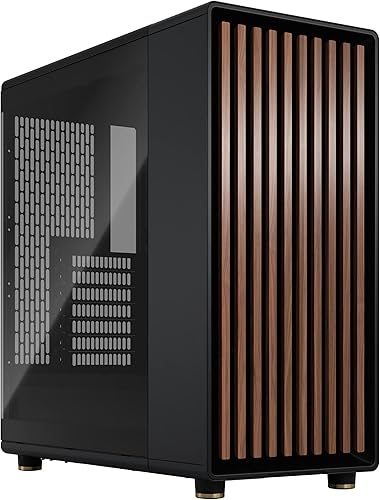
Prime Fractal Design North Charcoal Black ATX Mid Tower

ASUS TUF Gaming GeForce RTX 5070 Ti OC Edition

Prime Thermalright AXP90-X47 Full Copper Low Profile CPU

GIGABYTE B650 AORUS Elite AX AM5 ATX Motherboard
As an Amazon Associate we earn from qualifying purchases. Product prices and availability are accurate as of the date/time indicated.
Pros
- Outstanding gaming performance with 5.5 GHz boost and large cache
- Excellent multitasking with 8 cores and 16 threads
- Unlocked for overclocking to push performance further
- Future ready AM5 platform with DDR5 and PCIe 5.0 support
Cons
- CPU cooler not included and must be purchased separately
- Requires AM5 motherboard and DDR5 memory, no compatibility with older AM4 systems
- Needs capable cooling to sustain peak boost performance
The AMD Ryzen 7 9700X is an 8-core, 16-thread unlocked desktop processor built on the Zen 5 architecture for Socket AM5. It is designed for serious gamers, streamers and creators who want top tier performance without stepping up to a 12 or 16 core chip.
In real world use, it delivers consistent 100+ FPS in popular games thanks to its 5.5 GHz max boost and large 40 MB cache. The 16 threads and DDR5-5600 support also keep multitasking smooth, whether you are gaming while streaming or handling heavy creative workloads.
Built for the modern AM5 platform, the chip supports PCIe 5.0 on compatible motherboards for faster GPUs and SSDs. As an unlocked processor, it gives enthusiasts full control for overclocking, while Zen 5 brings improved efficiency and IPC over previous generations.
The main drawback is that no cooler is included, so you will need to budget for a capable aftermarket cooler. It also requires an AM5 motherboard and DDR5 memory, which means users on older AM4 systems cannot reuse their existing board or RAM.
Overall, the Ryzen 7 9700X is a powerful and well balanced choice for a high performance gaming rig with room to grow. If you want elite gaming speed, strong productivity and a future proof platform, it is an excellent investment.
Key Specifications
Brand: AMD
Model: Ryzen 7 9700X
Cores / Threads: 8 Cores, 16 Threads
Architecture: Zen 5
Base Clock: 3.8 GHz
Max Boost Clock: Up to 5.5 GHz
Total Cache: 40 MB
Memory Support: DDR5-5600
Socket: AM5
PCIe Support: PCIe 5.0 on select motherboards
Unlocked for Overclocking: Yes
Cooler Included: No
Pros
- Ideal 6000MT/s CL30 speed and latency balance for Ryzen AM5 and Intel DDR5 systems
- Dual compatibility with AMD EXPO and Intel XMP 3.0 for effortless setup
- Excellent stability with on-die ECC, users report zero issues after enabling EXPO
- Low-profile heat spreader design runs cool and fits under most CPU coolers
- Backed by Kingston limited lifetime warranty and strong build quality
Cons
- Requires enabling EXPO or XMP in BIOS to reach advertised 6000MT/s, defaults to lower JEDEC speed
- Desktop DIMM only and requires DDR5 compatible motherboard and CPU, check QVL for support
- No RGB lighting or extra customization for users wanting visual effects
The Kingston FURY Beast KF560C30BBEK2-32 is a 32GB DDR5 kit with two 16GB modules rated at 6000MT/s and CL30. It is designed for next gen desktop builds, especially AM5 Ryzen systems, and also supports modern Intel platforms for gamers, streamers and creators.
Its standout feature is the balanced 6000MT/s CL30 profile, widely regarded as the efficiency sweet spot for DDR5. With AMD EXPO and Intel XMP 3.0, you get one click overclocking, plus on-die ECC and dual 32-bit subchannels for added stability and efficiency. In real use it delivers noticeably faster multitasking, smoother gaming and quicker rendering.
Build quality is solid and practical, with a low-profile black heat spreader that stays cool and clears large air coolers. The 288-pin DIMM design feels durable and lightweight, and the understated look fits cleanly in most builds without adding bulk.
There are a few caveats to note. You must enable EXPO or XMP in BIOS to hit the full speed, otherwise it runs at standard JEDEC rates. It is DDR5 desktop only, so you will need a compatible motherboard and CPU, and checking the QVL list is recommended for guaranteed support.
Overall, this is a top tier DDR5 kit for anyone building a modern desktop who wants fast, stable and hassle free performance. If you want reliable high speed memory with simple setup and proven stability, the FURY Beast 32GB 6000 CL30 is an excellent, highly recommended choice.
Model: Kingston FURY Beast KF560C30BBEK2-32, 32GB Kit (2x16GB)
Memory Type: DDR5 DIMM, 288-Pin, 6000MT/s, CL30, 1.35 Volts
Compatibility: Desktop only, AMD EXPO and Intel XMP 3.0, Auto Overclocking support
Features: On-die ECC, Dual 32-bit subchannels, Low-profile heat spreader
Warranty: Limited Lifetime Warranty from Kingston Technology
Pros
- ATX 3.1 and PCIe 5.1 ready with included native 12V-2x6 cable and adapter
- Fully modular design greatly simplifies cable management and airflow
- Very quiet cooling with optimized 120mm rifle bearing fan curve
- High-quality 105C rated capacitors and Cybenetics Gold efficiency
- Compact 140mm length and strong 7-year warranty
Cons
- 850W may be more than needed for budget or mid-range builds
- Only one dedicated PCIe 8-pin cable included, relies on adapter for additional connectors
- No RGB lighting or advertised zero-RPM fan mode for silent idle operation
The CORSAIR RM850e (2025) is an 850W fully modular ATX power supply built for gamers, creators and anyone upgrading to RTX 40 series or newer GPUs. With ATX 3.1 and PCIe 5.1 compliance, it is ideal for high performance builds that need stable power and next generation connectors.
Its native 600W 12V-2x6 connector powers modern graphics cards without messy adapters, while support for 2x transient power excursions keeps your system stable during sudden GPU spikes. Cybenetics Gold efficiency and Modern Standby support improve low load efficiency and enable fast wake times, and the tuned 120mm rifle bearing fan stays quiet even under heavy load.
Design and build quality are standout strengths for this price class. At just 140mm long it fits easily in most mid tower and compact ATX cases, and fully modular cables keep builds tidy with better airflow. Industrial grade 105C rated capacitors ensure consistent electrical performance and long term reliability.
There are a few trade offs to consider. The included cable set is lean with only one native PCIe 8-pin cable plus a 12V-2x6 to dual 8-pin adapter, so users with multiple older GPUs may need extra cables. It also focuses on performance over aesthetics, with no RGB and no dedicated zero RPM mode for complete silence at idle.
Overall, the RM850e 850W hits an excellent balance of efficiency, compatibility and quiet operation for modern high end PCs. If you want a compact, future ready and dependable power supply that will handle demanding hardware for years, it is a smart and durable choice.
Model: CORSAIR RM850e (2025) CP-9020296-NA | Wattage: 850W | Form Factor: ATX | Modular: Fully Modular
Compliance: Intel ATX 3.1, PCIe 5.1 with native 12V-2x6 connector | Efficiency: Cybenetics Gold | Capacitors: Industrial-grade 105C rated
Cooling: 120mm rifle bearing fan with low-noise curve | Dimensions: 5.91 x 5.51 x 3.35 inches | Weight: 3.4 pounds
Connectors Included: 1x 24-pin ATX, 2x 8-pin EPS12V (4+4-pin), 1x PCIe 8-pin (6+2-pin), 1x 600W 12V-2x6, 1x 12V-2x6 to dual 8-pin adapter, 6x SATA, 2x PATA | Warranty: 7 Years
Pros
- Stunning furniture grade design with real walnut wood and metal accents
- Excellent thermal performance from mesh ventilation and included PWM fans
- Generous compatibility for large GPUs and front radiators
- Premium build quality with tempered glass and sustainably sourced materials
- Thoughtful, tool friendly layout that simplifies installation and upgrades
Cons
- Mid tower footprint is relatively large and needs ample desk or floor space
- Dark tempered glass and charcoal finish can show dust and fingerprints
- Limited to four total drive mounts, not ideal for heavy storage builds
The Fractal Design North Charcoal Black TG Dark is an ATX mid tower airflow case designed for gamers and creators who want performance without sacrificing style. It is perfect for those building a living room friendly PC that looks like premium furniture while housing high end components.
Standout features include the genuine walnut wood front paired with fine mesh ventilation that delivers natural, quiet airflow. In real world use, the open front and two included 140mm Aspect PWM fans provide strong cooling for modern GPUs up to 355mm, or up to 300mm with a 360mm front radiator installed.
Build quality is exceptional, with a sturdy metal chassis, sustainably sourced wood bars, and subtle brass accents. The clear tempered glass side panel offers scratch resistance and a perfect view of your build, while the integrated tab makes removing the top panel quick and tool free.
There are a few tradeoffs to consider. At 17.6 inches deep and 9.5 kg, it is not the most compact case for small spaces. Storage is also modest with two combo 3.5 and 2.5 inch mounts and two dedicated 2.5 inch mounts, which may limit heavy NAS style builds.
Overall, the North is a top tier choice for anyone who values airflow, build ease, and distinctive design. If you want a case that performs as good as it looks and earns its best seller status, this is a highly recommended option for your next ATX build.
Model: Fractal Design North Charcoal Black TG Dark FD-C-NOR1C-02
Form Factor: Mid Tower ATX, supports ATX, mATX and ITX motherboards, 7 bridgeless expansion slots
Cooling: Air cooling optimized, 2x 140mm Aspect PWM fans included, supports up to 360mm front radiator, GPU clearance 355mm
Storage: 2x combined 3.5 inch and 2.5 inch mounts plus 2x dedicated 2.5 inch mounts
Connectivity: 1x USB 2.0, 2x USB 3.0, 1x USB Type C, integrated dust filters
Dimensions and Weight: 17.6 x 8.46 x 18.46 inches, 9.5 kg, materials include metal, tempered glass and genuine walnut wood
Pros
- Excellent real-world performance for 1440p ultrawide and 4K gaming at ultra settings
- Highly effective and quiet triple-fan cooling even under heavy sustained loads
- Premium TUF build quality with rugged reinforcements and enhanced durability
- Factory overclock plus DLSS 4 offers immediate performance uplift
- Modern connectivity with DisplayPort 2.1a and HDMI 2.1b for high refresh displays
Cons
- Large 3.125-slot design requires a spacious case and may not fit compact builds
- Needs an 850W PSU with 16-pin 12V-2x6 connector, which may require a PSU upgrade
- Included adapter cable has mixed user feedback, native cable is recommended
The ASUS TUF Gaming GeForce RTX 5070 Ti OC Edition is a high performance graphics card built on NVIDIA Blackwell architecture with 16GB GDDR7 memory. It is designed for serious gamers, competitive FPS players and creators who need stable power for 1440p ultrawide and 4K gaming, video editing and virtualization.
In real-world use, it delivers consistently smooth high frame rates at ultra settings with DLSS 4 providing a clear boost in supported titles. The factory overclock to 2610MHz offers extra headroom without manual tweaking, and users report excellent stability during long gaming sessions and demanding productivity workloads.
Build quality is a major highlight with a rugged TUF design, military-grade components and a protective PCB coating that resists moisture and dust. The massive fin array with three Axial-tech fans and a phase-change thermal pad keeps thermals under control while staying relatively quiet, and the clean metallic gray finish with minimal RGB fits premium builds.
There are some practical considerations to note before buying. The card occupies 3.125 slots and measures 13 inches long, so it needs a roomy case with good airflow. It also requires an 850W PSU with a native 16-pin connector, and several users recommend skipping the included adapter in favor of a direct cable for reliable startup.
Overall, the TUF RTX 5070 Ti OC Edition combines battle-tested durability with top tier cooling and strong next-gen performance. If you have the case space and power supply to support it, it is an outstanding choice for high refresh gaming and future proofed 4K setups.
Graphics Processor: NVIDIA GeForce RTX 5070 Ti, Blackwell architecture, Boost Clock up to 2610MHz in OC mode and 2588MHz in Default mode.
Memory: 16GB GDDR7, PCI-Express x16 interface, supports DisplayPort 2.1a x3 and HDMI 2.1b x2 with maximum resolution of 7680x4320.
Cooling and Design: Triple Axial-tech fan design, 3.125-slot fin array, phase-change GPU thermal pad, Auto-Extreme manufacturing, dimensions 13 x 5.5 inches, weight 3.6 pounds.
Requirements and Extras: 850W PSU with 16-pin 12V-2x6 connector required, includes GPU holder, adapter cable, manual and TUF accessories, 3 year warranty.
Pros
- Excellent cooling performance for a 47mm low-profile cooler
- Very quiet operation even under gaming and heavy loads
- Full copper build improves conductivity and offers a distinctive premium look
- Broad compatibility with modern Intel and AMD sockets
- Compact size fits popular SFF cases like Dan A4-H2O and Fractal Terra
Cons
- Instruction manual can be confusing, especially for AM5 backplate installation
- Slim 92mm fan may require tuning for the best noise to performance balance
- Limited headroom for heavily overclocked or very high TDP CPUs
The Thermalright AXP90-X47 Full Copper is a 47mm tall low-profile air cooler built for compact ITX and SFF desktops. It is ideal for builders using slim cases where clearance is limited but reliable cooling is still essential.
With four 6mm copper heatpipes, AGHP technology and a 92mm TL-9015R slim PWM fan, it moves up to 42.58 CFM while staying under 22.4 dBA. Users report it quietly handles chips like the Ryzen 7 7800X3D and Intel i5-12500T, keeping gaming temps around 75C in tight cases.
The full copper construction sets it apart from aluminum alternatives, offering better thermal conductivity and a striking premium look. It uses an all-metal mounting platform with a secure backplate and secondary reflow soldering for long-term durability and stable contact.
Installation is not always straightforward, as the manual can be confusing regarding backplate use on certain AM5 motherboards like ASRock B650I models. As a low-profile cooler, it also has thermal limits and is not intended for heavily overclocked high TDP processors.
For SFF enthusiasts who need maximum cooling in minimum space, the AXP90-X47 Full Copper is one of the best value options available. It combines compact dimensions, quiet operation and premium materials in a cooler that punches well above its size.
Model: Thermalright AXP90-X47 Full Copper, 47mm Low Profile Design
Fan: 92mm TL-9015R Slim PWM Fan, 2700 RPM Max, 42.58 CFM, 22.4 dBA, 4-Pin Connector
Heatpipes: 4 x 6mm Copper Heatpipes with AGHP Technology
Compatibility: Intel LGA 1150/1151/1200/1700/1851 and AMD AM4/AM5
Dimensions & Material: 3.74 x 1.85 x 3.72 inches, Full Copper with Metal, Plastic and Silicone Components
Pros
- Excellent value for a full featured ATX AM5 board
- Robust thermal design with 6mm heatpipe and fully covered MOSFET heatsinks
- Strong connectivity suite including WiFi 6E, 2.5GbE and 12 USB ports
- Easy building experience with EZ-Latch, Q-Flash Plus and clean layout
- Stable performance in gaming and demanding workloads with overclocking headroom
Cons
- Some users report EXPO and XMP memory profiles causing boot failures requiring CMOS reset
- Isolated reports of reboot issues and initial LAN port detection quirks
- Only four SATA ports and no USB4 support for heavy storage users
The GIGABYTE B650 AORUS Elite AX is a full featured ATX motherboard built for AMD AM5, supporting Ryzen 7000, 8000 and 9000 series processors. It is ideal for gamers and creators who want modern DDR5 performance and PCIe 5.0 without stepping up to costly X670 boards.
In real world use it delivers rock solid stability for gaming and demanding workloads, with strong overclocking headroom thanks to its 14+2+1 phase 70A VRM. Users praise its fast PCIe 5.0 M.2 storage, smooth WiFi 6E connectivity and reliable 2.5GbE LAN once configured, plus easy memory tuning via AMD EXPO.
Build quality is a clear strength, featuring an 8 layer 2X copper PCB, fully covered MOSFET heatsinks with a 6mm heatpipe, and PCIe Ultra Durable Armor. Thoughtful builder friendly touches like EZ-Latch for M.2, Q-Flash Plus for BIOS updates without a CPU, and front and rear USB-C make installation clean and simple.
It is not without quirks, as some owners report EXPO and XMP memory profiles can cause boot failures requiring a CMOS reset, and isolated issues with reboot cycles and initial LAN detection. It also offers four SATA ports and lacks USB4, which power users with large storage arrays may find limiting.
Overall, the B650 AORUS Elite AX stands out as a well balanced, future proof foundation for a mid to high end AM5 build. If you want a durable, feature rich board with excellent connectivity and thermal headroom at a sensible cost, this is one of the smartest choices in its class.
Platform: AMD Socket AM5, B650 chipset, ATX form factor, supports Ryzen 7000, 8000 and 9000 series
Memory: 4x DDR5 DIMMs up to 128GB, AMD EXPO and Intel XMP support
Storage and Expansion: PCIe 5.0 M.2, PCIe 5.0 support, 4x SATA 6Gb/s, 3x PCIe slots with Ultra Durable Armor
Connectivity: WiFi 6E, 2.5GbE LAN, 12x USB ports including USB-C 3.2 Gen 2 front and rear, HDMI, 13 total ports
Design: 14+2+1 phase 70A digital VRM, 8 layer 2X copper PCB, M.2 Thermal Guard, EZ-Latch, Q-Flash Plus, RGB Fusion
| Part | Common at this level | Our 2026 pick | Why |
|---|---|---|---|
| CPU | a cpu in the same class | AMD Ryzen 7 9700X | a current platform match for this GPU tier so the processor does not hold it back |
| GPU | a gpu in the same class | ASUS Prime GeForce RTX 5070 | the class of card this build is planned around |
| Motherboard | a motherboard in the same class | Gigabyte B650 AORUS Elite AX | a board with a proven VRM and the I/O this build needs, without paying for features it will not use |
| Memory | a memory in the same class | Kingston Fury Beast 32GB DDR5 6000 | the tuned capacity and speed sweet spot for this platform |
| SSD | a ssd in the same class | WD Black SN850X 2TB | responsive storage sized for a modern game library |
| Power Supply | a power supply in the same class | Corsair RM850e | a modern ATX 3.1 unit with headroom above the combined draw of the CPU and GPU |
| Case | a case in the same class | Fractal Design North | good stock airflow and clearance for the cooler and graphics card in this build |
| CPU Cooler | a cpu cooler in the same class | Thermalright AXP90-X47 | quiet, capable cooling that keeps this CPU in its normal boost range |
The two parts that define the experience are the processor and the graphics card. The AMD Ryzen 7 9700X 8-Core is an 8 core and 16 thread design based on Zen 5 with a 5.5 GHz Max Boost and 40 MB cache, built for Socket AM5 and DDR5-5600 support per the spec sheet. Owners commonly report that it holds high boost clocks in games when paired with DDR5 6000 and adequate cooling, which is why we match it with a 32GB kit at that speed. It does not include a cooler in the box, so you need to add your own solution and follow the mounting instructions carefully.
For graphics, our buyable pick in this class is the ASUS TUF Gaming GeForce RTX 5070 Ti 16GB GDDR7 OC, which represents the RTX 5070 tier this build is planned around. Per the spec sheet it uses NVIDIA Blackwell architecture with DLSS 4, a Boost Clock of 2588MHz in default mode and 2610MHz in OC mode, and a 3.125 slot design with three Axial tech fans and a phase change GPU thermal pad. The card calls for a minimum 850W PSU with a 16 pin 12V-2×6 connector, so you should follow that guidance and use a native cable rather than adapters where possible.
Supporting parts keep the system quiet and responsive without adding cost where it does not help gaming. The Kingston FURY Beast 32GB (2x16GB) at 6000MT/s CL30 is the capacity and speed sweet spot for AM5, with AMD EXPO and Intel XMP 3.0 profiles and a low profile heat spreader that helps with cooler clearance. The Fractal Design North Charcoal Black Tempered Glass provides natural ventilation through its open front and mesh, support for ATX, mATX and ITX boards, GPU clearance up to 355 mm or up to 300 mm with a 360 mm front radiator, and two included 140 mm Aspect PWM fans to get airflow started out of the box.
Compatibility Check
Will these parts fit together and run without surprises? That is the question most builders at this level want answered before ordering, so we walk through socket, memory, physical clearance, and power step by step.
This build is AM5. Use a 32GB DDR5 6000 CL30 kit, and if you drop in a newer chip later check the board support page and use BIOS Flashback if a flash is needed. The GIGABYTE B650 AORUS Elite AX AMD AM5 ATX supports Ryzen 9000, 8000 and 7000 series processors on Socket AM5, with four DIMMs and both AMD EXPO and Intel XMP memory module support. Its power design is a Twin 14+2+1 phases with 70A Power Stage and an 8 layer 2X Copper PCB, plus a 6mm heatpipe and fully covered MOSFET heatsinks with M.2 Thermal Guard, which helps keep VRM temperatures in check during sustained loads. BIOS updates and overclocking are done at your own risk and may void warranty, so verify the support list for your exact CPU and follow the manual for Flashback if you need it.
Memory compatibility is straightforward if you stay on the sweet spot. The board lists DDR5 support and the kit we recommend is Kingston FURY Beast DDR5 6000 CL30 with EXPO, which aligns with the platform guidance to run 6000MT/s for balanced latency and stability. Install two sticks in the recommended slots per the board manual to enable dual channel, enable the EXPO profile in BIOS, and keep the BIOS updated if you see training issues. If you plan to add two more DIMMs later, check the qualified vendor list first, as four DIMM configurations can be more sensitive to speed and timings.
Physical clearance is where quiet builds succeed or get noisy. A triple fan card and a 240 or 360mm radiator fit a standard mid tower. The Fractal Design North is an ATX airflow mid tower with seven bridgeless expansion slots, a tempered glass side panel, and a genuine walnut front with mesh ventilation. It supports a GPU up to 355 mm, or up to 300 mm when a 360 mm front radiator is installed, and it includes two 140 mm Aspect PWM fans. The ASUS TUF card in this class uses a 3.125 slot design with a large fin array, so confirm you have three slots of clearance and good intake airflow. For CPU cooling, the Thermalright AXP90-X47 Full Cooper Low Profile CPU is only 47 mm tall with four 6 mm heatpipes, a 92 mm TL-9015R slim PWM fan rated at up to 22.4 DBA, and support for AM4 and AM5 plus Intel 115X, 1200 and 1851 with a backplate fastener. That height gives you wide case compatibility, but you should still check cooler height or radiator clearance against the case spec and follow the mounting instructions, using anti static handling throughout the build.
Power and cabling need headroom and the right connector. Size the supply above the combined draw of the CPU and GPU, follow the card maker recommended wattage, and use a native 12V-2×6 cable for an RTX 50 card. The CORSAIR RM850e (2025) ATX 3.1 PCIe 5.1 Ready 850W is an 850W fully modular unit that is ATX 3.1 and PCIe 5.1 compliant with a native 12V-2×6 connector, a 120 mm rifle bearing fan with a tuned fan curve for low noise, and 105C rated capacitors with Modern Standby support. That matches the 850W minimum called out for the RTX 5070 Ti class card and leaves headroom over the combined CPU and GPU draw for transients, which ATX 3.1 is designed to handle. Connect only the cables your build needs, seat the 12V-2×6 fully until it clicks, and avoid sharp bends near the connector.
Storage and I/O round out compatibility. The B650 AORUS Elite AX offers PCIe 5.0 and PCIe 5.0 NVMe x4 M.2 support, plus front and rear USB C with USB 3.2 Gen 2, WiFi 6E and 2.5GbE. A 2TB drive like the WD Black SN850X class gives you room for a modern library without juggling installs, and the board M.2 Thermal Guard helps keep drive temperatures stable. If you add more drives later, use the combined 3.5 inch and 2.5 inch mounts and the two dedicated 2.5 inch mounts in the North, and keep cables clear of the front intake for best thermals.
Performance: What To Expect
No verified frame rate numbers are available for this build, so we keep this section qualitative and do not invent figures. That approach avoids misleading you with numbers that depend heavily on game, settings, resolution, and driver version.
What you can expect in practice is a quiet system that targets 1440p high settings with smooth frame pacing. The Ryzen 7 9700X class processor is intended to keep the graphics card fed at that resolution, so you see fewer CPU limited stutters in open world and simulation titles. The RTX 5070 class card is the performance anchor, with Blackwell features and DLSS 4 available in supported titles to help with image quality and responsiveness when you enable them.
Thermally, the combination of a mesh front case with two 140 mm PWM fans, a low profile cooler with a slim PWM fan, and a power supply with a low noise fan curve is tuned for steady boost behavior rather than short bursts. You should hear a soft rise under load rather than sharp ramps, and you can fine tune fan curves in BIOS or software to favor noise or cooling. If you want more thermal headroom for sustained loads or a warmer room, consider the higher end cooling option described next.
Three Ways to Build This
Lower Cost Version
One GPU tier down with a cheaper CPU, a budget air cooler, a 1TB drive and an entry board, for a first build on a tight budget. You keep the same 32GB DDR5 6000 class memory and a modern ATX 3.1 supply, but you trim cost where it least affects 1080p and entry 1440p play. This suits students or first time builders who want a reliable daily system and can upgrade the graphics card later.
Balanced Version (Recommended)
The parts listed here, for most gamers who want headroom to upgrade later. You get the AMD Ryzen 7 9700X 8-Core with the ASUS TUF Gaming GeForce RTX 5070 Ti 16GB GDDR7 OC class card, the GIGABYTE B650 AORUS Elite AX AMD AM5 ATX board, Kingston FURY Beast 32GB (2x16GB) 6000MT/s DDR5 CL30, a 2TB WD Black SN850X class SSD, the CORSAIR RM850e (2025) ATX 3.1 PCIe 5.1 Ready 850W supply, the Fractal Design North Charcoal Black Tempered Glass case, and the Thermalright AXP90-X47 Full Cooper Low Profile CPU cooler. This is the pick for 1440p high settings with quiet operation and a clear path to a later CPU or GPU swap.
Higher End Version
Move up a GPU tier and to a Ryzen 7 9800X3D or Ryzen 9 9950X3D with a 360mm AIO and a 1000W supply, for high refresh play and years of headroom. You keep the same memory capacity and speed, add a larger radiator that still fits the mid tower front, and step up the power supply to keep headroom above the higher combined draw. This is for high refresh 1440p or mixed 4K gaming where you want extra thermal and power margin. For cooler sizing help, see our guide on 240mm AIO vs 360mm AIO for gaming.
FAQ
Is the Ryzen 7 9700X enough for an RTX 5070 at 1440p?
Yes, that is the intent of this pairing. The 9700X class is chosen so the processor does not hold the RTX 5070 class card back at 1440p high settings, while still leaving thermal headroom for quiet operation. If you plan to chase very high refresh rates in CPU heavy titles, consider the 9800X3D class in the higher end version.
Do I need to update the BIOS on the Gigabyte B650 AORUS Elite AX for Ryzen 9000?
Many B650 boards support Ryzen 9000 with a BIOS update. Check the board support page for your exact CPU, and use BIOS Flashback if a flash is needed. BIOS updates are done at your own risk and may affect warranty, so follow the manual and keep power stable during the process.
Will the Thermalright AXP90-X47 stay quiet in the Fractal North?
The AXP90-X47 is a 47 mm low profile cooler with a 92 mm slim PWM fan rated up to 22.4 DBA, and the North has an open front with mesh and two 140 mm PWM fans for steady intake. Owners commonly report quiet operation when fan curves are tuned for gradual ramps. For heavy sustained loads or warmer rooms, a larger air cooler or a 240mm or 360mm AIO gives more thermal margin, but you should verify radiator and GPU clearance before choosing.
Final Verdict
This mid class build puts budget where it matters for 1440p gaming, keeps noise and thermals under control with a ventilated case and modern power delivery, and leaves a clean upgrade path on AM5. It is not the right choice if you need the smallest possible case or you already target 4K high refresh, where a higher tier GPU and stronger cooling make more sense.
Our pick: the Balanced version we recommend, with the Ryzen 7 9700X and RTX 5070 class card, 32GB DDR5 6000, 2TB storage, and the RM850e in the Fractal North, for most gamers who want quiet 1440p performance with headroom to upgrade later.


Write Your Review
No reviews yet. Be the first to share your experience!