

If you are asking is the Arctic Liquid Freezer III 360 enough to cool a Ryzen 7 9800X3D, you are really asking how much cooling that chip needs for your build and whether a large 360mm AIO is necessary, overkill, or just right. The short answer is that a quality 360mm cooler is more than capable for this CPU in gaming, but the better question is how that cooler fits your case, your noise expectations, and your upgrade plans.
This buying guide gives you a decision framework you can use for any cooler you consider. You will weigh your resolution and refresh target, your platform and socket, your case size and radiator clearance, your power and noise budget, and whether you are building for today or for a future CPU upgrade. Use the example product below to see how the specs translate into real choices.
What Actually Matters
Cooler Capacity and How the 9800X3D Behaves
The Ryzen 7 9800X3D is efficient in gaming because of its 3D V-Cache design, and it does not behave like a high wattage workstation chip under all core loads. That means you do not need extreme cooling just to hit your gaming refresh targets, but you do want steady heat transfer so boost clocks stay consistent. When you evaluate any cooler, look at its radiator size, cold plate design, and fan and pump control rather than a single temperature claim.
Think in terms of headroom. A 360mm AIO gives you more thermal headroom and lower fan speeds than a smaller 240mm or a mid range air cooler, which helps with noise and with short bursts of heavy load. If you mostly play games at 1440p or 4K where the GPU is often the limit, you will see less benefit from extra capacity than if you run long all core tasks. For help placing your CPU and GPU balance, our CPU Cooling archive shows how cooler choice interacts with different build tiers.
Radiator Size and Case Clearance
Radiator size only helps if it fits. Before you fall in love with any 360mm model, check your case spec sheet for radiator support on the top and front, plus the maximum radiator length and thickness with fans installed. You also need to confirm clearance for RAM, VRM heatsinks, and the GPU, and that you have mounting points for a 360mm unit without blocking cable routing.
You should also plan airflow. A front mounted radiator brings cooler outside air through the rad but warms the interior slightly, while a top mounted radiator exhausts heat directly. Either can work well if you maintain a clear path for intake and exhaust. Always follow the manufacturer mounting instructions and check cooler height or radiator clearance against your exact case model, as even cases that list 360mm support can vary by 10 to 15mm in usable space.
Noise, Pump Design and Fan Control
Noise is where cooler choice becomes personal. A larger radiator can run fans slower for the same heat load, and pump noise matters as much as fan noise at idle. Per the spec sheet, the example cooler below uses a pump rated at a whisper quiet 20 dBA and fans with Magnetic Dome bearings and AirGuide technology to keep airflow focused and noise low. Those are the kinds of details to compare across models.
Control matters too. Look for PWM fan control and simple ARGB or fan cabling so you can tune curves in your BIOS without extra hubs. Daisy chained fans that connect to a single 4 pin PWM header and a single plus 5V ARGB header reduce clutter and make it easier to set a quiet daily profile and a higher performance profile for heavy tasks. If low noise during long gaming sessions is a priority, prioritize coolers that let you run quiet curves without sacrificing stability.
Socket Compatibility and Installation Quality
For AM5 you need confirmed AM5 and AM4 support and hardware that aligns well with the integrated heat spreader. A slightly convex cold plate with pre applied thermal paste, as described for the example unit, is designed to improve contact on modern IHS shapes and to speed up installation. That design approach can help you get consistent mounting pressure without reapplying paste on your first install.
Also assess the mounting system and instructions. Clear, well labeled brackets for Intel LGA 1851, LGA 1700 and AMD AM5 and AM4, plus captive screws and a logical backplate, save time and reduce the risk of uneven pressure. Remember to handle components with anti static precautions and to follow the manual for torque and paste spread. If you are new to liquid cooling, a straightforward mounting system is worth as much as a small difference in rated airflow.
To see how these criteria look in a real product listing, here are a few options that show the range:
This article contains affiliate links. If you buy through one of our links, CustomPCGaming may earn a commission at no extra cost to you. Commissions never influence which products we recommend or how we rank them. Read our Affiliate Disclosure for details.
Quick Picks at a Glance

Prime CORSAIR Nautilus 360 RS ARGB 360mm AIO Liquid CPU
As an Amazon Associate we earn from qualifying purchases. Product prices and availability are accurate as of the date/time indicated.
Pros
- Excellent 360mm cooling performance with efficient low-noise operation
- Very easy installation thanks to pre-applied thermal paste and daisy-chained fans
- Vibrant ARGB lighting controlled directly through compatible motherboards
- High-quality aluminum and copper construction with durable Magnetic Dome bearings
- Wide socket support for latest Intel and AMD platforms
Cons
- Large 360mm radiator requires a case with 360mm mounting support
- No dedicated controller included, relies entirely on motherboard headers for PWM and ARGB
- Fan noise can reach 36 dB at maximum 2100 RPM under full load
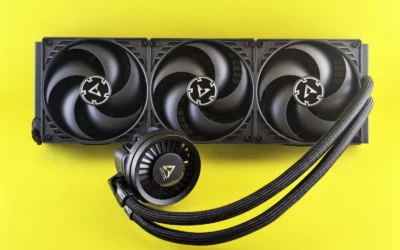
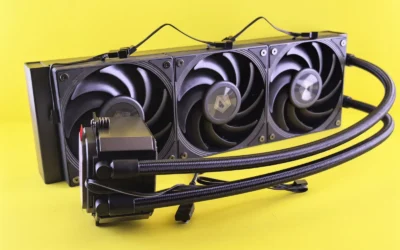
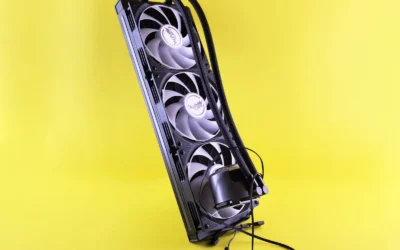
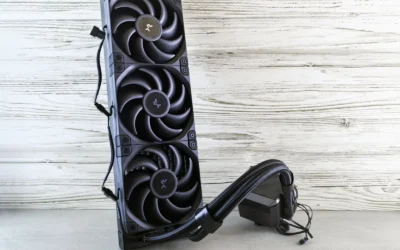
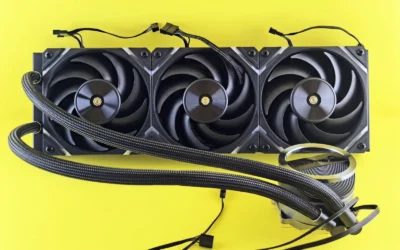
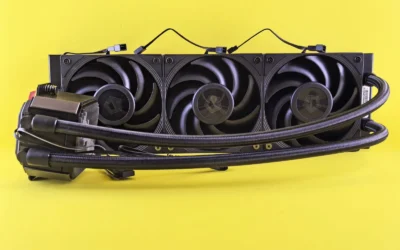
The CORSAIR Nautilus 360 RS ARGB is a 360mm all-in-one liquid CPU cooler designed for gamers, content creators and PC builders who need reliable thermal performance without complexity. It is ideal for high-performance Intel and AMD systems where air cooling is not enough and clean aesthetics matter.
In real world use, the efficient low-noise pump circulates coolant at high flow while staying whisper quiet at just 20 dBA, and the three RS120 ARGB fans deliver strong airflow and static pressure. CORSAIR AirGuide technology and Magnetic Dome bearings keep temperatures low during gaming and heavy workloads while maintaining impressively quiet operation.
Build quality is excellent with an aluminum and copper construction, a convex copper cold plate for optimal CPU contact and pre-applied thermal paste for quick installation. The daisy-chain fan design is a standout, letting you connect all three fans to a single 4-pin PWM header and one 5V ARGB header for a much cleaner build with direct motherboard control.
There are a few tradeoffs to consider. The large 360mm radiator needs a case that supports full-size AIO mounting, so compact builds may not be compatible. Since it relies on motherboard headers for lighting and speed control, users wanting dedicated CORSAIR iCUE software control will need a separate controller.
Overall, the Nautilus 360 RS ARGB offers outstanding cooling, quiet performance and simple installation in the competitive 360mm AIO market. For anyone building a modern Intel LGA 1851/1700 or AMD AM5/AM4 system who wants powerful cooling with vibrant ARGB and minimal wiring, it is an easy recommendation.
Radiator Size: 360mm with three RS120 ARGB fans, maximum speed 2100 RPM
Compatibility: Intel LGA 1851, LGA 1700 and AMD AM5, AM4 with included mounting hardware
Cooling Details: Copper convex cold plate with pre-applied thermal paste, aluminum radiator, water cooling method
Connectivity: Daisy-chain design, single 4-pin PWM header and single 5V ARGB header, 12V power, direct motherboard connection
Dimensions and Acoustics: 15.59 x 4.72 x 1.06 inches, pump noise 20 dBA, maximum fan noise 36 dB, 10 watt power draw
Matching a Part to Your Build
Scenario 1: High refresh 1440p gaming in a mid tower with 360mm support. If your goal is smooth high refresh gaming and you have a case that clearly lists top or front 360mm support, a 360mm AIO like the CORSAIR Nautilus 360 RS ARGB Liquid CPU Cooler is a comfortable fit for the 9800X3D. You get quiet operation from the low noise pump and three RS120 ARGB fans, plus easy control through your motherboard headers. This setup gives you thermal headroom for long sessions and keeps fan speeds moderate, which is ideal if you value low noise while chasing high frame rates. Pairing this with a balanced GPU choice matters too, so check our top RTX 5070 ti cards for 1440p gaming guide when you plan the rest of your system.
Scenario 2: Compact case or airflow constrained build. If your case only supports 240mm or 280mm radiators, or you have tall RAM and a tight top panel, a 360mm unit is not the right choice even though it cools well on paper. In that situation you should prioritize a cooler that is guaranteed to clear your RAM and top panel, with tubing length and radiator thickness that fit your layout. You can still cool the 9800X3D effectively with a smaller high quality cooler, but you will trade some acoustic headroom. Review your case manual for exact radiator clearance and consider a build breakdown like our ryzen 5 7600 RX 7700 XT 1000 dollar gaming PC amazon build to see how case and cooler choices interact on a budget.
Scenario 3: Quiet focused build or future upgrade headroom. If you work in a warm room, prefer a very quiet system, or plan to move the cooler to a hotter future CPU, the extra surface area of a 360mm AIO makes sense. The example CORSAIR unit helps here because its daisy chained RS120 ARGB fans run from one PWM header and one ARGB header, which keeps wiring tidy and lets you tune gentle fan curves. The convex cold plate and pre applied paste also help ensure good contact on AM5, and broad socket support for LGA 1851, LGA 1700, AM5 and AM4 means you can carry the cooler to a new platform later. For builders mapping a longer term path, our Budget Build Guides can help you balance cooler spend against GPU and storage priorities.
Common Mistakes
Mistake 1: Buying a 360mm radiator that does not fit your case. It is easy to assume any mid tower fits a 360mm rad, but many cases only support it in the front, or only with slim fans, or not at all with a long GPU installed. Always check the case spec sheet for radiator length, thickness, and fan count support at each mount point, and measure RAM and VRM heatsink clearance before you order.
Mistake 2: Ignoring noise and control. Focusing only on radiator size can leave you with a loud system at idle. Look at pump noise ratings, bearing type, and whether fans offer PWM control and simple daisy chaining. A cooler that lets you run low RPM at idle and ramp smoothly under load will feel better every day than one that is always audible, even if both keep the CPU within safe limits.
Mistake 3: Overlooking mounting and platform details. A great cooler performs poorly with uneven mounting pressure or the wrong bracket. Confirm AM5 compatibility out of the box, read the manual for the correct standoff and backplate, and do not overtighten. Use the pre applied paste pattern as directed or apply an even pea sized dot if you replace it, and handle the cold plate and CPU with anti static care.
Who Should Wait or Buy Differently
A 360mm AIO is not ideal for you if your case cannot cleanly mount a 360mm radiator, if you are building in a small form factor enclosure, or if you strongly prefer the simplicity and lower maintenance of air cooling. It is also not the right choice if your budget is tight and a smaller cooler would let you put more into the GPU or storage where you will feel the difference in games. If you are unsure about your case support or you plan to stay on a compact platform long term, wait and choose a cooler that is a guaranteed fit for your chassis and your noise goals, or pick a quality air cooler that is rated for your platform and is easier to install.
Frequently Asked Questions
Is the Arctic Liquid Freezer III 360 enough to cool a Ryzen 7 9800X3D for gaming?
Yes, a quality 360mm AIO is more than enough for gaming on the 9800X3D when it is properly mounted and your case has good airflow. The chip is efficient in games, so a large radiator mainly gives you lower noise and extra headroom for longer or heavier loads rather than being a strict requirement.
Do I need a 360mm AIO or would a smaller cooler work?
You do not strictly need a 360mm unit for this CPU if your case or budget points you to a smaller option. A well designed 240mm or 280mm AIO or a strong air cooler can handle the 9800X3D for gaming, but you may run fans a bit faster and have less acoustic headroom. Choose based on your case clearance and how quiet you want the system to be.
What should I check before buying any 360mm cooler for AM5?
Confirm AM5 and AM4 support, check that your case lists 360mm radiator support at your preferred mount point, and verify RAM and top panel clearance. Look for PWM fan control, simple daisy chained wiring to one PWM and one ARGB header, and a clear mounting system with pre applied paste. Owners commonly report that careful mounting and a tuned fan curve matter as much as radiator size for daily comfort.
Write Your Review
No reviews yet. Be the first to share your experience!