

If you are figuring out how to wall mount a monitor safely, you are choosing more than a bracket. You are deciding how your screen size, viewing distance, and wall structure will work together for comfort and long term stability. Your resolution and refresh target often pushes you toward a larger and heavier panel, while your case size and clearance, power budget and cable routing, plus your platform and socket path, shape whether this is a fix for your current setup or a mount that should carry your next upgrade.
A safe wall setup rewards patience and planning. You need to match VESA pattern and weight capacity to your exact monitor, anchor only into wood studs, concrete, or brick as directed, and leave room for tilt, swivel, and rotation. Follow the manufacturer mounting instructions closely, get a second person for heavy panels, and plan your cable path before you drill any holes.
What Actually Matters
VESA Pattern, Weight Rating, and Screen Size
Start with the three details that decide compatibility. Check your VESA hole pattern in your manual, weigh your monitor with the stand removed, and confirm your diagonal size. Common options in this range include 75x75mm to 200x200mm for flexible arms and 75x75mm or 100x100mm for compact or low profile designs, with capacities that span from 4.4 to 19.8lbs for light arms up to 44 lbs for heavy duty options and up to 8.0kg for sliding height models.
Size alone does not guarantee fit, so you should compare all three values together. A 13 to 32 inch arm can suit many desktop monitors, while other designs support 13 to 43 inch screens or ultrawide panels up to 49 inch in size. Owners commonly report that curved backs, recessed VESA areas, and off center ports cause more trouble than diagonal size, so look at the back of your monitor and compare it to the spec sheet before you commit.
Wall Structure and Anchoring Strength
Your wall decides what is possible for you. Single wood studs, concrete, and brick walls are the intended anchors for most of these mounts when you use the correct hardware and pilot holes. Drywall alone is not supported for several designs, and you should avoid hollow areas, weak plaster without solid backing, or tile that could crack under load.
Check the wall plate size and how it spreads load across the surface. A compact plate around 5.9 inch by 1.6 inch can simplify placement on a single stud, while wider brackets need careful centering over solid material. If you rent or you cannot locate solid backing, explore other options in our Monitor Arms & Mounting section instead of forcing a wall install.
Motion, Ergonomics, and Viewing Distance
Motion range controls your daily comfort more than you might expect. Tilt options in this class include +9 degree to -11 degree for glare control, plus or minus 15 degree designs, +90 degree to -45 degree arms for steep angles, and +10 degree to -10 degree sliders. Swivel spans from 20 degree limited glide to 90 degree turns and 180 degree swings, while 360 degree rotation lets you switch between landscape and portrait for code, documents, or streams.
Extension and profile matter just as much for your room layout. Arms that extend to 14.59 inch, 15 inch, or 21.6 inch pull your screen closer for shared viewing, then retract to 2.7 inch or 2 inch to save space when you step back. Low profile brackets that sit about 5.1cm from the wall keep your screen tight and stable, while sliding designs with about 16.0cm of height adjustment help you dial in eye level without a desk riser.
Build Quality, Installation Help, and Cable Routing
Look for all steel construction, clear step by step instructions, and labeled hardware that matches your wall type. Detachable VESA plates and sliding brackets make it easier for you to hang and remove the screen, and designs that call for two person installation deserve that extra help for ultrawide panels. Integrated cable management keeps your AV and power cords organized so they do not tug or pinch when you articulate the arm.
Support terms also tell you about longevity and peace of mind. Some brackets mention 5 year service coverage and others include 3 Year Manufacturer Warranty with friendly support available 7 days a week. If you want a warmer desk look after you free up surface area, our warm wood floating monitor desk setup breakdown shows how wall mounting pairs with lighting and layout in 2026.
To see how these ideas show up in real hardware, here are a few options that show the range from compact full motion arms to heavy duty ultrawide brackets:
This article contains affiliate links. If you buy through one of our links, CustomPCGaming may earn a commission at no extra cost to you. Commissions never influence which products we recommend or how we rank them. Read our Affiliate Disclosure for details.
Quick Picks at a Glance

Prime Pipishell Full Motion TV Wall Mount for 13-43 Inch

Prime WALI Full Motion Wall Mount for 13-32 Inch TV
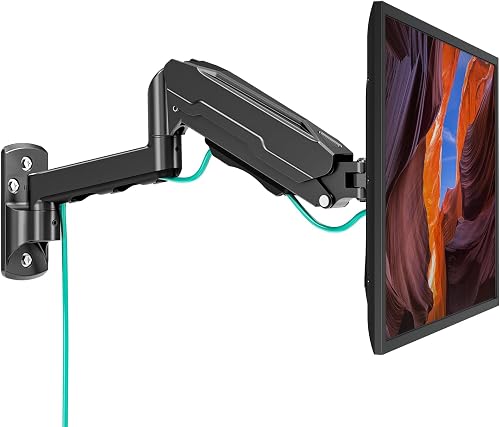
Prime MOUNT PRO Single Monitor Wall Mount for 13-32 Inch

Prime VIVO MOUNT-VWLP1 Low Profile Heavy Duty 49-Inch

Prime VIVO Height Adjustable Single Monitor Wall Mount
As an Amazon Associate we earn from qualifying purchases. Product prices and availability are accurate as of the date/time indicated.
Pros
- Wide compatibility with Samsung, Sony, LG, TCL, Vizio and other major TV brands plus monitors and smart displays
- True full motion adjustment reduces glare and improves viewing from different seating positions
- Long extension plus slim retraction balances flexibility with a neat low profile look
- Sturdy steel build supports up to 44 lbs with stable performance
- Simple single person installation with all necessary hardware included
Cons
- Single stud design may feel limited for heavier 43 inch TVs near max weight capacity
- Swivel range varies with larger screen sizes due to wall clearance
- Tilt range is useful but modest compared to larger premium mounts
The Pipishell Full Motion TV Wall Mount is designed for 13 to 43 inch flat and curved TVs, computer monitors and Echo Show 15 and 21 displays. It is ideal for bedrooms, dorms, kitchens, offices and small living spaces where flexible viewing angles and saving space matter.
In daily use, the full motion arm stands out with tilt for glare control, side to side swivel for different seating positions and 360 degree rotation for landscape or portrait setup. It extends over 14 inches when you need to angle the screen and folds back to under 3 inches for a neat look against the wall.
Built from alloy steel, the mount feels solid and stable for screens up to 44 lbs with VESA patterns from 75x75 to 200x200mm. The articulating joints move smoothly yet hold position well, and the black finish blends easily with most TVs and home office setups.
There are some limits to consider. Maximum swivel depends on screen size because larger displays can touch the wall, and the tilt range is useful but not extra wide. Single stud mounting is simple, but you must confirm VESA, weight and wall type before ordering.
Overall, this is a versatile and user friendly mount for small to midsize screens, monitors and smart displays. If you want easy installation, flexible positioning and a clutter free setup, it is a smart choice.
Compatibility: 13 to 43 inch LED and LCD flat and curved TVs and monitors plus Echo Show 15 and 21. Supports VESA 75x75mm, 100x100mm, 200x100mm and 200x200mm up to 44 lbs.
Motion: Tilt plus 9 degrees to minus 11 degrees, swivel up to 90 degrees left or right depending on screen size, and 360 degree rotation. Extends 14.59 inches and retracts to 2.7 inches.
Installation: Fits single wood stud, concrete and brick walls. Includes hardware and removable TV plate for single person installation. Material is alloy steel in black finish.
Pros
- Highly adjustable with tilt, swivel and rotation for ergonomic viewing
- Extends far from the wall yet folds flat to save space
- Strong metal build supports up to 33lbs with stable performance
- Easy to install with complete hardware and clear instructions
Cons
- Only fits 13 to 32 inch screens with VESA 75x75 or 100x100, so larger TVs are not compatible
- Requires wood stud, brick or concrete, drywall alone will not support it
- Single arm design is best for smaller displays and may feel less rigid at full 15 inch extension
The WALI WL-1330LM is a compact full motion wall mount built for 13 to 32 inch monitors and small flat panel TVs. It is ideal for anyone who wants to free up desk space in a bedroom, office, kitchen or gaming setup while keeping the screen perfectly positioned.
In daily use, the adjustability stands out with plus or minus 15 degrees of tilt, 180 degrees of swivel and 360 degrees of rotation. You can extend the arm up to 15 inches to pull the screen toward you, then push it back to just 2 inches from the wall when not in use.
Build quality is solid for its class with a full metal frame and a compact 5.9 by 1.6 inch wall plate. The joints move smoothly for repositioning yet hold the screen steady once tightened, which helps reduce neck strain during long work or viewing sessions.
There are limits to consider, as it only supports up to 33lbs and VESA 75x75 or 100x100 patterns. It also needs a wood stud, brick or concrete wall for safe mounting, so drywall only installation is not an option.
Overall, this is an excellent value for small to midsize screens where flexibility and space savings matter. If you need an affordable, sturdy and highly adjustable mount for a monitor or small TV, this WALI model is easy to recommend.
Brand and Model: WALI WL-1330LM, Black single monitor wall mount
Compatibility: Fits 13 to 32 inch screens up to 33lbs, VESA 75x75mm and 100x100mm
Motion Range: Plus or minus 15 degree tilt, 180 degree swivel, 360 degree rotation, 15 inch extension, 2 inch retracted profile
Installation: Wall mount for wood stud, brick or concrete, includes hardware kit and manual, 10 year warranty
Pros
- Wide 13 to 32 inch compatibility with standard VESA 75x75 and 100x100 patterns
- True full motion range with tilt, swivel, rotation and long 21.6 inch extension
- Smooth height adjustable gas spring for ergonomic comfort
- Sturdy metal construction with integrated cable management
- Space saving wall mount design ideal for compact desks and clean setups
Cons
- Not compatible with 1000R, 1500R or 1800R curved monitors
- Requires secure mounting to wood stud or solid concrete, not for drywall alone
- Initial tension adjustment is needed to match monitor weight for best performance
The MOUNT PRO Single Monitor Wall Mount is designed for 13 to 32 inch monitors weighing 4.4 to 19.8 lbs with VESA 75x75 and 100x100 patterns. It is a smart pick for remote workers, gamers, students, creators and traders who want a cleaner desk and more flexible viewing.
Standout performance comes from true full motion adjustment with tilt, 180 degree swivel, 360 degree rotation and up to 21.6 inches of extension. You can pull the screen close for focused work, push it back to open space, or flip between portrait and landscape for coding and design.
Build quality centers on a sturdy metal arm with a gas spring height system tested for thousands of movements. Motion feels smooth and stable once tension is set to your monitor weight, and integrated cable clips keep power and AV cords routed neatly along the arm.
There are a few limits to note. It does not support heavily curved 1000R, 1500R or 1800R screens, and it must be anchored to a wood stud or solid concrete wall for safety. You will also need a few minutes to dial in the tension and tilt resistance during setup.
Overall, this is a practical, space saving upgrade for home offices, gaming stations and collaborative workspaces. If you want ergonomic flexibility, solid construction and easy wall installation in one compact package, it delivers strong value.
Supported Screen Size: 13 to 32 inches
VESA Patterns: 75x75mm, 100x100mm
Weight Capacity: 4.4 to 19.8 lbs
Motion: +90 to -45 degree tilt, 180 degree swivel, 360 degree rotation, 21.6 inch extension
Mounting Type: Wall mount for wood stud or solid concrete walls
Material and Color: Metal, Black
Pros
- Supports large 49-inch ultrawides up to 44 lbs with excellent stability
- Space-saving low profile keeps monitor close to wall for clean setup
- Solid alloy steel build feels durable and secure
- Detachable VESA plate makes handling large screens easier
- Backed by 3-year warranty with full install hardware included
Cons
- Fixed design offers no tilt, swivel or height adjustment
- Requires secure wood stud or masonry install, not for drywall alone
- Two-person installation recommended due to size and weight of compatible monitors
The VIVO MOUNT-VWLP1 is a dedicated low profile wall mount designed specifically for large 49-inch ultrawide monitors weighing up to 44 lbs. It is ideal for gamers, multitaskers and professionals who want to free the desk and keep a massive screen securely on the wall.
In real world use, the mount holds wide screens close to the wall with impressive steadiness and minimal wobble. The detachable VESA bracket for 75x75mm and 100x100mm patterns makes it easier to attach and hang a heavy ultrawide safely.
Built from alloy steel with a clean black finish, the two-bracket system feels rugged and purposeful. Installation into wood stud or concrete and brick provides a solid anchor point that inspires confidence for daily use.
The tradeoff for that stability is a fully fixed design with no tilt, swivel or extension for repositioning. You will also need a suitable wall and a second person to help lift, since large ultrawides are awkward to handle alone.
Overall, this is a simple, strong and space-saving solution for 49-inch ultrawide owners who prioritize stability over adjustability. If you want your big screen flush, secure and out of the way, it delivers exactly that.
Model: MOUNT-VWLP1 by VIVO in Black, fixed wall mount for monitors. Mounting type is wall mount with fixed movement for a low profile position.
Compatibility: Supports screens up to 49 inches and up to 44 lbs. Fits VESA 75x75mm and 100x100mm mounting patterns.
Construction and Install: Alloy steel construction for strength and stability. Designed for wood stud or concrete and brick walls with hardware and instructions included.
Pros
- Space saving wall mount design frees up valuable desk surface
- Smooth tilt, swivel and full rotation for ergonomic comfort
- Simple slide height adjustment with secure latch positions
- Solid alloy steel build with clean low profile look
- Easy portrait to landscape rotation for work, coding and media
Cons
- No included hardware for curved or recessed back monitors
- Limited 16cm total height travel compared to full motion arms
- Requires drilling into studs or drywall, not ideal for renters
The VIVO MOUNT-VW01A is a single monitor articulating wall mount designed for 17 to 32 inch screens weighing up to 8.0kg. It is built for standing workstations, home offices and compact setups where desk space is limited.
In daily use, the sliding height adjustment feels fast and intuitive, letting you raise the screen until the latch clicks. You also get plus 10 to minus 10 degree tilt, 20 degree swivel and 360 degree rotation, so switching between landscape and portrait is simple.
The mount uses alloy steel construction with a clean black finish and sits only 5.1cm from the wall. It feels sturdy when secured to wood studs, keeps the setup tidy and creates more distance between you and the screen.
There are some limits to note, including only 16.0cm of total height travel and no hardware for curved or recessed back monitors. Wall installation is required, so it is best suited for permanent setups rather than temporary desks.
Overall, this is a practical, ergonomic and space saving solution for single monitor users who want flexible viewing angles. If you need a low profile wall mount with reliable articulation, it is a smart pick.
Model: VIVO MOUNT-VW01A, Single Monitor Wall Mount in Black
Compatibility: Fits 17 to 32 inch monitors up to 8.0kg with VESA 75x75mm or 100x100mm
Adjustment: 16.0cm height slide, plus 10 to minus 10 degree tilt, 20 degree swivel, 360 degree rotation
Profile and Mounting: Sits 5.1cm from wall, mounts to wood studs or drywall, articulating movement type
Materials and Warranty: Alloy steel construction with 3 year manufacturer warranty
Matching a Part to Your Build
If you run a compact home office with a 13 to 32 inch monitor, prioritize easy articulation and single stud placement. The WALI TV Wall Mount Full Motion for 13-32 inch fits screens up to 33lbs with 75x75mm to 100x100mm patterns, plus plus or minus 15 degree tilt, 180 degree swivel, and 360 degree rotation, and it extends 15 inch from the wall and retracts to 2 inch. Its tradeoff is limited VESA range and modest extension, so you should skip it if you plan to move to a larger VESA 200x200mm panel for your next upgrade.
For a similar size range with more reach and height flexibility, consider the MOUNT PRO Single Monitor Wall Mount for 13 to 32. It supports 4.4 to 19.8lbs with 75x75mm and 100x100mm patterns, offers +90 degree to -45 degree tilt, 180 degree swivel, and 360 degree rotation, and extends up to 21.6 inch with detachable cable management. It is not compatible with 1000R, 1500R, or 1800R curved screens, and it passed 20000 cycle movement evaluation per the spec sheet, so you will want to adjust it to your monitor weight before use and follow the wood stud or concrete guidance closely.
If you run an ultrawide battlestation, stability close to the wall matters more than long reach. The VIVO Low Profile Heavy Duty Ultrawide Monitor Wall holds ultrawide monitors up to 49 inch in size and 44 lbs in weight with VESA 75x75mm or 100x100mm patterns. Its all steel, low profile design holds your screen close for a clean and ergonomic setup, and the detachable VESA bracket slides together for simple assembly on wood stud or concrete and brick. You should plan for two person installation, and you should skip it if you need constant swivel for couch viewing, since tight profile designs trade motion for rigidity. If your desk cannot take wall anchors at all, our freestanding monitor stand for glass desk guide gives you a no drill path.
If you want one bracket for mixed TV, monitor, and portrait work, look at flexible full motion options. The Pipishell Full Motion TV Wall Mount for Echo Show supports 13 to 43 inch screens up to 44 lbs with 75x75mm to 200x200mm patterns, tilts +9 degree to -11 degree, swivels 90 degree left or right depending on screen size, rotates 360 degree, and extends 14.59 inch while retracting to 2.7 inch. Its removable plate helps with single person installation on single wood studs, concrete, or brick, but max swivel angle depends on screen size, so wide panels in tight corners may feel limited.
For precise eye level control in November 2026 workstations, the VIVO Height Adjustable 17 to 32 inch Single fits 17 to 32 inch screens up to 8.0kg with 75x75mm or 100x100mm patterns. You get +10 degree to -10 degree tilt, 20 degree swivel, 360 degree rotation, and 16.0cm of height adjustment with 8.4cm up and 7.6cm down from center, while it sits only 5.1cm from the wall. Its con is narrow swivel and no included hardware for curved or recessed backs, so you should avoid it for shared rooms where people watch from sharp side angles. Pair it with soft rear glow from our how to choose LED desk lighting for eye comfort guide to reduce glare after mounting.
Common Mistakes
• Anchoring to drywall alone. Many readers assume any wall will hold a monitor, but several of these designs state that drywall alone is not supported. You should locate a wood stud or use concrete or brick with the provided anchor system, follow the manufacturer mounting instructions, and stop if the wall feels soft, crumbly, or hollow.
• Assuming screen size equals compatibility. A 32 inch monitor can use 75x75mm, 100x100mm, or 200x200mm depending on the brand, and weight can range from under 19.8lbs to 33lbs or 44 lbs. You should confirm your exact VESA pattern and your panel weight without the stand, and remember that 1000R, 1500R, and 1800R curved models may be excluded on some arms.
• Picking the wrong profile for your room. A low profile bracket at 5.1cm looks clean but gives you little pull out for cable access, while a 21.6 inch arm needs side clearance to swivel without hitting shelves or walls. You should measure extension, retraction, tilt, and swivel against your desk depth and seating position, and leave slack in your cables so full motion does not strain your ports.
Who Should Wait or Buy Differently
Wall mounting is not ideal for every setup in 2026, so be honest about your room and your plans. If you rent and cannot drill, if your only wall is glass, thin partition, or tile you cannot risk cracking, or if your next upgrade will exceed 44 lbs or 8.0kg or move beyond 200x200mm, you should wait or choose a desk arm or freestanding stand instead. You should also hold off if you cannot find a stud or solid masonry, if you work alone with a very large ultrawide that calls for two person handling, or if you need daily multi room repositioning that a fixed wall point cannot provide.
Frequently Asked Questions
Can you mount a monitor on drywall without a stud?
You should not rely on drywall alone for these types of mounts. Most options in this guide are designed for single wood studs, concrete, or brick, and several state plainly that drywall alone is not supported. If you cannot hit solid backing, use a freestanding or desk clamped alternative.
How do you match VESA and weight before you buy?
Check your monitor manual for VESA pattern and weight without the stand, then compare it to the mount spec sheet. Look for 75x75mm to 200x200mm coverage if you own a larger display, or 75x75mm or 100x100mm for compact models, and stay under limits like 19.8lbs, 33lbs, 44 lbs, or 8.0kg. When in doubt, owners commonly report that photos of the rear panel help support teams confirm fit.
Should you choose full motion or low profile for gaming and work?
Choose full motion if you share your screen, switch between landscape and portrait with 360 degree rotation, or need tilt like +9 degree to -11 degree and swivel up to 180 degree for glare control. Choose low profile if you want your ultrawide tight to the wall at about 5.1cm with maximum rigidity and simple height adjustment around 16.0cm. Your seating distance and whether you play alone or with others should guide that call.






Write Your Review
No reviews yet. Be the first to share your experience!