

You are trying to decide if your current screen can move off its factory stand and onto an arm, riser, or wall bracket, and how to tell if your monitor is VESA compatible is the first checkpoint. That choice sits alongside your resolution and refresh target, your platform and socket, your case size and clearance, your power budget, and whether this mount is for your current screen or your next upgrade.
In this guide you will learn how to read the back of your monitor, how to confirm pattern size and weight limits from the spec sheet, and how to match those details to the right mount style. If you want more context on stands and arms, browse the Monitor Arms and Mounting section while you check your own display.
What Actually Matters
Check the Back Panel for a Square Mounting Pattern
Start with your eyes, not the manual. Unplug your display, lay it face down on a soft blanket or towel, and look at the center of the back cover. If you see a square arrangement of threaded holes, often hidden under the factory stand neck or a small plastic cover, your monitor was designed for VESA style mounting.
If you see only a smooth curved shell with no holes, or a proprietary clip where the stand locks in, you likely do not have a direct mount point. Owners commonly report a set of threaded holes in a square layout when a screen is compatible, while non compatible designs use a fixed neck or a recessed latch. When in doubt, search your exact model plus VESA on the maker site rather than guessing from screen size alone.
Confirm Pattern Size, Screen Size Range, and Weight Capacity
Once you find holes, you need to confirm which pattern you have. The example mounts in this guide list 50x50mm, 75x75mm, or 100x100mm, which are the common patterns for displays in the 13 inch to 32 inch class. You can measure from the center of one hole to the center of the next hole in millimeters, side to side and top to bottom, and compare that to the mount spec sheet.
Do not stop at hole spacing. You also need to check that your screen size and weight fall inside the mount range. For illustration, some arms in this category support up to 33lbs, others support 4.4 to 19.8lbs, and a glass riser style base is listed up to 77Lbs. If your panel is heavier than the arm rating, or larger than the listed 13 to 32 inch or 13 to 34 inch range, you should pick a stronger mount even if the holes line up.
Watch for Curved Screens, Recessed Backs, and Adapter Needs
Curved and specialty gaming screens need extra care. One wall mount in our data set is not compatible with 1000R, 1500R, or 1800R curved screens, while another arm states it works with most flat or curved monitors up to 19.8 lbs with 75x75mm or 100x100mm patterns. That split tells you that curve alone does not prove compatibility, so you must read the mount notes for your exact curve and weight.
Recessed backs and bulky power humps can also cause trouble. If the holes sit deep inside a cavity, the flat VESA plate may not sit flush and you may need longer spacers or a different bracket. If your monitor has no holes at all, a conversion bracket like a steel VESA plate kit can help in some cases, but only if your stand neck can be removed safely and the adapter is rated for your screen. If you have a glass desk, review ideas like freestanding monitor stand for glass desk before you choose a clamp that could stress the surface.
Match Mount Style to Your Desk or Wall
Think about where the mount will live. A freestanding riser sits on your desk and needs stable surface area, a C-clamp or grommet arm grips the desk edge or hole, and a wall mount needs solid structure. Per the spec sheets, clamp options here list desks 0.39 to 2.56 inch thick for C-clamp use and 0.39 to 2.95 inch thick for grommet use, so you should measure your top before you order.
For walls, follow the manufacturer mounting instructions closely. One articulating mount in this set is designed for wood studs, brick, or concrete walls and notes that drywall alone is not supported, with a wall plate listed at 5.9 by 1.6 inch. Also compare motion and reach to your room. Examples here extend 15 inches from the wall and retract to 2 inches, extend up to 21.6 inches, or offer height adjustment up to 17.5 inches with reach up to 18.1 inches, plus tilt ranges such as plus 15 to minus 15 degrees, plus 90 to minus 45 degrees, or plus 80 to minus 50 degrees, with swivel and 360 degree rotation for portrait use.
To show how those specs look in real listings, here are a few options that show the range:
This article contains affiliate links. If you buy through one of our links, CustomPCGaming may earn a commission at no extra cost to you. Commissions never influence which products we recommend or how we rank them. Read our Affiliate Disclosure for details.
Quick Picks at a Glance

Prime HEMUDU Single Monitor Desk Stand for 13-32 Inch

Prime WALI Full Motion Wall Mount for 13-32 Inch TV
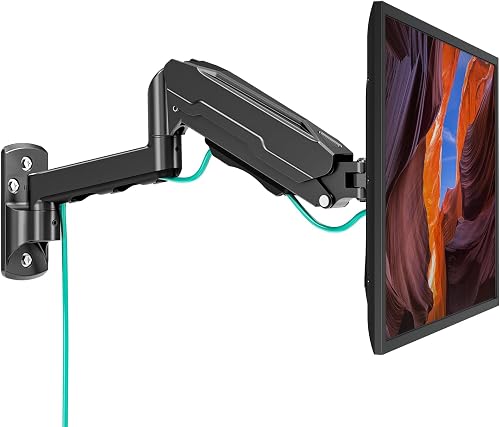
Prime MOUNT PRO Single Monitor Wall Mount for 13-32 Inch

Prime VIVO Steel Quick Release VESA Plate Kit 75×75

Prime ErGear Single Monitor Arm for 13-34 Inch Screens
As an Amazon Associate we earn from qualifying purchases. Product prices and availability are accurate as of the date/time indicated.
Pros
- Strong tempered glass base provides excellent stability for heavy monitors
- Full motion tilt, swivel and rotation helps improve posture for neck and back
- Freestanding design works on any desk without damage or clamps
- Easy installation with all necessary tools and hardware included
Cons
- Only supports VESA 50, 75 and 100, not compatible with larger VESA 200 monitors
- Glass base has a larger footprint than clamp mounts and uses more desk space
- Height adjusts in 4 fixed levels rather than continuous smooth sliding
The HEMUDU HT05B-001 is a freestanding single monitor riser designed for 13 to 32 inch LCD, LED and plasma screens. It is made for students, remote workers and office users who need better ergonomics without mounting to a wall or desk edge.
In daily use, the adjustable bracket delivers smooth tilt from -15 to +10 degrees, swivel from -50 to +50 degrees and full 360 degree rotation. You can switch quickly between landscape and portrait mode and choose from four height levels to reduce neck and back strain.
Build quality stands out with a 1/3 inch tempered glass base paired with a painted stainless steel center pole. The combination feels solid, supports up to 77 lbs, and includes built in cable management to keep your workspace neat.
The freestanding design takes up more desk space than a clamp or grommet mount, and height changes in fixed steps instead of continuous sliding. It also only fits VESA 50x50, 75x75 and 100x100 patterns, so check your monitor before buying.
Overall, this is a practical and stable solution for single monitor setups that need flexibility and easy installation. If you want an affordable, no drill stand with true ergonomic adjustment, this model is easy to recommend.
Compatibility: 13, 15, 17, 19, 21, 23, 27, 30, 32 inch screens with VESA 50x50, 75x75, 100x100.
Load Capacity: Up to 77 lbs (35 kg), Base Type: Freestanding pedestal with tempered glass.
Adjustments: Tilt -15 to +10 degrees, Swivel -50 to +50 degrees, 360 degree rotation, 4 level height.
Materials and Size: Stainless steel and tempered glass, 11.8 x 7.9 x 16 inches, 4.8 lbs, Black finish.
Model: HT05B-001, Installation: Open top slot VESA plate with tools and hardware included.
Pros
- Highly adjustable with tilt, swivel and rotation for ergonomic viewing
- Extends far from the wall yet folds flat to save space
- Strong metal build supports up to 33lbs with stable performance
- Easy to install with complete hardware and clear instructions
Cons
- Only fits 13 to 32 inch screens with VESA 75x75 or 100x100, so larger TVs are not compatible
- Requires wood stud, brick or concrete, drywall alone will not support it
- Single arm design is best for smaller displays and may feel less rigid at full 15 inch extension
The WALI WL-1330LM is a compact full motion wall mount built for 13 to 32 inch monitors and small flat panel TVs. It is ideal for anyone who wants to free up desk space in a bedroom, office, kitchen or gaming setup while keeping the screen perfectly positioned.
In daily use, the adjustability stands out with plus or minus 15 degrees of tilt, 180 degrees of swivel and 360 degrees of rotation. You can extend the arm up to 15 inches to pull the screen toward you, then push it back to just 2 inches from the wall when not in use.
Build quality is solid for its class with a full metal frame and a compact 5.9 by 1.6 inch wall plate. The joints move smoothly for repositioning yet hold the screen steady once tightened, which helps reduce neck strain during long work or viewing sessions.
There are limits to consider, as it only supports up to 33lbs and VESA 75x75 or 100x100 patterns. It also needs a wood stud, brick or concrete wall for safe mounting, so drywall only installation is not an option.
Overall, this is an excellent value for small to midsize screens where flexibility and space savings matter. If you need an affordable, sturdy and highly adjustable mount for a monitor or small TV, this WALI model is easy to recommend.
Brand and Model: WALI WL-1330LM, Black single monitor wall mount
Compatibility: Fits 13 to 32 inch screens up to 33lbs, VESA 75x75mm and 100x100mm
Motion Range: Plus or minus 15 degree tilt, 180 degree swivel, 360 degree rotation, 15 inch extension, 2 inch retracted profile
Installation: Wall mount for wood stud, brick or concrete, includes hardware kit and manual, 10 year warranty
Pros
- Wide 13 to 32 inch compatibility with standard VESA 75x75 and 100x100 patterns
- True full motion range with tilt, swivel, rotation and long 21.6 inch extension
- Smooth height adjustable gas spring for ergonomic comfort
- Sturdy metal construction with integrated cable management
- Space saving wall mount design ideal for compact desks and clean setups
Cons
- Not compatible with 1000R, 1500R or 1800R curved monitors
- Requires secure mounting to wood stud or solid concrete, not for drywall alone
- Initial tension adjustment is needed to match monitor weight for best performance
The MOUNT PRO Single Monitor Wall Mount is designed for 13 to 32 inch monitors weighing 4.4 to 19.8 lbs with VESA 75x75 and 100x100 patterns. It is a smart pick for remote workers, gamers, students, creators and traders who want a cleaner desk and more flexible viewing.
Standout performance comes from true full motion adjustment with tilt, 180 degree swivel, 360 degree rotation and up to 21.6 inches of extension. You can pull the screen close for focused work, push it back to open space, or flip between portrait and landscape for coding and design.
Build quality centers on a sturdy metal arm with a gas spring height system tested for thousands of movements. Motion feels smooth and stable once tension is set to your monitor weight, and integrated cable clips keep power and AV cords routed neatly along the arm.
There are a few limits to note. It does not support heavily curved 1000R, 1500R or 1800R screens, and it must be anchored to a wood stud or solid concrete wall for safety. You will also need a few minutes to dial in the tension and tilt resistance during setup.
Overall, this is a practical, space saving upgrade for home offices, gaming stations and collaborative workspaces. If you want ergonomic flexibility, solid construction and easy wall installation in one compact package, it delivers strong value.
Supported Screen Size: 13 to 32 inches
VESA Patterns: 75x75mm, 100x100mm
Weight Capacity: 4.4 to 19.8 lbs
Motion: +90 to -45 degree tilt, 180 degree swivel, 360 degree rotation, 21.6 inch extension
Mounting Type: Wall mount for wood stud or solid concrete walls
Material and Color: Metal, Black
Pros
- Tough steel plate feels stable and secure once mounted
- Simple slide in installation makes single person monitor mounting much easier
- Includes both short and long screws plus bushings for different monitor back styles
- Confirmed by users to work with VIVO arms and select other brands for added versatility
Cons
- Plate only provides fixed mounting, with no added tilt, swivel or height adjustment
- Only supports 75mm and 100mm VESA, so it will not fit larger VESA TVs or monitors
- Small arm fastening hardware can be easy to miss in packaging, so unpack and check both compartments
The VIVO PT-SD-VA01A is a replacement quick release VESA plate kit designed for computer monitors with 75x75mm and 100x100mm mounting holes. It is made for users who lost their original arm plate, need a second plate for quick swaps, or want simpler installation.
The standout feature is the slide in quick release design that lets you attach the plate to the monitor first, then drop it onto the arm. Users report it fits securely on 32 inch Samsung monitors and even works with compatible arms from other brands when brand matched plates do not.
Built from alloy steel with a black scratch resistant finish, the plate feels solid and durable despite its compact size. The kit includes thumb screws for flat backs plus longer screws with standoff bushings for recessed 75mm wells, covering most common monitor styles.
It is a basic fixed adapter, so it adds no movement on its own and is limited to 75mm and 100mm patterns. A few users noted confusion with packaging, as the second plate and hardware are tucked under packing paper, and the nut to secure the plate to some arms may need to be sourced separately.
For its purpose, this is a simple, sturdy and practical fix that saves you from replacing an entire monitor arm. If you need a reliable VESA 75 or 100 replacement plate with complete monitor side hardware, this VIVO kit is an easy recommendation.
Brand: VIVO, Model: PT-SD-VA01A, Color: Black, Material: Alloy Steel with scratch resistant finish.
Compatibility: VESA 75x75mm and 100x100mm, Supports monitors up to 32 inches, Mounting Type: VESA, Movement Type: Fixed.
In the Box: Quick release VESA plates, thumb mounting screws, long screws, standoff bushings and adjustment hardware. Backed by 3 Year Warranty.
Pros
- Sturdy alloy steel construction feels solid and holds monitor securely in place
- Quick three step setup with tool-free VESA plate and all needed tools included
- Smooth and wide range of motion for height, tilt, swivel and portrait to landscape rotation
- Compact footprint with effective cable management creates a cleaner workspace
Cons
- Slight shake possible when fully extended or when desk is bumped
- Limited to 19.8 lbs and 100x100mm VESA, not suitable for larger heavy duty displays
- Initial tension and tilt adjustment may need two hands and fine tuning
The ErGear Single Monitor Arm EGDMA69B is designed for 13 to 34 inch flat or curved monitors with 75x75mm or 100x100mm VESA patterns. It is a smart pick for home offices, gamers and students who want more desk space and better posture without a bulky stand.
You get up to 17.5 inches of height adjustment and 18.1 inches of reach, plus 80 degree up tilt, 50 degree down tilt, 90 degree swivel and 360 degree rotation. In daily use, that means easy eye level positioning, quick portrait to landscape flips and smooth sharing of your screen with others.
The alloy steel frame feels solid, with a 40 percent wider VESA head for extra stability and a durable core rated for long term use. Tool free cable clips keep cords tidy, while the C-clamp or grommet mount options fit most desks and leave a small footprint.
It supports up to 19.8 lbs, so very heavy 34 inch ultrawides and non VESA monitors will need an adapter or a heavier duty arm. Some users notice slight shake at full extension, and initial tilt tension is easier to set with two hands.
Overall, this is a sturdy, flexible and easy to install arm that delivers premium ergonomics for everyday work and play. If your monitor fits the size, weight and VESA requirements, it is an excellent upgrade for a cleaner, more comfortable setup.
Compatibility: 13 to 34 inch flat or curved monitors up to 19.8 lbs, VESA 75x75mm and 100x100mm. Movement: Up to 17.5 inch height, 18.1 inch reach, plus 80 degree up and 50 degree down tilt, plus or minus 90 degree swivel, 360 degree rotation.
Installation: C-clamp for desks 0.39 to 2.56 inches thick or grommet mount for desks 0.39 to 2.95 inches thick with tool free VESA plate. Build: Alloy steel in Black, tabletop mount, model EGDMA69B.
Matching a Part to Your Build
If you have a standard flat screen from 13 inch to 32 inch and you want a simple desk upgrade without drilling or clamping, look at a riser style base. The Single LCD Computer Monitor Free-Standing Desk illustrates this path with support for 50x50mm, 75x75mm, or 100x100mm patterns, a listed capacity up to 77Lbs, tilt from minus 15 to plus 10 degrees, swivel from minus 50 to plus 50 degrees, 360 degree rotation, and 4 level height adjustment along the center tube. It is a calm fit for renters and office builds where you want better posture and cable routing with minimal install fuss.
If you want your screen off the desk and close to the wall in a small bedroom, dorm, or living room PC setup, focus on wall structure and arm reach. The WALI TV Wall Mount Full Motion for 13-32 inch shows a compact full motion design with 75x75mm to 100x100mm support, capacity up to 33lbs, plus or minus 15 degrees of tilt, 180 degrees of swivel, and 360 degree rotation, with extension to 15 inches and retraction to 2 inches. The MOUNT PRO Single Monitor Wall Mount for 13 to 32 shows a longer arm alternative with extension up to 21.6 inches, tilt from plus 90 to minus 45 degrees, and support for 4.4 to 19.8lbs, but it is not listed for 1000R, 1500R, or 1800R curved screens, so curved owners should look elsewhere. For style ideas around wall and floating desks, see warm wood floating monitor desk setup.
If you want daily adjustability for work, coding, or shared screens, a desk clamp arm is often the most flexible pick. The ErGear Single Monitor Arm illustrates this class with fit for 13 to 34 inch flat or curved screens up to 19.8 lbs, 75x75mm or 100x100mm patterns, height adjustment up to 17.5 inches, reach up to 18.1 inches, tilt from plus 80 to minus 50 degrees, plus or minus 90 degrees of swivel, and 360 degree rotation. If your current display lacks holes but has a removable neck that can accept a bracket, the VIVO Steel VESA Compatible Plate Mounting Kit shows how a steel adapter plate with quick release design can bridge the gap, though you must still verify pattern size and weight with your monitor maker.
Common Mistakes
• Buying by screen size alone. A 27 inch label does not tell you if the back has 75x75mm or 100x100mm holes, how deep the recess is, or whether the panel weighs more than a 19.8 lbs or 33lbs limit. Always match pattern plus size plus weight together, and per the spec sheet, not by photo.
• Ignoring desk and wall limits. A clamp rated for desks 0.39 to 2.56 inch thick will not grip a thicker slab safely, and a wall mount rated for wood studs, brick, or concrete should not go on drywall alone. Follow the manufacturer mounting instructions for anchors, stud finding, and torque, and keep cables routed so they do not pull when the arm extends.
• Assuming every curved or all in one style screen will adapt. Some arms exclude strong curves entirely, recessed power boxes can block a flat plate, and some factory stands hide non standard latches instead of threaded holes. If you cannot confirm removable hardware and a square hole pattern, pause and check for a maker approved adapter or choose a different display for your arm based setup. A clean cable plan like minimalist RGB desk setup helps, but only after the mechanical fit is confirmed.
Who Should Wait or Buy Differently
If your monitor has a sealed back with no threaded inserts, a proprietary stand that does not detach, or a deep curve that your chosen arm excludes, an off the shelf arm is not ideal for you right now and is not a good fit until you confirm an adapter path. You should also wait if your desk is glass and unrated for clamps, if your wall is drywall without a stud, or if your panel weight sits right at the arm limit with no headroom, since a stronger mount, a freestanding base, or a different screen will serve you better than forcing a weak match.
Frequently Asked Questions
Where are VESA holes located on most monitors?
On most compatible models you will find them centered on the back panel, often under the factory stand or a snap off cover. Lay the screen face down on padding, remove the stand neck if the manual allows, and look for a square set of threaded holes. If you see only vents and smooth plastic, check the manual for your exact model.
How do you measure which VESA pattern you have?
Measure in millimeters from the center of one hole to the center of the adjacent hole, both across and down. Compare your result to common listings such as 50x50mm, 75x75mm, or 100x100mm found on mounts for 13 inch to 32 inch screens. Use the spec sheet as the final word, since visual guesses can be off by a few millimeters.
Can you mount a monitor with no VESA holes?
Sometimes, but only with a maker approved adapter that converts your specific stand connection to 75x75mm or 100x100mm. A steel plate kit can work when the neck is removable and the weight stays within the adapter and arm ratings. If no adapter exists for your model, you should keep the factory stand or plan your next display around VESA support.








Write Your Review
No reviews yet. Be the first to share your experience!