

You are trying to learn how to set monitor height and distance with an arm so your screen sits at eye level, at a comfortable reach, without wobble or clutter. The main variables are your monitor size and weight with VESA pattern, your desk thickness and mounting style, your desired height range and arm reach, and whether you run one screen now or plan a dual upgrade.
This buying guide gives you a simple decision framework you can reuse for any gaming or office build in September 2026. You will learn what to check first, how height and distance work together, and how to avoid poor fit. For more ideas in this category, browse the full Monitor Arms & Mounting archive.
What Actually Matters
Height Range and Eye Level Setup
Start with vertical travel, because it controls posture more than any other spec. You want the top edge of your display at or slightly below eye level so you look straight ahead or slightly down. A tall column with a 21 inch adjustment range gives you room to match low office chairs, tall gaming chairs, and standing desk positions without stacking books under the base.
To weigh this, sit in your normal chair and have someone note your seated eye height relative to the desk surface. Then check that the arm can raise the center of the VESA plate to that zone and still move down for relaxed viewing. Owners commonly report that small tweaks of an inch or two remove neck tension, so choose smooth height control over a very tall pole you will never use.
Viewing Distance and Arm Reach
Reach controls how close the screen feels and how much desk depth you save. Arms in this group extend up to 19.96 inches or up to 17.5 inches from the pole, which lets you pull the panel closer for focus work and push it back for controller play. Your resolution and refresh target also matter here, since you may sit closer to read small text on a high resolution panel or to fill your view in fast paced games. For visual inspiration on depth and placement, see this warm wood floating monitor desk setup breakdown.
To weigh this, think in terms of an arm length view with relaxed shoulders, not a fixed number. If your desk is shallow, prioritize forward extension and smooth swivel so you can angle the screen toward you. For two screens, look for wide span designs such as a 31.22 inch wide arm span with a 16 inch high bar, which help you curve side panels inward without crowding the center.
Weight Capacity, Size Range and VESA Fit
Size alone does not confirm fit. You must match three items at once, including screen size, weight with cables, and VESA hole pattern. The examples here cover 17 to 34 inch single screens, 13 to 32 inch dual screens, and 17 to 32 inch dual screens, with per arm support including 4.4 to 20 lbs, 4.4 to 19.8 lbs, up to 22 lbs, and up to 17.6 lbs. All use VESA 75x75mm or 100x100mm patterns, which covers most flat and curved office and gaming displays.
To weigh this, remove your factory stand and check the back panel for threaded holes spaced 75x75mm or 100x100mm. Confirm your panel weight without the stand, since curved and larger panels run heavier than they look. If you sit near the top of a stated range, pick the higher end pick with more headroom to reduce sag and the need for frequent retightening.
Mounting Method, Tilt Swivel and Stability
Mounting decides whether the arm stays solid during height moves. Common C clamp fits include 0.39 inch to 2.56 inch, 0.39 inch to 3 inch, and tops up to 3.1 inch, while grommet options include 0.39 inch to 2.17 inch, tops up to 1.9 inch, and 0.39 inch to 2.36 inch. Tilt options such as plus 90 degrees to minus 45 degrees, plus 90 degrees to minus 35 degrees, plus 90 degrees to minus 90 degrees, and plus or minus 45 degrees help you cut glare, while 180 degree swivel, plus or minus 90 degree swivel, and 360 degree rotation help you share the screen or turn it vertical.
To weigh this, measure your top thickness and check under the desk for beams or modesty panels that block a clamp. Makers often recommend solid wood tops for best grip, and you should follow the manufacturer mounting instructions for torque and pad placement. Reinforced steel structure and aerospace grade aluminum alloy both rate well per the spec sheet, and integrated cable clips keep cords from pulling the screen off center when you adjust distance.
To see how these specs look in real products, here are a few options that show the range from tall single arms to dual value arms:
This article contains affiliate links. If you buy through one of our links, CustomPCGaming may earn a commission at no extra cost to you. Commissions never influence which products we recommend or how we rank them. Read our Affiliate Disclosure for details.
Quick Picks at a Glance

Prime monTEK Tall Single Monitor Arm for 17-34 Inch

HUANUO Dual Monitor Mount for 17-32 Inch Screens

HUANUO Dual Monitor Stand for 13 to 32 Inch
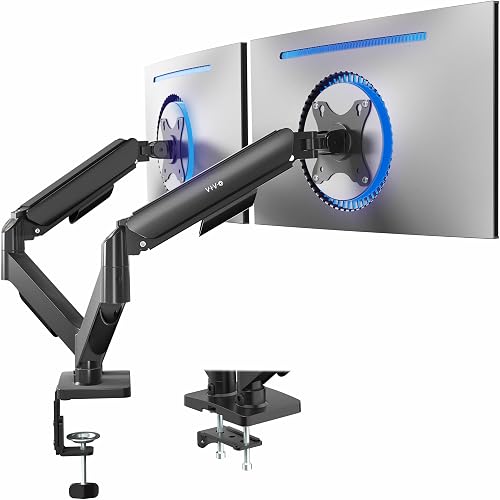
VIVO Dual Monitor Stand for 17 to 32 Inch Screens

Prime ErGear Dual Monitor Stand for 13-32 Inch Screens
As an Amazon Associate we earn from qualifying purchases. Product prices and availability are accurate as of the date/time indicated.
Pros
- Tallest in class 21 inch height range works well for tall users, sitting to standing desks and stacked viewing
- Strong 20lbs support handles large curved monitors with confidence
- Complete tilt, swivel and rotation adjustment for ergonomic, custom positioning
- Reinforced alloy steel frame delivers stable, wobble resistant performance
Cons
- Tabletop mounting only, so users needing grommet or wall mounting will need a different model
- Spec sheet lists 32 inches as max supported size while title states 34 inches, so verify weight and VESA for larger screens
- Black only finish offers no color options to match lighter desk setups
The monTEK Tall Single Monitor Arm is a full motion desk mount designed for 17 to 34 inch flat and curved monitors. It is built for remote workers, gamers and standing desk users who struggle to get their screen high enough for comfortable viewing.
The standout spec is the 21 inch tall column with up to 19.96 inches of extension, which makes eye level alignment easy. Combined with wide tilt, swivel and 180 degree rotation, you can quickly switch from landscape work to portrait reading or fine tune glare.
Built from reinforced alloy steel, this mount feels far more stable than lightweight plastic alternatives. The heavy duty structure holds up to 20lbs securely, which helps minimize sagging and wobble with larger curved displays.
Compatibility still needs attention, as you must confirm VESA pattern, monitor weight and desk thickness before buying. The spec listing shows some size variation and the mount is tabletop only in black, so options are limited.
Overall, this is a smart pick if height is your priority and you want ergonomic flexibility without a bulky stand. For its sturdy build, smooth adjustability and space saving design, it delivers excellent everyday value for home and office setups.
Pros
- Strong aluminum alloy construction supports large 32 inch monitors with stable, sag free holding
- Highly adjustable tilt, swivel, rotation and height for ergonomic comfort and glare reduction
- Compatible with flat and curved monitors with standard VESA 75 and 100 patterns
- Easy installation with both C-clamp and grommet mounting options and included tools
Cons
- Heavier monitors near the 22 lbs limit may need extra tension tuning to stay perfectly in place
- Needs a wide, sturdy desk within the supported thickness range, not ideal for thin or glass tops
- Two 32 inch monitors side by side need significant desk width to swivel freely
The HUANUO HNDS18 is a dual monitor mount designed for 17 to 32 inch flat or curved screens with VESA 75 or 100 patterns. It is built for remote workers, gamers and creators who want two screens at eye level without sacrificing desk space.
Each arm supports up to 22 lbs and offers tilt, swivel, 360 degree rotation and height adjustment up to 17.5 inches. In daily use, you can pull screens closer, switch to portrait mode for coding, or angle displays to cut glare with smooth motion.
Made from aerospace grade aluminum alloy, the stand feels solid and resists sag or wobble when properly tightened. The hang on VESA plate design with tightening knobs makes mounting straightforward, and both C-clamp and grommet options add flexibility.
Heavier monitors near the weight limit may need extra tension tuning to stay perfectly in place. You will also need a wide, sturdy desk to fully enjoy dual 32 inch screens, as full swivel requires clearance on both sides.
For users seeking an affordable, sturdy and highly adjustable dual monitor solution, this HUANUO mount delivers strong value. It improves ergonomics, reclaims desktop space and adapts easily to work, play and multitasking setups.
Brand: HUANUO, Model: HNDS18, Fits 17 to 32 inch monitors with VESA 75x75 or 100x100 patterns.
Weight capacity: 22 lbs per arm, Movement: Tilt, swivel, rotate and height adjustment up to 17.5 inches.
Mounting: C-clamp for 0.39 to 2.56 inch desks or grommet for 0.39 to 2.17 inch desks, Material: Aluminum alloy in Black.
Pros
- Solid cast metal construction feels premium and holds dual monitors without sagging
- Smooth gas spring adjustment is easy to set with one hand
- Quick installation with included hardware, manual and two mounting options
- Frees up desk space and improves ergonomics for long work or gaming sessions
Cons
- Both monitors must meet size, weight and VESA requirements, very light screens under 4.4 lbs may float
- Included M4x30 screws can be too long for some slim monitors
- Side to side panning range is more limited compared to tilt and height motion
The HUANUO HNDS6W is a white dual monitor desk mount designed for 13 to 32 inch computer screens with VESA 75x75mm or 100x100mm patterns. It is built for remote workers, gamers and students who want two screens at eye level without giving up desk space.
Each gas spring arm supports 4.4 to 19.8 lbs and offers full motion tilt, swivel, rotation and height adjustment. In daily use, screens move smoothly with one hand and stay in place with no sag, making it easy to switch between work, gaming and portrait mode.
The mount uses alloy steel with a reinforced hinge structure and a wide C-clamp or grommet base for stable fixation. The clean white finish looks modern, while integrated cable clips route wires neatly behind the arms for a clutter free setup.
Compatibility is strict, so you must match screen size, weight and VESA pattern together for both monitors. Very light displays below the minimum weight can float upward, and some users may need shorter screws than the included M4x30 hardware.
For dual 23 to 32 inch office or gaming setups, this HUANUO stand delivers smooth ergonomics, solid stability and easy installation. If your monitors meet the size and weight requirements, it is a practical upgrade for comfort, posture and workspace organization.
Model: HNDS6W-US, Color: White, Material: Alloy Steel, Mounting: C-clamp or Grommet Base
Screen Size: 13 to 32 inches per screen, Weight Capacity: 4.4 to 19.8 lbs per arm
VESA Pattern: 75x75mm and 100x100mm, Movement: Tilt up to 85 degrees, Swivel, Rotate, Height Adjustment
Features: Gas Spring Arms, Integrated Cable Management, Ergonomic Eye Level Design
Pros
- Supports large dual screens up to 32 inches with strong 19.8 lbs capacity per arm
- Highly adjustable with tilt, swivel, rotation and spring counterbalance
- Solid alloy steel build with dual mounting options for different desks
- Clears significant desk space while improving ergonomic comfort
Cons
- Arms extend behind the desk, so it requires clearance against walls
- Spring tension may need careful adjustment for lighter monitors near 4.4 lbs
- Two large 32 inch screens may feel crowded on smaller desks
The VIVO STAND-V002O is a dual monitor desk mount designed for 17 to 32 inch screens in gaming and office setups. It supports flat and curved monitors with VESA 75x75 or 100x100 patterns. It is a smart pick for users who want a cleaner, more ergonomic dual screen workspace.
Mechanical spring arms provide smooth, toolless adjustments with balanced positioning in any direction. You get 90 degrees of tilt, 180 degrees of swivel and full 360 degree rotation for landscape or portrait modes. In daily use, this makes it easy to share screens, reduce glare and find a comfortable viewing angle.
Built from alloy steel in classic black, the mount feels sturdy and stable with two fully loaded screens. The open top VESA plates allow quick slide on monitor installation, and all hardware is included. You can secure it with a heavy duty C-clamp for thick tops or use the bolt through grommet option.
The arms extend past the back edge of the desk, so you will need clearance if your desk is against a wall. Very light monitors near the minimum weight may require extra spring tension tuning. As with most dual mounts, two large 32 inch screens need a wide desk for full articulation.
Overall, the STAND-V002O delivers flexible ergonomics, solid construction and real desk space savings. It is well suited for productivity, creative work and immersive gaming with dual displays. For shoppers seeking an affordable and reliable dual monitor arm, it is an excellent value.
Compatibility: Dual monitors from 17 to 32 inches, 4.4 to 19.8 lbs per screen, VESA 75x75mm and 100x100mm.
Motion: Plus 90 to minus 90 degree tilt, 180 degree swivel, 360 degree rotation with mechanical spring adjustment.
Mounting and Build: Tabletop C-clamp for tops up to 3.1 inches or grommet mount up to 1.9 inches, alloy steel in black, model STAND-V002O.
Pros
- Fits large dual 32 inch setups that many budget mounts cannot handle
- Excellent range of motion for ergonomic comfort and reduced neck strain
- Sturdy metal frame with high 17.6 lbs per arm capacity
- Saves valuable desk space while keeping cables organized
- Flexible C clamp or grommet installation with clear instructions
Cons
- Requires VESA 75x75 or 100x100 mounting holes, not compatible with non VESA monitors
- Only recommended for solid wooden desks within specific thickness ranges
- Bottom desk beams or panels can interfere with clamp installation
The ErGear EGCM1 is a heavy duty dual monitor stand designed for home offices, gaming setups and multitasking workstations using two 13 to 32 inch monitors. It is ideal for users who want an immersive dual screen experience without taking up valuable desk space.
In real world use, the +/-90 degree swivel, +/-45 degree tilt and 360 degree rotation make it easy to find a comfortable, ergonomic viewing angle. You can place screens in landscape or portrait mode, angle them inward to reduce neck and eye strain, and adjust height along the 16 inch pole.
Build quality is a strong point thanks to the all metal frame, wide 31.22 inch arm span and secure VESA plates for 75x75mm and 100x100mm patterns. Once tightened, the mount holds monitors up to 17.6 lbs per arm steadily while integrated cable clips keep wires neat and out of sight.
There are some limitations to consider before buying. It only works with VESA compatible monitors and is recommended for solid wooden desks, so glass or thin desks and tables with under desk beams may cause installation issues. You will also need to check desk thickness for the C clamp or grommet mount.
Overall, the ErGear dual monitor mount delivers impressive flexibility, stability and desk saving design for dual 32 inch setups. If your monitors and desk meet the compatibility requirements, it is a practical and reliable upgrade for work and play.
Model: ErGear EGCM1 dual monitor desk mount in Black with metal construction.
Compatibility: Fits two 13 to 32 inch monitors up to 17.6 lbs each with VESA 75x75mm and 100x100mm.
Adjustment: Plus or minus 90 degree swivel, plus or minus 45 degree tilt, 360 degree rotation, height adjustable on 16 inch pole.
Mounting: Tabletop C clamp fits desks 0.39 to 3 inches thick, grommet mount fits 0.39 to 2.36 inches, wooden desks recommended.
Matching a Part to Your Build
If you run one main display and posture is your priority, focus on maximum lift and forward reach. The monTEK Tall Single Monitor Arm, 21″Max Height fits most 17 to 34 inch monitors from 4.4 to 20 lbs with VESA 75x75mm or 100x100mm, plus a 21 inch column and up to 19.96 inches of extension. Its plus 90 degree to minus 45 degree tilt, plus or minus 90 degree swivel, and 180 degree rotation make it simple to set eye level height, then fine tune distance and glare without moving the base.
If you run two matched 17 to 32 inch screens for work and play, prioritize even height and side angle control. The HUANUO Dual Monitor Mount for 2 Monitors up to 32 supports up to 22 lbs per arm and offers up to 17.5 inches of lift and extension, with plus or minus 90 degree swivel, plus 90 degree to minus 35 degree tilt, and 360 degree rotation. The VIVO Dual Monitor Stand, Fully Adjustable Arms is a close alternative for 17 to 32 inch screens from 4.4 to 19.8 lbs, with plus 90 degree to minus 90 degree tilt, 180 degree swivel, and 360 degree rotation, though owners note the back of the arms can extend past shallow desks.
If you want a value dual setup or you use lighter 13 to 32 inch panels, check weight limits closely. The ErGear Dual Monitor Stand supports up to 17.6 lbs per arm with plus or minus 90 degree swivel, plus or minus 45 degree tilt, and 360 degree rotation on a 31.22 inch span. The HUANUO Dual Monitor Stand covers 13 to 32 inch screens from 4.4 to 19.8 lbs and adds smooth spring motion for frequent moves. Both free up surface room for keyboard, speakers, and laptop dock, but neither is a good fit if your curved gaming panels sit near the top of the weight range. If your desk cannot take a clamp, review this freestanding monitor stand for glass desk guide before you buy.
Common Mistakes
Mistake 1: Buying by diagonal size only. Two 32 inch monitors can differ by several pounds once the stand is removed, and only VESA 75x75mm or 100x100mm holes confirm direct fit. Always verify size range, per arm weight range, and hole pattern together, and leave headroom if you use a heavy curved panel.
Mistake 2: Ignoring desk thickness and structure. A clamp rated 0.39 inch to 2.56 inch will not grip a thicker butcher block top, and a beam under the desk can block the bracket entirely. Measure thickness, confirm wood or other approved material, and choose C clamp or grommet based on what your top allows.
Mistake 3: Setting height once and forgetting distance and tilt. Many users raise the screen to eye level but leave it too far back or tilted up, which causes glare and forward head posture. After you set height, pull the arm to a relaxed reach, add slight downward tilt to cut reflections, and recheck after you change chairs. Good how to choose LED desk lighting for eye comfort habits also reduce strain during night sessions.
Who Should Wait or Buy Differently
A clamp arm is not ideal for every desk, and you should be plain about who should not buy now. If you own a glass, hollow core, or very thin top, if your monitor lacks VESA holes and you do not want an adapter, or if you use a super wide single panel that exceeds the stated size and weight limits, pause and consider a freestanding base or a wall solution rated for your exact display. Renters who move often or users who rearrange daily may also prefer a simpler stand until the setup is stable.
Frequently Asked Questions
How high should my monitor be on an arm?
Raise the panel so the top bezel sits near eye level and you gaze slightly downward at the center. Use the column travel first, such as the 21 inch range or up to 17.5 inches above the desktop found here, then add small tilt tweaks. If your neck bends up or your shoulders rise, lower the screen a bit and recheck.
How far should I sit from a monitor on an arm?
Start at a relaxed arm length view where you can read text without leaning forward, then use arm extension to fine tune. Reaches up to 19.96 inches or 17.5 inches let you bring the screen closer for documents and push it back for video or controller games. Owners commonly report that closer placement suits dense work while a bit more distance feels easier for long viewing.
Will these arms fit my monitor and desk?
Check three monitor items including 13 to 32 inch, 17 to 32 inch, or 17 to 34 inch size range, per arm weight such as 4.4 to 20 lbs or up to 22 lbs, and VESA 75x75mm or 100x100mm holes. Then measure desk thickness against the clamp or grommet range and confirm solid material with clear space underneath. When any value is close to the limit, assessed options with higher headroom usually hold alignment longer.

Write Your Review
No reviews yet. Be the first to share your experience!