

You are trying to solve a space puzzle when you learn how to organize a mic, headset, and webcam on one desk. Your headset needs a safe resting place, your controller needs quick access, your mic needs to stay close without blocking your keyboard, and your webcam needs a steady view without eating monitor space.
In 2026, the smart approach is to think in zones rather than buying random stands. Measure your desk edge and thickness, decide what must stay clamped overhead versus what can hang on the side, plan your cable path from each device to your PC, and leave room for your next add-on like a second controller or a phone holder. For broader display ideas, browse the Headset, Controller and Collectible Displays archive to see how different mounting styles fit small and large setups.
What Actually Matters
Mounting Method and Desk Compatibility
Your first filter should be how a mount grips your desk. Under desk clamps, side clamps, and C clamps all need a flat edge with enough depth to bite, plus protective pads so you do not scratch the finish. You should follow the manufacturer mounting instructions closely and tighten by hand until the mount feels solid without bowing your desk panel.
You should also decide between top mount and under mount positions before you buy. A top mount keeps your headset cups visible and easy to grab, while an under mount pushes gear out of your camera frame and frees surface area. If your desk has a beveled edge, a modesty panel, or a cable tray in the way, owners commonly report that fit issues show up fast, so check clearance on both sides of the edge.
Weight Support and Positioning Flexibility
Your mic and webcam behave very differently from your headset. A headset hangs passively, while a mic plus shock mount and a webcam on an adapter create leverage that pulls on an arm joint. You want ball heads with padded rings, anti twist pins, and firm friction locks that hold angle when you type, swivel your chair, or bump the desk.
You should think about reach and height as well as load. An articulating arm that extends overhead lets you place a webcam high for calls or low for overhead shots of your keyboard, while a fixed hanger cannot do that job. If you plan to swap between a mic, a small camera, and a phone, look for a system that accepts common threads and phone holders without forcing you to rebuild the whole mount.
Headset and Controller Storage Needs
Your headset and controller need shaped support, not just a hook. Wide hangers spread pressure across the headband, soft silicone pads keep controllers from sliding, and EVA style pads on the clamp protect both your gear and your desk. You should leave enough air gap that your ear cushions do not press against a panel, which helps pads keep their shape over time.
You should also count how many devices you actually store daily. If you rotate between console controllers and a PC headset, a single dual purpose hanger may be enough. If you share the desk or keep spares charged, you will benefit from multiple hangers and hooks so each item has a home and you stop stacking gear on your mousepad.
Cable Control and Daily Workflow
Your cables decide whether the setup feels clean or chaotic. A mic cable, a webcam cable, and a charging cable for your headset or controller can tangle quickly if they all drop straight to the floor. You should route each cable with clips or a tray so there is gentle slack for movement but no loops that catch your arm, and you can learn solid patterns in this guide on how to route cables for a clean desk setup.
You should match storage to your routine. If you stream daily, your mic and webcam should stay mounted and ready, while your headset lives on a side hanger you can grab without looking. If you work by day and play by night, modular boxes for pens, keys, and adapters plus dedicated hangers help you switch modes without clearing your whole surface.
Here are a few options that show the range from a simple dual hanger to a full side organizer and an overhead arm for cameras and mics:
This article contains affiliate links. If you buy through one of our links, CustomPCGaming may earn a commission at no extra cost to you. Commissions never influence which products we recommend or how we rank them. Read our Affiliate Disclosure for details.
Quick Picks at a Glance
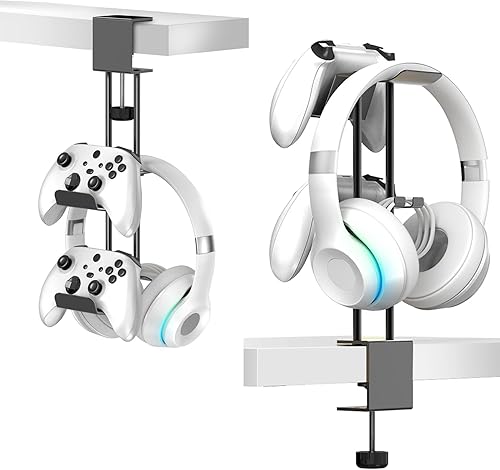
Prime TpeeTeek 2-in-1 Aluminum Headphone Stand

NEEWER 22 inch Magic Arm with Desk Clamp

Prime KDD 7-in-1 Clamp-On Desk Pegboard
As an Amazon Associate we earn from qualifying purchases. Product prices and availability are accurate as of the date/time indicated.
Pros
- Solid aluminum construction feels sturdy and built to last
- Dual holder design keeps headset and controller together and within reach
- Clamp with protective silicone and EVA pads prevents slips and desk scratches
- Works with PS5, Xbox Series X/S and most over-ear headphones
- Mounts above or below desk for clean, customizable setup
Cons
- Clamp only fits desks up to 1.95 inches thick, not suitable for extra thick tabletops
- Single silver color and minimalistic style offers limited aesthetic options
- Under-desk placement may not suit users who prefer a freestanding desktop display stand
The TpeeTeek Headphone Stand with Controller Holder is a 2-in-1 under desk organizer designed for PC and console gamers. It is ideal for anyone with a PS5, Xbox Series X/S and over-ear headphones who wants to clear desktop clutter.
Its dual hanger keeps your headset and controller side by side and within easy reach during play. The adjustable clamp locks firmly to desks up to 1.95 inches thick and can mount on top or underneath for flexible use.
Built from robust aluminum with a high temperature paint finish, the bar feels solid and resists oxidation and daily wear. Soft silicone pads in the holder plus an EVA pad on the clamp keep gear stable while protecting desks from scratches.
The clamp design does limit compatibility to thinner desks and will not fit extra thick tabletops. It also comes in a single silver minimalistic style, so options are limited if you want a matching setup color.
Overall, this is a practical, sturdy and space saving upgrade for small gaming stations. If you want affordable, universal storage that keeps essentials organized and protected, this TpeeTeek stand is a smart pick.
Form Factor: Desk stand with under desk clamp mount for gaming setups.
Compatibility: Most over-ear headphones, PS5, Xbox Series X/S and other controllers.
Material: Aluminum support bar with high temperature paint, silicone and EVA pads.
Clamp Range: Fits desks up to 1.95 inches thick, top or under desk install.
Color: Silver, Style: Modern Minimalistic, Includes: 1 stand holder with 2 year warranty.
Pros
- Sturdy aluminum construction feels stable and long lasting
- Highly adjustable with triple ball heads for creative angles
- Clamps to both flat desks and round rods, stands and rigs
- Includes phone holder and cleaning cloth for ready to use setup
Cons
- 500g weight limit is too low for full size DSLR with heavy lens
- 400g arm weight and 32cm folded size is bulky for travel
- Not water resistant, so limited for outdoor action use
The NEEWER UA057 is a 22 inch articulating magic arm bundled with a desk super clamp and phone holder, built for overhead and side angle shooting. It is aimed at streamers, YouTubers, podcasters, remote workers and tabletop photographers who need hands free mounting for cameras, phones, webcams and mics.
With three sets of 360 degree dual ball heads, you can adjust height, angle and orientation in seconds for overhead flat lays, Zoom calls or live demos. Each joint uses padded rings for a firm grip, so your phone or action cam stays locked in place without drifting during recording.
The arm and clamp are made from aluminum alloy with nonslip pads and anti twist pins at every mounting point. It clamps to flat surfaces up to 2 inch thick or round poles up to 1.6 inch, and works with desks, light stands, tripods and 25 to 30mm stabilizer rods.
The 500g payload means it handles action cams, phones, webcams and small mics best, but heavier DSLR and lens combos can strain it. It is also not water resistant and the folded 32cm arm adds noticeable weight to a travel kit.
For creators who want one affordable mount to handle overhead video, streaming and podcasting, the UA057 is a versatile and stable pick. It is easy to set up, highly adjustable and thoughtfully designed to prevent slips and scratches.
Model: NEEWER UA057 in Silver with aluminum alloy arm and super clamp, folding to 32 x 7 x 7cm and weighing 400g.
Reach: 55cm or 22 inch extended length with triple 360 degree dual ball heads and 1/4 inch plus 3/8 inch threads for ARRI style mounting.
Clamp Capacity: Fits flat surfaces up to 2 inch thick and round tubes up to 1.6 inch diameter, including desks, tripods, light stands and stabilizer rods.
In the Box: 1 articulating arm, 1 super clamp, 1 phone holder and 1 cleaning cloth with max load of 500g for phones, action cams, webcams and mics.
Pros
- Includes 7 accessory types for headphones, controllers, phone, pens and cables in one kit
- No-drill clamp installs without tools and includes pads to protect desk surface
- Detachable two-panel design allows easy reconfiguration and space saving storage
- Freely repositionable hooks and boxes support personalized gaming or office setups
Cons
- Only fits desks less than 2 inches thick, so not compatible with thicker countertops
- Plastic construction is lightweight but less sturdy than metal pegboards for heavy gear
- Compact depth may limit storage for larger accessories
The KDD 7 in 1 Clamp-on Desk Pegboard is a side mounted organizer designed to clear clutter without drilling into your desk. It is ideal for gamers, students and remote workers who keep headphones, controllers, phones and small tools close at hand.
Standout value comes from the full accessory kit, including a phone holder, three headset and controller hangers, two storage boxes, cable clips and five hooks. In daily use, this setup keeps essentials visible and reachable while freeing up valuable desktop surface for keyboard, mouse and work.
The layout is fully customizable, so you can reposition each module to fit your workflow or gaming setup. The two pegboard panels connect with buckles and detach without tools, which makes it easy to reconfigure or store flat when not needed.
Build quality centers on lightweight polished plastic that keeps the unit easy to mount and reposition. The clamp includes protective pads to avoid scratches, though it only fits desktops less than 2 inches thick, so check your desk edge before buying.
Overall, this is a smart pick for anyone who wants affordable, renter-friendly side storage with gaming ready versatility. If you need modular organization without permanent installation, the KDD pegboard delivers practical function in a compact footprint.
Brand: KDD, Model: 9-KDD-763, Color: Black, Material: Plastic with polished finish
Dimensions: 8.19 inch D x 3.07 inch W x 16.14 inch H, Weight: 1.34 kg, Compartments: 3
Mount: Clamp-on for desks under 2 inches thick, no drilling required, protective pads included
Includes: Phone holder, 3 hangers, 2 storage boxes, removable compartment, 2 cable clips, 5 hooks
Matching a Part to Your Build
If your main problem is headset plus controller clutter on a compact gaming desk, focus on a sturdy side or under mount hanger. The Headphone Stand with Controller Holder shows this approach well with its 2-in-1 layout that pairs headset storage and a controller holder in one aluminum unit. It uses soft silicone pads in the holder and an EVA style pad on the clamp to protect your gear and desk, and the adjustable locking clamp is rated for desks with a maximum thickness of 1.95 inches, so you can place it on top or underneath for quick grabs during play.
The trade off is scope, since this style does not carry your mic or webcam. You should choose it when your camera already sits on your monitor and your mic lives on a separate boom, and you simply want your headset and controller off the surface. Pair it with an under desk cable tray for gaming desks so your charging cable drops cleanly instead of dragging across your mousepad.
If your main problem is getting your webcam and mic off your monitor and into a better position, prioritize an articulated mount with a real load rating. The NEEWER 22″ Magic Arm with Desk C Clamp is built around an aluminum alloy arm with an extended length of 55 cm/22 inches and 3 sets of 360 degree dual ball head adapters for angle and height flexibility. It is rated for devices up to 500 g/17.6 oz, which covers many webcams, action cams, small phones, and compact mics for Zoom calls, overhead photography, gaming, streaming, video recording, and podcasts, and it mounts to flat surfaces up to 2 inches/50 mm thick or cylindrical objects up to 1.6 inches/40 mm in diameter.
You need to respect that weight limit and check your mic plus mount combo before you buy. Owners commonly report that heavier broadcast mics with large shock mounts can exceed what a compact magic arm holds comfortably, which leads to sag during long sessions. This pick is a good fit when you want one overhead point for a webcam or light mic that you can reframe quickly, but you should plan a separate hanger for your headset so you do not overload the arm.
If your desk is shared, small, or crowded with phone, pens, keys, and multiple controllers, look at side pegboard storage instead of single hooks. The KDD 7 in 1 Clamp-on Desk Pegboard takes this route with a 7-in-1 clamp on layout that includes a phone holder, 3 headphone and controller hangers, 2 different sized storage boxes, a removable medium compartment, 2 cable clips, and 5 hooks. It requires no drilling, installs with a clamp that has protective pads, and is designed for tables less than 2 inches thick, with detachable panels you can arrange to suit your space.
This system shines for daily workflow because everything has a slot and you can see your gear at a glance. The con is side footprint and reach, since a loaded pegboard hangs off the edge and can crowd your leg room if your desk is narrow. You should choose it when you need family friendly organization for Switch gear, headphones, controllers, and office bits in one place, and keep your webcam and mic on a dedicated arm so your camera view stays clear.
Common Mistakes
Mistake one is buying a clamp without measuring your edge. A mount rated for a maximum thickness of 1.95 inches or less than 2 inches will not grip a thick office top with a bevel, and a C clamp made for flat surfaces up to 2 inches/50 mm will wobble on a rounded pole. You should measure thickness and check for lips, drawers, and trays, then confirm pad placement so metal never touches wood directly.
Mistake two is overloading a magic arm with a mic that is too heavy. A rating up to 500 g/17.6 oz sounds generous until you add a shock mount, a pop filter, and a thick XLR cable that pulls to one side. You should total the full hanging weight, keep cables clipped with slack, and follow the manufacturer mounting instructions for tightening ball heads so your overhead angle does not drift mid call.
Mistake three is parking your headset where it blocks your mic or camera. A side hanger placed too high can push ear cups into your webcam frame, while a mic parked in front of a hanger forces you to reach across cables. You should trial the layout with your chair pushed in, leave breathing room for cushions and controller sticks, and route charging leads so they pull down and away rather than across your keyboard.
Who Should Wait or Buy Differently
You should pause if your desk cannot accept clamps, if your mic rig is well above compact arm limits, or if you need full studio isolation with a floor stand and acoustic treatment. A clamp based organizer is not ideal for glass tops with fragile edges, very thick executive desks beyond the listed clamp range, or setups where your camera must track across the room. In those cases you are better served by a freestanding headset stand, a heavy duty mic boom with a weighted base, or a wall shelf, and you can revisit clamp mounts after you confirm edge access and weight needs.
Frequently Asked Questions
Can one mount hold my mic, headset, and webcam at once?
In most cases you should split duties for stability and reach. Use an articulated arm for your webcam or compact mic where positioning matters, and use a dedicated hanger or pegboard for your headset and controller where passive support matters. This keeps weight balanced and lets you grab audio gear without shaking your video frame.
Will a clamp mount scratch or dent my desk?
A well designed clamp with soft pads and even pressure should leave your desk unmarked when installed correctly. You should clean the edge first, place pads fully on the surface, tighten gradually, and avoid over torquing on hollow or veneer tops. If you rent or use a premium finish, check the spot after a day and adjust as needed.
How do I keep all the cables tidy with three devices on one desk?
Give each device its own short path to the back edge, then combine them in a tray or clips with a little service slack. Keep mic and webcam leads separated from power bricks to reduce tugs, and leave a dedicated charging lead on your headset hanger so you are not fishing behind your PC. For dual screen layouts, these ideas for how to do cable management for a dual monitor setup translate well to mic and camera routing.



Write Your Review
No reviews yet. Be the first to share your experience!