

Video credit: Justin Tse. Original video: https://www.youtube.com/watch?v=xPk4-yFIL5A. This is our own independent breakdown and is not affiliated with the video creator. As an Amazon Associate, CustomPCGaming earns from qualifying purchases. Product prices shown in the video may have changed.
Watch the build
Parts in this build
- Amazon Basics Single Monitor Arm
- KAFRI RGB Headphone Stand
- Hbada Ergonomic Chair
- InnoGear Microphone Arm
- SteelSeries QcK Prism XL
- Edifier R1280T
- Cubiker L-Shaped Gaming Desk
- Govee RGBIC LED Strip
- Skywin Controller Stand
Parts list is our summary of the video for reference. Confirm current specs and price on the retailer page before buying.
Watch: The Setup Tour
This style mixes neon cyberpunk color with a practical student streaming layout that still works for homework. You get a corner friendly desk, glowing accents and gear placed for mic work and controller play. It tends to suit students and new streamers who want one desk for school, chat and games.
What This Setup Is Going For
You are going for dark surfaces with bright contrast. Think black desk finish, deep purple and cyan glow, plus small RGB details that pop on camera. The video above shows the look and proportions only, while our picks below are our own most current recommendations for November 2026.
Layout matters more than any single accessory. You want your main monitor centered on an arm, your keyboard and mouse on a large mat, and your tower or console off to the side where it stays ventilated. A mic arm swings in when you record and pushes out when you study, while stands keep your headset and controllers off the desk surface.
This approach suits a bedroom, dorm corner or small apartment wall where one desk must do everything. An L shape works well because you can put school work on one wing and streaming gear on the other. If you want ideas for glow placement, see these LED strip lights for gaming room baseboards for how strips change a wall without paint.
The tradeoffs are space, wiring and visual noise. A corner desk needs more floor depth than a flat desk against a wall, especially when you pull a monitor arm back. You also have more cables to route with speakers, a mic, a headset stand hub and lighting, so plan your power strip location early.
This style does NOT suit everyone. It does not suit very small rooms where an L desk blocks a closet door, renters who cannot drill or mount, tight budgets where lighting and arms would take money from your PC or chair, or people who move often and need a fast teardown. It can also feel busy on camera if you add too many glowing items at once.
The Gear Breakdown
This is the core of the breakdown. The tour video is representative of the look and layout only, not a shopping list. Our 2026 picks below show how you can build a similar cyberpunk student streaming desk setup with parts that are easy to find now.
This article contains affiliate links. If you buy through one of our links, CustomPCGaming may earn a commission at no extra cost to you. Commissions never influence which products we recommend or how we rank them. Read our Affiliate Disclosure for details.
Quick Picks at a Glance

Prime SteelSeries QcK XXL Gaming Mouse Pad

Edifier R1280T Powered Bookshelf Speakers

Prime InnoGear Microphone Boom Arm with Cable

Cubiker 63 Inch L-Shaped Electric Standing Desk

Prime Govee RGBIC Smart Car LED Strip Lights with App

KAFRI RGB Gaming Headset Stand with Controller

Prime Amazon Basics Single Monitor Arm Mount for 13-30
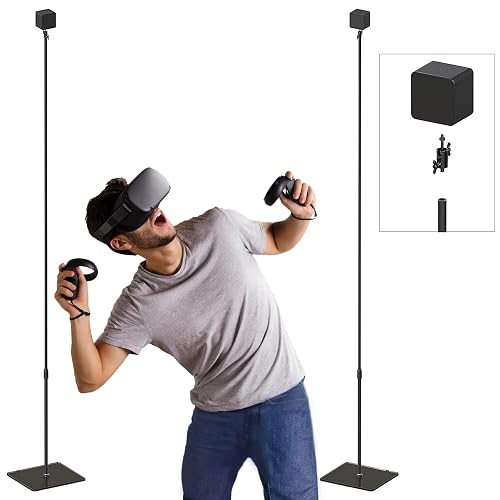
Prime Skywin VR Stand 2-Pack with Tempered Glass Base

Prime Hbada Ergonomic Mesh Office Desk Chair with Lumbar
As an Amazon Associate we earn from qualifying purchases. Product prices and availability are accurate as of the date/time indicated.
Pros
- Excellent tracking accuracy for both optical and laser sensors
- Generous XXL size gives plenty of room for wide mouse movements
- Stays firmly in place with durable non slip rubber base
- Smooth yet controlled glide praised for comfort and precision
- Durable cloth construction holds up well to daily use
Cons
- Slim 2mm profile offers minimal cushioning compared to thicker pads
- XXL footprint may overwhelm smaller desks, measure space before buying
- Black cloth surface can show dust, lint and wear over time
The SteelSeries QcK XXL is a full desk cloth mouse pad designed for gamers, creators and anyone who wants a clean, unified desk surface. Measuring 35 by 16 inches, it easily holds a keyboard, mouse and part of your monitor setup.
In real world use, the high thread count micro woven surface delivers smooth, consistent glide with precise stopping power. Both optical and laser sensors track accurately, making fast flicks feel quick while still allowing controlled, precise aim.
Build quality is simple but proven, with a smooth black cloth top and a durable rubber base that stays planted. At just 2mm thick, it lies flat without curling and avoids the overly soft, spongy feel of thicker pads.
The main tradeoff is size and maintenance. The XXL footprint is too large for compact desks, so measuring first is smart, and the dark cloth can collect dust and lint with daily use.
Overall, the QcK XXL is a legendary pick for good reason, offering reliable tracking, total desk coverage and trusted stability. If you want an affordable, no fuss upgrade to your battlestation, this is an easy recommendation.
Brand: SteelSeries, Model Number: 63429, Size: XXL, Dimensions: 35 inches x 16 inches x 0.08 inches, Thickness: 2mm, Material: Micro woven cloth top with rubber base, Color: Black, Shape: Rectangular.
Designed for gaming with optical and laser mice, the non slip base provides stability on wood, glass and laminate desks. The low profile design works well for low sensitivity players who need extra mousing space.
Pros
- Warm, detailed studio sound that outperforms typical plastic PC speakers
- Solid MDF wood cabinets with attractive classic finish
- Easy dual device connectivity with simple wired setup
- Convenient remote for volume plus side panel EQ controls
Cons
- Wired only with no Bluetooth, optical or USB input
- Bass is full for its size but lacks deep sub-bass for movies and bass heavy music
- Remote controls volume only, bass and treble must be adjusted on the speaker
The Edifier R1280T is a powered 2.0 bookshelf speaker system designed for near field listening at a desk, shelf or TV stand. It is built for students, remote workers, vinyl fans and casual gamers who want better sound than stock PC or TV speakers without adding a subwoofer.
With 42 watts of total power, a 4-inch woofer and 13mm silk dome tweeter in each cabinet, it produces warm, balanced and surprisingly room filling sound. Dual RCA AUX inputs let you keep a computer and turntable or TV connected at the same time, and users praise its clear vocals, smooth highs and pleasant bass for music, movies and gaming.
Build quality is a clear highlight, with solid MDF cabinets finished in classic wood effect vinyl that looks far more premium than typical plastic PC speakers. Side panel knobs for volume, bass and treble make tuning simple, while the included remote adds convenient volume control from across the room.
There are tradeoffs to know before buying. This wired only model has no Bluetooth, optical, USB or subwoofer output, so it is less flexible than newer versions for wireless streaming or home theater expansion. Bass is full for its size but rolls off below 80Hz, so bass lovers may miss deep rumble.
Overall, the R1280T remains one of the best value powered bookshelf speakers for desktops and small rooms. If you want simple setup, timeless looks and natural studio style sound for everyday listening, it is an easy recommendation.
Pros
- Holds heavy mics like SM7B and Yeti without drooping or wobbling
- Silent, smooth adjustment with strong spring tension that stays in place
- Integrated cable management keeps wires hidden and tidy
- Includes extension riser to clear large monitors
- Solid alloy steel build with easy clamp installation
Cons
- Initial movement can feel stiff until springs break in with use
- Shock mount not included for some compatible Fifine models
- Requires sturdy desk up to 2 inches thick, not suited for thicker desktops
The InnoGear MU-PSA28 is a desk mounted microphone boom arm designed for podcasters, streamers, musicians and remote workers. It is built to lift heavy condenser and dynamic mics off the desk while keeping cables tidy and the work area clear.
Standout performance comes from its extended reach and silent flexibility. With up to 32.3 inches of horizontal reach plus a 6.3 inch riser, it clears most monitors easily, while 135-degree tilt, 180-degree vertical adjustment and 360-degree base rotation let you pull the mic in close then swing it away.
Design centers on clean looks and heavy duty stability. Thickened alloy steel with strong internal springs supports up to 3.5 pounds, handling the Blue Yeti, Shure SM7B, HyperX QuadCast and AT2020 with ease, and hidden cable channels with rubber covers keep USB and XLR lines protected and out of sight.
There are minor tradeoffs to note. Movement can feel stiff at first and needs a short break in period, and the clamp only fits desks up to 2 inches thick. Some mics may still need a separate shock mount for best isolation.
Overall, this is a smart upgrade for creators who want professional positioning, neat cable routing and reliable support for heavier mics. If you need a sturdy, versatile and monitor friendly boom arm for recording or live streaming, the InnoGear MU-PSA28 is an excellent choice.
Model: InnoGear MU-PSA28, Black Standard Clamp version with alloy steel construction.
Reach and Height: Up to 32.3 inches horizontal, up to 37.4 inches vertical with included 6.3 inch extension riser.
Capacity and Mounting: Supports up to 3.5 pounds, 5/8 inch thread, clamp fits desks up to 2 inches thick.
In the Box: Mic arm stand, extension riser, rubber cable covers, table mounting clamp with 12 month warranty.
Pros
- Huge corner workspace ideal for multitasking and multi-monitor setups
- Smooth electric lift with memory buttons makes posture changes effortless
- Strong steel frame stays stable even when fully raised
- Safety features including anti-collision and child lock add peace of mind
Cons
- Splice board top creates a visible seam in the middle of the work surface
- Thin 0.6 inch top and 176 pound limit require careful weight distribution
- Heavy 83.7 pound build needs two people for assembly
The Cubiker 63 x 55 Inch L Shaped Standing Desk is an electric corner workstation built for home offices, study rooms and gaming setups. It is designed for users who need room for multiple monitors, a laptop and daily accessories without crowding.
Height adjusts electrically from 28.3 to 46.8 inches with three memory buttons for quick sit to stand changes. The motor runs quietly under 48 dB, so transitions are smooth and do not interrupt calls, streaming or focused work.
The modern black laminated top pairs with an industrial grade alloy steel frame for a clean, sturdy look. Adjustable feet help level the desk on uneven floors, while dual hooks keep headphones and bags within reach.
The spliced two piece top leaves a seam and the 0.6 inch panels feel thinner than premium single piece desks. At 83.7 pounds, assembly is a two person job and cable management will need your own tray or clips.
For productivity, comfort and corner space efficiency, this Cubiker standing desk delivers strong value. It is a smart pick for remote workers, students and gamers who want ergonomic flexibility with a large footprint.
Dimensions: 63W x 55D inches with height range from 28.3 to 46.9 inches for sitting and standing.
Materials: FSC-certified wood top with laminated finish and alloy steel frame for daily durability.
Capacity: Supports up to 176 pounds, suitable for monitors, laptops and office gear.
Features: Electric lift, 3 memory presets, anti-collision sensor, child lock, dual hooks and adjustable feet.
Use: Recommended for working, studying, writing, drafting and gaming in home office or bedroom.
Pros
- True multi-color RGBIC output creates more vibrant ambient lighting than standard RGB strips
- Strong app ecosystem with DIY effects, 16M colors and one-tap community presets
- Music sync and scene modes add fun, hands-free atmosphere for night driving
- Universal fit 4-piece design covers full interior for an immersive look
Cons
- Not water resistant, so strictly for interior use only
- Full customization requires the Govee Home App and smartphone connection
- Wired control box and 4-strip layout needs careful routing for a clean install
The Govee H70900A1 is a smart RGBIC interior car light kit with four LED strips, a control box and app control. It is built for drivers who want multi-color ambient lighting for daily commutes, night drives and weekend trips.
Its standout feature is RGBIC segmented control, which displays several colors at once for flowing rainbow effects. Four music modes use a built-in mic to pulse with your songs, while preset scenes and DIY mode with 16 million colors keep the look fresh.
The kit uses a universal fit strip design for inner placement with 12V vehicle power and compact plastic housing. Setup is straightforward with the Govee Home App handling color, brightness, speed, power and community effects in one place.
It is not water resistant, so use is limited to dry interior areas only. You will also need your phone nearby for full control, and routing wires for four strips plus the control box takes some planning for a tidy finish.
Overall, this Govee kit delivers vibrant, customizable interior lighting with strong app features for the category. If you want fun, music reactive ambient light with easy personalization, it is a smart pick for your car.
Model: Govee H70900A1, RGBIC Smart Interior Car Lights, Universal Fit
Kit Contents: 4 LED strips, control box, user manual for full interior coverage
Power and Placement: 12 volts, inner auto position, designed for car use
Control: Govee Home App with 16M colors, 4 music modes, scene modes and DIY sharing
Build: Plastic strip form factor, compact control box, not water resistant
Pros
- Holds multiple controllers and headset together to reduce clutter
- Built-in charging cables plus extra AC outlets and Type-C ports handle a full setup
- RGB lighting with 8 modes creates an immersive gaming atmosphere
- No assembly needed and reviewers note fast, convenient charging for PS5 and Xbox controllers
Cons
- Plastic construction feels lightweight and less premium than metal stands
- Only includes Type-C charging, so PS4 controllers and older micro-USB devices need adapters
- Built-in USB charging may be slower than plugging directly into a wall adapter
The KAFRI H50-NEW is a 3-in-1 tabletop station designed to hold four game controllers and one gaming headset in a single footprint. It is made for PS5, Xbox and PC gamers who want to organize a crowded desk and keep everything charged and ready.
Its standout feature is massive power expansion with 2 AC outlets and 4 Type-C ports, so you can charge controllers, headset, phone and more at the same time. The retractable Type-C cables are especially handy, letting you pull out only what you need and tuck it away to avoid tangles.
The 8 RGB lighting modes add real personality with flowing multicolor effects or single color breathing at the touch of a button. The black plastic body looks sleek and futuristic, and the non-slip base plus fire-resistant materials keep it stable and safe during daily use.
Build quality is functional rather than premium, as the plastic housing can feel light for heavy daily handling. Fit is also best for newer Type-C controllers, since older PS4 controllers can sit loosely and cannot charge without an adapter.
Overall, this is a smart pick for teen gamers and anyone building a tidy RGB setup with fewer chargers and cables. If you need centralized storage, flexible power and fun lighting in one compact hub, the KAFRI stand delivers strong everyday value.
Model: KAFRI H50-NEW, Color: Black, Form Factor: Tabletop stand with non-slip base.
Capacity: Holds up to 4 controllers plus 1 headset, compatible with PS5, Xbox One, Xbox Series X and S, smartphones and wireless headsets.
Power: 2 AC outlets plus 4 Type-C charging ports with built-in retractable Type-C cables for simultaneous charging.
Lighting: 8 RGB modes with one-touch button for multicolor flow and single-color breathing effects.
Materials: High-density fire-resistant plastic enclosure, slim profile design, includes stand body with 2 year manufacturer warranty.
Pros
- Extremely sturdy steel pole with very little wobble compared to gas spring arms
- Smooth tilt, swivel and rotation for easy landscape to portrait switching
- Smart in pole cable routing hides bulky plugs for a tidy workspace
- Quick and simple assembly with included hardware and detachable VESA plate
- Excellent stability for single and multi monitor setups using multiple mounts
Cons
- Manual height adjustment requires loosening the arm, not smooth one hand gas spring movement
- Height range tops out at 14.2 inches, which may feel low for very tall users or standing desks
- Clamp only fits desks 0.8 to 3.9 inches thick and is not ideal for glass or extra thick desktops
The Amazon Basics Single Computer Monitor Stand is a desk clamp arm designed for 13 to 30 inch monitors up to 22 pounds. It is ideal for home office users, students and anyone who wants to reclaim desk space while improving screen height and viewing comfort.
In daily use, the arm offers height adjustment from 7.9 to 14.2 inches plus tilt from -15 to +85 degrees and full 360 degree rotation. Switching between landscape and portrait is simple, and once tightened the screen stays put with no drift or sag.
Build quality is a clear highlight thanks to durable alloy steel and an extra wide support pole. The pole allows cables to be threaded inside for a clean look, and the detachable VESA plate in 75mm and 100mm sizes makes installation fast with included tools.
It is not perfect, as height adjustment is manual and not as fluid as a gas spring arm. The clamp only fits desks 0.8 to 3.9 inches thick, so very thick, glass or non standard desks may need another solution.
Overall, this is a simple, sturdy and reliable monitor mount that delivers excellent stability and tidy cable management. If you want an easy ergonomic upgrade for a single monitor setup without extra complexity, it is an easy recommendation.
Compatibility: Fits 13 to 30 inch monitors up to 22 pounds with 75 x 75mm and 100 x 100mm VESA patterns.
Adjustment: Height from 7.9 to 14.2 inches, tilt from -15 to +85 degrees, 360 degree rotation for landscape and portrait.
Mounting: Tabletop desk clamp fits desks 0.8 to 3.9 inches thick with full motion tilt arm.
Materials and Build: Durable alloy steel in black with internal cable management through the support pole.
Model Details: Amazon Basics model DLB111-US290, item weight 5.6 pounds, includes tools and hardware.
Pros
- Heavy double paned glass base feels premium and stays put better than lightweight tripods
- Sleek minimalistic look blends with home decor instead of looking like studio equipment
- Adjustable height and ball head offer flexible positioning for accurate tracking
- Ideal no-drill solution for renters, with stands that fit easily into corners
Cons
- Lightweight poles can wobble slightly on upper floors or in high traffic areas
- Assembly instructions are minimal and first time setup can take extra time
- Base stations and sensors are sold separately, stands only included
The Skywin SW-VR-GBS is a two pack of floor stands designed for HTC Vive Base Stations and Oculus Rift Constellation sensors. It is built for VR users who want room scale tracking without drilling holes in walls.
Each stand uses a 1/4 inch adjustable ball head so you can tilt and rotate sensors for precise coverage. In real rooms, owners report stable tracking and easy repositioning for different play spaces and corner setups.
The minimalistic design centers on a heavy tempered glass base that looks modern in living rooms and gaming setups. The base feels solid and resists tipping from pets or bumps, while the modular poles let you adjust height by adding or removing sections.
The aluminum poles are lightweight, so you may notice slight wobble on upper floors or in high traffic apartments. Assembly is simple with screw together parts, but the included instructions are minimal and first setup can take extra time.
For renters and anyone avoiding wall mounts, this is a clean and flexible alternative to bulky tripods. If you need an elegant, movable stand for Vive or Rift sensors and can place it on solid flooring, it is a smart pick with sensors sold separately.
Model: Skywin SW-VR-GBS, 2 Count Floor Stands
Compatibility: HTC Vive, Vive Cosmos, Vive Pro, SteamVR Base Station 2.0, Oculus Rift Constellation
Mount Type: 1/4 inch Adjustable Ball Head with Bracket Fastening
Base and Style: Tempered Glass Base, Minimalistic Modern Design
Mounting: Floor Stand, No Wall Drilling Required
Pros
- Adjustable lumbar support for personalized lower back comfort
- Thick W-shaped seat cushion reduces hip and leg pressure
- Flip-up arms and compact footprint save space in small rooms
- Breathable mesh back keeps you cool during extended sitting
- Sturdy alloy steel frame with silent PU casters for hard floors
Cons
- No headrest, so limited neck support for taller users
- Armrests flip up but do not adjust in height
- 15-inch seat depth and foam cushion may feel compact for larger adults
The Hbada E201BMA, also listed as model HDNY163GM-US, is a contemporary ergonomic desk chair designed for home offices, study rooms and gaming setups. It is aimed at adults who sit for long hours and need compact, supportive seating that fits under a standard desk.
Its standout feature is the 5cm height-adjustable lumbar support that lets you dial in precise lower back contact. Combined with the 12cm thick W-shaped foam cushion and tilt function, it helps distribute weight evenly and eases pressure on hips and legs during extended work.
Design wise, the chair pairs a breathable grey mesh S-shaped back with a flat foam seat, alloy steel frame and flip-up armrests. The PU silent casters glide quietly on hard floors, while the tapered leg base and 29.5 pound build feel stable without looking bulky.
Tradeoffs include the lack of a headrest and height-adjustable armrests, which taller users may miss. The 15 inch seat depth is on the compact side, so larger adults might find it less roomy than full size executive chairs.
Overall, the Hbada J3 series offers practical ergonomics, space-saving function and easy wipe clean care in a minimalist package. It is a smart pick for students, remote workers and small space dwellers who want daily comfort with simple style.
Brand: Hbada
Model Name: E201BMA, HDNY163GM-US
Color: Grey
Back Material: Breathable Mesh with S-Shape Design
Seat Material: Foam with Mesh Upholstery
Frame Material: Alloy Steel
Size: 23.62D x 23.62W x 38.18H in
Seat Height: 20.9 in, Seat Depth 15 in
Item Weight: 29.5 pounds
Features: Adjustable Lumbar, Flip-Up Arms, Tilt Function, PU Silent Wheels
| Gear | Common in this style | Our 2026 pick | Why |
|---|---|---|---|
| Monitor arm | a monitor arm in this style | Amazon Basics Single Monitor Arm | the safe default single arm when you just want it to work |
| Headphone stand | a headphone stand in this style | KAFRI RGB Headphone Stand | an RGB stand with a USB hub for a gaming look |
| Chair | a chair in this style | Hbada Ergonomic Chair | a very cheap mesh chair for a first setup |
| Mic arm | a mic arm in this style | InnoGear Microphone Arm | a low-cost boom arm that mounts to the desk and stays out of the shot |
| Desk mat | a desk mat in this style | SteelSeries QcK Prism XL | a large cloth mat with an RGB edge that anchors the desk visually |
| Speakers | a speakers in this style | Edifier R1280T | the value pick when there is room for real bookshelf speakers |
| Desk | a desk in this style | Cubiker L-Shaped Gaming Desk | an affordable corner desk that opens up a dual PC and console layout |
| Bias light | a bias light in this style | Govee RGBIC LED Strip | addressable strip for the back of a desk or monitor |
| Controller stand | a controller stand in this style | Skywin Controller Stand | a stand for two controllers on a console and PC desk |
The desk sets the whole plan. The Cubiker L Shaped Standing Desk gives you a wide corner surface with electric height adjustment from 28.3 inches to 46.8 inches and preset memory buttons. You can keep your monitor and school work in front of you and shift your tower, speakers or console to the return without crowding your mouse space.
Lighting does most of the cyberpunk work. The Govee Car LED Strip Lights uses RGBIC segmented control so you can show more than one color at a time behind your desk or monitor. You control color, brightness and scene modes from the app, and music modes let the glow react to sound when you want a stream intro feel.
The mat and arm decide how tidy it feels day to day. The SteelSeries QcK Gaming Mouse Pad – XXL Cloth covers 35 inches by 16 inches so your keyboard, mouse and monitor base sit on one even surface. Pair it with the Amazon Basics Single Computer Monitor Stand, which fits most 13 to 30 inch screens up to 22 pounds with 75 x 75mm and 100 x 100mm VESA support, and you free up the desk underneath for your Edifier R1280T Powered Bookshelf Speakers -2.0 and controller storage.
How To Adapt It To Your Room
Will this L shaped cyberpunk layout actually fit in your bedroom or dorm without blocking doors and outlets? Start there before you order anything. Measure your wall width, your corner depth and the path your chair needs to roll back. A corner layout needs more depth for a monitor arm to pull back, so leave room behind the desk for the arm swing and cables.
Adapt this to your space before buying. Measure the wall or small room for the desk width, a corner layout needs more depth for a monitor arm to pull back. The Cubiker pick is listed at 63 by 55 inches, which sounds generous until you add a tower, bookshelf speakers and stands. Tape the footprint on your floor and check that drawers, heaters and closet doors still open.
Check your monitor for a VESA pattern before choosing an arm, and confirm the desk edge thickness for a clamp. The Amazon Basics arm lists support for desks 0.8 to 3.9 inches thick, with height adjustment from 7.9 to 14.2 inches and tilt from minus 15 to plus 85 degrees. Confirm your screen weight against the listed 22 pound limit, follow the mounting instructions closely, and find a stud before any wall mount.
If you rent, use no-drill cable trays and adhesive raceways rather than screwing into the desk or wall, and find a stud before any wall mount. Clamp trays, adhesive channels and Velcro ties hold well and come off without damage. The InnoGear arm clamps to desks up to 2 inches thick with a reach up to 32.3 inches horizontally, so you can often mount it near a back corner and route the mic cable along the arm channel.
A standing desk lists a weight capacity, keep the tower, monitors and arm under it. Follow the assembly instructions step by step and keep power bricks off the moving frame where they can snag. For lighting, do not overload a single outlet with your PC, monitors, speakers, chargers and strips on one tap, and keep power supplies ventilated with space around them.
Match the cyberpunk look with the finish of the desk and mat first, then the lighting color, rather than buying every accessory in one brand. Pick black or dark wood, add a large dark mat, then set your strip to one or two colors like magenta and cyan. If you need headset and pad storage ideas that suit small desks, browse RGB headphone stand versus plain wood stand and how to store controllers on a desk before you add more glow.
What Actually Changes The Feel
Bias lighting changes the feel more than any other add on. A strip behind the desk or monitor softens contrast in a dark room and makes the wall glow in your chosen cyberpunk palette. You notice it on camera and in person, and you can shift the mood from study white to stream purple without moving gear.
Cable routing is the second biggest shift. When mic, speaker, charger and strip cables hang down, even good gear looks rushed. A clamp tray under the back edge plus a sleeve to the outlet hides most of the visual weight. You will also dust less and adjust height with more confidence when nothing pulls.
A full desk mat is third. It evens out sound, keeps your keyboard from sliding and gives your setup a defined zone. Cloth with stitched edges suits long study sessions and daily mouse use, while an RGB edge version adds border light that ties the desk to the wall glow. Explore more display and stand ideas in Headset, Controller & Collectible Displays if you collect figures or extra controllers.
Lower priority upgrades include a premium chair, a second light source and bigger speakers. The Hbada Office Chair Ergonomic Desk Chair with mesh back and flip up arms is comfortable for a first setup, and the KAFRI RGB Gaming Headphone Stand with Controller and Skywin VR Stand with Glass Base, VR Sensor Stand help with organization, but they do not transform the look the way glow, routing and mat coverage do. No verified frame rate numbers are available for this build, so keep expectations qualitative and focus on comfort, layout and lighting.
Build It At Three Budgets
You can build this look at three levels without losing the core idea. All three keep a corner friendly desk, a monitor arm, a large mat and one glow source. Pick based on how long you plan to keep the desk in one place.
Budget: First Student Build
Choose a manual or single motor desk, a well reviewed chair such as the SIHOO M57, a single VIVO arm, one Govee light strip, a large cloth mat and a no-drill cable tray. Add the InnoGear Mic Arm Microphone Boom Arm Cable when you start streaming voice or calls. This suits a first cyberpunk setup on a tight budget where you need school function first and glow second.
Balanced: The Setup We Recommend
Choose a dual motor standing desk like the Cubiker L Shaped Standing Desk, a mid ergonomic or racing chair, a gas spring arm like the Amazon Basics Single Computer Monitor Stand, a monitor light bar plus one strip, a stitched XL mat like the SteelSeries QcK Gaming Mouse Pad – XXL Cloth and a clamp-on cable tray with a sleeve. Add Edifier R1280T Powered Bookshelf Speakers -2.0 when you have room for real stereo separation. This suits most people who want it to last through school and regular streaming.
Premium: Long Term Keeper
Choose a Herman Miller or Steelcase chair, an Ergotron arm, a light bar plus wall panels, a felt or leather pad and a fully sleeved cable run. Keep the KAFRI RGB Gaming Headphone Stand with Controller for charging and the Skywin VR Stand with Glass Base, VR Sensor Stand for tidy sensor or controller placement. This suits a setup you plan to keep for years in a stable room where you can invest in seating and mounting once.
FAQ
Can I recreate this cyberpunk student streaming desk setup in a small bedroom?
Yes, if you measure first and skip the widest L return. Place the desk on the longest uninterrupted wall, use a single monitor arm to push the screen back, and keep your tower on the floor or side shelf. One strip and one large mat give you the theme without crowding the room.
Do I need a monitor arm and mic arm to get this look?
You do not need them on day one, but they help a lot with space and camera framing. An arm lifts the screen off the desk and hides the stock stand base, while a boom like the InnoGear Mic Arm Microphone Boom Arm Cable swings away when you study. If you rent, choose clamp mounts rated for your desk edge and follow the included instructions.
What is the easiest cyberpunk lighting upgrade without rewiring?
A single addressable strip behind your desk or monitor is the easiest win. Mount it where the diodes stay out of direct view so you see glow on the wall, not bare bulbs. Set one or two colors in the app and avoid mixing every color at once for a calmer result.
Final Verdict
This cyberpunk student layout works because it puts function first and uses light for personality. You study, stream and play from one corner without rebuilding the room, and each piece can move with you to a larger space later.
Our pick: the balanced version with the Cubiker L Shaped Standing Desk, gas spring arm, XL cloth mat and single strip plus tray, for most students who want comfort and glow that lasts.






Write Your Review
No reviews yet. Be the first to share your experience!