
You want to learn how to mount a heavy ultrawide on a monitor arm without sag at the joint, wobble while you type, or a clamp that slowly leans forward. Your decision is less about looks and more about support, because a wide panel puts leverage on every connection from the VESA plate to the desk edge.
You are not shopping for resolution and refresh target or power budget here, you are shopping for physical fit. Focus on true weight capacity for flat versus curved panels, VESA pattern and adapter needs, desk thickness and material, plus reach and height adjustment for your eye level and whether this is your current screen or your next upgrade to an even wider model.
What Actually Matters
True Weight Capacity For Flat Versus Curved Panels
Start with your monitor weight including cables and any adapter plate, then compare it to the arm rating with margin to spare. Per the spec sheets we researched, options in this class include 37.4 lbs capacity, 44 lbs capacity, and up to 59.4 lbs for flat screen or 48.4 lbs for curved screen, and that flat versus curved split matters because the curve shifts the center of gravity forward.
You should stay comfortably under the limit rather than matching it exactly, especially with super-wide displays. According to owners, arms run near maximum tend to droop over time or need frequent retightening, while an arm with headroom holds tilt better and feels more planted when you reposition the screen.
VESA Pattern And Adapter Needs
Most heavy ultrawide arms in this group support VESA 75x75mm and 100x100mm, which covers a large share of mainstream monitors. Check the back of your display or the manual before you order, because some 49 inch, 55 inch, and 57 inch models use a different factory pattern and need an additional steel adapter that is usually included with the monitor but not with the mount.
You also want to look at the VESA head design, not just hole spacing. A wider VESA head with a tighter fitting plate helps resist side to side rocking on a wide panel, and a detachable VESA plate with quick release makes it far easier for you to hang a large screen safely without holding the full weight at an awkward angle.
Desk Thickness, Material, And Clamp Style
Your desk is half the mount, so measure thickness at the exact spot where you plan to clamp and check what is underneath. The examples we compared cover C-clamp ranges such as 0.39 inch to 3.15 inch, 0.39 inch to 1.97 inch, 0.5 inch to 1.8 inch, and 0.4 inch to 1.8 inch, plus grommet ranges such as 0.39 inch to 2 inch, 0.39 inch to 1.77 inch, 0.5 inch to 2 inch, and up to 3.2 inch thick with C-clamp or 1.4 inch with grommet, so you need to match your desk to the right method.
You should favor solid wood or sturdy engineered tops and avoid thin hollow boards, glass tops, or desks with a crossbeam blocking the underside unless the maker approves that use. If you have a glass desk, a clamp arm is often not the right choice and you may prefer a different base style explained in this freestanding option for glass desks, and always follow the manufacturer mounting instructions and tighten the base screws evenly. For more ideas on sturdy wood setups, see this warm wood floating monitor setup breakdown.
Reach, Height, Tilt And Swivel For Daily Comfort
Ultrawide comfort comes from getting the center of the screen at eye level and at a viewing distance that does not force neck turning. Look for extension such as up to 21.2 inch, 21.57 inch, or 22.4 inch, plus lift such as up to 22.2 inch high, up to 20.35 inch above the desktop, height range from 8.7 inch to 18.7 inch, or 11 inches of smooth height adjustment, depending on whether you sit, stand, or share the desk.
You also want tilt such as +70 degree to -50 degree, +45 degree to -45 degree, or +50 degree to -20 degree, swivel such as plus or minus 90 degree or 180 degree, and rotation such as 360 degree or 180 degree for portrait checks or cable access. A pole mounted design can give you added vertical range for taller users and sit stand use, while a spring assist or gas spring arm lets you reposition a heavy screen with one hand. You can pair the ergonomics with room lighting ideas from this minimalist RGB desk setup.
The following are a few options that show the range from compact high capacity mounts to pole designs with added height flexibility:
This article contains affiliate links. If you buy through one of our links, CustomPCGaming may earn a commission at no extra cost to you. Commissions never influence which products we recommend or how we rank them. Read our Affiliate Disclosure for details.
Quick Picks at a Glance

ErGear Heavy Duty Monitor Arm for 13-49 Inch

Prime PUTILSENMOUNT Heavy Duty Aluminum Monitor Arm

Prime WALI GSM001XL Heavy Duty Monitor Arm for 13-49
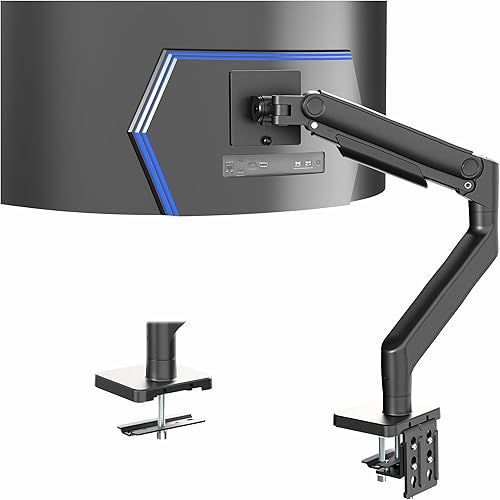
Prime VIVO STAND-V101V Heavy Duty Ultrawide Monitor Arm
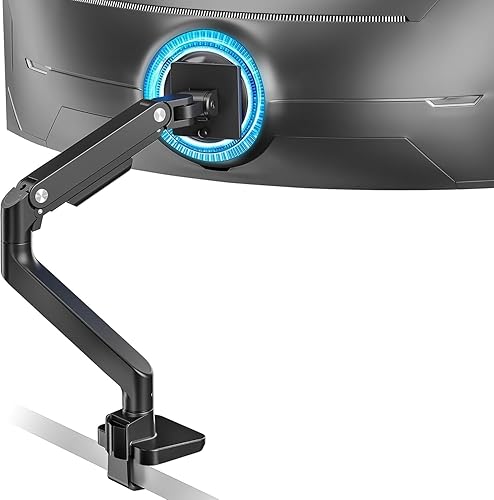
ARES WING Ultrawide Monitor Arm for 17-49 Inch

Mount-It! Ultrawide Monitor Desk Mount with Pole
As an Amazon Associate we earn from qualifying purchases. Product prices and availability are accurate as of the date/time indicated.
Pros
- Holds heavy ultrawide monitors steady with minimal wobble, even during fast mouse moves
- Easy to assemble and adjust with tools included and clear multilingual manual
- Wide range of motion for tilt, swivel and height helps reduce neck strain
- Space saving design with surprisingly effective cable management
- Flexible C-clamp and grommet mounting fits a wide range of desks
Cons
- May show slight shake when fully extended with very large 49 inch screens
- 360 degree rotation can feel limited in tight desk setups or with extra wide panels
- Single arm design only, so dual monitor users will need two units
The ErGear HNSS47 is a heavy duty single monitor arm designed for 13 to 49 inch monitors, including ultrawide and curved displays up to 37.4 lbs. It is built for gamers, creators and remote workers who need a stable, space saving alternative to a bulky factory stand.
In daily use, it delivers smooth and flexible positioning with +70 to -50 degree tilt, 90 degree swivel and 360 degree rotation. The 21.2 inch extension and 22.2 inch lift make it easy to reach eye level, which helps reduce neck strain during long sessions.
Build quality is a clear strength thanks to thickened alloy steel construction and a dual C-clamp base that spreads load evenly. Users report solid, planted performance with minimal wobble, plus effective built in cable management and a choice of C-clamp or grommet mounting.
It is not perfect, as very large panels may show a slight shake when fully extended or repositioned quickly. Some users also find full rotation tricky in tight spaces, and you will need a flat surface on both sides for the clamp to grip securely.
Overall, this is a versatile and dependable pick for large single monitor setups where strength and flexibility matter. If you want to free up desk space and keep a heavy ultrawide steady and comfortable to view, it is easy to recommend.
Model: ErGear HNSS47, Color: Black, Material: Alloy Steel, Mounting Type: C-Clamp and Grommet
Screen Compatibility: 13 to 49 inches, VESA 75x75 and 100x100, Max Load: 37.4 lbs
Motion Range: +70 to -50 degree tilt, plus or minus 90 degree swivel, 360 degree rotation, 21.2 inch extension, 22.2 inch height
Desk Fit: C-clamp for 0.39 to 3.15 inch desks, Grommet mount for 0.39 to 2 inch desks, Articulating arm for monitors
Pros
- Supports extra large 49, 55 and 57 inch ultrawides that most standard arms cannot hold
- Solid aluminum build feels stable and durable for heavy flat and curved screens
- Low profile design reclaims valuable desk space in tight rooms
- Easy topside clamp and grommet install with quick release VESA plate simplifies setup
Cons
- Some large Odyssey style 49, 55 and 57 inch monitors may need a separate steel adapter that is not included
- Single screen only with no dual monitor option for multitaskers
- Low profile articulating design offers less reach and height range than full gas spring arms
The PUTILSENMOUNT FPM80-C01X is a heavy duty ultrawide monitor arm built for 24 to 57 inch screens. It is aimed at ultrawide gamers, video editors and office users who want big screen immersion without giving up desk space.
In daily use, it holds heavy flat screens up to 59.4 lbs and curved screens up to 48.4 lbs with confidence. Tilt, swivel and rotation let you fine tune the viewing angle for better posture and a more organized workspace.
The all aluminum frame in black feels rigid and premium while keeping a slim, low profile look. The topside clamp and grommet options fit most desks and the quick release VESA plate makes mounting large panels much easier.
The main limitation is VESA fit on some 49, 55 and 57 inch models that need an additional steel adapter. That adapter usually comes with the monitor but is not included with the mount, so check your VESA pattern before ordering.
Overall, this is a strong, space smart choice for anyone running a super ultrawide in a compact setup. If you need stable support, simple adjustment and clean, organized ergonomics, it delivers excellent value.
Screen Compatibility: Fits 24 to 57 inch flat and curved monitors with 75x75 and 100x100 VESA patterns.
Weight Capacity: Supports up to 59.4 lbs for flat screens and up to 48.4 lbs for curved screens, including accessories.
Mounting Options: Tabletop clamp fits 0.39 to 1.97 inch desks, grommet fits 0.39 to 1.77 inch desks with topside installation.
Movement and Build: Articulating design with up to 50 degree tilt, swivel and rotation in durable black aluminum, model FPM80-C01X.
Check your monitor VESA holes first. If you own a 49, 55 or 57 inch ultrawide, confirm whether your monitor includes the required steel adapter for 75x75 or 100x100 mounting.
Measure your desk thickness and location. This low profile mount is best for desks against walls or in small rooms where you want the screen close and stable.
Consider your adjustability needs. It is great for ergonomic tilt and swivel tuning, but users who want tall height lift or full extension should consider a gas spring arm instead.
Pros
- Holds large 49 inch ultrawide curved monitors that most standard arms cannot support
- Excellent range of motion for ergonomic viewing and portrait to landscape rotation
- Sturdy metal build with enhanced VESA stability and smooth adjustment
- Easy two option installation with integrated cable management for a clean setup
- Backed by a 10 year warranty for long term peace of mind
Cons
- Requires careful check of VESA pattern, weight and size to ensure proper fit with large ultrawides
- Only recommended for solid wooden desks with no crossbeam, not ideal for glass tops
- Very large screens may need extra desk depth and fine tuning for full motion range
The WALI GSM001XL is a heavy duty single monitor arm built for 13 to 49 inch flat and 1000R curved ultrawide displays up to 44 lbs. It is made for gamers, remote workers and multitaskers who need a large screen at eye level while reclaiming desk space.
In daily use, the full motion range stands out with 21.57 inches of extension and over 20 inches of height adjustment. You get smooth 90 degree swivel, 45 degree tilt and 360 degree rotation, so switching from documents to gaming to video calls feels natural and reduces neck and back strain.
Build quality is a strong point thanks to the all metal construction, wider VESA head and tighter fitting panel for added stability. The internal core is rated for over 20,000 adjustment cycles, and integrated cable clips along the arms keep wiring neat for a clean, modern workstation.
There are a few limitations to consider, as fit depends on exact VESA pattern, weight and screen size, so verification is essential. WALI recommends solid wooden desks between 0.39 and 3.15 inches thick with no crossbeam underneath, which may rule out glass tops or obstructed frames.
Overall, this is one of the most capable and reliable options for oversized ultrawide monitors in its class. If you need sturdy support, true ergonomic flexibility and long term durability with a 10 year warranty, the GSM001XL is an excellent choice.
Model: GSM001XL, Single Arm, Color: Black, Material: Metal, Item Weight: 4.9 kg
Compatibility: 13 to 49 inch flat and 1000R curved monitors, up to 44 lbs, VESA 75x75mm and 100x100mm
Motion: 21.57 inch extension, 20.35 inch lift, 90 degree swivel, 45 degree tilt, 360 degree rotation
Mounting: Tabletop C-clamp or grommet base for desks 0.39 to 3.15 inches thick, wooden desk recommended
Warranty: 10 Year, Best Sellers Rank: Top 3 in Computer Monitor Arms
Pros
- Holds large 49 inch curved ultrawides securely without sagging
- Smooth spring-assisted movement for easy ergonomic positioning
- Sturdy aluminum and alloy steel build with stable desk clamp
- Thoughtful touches like detachable VESA plate and hidden cable routing
Cons
- Needs a very sturdy desk and careful tension tuning for max weight loads
- Single monitor only, not expandable for dual screen setups
- Large arm sweep requires ample desk depth and wall clearance
The VIVO STAND-V101V is a single heavy duty desk mount engineered specifically for large ultrawide monitors up to 49 inches and 44 lbs. It is built for Samsung Odyssey G9 owners, sim racers, and multitaskers who need a sturdy alternative to the stock stand.
The spring-assist arm counterbalances heavy screens so you can adjust height, tilt, and position with one hand. With 11 inches of vertical travel, plus 50 to minus 20 degree tilt, 180 degree swivel and 360 degree rotation, it makes finding an ergonomic viewing angle simple.
Made from aluminum and alloy steel, the arm feels rigid and stable even with a curved 49 inch panel mounted. The heavy duty C-clamp grips desks up to 3.2 inches thick, while integrated cable covers and a detachable VESA plate keep setup clean and straightforward.
It does require a solid, sturdy desk and careful tension adjustment to balance the heaviest monitors correctly. Its large footprint and wide swing radius can also feel bulky in tight spaces or on smaller desks.
For gamers and professionals running a super ultrawide, this mount delivers premium adjustability and rock solid support at a practical value. If you want to free up desk space and improve posture with a large curved display, it is a smart upgrade.
Compatibility: 17 to 49 inch monitors up to 44 lbs with 75x75mm and 100x100mm VESA patterns.
Adjustment: 11 inch spring-assisted height range, plus 50 to minus 20 degree tilt, 180 degree swivel, 360 degree rotation.
Mounting: Heavy duty C-clamp for desks up to 3.2 inches thick, plus optional grommet mount for desks up to 1.4 inches thick.
Build and Warranty: Aluminum and alloy steel construction in black, Model STAND-V101V with 3 year warranty.
Pros
- Exceptional weight capacity handles heavy 49 inch curved monitors other arms cannot
- Full motion flexibility improves posture, viewing comfort and gaming immersion
- Sturdy steel build with smooth gas spring adjustment
- Space saving design with built-in cable management for a clean setup
- Easy installation with C-clamp, grommet options and detachable VESA plate
Cons
- Monitors without VESA holes require a separate adapter that is not included
- Extra large ultrawides need a very sturdy desk within the correct thickness range to avoid wobble
- Single monitor design only, not suitable for dual screen setups
The ARES WING GDT1004BK is a heavy duty single monitor arm designed for large screens from 17 to 49 inches. It is made for gamers, creators and professionals using massive curved ultrawides like the Samsung Odyssey G9 who need strength a standard arm cannot offer.
In real world use, the motion range stands out with generous tilt, swivel and rotation plus wide height adjustment. You can extend the screen up to 22.4 inches, fine tune the angle for glare free viewing, and set a comfortable ergonomic height for long sessions.
Build quality feels solid thanks to an all steel frame and fatigue tested internal gas spring. Once tension is dialed to your monitor weight, movement is smooth and stable, and support for 75x75mm and 100x100mm VESA covers most monitors.
There are a few tradeoffs to consider. Monitors without VESA holes need a separate adapter, and a full size 49 inch panel requires a sturdy desk within the clamp range to stay rock solid. Thick cables can also slightly limit movement when fully extended.
Overall, this is a practical and powerful way to float an ultrawide while reclaiming desk space. If you want stable support, full adjustability and simple topside installation for a super ultrawide, it is a smart buy.
This single desk arm fits 17 to 49 inch flat and curved monitors weighing 4.4 to 44 lbs. It supports VESA 75x75mm and 100x100mm mounting patterns for broad compatibility with Samsung, LG and other major brands.
Motion includes +50 to -20 degree tilt, 180 degree swivel, 360 degree rotation, 8.7 to 18.7 inch height adjustment and up to 22.4 inch extension. The tabletop mount offers C-clamp fitting for 0.5 to 1.8 inch desks and grommet fitting for 0.5 to 2 inch desks.
Construction is metal with a black finish, model GDT1004BK. It includes integrated cable management and a detachable VESA plate for easier monitor attachment.
Choose this arm if you use a heavy 34, 43 or 49 inch ultrawide and your current stand takes too much space. It is ideal for immersive gaming, video editing, trading and multitasking where screen position matters.
Before buying, check your monitor weight, VESA pattern and desk thickness. Make sure your desk is solid wood or similarly sturdy, tighten the base fully, and adjust gas spring tension to match your screen.
For best results, route cables loosely through the management clips and leave slack for movement. If your monitor lacks VESA holes, plan to purchase a compatible adapter separately.
Pros
- Supports extra large ultrawides that most standard single arms cannot handle
- Excellent height flexibility for tall users and sit-stand workstations
- Smooth gas spring motion for easy tilt, swivel and repositioning
- Choice of clamp or grommet install with convenient top mount design
- Durable steel construction backed by lifetime warranty
Cons
- Tall pole design needs more vertical clearance than low profile arms
- 44 lb limit may not fit some heavier pro grade ultrawides, check monitor weight first
- Single large screen can dominate smaller desks at full extension
The Mount-It! MI-12017 is a heavy duty single arm mount designed for ultrawide monitors from 17 to 49 inches. It is made for gamers, creators and professionals who need extra height range for sitting, standing or shared workstations.
Its standout feature is the pole combined with a gas spring arm, which gives far more vertical travel than standard arms. You get smooth tilt, 180 degree swivel and rotation plus easy extension, so finding a comfortable angle for long sessions feels effortless.
Build quality is strong with high strength steel and aluminum plus reinforced joints rated to 44 lbs. The pole keeps large curved screens stable with less wobble, while integrated cable channels keep wires neatly routed for a clean premium desk look.
It is not ideal for every setup, as the tall pole needs good desk clearance and very heavy displays should be weighed first. Users with small monitors or tight spaces may prefer a more compact arm, but those give up height flexibility.
Overall, this is an excellent choice for tall users, sit stand desks and mixed use spaces that need frequent height changes. If you want a stable, full motion mount that truly handles a 49 inch ultrawide, this one delivers.
Compatibility: 17 to 49 inch monitors, VESA 75 and 100, up to 44 lbs capacity for ultrawide and curved screens.
Motion: Gas spring arm with tilt, 180 degree swivel, 180 degree rotation and extension plus pole height adjustment.
Install: Clamp and grommet base for desks 0.4 to 1.8 inches thick with top install design for easy setup.
Build: High strength steel and aluminum in black with cable management channels and lifetime warranty. Model MI-12017.
Matching a Part to Your Build
If your desk sits against a wall and your space is tight, prioritize a mount made for small areas with strong capacity for curved screens. The 24-57” Ultrawide Monitor Desk Mount is a useful illustration because it supports 24 to 57 inch screens at up to 59.4 lbs for flat screen or 48.4 lbs for curved screen, and it is described as a fit for desks against walls or compact rooms where you still want swivel, tilt, and rotation for posture relief.
If you use a sit stand desk, are tall, or share one desk among people of different heights, prioritize vertical range and smooth readjustment over raw extension. The Mount-It! Ultrawide Monitor Desk Mount with Pole shows that approach with its pole mounted design for sitting or standing use, gas spring movement with tilt of +50 degree to -20 degree plus 180 degree swivel and 180 degree rotation, and support for 17 to 49 inch screens up to 44 lbs. Browse the full Monitor Arms & Mounting archive if your setup changes between sitting and standing through the day as of November 2026.
If you have a solid wood desk and a mid weight ultrawide or 1000R curved model, prioritize a thick steel arm with a dual clamp and wide adjustment. The ErGear Heavy Duty Monitor Arm for 13-49″ Ultrawide illustrates that value lane with 37.4 lbs capacity, fit for 13 to 49 inch monitors, tilt of +70 degree to -50 degree with plus or minus 90 degree swivel and 360 degree rotation, extension up to 21.2 inch and lift up to 22.2 inch high. The WALI Heavy Duty Monitor Arm for 13-49 inch 1000R is another reference point for 1000R curved screens up to 49 inch and 44 lbs, with extension to 21.57 inch and lift to 20.35 inch above the desktop plus built in cable guides.
Common Mistakes
Mistake 1: Buying by screen size instead of weight plus adapter. A 49 inch class label does not tell you the load, and curved panels, added VESA adapters, and thick cables all add weight. Add those extras first, then choose an arm where your total sits well below ratings such as 44 lbs or 59.4 lbs for flat screen and 48.4 lbs for curved screen.
Mistake 2: Skipping desk checks. Many returns happen because the top is too thick, too thin, hollow, glass, or blocked underneath by a frame or crossbeam. Measure thickness where the clamp will actually sit, confirm whether your range needs C-clamp or grommet mounting, and follow the manufacturer mounting instructions for screw tightness and approved materials.
Mistake 3: Ignoring VESA adapters and cable strain. Some large ultrawide monitors need a brand specific adapter for 75x75mm or 100x100mm plates, and that part is often packed with the monitor rather than the arm. Confirm hole pattern and adapter fit before install day, then route cables with slack through the management covers so tilt and swivel do not tug on ports.
Who Should Wait or Buy Differently
A single heavy duty arm is not ideal for you if your desk cannot safely support a clamp load, if your monitor lacks VESA holes and you cannot source the correct adapter, or if you plan to run two large ultrawides side by side on one small base. You should not buy yet if your next upgrade is a much heavier super-wide model that would exceed 44 lbs or the curved rating of your shortlist, because you would be better served waiting and choosing a higher capacity mount, a wall solution with proper anchors, or a dual purpose stand made for your desk material and room layout.
Frequently Asked Questions
Can a single arm really hold a 49 inch curved ultrawide?
Yes, provided your total weight with adapter and cables stays under the rated load and your VESA pattern matches. Look for models rated for 13 to 49 inch or 17 to 49 inch screens at 44 lbs, or higher capacity designs rated up to 59.4 lbs for flat or 48.4 lbs for curved, and mount only to a solid desk within the stated clamp range.
Do I need a special adapter for Samsung Odyssey G9 style monitors?
Sometimes you do, because certain large ultrawide monitors do not use a direct 75x75mm or 100x100mm layout out of the box. Check your monitor box for the included steel adapter, factor its weight into your capacity math, and choose an arm such as the ARES WING Ultrawide Monitor Desk Arm for 17 to 49 or the VIVO Heavy Duty Aluminum Ultrawide Monitor Tension only after you confirm adapter compatibility.
How do I reduce wobble after installation?
Start by centering the screen on the VESA head, setting tilt tension so the panel stays put, and confirming the desk clamp or grommet is tight and level. Keep the arm extension only as far out as you need, use the cable covers to prevent cord pull, and recheck fasteners after the first week because heavy panels can settle slightly during early use.







Write Your Review
No reviews yet. Be the first to share your experience!