

If you are torn between a classic gas spring monitor arm and the HUANUO FlowLift™ Pro Monitor Arm for 13–32″ with MechaSpring, you are deciding how your screen should move and stay put. This gas spring vs mechanical spring monitor arm comparison settles that choice for single-screen gaming, coding and office builds. One approach floats with air pressure for constant motion, the other uses a coiled mechanical design for firm, repeatable hold.
Updated for September 2026, this guide is for you if you own a 13 to 32 inch monitor and want better posture and more desk space. Per the spec sheet, the HUANUO FlowLift Pro Monitor Arm for 13–32″ screens supports VESA 75x75mm or 100x100mm and a defined weight range for flat and curved panels. We reviewed motion feel, compatibility, service life and setup so you can match an arm to how often you adjust and where you play or work.
This article contains affiliate links. If you buy through one of our links, CustomPCGaming may earn a commission at no extra cost to you. Commissions never influence which products we recommend or how we rank them. Read our Affiliate Disclosure for details.
Quick Picks at a Glance

HUANUO FlowLift Pro Single Monitor Arm for 13-32
As an Amazon Associate we earn from qualifying purchases. Product prices and availability are accurate as of the date/time indicated.
Pros
- Strong metal and aluminum build holds large 31.5 inch displays up to 19.8 lbs without droop
- Quick installation with included hardware, clear instructions and snap-in VESA plate
- Smooth articulation for height, tilt, swivel and portrait rotation
- TUV Rheinland certified and tested at 3x load for added safety
- Slim profile frees desk space and keeps cables neat for a clean workstation
Cons
- Strict fit requires correct screen size, weight range and VESA pattern plus wood desk only
- Lower arm has limited vertical travel, most height adjustment comes from upper arm
- Plastic trim around joints needs careful tightening to avoid stripping during assembly
The HUANUO FlowLift Pro is a single monitor arm designed for 13 to 32 inch flat and curved screens with VESA 75 and 100 patterns. It is built for remote workers, coders, designers and gamers who want eye level comfort and a cleaner desk.
Standout features include the MechaSpring arm for consistent tension without gas pressure loss and the LockSteady system for one finger moves with no droop. In real use, it holds large 31.5 inch displays steady while allowing smooth tilt, swivel and rotation for work, play and screen sharing.
Build quality feels premium with 90 percent metal and aluminum construction in a slimmer, easy to grab profile. Setup is fast thanks to the tool free snap in VESA plate, dual C clamp and grommet base, plus integrated cable management for a minimalist look.
Compatibility is strict, so you must meet size, weight and VESA specs together and use a wood desk 0.59 to 3.54 inches thick. The lower arm offers limited vertical travel and a few users note plastic trim around joints needs careful tightening to avoid stripping.
Overall, the FlowLift Pro delivers strong stability, ergonomic flexibility and TUV Rheinland certified safety in a compact design. If your monitor and desk fit the requirements, it is a smart upgrade for comfort, focus and long term reliability.
Compatibility: 13 to 32 inch monitors, 4.4 to 19.8 lbs flat or 4.4 to 15.4 lbs curved, VESA 75x75 and 100x100.
Mounting: Tabletop C-clamp and grommet base for wood desks 0.59 to 3.54 inches thick.
Movement: Articulating arm with tilt up to 85 degrees, swivel and 360 degree rotation for landscape and portrait modes.
Materials and Safety: Aluminum and metal construction, TUV Rheinland certified and tested at 3x load, model HNDMA118B-SS.
How They Compare
Load Range, VESA Fit and Desk Compatibility
For fit, the HUANUO FlowLift Pro Monitor Arm for 13–32″ screens is very specific, which helps you avoid sag or clamp failure. It accepts 13 to 32 inch screens, supports 4.4 to 19.8 lbs for flat screens and 4.4 to 15.4 lbs for curved screens, and fits VESA 75x75mm or 100x100mm with a max load of 19.8 lbs. A classic gas spring monitor arm often claims a broad weight window too, but owners commonly report more trial and error to keep heavier curved panels level without tilt slip.
On desks, the difference matters for your build and safety. The HUANUO model is recommended only for wood desks from 0.59 to 3.54 inch thick with C-Clamp or grommet mounting, and the brand notes irregular edges need extra care when you clamp. If you use a glass top, that wood-only guidance is a clear limit, so review our Monitor Arms & Mounting guides and our picks for a freestanding stand for a glass desk before you clamp. Always follow the manufacturer mounting instructions and confirm thickness with a ruler.
Motion Feel and Holding Power for Daily Use
If you reposition hourly, a gas spring monitor arm feels light and floaty at first and invites frequent tweaks. You can push a display up, down or toward you for gaming, then pull it back for work calls, which suits shared desks and sit-stand routines where viewing distance changes. The trade-off, according to owners, is drift over weeks as pressure changes, so you may lift the screen back to eye level or retighten more often than you expect.
The HUANUO FlowLift Pro Monitor Arm for 13–32″ screens takes the opposite approach with its LockSteady System and MechaSpring arm for tilt, swivel and rotation. Per the spec sheet, it moves with light one-finger effort yet is tuned for set-and-hold stability for designing, coding and data analysis where the monitor stays in place. Backed by American Chiropractic Association endorsement for eye-level posture, it helps reduce neck and back strain when you stay in one position for long sessions, though it feels less floaty than gas.
Durability and Long-Term Stability
Longevity is where this gas spring vs mechanical spring monitor arm debate gets practical for your wallet and patience. Gas cylinders rely on sealed pressure, and owners commonly report gradual softening that shows up as slow sink or tilt slip, especially with heavier displays near the top of the range. That does not mean every gas arm fails, but you should expect periodic tension tweaks if you adjust daily, and heavier curved screens tend to expose weakness first.
The HUANUO FlowLift Pro Monitor Arm for 13–32″ screens is built around a mechanical coil that avoids pressure loss, with a claim of up to 2x the service life of conventional mounts and 90% professional-grade metal construction. It is also TUV Rheinland certified and rated at 3x its load for added safety, which adds confidence for daily gaming use and frequent tilt changes. With a 4.5 out of 5 rating from 4854 reviews, owners commonly praise steady hold, though a few note initial tension tuning takes patience to dial in.
Setup, Adjustment and Cable Management
Setup speed favors the HUANUO design if you work alone and want less hassle. It uses a Tool-Free InstaMount VESA plate that snaps with a secure click, plus a simple kit with 1 base and 1 screw, so you can mount without holding a heavy panel while turning screws. The integrated PrecisionView window shows a yellow indicator as you turn for tension, so you can see when calibration matches your monitor weight instead of guessing by feel and repeating steps.
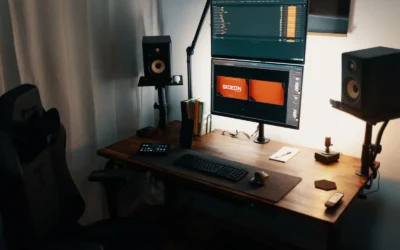
A typical gas spring monitor arm usually asks you to set tension blind, then mount, check droop, unmount and repeat until level. That loop is workable, but it costs time if your panel sits between settings or you swap monitors often. Both styles help you hide messy wires for a minimalist desk, and you can get ideas from this warm wood floating monitor desk setup or plan glow with RGB strip ideas for a corner desk glow to keep cables and lighting balanced.
Which One Should You Get
Choose a classic gas spring monitor arm if you constantly move your display through the day and share your PC with others. You will appreciate it for sit-stand desks, collaborative work where you swivel toward teammates, and living-room gaming where viewing angles change often. Just check your panel weight and VESA pattern first, and plan to retune tension now and then to keep alignment sharp for text and crosshairs.
Choose the HUANUO FlowLift Pro Monitor Arm for 13–32″ screens if you want a set-and-forget hold with visible tuning and longer service life. You will appreciate it for focused coding, competitive gaming at a fixed eye level, and study setups where the screen stays put for hours without droop. It suits wood desks in the supported 0.59 to 3.54 inch thickness range and single 13 to 32 inch panels within the listed flat or curved weight limits. Pair it with balanced bias lighting, like the options in our BenQ ScreenBar Halo 2 vs Quntis comparison, to ease eye strain during night sessions.
Who Should Skip Both
Both single-arm options are not ideal for oversized or extra-heavy battlestations and tricky furniture. If you use a glass top, hollow core, or irregular-edge desk, a clamp arm is not a good fit without added reinforcement, and if you run large ultrawides, stacked dual screens, or panels above 19.8 lbs flat, neither choice will hold safely. In those cases, consider a freestanding base, wall mount, or heavy-duty dual-arm platform rated for your exact size and load.
Frequently Asked Questions
Is a mechanical spring better than gas spring for a gaming monitor that stays in one place?
For a fixed gaming position, a mechanical spring is often the calmer pick because it is tuned to hold tilt and height without slow sink. Gas arms excel when you move constantly, but they may need more retuning over time. If you lock in eye level once and play for hours, the MechaSpring style hold will feel more consistent.
Will the HUANUO FlowLift Pro fit my curved 32 inch monitor and wood desk?
It can fit if you meet all three conditions at once, so check carefully before you order. Your screen must be 13 to 32 inches, weigh 4.4 to 15.4 lbs for curved panels, and use VESA 75x75mm or 100x100mm. Your wood desk must also measure 0.59 to 3.54 inch thick and have a stable edge for C-Clamp or grommet mounting.
Do gas spring monitor arms lose tension over time compared to mechanical spring arms?
According to owners, gas designs can soften gradually, which shows as droop or the need to add tension after months of adjustments. Mechanical coil designs do not rely on sealed pressure, so they tend to keep their setting longer with less upkeep. Either type still benefits from an initial calibration and a quick check after you change monitors or move desks.



Write Your Review
No reviews yet. Be the first to share your experience!