

You dock for big screen night, then juggle a charger, HDMI lead, and receiver for your controller while the handheld wobbles and cables snag across your desk. WiFi dips mid match, your neck aches from hunching over a small display, and swapping adapters kills the mood. A stand with extra ports unifies power, video, and accessories in one stable base, especially when paired with ideas from a dual monitor cable management guide for clean display routing.
In this 2026 guide, we compared eight docks built for Steam Deck, Steam Deck OLED, ROG Ally, Legion Go, and similar USB C handhelds. We focused on HDMI clarity, USB expansion, Ethernet reliability, power delivery, and stand comfort for long sessions. Whether you play at a desk, on a couch with a controller, or in tabletop mode with friends, you will find a layout below that fits your space and play style.
This article contains affiliate links. If you buy through one of our links, CustomPCGaming may earn a commission at no extra cost to you. Commissions never influence which products we recommend or how we rank them. Read our Affiliate Disclosure for details.
Quick Picks at a Glance

MEPATEM 6-in-1 Steam Deck Dock with 4K@60Hz HDMI

Prime Antank 6-in-1 Steam Deck Dock with Magnetic Stand

Prime Baseus 6-in-1 Steam Deck Dock with 4K@60Hz HDMI

Prime UGREEN 9-in-1 Steam Deck Dock with 4K@60Hz HDMI

Prime Anker 6-in-1 Steam Deck Dock with 4K@60Hz HDMI

JSAUX 6-in-1 Docking Station for Steam Deck OLED
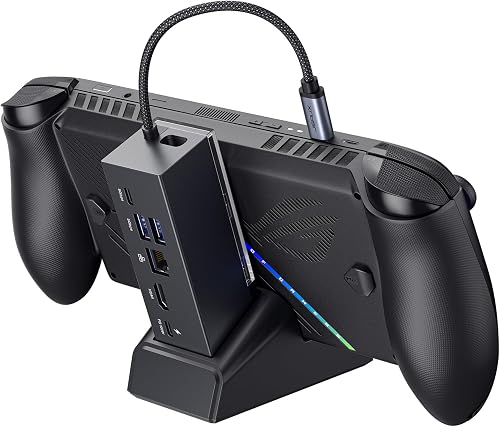
Prime JSAUX HB0609 6-in-1 Dock for Steam Deck
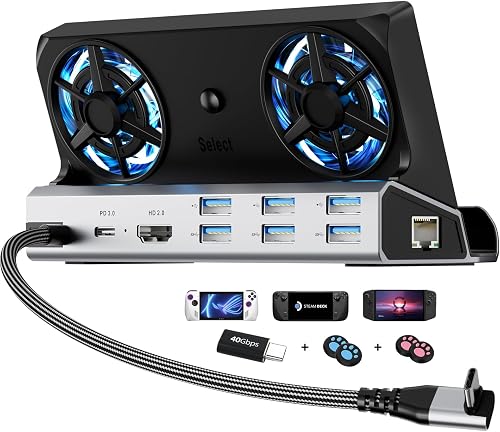
Prime YCBUENO 12-in-1 Steam Deck Dock with Dual Cooling
As an Amazon Associate we earn from qualifying purchases. Product prices and availability are accurate as of the date/time indicated.
Pros
- Sturdy aluminum build with weighted base prevents tipping and wobbling
- Crisp 4K@60Hz HDMI output for TV and monitor gaming
- Wide compatibility with Steam Deck OLED, ROG Ally, Legion Go, Switch, iPad and USB-C phones
- 100W PD charging plus three USB-A ports for keyboard, mouse and controllers
- Adjustable multi-angle stand works great for gaming and media viewing
Cons
- Bulkier and heavier than pocket dongle docks, less ideal for ultralight travel
- Not compatible with cases that use a built-in kickstand
- Single HDMI port only, so no dual monitor support
The MEPATEM 6-in-1 Gaming Docking Station is designed for Steam Deck, Steam Deck OLED, ROG Ally, Legion Go and other USB-C handhelds. It is for gamers who want to switch quickly from portable play to a comfortable big-screen desktop setup.
Real world performance centers on the 4K@60Hz HDMI 2.0 output, Gigabit Ethernet and 100W PD charging. You can connect to a TV or monitor for sharper visuals, plug in keyboard, mouse or controller via three USB-A 3.0 ports, and keep charging while you play.
Build quality is a clear highlight with thicker aluminum alloy and a weighted base for stability. The dual-shaft adjustable stand allows flexible viewing angles, while the 26mm wide groove holds devices with most thick cases on.
There are a few tradeoffs to know. The solid metal design adds weight compared to travel dongles, and it does not work with kickstand style protective cases. You also get one HDMI port, so it is built for single display setups.
Overall, this is a practical and sturdy dock for handheld gamers who value stability, fast charging and easy TV connectivity. If you want an organized home base for your Steam Deck or Ally, it is an excellent pick.
Model: MEPATEM 6-in-1 Docking Station SD Stand Base SD008A. Color: Black. Dimensions: 2.6 x 4.5 x 1.3 inches.
Ports: 1x HDMI 2.0 4K@60Hz, 1x USB-C PD 100W input, 3x USB-A 3.0, 1x Gigabit Ethernet. Total USB ports: 3. Total HDMI ports: 1.
Compatibility: Steam Deck and Steam Deck OLED, ROG Ally and ROG Ally X, Legion Go, Nintendo Switch, iPad and USB-C Android phones. Extra wide 26mm holder groove for use with cases.
Pros
- Stable, snug magnetic clip that holds Steam Deck firmly without blocking cooling
- Firm 270-degree hinge stays in place for bed, couch, airplane and vertical Tate mode play
- True plug and play HDMI with no buttons, plus stable wired Ethernet and fast charging
- Premium aluminum foldable design that packs flat and also works with MagSafe iPhones
Cons
- AC adapter not included, requires official Steam Deck charger for best results
- Not compatible with protective cases, clip must be removed for some standard docks
- Magnet strength may feel light for some setups and included USB-C cable only links dock to Deck
The Antank SD1 HUB is a 2-in-1 magnetic TV dock and foldable stand built exclusively for Steam Deck and Steam Deck OLED. It is made for travelers, tabletop players and anyone who prefers controller play in bed, on the couch or on a plane.
Performance centers on plug and play 4K HDMI output that auto enables when you connect a TV or monitor, with no buttons to press. You also get 100W USB-C PD charging, 1000Mbps Gigabit Ethernet and two USB 3.0 ports for controllers, dongles and fast data transfer.
Build quality feels premium thanks to the foldable aluminum alloy arm with firm 270-degree adjustment for landscape, portrait and even vertical Tate mode. The magnetic back clip grips snugly, holds a steady angle and leaves ports and vents open for cooling, and it folds flat for backpack travel.
There are a few tradeoffs to know. You will need your official AC adapter since one is not included, and the dock is not compatible with protective cases. Some users note the magnet could be stronger and the included USB-C cable is only meant to link the dock to the Deck.
Overall, this is a smart, space saving upgrade for Steam Deck owners who want docked big-screen gaming plus a reliable hands-free stand in one device. If you play lying down, travel often or love controller play, it delivers comfort, stability and real versatility.
Compatibility: Steam Deck, Steam Deck OLED and MagSafe iPhone 12 to 17
Video Output: 4K at 120Hz HDMI hub output, Steam Deck supports up to 4K at 60Hz, plug and play with auto switching
Ports: 1 x HDMI, 1 x 100W USB-C PD input, 1 x 1000Mbps Ethernet, 2 x USB 3.0, plus USB-C Deck connection
Design: Aluminum alloy foldable stand with 270-degree adjustment, landscape and portrait support, magnetic back clip
In the Box: 1 x Magnetic TV Dock Stand, 1 x Magnetic Back Clip, 1 x USB-C Cable
Pros
- Crisp 4K@60Hz HDMI output with backward support for 2K and 1080p high refresh
- Case friendly adjustable stand holds devices securely at a comfortable angle
- Three USB-A 3.0 ports for controllers, keyboards, drives and accessories
- Reliable gigabit Ethernet plus 100W charging for uninterrupted play
- Compact, solid build praised by users as a great value alternative to the official dock
Cons
- Power adapter and USB-C input cable are not included in the box
- Stand placement can partially cover rear vents unless you slide the Deck to one side
- Some users report occasional display handshake issues requiring reconnection
The Baseus 6-in-1 Docking Station is built for Steam Deck owners who want a simple way to play on a TV or switch to desktop mode. It is also a smart pick for ROG Ally, Legion Go, iPad and USB-C phone users who need the same one cable expansion.
In real use, the HDMI 2.0 output delivers crisp 4K at 60Hz with smooth support for 2K and 1080p high refresh gaming. Gigabit Ethernet keeps online play stable, while three USB-A 3.0 ports handle controllers, keyboards, storage and other accessories with ease.
The adjustable stand is a highlight, letting you angle your handheld for better viewing and fit it with a protective case still on. The compact black chassis feels solid and tidy on a desk, and at just over 300 grams it is easy to pack for travel.
There are a couple of tradeoffs to know. You will need to supply your own power adapter and USB-C input cable, and the cradle can block part of the rear vent unless you slide the Deck slightly to the side. A few users also note occasional display handshake hiccups.
Overall, this is a versatile, well built and editor recommended alternative to the official dock. If you want big screen 4K gaming, fast wired networking and 100W pass through charging in one hub, it is easy to recommend.
Model: Baseus 6-in-1 Docking Station for Steam Deck, ROG Ally and Legion Go. Ports: 1 x HDMI 2.0, 3 x USB-A 3.0, 1 x Gigabit RJ45 Ethernet, 1 x USB-C PD 100W.
Video Support: 4K at 60Hz, 2K at 60Hz, 1080p at 120Hz. Network: Up to 1000Mbps wired Ethernet for stable low lag play.
Size and Build: 5.31 x 3.38 x 1.18 inches, 317 grams, black finish with adjustable stand. In the Box: Docking station with 18 month warranty, power adapter and input cable sold separately.
Pros
- Excellent cooling design with open-back foldable stand
- High refresh rate support ideal for competitive gaming monitors
- Fast charging and data speeds in one compact hub
- Broad handheld compatibility plus Gigabit Ethernet and card readers
Cons
- Only one HDMI port, so no dual-monitor setup
- Not compatible with Switch 2
- Full 100W charging requires a compatible high-watt USB-C charger
The UGREEN 9-in-1 Docking Station is built for Steam Deck, ROG Ally, Legion Go and other USB-C handheld gamers who want a desktop style setup. It combines video output, charging, networking and storage expansion into one hub with a built-in stand.
In real use, the 4K@60Hz HDMI delivers sharp visuals on a 4K TV, while 2K@144Hz and 1080P@240Hz modes shine on gaming monitors. The 10Gbps USB ports transfer games quickly from external SSDs, and Gigabit Ethernet provides a much more stable online connection than WiFi.
The foldable dual-panel stand is the smartest design touch, as it holds the console securely without blocking rear exhaust vents. The grey compact body feels sturdy, stays portable for travel, and packs nine ports including HDMI, USB-C, USB-A, Ethernet and SD and TF slots.
There are a few limits to know. You get only a single HDMI output, so dual-monitor users will need another solution. It is also not compatible with Switch 2, and Steam Deck itself caps at 45W charging despite the 100W PD input.
Overall, this is one of the most complete docks for handheld PC gamers who value cooling, speed and versatility. If you regularly dock for big-screen play, fast transfers and wired networking, it is an easy upgrade that simplifies your entire setup.
Ports: 9-in-1 hub with HDMI, Gigabit Ethernet, USB-C 3.2 Gen 2, USB-A 3.2 Gen 2, dual USB-A 2.0, SD and TF slots, and USB-C PD input.
Video Output: Up to 4K@60Hz, plus 2K@144Hz, 2K@120Hz, 1080P@240Hz and 1080P@144Hz for TVs and high refresh monitors.
Power and Data: Up to 100W Power Delivery with 45W max for Steam Deck and 65W for ROG Ally, plus 10Gbps transfer on USB 3.2 ports.
Design and Compatibility: Grey foldable stand model 25869, 5.79L x 3.35W x 1.1H inches, works with Steam Deck, ROG Ally, Legion Go, MSI Claw and iPad Pro.
Pros
- True 4K@60Hz HDMI for sharp, smooth visuals on external displays
- 100W PD charging supports play while docked without battery drain
- Gigabit Ethernet plus 5Gbps USB ports for complete desktop style setup
- Compact, lightweight Anker design with integrated cable and 18 month warranty
Cons
- USB-C data port does not support video output, only the HDMI port does
- Limited to single HDMI display with no higher refresh 4K120 support
- Not compatible with ROG Ally X and does not include a PD wall charger in the box
The Anker 6-in-1 Dock (model A83S1) is designed for Steam Deck, Steam Deck OLED, Asus ROG Ally and Lenovo Legion Go owners who want a simple dock for TV and desk play. It consolidates charging, video, networking and accessories into one compact hub.
Standout performance comes from the 4K@60Hz HDMI port, which delivers crisp and fluid visuals for big screen gaming. Combined with 100W PD passthrough charging and 1,000 Mbps Ethernet, it keeps gameplay powered and stable during long sessions.
You also get two USB-A ports and one USB-C port, all rated at 5Gbps for mice, keyboards, controllers and external drives. In real use, this means you can dock, connect all your gear and jump straight into desktop mode or game mode without swapping cables.
Build quality reflects Anker standards with a light 150g grey chassis and a short 8.66 inch built in USB-C cable that reduces clutter. It is portable enough for travel yet sturdy enough to stay put on a desk during intense play.
The main limits are a single HDMI output and no video support from the USB-C data port, so multi monitor setups are not possible. Overall, it is an excellent value dock for handheld gamers who want reliable 4K output, fast charging and wired networking in one tidy package.
Model: Anker A83S1 6-in-1 USB-C Hub with 6 ports including HDMI, Ethernet, USB-C PD IN, USB-C data and 2x USB-A.
Video: 1x HDMI with up to 4K@60Hz output. Data: USB-A and USB-C ports up to 5Gbps for accessories and storage.
Network: 1x Gigabit Ethernet up to 1,000 Mbps for stable wired gaming. Power: Up to 100W PD passthrough input via USB-C.
Design: 150g grey chassis with 8.66 inch built in USB-C cable. Compatibility: Steam Deck, Steam Deck OLED, ROG Ally, Legion Go and USB-C devices.
Pros
- Excellent 4K@120Hz output that improves smoothness over older 4K@60Hz docks
- Reliable 100W charging supports demanding Turbo Mode play without battery drain
- Sturdy build quality that securely holds multiple handhelds and laptops
- Versatile 6-in-1 expansion with fast USB ports and stable wired internet
Cons
- Built-in USB-C connector cable is not detachable, so it needs careful handling to avoid bending
- Not compatible with ROG Xbox Ally models, limiting options for owners of the newest Xbox branded handhelds
- Requires a separate high wattage charger for best Turbo Mode performance, which is not included
The JSAUX HB0603 is a 6-in-1 docking station built for Steam Deck OLED and LCD, ROG Ally and Ally X, Legion Go series, MSI Claw and OneXPlayer. It is designed for handheld gamers who want to switch easily between portable play and a full desktop or living room setup.
The standout upgrade is HDMI 2.1 with 4K at 120Hz output, which delivers smoother motion and less tearing than older 4K at 60Hz docks. Combined with Gigabit Ethernet and 100W Power Delivery, it keeps online games stable and your device charged even in Turbo Mode.
In real world use, owners report flawless solo play on large TVs plus reliable support for keyboards, mice and controllers through the three USB-A 3.0 ports. The dock feels sturdy and well constructed, holding devices securely while adding laptop compatibility for work and play.
There are a few limits to note. It is not compatible with ROG Xbox Ally models, and you will need your own high wattage charger for peak performance. The attached USB-C connector is also fixed rather than detachable, so it needs careful handling to avoid bending.
Overall, this is one of the best value docks for Steam Deck and Windows handheld owners who want high refresh big screen gaming. If you want smooth 4K output, fast charging and dependable wired connectivity in a compact hub, it is an easy recommendation.
Model: JSAUX HB0603 6-in-1 Docking Station
Video Output: HDMI 2.1 up to 4K at 120Hz
Charging: Up to 100W Power Delivery via USB-C
Ports: 1x HDMI, 3x USB-A 3.0, 1x Gigabit Ethernet, 1x USB-C PD input
Compatibility: Steam Deck OLED/LCD, ROG Ally/Ally X, Legion Go/Go S/2, MSI Claw/8 AI Plus, OneXPlayer
Pros
- Supports high refresh video up to 4K at 120Hz for sharp docked visuals
- 100W PD passthrough keeps handhelds powered while playing and charging accessories
- Gigabit Ethernet provides faster, more stable online gaming than WiFi
- Lightweight modular design doubles as a travel stand for desktop and portable use
Cons
- Does not support VRR or ALLM, competitive gamers may need the HB0705 RGB model
- 65W or lower chargers can trigger a low power notice, 100W PD charger is recommended
- Custom art cards for personalization are not included
The JSAUX HB0609 is a 6-in-1 modular dock designed for Steam Deck, ROG Ally, ROG Ally X, ROG Xbox Ally and Ally X, Legion Go and Legion Go S. It is made for handheld gamers who want easy big screen play, wired networking and desktop style connectivity.
For real world performance, the HDMI port supports up to 4K at 120Hz and 1080p at 240Hz for crisp, fluid visuals on a TV or gaming monitor. Gigabit Ethernet delivers stable online play, while dual USB A 3.2 Gen 1, USB C 3.2 Gen 1 and 100W PD passthrough let you connect controllers, keyboards, storage and power at once.
Design is compact, lightweight and travel friendly, with a detachable base that works as a standalone stand. Silicone pads improve grip, stability and viewing angle, and the front cover can be removed to insert a custom art card for personalization.
The main limitations are lack of VRR and ALLM support, so users who need those features should consider the HB0705 RGB model instead. You will also want a 100W PD charger, since 65W or lower chargers can trigger a low power notice and charge more slowly while docked.
Overall, the HB0609 is a versatile and practical dock for multi handheld households and desktop setups. If you want high refresh video, reliable wired connection and flexible dock or stand use in one unit, it is an excellent pick.
This 6-in-1 dock includes 1 HDMI port, 1 Gigabit Ethernet port, 2 USB A 3.2 Gen 1 ports, 1 USB C 3.2 Gen 1 port and 1 USB C PD charging port with up to 100W input. Video output supports 4K at 120Hz and 1080p at 240Hz for TVs and monitors.
Compatibility includes ROG Xbox Ally X, ROG Xbox Ally, ROG Ally X, ROG Ally, Steam Deck LCD and OLED, Legion Go, Legion Go S, plus Razer Edge, AYA NEO, Logitech G Cloud and ONEXPLAYER. The unit measures about 3.35 by 1.93 by 4.92 inches and weighs about 0.27 kg in black.
Note that VRR and ALLM are not supported on this HB0609 model. For best charging results, pair the dock with a 100W PD charger and cable.
Pros
- Large dual 5cm fans for active cooling, a rare feature in this dock class
- Complete port selection with 6 USB ports, 4K60Hz HDMI and wired Ethernet
- Strong multi handheld compatibility from Steam Deck and Ally X to Legion Go and Switch
- Aluminum build with thoughtful extras like joystick caps and port saver extender
Cons
- No second video output for dual monitor setups
- Switch USB data functionality is limited by Nintendo design
- Thick protective cases may exceed the 27mm slot and require removal to dock
The YCBUENO YCE-V262B is a 12-in-1 docking station built for Steam Deck OLED and LCD, ROG Ally and Ally X, Legion Go, MSI Claw, Switch 1 and 2, plus laptops and tablets. It is ideal for handheld gamers who want a single hub for TV output, wired networking, accessories and fast charging.
Standout performance comes from the full port array with 4K at 60Hz HDMI, 1000Mbps Ethernet, three USB 3.0, three USB 2.0 and 100W PD 3.0 Type-C. In real use, that means smooth big screen play, stable online matches, plus room for keyboard, mouse, controller dongles and external drives at once.
The headline upgrade is dual 5cm RGB cooling fans, far larger than typical 2cm dock fans for higher airflow with lower noise. The open airflow design helps sustain peak frame rates and battery health during long sessions, and a rear switch turns off fans and RGB when you want silence.
Build quality is a step above plastic docks thanks to a screwless aviation aluminum chassis that adds durability and passive heat dissipation. The package also includes four silicone joystick caps and a Type-C extender that takes plug wear to protect your console port.
Keep in mind Switch USB data remains limited by Nintendo, and the cradle slot is sized for handhelds up to 27mm thick so bulky cases may not fit. Overall, this is a strong value pick for multi handheld households that need cooling, connectivity and 100W charging in one tidy dock.
Model: YCBUENO YCE-V262B, 12-in-1 Dual Cooling Fan Dock in aviation aluminum
Video and Network: HDMI 2.0 up to 4K at 60Hz, Gigabit Ethernet up to 1000Mbps
USB and Power: 3x USB 3.0 5Gbps, 3x USB 2.0, Type-C PD 3.0 up to 100W with 40Gbps data
Design: 7 x 2.4 x 2.8 inches, 9.7 ounces, dual 5cm RGB fans with rear on/off switch
Compatibility: Steam Deck OLED and LCD, ROG Ally and Ally X, Legion Go, S and 2, MSI Claw, Switch 1 and 2, laptops, iPads and Android
Buying Guide for Steam Deck Dock Stands With Extra Ports
More ports only help if the dock holds steady, stays cool, and matches your devices. Use these four checkpoints to narrow your pick quickly and avoid clutter that fights your setup.
Port Mix and 4K Video Output
Start with video and USB balance for your routine. Most picks here offer 4K@60Hz HDMI for TVs and monitors, while the JSAUX 6-in-1 Docking Station for Steam Deck/ROG steps up to 4K@120Hz over HDMI 2.1 for smoother motion on high refresh displays. The UGREEN Steam Deck Dock 9-in-1 USB C Docking adds rapid 10Gbps USB for external drives, and the YCE12-in-1 Steam Deck Dock for ROG Ally X stretches to 12-in-1 with three USB 3.0 plus three USB 2.0 for keyboards, mice, and receivers.
Think about your daily loadout before you choose. Two USB ports cover a controller dongle and mouse, while four or more help if you add storage, a keyboard, and a headset receiver at once. Keep video and data leads separated with help from a central cable management hub so your dock area stays tidy, reachable, and ready for quick swaps between handheld and desktop mode.
Stand Stability, Viewing Angle, and Cooling
A strong stand prevents wobble, protects vents, and sets a comfortable viewing angle. The 6-in-1 Gaming Docking Station for Steam Deck uses a weighted aluminum base with multi angle shafts for hands free play, while the Steam Deck Dock, Baseus 6-in-1 Docking Station offers an adjustable cradle that accepts many devices with cases on. The Antank 6-in-1 Steam Deck Dock takes a different path with a foldable magnetic clip that holds your Deck upright for controller play and tabletop sessions.
Cooling design matters during long sessions and downloads. Look for open backs that clear exhaust vents, like the foldable panels on the UGREEN Steam Deck Dock 9-in-1 USB C Docking, plus aluminum bodies that spread warmth away from the handheld. For setup inspiration, browse display stand ideas for your desk and favor airflow friendly case layouts that leave rear vents fully unblocked for steady performance.
Power Delivery and Wired Networking
Stable power keeps you in high performance modes without battery drain or stutter. The Anker Steam Deck Dock, 6-in-1 4K@60Hz HDMI Docking, the JSAUX 6-in-1 Docking Station for Steam Deck/ROG, and the JSAUX Docking Station for ROG Xbox Ally X all support up to 100W PD input to feed the handheld while driving accessories and external displays. Pair them with a capable wall adapter and your official charger where possible, since docks reserve a small share of power for their own circuits.
For online play, Gigabit Ethernet brings steadier ping than crowded WiFi in apartments and dorms. Every 6-in-1 here includes a 1000Mbps RJ45 for rapid downloads and smooth co op, and the YCE12-in-1 Steam Deck Dock for ROG Ally X adds the same wired option alongside its larger USB bank. Route that Ethernet cleanly under your desk with an under desk cable tray setup to prevent tugs when you reposition the dock for movie night.
Compatibility, Footprint, and Everyday Use
Beyond Steam Deck and OLED, the strongest picks welcome a wider handheld family. The JSAUX Docking Station for ROG Xbox Ally X lists ROG Xbox Ally, Ally X, Legion Go, Legion Go S, and other USB C devices, while the YCE12-in-1 Steam Deck Dock for ROG Ally X fits units up to 27mm thick and includes a Type C extender to reduce wear on your console port. Many models also accept iPad Pro, Surface tablets, and Android phones, which makes one dock useful across work and play.
Consider footprint, portability, and daily habits before you commit. Compact hubs like the Anker Steam Deck Dock, 6-in-1 4K@60Hz HDMI Docking tuck neatly behind a monitor for travel and small desks, while larger aluminum docks with dual cooling fans serve as a permanent home base with RGB flair. Finish your layout with clean desk cable routing methods so power, HDMI, and Ethernet leave the dock in one neat direction without strain.
Final Thoughts
If you want the most connections in one place, choose YCE12-in-1 Steam Deck Dock for ROG Ally X for its expanded USB bank and cooling fans. If you prefer magnetic simplicity for controller play, choose Antank 6-in-1 Steam Deck Dock for its foldable stand and automatic TV output.
Frequently Asked Questions
Can a Steam Deck dock stand output 4K to a TV while charging?
Yes. Every dock in this roundup pairs HDMI output with PD charging so you can play on a TV while topping up your handheld. Most support 4K@60Hz, while the JSAUX 6-in-1 Docking Station for Steam Deck/ROG reaches 4K@120Hz on capable displays. In 2026 setups, use a strong PD adapter and a quality HDMI cable for steady big screen sessions without flicker.
Do I need to remove my protective case to use these docks?
Sometimes, it depends on groove width and mount style. The 6-in-1 Gaming Docking Station for Steam Deck offers a 26mm wide groove that fits many cases, and the Steam Deck Dock, Baseus 6-in-1 Docking Station uses an adjustable stand designed to work with cases on. The Antank 6-in-1 Steam Deck Dock relies on a magnetic back clip and does not work with cases, so pick a wide groove model if you always play cased.
Will these docks work with ROG Ally, Legion Go, or Switch?
Many will, which is ideal if your household shares handhelds. The JSAUX Docking Station for ROG Xbox Ally X, UGREEN Steam Deck Dock 9-in-1 USB C Docking, and YCE12-in-1 Steam Deck Dock for ROG Ally X list ROG Ally, Legion Go, MSI Claw, tablets, and phones with USB C. Switch video and charging often work, though USB data can be limited by Nintendo. You can hide the extra leads with a cord hiding approach with a sleeve or raceway for a tidy TV bench.
Is Gigabit Ethernet worth it for handheld gaming?
If you play online or download large games, yes. A wired 1000Mbps link gives steadier ping and fewer drops than shared WiFi, which helps in competitive lobbies and late night co op. All the 6-in-1 models here, including options from Anker, Baseus, and JSAUX, include that port for plug and play wired sessions. In 2026 homes with many streaming devices, that wired link often feels like a clear upgrade.
This roundup is not a good fit for every build; consider your target resolution, platform, and budget before buying.






Write Your Review
No reviews yet. Be the first to share your experience!