

If you are weighing an aluminum monitor arm against the VIVO Black Pole Mount Monitor Arm for 17 to 32, you are really deciding what aluminum vs steel monitor arm build quality means for your desk. One approach favors a light frame that moves with little effort, the other favors a sturdy steel arm that locks to a vertical pole for steady play. Your choice shapes wobble control, viewing comfort, and how clean your gaming corner looks in 2026.
You game on a 17 inch secondary panel or a 32 inch main display, and you want a mount that holds position without sag. We reviewed owner feedback and spec sheets to compare these two build styles for stability, fit, and daily use. Explore more options in our Monitor Arms & Mounting hub before you clamp or rearrange your desk for a November 2026 refresh.
This article contains affiliate links. If you buy through one of our links, CustomPCGaming may earn a commission at no extra cost to you. Commissions never influence which products we recommend or how we rank them. Read our Affiliate Disclosure for details.
Quick Picks at a Glance
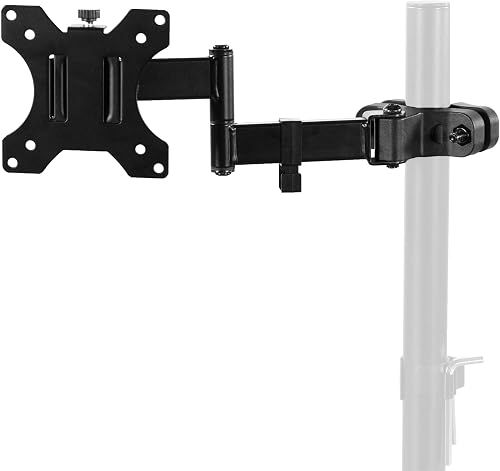
Prime VIVO Pole Mount Monitor Arm for 17 to 32 Inch
As an Amazon Associate we earn from qualifying purchases. Product prices and availability are accurate as of the date/time indicated.
Pros
- Solid alloy steel construction holds monitors firmly without slipping or sagging
- Extremely versatile fit for production carts, metro shelves, C-stands and desk poles
- Smooth tilt, swivel and rotate functions support ergonomic viewing and portrait mode
- Easy to install, adjust and relocate with removable VESA plate
Cons
- Pole is not included, so you must already have a compatible pole
- Compact arm length may feel short for larger 32 inch screens in tight setups
- Deeply recessed VESA sockets can require extra alignment and no rubber pad is included for metal poles
The VIVO MOUNT-POLE01A is a clamp on VESA bracket that adds a monitor to an existing pole, rather than a full stand. It is built for creators, office workers and DIY setups using production carts, shelving poles, C-stands or multi monitor poles.
It supports 17 to 32 inch screens up to 17.6 lbs with 75mm and 100mm VESA patterns. Users praise its stable hold on metro shelf poles and dual monitor poles, plus easy flipping between horizontal and vertical for photoshoots and client viewing.
The mount uses heavy duty alloy steel with tilt, swivel and rotation plus a swiveling arm for flexible positioning. Cable clips route cords along the arm, and the clamp rotates fully around the pole for quick collaboration and screen sharing.
The pole is not included, and the arm itself is fairly compact, so measure your screen and clearance first. Some monitors with recessed VESA holes need careful alignment, and there is no rubber liner to protect bare metal poles.
For its versatility and solid locking strength, this is a smart upgrade for custom workstations and mobile carts. If you already have a pole in the 1.1 to 2.4 inch range, it delivers pro level flexibility in a simple, reliable package.
Model: MOUNT-POLE01A by VIVO, black alloy steel pole mount bracket, pole not included.
Compatibility: 17 to 32 inch monitors and TVs up to 17.6 lbs, VESA 75x75mm and 100x100mm, pole diameter 1.1 to 2.4 inches.
Motion: 30 degree tilt up and down, 180 degree swivel, 360 degree rotation, full 360 degree clamp rotation around pole.
In the Box: Monitor arm with removable VESA plate, mounting hardware, cable clips, instruction manual, backed by 3 year warranty.
How They Compare
Material Strength and Long Term Stability
An aluminum monitor arm usually feels smooth and light in hand, and owners commonly report easy repositioning for shared screens and quick angle changes. The VIVO Black Pole Mount Monitor Arm for 17 to 32 takes the opposite path with sturdy steel construction that resists flex when you lean in for competitive play. If your priority is a rigid hold that stays where you leave it through long sessions, steel has a clear edge for confidence.
That rigidity comes with tradeoffs you should weigh for your room. An aluminum monitor arm can show more vibration on a tall desk if you bump the surface during intense moments, while the VIVO Black Pole Mount Monitor Arm for 17 to 32 adds more weight to your pole setup and needs a solid upright to perform well. Per the spec sheet, the VIVO arm earns 4.5 out of 5 from 729 reviews, which points to steady satisfaction when it is paired with a suitable pole and balanced screen.
Screen Size, Weight Support and VESA Fit
Fit is where specs settle the debate quickly for most buyers. An aluminum monitor arm often covers a wide range of small to mid size displays, but you must confirm VESA holes and load limits model by model because ratings vary widely. The VIVO Black Pole Mount Monitor Arm for 17 to 32 is rated for 17 inch to 32 inch screens up to 17.6 lbs with VESA 75x75mm or 100x100mm patterns. That clarity helps you match your monitor without guesswork or extra adapters.
You should not buy either style if your panel falls outside its stated range. An aluminum monitor arm that is too light for a heavy 32 inch class panel might droop over time and need frequent retightening, while the VIVO Black Pole Mount Monitor Arm for 17 to 32 is not made for larger TVs or heavy curved flagships above 17.6 lbs. Measure your screen size, check the VESA pattern on the back, and confirm weight with the factory stand removed before you commit to either path.
Tilt, Swivel, Rotation and Daily Flexibility
Daily comfort depends on motion range more than material name alone. An aluminum monitor arm typically offers fluid tilt and turn for quick sharing, which suits mixed use for work, school, and play in a shared room. The VIVO Black Pole Mount Monitor Arm for 17 to 32 lists +30 degrees to -30 degrees tilt, 180 degrees swivel, and 360 degrees rotation, plus a pole clamp that can rotate completely around the pole. You can tilt down for night sessions or spin the screen for a teammate to view your loadout.
Steel does not mean stiff or limited in this class. An aluminum monitor arm might feel lighter to nudge with one hand, yet the VIVO Black Pole Mount Monitor Arm for 17 to 32 still gives you full motion for ideal viewing angles with a swiveling arm for extra reach. The difference is effort and damping, where aluminum glides faster and steel settles with less bounce after you let go. If you adjust constantly through the day, pick the feel you prefer for your workflow and desk height.
Pole Clamp Install and Cable Setup
Installation separates these two paths more than any other factor. An aluminum monitor arm often uses a desk clamp or grommet base that attaches directly to your desktop edge for fast setup. The VIVO Black Pole Mount Monitor Arm for 17 to 32 is a universal pole mount that fits any pole from 1.1 inch to 2.4 inch in diameter, though please note pole is not included. A removable VESA plate makes screen attachment simple, and all hardware and instructions are provided for assembly.
Cable control also shapes perceived build quality in real rooms. An aluminum monitor arm might route cords through an internal channel for a hidden look, while the VIVO Black Pole Mount Monitor Arm for 17 to 32 uses cable management clips to route cords along the arm for a clean and organized appearance. If you use a glass top, read our guide on freestanding picks for glass desks before you clamp, since pole mounts need a stable upright rather than edge pressure alone.
Which One Should You Get
Choose aluminum monitor arm if you want a light touch for a compact setup with frequent repositioning. You likely use a mid size display for mixed gaming and school work, and you value quick turns for movies or shared viewing with friends. Pair it with a warm wood style desk like those in our warm wood floating monitor setup breakdown where a slim profile keeps the surface airy. You should not buy aluminum if your monitor feels heavy near steel limits and you dislike retightening joints.
Choose VIVO Black Pole Mount Monitor Arm for 17 to 32 if you already own a pole setup or plan a stacked multi screen pole for streaming and chat. You get support for 17 inch to 32 inch monitors up to 17.6 lbs, VESA 75x75mm or 100x100mm compatibility, and full motion with +30 degrees to -30 degrees tilt plus 360 degrees rotation. Check fit with VIVO Black Pole Mount Monitor Arm for 17 to 32 and confirm your pole measures 1.1 inch to 2.4 inch in diameter before ordering.
Who Should Skip Both
If you need a full desk clamp arm with gas spring height assist or a wall mount for a very large living room TV, these two styles are not ideal for your build. Neither the aluminum monitor arm approach nor the VIVO Black Pole Mount Monitor Arm for 17 to 32 is the right base for glass edge clamping without support or for panels above 17.6 lbs. Consider a freestanding base or a heavy duty wall solution, and see our minimalist RGB desk setup for low impact layout ideas that protect your desk.
Frequently Asked Questions
Is aluminum or steel better for a 32 inch gaming monitor?
For a 32 inch screen at the top of many arm ranges, steel often feels more planted during long play. The VIVO Black Pole Mount Monitor Arm for 17 to 32 supports 17 inch to 32 inch screens up to 17.6 lbs, so confirm your panel weight first. An aluminum monitor arm can work for lighter 32 inch models, but owners commonly report more wobble if you push near the limit.
Does the VIVO pole mount arm come with a pole?
No, pole is not included with this model and you must supply your own upright. The VIVO Black Pole Mount Monitor Arm for 17 to 32 clamps to any separate pole from 1.1 inch to 2.4 inch in diameter. An aluminum monitor arm with its own desk base might be simpler if you do not already own a pole.
Can I rotate to portrait mode for coding or chat?
Yes, both styles usually allow rotation, but check your clearance before you flip. The VIVO Black Pole Mount Monitor Arm for 17 to 32 offers 360 degrees rotation plus 180 degrees swivel and +30 degrees to -30 degrees tilt for portrait use. An aluminum monitor arm also rotates in most designs, though owners commonly report you might need extra pole height for taller vertical clearance.









Write Your Review
No reviews yet. Be the first to share your experience!