

When you are deciding on 1TB vs 2TB SSD in 2026, the Samsung SSD 990 PRO 1TB and the Samsung SSD 990 PRO 2TB, PCIe 4.0 M.2 2280 are essentially the same drive in two different sizes, and that makes the choice about capacity strategy rather than raw speed. Both target gamers, creators, and power users who want near max PCIe 4.0 performance, but they suit very different libraries and budgets.
The real decision is how you manage modern game sizes, how many large titles you keep installed at once, and whether you want headroom for recording, editing, or future DirectStorage titles without juggling installs. If you play a few games at a time and archive the rest, 1TB can work, if you keep a rotating library of 8 to 12 big games plus apps, 2TB is often the more comfortable fit in September 2026.
This article contains affiliate links. If you buy through one of our links, CustomPCGaming may earn a commission at no extra cost to you. Commissions never influence which products we recommend or how we rank them. Read our Affiliate Disclosure for details.
Quick Picks at a Glance

Samsung 990 PRO 2TB PCIe 4.0 NVMe M.2 SSD
As an Amazon Associate we earn from qualifying purchases. Product prices and availability are accurate as of the date/time indicated.
Pros
- Exceptional sequential speeds up to 7450 MB/s read
- Strong power efficiency and smart thermal control
- Large 2TB capacity perfect for gaming and creative work
- Highly reliable with proven Samsung controller and NAND
- Easy M.2 installation and PS5 compatibility
Cons
- Requires PCIe 4.0 system to achieve advertised maximum speeds
- Premium cost compared to PCIe 3.0 and budget Gen4 drives
- This model does not include a heatsink, separate cooling may be needed for heavy sustained loads
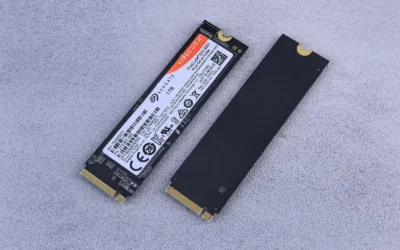
The Samsung 990 PRO 2TB is a flagship PCIe 4.0 NVMe M.2 SSD built for gamers, content creators and power users who demand top tier speed and capacity. With its compact 2280 form factor and PS5 compatibility, it fits modern desktops, laptops and consoles that support PCIe 4.0.
In real world use it delivers near maximum PCIe 4.0 performance with sequential reads up to 7450 MB/s and writes up to 6900 MB/s. Users report faster game loads, snappy system responsiveness and smooth handling of large file transfers, video editing and heavy multitasking thanks to more than 55 percent better random performance than the 980 PRO.
Built around Samsung's in-house controller and NAND, the drive offers excellent build quality in an ultra compact and lightweight design that installs easily in any M.2 slot. Intelligent heat control and improved power efficiency help maintain consistent performance while using less energy, making it suitable for both desktops and laptops.
To unlock its full potential you will need a PCIe 4.0 capable motherboard or device, otherwise speeds will be limited by your hardware. This base model does not include a heatsink, so users running sustained intensive workloads may want to add dedicated cooling, and it carries a premium over slower Gen3 or entry level Gen4 alternatives.
Overall the 990 PRO 2TB stands out as one of the fastest and most reliable PCIe 4.0 SSDs available, backed by Samsung's reputation and a 5 year warranty. If you want a high capacity, future ready drive that noticeably improves everyday computing and demanding workloads, it is an excellent investment.
Capacity: 2TB
Form Factor: M.2 2280
Interface: PCIe 4.0 x4, NVMe
Sequential Read Speed: Up to 7450 MB/s
Sequential Write Speed: Up to 6900 MB/s
Compatible Devices: Desktop, Laptop, Sony PlayStation 5
Model Number: MZ-V9P2T0B/AM
Warranty: 5 Years Manufacturer
Choose the Samsung 990 PRO 2TB if you need maximum PCIe 4.0 speed combined with large capacity for gaming, 4K editing or heavy workloads. It is the right fit when your system has an M.2 2280 PCIe 4.0 slot and you want noticeably faster boots, loads and transfers.
Consider your cooling setup before buying, as this version comes without a heatsink. If you run long sustained writes or use it in a compact build or PS5, adding a heatsink or choosing a heatsink model will help maintain peak performance.
For users on PCIe 3.0 systems or tight budgets, a more affordable Gen3 or entry Gen4 drive may be sufficient. For everyone else seeking a fast, efficient and reliable upgrade with room to grow, the 990 PRO 2TB is a top recommendation.
How They Compare
Capacity and Real-World Library Management
The Samsung SSD 990 PRO 2TB, PCIe 4.0 M.2 2280 doubles the usable space of its 1TB sibling while staying in the same M.2 2280 form factor, and that space matters more than it did a few years ago. Per the spec sheet, the family scales from 1TB to 4TB, so both options give you room to sync saves, launchers, and creative projects without immediately relying on a secondary drive.
In practice, owners commonly report that a 1TB drive fills quickly when you install three or four current AAA titles alongside Windows, launchers, and a few multiplayer staples, which forces regular uninstalls. The 2TB model lets you keep your active rotation installed plus a couple of large single player games ready to go, which is why it is often recommended for 1440p and 4K builds where you expect to keep high resolution texture packs installed. If you want to see how storage fits into a balanced parts list, our ryzen 5 7600 RX 7700 XT 1000 dollar gaming PC amazon build shows how builders pair capacity with GPU and CPU choices.
Performance, PCIe 4.0 Bandwidth and Power Efficiency
Both capacities are rated to reach near max performance of PCIe 4.0 with sequential read and write speeds up to 7450/6900 MB/s, so you should not expect a meaningful difference in load times between 1TB and 2TB in everyday gaming. Samsung also notes a more than 55% improvement in random performance compared to the 980 PRO, which helps with heavy computing, faster loading, and responsiveness when your system is handling many small files at once.
Where the spec sheet does differentiate the generation is power efficiency, with up to 50% improved performance per watt over the 980 PRO and an in-house controller with smart heat control. That efficiency is valuable in compact builds and laptops where thermal headroom is limited, and it helps both capacities maintain ferocious performance under sustained use. For context on pairing fast storage with a modern GPU at higher resolutions, see our top RTX 5070 ti cards for 1440p gaming and our RTX 4060 ti vs RTX 5060 to understand bandwidth needs.
Form Factor, Compatibility and Thermal Control
Both drives use the PCIe 4.0 M.2 2280 form factor, so they install in the same slot type found on most current AMD and Intel gaming motherboards and in many PlayStation 5 expansion bays that support 2280 drives. You should still verify your motherboard manual for PCIe 4.0 lane sharing, M.2 heatsink clearance, and whether your top slot is CPU connected for the best performance, and you should follow the manufacturer mounting instructions and use anti-static handling.
Thermal behavior is governed by the same controller design and smart heat control, so neither capacity is inherently hotter, though a fuller drive can run warmer during large sustained writes. Owners commonly report that a motherboard heatsink or the version with an integrated heatsink helps keep temperatures in check during long installs or file transfers. If you are picking a board to host either capacity, our guide on how to choose a B550 motherboard for gaming explains M.2 slot layout and compatibility, and you can browse more options in our NVMe & SSD Storage category.
Value Positioning and Upgrade Strategy
Without discussing specific pricing, the Samsung SSD 990 PRO 2TB, PCIe 4.0 M.2 2280 is the more premium choice and the 1TB model is the more affordable entry point into the same performance tier. If you are building on a tight budget and already have a secondary SATA SSD or hard drive for bulk storage, starting with 1TB for your OS and active games can keep initial costs lower while still delivering the full PCIe 4.0 experience.
The 2TB option is often the better long term value if you prefer a single drive setup or want to avoid adding a second drive later, since it reduces the need to migrate games and manages free space more gracefully as drives fill. Keeping 15 to 20 percent free space helps maintain consistent performance, so a larger capacity gives you more usable space before you hit that threshold. Builders who plan a clean, single drive system in 2026 often evaluate this alongside other components in our Budget Build Guides to balance storage against GPU and CPU priorities.
Which One Should You Get
Choose the Samsung SSD 990 PRO 1TB if you play two to four games at a time, you are comfortable uninstalling titles you have finished, and you want the 990 PRO performance tier with the smallest capacity commitment. It is a strong fit for 1080p and 1440p gaming PCs where your library lives partly on a second drive or in the cloud, for compact ITX builds where you want a fast boot drive without overcommitting on storage, and for upgraders who plan to add another M.2 drive later when needed.
Choose the Samsung SSD 990 PRO 2TB, PCIe 4.0 M.2 2280 if you keep a large active library, you install high resolution texture packs, or you also use the PC for video editing, data analysis, or content creation where large scratch files benefit from extra space. It is the better pick for 1440p high refresh and 4K builds that pair a powerful GPU with fast storage, for users who want to keep 8 to 12 large games installed without micromanaging space, and for anyone who prefers a simple single drive setup that will stay comfortable well into 2026 and beyond.
Who Should Skip Both
These drives are not ideal for builders who need maximum bulk storage on a minimal budget or who still rely on older systems without an M.2 PCIe 4.0 slot, where you would not see the benefit of 7450/6900 MB/s speeds. This option is also not a good fit if you need 4TB or more on a single drive for a massive media archive, or if your case and motherboard lack proper M.2 cooling and you are not willing to add a heatsink, since sustained writes without adequate cooling can limit performance.
Frequently Asked Questions
Is 1TB enough for gaming in 2026 or do I need 2TB?
1TB is enough if you rotate a small number of games and move completed titles to secondary storage or redownload them later. If you like to keep many large AAA games installed with extra texture packs, or you also store video projects, 2TB gives you far more breathing room and reduces how often you need to uninstall.
Does the 2TB Samsung 990 PRO run slower or hotter than the 1TB model?
Per the spec sheet both capacities share the same PCIe 4.0 interface and up to 7450/6900 MB/s sequential speeds, plus the same controller with smart heat control and up to 50% improved performance per watt over the 980 PRO. Owners commonly report similar load times between the two, with thermals depending more on case airflow and whether a motherboard heatsink is used than on capacity alone.
Will the Samsung SSD 990 PRO 2TB work with my B550 motherboard or PS5?
The drive uses the standard M.2 2280 form factor and PCIe 4.0, so it is compatible with most B550 boards that have a PCIe 4.0 M.2 slot and with PS5 systems that accept 2280 NVMe expansion drives, though you should confirm your specific board or console firmware requirements. Check your motherboard manual for slot support and heatsink clearance, and follow the manufacturer instructions for installation and secure mounting.

Write Your Review
No reviews yet. Be the first to share your experience!