

If you are asking is the Lexar NM790 a good gaming SSD in 2026, you are really asking how to match storage to your whole build. Your decision comes down to your resolution and refresh target, your platform and socket, your case size and M.2 clearance, your power budget, and whether you are buying for your current system or your next upgrade.
As of September 2026, most gaming PCs still boot and load games from an internal M.2 NVMe drive, while external SSDs handle library overflow and backups. This guide walks you through what actually matters for gaming, so you can evaluate any drive on the spec sheet and owner feedback rather than marketing. For a broader look at the category, browse our NVMe & SSD Storage archive to see how different interfaces and capacities fit together.
What Actually Matters
Interface and Real-World Speed for Games
Your motherboard determines which speed tier you can actually use. A PCIe Gen 4×4 slot is the sweet spot for most gaming builds in 2026, while PCIe Gen 5×4 requires a newer board and CPU that explicitly supports it. If your board only has Gen 4, a Gen 5 drive will still work but will be limited to Gen 4 speeds, so you would be paying for headroom you cannot use yet.
For gaming, sequential numbers like 7400MB/s read or 14000MB/s read look dramatic, but load times and DirectStorage performance depend more on random access and how the drive handles sustained transfers. Per the spec sheet, a Gen 4 drive with 7400MB/s read and 6500MB/s write is already about 2x faster than PCIe Gen 3, and a Gen 5 drive can accelerate load times by up to 200% when paired with a compatible platform. Check your motherboard manual for M.2 support before you chase the highest sequential figure, and see our how to choose a B550 motherboard for gaming guide if you are still selecting a platform.
DRAM Cache, HMB, SLC Cache, and Endurance
Many modern NVMe SSDs use either a dedicated DRAM cache or Host Memory Buffer (HMB) to map data quickly. HMB 3.0, for example, lets the drive use a portion of your system memory for that mapping, which can reduce power consumption by up to 40% compared to DRAM cache-enabled PCIe Gen 4 SSDs and keep the drive cooler in compact builds. DRAM cache and SLC Dynamic Cache both aim to keep transfers smooth when the drive fills up, so you should compare how each model describes its caching approach rather than assuming one is always better.
Endurance matters if you install large games frequently, record gameplay, or create content. Look for the TBW rating, such as 1500TBW on a 2TB model, and consider your write workload over several years. A higher TBW and a longer warranty suggest more headroom for heavy use, while a lower endurance rating is fine if you mostly read games and rarely rewrite the entire drive. Owners commonly report that real endurance feels adequate for gaming, but creators who constantly move video files should weigh TBW more heavily.
Form Factor, Thermal Design, and Compatibility
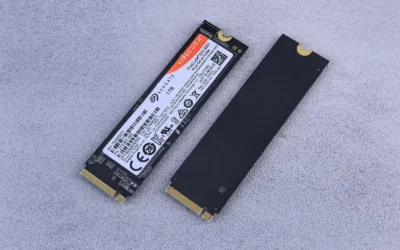
Almost all internal gaming SSDs use the M.2 2280 form factor, but your case and motherboard still impose limits. Check whether your M.2 slot has a built-in heatsink, how much clearance you have under a GPU, and whether your board throttles a hot drive. A 6nm controller and a dedicated thermal control design can help maintain performance under sustained loads, which is especially relevant for Gen 5 drives that run hotter than Gen 4.
For external drives, compatibility is about connectors and power. A drive with dual USB-C and USB-A connectors works across more devices without adapters, while USB 3.2 Gen 2×2 support is needed to reach 2000MB/s read and 1800MB/s write, and USB 3.2 Gen 2 is needed for 1050MB/s read and 1000MB/s write. Some compact phone-oriented drives note specific iPhone compatibility, so verify your phone model and that your system actually supports the USB standard listed, or performance may be lower. Also consider physical durability, such as IP65 or IP66 ratings, drop resistance up to 1 meter or 3 meters, weight as low as 13g or 42g or 55g, and thickness around 10.5mm if you carry the drive daily.
A few options that show the range:
This article contains affiliate links. If you buy through one of our links, CustomPCGaming may earn a commission at no extra cost to you. Commissions never influence which products we recommend or how we rank them. Read our Affiliate Disclosure for details.
Quick Picks at a Glance

Lexar NM790 2TB NVMe SSD PCIe Gen4 M.2 2280

Lexar NM1090 PRO 1TB PCIe Gen 5 NVMe SSD

Lexar Armor 700 2TB Portable SSD

Lexar ES3 1TB Portable SSD Silver

Prime Lexar D70E 1TB Dual Drive External SSD

Lexar 2TB Professional Go Portable SSD
As an Amazon Associate we earn from qualifying purchases. Product prices and availability are accurate as of the date/time indicated.
Pros
- Exceptional sequential speeds up to 7400MB/s read for next level responsiveness
- Broad compatibility with desktop, laptop and PlayStation 5 via M.2 2280 slot
- Single-sided, low power design runs cooler and fits compact systems easily
- Reliable TLC NAND with high endurance and five year limited warranty
Cons
- No dedicated DRAM cache, relies on Host Memory Buffer which can be slower under heavy sustained writes
- Heatsink not included, separate cooling may be needed for PS5 or high performance desktops
- Requires PCIe Gen4 compatible system to achieve maximum advertised speeds
The Lexar NM790 2TB is a high performance PCIe Gen4 NVMe SSD built for gamers, content creators and power users who demand both speed and capacity. With its M.2 2280 form factor, it is designed as a direct upgrade for desktops, laptops and the PlayStation 5.
In real world use, the drive delivers on its rated 7400MB/s read and 6500MB/s write speeds, cutting game load times and accelerating large file transfers. Thanks to HMB 3.0 and Dynamic SLC Cache, it maintains smooth and consistent performance even without onboard DRAM, while offering twice the speed of Gen3 drives.
Lexar uses a single-sided design that makes installation simple, even in compact laptops and the PS5 expansion slot. The build is also highly efficient, consuming up to 40 percent less power than DRAM equipped competitors, which helps keep temperatures lower during extended gaming or editing sessions.
There are a few tradeoffs to consider. The lack of dedicated DRAM means extremely heavy sustained writes may not match premium DRAM cache drives, and no preinstalled heatsink is included. You will also need a Gen4 capable system to unlock its full potential.
Overall, the NM790 2TB offers an outstanding balance of speed, capacity and efficiency for its class. For gamers and creators looking to expand storage with top tier Gen4 performance and proven reliability, it is an excellent choice.
Capacity: 2TB, Form Factor: M.2 2280, Interface: PCIe Gen4 x4 NVMe, Model: LNM790X002T-RNNNU
Performance: Up to 7400MB/s read, 6500MB/s write, 2x faster than PCIe Gen3, Endurance: 1500TBW
Technology: HMB 3.0, Dynamic SLC Cache, TLC NAND, Single-sided design for wide compatibility
Compatibility: Desktop, Laptop, Sony PlayStation 5, Power Efficiency: Up to 40% lower than DRAM cache Gen4 SSDs
Warranty: Five year limited warranty, Material: Metal enclosure, Color: Black
Pros
- Class leading Gen 5 sequential speeds up to 14,000MB/s read and 10,000MB/s write
- Excellent thermal efficiency, reviewers report around 46C daily use and under 60C under heavy writes
- DRAM and SLC caching ensures consistently fast transfers and system responsiveness
- DirectStorage support enhances gaming loads and overall experience
- Backed by a five year limited warranty and strong build quality
Cons
- Requires a CPU and motherboard with native PCIe Gen 5 support to reach advertised speeds, otherwise limited to Gen 4 performance
- 1TB capacity may fill quickly for large game libraries or 4K video projects
- Premium Gen 5 investment compared to mainstream Gen 4 drives and benefits most from a heatsink equipped board
The Lexar NM1090 PRO is a flagship PCIe Gen 5 M.2 2280 NVMe SSD built for enthusiasts who demand the fastest storage available. It is designed for high end gaming PCs, AI workstations and creative rigs where every second of load time and data transfer matters.
With sequential reads up to 14,000MB/s and writes up to 10,000MB/s, it delivers load times up to 200 percent faster than Gen 4. DRAM Cache and SLC Dynamic Cache keep transfers snappy, while Microsoft DirectStorage support helps games load faster and reduces CPU overhead.
The drive uses an efficient 6nm controller with an advanced thermal control design to manage heat during sustained performance. Reviewers note steady everyday temps around 46C and under 60C during heavy writes, plus dust, shock and vibration resistance for added durability.
To unlock full Gen 5 speeds you need a compatible CPU and motherboard, such as Ryzen 7000 or 9000 series or Intel platforms with Gen 5 lanes, otherwise speeds cap at Gen 4 levels. The 1TB capacity is fast but may fill quickly for users with large libraries, and you will want a heatsink equipped motherboard for best thermal headroom.
For builders with a true Gen 5 system, the NM1090 PRO offers elite responsiveness for gaming, AI model training and 4K rendering. If your platform supports it and you value cutting edge speed with a five year warranty, this is an impressive and future proof upgrade.
Capacity: 1TB, Form Factor: M.2 2280, Interface: PCIe Gen 5 x4 NVMe, Model: LNM109P001T-RNNNU
Performance: Up to 14,000MB/s sequential read, 10,000MB/s sequential write, Media Speed up to 13,000MB/s
Cache and Controller: DRAM Cache and SLC Dynamic Cache, efficient 6nm controller with thermal control design
Compatibility: Desktop PCs and PS5, Features: Dust resistant, shock resistant, vibration resistant, DirectStorage support
Warranty: Five year limited warranty, Weight: 1.6 ounces, Installation: Internal M.2 slot
Pros
- Exceptional 2000MB/s transfer speeds accelerate creative workflows
- Highly rugged with IP66 rating and 3-meter drop resistance
- Broad compatibility including direct iPhone ProRes recording
- Stable, reliable performance with effective thermal management
- Compact, portable design backed by a five-year limited warranty
Cons
- Requires USB 3.2 Gen 2x2 port to reach full 2000MB/s, slower on older USB ports
- Magnetic ring for iPhone ProRes mounting sold separately
- Isolated reports of drive failure after several months of use
The Lexar Armor 700 is a high performance 2TB portable SSD designed for professional photographers, videographers and content creators who work on location. It pairs desktop class speed with a rugged, travel ready build that is made to handle demanding shoots and outdoor conditions.
In real world use, its USB 3.2 Gen 2x2 interface delivers up to 2000MB/s read and write speeds for dramatically faster backups and 4K video transfers. It also supports direct Apple ProRes recording up to 4K 60FPS on iPhone 15 Pro models and later, plus seamless plug and play use with PC, Mac, Android and gaming consoles.
Build quality is a major strength, with an IP66 rating for full dust and water protection and durability against drops up to 3 meters. The unique Thermal Control Design helps maintain optimal temperatures during sustained transfers, while the compact dark blue chassis and included all-in-one USB-C and USB-A cable keep it highly portable.
There are a few limitations to note. You will need a USB 3.2 Gen 2x2 port to achieve the advertised maximum speeds, otherwise performance is limited by your device. The MagSafe compatible magnetic ring for iPhone mounting is sold separately, and a small number of users have reported the drive becoming unresponsive after extended use.
Overall, the Armor 700 is an excellent choice for creators and gamers who need fast, reliable and truly rugged portable storage. If you value speed, durability and versatile cross device compatibility for field work or content creation, it offers strong performance and peace of mind.
Capacity: 2TB Portable Solid State Drive
Interface: USB 3.2 Gen 2x2 with up to 2000MB/s read and write speeds
Rugged Rating: IP66 dust and water resistant, 3-meter drop resistant
Compatibility: PC, Mac, Android, iPhone 15/16 series, cameras, PS4, PS5
Special Features: Apple ProRes direct recording, Thermal Control Design, included USB-C and USB-A cable
Dimensions: 3.39 x 2.14 x 0.52 inches, 0.16 kg, Dark Blue, 5-year limited warranty
Pros
- Excellent transfer speeds for quick backups and 4K media handling
- Extremely compact, lightweight and durable aluminum design
- Broad cross device compatibility including modern iPhones and gaming consoles
- Includes 256-bit AES encryption software for data security
- Backed by a 3-year limited warranty and strong best seller ranking
Cons
- MagSafe is not available on this version
- Not compatible with iPhone 14 and older models
- Requires USB 3.2 Gen 2 port to achieve full advertised speeds, and some users report occasional disconnects
The Lexar ES3 1TB Portable SSD is a compact external drive designed for users who need fast, portable storage across multiple devices. It is especially suited for iPhone 15 to 17 users, Android owners, laptop users and console gamers on PS5 and Xbox Series X|S who want quick backups and expanded storage.
With USB 3.2 Gen 2 support, it delivers up to 1050MB/s read and 1000MB/s write speeds for rapid file transfers and smooth 4K video handling. Real world users report consistently fast and stable performance on compatible ports, making large photo libraries and game transfers notably quicker.
Weighing just 42g and measuring only 10.5mm thick, the ES3 is smaller than a credit card and slips easily into any pocket. The silver aluminum casing feels durable and premium, and the included Type-C cable ensures simple plug and play use without extra power.
There are a few limitations to note. This version does not include MagSafe, and it is not supported on iPhone 14 and older models. You will also need a USB 3.2 Gen 2 port to reach full speeds, and a small number of users have reported occasional disconnects after extended use.
Overall, the Lexar ES3 offers an excellent balance of speed, portability and compatibility for everyday creators and gamers. If you want a lightweight, reliable SSD for phone backups, media storage and console expansion, it is a strong and versatile choice backed by a 3 year warranty.
Capacity: 1TB
Interface: USB 3.2 Gen 2, up to 1050MB/s read, 1000MB/s write
Connectivity: USB Type-C, includes Type-C cable, plug and play
Dimensions: 3.96 x 1.97 x 0.41 inches, 10.5mm thin
Weight: 42g to 45g, ultra slim portable form factor
Compatibility: iPhone 17 series, Android, laptops, cameras, PS5, PS4, Xbox Series X|S
Security: Lexar DataShield 256-bit AES encryption software
Model: LES3XXX001T-RNSAU, Color Silver
Pros
- Exceptional USB 3.2 Gen 2x2 speeds up to 2000MB/s read and 1800MB/s write via USB-C
- Integrated dual USB-C and USB-A connectors eliminate cables and adapters
- Compact, lightweight 55g metal design built for everyday carry and travel
- Wide device support plus convenient auto backup through the Lexar App
Cons
- Full 2000MB/s speed requires USB 3.2 Gen 2x2 support, many Macs and older devices will run slower
- USB-A connection is limited to 1000MB/s read and 900MB/s write, half the USB-C performance
- Cable-free stick design offers less flexibility for desktop use or extended reach
The Lexar D70E 1TB is a high performance dual drive external SSD built for users who need fast, portable storage without the hassle of cables. It is an excellent fit for photographers, videographers, students and professionals who frequently switch between Mac, PC, tablets and smartphones.
Its standout feature is blazing USB 3.2 Gen 2x2 performance, delivering up to 2000MB/s read and 1800MB/s write via USB-C and up to 1000MB/s read via USB-A. In real world use, this means you can transfer large 4K video files, photo libraries and project folders in seconds, with the Lexar App enabling automatic backups of photos and videos.
Design wise, the D70E impresses with a truly portable form factor. Weighing just 55g, it features a durable silver metal housing and an integrated lanyard loop for secure everyday carry. The cable-free dual connector design is exceptionally convenient, letting you plug directly into any device without searching for adapters.
There are a few limitations to consider. Maximum speeds are only achievable on devices that support USB 3.2 Gen 2x2, so many Macs and older systems will see lower performance. The compact stick form also means no extension cable for hard to reach ports, and USB-A speeds are notably slower than USB-C.
Overall, the Lexar D70E 1TB is a powerful and ultra convenient portable SSD that balances speed, compatibility and portability. If you want a pocket sized drive for fast cross device backups and file transfers without carrying cables, it is a top tier choice.
Capacity: 1TB (also available up to 2TB), usable capacity may vary. Interface: USB 3.2 Gen 2x2 with integrated dual USB-C and USB-A connectors, cable-free design. Speed: Up to 2000MB/s read and 1800MB/s write via USB-C, up to 1000MB/s read and 900MB/s write via USB-A.
Compatibility: Mac, PC, laptops, tablets and smartphones. Special Features: Lexar App support for automatic photo and video backup. Build: Metal housing, silver finish, 55g weight, integrated lanyard loop. Use Cases: File transfer, data backup, storage expansion.
Pros
- Extremely compact and lightweight at just 13 grams
- Verified seamless ProRes 4K 60fps recording without lag or dropped frames
- Fast 1050MB/s read and 1000MB/s write speeds for editing directly on the drive
- Wide compatibility across iPhone, iPad, Mac, PC and other USB-C devices
- Durable IP65 rating with drop resistance and protective silicone case plus 5-year warranty
Cons
- Not compatible with iPhone 17 series due to Apple power requirement changes, updated model expected in 2026
- Isolated reports of drive not being detected or controller failure after several months
- Requires a firm press to fully seat the Type-C connector for a reliable connection
The Lexar Professional Go Portable SSD is an ultracompact external drive designed specifically for mobile creators who shoot high bitrate video on iPhone 15 Pro and above. Weighing just 13 grams, it plugs directly into the USB-C port to instantly expand storage and enable seamless workflows without cables or extra rigs.
In real world use, it delivers on its promise of 1050MB/s read and 1000MB/s write speeds, allowing flawless Apple ProRes 4K 60fps recording directly to the drive. Reviewers consistently praise its plug and play reliability, zero dropped frames, and fast transfers that let you edit ProRes Log footage right on the drive without copying to a computer first.
Design wise, the drive is impressively tiny at 1.71 inches and comes with a protective silicone case and phone mount adapter for convenient rear mounting. Its IP65 dust and water resistance plus 1 meter drop protection make it ready for travel, outdoor shoots, and daily carry, while the tight Type-C connection feels secure once firmly seated.
There are caveats to consider before buying. Lexar confirms compatibility issues with the iPhone 17 series due to new power requirements, with a revised version not expected until early 2026. A small number of users also report the drive eventually not being detected, suggesting potential controller reliability concerns, and it needs a firm press to fully engage.
Overall, the Professional Go is a must have tool for iPhone videographers, content creators, and anyone needing pocketable high speed storage. If you shoot ProRes on a supported iPhone 15 or 16 Pro, iPad, or work across Mac and PC, its speed, portability, and rugged build offer exceptional value and creative freedom.
Matching a Part to Your Build
If you are building a balanced 1440p gaming PC on a Gen 4 platform, an internal Gen 4 drive is usually the most sensible foundation. The Lexar 2TB NM790 Internal NVMe SSD, 7400/6500 MB/s illustrates this tier well, with PCIe Gen 4×4, HMB 3.0, Dynamic SLC Cache, and 7400MB/s read with 6500MB/s write. It is designed for gamers and creators who want fast loads without the extra heat and platform requirements of Gen 5, and the 2TB capacity gives you room for a large active library. Pair it with a build like the one in our ryzen 5 7600 RX 7700 XT 1000 dollar gaming PC amazon build and you will have a straightforward boot and game drive that does not complicate cooling.
If you are on a newer AMD Ryzen or Intel platform with PCIe 5.0 support and you want maximum headroom for DirectStorage and large asset streaming, consider a Gen 5 option. The Lexar 1TB NM1090 PRO NVMe SSD, 14,000/10,000 MB/s shows that range, with up to 14000MB/s read and 10000MB/s write, a 6nm controller for heat control, plus DRAM Cache and SLC Dynamic Cache. This type of drive is a better fit if you plan to keep the system for several years and your motherboard and case can handle the thermal load. If you are still choosing a GPU to pair with that storage, our RTX 4060 ti vs RTX 5060 comparison can help you balance graphics and storage budgets.
If your primary need is portability, backups, or console expansion rather than a boot drive, look at external models instead of forcing an internal NVMe into the wrong role. The Lexar 2TB Armor 700 External SSD, 2000MB/s R/W offers up to 2000MB/s read and write over USB 3.2 Gen 2×2 with an IP66 rating and 3-meter drop resistance for travel, while the Lexar D70E 1TB Dual Drive External SSD adds a cable-free dual USB-C and USB-A design with up to 2000MB/s read and 1800MB/s write on USB-C and up to 1000MB/s read and 900MB/s write on USB-A. For ultra-compact carry or direct phone recording, the Lexar 2TB Professional Go Portable SSD at 13 grams and the Lexar ES3 1TB Portable SSD Silver at 42 grams and 10.5mm thick both deliver up to 1050MB/s read and 1000MB/s write over USB 3.2 Gen 2, with IP65 protection on the Go model. Use these for moving a library, not as your main Windows gaming drive.
Common Mistakes
Mistake one is buying an external SSD as your primary PC gaming drive because the sequential speed looks high. Even a 2000MB/s external over USB cannot match the low latency and DirectStorage path of an internal M.2 NVMe, and you add cable and controller overhead. Keep externals for backup, media, and moving games between systems, and install your active games on an internal M.2.
Mistake two is mismatching the drive to your platform. If your motherboard only supports PCIe Gen 4, a 14000MB/s Gen 5 drive will be bottlenecked, and you may also need to address extra heat without benefit. Conversely, putting a Gen 4 drive in a Gen 5-ready system is fine, you are simply choosing efficiency and lower thermals over peak sequential speed. Always verify the M.2 slot version, whether it shares bandwidth with your GPU or SATA ports, and that your case has airflow over the drive area.
Mistake three is ignoring endurance, cache behavior, and physical compatibility. A drive without adequate SLC cache tuning can slow noticeably when nearly full, and a drive with low TBW may not suit frequent large writes. Also check that the drive height with its heatsink clears your GPU and that your external drive actually supports the USB standard your PC provides, or you will not reach the advertised 2000MB/s or 1050MB/s figures. Handle all M.2 installations with anti-static precautions and follow the manufacturer mounting instructions.
Who Should Wait or Buy Differently
The Lexar NM790 class of Gen 4 drive is not ideal for you if you already own a PCIe Gen 5 platform with good cooling and you specifically want the highest sequential throughput for future DirectStorage titles or heavy creation workloads that benefit from 10000MB/s or higher writes. It is also not the right choice if you need a rugged portable library for cameras, phones, and consoles, where an IP66 or IP65 external with USB-C support would serve you better, or if your current motherboard lacks an available M.2 2280 slot and you would be better served by freeing space first or choosing an external for now.
Frequently Asked Questions
Is the Lexar NM790 good for gaming in 2026?
For most gaming PCs that support PCIe Gen 4×4, yes. Per the spec sheet it delivers up to 7400MB/s read and 6500MB/s write with HMB 3.0 and Dynamic SLC Cache, which is more than enough for fast boots and game loads, and it uses up to 40% less power than some DRAM cache-enabled Gen 4 drives. If your platform supports Gen 5 and you want maximum future headroom, a Gen 5 model may be more appropriate.
Do I need a PCIe Gen 5 SSD for gaming?
Not for most builds. Gen 5 drives like those rated at 14000MB/s read and 10000MB/s write offer higher peak throughput and can accelerate load times by up to 200% on supported systems, but you need a compatible motherboard, CPU, and adequate thermal design to benefit. For 1080p and 1440p gaming on Gen 4 systems, a quality Gen 4 NVMe is typically the better value and runs cooler.
Can I use a portable SSD like the Armor 700 or ES3 as my main gaming drive?
You can store and move games on externals, and some consoles support running games from them, but for a desktop PC you should install active games on an internal M.2 NVMe. Externals that reach 2000MB/s or 1050MB/s over USB are excellent for backups, travel, and expanding console storage, yet they add USB overhead and do not replace the direct PCIe path of an internal drive for your operating system and most-played titles.
Write Your Review
No reviews yet. Be the first to share your experience!