

If you are asking do you need a Gen5 SSD for gaming or is Gen4 enough, you are really asking how to spend your storage budget wisely. For most gamers in 2026, the choice is not just about the biggest sequential number on the box, it is about whether your motherboard can use that speed, whether your case can cool it, and whether you will notice the difference at your resolution and refresh target.
This buying guide gives you a decision framework you can apply to any build, from a budget 1080p rig to a high refresh 1440p or 4K system you plan to keep for several years. You will weigh platform and socket support, case size and heatsink clearance, power and thermal budget, and whether you are buying for what you play today or for a next upgrade that adds DirectStorage games and larger installs. For a broader view of storage options, browse the NVMe & SSD Storage category.
What Actually Matters
1. Your Platform Determines Your Ceiling
A Gen5 drive only runs at Gen5 speed in a Gen5 M.2 slot with four PCIe lanes available. Many Intel 13th and 14th Gen and AMD Ryzen 7000 and newer platforms offer at least one Gen5 M.2 slot, but B550, older B650 boards, and many budget motherboards may only provide Gen4 or share bandwidth with your graphics card. Check your motherboard manual for which slot is Gen5, whether it is connected to the CPU or chipset, and if populating it reduces GPU lanes.
If your board does not have a Gen5 slot, a Gen5 SSD will still work but will be limited to Gen4 speeds, so you are paying for headroom you cannot use today. If you plan a platform upgrade in the next year or two, that headroom might make sense. If you plan to stay on your current board for a long time, a quality Gen4 drive often gives you better value per gigabyte. Our guide on how to choose a B550 motherboard for gaming is a helpful reminder to match storage to your chipset.
2. Where Sequential Speed Helps Games, and Where It Does Not
Sequential read and write numbers look dramatic, with Gen5 drives reaching up to 14,900MB/s read and up to 14,000MB/s write on some models, while other Gen5 options are rated around 11,000MB/s read and 9,500MB/s write. In gaming, those numbers matter most for large file transfers, game installs, level loads, and emerging DirectStorage titles that stream assets directly from the SSD. For many current games, the difference between a fast Gen4 drive and a Gen5 drive in load times is small, often a second or two, because random performance and game engine design are the limiters.
Random read and write performance, often expressed as IOPS, tells you more about responsiveness when a game loads many small files. Drives in this class list figures such as 2,000K/2,000K IOPS or up to 2,200K/2,600K IOPS and over 2,300,000 IOPS. Higher IOPS can help with stutter reduction and asset streaming, but you will feel it most if you play open world games, create content, or run AI workloads alongside gaming. If your main goal is higher frame rates at 1440p, your graphics card choice will have a far larger impact, as explained in RTX 4060 ti vs RTX 5060
3. Thermals, Heatsinks, and Physical Fit
Gen5 controllers run hotter than Gen4 controllers, so thermal design matters. Some drives include an integrated heatsink for silent, stable operation under heavy gaming sessions, while others are sold as bare drives and rely on your motherboard heatsink. Controllers built on 6nm or 5nm processes are designed to improve power efficiency, with claims such as 1.7x better power efficiency than Gen4 rivals or up to 49% better efficiency than a previous generation, and average operating power around 7.5W or under. Even with those improvements, sustained writes can push temperatures up, and passive cooling that holds around 73°C under load is a good sign for marathon sessions.
Before you buy, measure clearance. A tall integrated heatsink may not fit under a GPU, under a motherboard cover, or in a compact ITX case. A bare drive with a low profile motherboard heatsink may be the better choice for small form factor builds. Always follow the manufacturer mounting instructions, use the correct standoff and screw, and handle the drive with anti-static precautions. If your case has limited airflow, prioritize a drive and heatsink combination that is rated for stable operation without throttling.
4. Capacity, Endurance, and How Long You Keep Games Installed
Capacity affects your experience more than peak speed for most gamers. Modern AAA titles can exceed 100GB each, so a 1TB drive fills quickly if you keep several games installed plus your OS and apps. A 4TB drive gives you room for a large library, 8K video, and future OS updates without constant uninstalls, and some lines offer up to 8TB options for creators and collectors.
Endurance, expressed as TBW, tells you how much data can be written over the life of the drive. For example, one model lists up to 4,800 TBW for its 8TB capacity. For pure gaming, even a lower TBW rating is usually sufficient because games are mostly reads. If you also do video editing, AI model work, or frequent large writes, favor higher endurance and TLC NAND with a 5-year warranty. Choose capacity first, then pick the speed tier that fits your platform and budget.
Here are a few options that show the range of Gen5 designs, from compact 1TB drives with heatsinks to high capacity 4TB models built for sustained performance:
This article contains affiliate links. If you buy through one of our links, CustomPCGaming may earn a commission at no extra cost to you. Commissions never influence which products we recommend or how we rank them. Read our Affiliate Disclosure for details.
Quick Picks at a Glance

Prime SIXMemory X15000 1TB PCIe Gen5 NVMe M.2 SSD Up

Prime Biwin Black Opal X570 PRO 1TB Gen5 NVMe SSD

WD_BLACK SN8100 4TB PCIe 5.0 NVMe SSD

Prime Samsung 9100 PRO 4TB PCIe 5.0 NVMe M.2 SSD

Crucial T705 4TB PCIe Gen5 NVMe M.2 SSD
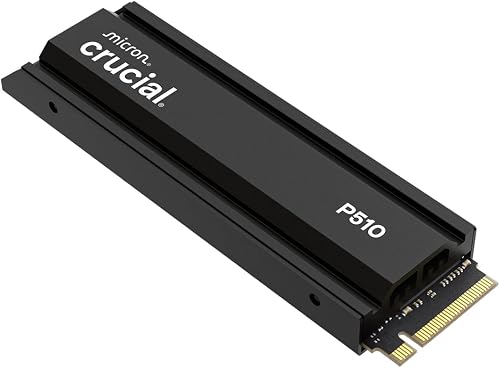
Crucial P510 1TB PCIe Gen5 NVMe SSD with Heatsink
As an Amazon Associate we earn from qualifying purchases. Product prices and availability are accurate as of the date/time indicated.
Pros
- Top tier sequential and random speeds for next gen gaming and creation
- Excellent thermal management with included heatsink and efficient 6nm controller
- Strong power efficiency compared to previous Gen4 drives
- Wide compatibility including PS5 and Xbox Series X/S with backward support
- Backed by 5 year limited warranty
Cons
- Requires PCIe Gen5 motherboard to reach advertised maximum speeds, slower on older systems
- Limited brand recognition and no dedicated manufacturer page for firmware updates
- Real world speeds can vary by system configuration as noted by some users
The SIXMemory X15000 is a high performance 1TB PCIe Gen5 x4 NVMe M.2 2280 SSD built for gamers, content creators and AI power users. It is designed to eliminate load times and accelerate demanding workflows from AAA gaming to 3D rendering.
In real world use, it delivers sequential speeds up to 14,356 MB/s read and 13,662 MB/s write, with 2,000K IOPS for rapid random access. SLC dynamic caching and Gen5 bandwidth keep 8K streaming, large file transfers and intense raid battles smooth and stutter free.
Built on a power efficient 6nm controller and 3D TLC NAND, the drive maintains thermals around 73C passively even under sustained load. The included heatsink and standard 2280 form factor ensure easy installation in desktops, laptops and consoles like PS5 and Xbox Series X/S.
There are some drawbacks to consider. You need a PCIe Gen5 compatible motherboard to unlock full performance, and speeds will be lower on Gen4 or Mac systems. As a newer brand, SIXMemory lacks the extensive support ecosystem of Samsung or WD, with limited firmware resources available.
Overall, the X15000 delivers flagship Gen5 performance with strong thermal efficiency and a reassuring 5 year warranty. If you want next generation speed for competitive gaming and creative production without throttling, this is a compelling and future proof upgrade.
Capacity: 1TB, Form Factor: M.2 2280, Interface: PCIe Gen5.0 x4 NVMe, Backward Compatible
Performance: Up to 14,356 MB/s Sequential Read, 13,662 MB/s Sequential Write, 2,000K IOPS Random Read/Write
Technology: 3D TLC NAND, 6nm Controller, SLC Dynamic Caching, Passive Thermal Design at 73C
Compatibility: Desktop, Laptop, PS5, Xbox Series X, Xbox Series S, Includes Heatsink and Quick Start Guide
Warranty: 5 Year Limited Warranty with Specialized Support
Pros
- Blazing 14000MB/s sequential read speed on PCIe Gen5 x4
- Efficient 6nm controller for high performance with improved efficiency
- Backward compatible with Gen4 and Gen3 systems
- Compact M.2 2280 form factor with Native Command Queuing support
Cons
- Needs a Gen5 compatible motherboard and CPU to reach full advertised speeds
- Gen5 performance generates extra heat and benefits from a dedicated heatsink
- 1TB capacity may be small for users with large game or media libraries
The Biwin Black Opal X570 PRO is a PCIe Gen5 x4 NVMe M.2 2280 SSD built for enthusiasts who demand maximum throughput. With 1TB of capacity and speeds up to 14000MB/s, it targets gamers, content creators and power users handling large files and AI workloads.
Its headline feature is Gen5 performance that delivers up to 2.5 times faster reads and 5 times faster writes than Gen4 drives. In real world use, that means dramatically faster boot times, game level loads and 4K video transfers with less waiting and smoother multitasking under heavy loads.
Built around an efficient 6nm controller, the drive balances raw speed with improved power efficiency in the compact M.2 2280 form factor. It supports Native Command Queuing and PCIe x4 connectivity, and offers backward compatibility so it works in Gen4 and Gen3 systems as well as modern Gen5 desktops and laptops.
Like most Gen5 SSDs, it runs hot under sustained load and will benefit from a quality heatsink or motherboard thermal armor. You will also need a Gen5 capable platform to unlock the full 14000MB/s, otherwise performance will be limited to your system interface speed.
Overall, the X570 PRO is an excellent choice for users building a future proof high performance PC who want top tier speed today. If your system supports Gen5 and you need fast, responsive storage for gaming and creation, this drive delivers elite level performance in a simple drop in upgrade.
Model: Biwin Black Opal X570 PRO 1TB (Mfr Part: BIWIN X570 PRO)
Interface: PCIe Gen5 x4, NVMe, M.2 2280, backward compatible
Performance: Up to 14000MB/s sequential read, 6nm controller, Native Command Queuing
Compatibility: Desktop, laptop and gaming console, internal installation
Form Factor and Weight: M.2 2280, 0.01 kg, 1TB solid state storage
Pros
- Exceptional sequential and random speeds that noticeably outperform Gen4 drives in real world tests
- Excellent power efficiency and thermal optimization for a high performance Gen5 drive
- Huge 4TB capacity ideal for gaming, multimedia and professional storage needs
- Easy installation with broad desktop and laptop compatibility and 5 year limited warranty
Cons
- Requires a PCIe Gen5 motherboard and slot to reach advertised speeds, limited benefit on Gen4 systems
- Bare drive design without included heatsink may require separate cooling for sustained heavy loads
- SanDisk Dashboard and Acronis migration software are Windows only
The WD_BLACK SN8100 4TB is a flagship PCIe Gen5 x4 NVMe SSD in the M.2 2280 form factor, designed for high end gaming rigs, workstations and AI systems. It is ideal for enthusiasts, video editors and creators who need maximum throughput and large capacity in one drive.
In real world use it delivers up to 14,900MB/s sequential reads, up to 14,000MB/s writes and over 2,300,000 IOPS on 2TB to 4TB models. Reviewers report noticeably faster app launches, game loads and file transfers compared to Gen4 drives when paired with a Gen5 ready motherboard.
Built with advanced TLC 3D CBA NAND, the drive balances speed with reliability and endurance for demanding workloads. Its low power profile under 7.5W average and optimized thermals help keep systems cool, while the lightweight bare M.2 design allows easy installation and custom heatsink options.
The main drawback is platform dependence, as older or budget Gen4 motherboards cannot unlock its full speed potential. It also ships without a heatsink, so sustained performance may require added cooling, and the companion SanDisk Dashboard software is limited to Windows.
Overall, the SN8100 4TB is a top tier, future proof upgrade for users with a Gen5 system who want the fastest storage available. If your motherboard supports PCIe Gen5 and you need huge capacity for gaming or creation, it is one of the most compelling NVMe SSDs you can buy.
Capacity: 4TB, series available up to 8TB
Interface: PCIe Gen5 x4, NVMe, M.2 2280 form factor
Sequential Performance: Up to 14,900MB/s read, up to 14,000MB/s write, over 2,300,000 IOPS random
NAND Technology: TLC 3D CBA NAND with up to 4,800 TBW endurance on 8TB model
Power and Thermals: Average operating power under 7.5W with optimized thermal performance
Compatibility: Desktop and Laptop, heatsink ready design, 5 Year Limited Warranty
Pros
- Class-leading PCIe 5.0 speeds up to 14,800MB/s read and 13,400MB/s write
- Exceptional random IOPS for near-instant boot, load times and AI workload handling
- Large 4TB capacity with option for up to 8TB for future expansion
- Power efficient 5nm controller with advanced thermal control for stable performance
- Trusted Samsung build quality with in-house components and 5 year warranty
Cons
- Requires a PCIe 5.0 compatible motherboard and system to reach full advertised speeds
- Premium price compared to PCIe 4.0 SSDs
- May need additional heatsink or airflow in compact builds to sustain peak performance
The Samsung SSD 9100 PRO 4TB is Samsung's flagship PCIe 5.0 M.2 NVMe drive built for users who demand next generation speed and capacity. It is designed for hardcore gamers, 4K and 8K video editors, and professionals running AI and heavy creative workloads where every second counts.
In real world use, it delivers blistering sequential speeds up to 14,800MB/s read and 13,400MB/s write, roughly twice as fast as the popular 990 PRO. Random performance up to 2,200K read and 2,600K IOPS translates to near instant boot times, faster game level loads, and seamless multitasking even with massive files.
Build quality reflects Samsung's reputation as the world's leading flash memory brand since 2003. The drive uses in house DRAM and NAND, a power efficient 5nm controller, and innovative thermal control to maintain consistent performance. Users consistently praise its solid construction and rock solid stability in both desktop and home lab builds.
The main drawbacks are platform requirements and cost. You will need a PCIe 5.0 capable system to unlock its full potential, and as a flagship Gen5 drive it carries a premium price. Some compact systems may also need extra cooling to sustain peak speeds during prolonged heavy transfers.
Overall, the 9100 PRO 4TB is an outstanding choice if you want top tier speed, huge capacity, and proven reliability in one package. For enthusiasts and creators who want to future proof their system and eliminate storage bottlenecks, it delivers performance that truly justifies the investment.
Capacity: 4TB (8TB option available later in 2025), Form Factor: M.2 2280, Interface: PCIe 5.0 x4 NVMe, Model: MZ-VAP4T0B/AM
Sequential Speeds: Up to 14,800 MB/s read, 13,400 MB/s write, Random Speeds: Up to 2,200K IOPS read, 2,600K IOPS write
Controller: 5nm controller with 49 percent better power efficiency than 990 PRO, Cache: 4GB, Features: Hardware encryption, Intelligent TurboWrite, innovative power and thermal control
Compatibility: Desktop and Laptop PCs with M.2 PCIe 5.0 slot, Software: Samsung Magician for firmware updates and health monitoring, Warranty: 5 Year Manufacturer
Pros
- Class-leading sequential performance up to 14,100MB/s read and 12,600MB/s write
- Huge 4TB capacity perfect for large game libraries and heavy content creation
- Fully optimized for DirectStorage and next-gen Intel and AMD platforms
- Built with quality Micron TLC NAND, hardware encryption and 5-year warranty
- Includes Acronis cloning software and Adobe Creative Cloud subscription
Cons
- Runs very hot under sustained loads and requires a dedicated heatsink with good airflow to avoid throttling
- Premium cost compared to PCIe Gen4 drives
- Needs an M.2 Gen5 slot to hit max speeds, so older systems will not see full benefit
The Crucial T705 4TB is a flagship PCIe Gen5 NVMe M.2 SSD built for users who refuse to compromise on speed and capacity. Designed for hardcore gamers, video editors and 3D creators, it targets high-end desktops and workstations with Gen5 support.
In real-world use it delivers blistering sequential speeds up to 14,100MB/s read and 12,600MB/s write, cutting boot times, game loads and large file transfers dramatically. DirectStorage optimization also helps reduce latency and CPU load, which keeps gameplay and multitasking smooth.
Built on Micron TLC NAND in the compact M.2 2280 form factor, the drive feels premium and lightweight at just 9.9g. It is designed to be used with your motherboard or an aftermarket heatsink, and it includes hardware encryption plus Crucial Storage Executive software for monitoring.
The main drawback is heat. Multiple users report the drive runs extremely hot and can throttle or shut down without proper cooling, so a quality heatsink and airflow are essential. It also commands a higher price than Gen4 models and only shines in a true Gen5 slot.
Verdict: If you have a compatible Intel 13th/14th Gen or Ryzen 7000 system and need top-tier speed with 4TB of space, the T705 is one of the fastest consumer SSDs available. Just budget for good cooling to unlock its full potential.
Capacity: 4TB, Form Factor: M.2 2280, Interface: PCIe Gen5 NVMe, Sequential Read up to 14,100MB/s, Sequential Write up to 12,600MB/s.
NAND: Micron TLC NAND, Cache: 4GB, Hardware Encryption Supported, Platform: x86_64, Compatible with Desktop, Workstation and Gaming Systems.
Compatibility: Intel 13th/14th Gen and AMD Ryzen 7000 with M.2 Gen5 slot, Requires heatsink and proper airflow, Dimensions: 3.15 x 0.87 x 0.15 inches, Weight: 9.9g.
Warranty: 5-year limited warranty, Bundle: 1-month Adobe Creative Cloud All-Apps, Acronis True Image, Crucial Storage Executive, Model: CT4000T705SSD3.
Choose the T705 4TB if you need maximum speed for 4K/8K editing, large game libraries or heavy multitasking and your motherboard has an M.2 Gen5 slot. It is overkill for casual users or older Gen3/Gen4 only systems.
Always pair it with a quality heatsink, either the motherboard integrated one or an aftermarket cooler, and ensure good case airflow. This prevents thermal throttling during sustained transfers and gaming.
Use the included Acronis True Image for easy cloning when upgrading your boot drive, and install Crucial Storage Executive to monitor health, temperature and firmware updates.
Pros
- Blazing Gen5 performance that easily exceeds PS5 requirements
- Included heatsink ensures silent cooling and no clearance issues on PS5
- Compact M.2 2280 design with easy installation and broad compatibility
- Trusted Micron build quality with 5-year limited warranty
Cons
- Needs a Gen5 compatible PC to reach full advertised speeds, otherwise runs at Gen4 rates
- Heatsink version adds height and may not fit some thin laptops
- 1TB may feel limiting for large game or 4K video libraries compared to 2TB options
The Crucial P510 1TB PCIe Gen5 NVMe SSD with Heatsink is built for gamers, content creators and home power users who want next generation storage speed. It combines Gen5 performance with plug and play simplicity for PS5 consoles, gaming desktops and compatible laptops.
Its standout feature is PCIe 5.0 performance with sequential reads up to 11,000MB/s and writes up to 9,500MB/s. In real world use, this means faster bootups, near instant game loading and rapid transfers of large files, with PS5 users reporting quick formatting and seamless game moves.
Design and build quality are strong thanks to Micron G8 TLC NAND and a low profile integrated heatsink. The heatsink provides silent, stable cooling under heavy loads, while the standard M.2 2280 form factor keeps installation straightforward and weight minimal.
There are a few tradeoffs to consider. You need a Gen5 ready motherboard or system to unlock full speed, otherwise performance is limited to Gen4 levels. The attached heatsink, while perfect for PS5 and desktops, may not fit ultra thin laptops that require a heatsink free drive.
Verdict: The P510 is a future proof, high performance upgrade that balances speed, cooling and reliability. For PS5 expansion and Gen5 gaming PCs, it delivers top tier responsiveness and trusted endurance that is worth the investment.
Model: Crucial P510 CT1000P510SSD5-01, 1TB, M.2 2280, PCIe Gen5 x4 NVMe
Performance: Up to 11,000MB/s sequential read, up to 9,500MB/s sequential write, TLC G8 NAND
Compatibility: Desktop, laptop, workstation, PlayStation 5, backward compatible with PCIe Gen4, supports Windows, Mac OS X and Linux
Design and Warranty: Integrated heatsink for silent thermal control, 30g, 3.1 x 0.9 x 0.38 inches, 5-year limited warranty, includes Acronis True Image and Adobe Creative Cloud All-Apps trial
Buy the Crucial P510 if you own a PS5 and want fast, hassle free expanded storage with a heatsink that fits perfectly. It is also ideal for gamers and creators building or upgrading to a Gen5 PC who want the fastest load times available.
Consider other options if your system only supports Gen4, as you will not see the full Gen5 benefit. Users with ultra thin laptops or those needing 2TB or more for massive libraries may prefer a different capacity or a drive without a preinstalled heatsink.
Matching a Part to Your Build
Scenario 1: Value 1440p gaming PC on a Gen4 or mixed Gen4/Gen5 board. If you are building around a midrange GPU and a B550 or mainstream B650 board, you may have only one Gen5 slot or none at all. In that case, a drive like the Crucial P510 PCIe Gen5 NVMe 1TB SSD with Heatsink is instructive. It is rated up to 11,000MB/s read and 9,500MB/s write, includes an integrated heatsink, and is marketed for broad desktop and laptop compatibility. You get Gen5 headroom if you have the slot, but you are not paying for the absolute highest sequential tier. If your board is Gen4 only, you could save money with a Gen4 drive and put the difference toward your GPU or a larger capacity, which you will notice more in daily use.
Scenario 2: High end build for 4K, creation, and future DirectStorage titles. If you have a platform with a dedicated Gen5 M.2 slot, good case airflow, and you plan to keep the system for years, the top sequential tier makes more sense. Examples in this group include the WD_Black SN8100 4TB NVMe SSD – PCIe 5.0×4 with up to 14,900MB/s read and up to 14,000MB/s write and over 2,300,000 IOPS, the Crucial T705 PCIe Gen5 NVMe 4TB SSD with up to 14,100MB/s read and 12,600MB/s write, the Samsung SSD 9100 PRO 4TB, PCIe 5.0×4 M.2 2280 with up to 14,800/13,400 MB/s and 2,200K/2,600K IOPS, and the SIX NVME M.2 SSD 1TB – PCIe gen 5.0×4 X15000 M.2 with 14,356/13,662 MB/s and 2,000K/2,000K IOPS. These are higher-end picks that favor large capacity, high random performance, and better power efficiency from newer controllers. Pair them with a motherboard heatsink or confirm the integrated heatsink fits, and make sure your power supply has headroom for the whole system.
Scenario 3: Compact or thermally constrained build. In an ITX case or a laptop with limited M.2 cooling, prioritize efficiency and fit over peak sequential numbers. The BIWIN Black Opal X570 PRO 1TB SSD Gen5×4 Read, which highlights a 6nm controller and claims up to 2.5 times faster read speeds than Gen4, and the SIX drive with its 6nm controller and 73°C passive thermal claim, show how newer controllers aim to keep heat down. For these builds, verify heatsink height against your case and motherboard, and consider a bare drive that uses the motherboard heatsink if clearance is tight. If you are trying to balance storage with a tight overall budget, the breakdown in ryzen 5 7600 RX 7700 XT 1000 dollar gaming PC amazon build shows how storage choices interact with CPU and GPU spending. For GPU heavy 1440p builds, also see top RTX 5070 ti cards for 1440p gaming.
Common Mistakes
Mistake 1: Buying Gen5 for a Gen4 slot and expecting Gen5 speed. A Gen5 SSD will work in a Gen4 slot, but it will be limited to Gen4 bandwidth. Owners commonly report little to no load time improvement in that configuration. Always confirm your M.2 slot generation and lane count before you pay for a faster tier.
Mistake 2: Ignoring heatsink compatibility and airflow. An integrated heatsink helps with sustained performance, but it can conflict with GPU backplates, motherboard armor, or tight ITX layouts. A drive without a heatsink may need the motherboard heatsink installed correctly with the thermal pad. Skipping this step can lead to thermal throttling during long installs or file copies.
Mistake 3: Chasing peak sequential speed instead of capacity you will actually use. A 1TB drive rated at 14,000MB/s+ will feel slower in practice than a 4TB drive at 11,000MB/s if the smaller drive is constantly full and forces you to shuffle games. For most gamers, moving from 1TB to 2TB or 4TB improves daily convenience more than moving from 11,000MB/s to 14,900MB/s. Check endurance and warranty as well, especially if you also create content.
Who Should Wait or Buy Differently
A Gen5 SSD is not ideal for you if your motherboard lacks a Gen5 M.2 slot, if your case cannot accommodate the heatsink you need, or if your budget would be better spent on a larger Gen4 drive or a stronger GPU for your target resolution and refresh rate. It is also not the right choice if you primarily play esports titles that load in seconds already and you value quiet, low power operation over maximum sequential throughput. In those situations, a high quality Gen4 drive or a larger capacity Gen5 drive at a more modest speed tier is often the smarter buy, and you can revisit Gen5 when your next platform upgrade adds native support and better cooling.
Frequently Asked Questions
Will a Gen5 SSD work in a Gen4 M.2 slot?
Yes, it is backward compatible, but it will run at Gen4 speeds. You will not get the rated Gen5 sequential numbers unless the slot, CPU lanes, and BIOS all support PCIe 5.0 x4. If you plan to upgrade your motherboard soon, buying Gen5 now can still make sense for future headroom.
Do you need a heatsink for a Gen5 SSD for gaming?
You should use a heatsink, either the integrated one that comes on some models or the heatsink included with your motherboard. Gen5 controllers generate more heat under sustained loads, and without proper cooling the drive may throttle. Check clearance in your case and follow the manufacturer instructions for pad placement.
Is Gen5 noticeably faster than Gen4 for game load times today?
For most current games, the difference is modest, often a small reduction in load times rather than a dramatic change. You will notice Gen5 more when copying large files, installing games, or playing future titles that use DirectStorage to stream assets. If faster loads are your only goal, capacity and random IOPS matter as much as peak sequential speed.





Write Your Review
No reviews yet. Be the first to share your experience!