

If you are asking will a Ryzen 7 9800X3D work in my B650 motherboard without a BIOS update, you are really asking about timing, not just socket fit. Socket AM5 physically fits Ryzen 7000, 8000, and 9000 series processors, including the 8-core, 16-thread AMD RYZEN 7 9800X3D 8-Core with its 96MB L3 cache and boost up to 5.2GHz, but whether your specific B650 board posts on day one depends on when it was manufactured and which BIOS it shipped with.
In this buying guide you will learn how to choose the right approach for your build based on your resolution and refresh target, your platform and socket plans, your case size and clearance for cooling, your power budget, and whether this is a drop-in upgrade or the start of a longer AM5 upgrade path. You will see how to read the board specs, what to look for on the box, and which alternative makes sense if you want guaranteed compatibility.
What Actually Matters
Socket Support Is Not the Same as Ready Out of the Box
All B650 motherboards use the AM5 socket and, per the spec sheet, are designed to support AMD Ryzen 7000, 8000, and 9000 series processors. That is the platform promise that makes AM5 attractive if you want to stay on one socket for several years. The detail that decides your question is the BIOS version installed at the factory.
Boards built early in the B650 life cycle shipped with a BIOS that predates Ryzen 9000 series and the newer X3D parts. Boards built more recently often ship with a newer BIOS and may have a sticker on the box that says Ryzen 9000 Ready. If your board is from older stock, or you have had it in your system for a while, you should assume it needs an update for the AMD RYZEN 7 9800X3D 8-Core to post. When you shop, look for that ready sticker and check the support page for the BIOS version that adds 9000 series support, and compare it to what your board reports in its current BIOS.
BIOS Flash Options Determine Your Risk
The most important feature to evaluate on a B650 board if you plan to use a Ryzen 9000 X3D chip is how you can update the BIOS without a supported CPU. Many B650 boards, including models like the ASUS ROG Strix B650-A Gaming WiFi AMD B650 AM5, include a USB BIOS Flashback style feature that lets you update from a USB drive with only power connected. The product data for that board notes that a BIOS update may be required when used with AMD Ryzen Desktop 9000 and 8000 Series CPU processors, which is exactly the situation you face with the 9800X3D.
If your board has that flash capability, you can usually make an older B650 work with the new chip by updating before you swap processors. If it does not, you will need a supported older AM5 CPU to perform the update, or help from a retailer. BIOS updates and overclocking are done at your own risk and may void warranty, so follow the manufacturer instructions exactly, use anti-static handling, use a reliable USB drive formatted as directed, and do not interrupt power during the flash. If you are not comfortable with that process, choosing a board that is already validated for 9000 series or a bundle that is pre-updated removes the uncertainty.
Power Delivery, Cooling, and Memory Support for Zen 5 X3D
Once BIOS compatibility is confirmed, the next filters are power delivery and memory. The 9800X3D is an unlocked part with 3D V-Cache that benefits from stable power and good cooling, and per the spec sheet for the related bundle, liquid cooling is recommended and the cooler is not included. You should check cooler height or radiator clearance against your case before you buy, and follow the manufacturer mounting instructions for AM5.
On the board side, compare VRM design and thermal design. The ASUS ROG Strix B650-A Gaming WiFi AMD B650 AM5 lists a 12 plus 2 power stage design with 8 plus 4 pin ProCool connectors and large VRM heatsinks, which is a solid foundation for multi-core processors. The GIGABYTE B850 Gaming X in the Budget Build Guides alternative bundle lists a digital 6 plus 2 plus 2 phase VRM solution. Either approach can be fine for gaming, but thicker heatsinks, good airflow, and a case with adequate fan support help sustain boost behavior.
For memory, all of these boards use DDR5 and support AMD EXPO profiles. The GIGABYTE B850 Gaming X notes DDR5 memory overclocking up to 8200MT/s and support for up to 256GB across four DIMMs, while B650 boards also support DDR5 but with varying qualified speeds. Pick a memory kit that is on your board vendor qualified list, and plan to enable the EXPO profile in BIOS after you have a stable post.
Platform Features You Keep or Trade
B650 gives you modern connectivity without moving to the newer B850 or X670 tier. Evaluate what you actually need for your build. The ASUS ROG Strix B650-A Gaming WiFi AMD B650 AM5 offers one PCIe 5.0 M.2 slot and two PCIe 4.0 M.2 slots, plus WiFi 6E, 2.5G LAN, and USB 3.2 Gen 2×2 Type-C. The GIGABYTE B850 Gaming X bundle adds PCIe 5.0 x16 support, three M.2 slots, WiFi 6E and Bluetooth 5.3, and features like X3D Turbo Mode and EZ-Latch designs.
If your priority is keeping your current B650 board and you already have DDR5, storage, and a case you like, staying on B650 and updating the BIOS is usually the most efficient path. If you are building from scratch and want the newest I/O layout and out-of-the-box 9000 series support, a B850 board that explicitly lists Ryzen 9000 support can simplify the process. Review your Graphics Cards pairing as well, since your GPU choice and monitor refresh target influence whether the X3D premium is worthwhile for your games.
A few options that show the range:
This article contains affiliate links. If you buy through one of our links, CustomPCGaming may earn a commission at no extra cost to you. Commissions never influence which products we recommend or how we rank them. Read our Affiliate Disclosure for details.
Quick Picks at a Glance
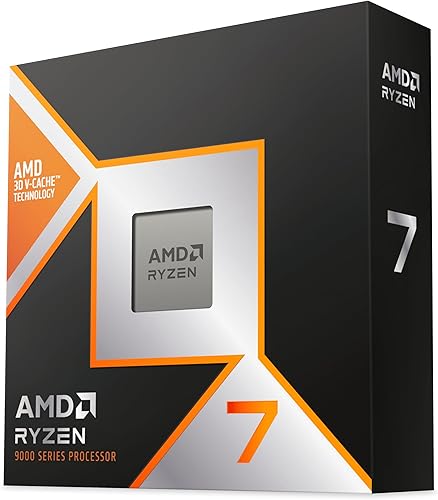
AMD Ryzen 7 9800X3D 8-Core 16-Thread

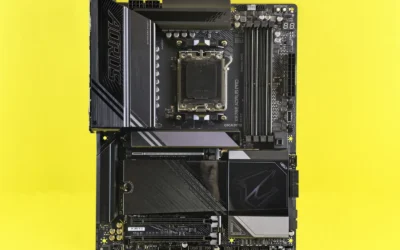
Prime ASUS ROG Strix B650-A Gaming WiFi AM5 Motherboard
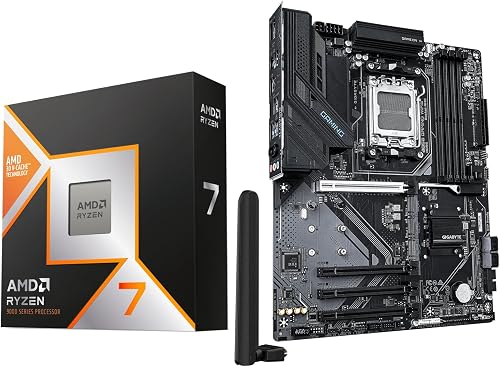
AMD Ryzen 7 9800X3D + GIGABYTE B850 Gaming X
As an Amazon Associate we earn from qualifying purchases. Product prices and availability are accurate as of the date/time indicated.
Pros
- Exceptional gaming performance with extremely consistent frame times
- Excellent power efficiency and manageable thermals with a good aftermarket cooler
- Easy installation on AM5 platform with broad motherboard compatibility after BIOS update
- Strong all around performance for gaming, streaming and everyday creation tasks
Cons
- Cooler not included, requires separate high quality cooling solution
- Requires AM5 motherboard and DDR5 memory, not compatible with AM4 systems
- 8-core design is less optimal for heavy workstation rendering versus higher core count CPUs
The AMD Ryzen 7 9800X3D is a high performance desktop processor designed for gamers, streamers and creators who demand top tier speed. Built on the Zen 5 architecture with next generation 3D V-Cache, it is purpose built to eliminate CPU bottlenecks in modern titles.
In real world gaming, the massive 96MB L3 cache and boost clocks up to 5.2GHz deliver outstanding frame rates and remarkably consistent frame times. Users report smooth performance in demanding and CPU heavy games, with excellent 1% lows that reduce stutter during competitive play and streaming.
The chip uses the proven Socket AM5 platform and offers drop in compatibility with existing AM5 motherboards after a BIOS update. Build quality reflects AMDs premium design, with improved thermal performance over the previous generation and efficient operation even during long sessions with a quality aftermarket cooler.
As a gaming focused CPU, it is not the best choice for heavy workstation or rendering workloads where higher core count processors excel. It also ships without a cooler, requires an AM5 board and DDR5 memory, and needs capable cooling to maintain its boost performance.
Overall, the Ryzen 7 9800X3D stands out as the go to processor for gamers who want the fastest and most stable gaming experience available. If your priority is maximum FPS, low latency and future ready AM5 support, this CPU is an excellent investment.
Model: AMD Ryzen 7 9800X3D, 8-Core, 16-Thread, Zen 5 Architecture
Cache: 96MB L3 Cache, 104MB Total Cache, 8MB L2 Cache
Clock Speed: 4.7GHz Base, Up to 5.2GHz Boost
Socket & Platform: Socket AM5, Supports DDR5 and PCIe 5.0, Windows 11 Ready
Power & Cooling: 140W, External Cooler Required, Cooler Not Included
Pros
- Excellent future proofing with AM5 socket and PCIe 5.0 storage
- Strong and efficient 12+2 power delivery for multi-core processors
- Effective VRM cooling keeps performance stable during gaming and creation
- Fast DDR5 memory and triple M.2 support with heatsinks
- Premium networking and I/O including WiFi 6E and Type-C
Cons
- BIOS update may be required for Ryzen 9000 and 8000 series CPUs
- PCIe 5.0 is limited to M.2 storage, GPU slot is PCIe 4.0 only
- White ROG premium features cost more than entry level B650 boards
The ASUS ROG Strix B650-A Gaming WiFi is a full size ATX motherboard built for AMD AM5, supporting Ryzen 7000, 8000 and 9000 series processors. It is ideal for gamers, creators and DIY builders who want DDR5 performance and modern connectivity without paying for an X670 platform.
In real world use, the 12 plus 2 power stage design with ProCool 8 plus 4 pin connectors delivers clean, stable power for demanding multi core workloads and light overclocking. The triple M.2 setup includes one PCIe 5.0 slot and two PCIe 4.0 slots with heatsinks, plus DDR5 support up to 6400MHz and 128GB for fast loads and smooth multitasking.
Build quality is a standout, with massive VRM heatsinks, strategically cut airflow channels and high conductivity thermal pads that keep temperatures controlled. The clean white and silver ROG Strix design with Aura Sync RGB looks premium in a windowed case, while the ATX layout provides four memory slots, four SATA ports and broad I/O.
There are a few trade offs to note. A BIOS update may be needed for Ryzen 9000 and 8000 CPUs out of the box, which can be tricky without BIOS Flashback experience. PCIe 5.0 is also limited to storage only, as the primary graphics slot runs at PCIe 4.0, and it lacks some enthusiast extras of higher end boards.
Overall, the ROG Strix B650-A Gaming WiFi offers a compelling balance of power, cooling, style and future ready features. For anyone building a modern Ryzen gaming PC that needs reliable power delivery, fast networking with WiFi 6E and 2.5G LAN, and room to grow, it is one of the best B650 choices available.
Pros
- Elite gaming performance from the 9800X3D with massive 104MB L2 and L3 cache
- Full AM5 future proofing with PCIe 5.0, DDR5 and support for Ryzen 7000, 8000 and 9000 series
- Strong connectivity with Wi-Fi 6E, Bluetooth 5.3 and high speed USB Type-C
- Builder friendly features including PCIe EZ-Latch Plus, WIFI EZ-Plug and Q-Flash Auto Scan
- Large memory headroom with 256GB capacity and DDR5 overclocking to 8200MT/s
Cons
- CPU cooler not included and liquid cooling is recommended, adding to total build cost
- ATX form factor requires a mid or full tower case, not suitable for compact builds
- DDR5 only, so existing DDR4 memory kits cannot be reused
This Micro Center bundle combines the AMD Ryzen 7 9800X3D processor and GIGABYTE B850 Gaming X WIFI6E motherboard into a ready to build AM5 foundation. It is designed for serious gamers and PC builders who want elite performance without hunting for compatible parts separately.
In real world gaming, the 9800X3D stands out with its Zen 5 architecture and Next Gen 3D V-Cache, delivering exceptionally high frame rates and low latency in CPU intensive titles. Paired with PCIe 5.0 support, DDR5 up to 8200MT/s via AMD EXPO, and X3D Turbo Mode, the combo is built to push high refresh 1080p and 1440p gaming.
The GIGABYTE B850 Gaming X brings a clean ATX layout with a robust 6+2+2 phase digital VRM, four DDR5 DIMM slots and three M.2 slots for fast storage. Builder friendly touches like PCIe EZ-Latch Plus, WIFI EZ-Plug and a multi theme BIOS with Q-Flash Auto Scan make installation and tuning straightforward.
There are a few tradeoffs to consider before buying. The processor does not include a cooler and AMD recommends liquid cooling, which adds cost and case requirements. You will also need DDR5 memory and an ATX compatible case, so upgraders from DDR4 or small form factor systems should plan accordingly.
Overall, this bundle offers outstanding value and simplicity for anyone building a next generation gaming PC. If you want the current king of gaming CPUs on a modern, well equipped motherboard with Wi-Fi 6E and future upgrade headroom, this combo is an excellent choice.
Processor: AMD Ryzen 7 9800X3D, 8-Core 16-Thread, up to 5.2 GHz Boost, 104MB L2 + L3 Cache, Socket AM5, 120W TDP, unlocked for overclocking
Motherboard: GIGABYTE B850 Gaming X WIFI6E, ATX Form Factor, AMD B850 Chipset
Memory Support: 4x DDR5 DIMM slots, Dual Channel up to 256GB, up to 8200MT/s OC, AMD EXPO supported
Expansion and Storage: PCIe 5.0 x16 slot, 3x PCIe slots total, 3x M.2 slots, 4x SATA 6Gb/s ports
Connectivity: Wi-Fi 6E, Bluetooth 5.3, 1x USB 3.2 Gen 2x2 Type-C, 15x USB ports total, 1x HDMI, 1x Ethernet
Compatibility: Supports AMD Ryzen 7000, 8000, 9000 Series, integrated Radeon Graphics, Windows 10 and Windows 11 64-Bit
Matching a Part to Your Build
Scenario 1: You already own a B650 system and want a drop-in gaming upgrade. If you have a working AM5 system with DDR5, the AMD RYZEN 7 9800X3D 8-Core is a logical target for higher refresh gaming, especially when you are CPU limited at 1080p or 1440p. First, check your current BIOS version against the board support page for 9000 series support. If your board has USB BIOS Flashback, download the correct BIOS, follow the vendor steps, and update before you install the new chip. If it lacks that feature, arrange for a loaner CPU or retailer update service. Also confirm your cooler is adequate, since the spec sheet notes cooler not included and liquid cooling is recommended for the bundle version that shares the same 5.2 GHz max boost and 104MB L2 plus L3 cache configuration.
Scenario 2: You are buying a new board now and want minimal hassle. If you have not yet purchased a motherboard, you can choose between staying on B650 or stepping to B850. The ASUS ROG Strix B650-A Gaming WiFi AMD B650 AM5 remains a strong ATX option with robust power stages, three M.2 slots with heatsinks, and WiFi 6E, but you must verify whether the specific unit you receive is Ryzen 9000 Ready or plan to flash it. The Micro Center AMD 9800X3D Processor with GIGABYTE bundle represents the higher-end pick that pairs the 8-core, 16-thread 120W TDP processor with a B850 Gaming X board that lists support for Ryzen 9000, 8000, and 7000 series, DDR5 up to 8200MT/s, and PCIe 5.0 support. That type of bundle is useful if you want the CPU and board validated together and you prefer not to manage the BIOS process yourself.
Scenario 3: You are on a tight upgrade timeline and need guaranteed post. If you need the system to post on first power-on with the 9800X3D and you cannot afford downtime, prioritize a board or bundle that is explicitly labeled as supporting Ryzen 9000 out of the box, or buy from a retailer that will update the BIOS before shipping. This is also a good moment to review the rest of your platform, including whether your power supply has the right connectors and headroom and whether your case can clear your cooler. For broader context on balancing CPU and GPU spend, the ryzen 5 7600 RX 7700 XT 1000 dollar gaming PC amazon build breakdown shows how platform cost affects total budget.
Common Mistakes
Assuming AM5 equals ready. Many readers see AM5 on the box and assume will a Ryzen 7 9800X3D work in my B650 motherboard without a BIOS update is always yes. Socket fit is necessary but not sufficient. Always check the BIOS version history for your exact board revision, look for a Ryzen 9000 Ready label, and have a flash plan if your board was manufactured before that BIOS.
Forgetting cooler clearance and power headroom. The 9800X3D is efficient for its class, but you still need to verify cooler height or radiator clearance against your case, confirm the cooler includes AM5 mounting hardware, and follow the manufacturer mounting instructions. On the power side, recommend wattage headroom over the combined GPU and CPU draw and follow the GPU maker recommended wattage for your graphics card. Do not assume a small older PSU will be comfortable with a new high refresh GPU pairing, and never claim a unit handles any card.
Buying memory or storage the platform cannot use well. A common error is buying a very high speed DDR5 kit that is not on the board qualified list, or paying for extra M.2 drives without checking slot types. B650 boards like the ASUS model support DDR5 and have a mix of PCIe 5.0 and 4.0 M.2 slots, while B850 adds PCIe 5.0 x16 on select boards. Match your kit to the vendor list, enable EXPO only after you have a stable post, and put your fastest drive in the PCIe 5.0 M.2 slot if you have one.
Who Should Wait or Buy Differently
This path is not ideal for you if you do not want to manage a BIOS update and your current B650 board lacks USB BIOS Flashback and has no easy access to a supported older AM5 CPU. It is also not a good fit if your case, cooler, or power supply would need a full replacement to support the new chip and your budget is better spent on a GPU upgrade for your target resolution. In those cases, consider a pre-updated B850 bundle, a board that is factory validated for Ryzen 9000, or waiting until you can do CPU, board, and cooling together. You can explore more board options and compatibility notes in the Motherboards & Compatibility section and compare GPU priorities in top RTX 5070 ti cards for 1440p gaming if your main goal is higher frame rates at 1440p.
Frequently Asked Questions
Will a Ryzen 7 9800X3D work in my B650 motherboard without a BIOS update?
Sometimes, but you should not count on it unless the board is labeled Ryzen 9000 Ready or the support page shows it shipped with a 9000 series BIOS. Most B650 boards that have been in inventory for a while need an update, and the ASUS ROG Strix B650-A Gaming WiFi AMD B650 AM5 explicitly notes a BIOS update may be required for Ryzen 9000 and 8000 series. Check your board revision and current BIOS version before you buy the CPU.
How do I update a B650 board if I do not have an older Ryzen CPU?
Use the USB BIOS Flashback feature if your board has it, following the vendor guide for file name, port, and button press, and keep power stable during the process. If your board lacks that feature, you will need a supported AM5 CPU to boot and flash, or a retailer service that can update it for you. Remember that BIOS updates are done at your own risk and may void warranty if done incorrectly.
Do I need a new cooler or power supply for the 9800X3D on B650?
You will need an AM5 compatible cooler, and per the spec sheet the cooler is not included with the AMD RYZEN 7 9800X3D 8-Core, with liquid cooling recommended in the related bundle listing. Check cooler height or radiator clearance against your case and follow the mounting instructions. For power, keep headroom over your combined GPU and CPU draw and follow the GPU maker recommended wattage rather than sizing to the minimum.



Write Your Review
No reviews yet. Be the first to share your experience!