

If you are planning an Intel build around the B860 chipset, you are choosing the sensible middle ground between budget H810 and premium Z890. Your decision affects VRM headroom for your CPU, the IO you will live with for years, and how much of your budget stays available for your graphics card.
This guide shows you how to choose a B860 motherboard for gaming based on VRM, IO, and price, so you can match the board to your resolution and refresh target, case size and clearance, power budget, and whether you are building for now or for a next generation CPU and GPU upgrade. You will see what actually matters and how to avoid paying for features you will not use.
What Actually Matters
VRM and Thermal Design for Gaming Loads
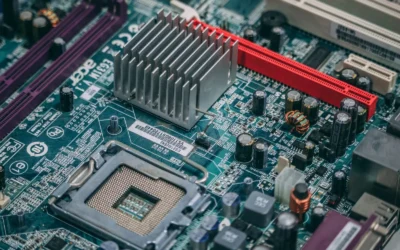
When you evaluate VRM for gaming, you are really evaluating sustained power delivery during long sessions, not just a brief boost. Look at the number of power stages, their rated amperage, and whether they use SPS or DrMOS designs with proper heatsinks and thermal pads. A board with a weak VRM may throttle a higher core count CPU when you play CPU heavy titles or stream at the same time.
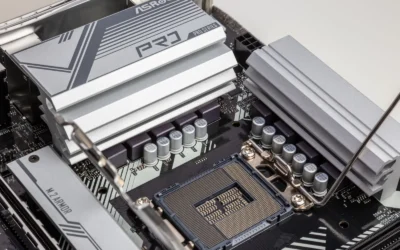
For B860, most gaming builds use locked or modestly power limited Intel CPUs, so you do not need the extreme overclocking VRM of Z890. Focus on a solid 12 to 14 phase design with large heatsinks and quality thermal pads, and check that the heatsink extends over the chokes and MOSFETs. Also confirm the board has adequate fan headers and pump support if you plan an AIO, and that the VRM heatsink does not interfere with your cooler height.
Compare boards by how they cool, not just how many phases they advertise. Extended heatsinks, extra choke pads, and good airflow from your case matter more than marketing numbers. If you plan to keep the same board through a CPU upgrade, give yourself headroom. If you will stay with a 65W class CPU, you can save money here and put it toward your GPU, which you can explore in our Graphics Cards section.
IO, Storage, and Expansion You Will Actually Use
IO determines daily convenience, so make a list of what you actually plug in: USB devices, headset, Ethernet, Wi-Fi, and displays. B860 boards vary widely in rear USB count, USB 20G Type-C support, audio, and networking. If you rely on wireless, look for Wi-Fi 7 with Bluetooth 5.4 and a 5G LAN port for future wired speed, rather than settling for older Wi-Fi 6 and 2.5G LAN if the price gap is small.
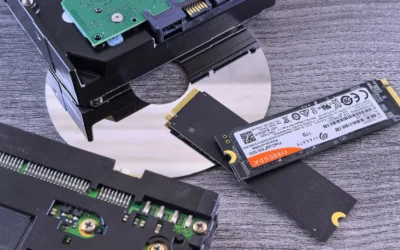
Storage matters for load times and future expansion. Count the M.2 slots and their generations. A good B860 gaming board should offer at least two M.2 Gen5 x4 slots and additional Gen4 slots, with heatsinks or shields to prevent thermal throttling. Check whether populating a second M.2 slot shares bandwidth with your PCIe x16 slot or SATA ports, so your GPU stays at full speed.
Expansion is often overlooked. Confirm you get a PCIe 5.0 x16 slot with reinforcement for heavy GPUs, and that it runs at full x16 when your M.2 drives are populated. Look at internal headers for front panel USB-C, ARGB, and fan control. If you need S/PDIF or high performance audio, verify the board includes it, so you do not need an add-in card later. You can see how builders balance IO and storage in this ryzen 5 7600 RX 7700 XT 1000 dollar gaming PC amazon build.
Memory, PCIe, and Platform Compatibility
B860 uses LGA1851 and DDR5, so verify memory support carefully. Check the board QVL and the claimed overclock speeds and whether it uses SMT DIMM slots for better signal integrity. Four DIMM slots give you flexibility, but two DIMM boards often clock higher if you only need 32GB or 64GB. Decide capacity first, then speed, based on the games you play and whether you multitask heavily.
PCIe layout affects GPU and SSD upgrades. A PCIe 5.0 x16 slot is now common in this class and keeps you ready for next generation GPUs, while Gen5 M.2 slots let you add fast storage without compromise. Always confirm case clearance for tall memory and large GPU coolers, and follow the manufacturer mounting instructions with anti-static handling when you install. Updating BIOS to support a new CPU is done at your own risk and may affect warranty, so follow the board maker guidance exactly.
Price Tiers and Where Your Money Makes a Difference
B860 boards span three rough tiers. Entry boards cover basic gaming with fewer M.2 slots, simpler audio, and Wi-Fi 6. Mid range adds better VRM cooling, Wi-Fi 7, 5G LAN, USB 20G, and extra Gen5 storage. Higher end picks add premium audio, more robust heatsinks, and expanded connectivity you may not need if you are focused on 1080p or 1440p gaming.
Put your budget where it improves frames or stability. If you play at 1440p high refresh, a mid range B860 with solid VRM and good IO often beats a premium board paired with a weaker GPU. Review your total build budget, including cooler, PSU headroom, and case, before you stretch for a board. Our Budget Build Guides show how balancing board and GPU affects overall value.
Do not pay for features you will not use. If you will never need four M.2 drives or extreme memory overclocking, choose the board that nails the basics and invest the savings in a better GPU or a larger SSD. If you need workstation IO or plan heavy multitasking, the more premium choice with expanded connectivity is easier to justify. For context on pairing a mid range board with a strong GPU, see our top RTX 5070 ti cards for 1440p gaming.
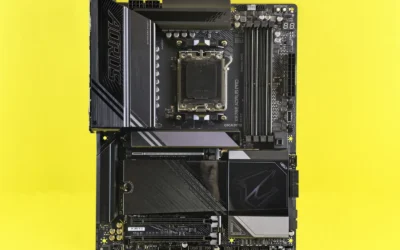
To see how these criteria look in a real product, here are a few options that show the range. The example below is an AMD B850 board that closely mirrors B860 class features for VRM, memory, and IO, so you can apply the same evaluation logic to Intel B860 models:
This article contains affiliate links. If you buy through one of our links, CustomPCGaming may earn a commission at no extra cost to you. Commissions never influence which products we recommend or how we rank them. Read our Affiliate Disclosure for details.
Quick Picks at a Glance

Prime MSI MAG B850 Tomahawk MAX WiFi AM5 ATX Motherboard
As an Amazon Associate we earn from qualifying purchases. Product prices and availability are accurate as of the date/time indicated.
Pros
- Powerful 14 phase 80A SPS VRM handles flagship Ryzen 9000 CPUs
- PCIe 5.0 x16 and dual Gen5 M.2 slots for future GPU and SSD upgrades
- Excellent memory support up to DDR5 8400+ OC and 256GB
- Modern networking with Wi-Fi 7, Bluetooth 5.4 and 5G LAN
- Robust cooling and durable server grade PCB design
Cons
- Full ATX form factor requires a mid or full tower case
- Only one full length PCIe 5.0 x16 slot limits expansion options
- B850 chipset has fewer premium features than X870E for extreme overclockers
The MSI MAG B850 Tomahawk MAX WiFi is a full size ATX motherboard built on the AMD B850 chipset for AM5 socket Ryzen 9000, 8000 and 7000 processors. It is aimed at gamers and PC builders who want next gen features without stepping up to the more expensive X870 platform.
Performance is a clear highlight thanks to its 14 Duet Rail 80A SPS VRM and dual 8-pin CPU connectors that handle high core count Ryzen 9000 chips with ease. Combined with PCIe 5.0 x16 graphics support, dual Gen5 M.2 slots and DDR5 overclocking to 8400+ MT/s, it delivers excellent headroom for gaming, content creation and future upgrades.
Build quality is premium with a server grade PCB using 2oz thickened copper, PCIe Steel Armor II on the primary slot and an extended heatsink design. MSI adds thoughtful touches like 7W/mK MOSFET thermal pads, EZ M.2 Shield Frozr II and EZ Clip II that make installation easier and keep temperatures in check during long sessions.
There are a few tradeoffs to consider. As an ATX board it requires a mid or full tower case, and it offers only one full PCIe 5.0 x16 slot which limits multi GPU or extensive expansion options. Users seeking the absolute most connectivity and overclocking features may still prefer an X870E board.
Overall, the Tomahawk MAX WiFi strikes an impressive balance of power, cooling and modern connectivity including Wi-Fi 7, Bluetooth 5.4 and 5G LAN. For most gamers building a Ryzen 9000 system, it offers outstanding value and future proofing in a durable, well designed package.
Socket / Chipset: AM5, AMD B850, supports Ryzen 9000 / 8000 / 7000 Series
Memory: 4x DDR5 DIMM, up to 256GB, 8400+ MT/s OC, SMT slots
Expansion / Storage: 1x PCIe 5.0 x16 with Steel Armor II, 2x M.2 Gen5 x4, 1x M.2 Gen4 x4, 1x M.2 Gen4 x2, 6x SATA ports
Networking / I/O: Wi-Fi 7, Bluetooth 5.4, Realtek 5G LAN, USB 20G Type-C, 7.1 Audio Boost 5 with S/PDIF
Power / Cooling: 14 Duet Rail 80A SPS VRM, dual 8-pin CPU power, Extended Heatsink, EZ M.2 Shield Frozr II
Matching a Part to Your Build
Scenario 1: 1440p high refresh with a locked Intel i5 or i7 and a mid to high end GPU. You want stable power and fast IO without paying for Z890 overclocking. Look for a B860 with a 14 phase or similar SPS VRM with extended heatsinks, PCIe 5.0 x16 with Steel Armor style reinforcement, and at least two M.2 Gen5 x4 slots plus an extra Gen4 slot. The Motherboards & Compatibility category can help you compare ATX options that fit this profile, and the MSI MAG B850 Tomahawk MAX WiFi Motherboard, ATX illustrates the class well with its 14 Duet Rail Power System at 80A SPS, PCIe 5.0 x16 at 128GB/s, and Wi-Fi 7 plus 5G LAN.
Scenario 2: ATX build that prioritizes storage and future upgrades. If you plan to add multiple NVMe drives over time, prioritize four M.2 connectors with Gen5 support and effective cooling like EZ M.2 Shield Frozr II and EZ M.2 Clip II for easy installation. The MSI MAG B850 Tomahawk MAX WiFi Motherboard, ATX shows this layout with 2 x M.2 Gen5 x4 128Gbps slots, 1 x M.2 Gen4 x4 64Gbps slot and 1 x M.2 Gen4 x2 32Gbps slot, plus 4 x DDR5 DIMM SMT slots rated for 8400+ MT/s OC in a 1DPC 1R configuration. Check that your case has clearance for the chipset heatsink and that your PSU has headroom above your combined CPU and GPU draw.
Scenario 3: Value focused 1080p or entry 1440p build that needs strong connectivity. Here you can save on extreme VRM and focus on networking and rear IO. Look for Wi-Fi 7 with Bluetooth 5.4, 5G LAN, USB 20G Type-C, and 7.1 channel audio with Audio Boost style enhancements and S/PDIF output if you use a soundbar or DAC. The MSI MAG B850 Tomahawk MAX WiFi Motherboard, ATX demonstrates this IO mix, and it is useful to compare it against simpler B860 boards that drop Wi-Fi 7 or 5G LAN to hit a lower tier. Choose the IO you will actually use every day, not the spec sheet that looks best.
Common Mistakes
Mistake 1: Undersizing the PSU and ignoring headroom. Builders often match PSU wattage too closely to their current parts. You should add headroom over your combined GPU and CPU draw and follow the GPU maker recommended wattage, especially if you plan a GPU upgrade. A board with good VRM cannot compensate for a PSU that is constantly near its limit.
Mistake 2: Forgetting physical clearance. A tall air cooler, thick radiator, or high profile RAM can conflict with VRM heatsinks, M.2 shields, or case panels. Always check cooler height or radiator clearance against your case spec, verify RAM height under your cooler, and confirm your GPU length and thickness fit with front fans or radiators installed. Handle parts with anti-static precautions and follow the manual for mounting pressure.
Mistake 3: Paying for speed you cannot use or mismatching memory. Buying the most expensive B860 for extreme memory overclocking when you run a basic DDR5 kit wastes budget that could improve your GPU or SSD. Also, do not assume any DDR5 kit will hit 8400+ MT/s, that rating is typically 1DPC 1R with overclocking and depends on the CPU memory controller and QVL. Pick a board whose memory topology and QVL match the kit you actually plan to buy.
Who Should Wait or Buy Differently
B860 is not ideal for everyone. If you need CPU overclocking, extensive PCIe bifurcation, or the most USB4 and Thunderbolt expansion, a Z890 board is not the right choice to replace with B860, and you should step up. If you are building on a very tight budget with a low power CPU and only one NVMe drive, an H810 board may be a better fit, and if you are on AM5 with Ryzen 7000, 8000, or 9000, you should shop B850 or X870 instead of B860. Also wait if your case, cooler, or PSU cannot support your planned upgrade, fix those first before you buy.
Frequently Asked Questions
Do I need Z890 instead of B860 for gaming?
For most gamers, no. B860 gives you modern DDR5, PCIe 5.0 x16, Gen5 M.2, and strong networking like Wi-Fi 7 and 5G LAN without the cost of Z890 overclocking features. Choose Z890 only if you specifically need CPU overclocking or premium IO that B860 does not offer.
How important is VRM quality on B860 if I use a locked Intel CPU?
It still matters for stability and noise, but you do not need a flagship VRM. A well cooled 80A SPS design with an extended heatsink and quality thermal pads, similar to the 14 Duet Rail Power System seen on the MSI MAG B850 Tomahawk MAX WiFi Motherboard, ATX, is more than enough for locked CPUs and keeps temperatures and fan speeds lower during long gaming sessions.
What IO should I prioritize for a gaming B860 board?
Prioritize the ports you use daily: enough rear USB including a 20G Type-C, reliable Ethernet and Wi-Fi, and audio that matches your setup. For storage, look for multiple M.2 slots with Gen5 x4 support and heatsinks to avoid throttling. If you use wireless, Wi-Fi 7 with Bluetooth 5.4 is worth favoring for longevity.


Write Your Review
No reviews yet. Be the first to share your experience!