

You are choosing between a classic SATA SSD and the Samsung SSD 990 PRO 2TB, PCIe 4.0 M.2 2280 for your gaming build in 2026, and the choice shapes load behavior, slot use, and room for DirectStorage titles. If you play at 1080p or 1440p high refresh on an AMD or Intel board with mixed drives, this SATA SSD vs NVMe SSD for Gaming in 2026 comparison gives you a clear path.
Updated for September 2026, you want quick boot times without wasting an M.2 slot, or you want peak PCIe 4.0 throughput for a primary drive that holds your OS plus your most played games. This guide reviewed owner feedback and per the spec sheet details to help you match each option to your motherboard, resolution, and library size, with more background in our NVMe and SSD Storage guides.
This article contains affiliate links. If you buy through one of our links, CustomPCGaming may earn a commission at no extra cost to you. Commissions never influence which products we recommend or how we rank them. Read our Affiliate Disclosure for details.
Quick Picks at a Glance

Samsung 990 PRO 2TB PCIe 4.0 NVMe M.2 SSD
As an Amazon Associate we earn from qualifying purchases. Product prices and availability are accurate as of the date/time indicated.
Pros
- Exceptional sequential speeds up to 7450 MB/s read
- Strong power efficiency and smart thermal control
- Large 2TB capacity perfect for gaming and creative work
- Highly reliable with proven Samsung controller and NAND
- Easy M.2 installation and PS5 compatibility
Cons
- Requires PCIe 4.0 system to achieve advertised maximum speeds
- Premium cost compared to PCIe 3.0 and budget Gen4 drives
- This model does not include a heatsink, separate cooling may be needed for heavy sustained loads
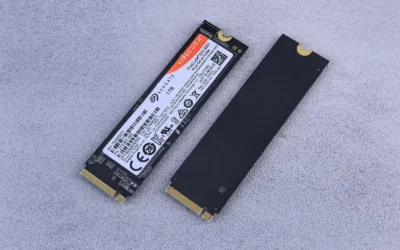
The Samsung 990 PRO 2TB is a flagship PCIe 4.0 NVMe M.2 SSD built for gamers, content creators and power users who demand top tier speed and capacity. With its compact 2280 form factor and PS5 compatibility, it fits modern desktops, laptops and consoles that support PCIe 4.0.
In real world use it delivers near maximum PCIe 4.0 performance with sequential reads up to 7450 MB/s and writes up to 6900 MB/s. Users report faster game loads, snappy system responsiveness and smooth handling of large file transfers, video editing and heavy multitasking thanks to more than 55 percent better random performance than the 980 PRO.
Built around Samsung's in-house controller and NAND, the drive offers excellent build quality in an ultra compact and lightweight design that installs easily in any M.2 slot. Intelligent heat control and improved power efficiency help maintain consistent performance while using less energy, making it suitable for both desktops and laptops.
To unlock its full potential you will need a PCIe 4.0 capable motherboard or device, otherwise speeds will be limited by your hardware. This base model does not include a heatsink, so users running sustained intensive workloads may want to add dedicated cooling, and it carries a premium over slower Gen3 or entry level Gen4 alternatives.
Overall the 990 PRO 2TB stands out as one of the fastest and most reliable PCIe 4.0 SSDs available, backed by Samsung's reputation and a 5 year warranty. If you want a high capacity, future ready drive that noticeably improves everyday computing and demanding workloads, it is an excellent investment.
Capacity: 2TB
Form Factor: M.2 2280
Interface: PCIe 4.0 x4, NVMe
Sequential Read Speed: Up to 7450 MB/s
Sequential Write Speed: Up to 6900 MB/s
Compatible Devices: Desktop, Laptop, Sony PlayStation 5
Model Number: MZ-V9P2T0B/AM
Warranty: 5 Years Manufacturer
Choose the Samsung 990 PRO 2TB if you need maximum PCIe 4.0 speed combined with large capacity for gaming, 4K editing or heavy workloads. It is the right fit when your system has an M.2 2280 PCIe 4.0 slot and you want noticeably faster boots, loads and transfers.
Consider your cooling setup before buying, as this version comes without a heatsink. If you run long sustained writes or use it in a compact build or PS5, adding a heatsink or choosing a heatsink model will help maintain peak performance.
For users on PCIe 3.0 systems or tight budgets, a more affordable Gen3 or entry Gen4 drive may be sufficient. For everyone else seeking a fast, efficient and reliable upgrade with room to grow, the 990 PRO 2TB is a top recommendation.
How They Compare
Sequential Speed and Game Loading Behavior
The Samsung SSD 990 PRO 2TB, PCIe 4.0 M.2 2280 is built to reach near max PCIe 4.0 throughput, with read and write speeds up to 7450/6900 MB/s per the spec sheet and a more than 55% improvement in random performance compared to 980 PRO. A classic SATA SSD moves data over an older interface with far lower sequential headroom, so owners commonly report longer level loads and slower large file copies even though day to day responsiveness still feels solid for browsing and older titles. You should view SATA as capable bulk storage rather than a speed rival.
You will feel the gap most when you boot, fast travel in open world games, or move a large game folder between drives, where the Samsung SSD 990 PRO 2TB, PCIe 4.0 M.2 2280 keeps queues shorter and asset streaming smoother. A SATA SSD remains useful for your secondary library, launchers, and recordings, but you should not pick it as your primary drive if your board has a spare Gen4 M.2 slot and you play DirectStorage capable titles at 1440p or 4K. Your CPU and GPU still decide frame rates, yet the NVMe drive reduces waiting between action.
Form Factor, Slots and Platform Fit
The Samsung SSD 990 PRO 2TB, PCIe 4.0 M.2 2280 uses an M.2 2280 stick that slides directly onto your AMD or Intel motherboard and runs over PCIe 4.0, so you avoid extra cables and keep airflow paths cleaner. A SATA SSD needs a separate bay plus power and data cables, which adds clutter in compact cases and can block airflow around a long graphics card if your routing space is tight. If you value a clean build with fewer cables, the M.2 approach is easier to live with.
If you own a recent AMD or Intel board with Gen4 support, you likely have at least one M.2 socket ready for the Samsung SSD 990 PRO 2TB, PCIe 4.0 M.2 2280, though you should confirm lane sharing with your second PCIe slot in the manual. If your M.2 sockets are already filled by other drives, a SATA SSD gives you an easy add on without removing anything, which helps when you want more game storage in a hurry. Our guide on how to choose an NVMe SSD for capacity, Gen, and DRAM explains how to balance slots, capacity, and motherboard limits.
Capacity Choices for Large Libraries
The Samsung SSD 990 PRO 2TB, PCIe 4.0 M.2 2280 gives you 2TB in one M.2 2280 module, and the family spans storage capacities from 1TB to 4TB per the spec sheet, which suits a boot drive plus a rotation of large current releases. A SATA SSD is often chosen for bulk overflow, yet adding multiple SATA drives means more cables and mounts, while a single high capacity NVMe keeps your library on one quick volume. You simplify drive letters, installs, and moves when fewer volumes hold more games.
Owners rate the Samsung SSD 990 PRO 2TB, PCIe 4.0 M.2 2280 at 4.7 out of 5 from 13322 reviews, and many note that 2TB hits a sweet spot for an OS plus core games without constant uninstalls. If you hold a growing collection of installed titles, you can pair it with a SATA SSD for older games and media, or explore larger NVMe options in our best value 4TB NVMe SSD for large game libraries guide. You get flexibility to keep priority titles on NVMe speed while bulk files sit on SATA.
Power Efficiency and Heat Control
Per the spec sheet, the Samsung SSD 990 PRO 2TB, PCIe 4.0 M.2 2280 uses an in-house controller with smart heat control and delivers up to 50% improved performance per watt over the 980 PRO. A SATA SSD typically draws little power and runs cool behind the motherboard tray, but it cannot match that efficiency at high throughput because it takes longer to finish the same copy or load job. You save time and waste less energy per task when the NVMe drive completes heavy transfers sooner.
You should still give the Samsung SSD 990 PRO 2TB, PCIe 4.0 M.2 2280 your motherboard M.2 heatsink or good case airflow, especially in small builds where a hot graphics card blows directly over the M.2 area. A SATA SSD is more forgiving about placement and needs no heatsink planning, which is a real advantage if your board lacks M.2 cooling or your M.2 slot sits under a thick graphics card. Your case choice matters here, so leave room for airflow around both drive types.
Which One Should You Get
Choose SATA SSD if you run a 1080p build with all M.2 slots occupied and you need simple overflow for older titles, launchers, and captures without reinstalling your OS. You get simple cable installation, cool and quiet operation, and a good home for games where ultra quick streaming is less critical, while you save your primary M.2 slot for a later NVMe upgrade. This path suits secondary PCs, family systems, and budget upgrades where capacity matters more than peak throughput. You can keep your expansion lean while adding room for media and backups.
Choose Samsung SSD 990 PRO 2TB, PCIe 4.0 M.2 2280 if you want a primary Gen4 drive for 1440p high refresh or 4K gaming with shorter loads and smoother asset streaming for DirectStorage era titles. You get read and write speeds up to 7450/6900 MB/s, 2TB of space for your OS and rotation, and power efficiency built for long sessions, see it here: Samsung SSD 990 PRO 2TB, PCIe 4.0 M.2 2280. For help sizing smaller boot options, see our affordable 1TB NVMe SSDs for fast gaming in 2026 guide and keep SATA for overflow.
Who Should Skip Both
If you edit large video projects on a laptop with no spare M.2 slot and no SATA bays, or you need rugged portable storage for travel between PCs, this pair is not ideal for you. You are not a good fit for internal SATA or M.2 upgrades when your workflow demands an external enclosure or a full workstation network volume, so you should prioritize portability and backup over internal load times. Owners with handhelds or consoles that need specific expansion cards should also look elsewhere.
Frequently Asked Questions
Is an NVMe SSD faster than a SATA SSD for gaming in 2026?
Yes, per the spec sheet the Samsung SSD 990 PRO 2TB, PCIe 4.0 M.2 2280 reaches up to 7450/6900 MB/s, which is far above what owners commonly report for SATA drives on the older interface. You will notice shorter boots and level loads, though frame rates still depend on your CPU and GPU once the level is loaded.
Can I install a SATA SSD alongside the Samsung SSD 990 PRO 2TB, PCIe 4.0 M.2 2280?
Yes, most AMD and Intel gaming boards let you run both at once, with the Samsung SSD 990 PRO 2TB, PCIe 4.0 M.2 2280 as your boot and priority game drive and the SATA SSD for overflow. You should confirm available SATA ports and M.2 lane sharing in your manual, and keep your cables routed for clean airflow.
Do you need a heatsink for the Samsung SSD 990 PRO 2TB, PCIe 4.0 M.2 2280 or is SATA simpler for hot builds?
The Samsung SSD 990 PRO 2TB, PCIe 4.0 M.2 2280 includes smart heat control from its in-house controller, but you still benefit from your motherboard heatsink in compact cases with limited airflow. A SATA SSD runs cooler with no heatsink worries, so pick SATA for secondary storage if your M.2 slot sits under a long, hot graphics card and lacks cooling.





Write Your Review
No reviews yet. Be the first to share your experience!