

If you are asking do you need a BIOS update to run a Ryzen 7 5700X3D on a B550 board, you are making the right check before you buy. The Ryzen 7 5700X3D uses the AM4 socket and DDR4 like other late Ryzen 5000 chips, but it launched well after most B550 boards first shipped, so the BIOS version on the board matters more than the socket itself.
This buying guide gives you a simple decision framework for September 2026. You will learn how to match your resolution and refresh target, your platform and socket, your case size and clearance, your power budget, and your plan for a current upgrade versus a next platform jump, so you can decide if a B550 board is the smart home for a 5700X3D or if you should buy differently. For a broader view of board options, browse the Motherboards & Compatibility archive.
What Actually Matters
BIOS Age and AGESA Support for Ryzen 5000 X3D
B550 launched for Ryzen 3000 series and was later updated for Ryzen 5000 series, including G-series parts. The Ryzen 7 5700X3D arrived even later, so it needs a newer AGESA than early 5000 support. In practice, most B550 boards need a BIOS from early to mid 2024 or newer to POST with a 5700X3D.
How to weigh it: Check the CPU support list on the motherboard maker site and note the minimum BIOS version listed for the 5700X3D. Then check what BIOS the board ships with now. If you are buying new stock in 2026, many boards ship with a recent BIOS, but open box, warehouse old stock, or a board that has sat on a shelf may not. Owners commonly report that boards bought in the last year often POST out of the box, while boards bought two years ago almost always needed an update.
If you already own a B550 board, you can often update with your current CPU installed. If you are buying a board and CPU together with no older AM4 CPU on hand, the flash method matters more than the version number on the box. Always follow the manufacturer instructions, handle the board with anti-static precautions, and remember that BIOS updates and any overclocking are done at your own risk and may void warranty.
BIOS Flashback Without a CPU Installed
Because the 5700X3D may not POST on an old BIOS, the safest buying filter is a board that can flash without a CPU, RAM, or GPU installed. Different brands use different names for the same idea, such as BIOS Flashback, Q-Flash Plus, or similar.
How to weigh it: If you do not have a supported older Ryzen to boot with, prioritize this feature. You download the correct BIOS to a USB drive, rename it per the manual, plug it into the marked port, and press the flash button. It is not instant and you should not interrupt power while it runs. If you do have an older Ryzen 3000 or 5000 chip available, you can update from within the BIOS itself and this feature is less critical.
When you compare boards, look at the rear I/O description and the manual to confirm the feature is present. A board that lists BIOS Flashback or Q-Flash Plus in its key features gives you a recovery path even if the preinstalled BIOS is too old for the 5700X3D. That flexibility is especially valuable when you buy online and cannot verify the BIOS sticker before shipping.
Power Delivery and Cooling for X3D Chips
The 5700X3D is efficient for gaming and does not need extreme overclocking headroom, since X3D parts are voltage limited, but stable power delivery still matters for consistent boost behavior. B550 boards vary widely, from compact 3+3 phase designs to more robust 12+2 teamed stages with 50A DrMOS, 10+3 digital phases, or 8+2 and 8+1 DrMOS layouts.
How to weigh it: For a stock 5700X3D in a well ventilated case, even a modest B550 power design can run the chip. If you plan long gaming sessions, a warm room, or a case with restricted airflow, look for larger VRM heatsinks, extended heatsink coverage, thermal pads on chokes, and features like M.2 Shield Frozr. These do not increase FPS by themselves, but they help maintain steady performance and lower fan noise over time.
Also check cooler and case clearance. The 5700X3D benefits from a capable tower cooler or 240mm+ AIO, so verify CPU cooler height or radiator support against your case spec sheet. Per the spec sheets we evaluated, boards like those with hybrid fan headers and Fan Xpert or Q-Fan Control make it easier to tune fan curves after you confirm the cooler fits.
Memory, Storage, and Connectivity You Will Actually Use
All B550 boards in this class use DDR4 and PCIe 4.0, but the details differ. Per the spec sheets, you will see DDR4-3200 as the baseline JEDEC support and memory overclocking support up to 4800+MHz/OC via XMP or Extreme Memory Profile, depending on the board and memory kit. For a 5700X3D, owners commonly report that DDR4-3200 or DDR4-3600 with tight timings is the sweet spot, and going much higher often adds cost without meaningful gain.
Storage and expansion also deserve a quick check. Most B550 ATX boards provide two M.2 slots, typically one PCIe 4.0 x4 64Gbps slot and one PCIe 3.0 x4 32Gbps slot, plus a PCIe 4.0 x16 slot with Steel Armor or SafeSlot reinforcement for your graphics card. If you plan to reuse a large game library, confirm the number of SATA 6Gb/s ports and front panel USB support, such as USB 3.2 Gen 1, Gen 2 Type-A, Type-C, and even a Thunderbolt header on some models.
Networking is the last filter. You will find options ranging from 1Gb LAN to 2.5Gb LAN with LANGuard, plus WiFi 5, WiFi 6, or WiFi 6E with Bluetooth 5.2 or 5.3. Choose based on your router and whether you use wired Ethernet. If you game on WiFi, a board with WiFi 6E and an included antenna is more useful than paying for a premium power stage you will not leverage. If you are trying to keep costs down, see the Budget Build Guides for how to balance board features with GPU and CPU spend.
The list below shows a few options that show the range, from compact Micro-ATX to full ATX with stronger power and WiFi 6E, so you can see how these criteria map to real products.
This article contains affiliate links. If you buy through one of our links, CustomPCGaming may earn a commission at no extra cost to you. Commissions never influence which products we recommend or how we rank them. Read our Affiliate Disclosure for details.
Quick Picks at a Glance

ASUS ROG Strix B550-F Gaming WiFi II AM4 ATX
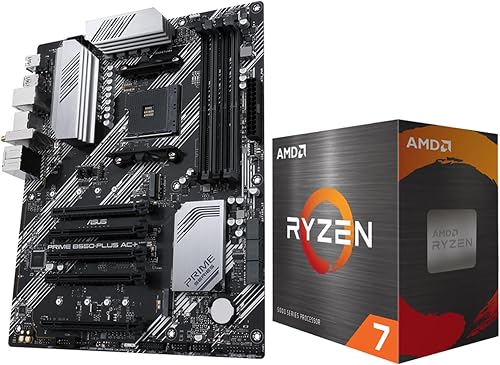
AMD Ryzen 7 5800XT + ASUS Prime B550-PLUS AC-HES

ASUS TUF Gaming B550-PLUS WiFi II AM4 ATX

GIGABYTE B550 Gaming X V2 AM4 ATX Motherboard

Prime GIGABYTE B550M K Micro-ATX Motherboard for AMD AM4

MSI B550 Gaming WIFI6E ATX Motherboard for AMD
As an Amazon Associate we earn from qualifying purchases. Product prices and availability are accurate as of the date/time indicated.
Pros
- Handles high end Ryzen 9 CPUs with warm but well controlled VRM temperatures
- Comprehensive next gen connectivity including WiFi 6E, 2.5Gb LAN and USB Type-C
- Dual PCIe 4.0 M.2 slots and PCIe 4.0 x16 support for fast storage and graphics
- Highly praised for easy installation, reliable first time POST and intuitive BIOS
Cons
- AM4 and DDR4 platform limits upgrade path to Ryzen 7000 and DDR5
- Fewer PCIe 4.0 lanes and expansion than X570 chipset boards
- Retail packaging can be minimal and may not include spare motherboard screws
The ASUS ROG Strix B550-F Gaming WiFi II is an ATX motherboard designed for the AMD AM4 socket and Ryzen 3000, 5000 and G-series processors. It is ideal for gamers, creators and DIY builders who want high end features and reliable overclocking without stepping up to X570.
In real world use it delivers fast PCIe 4.0 performance through dual M.2 slots and a primary x16 slot, plus smooth networking via WiFi 6E and Intel 2.5Gb Ethernet. Owners report stable operation even with demanding chips like the Ryzen 9 5950X with PBO enabled, and many highlight instant posting and fast boot times.
Design and build quality are standout strengths, with a 12+2 teamed power stage layout, ProCool power connector, alloy chokes and durable capacitors. The Stack Cool 3+ PCB design improves heat dissipation, while Aura Sync RGB, HDMI 2.1 and DisplayPort 1.2 add modern style and display flexibility.
Drawbacks are tied to the platform itself, as this board does not support DDR5 or Ryzen 7000 and newer CPUs. It also provides fewer PCIe 4.0 lanes than X570, and some buyers note the box arrives with minimal padding and no extra mounting hardware.
Overall, it remains one of the most well rounded B550 options, balancing power delivery, cooling and connectivity at a competitive point in the market. If you are building or upgrading an AM4 system, it is a reliable and future ready choice for gaming and productivity.
Socket / Chipset: AM4, AMD B550 for Ryzen 3000, 5000 and 4000/5000 G-Series
Memory: 4x DDR4 slots, up to 128GB, Dual Channel
Expansion: PCIe 4.0 x16, 5x PCIe slots total, 2x M.2 slots, 6x SATA 6Gb/s
Networking: WiFi 6E (802.11ax), Bluetooth 5.2, Intel 2.5Gb Ethernet with LANGuard
Rear I/O: USB 3.2 Gen 2 Type-C, multiple USB ports, HDMI 2.1, DisplayPort 1.2, Optical S/PDIF, 2.5Gb LAN
Features: 12+2 Teamed Power Stages, ProCool Connector, BIOS Flashback, Aura Sync Addressable Gen 2 RGB, Stack Cool 3+
Pros
- Strong gaming performance for 1080p and mid-range 1440p with modern discrete GPUs
- Full ATX feature set with WiFi, dual M.2, Type-C and extensive USB connectivity
- Reliable power delivery and thermal design for overclocking and sustained loads
- Proven AM4 platform lets you reuse DDR4 memory to save on build costs
Cons
- No CPU cooler included, aftermarket cooler purchase required
- Discrete graphics card required, no integrated graphics
- AM4 and DDR4 platform offers limited future upgrade path compared to AM5
The Micro Center Ryzen 7 5800XT and ASUS Prime B550-PLUS AC-HES bundle combines an 8-core, 16-thread AM4 processor with a feature-rich ATX motherboard. It is built for gamers and value-focused builders who want high frame rates without moving to the pricier AM5 and DDR5 ecosystem.
In real-world use, the 5800XT delivers fast gaming performance with its 4.8 GHz max boost and 19MB cache, easily pushing over 100 FPS in popular titles when paired with a capable GPU. PCIe 4.0 support, dual NVMe M.2 slots and DDR4 support up to 4866 MHz keep load times quick and multitasking smooth, and users report cool, stable operation under ultra settings.
The ASUS Prime B550-PLUS AC-HES brings a durable, well laid out ATX design with VRM and PCH heatsinks, 8+1 DrMOS power stages and SafeSlot Core protection. ASUS OptiMem improves memory stability at higher frequencies, while Fan Xpert 2, WiFi, 1Gb LAN and USB 3.2 Gen 2 Type-C add everyday convenience and connectivity.
There are tradeoffs to consider. The newer 5800XT no longer includes the Wraith Prism cooler, so you will need an aftermarket cooler, and the CPU has no integrated graphics. As an AM4 and DDR4 system, it is a mature platform with excellent value but less long term upgrade headroom than AM5.
Overall, this combo is a smart, cost effective foundation for a gaming PC that prioritizes current performance and proven stability. If you have DDR4 and a discrete GPU ready, it offers excellent power, connectivity and build quality for 1080p and 1440p gaming.
CPU: AMD Ryzen 7 5800XT, 8 cores, 16 threads, up to 4.8 GHz boost, 19MB L2+L3 cache, 105W TDP, Socket AM4, unlocked for overclocking
Motherboard: ASUS Prime B550-PLUS AC-HES, ATX, AMD B550 chipset, 4x DDR4 DIMM slots up to 128GB, 2x M.2 slots, 6x SATA 6Gb/s, PCIe 4.0
Connectivity: WiFi, 1Gb Ethernet, USB 3.2 Gen 2 Type-C, DisplayPort, HDMI, 10x USB ports total, Windows 10 and 11 64-bit support
Power and Cooling: 8+1 DrMOS power stages, VRM heatsink, PCH heatsink, hybrid fan headers, Fan Xpert 2, 5X Protection III
Pros
- Proven stability and durability with military-grade components and robust power design
- Ryzen 5000 ready out of the box with BIOS FlashBack support
- Excellent thermal design with fanless heatsinks and customizable Fan Xpert 4 control
- Strong connectivity with WiFi 6, 2.5Gb LAN and PCIe 4.0 M.2
- Intuitive BIOS that is easy to navigate for beginners and enthusiasts
Cons
- Top RGB header placement can be blocked by large CPU coolers
- WiFi drivers may require manual installation via ASUS DriverHub
- AM4 and DDR4 platform offers no upgrade path to AM5 and DDR5
The ASUS TUF Gaming B550-PLUS WiFi II is an ATX motherboard built for AMD AM4 socket and Ryzen 3000 and 5000 series CPUs. It is ideal for gamers and PC builders who want proven AM4 performance and long term stability without moving to the newer AM5 platform.
In real world use it delivers rock solid stability thanks to its 8+2 DrMOS power stages and optimized power delivery. You get PCIe 4.0 for a fast NVMe SSD, dual M.2 slots, plus WiFi 6 and 2.5Gb LAN with LANGuard that keep gaming, streaming and file transfers smooth and responsive.
Build quality is a clear strength, with military grade components, alloy chokes, durable capacitors and fanless VRM and PCH heatsinks. The board has a clean TUF aesthetic with textured details, Aura Sync RGB headers, and comprehensive cooling control via Fan Xpert 4 and UEFI Q-Fan.
There are a few tradeoffs to note. The RGB header placement at the top can be blocked by larger CPU coolers, forcing you to route cables to the bottom header. WiFi drivers can also be finicky and often work best when installed through ASUS DriverHub rather than the website download.
Overall, this is one of the most balanced and dependable B550 options for AM4 builds. If you want modern connectivity, easy BIOS navigation and durable performance for gaming and everyday computing, it is an excellent choice.
Socket: AM4, supports AMD 3rd Gen Ryzen and Ryzen 5000 series
Chipset: AMD B550 with PCIe 4.0 support
Memory: 4x DDR4 DIMM slots, up to 128GB
Storage: Dual M.2 slots (one PCIe 4.0 x4), 6x SATA 6Gb/s ports
Networking: WiFi 6 (802.11ax), Bluetooth 5.2, 2.5Gb Ethernet with LANGuard
Expansion: 5x PCIe slots, HDMI 2.1, DisplayPort 1.2, USB 3.2 Gen 2 Type-C and Type-A
Form Factor: ATX, 24-pin main power, Addressable Gen 2 RGB headers and Aura Sync
Pros
- Excellent value for AM4 and DDR4 builds, perfect for reusing existing memory
- PCIe 4.0 support for GPU and primary M.2 delivers next gen speed
- Q-Flash Plus and integrated I/O shield make installation and BIOS updates easy
- Robust 10+3 phase power and advanced VRM cooling for stable performance
- Strong user satisfaction for reliability, boot speed and ease of use
Cons
- No built in WiFi, requires separate adapter or card for wireless connectivity
- AM4 and DDR4 only, not compatible with DDR5 or Ryzen 7000 and newer CPUs
- Only one M.2 slot is PCIe 4.0, second is PCIe 3.0, and LAN is GbE not 2.5GbE
The GIGABYTE B550 Gaming X V2 is a full ATX motherboard for the AMD AM4 socket, supporting Ryzen 5000, 4000 and 3000 series processors. It is built for budget conscious gamers, upgraders and DIY builders who want modern features while reusing DDR4 memory and ATX cases.
In real world use it delivers fast, stable performance thanks to its Digital Twin 10+3 power phase design and PCIe 4.0 support for graphics and NVMe SSDs. Users report quick boots, smooth gameplay with cards like the RX 6600 and RX 580, and noticeable gains moving from PCIe 3.0 to 4.0, with AMD StoreMI helping to accelerate traditional storage.
Design and build quality are strong for the class, with premium chokes and capacitors, advanced VRM heatsinks and an integrated I/O shield that speeds up assembly. You get four DDR4 DIMM slots up to 128GB with XMP support, dual M.2 slots, front USB-C, multiple USB 3.2 ports and RGB Fusion headers for cooling and lighting.
There are a few tradeoffs to note. Wireless is not built in, so you will need an adapter for WiFi or Bluetooth, and as an AM4 DDR4 board it cannot be upgraded to DDR5 or AM5 CPUs. Only the primary M.2 is PCIe 4.0 while the second is PCIe 3.0, and networking tops out at GbE LAN.
Overall the B550 Gaming X V2 is a smart, dependable value pick for AM4 builds. It blends current connectivity, solid thermals and builder friendly features in a proven platform, making it an excellent choice for affordable DDR4 gaming systems.
Platform: AMD B550 Chipset, Socket AM4, ATX Form Factor, supports Ryzen 5000, 4000, 3000 Series
Memory: 4x DDR4 DIMM slots, up to 128GB, XMP support, 3200MHz and higher via overclocking
Expansion and Storage: 1x PCIe 4.0 x16, 1x PCIe 4.0 M.2, 1x PCIe 3.0 M.2, 4x SATA 3 ports
Connectivity: Front USB 3.2 Gen 1 Type-C, 3x USB 3.2 Gen 2 Type-A, 1x USB 3.2 Gen 1 Type-A, 2x USB 2.0, 1x HDMI, 1x GbE LAN, Optical S/PDIF, RGB Fusion headers
Special Features: Digital Twin 10+3 Power Phase, Advanced VRM Heatsink, Integrated I/O Shield, Q-Flash Plus, AMD StoreMI Technology
Pros
- Full support for Ryzen 5000 series on affordable AM4 platform
- PCIe 4.0 x16 and PCIe 4.0 M.2 deliver next gen speed for gaming and storage
- Two M.2 slots and four SATA ports offer excellent storage flexibility
- Four DIMM slots support up to 128GB DDR4 with XMP
- Q-Flash allows BIOS updates without a CPU installed
Cons
- 3+3 power phase design limits extreme overclocking potential
- Micro-ATX size offers fewer PCIe expansion slots than full ATX boards
- Lacks WiFi, Bluetooth and 2.5GbE LAN found on more premium models
The GIGABYTE B550M K is a Micro-ATX motherboard designed for AMD's AM4 socket, supporting Ryzen 3000, 4000 and 5000 series processors. It is built for budget gamers, first time builders and anyone wanting modern features without moving to the more expensive AM5 platform.
In daily use it delivers responsive performance with a PCIe 4.0 x16 slot for current GPUs and a PCIe 4.0 M.2 slot for high speed NVMe drives. The additional PCIe 3.0 M.2 slot, four SATA ports and four USB 3.2 Gen 1 ports provide flexible storage and peripheral connectivity for gaming and productivity.
Design and build quality are solid for this class, featuring a digital 3+3 VRM with premium chokes and capacitors for stable power delivery. The dedicated chipset heatsink aids heat dissipation, and the compact 10.43 inch square layout fits easily in smaller cases while retaining four DDR4 DIMM slots.
Drawbacks are modest but worth noting. The entry level VRM is not intended for heavy overclocking, and connectivity is basic with 1GbE LAN and no integrated WiFi or Bluetooth. Expansion is also more limited than full ATX boards with only two PCIe slots.
Verdict: The B550M K is an excellent value foundation for a capable AM4 gaming or work PC. If you want PCIe 4.0, dual M.2 support and proven Ryzen 5000 compatibility in a compact and affordable board, it is a smart and reliable choice.
Platform: AMD Socket AM4, AMD B550 Chipset, Micro-ATX Form Factor
CPU Support: Ryzen 5000, 4000 and 3000 Series, 3+3 Digital VRM Design
Memory: 4x DDR4 DIMM slots, up to 128GB, XMP Support, 3200 MHz
Storage: 1x PCIe 4.0 M.2, 1x PCIe 3.0 M.2, 4x SATA 3 Ports
Expansion: 1x PCIe 4.0 x16 slot, 1x PCIe slot
Connectivity: 4x USB 3.2 Gen 1, 4x USB 2.0, 1x HDMI, 1x GbE LAN, Optical S/PDIF, Q-Flash
Pros
- Excellent stability and memory compatibility with refreshed BIOS and latest AGESA microcode
- Robust 8+2+1 DrMOS power design and extended cooling for sustained performance
- Integrated WiFi 6E and Bluetooth 5.3 plus 10Gbps USB Type-C adds strong value
- PCIe 4.0 x16 and Gen4 M.2 support for high-end GPUs and NVMe SSDs
- Easy installation and durable build with Steel Armor and 2oz copper PCB
Cons
- AM4 and DDR4 platform has no upgrade path to DDR5 or Ryzen 7000 and newer CPUs
- Only 1Gbps LAN, lacks faster 2.5Gbps Ethernet found on newer boards
- Not compatible with AMD Ryzen 5 3400G and Ryzen 3 3200G processors
The MSI B550 Gaming WIFI6E is an ATX motherboard built for AMD AM4 and Ryzen 5000 series processors, including 5000 G-Series and 3000 series CPUs. It is ideal for gamers and budget-conscious builders who want modern features without moving to the pricier AM5 and DDR5 platform.
In real-world use, it delivers rock-solid stability thanks to its refreshed BIOS and latest AGESA microcode, eliminating early B550 bugs like fTPM stutters. Users report plug-and-play setup, excellent memory compatibility up to 4800+MHz OC, and fast load times via its PCIe 4.0 x16 slot and Gen4 M.2 with Shield Frozr.
Build quality is a clear strength, with an 8+2+1 Duet Rail Power System using 50A DrMOS, 2oz thickened copper PCB, and PCIe Steel Armor for heavy graphics cards. Cooling is well handled by an extended heatsink, chipset heatsink, thermal pads, and M.2 Shield Frozr to keep VRMs and storage cool under load.
There are some platform limitations to consider. As an AM4 and DDR4 board, it is not upgradeable to Ryzen 7000 or DDR5, and it lacks 2.5G LAN, offering only 1Gbps. It also has just one Gen4 M.2 slot and is not compatible with Ryzen 5 3400G and Ryzen 3 3200G.
Overall, the B550 Gaming WIFI6E is a fantastic value for a dependable Ryzen 5000 gaming build with modern connectivity like WiFi 6E, Bluetooth 5.3 and USB 10Gbps Type-C. If you want an affordable, hassle-free and durable foundation for gaming and everyday use, this board is an easy recommendation.
Socket: AM4 for AMD Ryzen 5000, 5000 G-Series, 4000 G-Series and 3000 Series processors
Chipset: AMD B550, ATX form factor with 8+2+1 Duet Rail Power System, 50A DrMOS and Core Boost
Memory: 4x DDR4 DIMM slots, Memory Boost up to 4800+MHz OC, 1DPC 1R
Expansion and Storage: 1x PCIe 4.0 x16 slot with Steel Armor, 1x M.2 Gen4 x4 64Gbps with Shield Frozr, 1x M.2 Gen3 x4 32Gbps
Connectivity: WiFi 6E, Bluetooth 5.3, Realtek 1G LAN, USB 10Gbps Type-C, 7.1 HD Audio with Audio Boost, 4K/30Hz display support
Matching a Part to Your Build
Scenario 1: You already own a B550 board and want to drop in a 5700X3D. Check your current BIOS version in the UEFI or with the maker utility, then compare it to the minimum BIOS listed for the 5700X3D on the support page. If you are behind, update using your current CPU before swapping. If your board is the GIGABYTE B550 Gaming X V2 AMD AM4 ATX Motherboard or the GIGABYTE B550M K AMD AM4 Micro-ATX Motherboard, the Q-Flash Plus feature lets you update even without a CPU installed, which is reassuring if you already sold your old chip. The Gaming X V2 with its Digital Twin 10+3 Power Phase and Advanced Thermal Armor is a comfortable fit for long sessions, while the B550M K with its 3+3 VRM design is workable for stock operation in a compact case with good airflow.
Scenario 2: You are building new on AM4 to reuse DDR4 and keep costs contained. Here you are choosing between ATX boards with different power and networking. The Asus ROG Strix B550-F Gaming WiFi II AMD AM4 stands out with its 12+2 teamed power stages, ProCool connector, WiFi 6E, Intel 2.5Gb Ethernet, and BIOS Flashback, which together make it forgiving for a first time 5700X3D install. The ASUS TUF Gaming B550-PLUS WiFi II AMD AM4 is a slightly more value oriented take with 8+2 DrMOS, WiFi 6, 2.5Gb LAN, and BIOS Flashback, plus HDMI 2.1 and DisplayPort 1.2 if you need integrated graphics output for a G-series APU later. Either board covers dual M.2 and PCIe 4.0 for a modern GPU, so let your case size and WiFi needs decide.
Scenario 3: You want a compact or secondary rig, or you found a bundle. The MSI B550 Gaming WIFI6E Motherboard, ATX with its 8+2+1 Duet Rail Power System and WiFi 6E plus Bluetooth 5.3 is a balanced ATX option if you want modern wireless without stepping to the higher end pick, and its M.2 Shield Frozr helps keep Gen4 drives cool. The MICRO CENTER AMD 5800XT Processor with ASUS Prime bundle illustrates a different path: it pairs an 8 core, 16 thread 5800XT with 4.8 GHz Max Boost and an ASUS Prime B550-PLUS AC-HES that has 8+1 DrMOS, PCIe 4.0, dual M.2, and WiFi. That bundle is useful if you need a CPU and board together, but if your goal is specifically a 5700X3D for gaming, you would still want to confirm the Prime board BIOS revision and whether it has USB BIOS Flashback before committing.
Common Mistakes
Mistake 1: Assuming any B550 will POST with a 5700X3D out of the box. Many B550 boards shipped before the 5700X3D existed, so the factory BIOS may be too old. Always verify the minimum BIOS on the CPU support list and have a flash plan. If you cannot verify the BIOS sticker and you have no spare AM4 CPU, buy a board that explicitly lists BIOS Flashback or Q-Flash Plus.
Mistake 2: Paying for memory speed or power stages you will not use. The 5700X3D gains little from extreme DDR4 clocks beyond the common 3200 to 3600 range, and it does not scale with voltage like non X3D chips. A board that advertises 4800+MHz/OC support is nice for flexibility, but you do not need to buy the fastest kit to get strong gaming performance. Similarly, a 12+2 stage VRM is reassuring, but a well cooled 8+2 or 10+3 design is already solid for stock X3D operation. Put the savings toward your graphics card, which matters more for your target resolution and refresh rate. You can see how GPU choice shifts with resolution in our Graphics Cards section.
Mistake 3: Forgetting physical and power budget checks. Confirm ATX versus Micro-ATX against your case, check M.2 heatsink clearance under a large GPU, and verify front panel USB-C and audio headers match your case cables. On power, add your GPU and CPU draw and follow the GPU maker recommended wattage with headroom, rather than assuming any PSU will handle any card. Also check cooler height or radiator length against the case spec, and use the board fan headers and BIOS fan control to keep noise in check after the build.
Who Should Wait or Buy Differently
A B550 plus 5700X3D is not ideal for you if you are buying DDR5, need PCIe 5.0 for a future GPU or Gen5 SSD, or want a platform with several more CPU generations ahead. In that case a newer AM5 board and DDR5 build is not a good fit for AM4, and you would be better served waiting or reallocating budget to that platform even if it costs more upfront. It is also not the right choice if you need heavy overclocking or workstation I/O, where a different chipset or a larger board with more M.2 and USB bandwidth makes more sense. If you already have a solid B550 board with a recent BIOS and a good DDR4 kit, however, a 5700X3D can be a sensible final AM4 upgrade.
Frequently Asked Questions
Do all B550 boards need a BIOS update for the Ryzen 7 5700X3D? Not all, but many do. New stock in 2026 often ships with a recent BIOS that already supports the 5700X3D, while older inventory may not. Check the maker CPU support list for the minimum BIOS and use BIOS Flashback or Q-Flash Plus if you cannot POST to update.
How do I update a B550 BIOS without an older CPU? Use the USB flash feature if your board has it. Put the correct BIOS file on a FAT32 USB drive, insert it in the marked BIOS USB port, and press the flash button per the manual with power connected but the system off. Do not power off during flashing, and follow anti-static handling.
Will a budget B550 board handle a 5700X3D? For stock gaming, yes, provided the BIOS supports it and airflow is decent. More robust power stages and larger heatsinks, like 10+3 or 12+2 designs, run cooler and quieter under sustained loads, but even compact 3+3 phase boards can work in a well ventilated case. Prioritize BIOS support and flash capability first, then cooling and connectivity.



Write Your Review
No reviews yet. Be the first to share your experience!