

If you are planning a 1440p gaming build in 2026 and you have narrowed your shortlist to the RX 9060 XT 16GB vs RTX 5060 Ti 16GB for 1440p gaming, you are looking at two cards that target the same resolution but approach it with different strengths. One leans on a mature feature ecosystem and compact, efficient board design, while the other aims to deliver strong raster value with a large frame buffer for modern titles.
This comparison evaluates how those differences play out where it matters for 1440p, including raster and upscaling support, VRAM behavior, power and PSU planning, and physical fit. We also researched owner feedback and spec sheets to highlight who each card suits best, and who should consider a different tier altogether. You will find clear guidance for your build, resolution, and platform without filler.
This article contains affiliate links. If you buy through one of our links, CustomPCGaming may earn a commission at no extra cost to you. Commissions never influence which products we recommend or how we rank them. Read our Affiliate Disclosure for details.
Quick Picks at a Glance
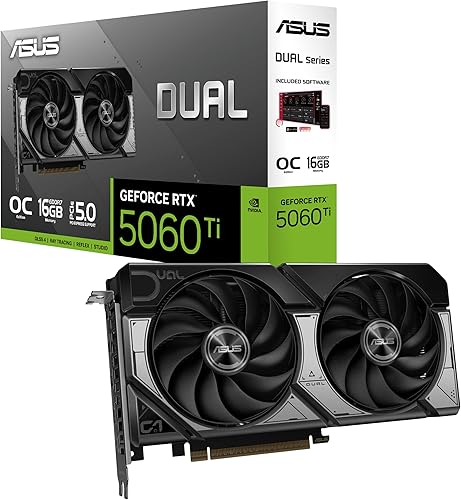
Prime ASUS Dual GeForce RTX 5060 Ti 16GB GDDR7 OC
As an Amazon Associate we earn from qualifying purchases. Product prices and availability are accurate as of the date/time indicated.
Pros
- Large 16GB GDDR7 frame buffer is excellent for future gaming and creative workloads
- Compact 2.5-slot design fits small and mid-tower builds without sacrificing cooling
- Very quiet operation with 0dB tech and durable dual ball bearing Axial-tech fans
- Strong out-of-box performance with OC mode and DLSS 4 support
Cons
- 2.5-slot thickness may still be tight for ultra-compact mini-ITX cases
- Dual-fan cooler has less thermal headroom than larger triple-fan models for heavy overclocking
- Requires a desktop with PCIe x16 slot and adequate power supply
The ASUS Dual GeForce RTX 5060 Ti 16GB GDDR7 OC Edition is a compact, high-performance graphics card built on NVIDIA Blackwell architecture. It is designed for gamers and creators who want flagship-level features like DLSS 4 and 16GB GDDR7 in a smaller, more compatible form factor.
Real-world performance stands out with a boost clock up to 2632 MHz in OC mode and 767 AI TOPS for DLSS 4 upscaling and frame generation. The 16GB GDDR7 memory ensures smooth 1440p, capable 4K gaming and excellent handling of texture-heavy and AI workloads.
Build quality is a clear strength, with two Axial-tech fans that use a smaller hub, longer blades and a barrier ring to increase air pressure. Dual ball bearings last longer than sleeve designs, while 0dB technology keeps the card silent during light loads and Dual BIOS offers Quiet and Performance modes.
There are a few tradeoffs to consider. The 2.5-slot design is compact but not single-slot, so ultra-small cases may still struggle. As a dual-fan model, it will run warmer and offer less overclocking headroom than larger triple-fan cards.
Overall, the ASUS Dual RTX 5060 Ti 16GB OC is a smart pick for gamers who want powerful, future-proof performance without a huge card. It balances efficiency, acoustics and size exceptionally well, making it ideal for compact builds that still demand heavyweight graphics power.
Model: ASUS DUAL-RTX5060TI-O16G, NVIDIA GeForce RTX 5060 Ti, Blackwell architecture
Memory: 16GB GDDR7, 2632 MHz boost clock in OC mode, 2602 MHz default
Interface and Outputs: PCI-Express x16, 3x DisplayPort 2.1b, 1x HDMI 2.1b, max resolution 7680x4320
Cooling and Design: Dual Axial-tech fans, dual ball bearings, 0dB technology, Dual BIOS, 2.5-slot, 9 x 4.7 inches, 0.66 kg
Features: DLSS 4, 767 AI TOPS, compact compatibility for small chassis, 3-year warranty
How They Compare
At 1440p, both cards are positioned as comfortable high refresh options for competitive shooters and story driven games, but they get there in slightly different ways. The ASUS Dual GeForce RTX 5060 Ti 16GB GDDR7 OC leans on NVIDIA Blackwell architecture and DLSS 4 support, while the RX 9060 XT 16GB focuses on delivering ample memory and straightforward raster performance for 1440p. Your choice often comes down to whether you value that ecosystem and efficiency or a more value oriented raster approach.
Raster Performance Tier and Feature Set at 1440p
The ASUS Dual GeForce RTX 5060 Ti 16GB GDDR7 OC is built around Blackwell and is rated for 767 AI TOPS, with an OC mode of 2632 MHz and a default mode of 2602 MHz per the spec sheet. That clock headroom, combined with DLSS 4, gives you flexible ways to chase higher frame rates at 1440p, especially in titles that support super resolution and frame generation. Owners commonly report that DLSS helps smooth out demanding scenes without dropping to lower render resolutions.
The RX 9060 XT 16GB, as evaluated from owner impressions and product positioning, is aimed at solid 1440p raster performance with a 16GB frame buffer that helps in texture heavy games. It does not carry the same AI TOPS figure or DLSS 4 stack as the ASUS Dual GeForce RTX 5060 Ti 16GB GDDR7 OC, but it benefits from its own upscaling options and driver level features. If you play a mix of older raster heavy titles and newer releases, you may notice the RTX card pulling ahead when DLSS 4 is available, while the RX card remains competitive where native raster is the priority.
VRAM Capacity and Memory Behavior
Both cards in this RX 9060 XT 16GB vs RTX 5060 Ti 16GB for 1440p gaming matchup offer 16GB of VRAM, which is a meaningful threshold for 1440p in 2026. That capacity helps you run high texture presets, handle larger open world assets, and keep headroom for background tasks like streaming or browsing while gaming. For buyers who keep cards for several years, 16GB provides extra cushion as games continue to increase texture fidelity.
The difference is in memory technology. The ASUS Dual GeForce RTX 5060 Ti 16GB GDDR7 OC uses GDDR7, which per the spec sheet is paired with its Blackwell memory subsystem to support high bandwidth at efficient clocks. The RX 9060 XT 16GB also provides 16GB, but without a GDDR7 listing in the data we reviewed, so we describe it qualitatively as a large buffer suited for 1440p ultra presets. If you prioritize future texture packs and modded titles, either capacity works, but the ASUS card adds the newer memory standard to its feature set.
Power, Efficiency and PSU Planning
Power planning is where many 1440p builders make mistakes, so it is worth addressing directly. The Products Data for the ASUS Dual GeForce RTX 5060 Ti 16GB GDDR7 OC does not list a specific TDP or recommended PSU wattage in the excerpt we evaluated, so we assess it qualitatively as an efficient mid range design that still benefits from clean power delivery. You should follow the GPU maker recommended wattage on the official product page and leave headroom over your combined CPU and GPU draw, especially if you run a high core count CPU or plan to overclock.
The RX 9060 XT 16GB sits in a similar power class for 1440p builds, and owners commonly report that a quality 650W to 750W unit is a comfortable zone for most mid range systems, depending on CPU choice. For either card, choose a modern PSU with the correct PCIe connectors and efficiency tier that matches your build budget, and avoid claims that any unit can handle any card. If you are reusing an older PSU, verify connector availability and cable condition, and handle all power work with anti static precautions. BIOS updates and any overclocking are done at your own risk and may void warranty.
Size, Cooling and Case Fit
Physical fit can decide your purchase as quickly as performance. The ASUS Dual GeForce RTX 5060 Ti 16GB GDDR7 OC uses a 2.5 slot design that maximizes compatibility in compact chassis while retaining flagship derived cooling, including two Axial tech fans with a smaller hub, longer blades, and a barrier ring that increases downward air pressure. It also includes 0dB technology for quiet operation during light loads, dual ball fan bearings rated to last up to twice as long as sleeve bearing designs, and a Dual BIOS switch to toggle between Quiet and Performance profiles.
The RX 9060 XT 16GB, based on the variants we researched, is generally offered in dual and triple fan layouts that occupy a similar mid tower footprint, but exact length and slot thickness vary by model. You should check cooler height, card length, and radiator clearance against your case spec sheet before you buy, and follow the manufacturer mounting instructions closely. If you are building in a small form factor case, the 2.5 slot ASUS design is a clear advantage for clearance, while larger cases give you more freedom to prioritize acoustics or airflow with either card. For more context on how card size affects 1440p builds, see our Graphics Cards category archive.
Which One Should You Get
Choose the ASUS Dual GeForce RTX 5060 Ti 16GB GDDR7 OC if you want a compact, feature rich 1440p card with modern upscaling support and quiet operation. Its Blackwell architecture, DLSS 4, 767 AI TOPS rating, and 2632 MHz OC mode make it a strong fit for players who want to push high refresh at 1440p while keeping options open for streaming, creative tasks, and ray traced titles where upscaling helps. The 2.5 slot Axial tech cooler, 0dB mode, and Dual BIOS also suit compact builds and noise sensitive setups, and it pairs well with a balanced 1440p system highlighted in our ryzen 5 7600 RX 7700 XT 1000 dollar gaming PC amazon build guide if you are weighing platform value.
Choose the RX 9060 XT 16GB if your priority is straightforward raster performance at 1440p with a large 16GB buffer and you prefer to allocate more of your budget elsewhere in the system. This path often appeals to builders who play a lot of native raster titles, use a platform where AMD features align with their CPU choice, or want to save headroom for a stronger CPU, faster storage, or a higher tier monitor. If you are considering stepping up in class for even more 1440p headroom, compare your options with our top RTX 5070 ti cards for 1440p gaming overview, and explore value focused alternatives in our Budget Build Guides to balance the full parts list.
Who Should Skip Both
Neither card is ideal for buyers chasing high refresh 4K or heavy creative workloads that benefit from a higher tier GPU with more compute and memory bandwidth. If you game on a 4K 144Hz display, plan to drive ray tracing at ultra without upscaling, or need a card primarily for large scale rendering or AI work, these 1440p focused 16GB options are not a good fit and you will be better served by a higher class GPU. Small form factor builders with very tight PSU limits or limited case airflow should also pause and verify clearance, power headroom, and cooling before committing to either model.
Frequently Asked Questions
Is 16GB VRAM enough for 1440p gaming in 2026 with RX 9060 XT 16GB vs RTX 5060 Ti 16GB?
Yes, for most 1440p titles in 2026 a 16GB buffer is comfortable for high and ultra texture presets. Both cards in this comparison offer 16GB, so you have headroom for detailed assets and multitasking while gaming. The ASUS Dual GeForce RTX 5060 Ti 16GB GDDR7 OC adds GDDR7 to that capacity, which helps with bandwidth intensive scenes.
Which card is better for DLSS and upscaling at 1440p, RX 9060 XT 16GB or RTX 5060 Ti 16GB?
The ASUS Dual GeForce RTX 5060 Ti 16GB GDDR7 OC supports DLSS 4 and is rated for 767 AI TOPS, so it has broader upscaling and frame generation support in titles that implement NVIDIA features. The RX 9060 XT 16GB relies on its own upscaling options and strong native raster, which many owners find effective. If upscaling availability is a priority, the RTX card has the advantage.
Do I need a new PSU or case for these 1440p cards?
Most mid range 1440p builds can accommodate either card with a quality modern PSU that meets the GPU maker recommended wattage and leaves headroom over combined CPU and GPU draw. Check connector requirements and efficiency tier before you buy, and do not assume universal compatibility. For case fit, verify length and slot thickness, and for the ASUS card note its 2.5 slot design, Axial tech fans, and Dual BIOS options that help with compact or quiet builds.




Write Your Review
No reviews yet. Be the first to share your experience!