

Figuring out how to choose a Intel Arc B580 model, which brand and cooler fits your PC is less about finding the fastest card on paper and more about matching the right design to your actual build. Every B580 uses the same Intel Xe2-HPG GPU with 12GB of GDDR6, but brands tune the cooler, clock speed, length, and extras differently, and those choices affect noise, case fit, and power needs.
Before you compare specific cards, clarify your own variables. What resolution and refresh rate are you targeting, is it smooth 1080p or higher refresh 1440p? What platform and socket are you on, how much clearance does your case offer for length and thickness, what is your power budget and PSU headroom, and are you buying for your current monitor or planning a next upgrade? Answering those questions first makes the rest of the decision much easier, and you can explore more options in our Graphics Cards section as you plan.
What Actually Matters
Cooler Design and Noise Behavior
Cooler design is the biggest practical difference between B580 models. A dual axial fan setup moves a lot of air through a large heatsink, while features like striped axial fan blades and a tuned shroud aim to keep airflow steady under load. You should look at how many fans are used, whether the heatsink is a true 2-slot design, and how the card exhausts heat inside your case.
Noise behavior matters just as much as raw cooling. Some designs include 0dB Silent Operation that stops the fans completely at low temperatures for quiet desktop use, then ramps up smoothly when you game. If your PC sits on your desk or you value a quiet room, prioritize a cooler that is reviewed as quiet at idle and under load, and check owner feedback about fan tone rather than just fan count. A well ventilated case helps any cooler perform better, so consider your case airflow as part of the choice.
Clock Speed and Real Performance Headroom
All Intel Arc B580 cards share the same core architecture with 160 XMX engines for AI acceleration and support for Xe Super Sampling 2 (XeSS 2), plus 12GB of GDDR6 on a 192-bit bus running at 19 Gbps. Where brands differ is the factory tuned GPU clock. In the current range you will see examples like 2740 MHz and 2760 MHz boost clocks, a small difference on paper.
For you, that 20 MHz gap is not the deciding factor. At 1080p and 1440p, both clocks provide fast, responsive gaming per the spec sheet, and any difference will be minor compared to your CPU choice, game settings, and whether you use XeSS 2. Instead of chasing the highest number, evaluate whether a factory overclocked model fits your power and thermal budget, and remember that you can often achieve similar results with manual tuning if you are comfortable doing so at your own risk.
Size, Fit and Power Requirements
Physical fit is where many buyers run into trouble. Even though the B580 is positioned as an efficient card, you still need to verify length, thickness, and power connector needs against your case and PSU. For example, a common B580 layout is a 2-slot card at 249mm length that requires one 8-pin power connector, with a manufacturer recommendation for a 650W power supply.
You should measure your case clearance from the rear bracket to the front panel or radiator, check that a 2-slot cooler will not interfere with adjacent PCIe devices, and confirm your PSU has the required 8-pin cable and enough headroom over your combined CPU and GPU draw. Follow the GPU maker recommended wattage and leave extra headroom for peaks, and always handle installation with anti-static precautions and the power fully disconnected. If you are building in a compact case, also review our Budget Build Guides for tips on balancing size and airflow.
Outputs, Build Quality and Extra Features
Do not overlook outputs and build details. Modern B580 cards typically offer DisplayPort 2.1 and HDMI 2.1a, which gives you flexibility for high refresh monitors and TVs. If you plan to run multiple displays or a high refresh 1440p panel, confirm the exact port layout meets your needs before you buy.
Build quality extras can affect long term satisfaction. A metal backplate adds rigidity and helps protect the PCB, a bundled graphics card sag bracket helps prevent droop in larger cases, and small touches like a blue breathing light or multiple-color LED indicator let you match your build theme. These features do not change frame rates, but they do influence durability, installation ease, and how the card looks in a windowed case. Decide which extras you value and which you can skip to stay within your budget.
To see how these differences look in practice, here are a few options that show the range:
This article contains affiliate links. If you buy through one of our links, CustomPCGaming may earn a commission at no extra cost to you. Commissions never influence which products we recommend or how we rank them. Read our Affiliate Disclosure for details.
Quick Picks at a Glance

SPARKLE Intel Arc B580 Titan OC 12GB GDDR6
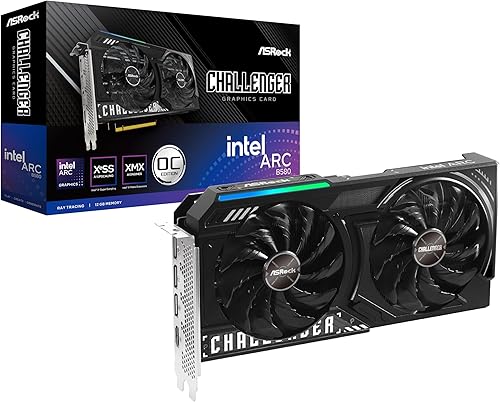
ASRock Intel Arc B580 Challenger 12GB OC Graphics
As an Amazon Associate we earn from qualifying purchases. Product prices and availability are accurate as of the date/time indicated.
Pros
- Strong 1080p Ultra and solid 1440p performance with 12GB VRAM
- Stays cool and quiet even during extended gaming sessions
- Excellent for video transcoding and content creation tasks
- High quality, thinner build with metal backplate and sag bracket included
- Benefits from frequent Intel driver and firmware updates
Cons
- Drivers still maturing, occasional performance dips in demanding titles
- Does not support VR gaming
- Can run warm in compact cases with limited airflow
The SPARKLE Intel Arc B580 Titan OC is a factory overclocked graphics card built on Intel's Arc B580 platform with 12GB of GDDR6 memory. It is designed for gamers targeting high refresh 1080p Ultra and smooth 1440p gaming, as well as creators needing strong video transcoding on a mid range budget.
In real world use, the 2760MHz boost clock and 19 Gbps memory deliver excellent performance for modern titles and media workloads. Users report cool and quiet operation under load, with strong value compared to older mainstream cards, and Intel's frequent driver updates continue to refine gaming stability.
Build quality is a clear highlight, with SPARKLE's TORN Cooling 2.0 and three axial fans providing efficient airflow in a slimmer profile than many competitors. The card includes a sturdy metal backplate, a blue breathing light accent, and a sag bracket for added support and a cleaner look inside your case.
There are a few caveats to consider before buying. Intel's Arc drivers are still maturing, so performance under heavy or niche workloads can vary, and VR gaming is currently not supported. The card can also run warm in compact builds, so good case airflow is recommended.
Overall, the B580 Titan OC is a compelling choice for budget conscious gamers and creators who want 12GB VRAM, modern DisplayPort 2.1 and HDMI 2.1 connectivity, and quiet cooling. If you do not need VR and can benefit from ongoing driver improvements, it offers outstanding versatility and long term value.
GPU: Intel Arc B580, OC Edition Boost Clock up to 2760MHz
Memory: 12GB GDDR6, 19 Gbps Memory Clock
Cooling: TORN Cooling 2.0 with Triple Axial Fans
Outputs: 1x HDMI 2.1, 3x DisplayPort 2.1, Max Resolution 3840x2160
Interface: PCI Express x8, Dimensions 12.4 x 4.61 inches, Weight 954g
Extras: Metal Backplate, Blue Breathing Light, Sag Bracket Included, 3 Year Limited Warranty
Pros
- Excellent 1440p performance with generous 12GB VRAM for modern games
- Very quiet and cool operation with 0dB fan stop technology
- Strong value compared to high priced flagship GPUs
- XeSS 2 upscaling and AV1 encode support for gaming and content creation
- Solid build quality with metal backplate and compact 2-slot design
Cons
- Intel Arc drivers still maturing, occasional game compatibility or shading quirks reported
- Requires 650W power supply and 249mm case clearance, check fit before purchase
- HDMI 2.1 support limited on Linux and no CEC support
The ASRock Intel Arc B580 Challenger 12GB OC is a mid-range graphics card built on Intel's Xe2-HPG architecture, designed for gamers targeting smooth 1080p and 1440p performance. It is ideal for budget conscious builders, casual creators, and anyone wanting modern features without paying flagship prices.
In real world use, the factory overclock to 2740 MHz and 19 Gbps memory delivers consistently high frame rates in demanding titles, with users reporting stable, stutter free gameplay at 1440p ultra settings. Support for Xe Super Sampling 2 and 160 XMX AI engines boosts performance further, while 12GB of GDDR6 on a 192-bit bus handles high resolution textures and AV1 encoding with ease.
ASRock's dual fan design with striped axial fans and 0dB Silent technology keeps the card cool and virtually silent under light loads, and the metal backplate with thermal pads adds rigidity and heat dissipation. At 249mm long with a 2-slot footprint and single 8-pin power connector, it fits most mid-tower cases and installs easily.
There are a few caveats to consider. Intel's Arc drivers have improved greatly but can still show occasional shading quirks or compatibility issues with less common games, and Linux users may find HDMI 2.1 support incomplete. You will also need a 650W power supply and to verify case clearance before buying.
Overall, the B580 Challenger offers outstanding value, combining strong 1440p performance, generous VRAM, and creator friendly features in a quiet, well built package. If you want reliable high refresh gaming and future ready connectivity at a sensible price, this is one of the smartest mid-range choices available.
GPU: Intel Arc B580, Xe2-HPG Architecture, 160 XMX Engines, 2740 MHz Boost Clock
Memory: 12GB GDDR6, 192-Bit Bus, 19 Gbps Memory Speed
Interface: PCI Express 4.0 x8, 1x 8-pin Power Connector, 650W PSU Recommended
Cooling: Dual Fan with Striped Axial Design, 0dB Silent Operation, Metal Backplate with Thermal Pad
Connectivity: 3x DisplayPort 2.1, 1x HDMI 2.1a, Supports 4 Displays up to 7680 x 4320
Dimensions: 2-Slot Design, 249mm Length, 999g Weight
Features: XeSS 2 Support, AV1 Encode, LED Indicator, Super Alloy Construction
Matching a Part to Your Build
Scenario 1: Compact 1080p build with limited case space. If you are working with a micro ATX or small mid tower, length and thickness are your first filters. The ryzen 5 7600 RX 7700 XT 1000 dollar gaming PC amazon build breakdown shows how quickly clearance becomes a constraint. In this situation, the ASRock Intel Arc B580 Challenger 12GB OC Graphics is a logical illustration, its 249mm length and 2-slot form factor are easier to place, it needs only one 8-pin connector, and its 0dB Silent Operation helps keep noise low when you are browsing or watching video. Pair it with a quality 650W PSU as recommended and verify your case supports its length with front fans or a radiator installed.
Scenario 2: Airflow focused 1440p gaming build in a mid tower. If you have a larger case with good front to back airflow and you want a bit more thermal headroom and visual flair, a larger triple fan style cooler with extra rigidity makes sense. The Sparkle Intel Arc B580 Titan OC, 12GB GDDR6 illustrates this approach, with TORN Cooling 2.0 and axial fans, a metal backplate, and an included sag bracket to support the card in a windowed build. Its boost clock of 2760MHz is the higher-end pick in this pair, which may appeal if you want every bit of factory tuned speed without manual adjustment, provided your case can accommodate the cooler and your PSU meets the recommended headroom.
Scenario 3: Creator and AI assisted workflow on a balanced budget. If you game at 1080p or 1440p but also work with large textures, video editing, or AI features that use the 160 XMX engines and XeSS 2, prioritize the shared strengths of the B580 platform: 12GB of VRAM on a 192-bit bus at 19 Gbps and PCIe 4.0 support. Both example cards offer that foundation, so choose based on fit and noise rather than VRAM alone. If you plan to keep the card for several years and might move to a higher resolution monitor later, a model with robust cooling and a backplate may age more gracefully, while a compact dual fan model keeps your options open for a smaller next case. For context on higher tier 1440p choices, you can compare with our top RTX 5070 ti cards for 1440p gaming guide.
Common Mistakes
Mistake 1: Undersizing your power supply. It is easy to focus on the single 8-pin connector and assume any PSU will do, but the maker recommendation of a 650W unit exists for a reason. Add up your CPU, GPU, and other components, then leave comfortable headroom for transient peaks and future drives or fans. Never assume a unit handles any card, always follow the manufacturer guidance and use a reputable PSU with the correct cable.
Mistake 2: Forgetting to check physical clearance. A card that is 249mm long and 2 slots thick may still not fit if your case has a front radiator, thick front fans, or a drive cage in the way. Measure from the PCIe bracket to the obstruction, check cooler height against side panel clearance, and confirm the sag bracket or backplate will not interfere with your RAM or chipset heatsink. Follow the manufacturer mounting instructions and tighten the bracket evenly to avoid stress on the PCIe slot.
Mistake 3: Overvaluing a small factory overclock. The difference between 2740 MHz and 2760 MHz is modest, and owners commonly report that real world experience depends more on cooling, case airflow, and game settings than on 20 MHz. Do not pay a premium for an OC label if it forces you into a larger cooler that does not fit or a louder fan profile you will not enjoy. Choose the cooler and size that matches your case first, then consider clock speed as a secondary factor.
Who Should Wait or Buy Differently
This class of card is not ideal for everyone. If you already own a faster high end GPU for 4K high refresh gaming, or if your case and PSU cannot meet the 650W recommendation and 8-pin requirement without a full rebuild, this is not a good fit right now. It is also not the right choice if you need a single slot or ultra compact low profile design for a tiny chassis, or if you are waiting for November 2026 sales to stretch your budget toward a higher tier. In those situations, consider saving for a different tier, upgrading your case or PSU first, or waiting for a model that better matches your exact size and power constraints.
Frequently Asked Questions
Do all Intel Arc B580 models come with 12GB of VRAM?
Yes, per the spec sheet the B580 cards in this generation are built with 12GB of GDDR6 on a 192-bit bus at 19 Gbps. That capacity helps with modern textures at 1080p and 1440p and gives you headroom for creative apps. Brand and cooler do not change the VRAM amount.
Is a factory overclock like 2760MHz worth choosing over 2740MHz?
A factory overclock can offer a small out of box uplift, but the gap between 2740 MHz and 2760 MHz is modest. You will often see more impact from cooler quality, case airflow, and using features like XeSS 2. Choose the card that fits your case and noise preference first, then treat clock speed as a tie breaker.
How do I know if a B580 will fit my case and PSU?
Check the card dimensions, such as 249mm length and 2-slot thickness, against your case spec sheet, and confirm you have one free 8-pin PCIe cable and a PSU that meets the 650W recommendation with headroom. Verify clearance with front fans or radiators, and follow the manufacturer instructions for mounting and power connection. When in doubt, contact support through the retailer before you buy.





Write Your Review
No reviews yet. Be the first to share your experience!