

If you are asking is the Core Ultra 7 265K worth it for 1440p gaming in 2026, you are really asking how much CPU you need when your graphics card is doing most of the heavy lifting. At 1440p, your CPU choice affects frame consistency, background task handling, and how long your platform stays relevant, more than it affects peak average speed. You also have to weigh socket and motherboard cost, DDR5 memory, case clearance for your cooler, and your power budget before you commit. This guide gives you a reusable decision framework, with a concrete example to show how specs translate to a real build.
You will learn what to prioritize for 1440p gaming, how to read core counts and boost clocks without getting lost in marketing, and how platform features like PCIe 5.0 storage or Wi-Fi 7 factor into value. We researched the spec sheets and compared owner feedback to keep the advice practical, and we will point you to related builds so you can see tradeoffs in context. For a broader view of current options, browse our Gaming CPUs archive, updated for November 2026.
What Actually Matters
1. How 1440p Changes the CPU vs GPU Balance
At 1440p, most games become graphics card limited, which means your GPU choice often determines your ceiling while your CPU determines your floor. A strong CPU keeps your 1% lows steady, prevents stutters when you have Discord, a browser, or streaming software open, and helps you maintain consistent frame pacing. If you pair a powerful GPU with a weak CPU, you may see your GPU waiting for data, especially in CPU heavy titles like strategy games or large open world games.
Think about your refresh target in qualitative terms. If you aim for high refresh competitive play, the CPU matters more because you are pushing for consistently high frame delivery. If you aim for visually rich single player games at high settings, the GPU matters more. Check our guide to top RTX 5070 ti cards for 1440p gaming to see how GPU selection pairs with CPU headroom, and look at Graphics Cards to understand where your budget has the biggest impact.
2. Core Layout, Clocks and Cache on LGA 1851
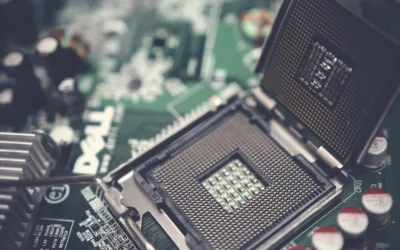
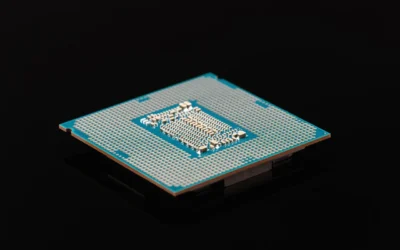
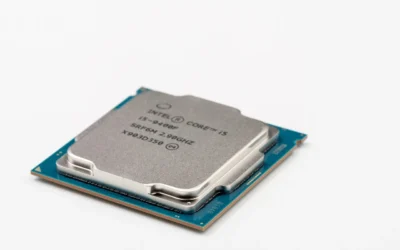
Modern Intel Ultra processors use a hybrid layout, and the example combo in this guide shows what that looks like in practice: 20 cores made up of 8 P-cores plus 12 E-cores and 20 threads, with boost capability up to 5.5 GHz and 36MB of cache on the LGA 1851 socket. P-cores handle demanding game threads and single threaded work, while E-cores handle background tasks and efficiency. Cache helps keep frequently used game data close to the cores, which can improve responsiveness.
Do not chase core count alone for 1440p gaming. More cores help if you stream, compile, edit video, or run heavy multitasking while gaming, but many games still benefit most from strong per core performance and low latency. When you compare options, look at the balance of P-core count, boost clock, and cache, and read owner reports about real world smoothness rather than relying on marketing claims. A 125W Processor Base Power rating also tells you this is not a low power part, so plan cooling and power delivery accordingly.
3. Platform Cost, Memory and Motherboard Features
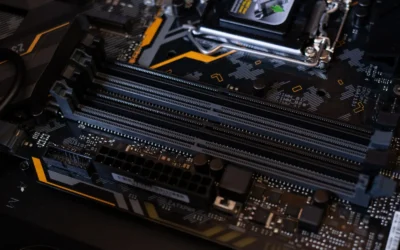
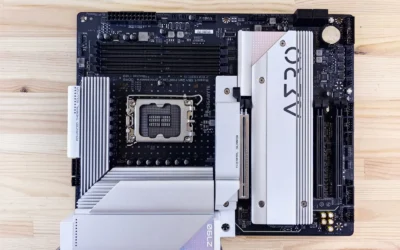
The CPU is only part of the cost. The socket dictates your motherboard, and that dictates memory support and future upgrades. LGA 1851 with a Z890 board means DDR5 with XMP support, and the example board here offers 4 DDR5 slots with XMP Memory Module Support and D5 Bionic Corsa tuning, plus 4 M.2 slots including 1 PCIe 5.0 x4 slot. Those features matter if you want fast storage for large game libraries and quick load times, or if you plan to keep the system for several years.
Evaluate connectivity you will actually use. This Z890 Gaming X WIFI7 example includes 2.5GbE LAN and Wi-Fi 7 with a directional ultra high gain antenna, USB4 Type-C with DP-Alt and DisplayPort, and DIY friendly touches like PCIe EZ-Latch, EZ-Latch Plus, EZ-Latch Click, WIFI EZ-Plug, EZ-Debug Zone, and Sensor Panel Link. If you use wired networking, you may not value Wi-Fi 7 as highly. If you need multiple fast drives, four M.2 slots is a practical benefit. Compare the total platform value, not just the processor, and see how it fits with a balanced build like the ryzen 5 7600 RX 7700 XT 1000 dollar gaming PC amazon build to understand where spending more on the board helps or hurts.
4. Power, Thermals and Cooler Clearance
High core count chips with high boost clocks need solid power delivery and cooling. The example board advertises a digital twin 16+1+2 phases VRM solution with VRM Thermal Armor Advanced and M.2 Thermal Guard, which is designed to keep power stable under sustained loads. That matters for long gaming sessions and for keeping boost behavior consistent. Still, your case and cooler choice determine the final result.
Before you buy, check cooler height or radiator clearance against your case spec sheet, and confirm RAM clearance if you use a large air cooler. Follow the manufacturer mounting instructions carefully and use proper anti-static handling when you install the CPU. For power, give yourself headroom over the combined draw of your CPU and GPU and follow the GPU maker recommended wattage for your graphics card, rather than sizing exactly to the base power number. A 125W base power does not include boost behavior, so your cooler and power supply should be chosen for sustained loads, not just the label.
To see how these criteria look in a real product, here are a few options that show the range:
This article contains affiliate links. If you buy through one of our links, CustomPCGaming may earn a commission at no extra cost to you. Commissions never influence which products we recommend or how we rank them. Read our Affiliate Disclosure for details.
Quick Picks at a Glance

Intel Core Ultra 7 265K & GIGABYTE Z890 Gaming X
As an Amazon Associate we earn from qualifying purchases. Product prices and availability are accurate as of the date/time indicated.
Pros
- Outstanding multi core and single core performance in gaming and Cinebench workloads
- Stable and efficient power delivery that keeps the system cooler and quieter under load
- Comprehensive modern connectivity including WiFi 7, USB4 and 2.5GbE
- User friendly BIOS with one click profiles and excellent DIY building features
- Strong value as a pre matched CPU and motherboard combo
Cons
- Memory compatibility is picky, you must check the QVL list to hit full XMP speeds up to 8400MT/s
- LGA 1851 is a new platform, so DDR5 and cooler compatibility should be verified before buying
- Full ATX size and 125W base power require a capable cooler and spacious case
The Micro Center Intel Core Ultra 7 265K and GIGABYTE Z890 Gaming X WIFI7 combo is a high performance foundation for a modern gaming or workstation PC. It combines a 20 core unlocked desktop processor with a feature rich Z890 motherboard, making it perfect for gamers, creators and power users who want a hassle free, validated pairing.
In real world use, the 8 performance cores and 12 efficiency cores deliver excellent speed up to 5.5GHz with strong single and multi core results. Users report high Cinebench scores and smooth 60 plus fps gaming, while unlocked multipliers and BIOS profiles make overclocking simple. Support for DDR5 with XMP and D5 Bionic Corsa helps push memory performance even higher.
Build quality is a clear highlight thanks to the 16+1+2 phase digital VRM, VRM Thermal Armor Advanced and M.2 Thermal Guard for sustained stability. The board offers four M.2 slots with one PCIe 5.0 x4, four DDR5 slots, plus WiFi 7 with a high gain antenna, 2.5GbE LAN and USB4 Type-C with DisplayPort.
The main drawback is memory sensitivity, as the board can be selective about RAM and may need QVL verified kits to run stable XMP profiles. As a new LGA 1851 platform, you will also want to confirm cooler and case fitment. These are minor trade offs for the performance offered.
Overall, this combo offers enthusiast grade performance, next gen connectivity and builder friendly features in one package. If you are building a new DDR5 system and want top tier gaming and productivity without hunting for compatible parts, it is an excellent and highly recommended choice.
Processor: Intel Core Ultra 7 265K, 20 cores (8 P-cores + 12 E-cores), 20 threads, up to 5.5GHz, 36MB cache, LGA 1851, 125W base power, unlocked
Motherboard: GIGABYTE Z890 Gaming X WIFI7, ATX, Intel Z890 chipset, supports Intel Core Ultra Series 2
Memory Support: 4x DDR5 DIMM slots with XMP support and D5 Bionic Corsa, high speed support reported up to 8400MT/s
Storage: 4x M.2 slots including 1x PCIe 5.0 x4, high grade storage standards
Connectivity: WiFi 7 with directional ultra high gain antenna, 2.5GbE LAN, USB4 Type-C with DP-Alt, DisplayPort
Power and Cooling: 16+1+2 phases digital VRM, VRM Thermal Armor Advanced, M.2 Thermal Guard, AIO Fan Control
DIY Features: PCIe EZ-Latch, EZ-Latch Plus, EZ-Latch Click, EZ-Debug Zone, WIFI EZ-Plug, Sensor Panel Link, Q-Flash Auto Scan
Matching a Part to Your Build
If you are building a new high refresh 1440p gaming PC and you want headroom for streaming or heavy multitasking, a hybrid 20 core layout like the one in the MICRO CENTER CPU Motherboard Combo is a logical fit. The 8 P-cores give you strong gaming threads, the 12 E-cores absorb background work, and the Z890 platform gives you DDR5, PCIe 5.0 storage, and modern connectivity. This type of combo makes sense when you are starting from scratch and want a platform you can keep for several upgrade cycles without replacing the motherboard.
If you already own a capable GPU and you play mostly single player, visually demanding games at high settings, you may not need to maximize CPU cores. In that scenario, put more of your budget toward the graphics card and choose a CPU that avoids bottlenecks without overprovisioning. The combo still works, but you should weigh whether the extra platform features justify the higher-end pick compared to a more modest CPU and board that still meets your needs.
If you have a compact case, a small air cooler, or a strict power and noise target, think carefully about thermals. A chip with a 125W base power and boost up to 5.5 GHz will want a capable cooler and good case airflow to stay quiet. Measure your case cooler clearance, radiator support, and fan layout before you decide. If your case cannot accommodate the cooling you need, a lower power CPU or a different chassis may be the better path to a quiet 1440p experience.
Common Mistakes
Mistake 1: Undersizing the power supply and cooling. Builders often match the power supply to the base power number and forget boost loads and GPU draw. Choose a supply with headroom over your combined CPU and GPU needs, follow the graphics card maker guidance, and pick a cooler that fits your case with room for airflow. An undersized cooler will limit boost and create noise.
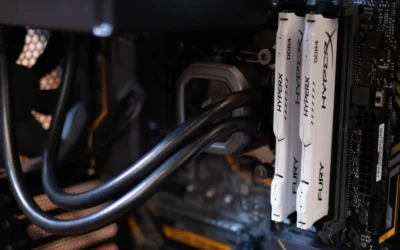
Mistake 2: Forgetting clearance and compatibility. A tall air cooler can conflict with RAM heat spreaders or side panels, and a long GPU can block drive bays. Check cooler height, radiator length, RAM height, and M.2 heatsink clearance against your case manual. Also confirm your DDR5 kit is on the board support list and that XMP is enabled in BIOS, which you should update at your own risk and only per the manufacturer instructions.
Mistake 3: Paying for platform features you will not use. Four M.2 slots, PCIe 5.0, Wi-Fi 7, and premium VRM designs are valuable if you need them, but they add cost if you do not. If you only need one or two drives and use wired networking, a simpler board may free budget for a stronger GPU, which often matters more at 1440p. Map features to your actual build plan for the next two to three years.
Who Should Wait or Buy Differently
This type of high core count LGA 1851 combo is not ideal for you if you are on a tight budget, if you already own a recent platform that still meets your refresh target, or if you prioritize a small, low noise build with limited cooling. It is also not the right choice if your current bottleneck is clearly the graphics card, in that case upgrading the GPU first will give you more noticeable gains at 1440p. If you are unsure, compare total platform cost, including DDR5 and cooling, and consider whether waiting for a sale or choosing a more modest CPU lets you balance the rest of your system.
Frequently Asked Questions
Is the Core Ultra 7 265K overkill for 1440p gaming?
For pure 1440p gaming with no streaming or heavy background work, you may not need 20 cores, and a smaller CPU can still deliver a smooth experience. The extra cores help most when you multitask, create content, or want platform longevity. Evaluate your use case, not just core count.
What should I pair with this CPU for 1440p?
Pair it with a capable 1440p graphics card and DDR5 memory that matches your board support list, and make sure your power supply has headroom for both. Owners commonly report the best balance comes from matching GPU strength to your monitor refresh goal and keeping thermals under control. Also verify your case can handle your cooler choice.
Do I need a Z890 motherboard for this socket?
LGA 1851 requires a compatible board, and Z890 gives you the full feature set like PCIe 5.0 storage, multiple M.2 slots, and advanced power design. If you do not need those extras, a different chipset for the same socket may save money. Choose based on the connectivity and storage you will actually use.
Write Your Review
No reviews yet. Be the first to share your experience!