

Deciding on the best motherboard and RAM to pair with the Ryzen 9 9950X3D is less about chasing the highest numbers on the box and more about matching the platform to your actual build. This processor is a 16-Core, 32-Thread chip with a 5.7 GHz Max Boost and 144 MB of L2 plus L3 cache, built on Zen 5 with Next Gen 3D V-Cache, and it runs on Socket AM5 with DDR5 only and a Default TDP of 170W. That combination means your motherboard and memory choices directly affect stability, thermals, and how well your system ages.
Before you pick parts, clarify your targets. What resolution and refresh rate are you aiming for, what case size and cooler clearance do you have, what is your power budget for CPU plus GPU, and are you building for now or for a next upgrade on AM5? If you are planning a high end GPU pairing, our top RTX 5070 ti cards for 1440p gaming breakdown can help you balance GPU and platform costs, and the Gaming CPUs archive is a good place to compare how this chip fits in the wider lineup.
What Actually Matters
Platform and Chipset Fit on Socket AM5
Socket AM5 is your non negotiable starting point. The Ryzen 9 9950X3D requires an AM5 board, and chipsets like X870E sit at the top of the stack with full PCIe 5.0 support on select motherboards. Per the spec sheet, that can mean a PCIe 5.0 slot for your graphics card and multiple Gen 5 M.2 slots for storage, which matters if you want fast load times and headroom for future drives.
Think about upgrade path as well. Boards that support AMD Ryzen 9000, 8000, and 7000 Series give you flexibility if you keep the platform for several years. If you know you will add more M.2 drives or want USB4, Wi-Fi 7, and 5G LAN now, choose a chipset and board that already includes them rather than planning to add cards later. For a sense of how platform cost affects total builds, see our ryzen 5 7600 RX 7700 XT 1000 dollar gaming PC amazon build.
DDR5 Memory Speed, Capacity, and Stability
Ryzen 9 9950X3D uses DDR5 only, in a dual channel configuration. The example board in this guide supports Dual-Channel DDR5 up to 256GB and DDR5 8400+ MT/s when overclocked, which shows the ceiling, not the everyday target. For most gamers, capacity and stability matter more than chasing the highest MT/s figure.
We evaluated owner feedback and spec sheets rather than lab runs, and owners commonly report that moderate DDR5 speeds with tight timings and EXPO profiles offer the best balance of performance and reliability on Zen 5 with 3D V-Cache. Choose a 32GB kit (2x16GB) for pure gaming, 64GB if you run heavy creation tasks alongside games, and only consider larger capacities if you know your workload needs it. Always check the motherboard QVL list for validated kits, and remember that running four DIMMs or very high overclocked speeds can require manual tuning.
Power Delivery, Cooling Clearance, and Physical Fit
With a Default TDP of 170W and unlocked overclocking support, this CPU benefits from a board with strong power delivery and cooling. Look for a Duet Rail Power System like the 14+2+1 design noted on the example board, dual 8-pin CPU power connectors, and solid heatsinks with thermal pads rated for 7W/mK. An 8-layer PCB made with 2oz thickened copper and server-grade material also helps with signal stability and heat distribution.
Physical fit is just as important. This is an ATX Form Factor board, so confirm your case supports ATX and that your cooler clears your RAM. Check cooler height or radiator clearance against your case spec sheet before you buy, and follow the manufacturer mounting instructions closely. Use anti-static handling, and note that BIOS updates and overclocking are done at your own risk and may void warranty.
Connectivity and Expansion You Will Actually Use
Make a list of ports and slots you will use in November 2026 and beyond. The example platform offers 2x PCIe 5.0 x4 M.2 slots, 2x PCIe 4.0 x4 M.2 slots, 4x SATA 6GB/s ports, 2x USB 40Gbps Type C with USB4 support, 5G LAN, Wi-Fi 7, and Bluetooth 5.4. If you plan to run multiple fast NVMe drives, count the M.2 slots and whether they share bandwidth with the PCIe slot.
Do not pay for connectivity you will not use. If you are on wired networking and have no USB4 devices, you can prioritize VRM quality and memory support over the latest wireless. If you do need wireless VR, streaming, or fast external storage, Wi-Fi 7 and USB4 become more valuable. Audio Boost 5 and similar features are nice for immersion, but they should not outweigh core fit and power design.
A few options that show the range help illustrate these tradeoffs:
This article contains affiliate links. If you buy through one of our links, CustomPCGaming may earn a commission at no extra cost to you. Commissions never influence which products we recommend or how we rank them. Read our Affiliate Disclosure for details.
Quick Picks at a Glance

AMD Ryzen 9 9950X3D & MSI MAG X870E Tomahawk WiFi
As an Amazon Associate we earn from qualifying purchases. Product prices and availability are accurate as of the date/time indicated.
Pros
- Exceptional gaming and creation performance from flagship 16-core 9950X3D with 3D V-Cache
- Future proof X870E feature set with PCIe 5.0, four M.2 slots and Wi-Fi 7
- Excellent stability and ease of installation praised by users
- Premium power design and cooling for reliable overclocking
- Strong DIY friendly features that simplify building and upgrades
Cons
- No CPU cooler included, requires separate high performance air or liquid cooling
- High 170W TDP demands a robust power supply and good case airflow
- Full ATX size and flagship specs may be overkill for compact or budget builds
This Micro Center bundle combines AMD's flagship Ryzen 9 9950X3D processor with the MSI MAG X870E Tomahawk WiFi motherboard into a single high performance platform. It is designed for serious gamers, streamers and creators who need top tier gaming speed and heavy multitasking power without compatibility guesswork.
In real world use, the 16-core, 32-thread 9950X3D with 5.7 GHz boost and 144MB cache delivers exceptional gaming frame rates thanks to Zen 5 and next gen 3D V-Cache. Paired with PCIe 5.0 for graphics and dual Gen 5 M.2 slots, DDR5 up to 8400+ MT/s OC and Wi-Fi 7 with USB4, this combo handles demanding games, Blender renders and OBS streaming with ease and stability.
MSI brings enthusiast grade build quality with a 14+2+1 Duet Rail power system, dual 8-pin CPU connectors and an 8-layer 2oz copper PCB for reliable overclocking. Extended heatsinks, 7W/mK MOSFET pads and EZ M.2 Shield Frozr II keep temperatures in check, while EZ Clip II, EZ PCIe Release and EZ Antenna make installation and upgrades remarkably simple.
There are a few tradeoffs to consider. The processor does not include a cooler and its 170W TDP means you will need a strong liquid cooler like a 360mm or 420mm AIO and good case airflow. The full ATX board and flagship specs also make this bundle more than most casual users need, and it is best suited to those building a premium, long term system.
Overall, this is a top tier gaming and creation foundation that offers outstanding speed, future proof connectivity and proven stability. If you want the fastest AM5 gaming platform available today with room to grow, this Ryzen 9 9950X3D and X870E Tomahawk combo is an excellent investment.
Processor: AMD Ryzen 9 9950X3D, 16-Core 32-Thread, up to 5.7 GHz Max Boost, 144MB L2+L3 Cache, Socket AM5, 170W TDP, Unlocked
Motherboard: MSI MAG X870E Tomahawk WiFi, ATX, AMD X870E Chipset, Supports Ryzen 9000, 8000, 7000 Series
Memory Support: Dual Channel DDR5 up to 256GB, up to 8400+ MT/s OC, 4 DIMM slots
Storage: 2x PCIe 5.0 x4 M.2, 2x PCIe 4.0 x4 M.2, 4x SATA 6Gb/s
Expansion: PCIe 5.0 slot, 4 total PCIe ports, 1x HDMI
Connectivity: Wi-Fi 7, Bluetooth 5.4, 5G LAN, 2x USB4 40Gbps Type-C, 21 total USB ports
Power Design: 14+2+1 Duet Rail Power System, dual 8-pin CPU, 24-pin ATX, 8-layer PCB
Features: EZ M.2 Shield Frozr II, EZ M.2 Clip II, EZ PCIe Release, EZ Antenna, Audio Boost 5, Integrated Radeon Graphics
Matching a Part to Your Build
For a high refresh 4K gaming build with a premium GPU, prioritize PCIe 5.0 support, strong VRMs, and fast M.2 expansion. The Micro Center AMD 9950X3D Processor with MSI MAG bundle is a clear illustration here, it pairs the 16-Core 9950X3D with the MSI MAG X870E Tomahawk WiFi, which provides a 14+2+1 power design, dual 8-pin connectors, extended heatsinks, and EZ DIY features like EZ M.2 Shield Frozr II, EZ M.2 Clip II, and EZ PCIe Release. That setup gives you headroom for the 170W TDP and keeps thermals under control during long sessions.
For a mixed gaming and creation build where you edit video or compile while gaming, focus on DDR5 capacity and storage flexibility. Look for a board that supports up to 256GB, offers four M.2 slots split between PCIe 5.0 and PCIe 4.0, plus 4x SATA for archival drives. Pair it with a 64GB DDR5 kit from the QVL and you will have room for large projects without needing to replace memory later. This is also where 5G LAN and Wi-Fi 7 help if you move large files over your network.
For a value aware ATX build that still wants AM5 longevity, you do not need every flagship feature. If your case and budget are tighter, you could look at a B-series AM5 board with good memory support and fewer Gen 5 slots, and put the savings toward a better cooler or GPU. Our Budget Build Guides section shows how platform savings can be reallocated. Just make sure any alternative still has the BIOS support for Ryzen 9000 Series and the power delivery to handle sustained loads.
Common Mistakes
Mistake 1: Undersizing the power supply. The 9950X3D lists a Default TDP of 170W, and that is before you add a high power GPU, fans, and drives. Add your CPU and GPU draw together, then add headroom and follow the GPU maker recommended wattage for your specific card. Never assume a unit handles any card or offers unlimited power, and choose a quality PSU with the right PCIe connectors for your GPU.
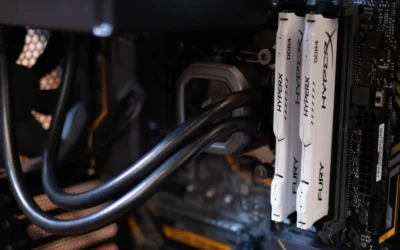
Mistake 2: Ignoring cooler, RAM, and case clearance. Tall DDR5 heatspreaders can interfere with large air coolers, and a thick 360mm radiator may not fit in a compact case. Check the case spec for CPU cooler height and radiator support, check RAM height, and confirm the board layout around the socket. The Frozr Guard extended heatsink design helps VRMs, but it also adds height near the socket that you should verify against your cooler.
Mistake 3: Chasing the highest MT/s or buying more capacity than you need. A board that supports DDR5 8400+ MT/s OC does not mean every kit will run at that speed without tuning, and owners commonly report that stability matters more than peak numbers. Buying 128GB or 256GB for gaming alone adds cost and can make stability harder, while very high MT/s kits may need manual voltage and timing adjustments. Pick a validated kit at a sensible speed, enable its EXPO profile, and prioritize reliable operation over headline frequencies.
Who Should Wait or Buy Differently
This approach is not ideal for small form factor builders who need Micro ATX or Mini ITX, or for anyone who wants to reuse DDR4, the 9950X3D is DDR5 only and the example X870E board is full ATX. It is also not the right choice if you are on a tight budget and do not need PCIe 5.0 storage, Wi-Fi 7, or USB4 right now, a more modest AM5 board with solid power delivery and DDR5 support will serve you better. If you are unsure about cooling, remember the processor does not include a cooler, so factor a capable air or liquid solution into your budget and wait until you have confirmed case clearance and PSU headroom.
Frequently Asked Questions
Do I need an X870E motherboard for the Ryzen 9 9950X3D?
No, but it is a strong fit if you want PCIe 5.0 for GPU and M.2, USB4 with 40Gbps Type C, and premium power delivery like a 14+2+1 design. A quality B650 or X670 board with AM5 support and a recent BIOS can also run the chip well if you do not need those extras.
What DDR5 RAM should I pair with the 9950X3D?
Choose a dual channel DDR5 kit from your motherboard QVL, 32GB is enough for most gamers and 64GB helps for creation work. Boards like the MSI MAG X870E Tomahawk WiFi list support up to 256GB and up to 8400+ MT/s OC, but owners commonly report that a stable EXPO kit at a moderate speed is more reliable than chasing the maximum.
Will I need a BIOS update and what about cooling?
Many AM5 boards need a BIOS update to support Ryzen 9000 Series, which you should do following the board maker instructions and at your own risk. The 9950X3D does not include a cooler and has a 170W Default TDP, so plan for a capable cooler, verify height or radiator clearance in your case, and ensure good case airflow.
Write Your Review
No reviews yet. Be the first to share your experience!