

Video credit: Rincón de Varo – Hardware & PC Gaming. Original video: https://www.youtube.com/watch?v=jD-jcKoM3wQ. This is our independent parts analysis and is not affiliated with the video creator. As an Amazon Associate, CustomPCGaming earns from qualifying purchases. Product prices shown in the video may have changed.
Watch the build
Parts in this build
- AMD Ryzen 7 7700
- GeForce RTX 5070
- MSI PRO B650M-A WiFi
- Corsair Vengeance 32GB DDR5 6000
- Crucial P3 Plus 2TB
- Corsair RM750e
- Lian Li Lancool 216
- Thermalright Peerless Assassin 120
Parts list is our summary of the video for reference. Confirm current specs and price on the retailer page before buying.
This is our independent parts analysis and is not affiliated with the video creator. As an Amazon Associate, CustomPCGaming earns from qualifying purchases. Product prices shown in the video may have changed.
The video above shows a build in this class, a practical 1440p AM5 system that balances a strong CPU and GPU with sensible supporting parts. Use it as a visual reference for airflow, cable routing, and case scale while you compare the specific parts we recommend below.
Watch: The Build Video
If you are deciding between a budget 1080p box and a true 1440p system, this class sits right in the sweet spot for most gamers in 2026. You get modern platform features, room to upgrade, and a GPU that is meant for higher resolution play without paying for flagship extras you may not need.
What This Build Is
This is a 1440p focused gaming PC in the AM5 class, built around the AMD Ryzen 7 7700 and the GeForce RTX 5070. That pairing is intentional. At 1440p the graphics card does most of the heavy lifting, and an eight core Zen 4 CPU keeps it fed so you are not leaving performance on the table in modern titles.
Think of this as a balanced mid range build, not a bare bones budget box and not a halo system. You are putting the largest share of the budget into the two parts that most affect gaming, the CPU and GPU, while keeping the motherboard, cooler, and case practical. It is the approach we see most often from builders who want high settings at 1440p and a clear upgrade path.
On the platform side, AM5 gives you DDR5, PCIe Gen4 and Gen5 storage options, and a socket that still has new chips ahead of it. That matters if you plan to keep the system for several years. You can start with a capable eight core today and later move to a future X3D chip without replacing the whole platform, which is a key reason we favor AM5 for this tier.
Builds at this level usually make two tradeoffs to hit a target budget. First, they choose a sensible B650 board with solid power delivery and connectivity rather than a premium overclocking board. Second, they use a proven air cooler instead of a large AIO. Both choices save money without hurting gaming results, and both are easy to change later if your needs shift.
The other common corner cut is storage. Many listings in this class still ship with a 1TB drive, which fills up fast when single games can exceed 100GB. We recommend 2TB from the start so you are not constantly uninstalling and redownloading. A Budget Build Guides approach should always weigh that quality of life factor, not just raw frame rates.
Who should not build this? If you play only lightweight esports titles at 1080p, this much GPU is more than you need and a lower tier would be better value. If you need heavy workstation rendering or you want 4K high refresh with ray tracing maxed, you should step up a GPU tier and consider a higher core count or X3D CPU. This build is for 1440p gamers who want smooth, high settings today with headroom for the next few years.
Parts Breakdown
This is the core of our ryzen 7 7700 rtx 5070 amazon gaming pc build breakdown. The table shows what is common at this level and what we would pick right now in 2026, then we explain the key decisions in more detail.
This article contains affiliate links. If you buy through one of our links, CustomPCGaming may earn a commission at no extra cost to you. Commissions never influence which products we recommend or how we rank them. Read our Affiliate Disclosure for details.
Quick Picks at a Glance

Prime Crucial P3 Plus 2TB PCIe Gen4 NVMe M.2 SSD
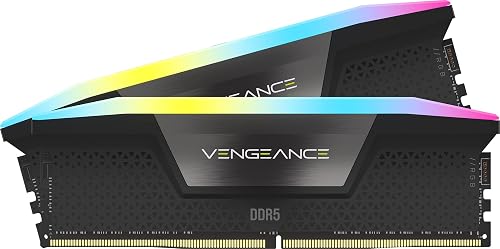
CORSAIR Vengeance RGB DDR5 32GB (2x16GB)

Prime Thermalright Peerless Assassin 120 SE CPU Cooler

GIGABYTE B650 Eagle AX AM5 ATX Motherboard

AMD Ryzen 7 7700 8-Core 16-Thread Unlocked AM5

GIGABYTE AORUS GeForce RTX 5070 Infinity 12GB
As an Amazon Associate we earn from qualifying purchases. Product prices and availability are accurate as of the date/time indicated.
Pros
- Fast Gen4 performance for boot times, multitasking and everyday productivity
- Large 2TB capacity for extensive media and application libraries
- Wide compatibility with PCIe Gen4 and Gen3 systems for easy installation
- Trusted Micron 3D NAND quality with strong endurance and 5-year warranty
- Includes useful software bundle for cloning and creative work
Cons
- Not the fastest Gen4 drive available, slower than premium 7000MB/s models for heavy gaming or pro workloads
- DRAM-less QLC design can show reduced sustained write speeds under prolonged heavy transfers
- No integrated heatsink, thermal performance relies on system cooling
The Crucial P3 Plus 2TB is a PCIe Gen4 NVMe M.2 SSD designed for home users, students and office multitaskers who want a noticeable everyday speed boost. It is ideal for upgrading an aging laptop or desktop to faster boot times, quicker app loads and smoother file handling without complex installation.
In real world use, sequential speeds up to 5000MB/s read and 4200MB/s write deliver snappy responsiveness for browsing, office apps, light content creation and casual gaming. The 2TB capacity offers generous room for essential programs, documents and media, while PCIe Gen4 efficiency keeps everyday computing fluid.
Built with Micron 3D NAND and rated for over 1.5 million hours MTTF, the drive feels reliable and well engineered in its compact M.2 form factor. It supports hardware encryption, works across Linux, Mac and PC platforms, and is backed by a limited 5-year warranty for added confidence.
Drawbacks are modest but worth noting. It does not match the peak speeds of enthusiast Gen4 drives, and its DRAM-less architecture may dip during very long, heavy write sessions. It also ships without a heatsink, so users in compact or warm systems should ensure adequate airflow.
Overall, the Crucial P3 Plus 2TB offers excellent value for everyday upgrades, combining strong Gen4 speed, large capacity and trusted durability. For users seeking a simple, affordable and reliable storage boost for home or business use, it is a smart and future ready choice.
Capacity: 2TB NVMe M.2 SSD
Interface: PCIe Gen4 x4 NVMe, backward compatible with Gen3
Performance: Up to 5000MB/s read, up to 4200MB/s write, 6Gb/s data transfer rate
Form Factor: M.2 2280, dimensions 3.15 x 0.87 x 0.09 inches, weight 0.01 kg
NAND & Reliability: Micron 3D NAND, 1.5 million hours MTTF, hardware encryption
Compatibility: Desktops and laptops that accept PCIe NVMe Gen4 M.2 drives, supports Linux, Mac, PC
Warranty: Limited 5-year warranty, Model CT2000P3PSSD8
Pros
- High frequency 6000MHz performance with low CL30 latency for responsive multitasking
- Brilliant individually addressable RGB lighting visible from any angle
- Dual compatibility with AMD EXPO and Intel XMP 3.0 for easy setup
- Stable overclocking with onboard voltage regulation and custom PCB design
- Backed by Corsair build quality and a limited lifetime warranty
Cons
- Maximum 6000MHz speed requires manual BIOS tuning and compatible motherboard and CPU
- Premium price for RGB and high speed bin compared to standard DDR5 kits
- Some systems may need to run below full speed for stability, especially on certain AMD boards
The CORSAIR Vengeance RGB DDR5 32GB kit (2x16GB, 6000MHz, CL30) is a high performance memory kit designed for modern gaming and workstation desktops. It is built for enthusiasts, gamers and creators who want top tier DDR5 bandwidth, low latency and striking aesthetics on both AMD and Intel platforms.
In real world use, the 6000MHz speed and CL30 timings provide noticeably smoother gaming, faster rendering and lag free multitasking. Enabling AMD EXPO or Intel XMP 3.0 in BIOS unlocks the full speed instantly, while CORSAIR iCUE allows real time monitoring and voltage tuning for stable overclocking.
Design and build quality are excellent, with a sleek gray aluminum heat spreader and a panoramic light bar housing ten ultra bright, individually addressable RGB LEDs per module. The custom PCB ensures clean signal integrity, while onboard voltage regulation gives more precise control than traditional motherboard based overclocking.
There are a few drawbacks to consider. You must enable EXPO or XMP in BIOS to reach the advertised speed, and some motherboard and CPU combinations may default to lower speeds like 5200MHz for stability. The 1.40V operating voltage and RGB premium also mean it costs more than basic DDR5 options.
Overall, Vengeance RGB DDR5 is one of the best DDR5 kits for users who want both elite performance and standout lighting. If you want fast, reliable memory that looks as good as it performs and you have a compatible DDR5 system, it is an outstanding upgrade.
Capacity: 32GB (2x16GB) Dual Channel Kit, DDR5, 288-Pin DIMM, Model CMH32GX5M2B6000Z30K
Performance: 6000MHz, Timings CL30-36-36-76, Voltage 1.40V, Intel XMP 3.0 and AMD EXPO Support
Features: Ten-zone RGB LEDs per module, panoramic light bar, onboard voltage regulation, custom high performance PCB
Compatibility: Desktop DDR5 systems, optimized for latest Intel and AMD motherboards, iCUE software control
Choose this 6000MHz CL30 kit if you want the sweet spot for DDR5 gaming and creation, balancing high frequency with low latency. Lower latency kits offer better responsiveness than higher speed CL36 or CL40 alternatives in many games.
Make sure your motherboard and CPU support DDR5 and 6000MHz EXPO or XMP profiles, and that your case has clearance for RGB DIMMs. Update your BIOS before installation for best compatibility.
If you prioritize budget over lighting, consider a non RGB Vengeance kit with similar specs. If you want maximum aesthetics and easy tuning with iCUE, this RGB model is worth the premium.
Pros
- Excellent cooling performance for its class with dual tower and six heat pipe layout
- Very quiet operation even at full 1550 RPM with PWM control
- Broad support for latest Intel and AMD sockets
- Solid build quality with copper base and aluminum heatsink
- Efficient dual fan setup without the complexity of liquid cooling
Cons
- Tall 155mm height requires a mid tower or larger case, compatibility check is essential
- AMD installation requires the original motherboard backplate which is not included
- Bulky 907g dual tower design can make installation tight in compact builds
The Thermalright Peerless Assassin 120 SE is a dual tower air cooler designed for gamers, enthusiasts and PC builders who want high end cooling without an AIO. It targets users running modern Intel LGA 1700 and 1851 or AMD AM4 and AM5 CPUs who need reliable thermal headroom for gaming and multitasking.
In real world use, the six AGHP copper heat pipes and dual 120mm PWM fans deliver impressive heat dissipation while staying efficient. With up to 66.17 CFM airflow and a max speed of 1550 RPM, it keeps temperatures low under load while maintaining noise at just 25.6 dB for quiet operation.
Build quality is a clear strength thanks to the pure copper base, nickel plated heat pipes and dense aluminum fin stacks joined by reflow welding. The dual TL-C12C fans use a 4 pin PWM connection for precise speed control and the offset tower design helps preserve RAM clearance on most motherboards.
The main drawback is its size, as the 125 x 135 x 155mm footprint demands a spacious case and careful compatibility checks. Installation on AMD systems also requires reusing the original motherboard backplate, which can be inconvenient if it was misplaced.
Overall, the Peerless Assassin 120 SE offers best in class air cooling performance, quiet operation and broad socket support at an accessible point. It is an excellent choice for anyone wanting powerful, reliable CPU cooling without the cost or maintenance of liquid cooling.
Model: Thermalright PA120 SE Dual Tower CPU Cooler
Dimensions: 125 x 135 x 155mm (4.92 x 5.31 x 6.1 inch)
Heat Pipes: 6 x 6mm pure copper with AGHP technology
Fans: 2 x TL-C12C 120mm PWM, 1550 RPM ±10%, 66.17 CFM, 25.6 dB(A), 4-Pin 12V
Compatibility: Intel LGA 115X / 1200 / 1700 / 1851 and AMD AM4 / AM5
Materials: Aluminum fins, pure copper base and heat pipes, metal mounting kit
Weight: 907g
Pros
- Excellent value with premium features like PCIe 5.0 M.2, DDR5 and WiFi 6E
- Stable power delivery and thermal guards keep performance consistent under gaming and heavy loads
- Generous expansion with triple M.2, four DDR5 slots up to 128GB and four PCIe slots
- User-friendly UEFI BIOS and Q-Flash Plus praised by first-time builders for easy setup
- Strong wired and wireless connectivity plus versatile rear I/O for peripherals
Cons
- Only one M.2 slot is PCIe 5.0, the other two are PCIe 4.0
- Limited to GbE LAN instead of faster 2.5GbE found on some competing B650 boards
- Full ATX size requires a mid or full tower case, not suited for compact builds
The GIGABYTE B650 Eagle AX is an ATX motherboard built for AMD AM5, supporting Ryzen 7000, 8000 and 9000 series processors with DDR5 memory. It is ideal for gamers, creators and first-time builders who want modern features and a clear upgrade path without moving to a premium chipset.
In real world use it delivers smooth gaming and multitasking thanks to its 12+2+2 phase digital VRM and DDR5 support with EXPO and XMP profiles. The triple M.2 layout with one PCIe 5.0 slot is a standout for video editing and large game libraries, while WiFi 6E and USB 3.2 Gen2x2 Type-C keep wireless and wired transfers fast.
Design and build quality are strong with a stealthy black Eagle aesthetic and reinforced thermal guards for the VRM and M.2 drives. The layout offers four DDR5 DIMM slots up to 128GB, four PCIe slots and generous rear I/O including HDMI, DisplayPort and multiple USB ports, all controlled through an intuitive UEFI and Smart Fan 6.
There are a few tradeoffs to note. Only one M.2 slot runs at PCIe 5.0 speed while the others are PCIe 4.0, and networking is limited to GbE LAN rather than 2.5GbE. Its ATX form factor also needs a mid or full tower case, so it is not suited for small form factor builds.
Overall the B650 Eagle AX hits a sweet spot of features, stability and value in the B650 range. If you want a reliable, future-ready foundation for a Ryzen DDR5 system with strong storage options and modern wireless, it is one of the most versatile choices in its class.
Socket & Chipset: AM5, AMD B650, ATX form factor
CPU Support: AMD Ryzen 7000, 8000 and 9000 Series Processors
Memory: 4x DDR5 DIMM slots, up to 128GB, AMD EXPO and Intel XMP support
Storage: 3x M.2 slots (1x PCIe 5.0, 2x PCIe 4.0) plus 4x SATA 3 ports, M.2 Thermal Guard
Expansion: PCIe slots for GPU and add-in cards, 1x HDMI, 1x DisplayPort
Connectivity: WiFi 6E, Realtek GbE LAN, USB 3.2 Gen2x2 Type-C, total 18 USB ports
Special Features: 12+2+2 Phase Digital VRM, Smart Fan 6, Q-Flash Plus, 24-pin power
Pros
- Powerful 8-core, 16-thread architecture for gaming and productivity
- Unlocked multiplier allows for simple overclocking
- Includes Wraith Prism RGB cooler, saving cost of aftermarket cooling
- AM5 socket ensures future upgrade path and modern connectivity
- Highly rated for reliable real world gaming performance
Cons
- Requires AM5 motherboard and DDR5 RAM, not compatible with older AM4 systems
- Stock cooler can become audible under sustained heavy loads
- May offer more power than needed for basic everyday computing tasks
The AMD Ryzen 7 7700 is an 8-core, 16-thread unlocked desktop processor built on the AM5 platform for gamers, streamers and creators. It is designed for users who need strong multitasking and gaming performance without stepping up to a flagship CPU.
With a 3.8 GHz base clock and unlocked overclocking support, it handles modern games, content creation and heavy multitasking with ease. The 16-thread architecture keeps frame rates smooth while streaming, editing or running demanding applications in the background.
Build quality is solid and modern, with AM5 socket support for DDR5 memory and PCIe 5.0 on compatible motherboards. The included Wraith Prism RGB cooler adds value with reliable cooling, quiet operation at moderate loads and customizable lighting that fits gaming builds.
The main drawback is platform cost, since AM5 requires a new motherboard and DDR5 RAM if you are upgrading from AM4. The stock cooler performs well but can become noticeable under sustained heavy loads, and enthusiasts may still prefer an aftermarket solution for overclocking.
Overall, the Ryzen 7 7700 offers an excellent balance of gaming power, productivity and future ready features. It is a smart choice for anyone building a new AM5 system who wants high performance, overclocking headroom and an included cooler right out of the box.
Brand: AMD
Model: Ryzen 7 7700
Cores / Threads: 8 Cores, 16 Threads, Unlocked
Base Clock: 3.8 GHz
Socket: AM5
Cooler Included: Wraith Prism RGB LED Cooler
Category: CPU Processors, Desktop Processor
Pros
- Powerful 12GB GDDR7 on 192-bit bus for high resolution gaming and content creation
- Efficient WINDFORCE HYPERBURST triple fan cooling for quiet and stable operation
- High 2715 MHz boost clock and 28000 MHz memory speed for excellent performance
- PCIe 5.0 support and 8K display capability for future ready builds
- Premium build quality with metal backplate, RGB Halo and included VGA holder kit
Cons
- Large 12.17 inch triple fan design requires a spacious case with good airflow
- 16-pin power connector may require an adapter for older power supplies
- Heavier 2.7 pound design needs proper support, especially for vertical mounting
The GIGABYTE AORUS GeForce RTX 5070 Infinity 12G is a high performance graphics card built on NVIDIA RTX 50 series architecture. It is designed for enthusiast gamers and content creators who demand smooth 4K gaming, fast rendering and AI powered performance.
With 12GB of GDDR7 memory on a 192-bit interface, a 2715 MHz boost clock and 28000 MHz memory speed, it delivers fast frame rates and enhanced ray tracing. Upgraded RT Cores and Tensor Cores provide realistic lighting and AI acceleration for both gaming and creative applications.
Cooling is handled by the triple fan WINDFORCE HYPERBURST system, which keeps temperatures low while maintaining quiet operation. The card features a die cast metal backplate for rigidity, RGB Halo lighting for customizable style, and a magnetic backplate cover plus VGA holder kit for a clean, secure installation.
The large 12.17 inch length and triple fan design require a spacious case and good airflow, so compact builds should check clearance carefully. It also uses a 16-pin power connector, which may require an adapter or compatible PSU if you are upgrading from an older system.
Overall, the AORUS RTX 5070 Infinity 12G is an excellent choice for users building a future ready PCIe 5.0 system with headroom for 8K displays. If you want premium cooling, striking design and top tier RTX 50 series performance in one package, this card delivers.
GPU: NVIDIA GeForce RTX 5070, 2715 MHz Boost Clock, RTX 50 Series
Memory: 12GB GDDR7, 192-bit, 28000 MHz Memory Speed
Interface: PCI-Express x16 5.0, DisplayPort, HDMI
Cooling: WINDFORCE HYPERBURST Cooling System with 3 Fans
Display Support: Up to 7680 x 4320 Resolution
Dimensions and Weight: 12.17 x 5.2 inches, 2.7 pounds
Model: GV-N5070AORUS IF-12GD with 3 Year Manufacturer Warranty
Included: Graphics Card, 16-pin Power Cable, Magnetic Backplate Cover, VGA Holder Kit, AORUS Metal Sticker
| Part | Common at this level | Our 2026 pick | Why |
|---|---|---|---|
| CPU | a Ryzen 5 9600X or Ryzen 7 7700 | AMD Ryzen 7 7700 | eight Zen 4 cores for gaming plus light creation work |
| GPU | an RTX 5070 or RX 9070 | GeForce RTX 5070 | the mainstream 1440p Blackwell card, 12GB GDDR7 and DLSS 4 |
| Motherboard | a B650 board | MSI PRO B650M-A WiFi | enough USB, VRM and a real path to a future X3D chip |
| Memory | a 32GB DDR5 6000 kit | Corsair Vengeance 32GB DDR5 6000 | 32GB DDR5 6000, plenty for gaming and background apps |
| SSD | a 1 or 2TB Gen4 drive | Crucial P3 Plus 2TB | 2TB of Gen4 storage so 100GB games do not force reinstalls |
| Power Supply | a 700 to 750W unit | Corsair RM750e | fully modular 750W ATX 3.1 with headroom for a future GPU |
| Case | a mesh airflow case | Lian Li Lancool 216 | big intake fans and easy building, great value airflow |
| CPU Cooler | a budget tower cooler | Thermalright Peerless Assassin 120 | a low cost dual tower air cooler far quieter than a stock unit |
The two most important choices are the CPU and GPU, and they work as a pair. The AMD Ryzen 7 7700 8-Core, 16-Thread Unlocked gives you eight cores and sixteen threads on AM5, which is plenty for gaming while leaving room for streaming, Discord, and browser tabs in the background. Owners commonly report that it stays efficient in games and it includes the Wraith Prism RGB cooler in the box, though we recommend a quieter tower for daily use.
For graphics, the GIGABYTE AORUS GeForce RTX 5070 Infinity 12G is the mainstream Blackwell option for 1440p. Per the spec sheet it offers 12GB of GDDR7 on a 192 bit interface with PCIe 5.0 and the WINDFORCE HYPERBURST cooling system. That memory capacity and DLSS 4 support are what make it comfortable at 1440p with high settings, and the triple fan design is built for sustained loads.
Around those two, the supporting picks keep the system balanced. The CORSAIR Vengeance RGB DDR5 RAM 32GB (2x16GB) kit runs at up to 6000MHz with CL30-36-36-76 timings and AMD EXPO support, which matches the sweet spot for AM5. The Crucial P3 Plus PCIe Gen4 NVMe 2TB SSD delivers up to 5,000MB/s read and up to 4,200MB/s write, so load times and installs stay quick. The Thermalright Peerless Assassin 120 SE CPU Cooler at 125 by 135 by 155mm with dual 120mm PWM fans up to 1550 RPM and 66.17 CFM keeps noise low while clearing most RAM.
Compatibility Check
Will all of these parts work together without surprises? That is the first question every first time builder asks at this budget, and this combination is deliberately low risk if you check a few details before you buy.
This build is AM5, so any B650, B650E, B850 or X870 board works and it is DDR5 only. You cannot reuse DDR4, so plan for a new memory kit. A current B650 or B850 board usually ships ready for today’s chips, but check the board support page and use BIOS Flashback if a flash is needed. BIOS updates and any overclocking are done at your own risk and may void warranty, so follow the manufacturer instructions closely and do not interrupt power during a flash.
Socket and chipset fit is straightforward. The Ryzen 7 7700 uses AM5 LGA 1718, which matches the GIGABYTE B650 Eagle AX AM5 LGA 1718 ATX board listed in our data. That board provides DDR5 support with AMD EXPO and Intel XMP, a 12 plus 2 plus 2 phases digital VRM, and triple M.2 slots with one PCIe 5.0 and two PCIe 4.0. It also includes WiFi 6E and GbE LAN, so you are covered for wired and wireless networking without add in cards.
Memory compatibility is equally simple if you stick to the recipe. Match memory to a 32GB DDR5 6000 kit on AM5. The Corsair Vengeance kit we highlight is a 2 by 16GB DDR5 6000 CL30 kit with AMD EXPO, which is the configuration most builders use for stability and performance on this platform. Enable EXPO in the BIOS after you confirm the system posts, and verify the kit is on the board QVL if you want extra peace of mind.
Physical clearance needs a quick check, but there are no red flags here. In a standard mid tower a triple fan GPU and a 240 or 360mm radiator fit without issue. The Lancool 216 class of airflow cases is designed for long graphics cards and tall coolers, and the Peerless Assassin 120 SE at 155mm tall fits most mid towers. Still, check cooler height or radiator clearance against the case spec sheet, and confirm GPU length against the case GPU clearance. Follow mounting instructions and use anti static handling throughout the build.
For power, size the supply above the combined draw of RTX 5070 and the CPU, follow the GPU maker recommended wattage, and use a native 12V-2×6 connector for an RTX 50 card. The Corsair RM750e at 750W is fully modular and ATX 3.1, which gives you headroom for transient spikes and a future GPU step up. Do not assume any 750W unit handles any card, always follow the GPU maker guidance and use the correct native cable rather than adapters where possible.
A few practical tips help you avoid common mistakes. Install the M.2 drive in the top slot with the included Thermal Guard if you want the best sustained performance, and keep airflow in mind when you route cables behind the motherboard tray. If you choose an air cooler, leave room for memory clearance, the Peerless Assassin design does, but very tall RGB heatspreaders can still be tight. If you later switch to an AIO, confirm radiator support at the top or front and fan thickness before you order. For more on cooling choices, see our guide to 240mm AIO vs 360mm AIO for gaming and our notes on how to choose a case for GPU clearance and radiator support.
Performance: What To Expect
No verified frame rate numbers are available for this build, so we will keep this section qualitative and will not invent figures. That approach protects you from misleading expectations, since real results vary with game, settings, resolution, and background tasks.
Qualitatively, this is a 1440p high settings system. The RTX 5070 with 12GB GDDR7 and DLSS 4 is positioned as the mainstream Blackwell card for that resolution, so you can expect to run modern titles at high presets without constantly lowering textures or shadows. The Ryzen 7 7700 with eight cores keeps the GPU fed, which helps maintain consistency when you have streaming software, voice chat, and a browser open.
The supporting parts shape the experience in subtle but important ways. A 32GB DDR5 6000 kit means you are not closing apps to free memory, and a 2TB Gen4 drive rated up to 5,000MB/s read means large games load quickly and you can keep several installed. A dual tower air cooler like the Peerless Assassin at up to 25.6 dB(A) keeps fan noise lower than a stock cooler during long sessions, which makes the system more pleasant to live with day to day.
Three Ways to Build This
Use these three versions to match your budget and goals. All stay in the same 1440p AM5 family, they just shift money between CPU, GPU, cooling, and storage.
Lower Cost Version
Keep a similar GPU tier but choose a cheaper CPU, use the stock cooler or a budget air tower, pick a smaller SSD, and select an entry B650 board. You still target 1440p, but you trim costs where upgrades are easy later.
Who it suits: first time builders who want to get into 1440p on a tight budget and are comfortable adding storage or a better cooler in six to twelve months. You give up some multitasking headroom and quiet operation at first, but you keep the core gaming experience intact.
Balanced Version, Our Recommended Build
This is the build detailed above: Ryzen 7 7700 with RTX 5070, a 32GB DDR5 6000 kit, a 2TB Gen4 SSD, a quiet tower cooler like the Thermalright Peerless Assassin 120 or a 240mm AIO, and an airflow case such as the Lian Li Lancool 216. It balances cost, noise, and future proofing without overspending on the motherboard or cooler.
Who it suits: most 1440p gamers who want room to grow. You get eight cores for gaming plus light creation, enough memory and storage to avoid daily compromises, and a platform that can take a future X3D CPU. If you only build once every few years, this is the sensible center point.
Higher End Version
Move up one GPU tier and step to a Ryzen 7 9800X3D or Ryzen 9 9950X3D, add a 360mm AIO, and choose a 1000W ATX 3.1 supply. Keep the 32GB DDR5 6000 memory and 2TB SSD as a baseline, or expand both if you create content.
Who it suits: players chasing high refresh 1440p or entry 4K, and builders who want years of headroom before the next major upgrade. You pay more up front for extra GPU power and top tier gaming CPUs, but you gain longevity and more thermal headroom for sustained loads.
FAQ
Is the Ryzen 7 7700 enough for an RTX 5070 at 1440p?
Yes, that is why we pair them. At 1440p the GPU is usually the limiting factor, and an eight core Zen 4 chip like the 7700 keeps it fed in modern games while handling background apps. If you focus on competitive 1080p high refresh, an X3D chip would be a more targeted upgrade.
Do I need 32GB of RAM and a 2TB SSD for this build?
We recommend both for a smoother daily experience. 32GB DDR5 6000 is the current sweet spot for AM5 and avoids memory pressure when you game with browsers and chat open. A 2TB Gen4 drive like the Crucial P3 Plus means you can keep several large games installed without juggling installs.
Will a B650 motherboard limit future upgrades?
No, a good B650 board is a practical foundation for this class. This build is AM5, so any B650, B650E, B850 or X870 board works, and a current B650 or B850 usually ships ready for today’s chips. You still have a path to a future X3D CPU, PCIe Gen4 and Gen5 storage, and modern connectivity, just check the support page and use BIOS Flashback if needed.
Final Verdict
This Ryzen 7 7700 and RTX 5070 combination hits the balance most 1440p gamers actually want: strong GPU power where it matters, an eight core CPU that does not hold it back, and sensible supporting parts that keep noise and cost in check. It is not the cheapest way to post a frame rate, and it is not a flagship, but it is a well rounded system you can live with and upgrade over time.
Our pick: the Balanced version we recommend, with the Ryzen 7 7700, RTX 5070, 32GB DDR5 6000, 2TB Gen4 SSD, and a quiet tower cooler in an airflow case, for most 1440p gamers who want value and a clear path to a future X3D upgrade.
This build guide is not the right choice if you need a specific professional workload or the highest possible frame rates; it is aimed at value gaming within a set budget.







Write Your Review
No reviews yet. Be the first to share your experience!