

Video credit: Teknoyd. Original video: https://www.youtube.com/watch?v=Tp6q7XtJbtQ. This is our own independent breakdown and is not affiliated with the video creator. As an Amazon Associate, CustomPCGaming earns from qualifying purchases. Product prices shown in the video may have changed.
Watch the build
Parts in this build
- Stageek Cable Clips
- WALI Dual Monitor Arm
- GTRACING Gaming Chair
- SIHOO M57 Ergonomic Chair
- Bestier L-Shaped Gaming Desk
- Brainwavz Hengja Desk Hook
- Logitech G502 X
- Razer Strider XXL
- SIHOO Doro C300
Parts list is our summary of the video for reference. Confirm current specs and price on the retailer page before buying.
Watch: The Setup Tour
This cyberpunk station is about deep blacks, neon glow and a tight corner layout that feels like an arcade booth after dark. If you want a space that works for classes or work by day and turns moody for games at night, this style will speak to you. Think of the video as a lookbook for layout and mood only, not a shopping list, because our picks below are our own independent recommendations.
What This Setup Is Going For
You are building a small night city on your desk. The base is almost always black, from the desk surface to the mat to the monitor bezels, then you add one or two neon colors on top with light strips and screen glow. That contrast is what sells the cyberpunk feel more than any single gadget.
The layout in this style is usually a corner L shape or a wide straight desk with two screens. An L shape like the one we recommend gives you a main zone for your keyboard and mouse plus a side zone for a console, books or figures. A dual screen or ultrawide setup fills your view and hides the wall behind you, which helps a small room feel larger.
This look suits a bedroom, a shared apartment corner or a dorm where you want one station for work, study and play. You do not need a huge room, but you do need depth in front of you so your monitors can sit back and your chair can roll. If you want help planning width, see how to choose gaming desk size for your setup before you order.
The tradeoff is that matching glow takes planning. If you buy every accessory in a different shade of pink or blue, the desk can look busy instead of cinematic. It is better to lock your desk finish and mat first, then pick one lighting color to repeat. Cable routing is the other tradeoff, because neon light makes every loose cable stand out.
This style does NOT suit everyone. If you move often, rent a tiny room with no wall space, or need a silent and minimal office for video calls, the extra lighting and larger footprint may frustrate you. It also does NOT suit very tight budgets if you try to buy everything at once, which is why we break it into three build paths below. For more context in this category, browse Gaming Desks & Chairs.
The Gear Breakdown
Here is the core of this 1500 dollar cyberpunk gaming desk and chair setup guide. The list below reflects our current 2026 research for building a similar look, not what is shown in the tour video. Use it as a starting point, then adapt for your room and monitors.
This article contains affiliate links. If you buy through one of our links, CustomPCGaming may earn a commission at no extra cost to you. Commissions never influence which products we recommend or how we rank them. Read our Affiliate Disclosure for details.
Quick Picks at a Glance

Prime Razer Strider XXL Hybrid Gaming Mouse Mat

Prime BRAINWAVZ Hengja Desk Headphone Hanger Mount

Logitech G502 HERO Wired Gaming Mouse
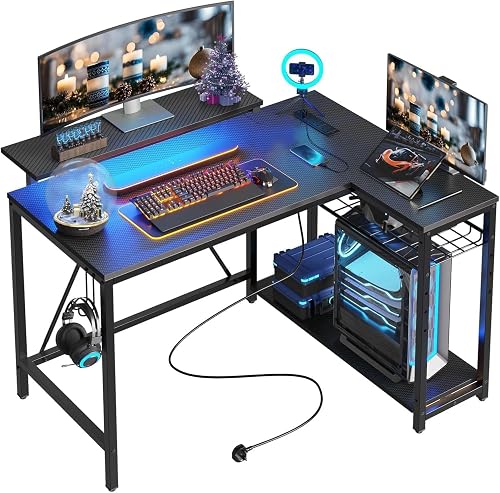
Bestier 42-Inch L-Shaped Computer Desk

WALI Freestanding Dual Monitor Stand for 13-27

GTRACING GT099 Gaming Chair

SIHOO M57 Ergonomic Office Chair with Mesh Back

SIHOO Doro C300 Ergonomic Office Chair
As an Amazon Associate we earn from qualifying purchases. Product prices and availability are accurate as of the date/time indicated.
Pros
- Smooth, fast glide with solid stopping power for FPS, MOBA and everyday use
- Extra large XXL size fits full keyboard and mouse with room for low DPI movement
- Stays firmly in place thanks to textured grooved anti slip underside
- Durable and easy to clean with water resistant surface and fray resistant edges
Cons
- XXL footprint needs a large desk and can overwhelm compact setups
- Hybrid texture feels different from pure cloth and takes time to adjust to
- Some users report actual dimensions measure slightly smaller than listed
The Razer Strider XXL is a hybrid mouse mat that combines a firm gliding top with a soft, rollable base. It is made for gamers who want hard surface speed without giving up cloth like control and comfort.
In real use, the glide feels fast and even yet offers reliable stopping power for precise flicks. Users moving from cloth pads note smoother tracking in games while keeping accuracy for productivity work.
Build quality is strong with a 3mm cushioned profile, grooved anti slip underside and stitched edges that resist fraying. The water resistant surface wipes clean easily and the XXL size covers keyboard and mouse with room to spare.
The large footprint is not ideal for compact desks and the hybrid texture takes time to adjust to if you love traditional fabric. A few buyers also note the mat can measure slightly smaller than the listed dimensions.
Overall, the Strider XXL is an excellent pick for competitive and casual gamers seeking speed, control and portability in one mat. If you have the desk space, it delivers a premium, durable upgrade over standard cloth pads.
Brand: Razer, Model: RZ02-03810100-R3U1, Color: Classic Black, Use: Gaming mouse mat.
Size: 16.2 x 37 inches, Thickness: 3mm, Weight: 13.92 ounces, Material: Polyvinyl Chloride.
Features: Non slip grooved base, anti fraying stitched edges, water resistant surface, rollable portable design with wrist support.
Pros
- Strong all metal build with durable scratch resistant finish
- Highly versatile with adjustable clamp and horizontal plus vertical mounting
- Curved rest is gentler on headbands than flat hooks
- Small footprint keeps desk clear and installation is simple
Cons
- Open end has no safety lip, so headphones can slip off if knocked
- Switching mount orientation needs a hex key adjustment
- No dedicated cable manager, cord routing needs extra planning
The BRAINWAVZ Hengja is a clamp on metal hanger designed to get headphones off your desk and within easy reach. It is made for PC gamers, office workers, students and anyone with limited desktop space who wants a tidy setup.
Its standout trick is rotatable mounting for both horizontal surfaces like desks and shelves, plus vertical surfaces like desk legs and bookcase sides. In real use, it holds light on ear models to heavy over ear gaming headsets securely, while the curved arm cradles the headband to reduce pressure points.
Build quality is a clear highlight, with thick all metal construction and a polished matte black finish that resists scratches. At just 4.72 inches long and 4.16 ounces, it feels sturdy without looking bulky, and it adds a clean, minimalist touch to home, work or studio spaces.
There are a few tradeoffs to note. The hanger tip has no raised lip, so headphones can slide if bumped hard, and rotating between horizontal and vertical modes requires a hex key adjustment. Cable storage is also basic, so you will need to plan where to route your headphone cord.
Overall, the Hengja is a smart, durable alternative to bulky floor stands. If you want a strong, space saving holder that clamps on without glue or mess, it is an excellent pick for gaming and everyday listening setups.
Model: BWAVZ-HENGJA-BLK, Color: Black, Material: Metal with polished finish
Dimensions: 4.72 x 2.36 x 2.36 inches, Weight: 4.16 ounces, Mounting: Tabletop clamp with bracket fastening
Compatibility: On ear and over ear headphones, all phone models, ideal for gaming and PC headsets, plus cables and small accessories
Pros
- Exceptional HERO sensor accuracy up to 25,600 DPI with adjustable sensitivity from 200 DPI
- Deep customization with 11 programmable buttons, onboard profiles and adjustable weights
- Durable mechanical switch tensioning for clean, consistent click feedback
- Comfortable ergonomic shape with textured grips for extended gaming sessions
Cons
- Wired only design with USB cable, no wireless option for clutter free setups
- Right handed shape only, not suitable for left handed users
- Larger and heavier body may feel bulky for small hands or fingertip grip players
The Logitech G502 HERO is a wired gaming mouse built for PC gamers who want precision, control, and deep customization. With its right handed ergonomic shape and 11 programmable buttons, it suits FPS, MOBA, MMO, and productivity users who rely on macros and quick commands.
At its core is the HERO optical sensor with up to 25,600 DPI, tunable from 200 DPI for ultra precise tracking. In real world play, it delivers consistent, responsive movement with zero smoothing, filtering, or acceleration, plus a dual mode hyper fast scroll wheel for fast scrolling or click to click control.
Build quality feels premium with textured grips, metal pivot hinges, and spring tensioned left and right clicks for a crisp response. The tunable weight system lets you add up to five 3.6g weights to adjust balance, while LIGHTSYNC RGB adds personalized lighting that syncs with other Logitech G gear.
It is not perfect for everyone. The larger, heavier body can feel bulky for small hands or strict claw and fingertip grip players, and the right hand only shape excludes left handed users. Full RGB and profile customization also requires Logitech Gaming Software on Windows 7 or newer.
Overall, the G502 HERO remains a top pick for gamers who want proven accuracy, durable switches, and unmatched customization in a wired mouse. If you want a comfortable, highly tunable mouse for competitive and casual play, it is hard to beat.
Connectivity: Wired USB with 1.0 meter cable, corded electric power, plug and play for PC.
Sensor and Performance: Optical HERO sensor, 200 to 25,600 DPI, sub micron tracking, 11 buttons and dual mode scroll wheel.
Design: Right handed ergonomic build in black with LED LIGHTSYNC RGB, metal accents, and five adjustable 3.6g weights.
Compatibility and Extras: Works with Windows 7 and newer, includes mouse and quickstart guide, 1 year hardware limited warranty.
Pros
- Perfect small-space footprint that still fits dual monitors according to buyers
- Built-in charging hub eliminates need for extra extension cords
- Sturdy yet lightweight steel frame that is easy to assemble and move
- Versatile reversible layout and convertible monitor stand adapt to different rooms
Cons
- Compact 42-inch size may feel tight for large PC towers or triple-monitor setups
- Engineered wood top requires gentle cleaning and protection from heat and moisture
- Assembly required and two people recommended for easiest setup
The Bestier 42-Inch L-Shaped Computer Desk is a compact corner workstation designed for bedrooms, dorms, apartments and small home offices. It combines a main desk surface with four storage shelves, a monitor riser and integrated tech features to maximize every inch of corner space.
In real world use, the standout is convenience. The built-in power strip with two AC outlets, USB and Type-C ports keeps your monitor, laptop and phone charged right at the desk, while the under-shelf LED strip provides soft task light by day and immersive ambience for gaming at night.
Design follows a modern industrial style with a black carbon fiber finish, open shelving and a reinforced steel frame. The 0.75-inch engineered wood top feels sturdy for daily work and play, and the reversible shelves plus convertible monitor stand let you configure it left or right to suit your room.
There are tradeoffs for the small footprint. The 42-inch width is ideal for one or two compact monitors but can feel tight for oversized towers or multi-screen battle stations, and the engineered wood surface needs prompt, gentle cleaning to avoid heat or moisture damage.
Overall, this is a smart pick for students, remote workers and casual gamers who want an organized, tech-ready corner setup without taking over the room. It delivers storage, power, lighting and ergonomic comfort in one space-saving package.
Dimensions: 41.93 inches wide by 32.28 inches deep by 35.91 inches high with a 42-inch L-shaped layout for corner placement.
Materials: Engineered wood desktop with carbon fiber finish supported by a heavy-duty steel frame, weighing 32.6 pounds.
Features: 4 open shelves, 2-in-1 monitor stand or display shelf, under-shelf LED light strip, 2 AC outlets plus USB and Type-C ports, headphone and backpack hook.
Assembly: Assembly required with included hardware and step-by-step manual, two adults recommended for easiest setup.
Pros
- Freestanding design works on any desk without clamps or holes
- Highly adjustable tilt, swivel, rotation, and height for ergonomic comfort
- Sturdy steel pole and V-base hold two monitors securely with minimal wobble
- Great space saver that lifts screens off the desk for a cleaner setup
- Simple installation with detachable VESA plates and complete hardware kit
Cons
- V-base footprint uses more desk depth than edge clamp mounts
- Max 27 inch size and 22 lbs per arm will not fit large ultrawide or heavy gaming monitors
- Height adjustment is manual on the pole, not a smooth gas spring lift
The WALI MF002 is a freestanding dual monitor stand designed for 13 to 27 inch screens weighing up to 22 lbs each. It is ideal for home offices, dorms, students, and multitaskers who want a dual screen setup without drilling or clamping.
Each arm extends and retracts with +/-90 degree tilt and swivel, plus 360 degree rotation for landscape to portrait switching. The 16 inch height adjustable pole lets you align both monitors at eye level for comfortable viewing and improved productivity.
Built from heavy duty metal with a stable V-shaped base, the stand feels solid and keeps screens steady during daily use. The black steel finish looks clean and modern, blending easily into home, school, or office environments.
Because it is freestanding, the base takes up more desk depth than a clamp mount, which can matter on compact desks. It is also limited to VESA 75 and 100 patterns and smaller screens, so it will not support large ultrawides or heavier gaming displays.
Overall, the WALI MF002 delivers excellent flexibility, stability, and value for standard dual monitor setups. If you need an affordable, no hassle way to raise two screens and reclaim desk space, it is a smart pick.
Model: WALI MF002 in Black, freestanding tabletop V-base design made of metal. Supports 13 to 27 inch flat screens and monitors up to 22 lbs per arm.
Compatibility: VESA 75x75mm and 100x100mm with detachable, height adjustable plates. Fits most monitors, flat screens, and small TVs in that size range.
Adjustment range: 16 inch center pole for height, arms extend and retract, +/-90 degree tilt and swivel, 360 degree rotation for landscape or portrait mode.
Pros
- Ergonomic high-back support with included headrest and lumbar cushions
- Wide adjustability with recline, 3D arms and smooth height control
- Durable metal frame and easy to clean faux leather finish
- Modern racing style fits gaming rooms, offices and study spaces
Cons
- Faux leather upholstery can trap heat during long sessions
- Firm foam may need a short break in period for optimal comfort
- Large footprint and 47 pound weight require ample space and careful assembly
The GTRACING GT099 in Dark Black is a high back racing style chair built for gaming, office work and study. It is ideal for teens and adults who want ergonomic support during long sessions in a game room, living room or home office.
Real world comfort comes from the thick molded foam seat plus adjustable headrest and lumbar pillows that ease neck and back pressure. The 90 to 155 degree recline, 3D armrests and Class 3 gas lift let you fine tune height and posture for play, work or rest.
Design blends a modern solid black look with carbon fiber textured faux leather that wipes clean easily. A solid metal frame, supportive foam core and smooth rolling casters give it a sturdy, planted feel for everyday indoor use.
There are a few tradeoffs to consider. The faux leather upholstery can feel warm over long sessions and the foam feels firm until broken in. At 47 pounds with a 21 x 21 x 52 inch footprint, it also needs decent floor space and time for assembly.
Overall, the GT099 is a strong pick for gamers and remote workers who want adjustable ergonomics with bold racing style. If you want head to toe support, flexible recline and a cohesive battlestation look, this chair delivers.
Brand: GTRACING, Model: GT099, Color: Dark Black, Style: Modern Racing
Materials: Metal frame, faux leather upholstery, foam fill, carbon fiber texture finish
Dimensions: 21 inch D x 21 inch W x 52 inch H, Seat Depth: 22.8 inches, Weight: 47 pounds
Adjustability: 90 to 155 degree recline, 3D armrests, Class 3 gas lift height adjustment, swivel recliner with headrest and lumbar pillow
Use: Indoor gaming, office and study, Age Range: Teen and Adult, Room Type: Game Recreation Room, Living Room, Study Room
Pros
- Highly adjustable headrest, lumbar support and 90 to 126 degree recline
- Breathable high-back mesh with split back design for spinal comfort
- Sturdy aluminum base with 330 lb capacity and silent rolling casters
- Certified safety testing with 3-year warranty and 30-day returns
Cons
- Assembly required and initial setup may take extra time
- 3D armrests are versatile but lack full 4D adjustability found on premium chairs
- Mesh seat feels firmer than padded chairs and recline is limited to 126 degrees
The SIHOO M57 is a modern high back desk chair built for home office use, studying and gaming. It is ideal for adults who sit for long hours and need adjustable neck, back and arm support in a breathable package.
Standout features include an adjustable headrest that tilts and lifts, plus lumbar support that moves in height and depth. The 90 to 126 degree recline, smooth height lift and 360 degree swivel let you shift posture easily through the workday.
The design uses breathable mesh on a split backrest to match the curve of your spine while reducing heat buildup. A waterfall edge seat supports the thighs, and the reinforced aluminum base with dual frame back feels stable and durable.
There are a few tradeoffs to consider, including assembly that takes time and a firmer mesh seat feel at first. The 3D armrests are versatile but not as fully adjustable as premium 4D arms, and recline is moderate rather than full flat.
Overall, the M57 delivers strong ergonomic value with trusted safety certifications and user friendly adjustability. It is a smart pick for anyone wanting lasting comfort, quiet mobility and reliable back support for daily desk work.
Model M57-M111 in Black with modern high back style, solid pattern and breathable mesh finish. Designed for office and home office use with swivel movement and tapered aluminum legs.
Supports up to 330 lbs with reinforced base, dual frame backrest and silent casters suited for hard floors. Includes 3 position recline from 90 to 126 degrees, 360 degree swivel and smooth height lift.
Adjustability includes tilt and lift headrest, height and depth lumbar support, and 3D armrests with waterfall edge seat for thigh comfort. Assembly is required and the chair is shaped in an L form for ergonomic seating.
Pros
- Excellent long hour comfort with bouncy, breathable mesh that stays cool
- Intuitive adjustments for headrest, lumbar support and recline for a personalized fit
- Solid aluminum base and high quality frame feel stable, weighty and durable
- Sleek modern light grey design fits well in home office setups
Cons
- Assembly involves many parts and can take over an hour for first time setup
- Firm mesh seat angle may feel uncomfortable at first and needs a break in period
- US version lacks footrest found in other markets and headrest can slip if not secured
The SIHOO Doro C300 is a mid sized ergonomic office chair built for home office workers, programmers and big and tall users who sit for long hours. With a 300 pound capacity and breathable full mesh design, it targets anyone seeking posture support without heat buildup.
Its standout system includes an auto adjusting 3D headrest, dynamic lumbar support and linked 3D armrests that move with you as you recline. In daily use, owners report reduced back fatigue during long workdays, plus a bouncy mesh seat with light grip that prevents sliding.
The chair uses a modern light grey mesh over a sculpted frame with a sturdy aluminum base that feels weighty and stable. The flexible backrest follows the natural curve of the spine while the intelligent recline mechanism delivers a smooth, balanced lean back.
It is not perfect, as assembly involves many parts and can take over an hour for first time builders. Some users need time to adjust to the firm mesh seat, and the US model does not include a footrest while the headrest can slip down if not tightened properly.
Overall, the Doro C300 offers strong ergonomic value for remote professionals who want customizable comfort and cooling airflow. If you want a supportive, modern task chair for all day focus, it is a smart pick for your home office.
Model: SIHOO Doro C300, C-SERIES in Modern Light Grey, L-Shape design
Dimensions: 30.91 inches D x 27.56 inches W x 49.6 inches H with 18.11 inch seat depth
Materials: Breathable mesh seat and back with durable aluminum frame
Capacity: Supports up to 300 pounds, chair weight 49.4 pounds
Adjustments: Auto adjustable 3D headrest, dynamic lumbar support, linked 3D armrests and gravity recline
| Gear | Common in this style | Our 2026 pick | Why |
|---|---|---|---|
| Cable management | a cable management in this style | Stageek Cable Clips | adhesive clips to route cables along the desk edge |
| Monitor arm | a monitor arm in this style | WALI Dual Monitor Arm | a sturdy dual arm for heavier panels |
| Chair | a chair in this style | GTRACING Gaming Chair | a low-cost racing chair with a footrest for reclining |
| Chair | a chair in this style | SIHOO M57 Ergonomic Chair | a budget mesh ergonomic chair for hot rooms |
| Desk | a desk in this style | Bestier L-Shaped Gaming Desk | a budget corner desk with built-in accent lighting |
| Headphone stand | a headphone stand in this style | Brainwavz Hengja Desk Hook | a clamp hook that keeps the headset under the desk edge |
| Mouse | a mouse in this style | Logitech G502 X | a familiar shape with enough buttons for most games |
| Desk mat | a desk mat in this style | Razer Strider XXL | a hybrid hard-soft feel in a full-desk size |
| Chair | a chair in this style | SIHOO Doro C300 | an ergonomic chair with a dynamic lumbar system at a mid price |
The desk defines this build more than anything else. Per the spec sheet, the Bestier 42-Inch L-Shaped Computer Desk is a 42 inch corner design with reversible shelves, a 2 in 1 monitor stand or display shelf, a built in LED strip, plus a power strip with 2 AC outlets, USB and Type C. That gives you storage, screen lift and glow in one box, which is ideal when you want the cyberpunk mood without wiring three separate kits.
Lighting and surface come next. The built in strip washes the desk in color, and the Razer Strider Hybrid Mouse Mat gives you a large, even base for it to reflect off. Per the spec sheet it is 3mm thick with an anti slip grooved base, stitched edges and a water resistant top that wipes down quickly. Owners commonly report that the hybrid surface feels fast yet controlled, which suits both work and shooters.
Cable control is what keeps neon from looking messy. Adhesive clips along the back edge plus a tray under the desk pull power bricks and monitor cables out of sight. When your cables sit tight to the desk, the light reads as a soft halo instead of a spotlight on clutter. For related ideas, see Neon RGB First Time Desk Setup Breakdown and 2026 Picks.
How To Adapt It To Your Room
Will a corner cyberpunk station actually fit your wall and still leave room to play? Start there before you buy anything. Measure the wall or shared room for desk width, then measure depth from the wall to where your chair will roll. A small desk layout needs more depth for a monitor arm to pull back, or your screens will sit too close to your face.
Adapt this to your space before buying. Measure the wall or shared room for the desk width, a small desk layout needs more depth for a monitor arm to pull back. Tape the footprint on the floor with painter tape and sit in the outline with your current chair. You will quickly feel if the L return blocks a door, a closet or a bed drawer.
Check your monitor for a VESA pattern before choosing an arm, and confirm the desk edge thickness for a clamp. Per the spec sheet, the WALI Freestanding Dual Monitor Stand for 13-27 fits most 13 to 27 inch screens up to 22 lbs per arm with 75x75mm or 100x100mm patterns on a 16 inch pole. Confirm both your panel size and weight, then check that your desk edge can take the base or clamp. Follow the mounting instructions closely and tighten in small steps.
If you rent, use no drill cable trays and adhesive raceways rather than screwing into the desk or wall, and find a stud before any wall mount. Adhesive clips work well on smooth laminate and metal, but they hold better if you wipe the surface first and let them set overnight. A clamp on tray under the back edge hides your power strip without holes, and a fabric sleeve groups the monitor cables into one run.
Match the cyberpunk look with the finish of the desk and mat first, then the lighting color, rather than buying every accessory in one brand. Pick a black desk and a large dark mat, then choose one accent like magenta, cyan or violet and repeat it in the strip and wallpaper. That restraint makes the setup feel designed instead of random, and it saves you from rebuying gear later.
A standing desk lists a weight capacity, keep the tower, monitors and arm under it. Even with a fixed L desk, keep weight centered and do not overload a single outlet. Keep power supplies ventilated behind the desk, leave air around bricks and strips, and route cables so they do not pull when you swivel screens. If you want under desk ideas, browse Cable Management & Under-Desk for trays and routing layouts.
Think about heat and noise too. Mesh chairs like the SIHOO options breathe better if your room runs warm, while a padded racing chair feels cozier in a cool basement. Place your tower where it can exhaust without blowing hot air on your legs, and leave a few inches behind monitors for airflow. Small choices like this matter more than adding another light.
What Actually Changes The Feel
Bias lighting changes the feel more than any other add on. A soft strip behind the desk or under a shelf lowers the contrast between a bright screen and a dark room, so long sessions feel calmer on your eyes. You do not need many colors, one steady hue that matches your wallpaper is enough.
Cable management is second. When cables float behind a glowing desk, your eye goes straight to them. When they are clipped tight and sleeved, the whole station looks wider and more intentional. Start with the tray and edge clips, then add a sleeve for the final run to your PC.
A full desk mat is third. It unifies the keyboard and mouse zones, softens wrist pressure and gives your lighting something smooth to reflect on. Per owner feedback, a large stitched mat also stops your keyboard from drifting during intense moments. It is a simple upgrade you will notice every day.
Lower priority items include extra display shelves, matching headphone stands and additional accent lights. They look nice in photos but they do not change comfort or focus as much. If you are deciding between a better chair or a second light kit, choose comfort first and add glow later in November or when you rearrange.
Build It At Three Budgets
You can reach the same mood at different spend levels. Pick the path that matches how long you plan to keep the setup and how often you move. All three keep the black base plus neon accent formula.
Budget Version
Choose a manual or single motor desk, the SIHOO M57 Ergonomic Office Chair, a single arm, one light strip, a large cloth mat and a no drill cable tray. Per the spec sheet the M57 offers mesh support, 3D armrests and recline from 90 to 126 degrees with a sturdy base rated up to 330 lbs. This path suits students and first time builders who want the cyberpunk vibe in a rental without a large commitment.
Balanced Version, Our Recommendation
Choose the Bestier 42-Inch L-Shaped Computer Desk, the WALI Freestanding Dual Monitor Stand for 13-27, the Logitech G502 Hero Wired Gaming Mouse – Black with its HERO sensor up to 25600 DPI and 11 programmable buttons, the Razer Strider Hybrid Mouse Mat and the BRAINWAVZ Hengja – The Desk Headphone Stand Hanger. Add a monitor light bar plus one strip and a clamp on tray with a sleeve. This suits most people who want the look to last through school, work and daily play.
For seating in this tier, pick the GTRACING Gaming Chair Racing Office Computer if you like a padded racing feel with recline from 90 to 155 degrees, or the SIHOO M57 if you run warm and prefer mesh. Both pair well with the L desk because they tuck under the return and roll easily on hard floors with a mat underneath.
Premium Version
Choose a Herman Miller or Steelcase chair, an Ergotron arm, the SIHOO Doro C300 Ergonomic Office Chair as a mid ergonomic alternative with dynamic lumbar support, plus a light bar with wall panels, a felt or leather pad and a fully sleeved cable run. This suits builders who plan to keep the same station for years and want top tier adjustability and finish. It is overkill if you move every semester or share a very small room.
FAQ
Can I fit a cyberpunk L desk in a small bedroom?
Often yes, if you measure first and use the corner. Tape out the L footprint and check door swing, closet access and chair roll space. If depth is tight, use a single monitor on an arm pushed back rather than two panels pulled forward.
What should I check before buying a dual monitor arm?
Check your monitor VESA pattern and weight against the arm spec, then check your desk edge thickness for the clamp or base. Per the spec sheet, many dual arms support 75x75mm or 100x100mm up to 22 lbs per arm. Follow the mounting instructions and adjust tilt and swivel slowly until both screens sit level.
Which chair is better for long sessions, racing or mesh ergonomic?
It depends on your room and posture. A padded racing chair like the GTRACING model feels cozy and reclines far for movies, while mesh models like the SIHOO M57 and Doro C300 breathe better and support the lower back during work. If you run warm or sit for many hours, owners commonly report better comfort with mesh and adjustable lumbar.
Final Verdict
This style works when you keep the base simple and let one neon color do the talking. Prioritize desk fit, seating comfort and hidden cables, then add glow last. You will end up with a station that feels cinematic at night and still practical by day.
Our pick: the Balanced Version with the Bestier L desk, WALI dual arm, Razer Strider mat and SIHOO M57 for most people who want lasting comfort and easy rental friendly setup.





Write Your Review
No reviews yet. Be the first to share your experience!