

If you are asking is the NZXT H7 Flow a good airflow case for a hot GPU, you are really asking how to keep a high power graphics card cool without turning your system into a loud, cramped oven. The right case does more than look good, it determines how much fresh air reaches your GPU, how easily hot air leaves, and whether your cooler and card actually fit.
This buying guide gives you a decision framework for airflow cases. You will weigh your resolution and refresh target, platform and socket, case size and clearance, power budget, and whether you are building for today or planning a hotter GPU upgrade next year. Use it to compare any case, including the NZXT Flow family, with confidence.
What Actually Matters
Direct GPU Airflow Path
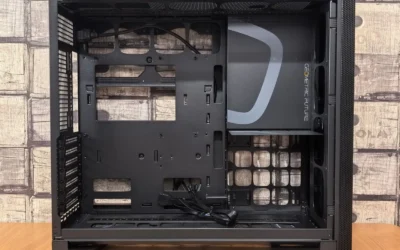
For a hot GPU, the most important factor is whether cool air can reach the card directly. Look for a case that provides an unobstructed intake in front of or below the GPU, with mesh or perforated panels rather than solid glass or plastic. Bottom-mounted fan positions that blow straight into the GPU fans, or a highly ventilated front that feeds the entire card length, will lower temperatures more than simply adding extra exhaust fans up top.
When you compare cases, check how the manufacturer describes intake. A case that supports three 120mm fans in the bottom for direct GPU cooling is designed specifically for this purpose, while a case with a perforated PSU shroud that allows intake from below can also help. Also consider dust filtering, ultra-fine mesh keeps dust out but needs regular cleaning to maintain airflow, so make sure filters are easy to remove. For more context on pairing a case with high power cards, see our Graphics Cards section.
Case Size, GPU Clearance, and Radiator Support
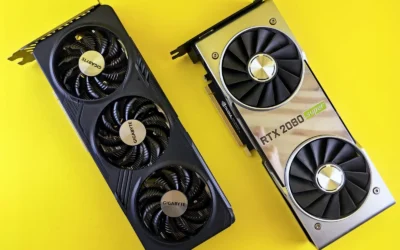
Airflow means little if your card does not fit or chokes against the side panel. Always check maximum GPU length and thickness in the spec sheet, and leave extra room for power cables and front fans or radiators. Compact dual-chamber or compact mid-tower designs can still cool well, but they trade some space for a smaller footprint, so verify clearance before you buy.
Radiator support matters even if you air cool your GPU, because it tells you how much cooling headroom the chassis has. A case that supports up to a 420mm radiator in front and a 360mm radiator on top gives you flexibility for a large front intake or a top-mounted AIO for your CPU, which reduces overall case heat. A smaller 20.7L mini-ITX case that supports up to a 280mm radiator can still handle strong cooling, but you must confirm it fits GPUs up to the length you need, such as 331mm. Always check cooler height and radiator clearance against your case and follow the manufacturer mounting instructions.
Out-of-the-Box Fans and Noise Balance
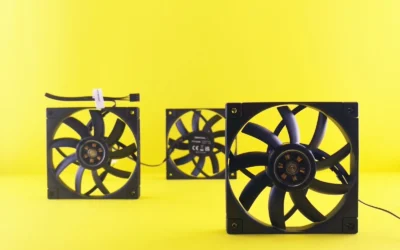
Count what is included and where the fans are placed. A case that comes equipped with three front-mounted 120mm fans gives you strong intake from day one, while a case with only two 120mm fans, one front and one rear, will likely need additional fans for a hot GPU. Fan position matters as much as quantity, angled side fans or bottom fans aimed at the GPU are more effective for graphics cooling than extra top exhaust alone.
Also think about noise. High airflow mesh panels help fans run slower and quieter, but adding many fans at high speed will still be loud. Look for cases that include quiet airflow fans and offer good cable management with wide channels and straps, because tidy cables improve internal airflow and make it easier to add or adjust fans later. Reviews and owner reports can help you assess noise, per the spec sheet and according to owners is a safer guide than marketing claims.
Build Ease, Cable Management, and Future Upgrades
A hot GPU build often means thick power cables, a large cooler, and possibly a vertical mount. An intuitive cable management system with wide channels, built-in hooks, and included straps makes routing easier and prevents cables from blocking airflow. Tool-less panels, wraparound glass with a seamless edge, and easy access to dust filters also save time during building and cleaning.
Think about your upgrade path. If you plan to move to an even hotter GPU or add liquid cooling later, choose a case with extra fan mounts and radiator headroom now, even if you do not need it today. If you prefer a showcase look with panoramic glass panels, make sure the design still provides perforated top and side panels for ventilation. You can explore more layouts in our Cases & Airflow archive to see how different form factors balance looks and cooling.
To illustrate how these trade-offs play out in real products, here are a few options that show the range:
This article contains affiliate links. If you buy through one of our links, CustomPCGaming may earn a commission at no extra cost to you. Commissions never influence which products we recommend or how we rank them. Read our Affiliate Disclosure for details.
Quick Picks at a Glance

NZXT H6 Flow Compact Dual-Chamber Mid-Tower ATX

Prime NZXT H7 Flow Mid-Tower ATX Airflow Case

Prime NZXT H2 Flow Mini-ITX Case

NZXT H5 Flow Compact ATX Mid-Tower PC Case
As an Amazon Associate we earn from qualifying purchases. Product prices and availability are accurate as of the date/time indicated.
Pros
- Excellent thermal performance with angled intake fans focused on GPU cooling
- Stunning panoramic glass design ideal for showcasing components
- Very easy build experience with smart cable management and removable panels
- Compact dual-chamber layout that feels spacious without being oversized
- Solid metal construction with high quality fit and finish
Cons
- Limited storage expansion with only one 3.5-inch internal bay
- Wider dual-chamber footprint needs more desk space than standard mid-towers
- Base model does not include RGB lighting, requires add-ons for illuminated builds
The NZXT H6 Flow CC-H61FB-01 is a compact dual-chamber mid-tower case designed for gamers and builders who want airflow and aesthetics in one package. It supports ATX, micro-ATX and mini-ITX motherboards and is built to highlight your components while keeping thermals low.
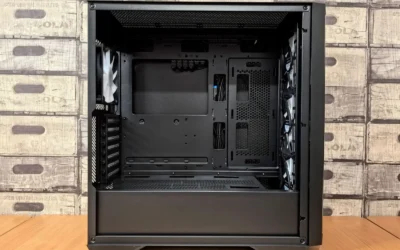
In real world use, the three pre-installed 120mm angled front fans deliver direct airflow to the GPU and maintain strong cooling under load. Reviewers highlight its efficient thermal design and flexible support for up to nine fans, allowing for highly customizable cooling setups.
Design and build quality are top tier, with wraparound panoramic glass, perforated airflow panels and a sturdy metal chassis. The dual-chamber layout hides the power supply and cables for a clean look, while wide channels and straps make cable routing fast and tidy.
There are a few drawbacks to note. Storage is limited to a single 3.5-inch bay, which may not suit users with large HDD collections. The wider footprint also requires more desk space, and the glass panels can show fingerprints and dust more readily.
Overall, the H6 Flow is a well balanced choice that blends cooling, ease of building and modern showcase style. For anyone wanting a compact aquarium-style case that performs as good as it looks, it is an excellent pick.
Model: NZXT H6 Flow CC-H61FB-01, Compact Dual-Chamber Mid-Tower, Color Black, Material Metal and Tempered Glass
Compatibility: ATX, micro-ATX, mini-ITX motherboards, GPUs up to 365mm, Bottom mount power supply, Air cooling with support for up to 9 fans
Cooling and I/O: Includes 3 x 120mm angled front fans, Perforated top and side panels with dust filtering, USB ports and audio interface
Dimensions and Storage: 16.34 x 11.3 x 17.13 inches, 9400g, 1 x 3.5-inch internal bay, Wide cable management channels with straps
Pros
- Excellent airflow and thermal performance for both CPU and GPU
- Three included front fans provide strong cooling without extra purchases
- Flexible cooling options with support for large front and top radiators
- Smart cable management system simplifies building and improves airflow
- Clean, modern NZXT design with solid metal and plastic construction
Cons
- Bottom fans for dedicated GPU cooling are not included and must be purchased separately
- Only one 3.5 inch internal bay limits traditional hard drive expansion
- Large dimensions and 11.35 kg weight require ample desk or floor space
The NZXT H7 Flow CM-H72FB-01 is a mid-tower ATX airflow case designed for gamers and performance focused builders who prioritize cooling. It balances a relatively narrow footprint with full support for ATX motherboards and high end components.
Its standout feature is dedicated GPU cooling with space for three 120mm bottom fans that feed fresh air directly to the graphics card. Out of the box, three included front fans and high flow mesh panels deliver strong airflow, while support for up to 420mm front and 360mm top radiators makes it ideal for custom liquid cooling.
Build quality is solid with a mix of metal and plastic, clean lines and the signature NZXT minimalist aesthetic in black. The intuitive cable management system with wide channels, hooks and straps keeps the interior tidy and simplifies the build process, even for less experienced builders.
There are a few tradeoffs to consider. The bottom fans for GPU cooling are not included, so you will need to budget for them, and storage expansion is limited with just one 3.5 inch bay. At over 21 inches tall and 11.35 kg, it is still a substantial case that needs adequate space.
Overall, the H7 Flow is a top choice for airflow first builds that need excellent thermal headroom without moving to a full tower. If you want cool, quiet performance, flexible radiator options and a clean showcase for your components, it delivers outstanding versatility.
Model: NZXT H7 Flow CM-H72FB-01, Black, Mid-Tower ATX
Cooling: 3x 120mm front fans included, supports 3x 120mm bottom fans for GPU, up to 420mm front radiator and 360mm top radiator
Motherboard & Expansion: ATX compatible, 7 expansion slots, bottom mount PSU
Storage & I/O: 1x 3.5 inch internal bay, USB ports include USB 3.0 and USB 2.0
Materials & Dimensions: Metal and plastic construction, 18.43 x 9.6 x 21.42 inches, 11.35 kg
Pros
- Excellent airflow from mesh on every side with dual pre installed exhaust fans
- Compact footprint smaller than a sheet of paper yet fits large high end GPUs
- Flexible cooling support for both air and 280mm liquid coolers
- Easy building experience with tool less access and smart cable management
- Includes premium PCIe 5.0 riser cable for vertical GPU installation
Cons
- Mini-ITX only, no support for larger motherboards limits future upgrades
- Compact vertical layout requires careful planning for cooler and cable clearance
- Limited front connectivity with only a single USB 3.0 port
The NZXT H2 Flow CI-H21FB-01 is a compact vertical Mini-ITX case designed for gamers and small form factor enthusiasts who want desktop power without the bulk. With its tiny 20.7L footprint, it is ideal for small desks, living rooms or portable setups where space matters.
Performance is where the H2 Flow stands out, with ultra fine mesh panels on every side and two pre installed F120Q fans for strong exhaust cooling. It supports up to a 280mm radiator and GPUs up to 331mm long, so you can run high end components without thermal throttling.
Build quality feels premium with a mix of glass and metal and a hybrid glass and mesh side panel that shows off your hardware. Tool less panels, integrated cable routing and Velcro straps keep the interior clean, while the included PCIe 5.0 riser cable ensures easy vertical GPU mounting at full bandwidth.
The compact size does come with tradeoffs, as you are limited to Mini-ITX motherboards and need to plan cooler and cable clearance carefully. Front connectivity is also minimal with just a single USB 3.0 port, which may disappoint users who rely on multiple front inputs.
Overall, the H2 Flow delivers an impressive balance of size, airflow and building convenience for its class. If you want a stylish, space saving case that can still handle serious gaming hardware and liquid cooling, it is an excellent choice for a modern compact build.
Model: NZXT H2 Flow CI-H21FB-01, Black, Mini-Tower
Capacity and Compatibility: 20.7L vertical layout, Mini-ITX motherboard, GPUs up to 331mm, bottom mount PSU
Cooling Support: Air and liquid cooling, up to 280mm radiator, dual F120Q CV top fans included
Materials and Panels: Glass and metal construction, ultra fine mesh panels, hybrid glass and mesh side panel
Special Features: Tool less installation, integrated cable management with Velcro straps, premium PCIe 5.0 riser cable
Connectivity: 1x USB 3.0 port
Weight and Warranty: 4.55 kg, 2 Year Manufacturer Warranty
Pros
- Excellent thermal performance, especially for GPUs, praised by users with high-end cards like RTX 5080 and 5070
- Spacious yet compact interior makes building easy and accessible even for first-time builders
- Smart cable management system with wide channels and straps for a clean, professional look
- Supports large 360mm front radiators for powerful AIO cooling and future upgrades
- Solid build quality with durable metal construction, no sharp edges and effective dust filtration
Cons
- Optimal GPU cooling requires two additional 120mm bottom fans that are not included
- Mesh side panel exposes the PSU basement, making it difficult to fully hide cables
- Only two fans included, so extra fans are recommended to maximize airflow potential
The NZXT H5 Flow CC-H52FB-01 is a compact ATX mid-tower case designed for gamers and DIY builders who want powerful cooling in a smaller footprint. It supports ATX, Micro-ATX and Mini-ITX motherboards, making it versatile for both new builds and upgrades without dominating your desk.
Its standout strength is GPU-focused airflow. The perforated PSU shroud lets you mount two 120mm fans below to feed fresh air directly to your graphics card, while mesh on the front, top and side maximizes ventilation. Users report noticeably lower temperatures, even with high-end GPUs and overclocked CPUs paired with a 360mm front AIO.
Design and build quality impress for the category. The metal chassis feels sturdy with smooth edges, and the minimalist black aesthetic fits any gaming setup. Inside, wide channels, hooks and straps make cable routing simple, and reviewers consistently highlight how easy and clean the building experience is.
There are minor drawbacks to note. To get the best GPU cooling you need to purchase extra bottom fans, and the open mesh design means cables in the basement remain visible. Baseline cooling with the two included fans is good, but not fully optimized until you add more airflow.
Overall, the H5 Flow is an outstanding value for its cooling performance, radiator support and builder-friendly layout. If you want a compact case that runs cool, is easy to build in and is ready for future upgrades, it is one of the top mid-tower choices available.
Case Type: Compact ATX Mid-Tower with bottom-mounted PSU, supports ATX, Micro-ATX and Mini-ITX motherboards, 7 expansion slots, 4 internal bays for 3.5 inch drives.
Cooling Support: Up to 360mm radiator in front, up to 240mm radiator on top, perforated PSU shroud for two 120mm bottom fans, includes two 120mm Quiet Airflow fans (front and rear).
Design and Connectivity: Metal construction, dimensions 18.31 x 16.93 x 8.86 inches, ultra-fine mesh panels for airflow and dust filtering, front I/O with USB ports, seamless cable management with channels, hooks and straps.
Matching a Part to Your Build
Scenario 1: High power 1440p or 4K gaming with a large, hot GPU. If your priority is maximum GPU cooling in a standard ATX build, prioritize a mid-tower with dedicated bottom intake. The NZXT H7 Flow – Mid-Tower ATX Airflow PC Case is built for this, it supports three bottom-mounted 120mm fans for direct GPU cooling while retaining a narrow mid-tower footprint, comes with three front-mounted 120mm fans, and supports up to a 420mm radiator in front and 360mm on top. That combination gives you direct airflow to the card and plenty of headroom for a CPU AIO. Pair it with a build like the one in our top RTX 5070 ti cards for 1440p gaming guide if you are targeting high refresh rates.
Scenario 2: Compact build where you want showcase looks without choking the GPU. If you want a smaller footprint but still need strong graphics cooling, look at a compact dual-chamber option. The NZXT H6 Flow | CC-H61FB-01 uses a compact dual-chamber design to improve thermal performance, wraparound glass panels for an unobstructed view, and includes three pre-installed 120mm fans positioned at an ideal angle. The top and side panels use an airflow-optimized perforation pattern to enhance performance and filter dust. It is a good fit when you want a clean, uncrowded aesthetic but still need out-of-the-box cooling for a warm GPU, without going to a full large tower.
Scenario 3: Small space or mini-ITX with a powerful card. If you need to save desk space, a vertical mini-ITX case can work, but you must be strict about clearance. The NZXT H2 Flow – Mini-ITX 20.7L Airflow PC Case is a 20.7L vertical design that fits most GPUs up to 331mm, includes a premium PCIe 5.0 riser cable for vertical mounting and dual F120Q CV fans for exhaust, and supports up to a 280mm radiator behind a hybrid glass and mesh side panel. It is suitable if you value a footprint smaller than a sheet of paper and are willing to plan cable routing carefully. For a more budget friendly ATX compromise, the NZXT H5 Flow – Compact ATX Mid-Tower PC Case offers a perforated PSU shroud for intake from two 120mm fans, ultra-fine mesh on the front, top and side, and support for up to a 360mm front radiator and 240mm top radiator, but it only includes two 120mm fans so you should budget for extra bottom intake fans. See how these choices fit into a complete parts list in our ryzen 5 7600 RX 7700 XT 1000 dollar gaming PC amazon build.
Common Mistakes
Mistake 1: Buying a case without planning GPU intake. Many builders focus on front and rear fans and forget that a hot GPU needs air from below or directly in front. If you choose a case with a solid PSU shroud and no bottom fan support, your card will recirculate warm air. Always confirm whether the case supports bottom fans for direct GPU cooling or has a perforated shroud that allows intake, and add those fans if they are not included.
Mistake 2: Ignoring clearance for coolers, radiators, and cables. A large GPU can conflict with front radiators, thick cables, or a CPU air cooler that is too tall. Check GPU length, CPU cooler height, and radiator thickness against the case spec sheet, and remember that a compact case may require a smaller cooler or a specific radiator size. Follow the manufacturer mounting instructions and handle components with anti-static precautions, as poor fitment can block airflow and make the build difficult to complete.
Mistake 3: Assuming more mesh or more fans automatically fixes a hot card. Mesh helps, but only if the airflow path is directed. Adding extra top exhaust without sufficient intake can create negative pressure that pulls in dust and does not cool the GPU. Balance intake and exhaust, keep filters clean, and route cables through wide channels and straps so they do not obstruct the path from intake to GPU to exhaust.
Who Should Wait or Buy Differently
The NZXT H7 Flow and similar airflow focused mid-towers are not ideal for every builder. If you need the smallest possible case for a portable build, a narrow mid-tower with support for three bottom fans may still be larger than you want, and a 20.7L mini-ITX option or a truly compact case might be a better fit despite tighter building constraints. It is also not a good fit if you plan to keep your current GPU for a long time and value silence over maximum cooling, a case with fewer mesh panels and more sound dampening could serve you better, or you might wait if you are considering a platform change that would affect motherboard size and cooler choice. If you are unsure, compare your current card length and power budget against the case dimensions and fan layout before committing.
Frequently Asked Questions
Is the NZXT H7 Flow a good airflow case for a hot GPU?
Based on its design, it is a strong choice for hot GPUs because it supports three bottom-mounted 120mm fans that blow directly into the graphics card, includes three front-mounted 120mm fans for out-of-the-box cooling, and uses high-performance mesh panels for intake and exhaust. That direct cooling path is exactly what high power cards need, especially in a narrow mid-tower footprint.
Do I need extra fans for the H7 Flow or similar cases?
It depends on the model. The H7 Flow includes three front fans but bottom fans for direct GPU cooling are support rather than included, so you will want to add them for the best GPU temperatures. The H5 Flow is similar, it includes one front and one rear fan and relies on two optional 120mm fans on the perforated PSU shroud for optimal GPU intake.
What should I check before buying any airflow case for a hot GPU?
Check GPU length and thickness against the case maximum, confirm bottom or side intake fan support, verify radiator clearance if you use an AIO, and make sure your power supply and cables will not block airflow. Also review the spec sheet for mesh coverage, dust filtering, and cable management features, and evaluate owner feedback on noise and temperatures as of November 2026.

Write Your Review
No reviews yet. Be the first to share your experience!