

Video credit: Josh Fenn. Original video: https://www.youtube.com/watch?v=WJwf9sVCKaQ. This is our own independent breakdown and is not affiliated with the video creator. As an Amazon Associate, CustomPCGaming earns from qualifying purchases. Product prices shown in the video may have changed.
Watch the build
Parts in this build
- ODK Small Computer Desk
- Corsair iCUE LS100
- Brainwavz Hengja Desk Hook
- Stageek Cable Clips
- Amazon Basics Single Monitor Arm
- InnoGear Microphone Arm
- Keychron K8 Pro
- Razer Strider XXL
- Rockville RHTSB Desktop Stands
Parts list is our summary of the video for reference. Confirm current specs and price on the retailer page before buying.
Watch: The Setup Tour
If you want to learn how to organize a mic and headset on a cozy wall-mounted monitor setup, this style is for you. It pairs a floating screen with warm lighting and hidden audio gear, which suits hybrid workers, students and PC plus console players who want a calm bedroom space.
What This Setup Is Going For
You are going for a warm and compact battlestation where the monitor floats and your headset and mic disappear when you do not need them. The desk stays open in the middle for your keyboard and mat, while audio tools live on the edges and underneath. That layout photographs well and feels calm when you sit down to work or play.
Most builds in this style use a single display on an arm, a small to mid size desk and a standing desk frame if your budget allows it. You keep the tower on the floor or to the side, you lift bookshelf speakers to ear level on small stands and you let a soft glow behind the screen do most of the mood work. For ideas on matching furniture and displays, see this cozy console and PC setup breakdown for layout reference.
This approach suits a bedroom, a dorm corner or a shared living space where you cannot spread out. You can push the screen back for controller play, pull it close for typing and swing the mic in only when you call or record. A tenkeyless board like the Keychron option below helps because it leaves room for your mouse and keeps your arms in a more natural position.
The tradeoffs are real. A wall mounted look still needs a strong arm, careful cable routing and enough desk depth for the arm to fold. You will spend more time planning VESA fit, clamp thickness and cord paths than you would with a simple stand on a leg. Matching wood tones, mats and light color also takes patience if you do not want a mix of cold and warm whites.
This style does NOT suit everyone. It is a poor fit for very small rooms where a boom arm cannot swing, for renters who cannot drill or mount, for tight budgets where an arm plus lighting plus mat is too much at once and for people who move often and need a setup that packs in minutes. If you rearrange every semester, a simpler freestanding layout will serve you better.
The Gear Breakdown
These are our current 2026 picks for building this look from scratch. The table gives you the quick view, then we explain which pieces shape the feel the most so you know where to focus your money first.
This article contains affiliate links. If you buy through one of our links, CustomPCGaming may earn a commission at no extra cost to you. Commissions never influence which products we recommend or how we rank them. Read our Affiliate Disclosure for details.
Quick Picks at a Glance

Prime Razer Strider XXL Hybrid Gaming Mouse Mat

Prime BRAINWAVZ Hengja Desk Headphone Hanger Mount
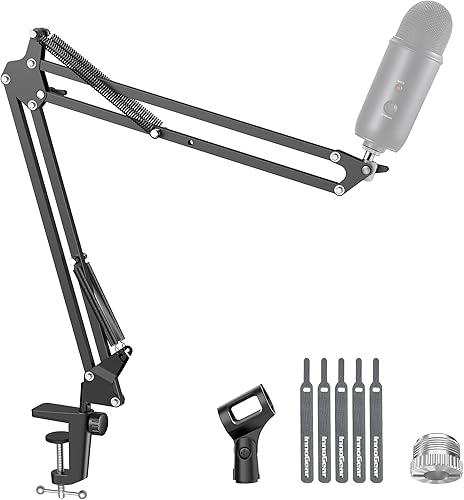
Prime InnoGear MU01 Mic Boom Arm Stand for Blue Yeti

Prime Amazon Basics Gas Spring Single Monitor Arm
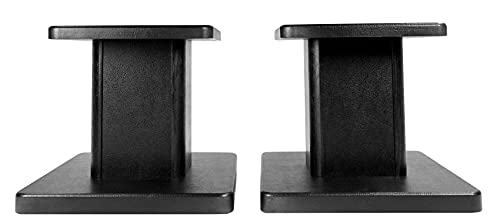
Rockville RHT8B Pair 8-Inch Desktop Studio Monitor

Corsair iCUE LT100 Smart Lighting Tower Starter

Prime Keychron K8 Wireless Mechanical Keyboard TKL
As an Amazon Associate we earn from qualifying purchases. Product prices and availability are accurate as of the date/time indicated.
Pros
- Smooth, fast glide with solid stopping power for FPS, MOBA and everyday use
- Extra large XXL size fits full keyboard and mouse with room for low DPI movement
- Stays firmly in place thanks to textured grooved anti slip underside
- Durable and easy to clean with water resistant surface and fray resistant edges
Cons
- XXL footprint needs a large desk and can overwhelm compact setups
- Hybrid texture feels different from pure cloth and takes time to adjust to
- Some users report actual dimensions measure slightly smaller than listed
The Razer Strider XXL is a hybrid mouse mat that combines a firm gliding top with a soft, rollable base. It is made for gamers who want hard surface speed without giving up cloth like control and comfort.
In real use, the glide feels fast and even yet offers reliable stopping power for precise flicks. Users moving from cloth pads note smoother tracking in games while keeping accuracy for productivity work.
Build quality is strong with a 3mm cushioned profile, grooved anti slip underside and stitched edges that resist fraying. The water resistant surface wipes clean easily and the XXL size covers keyboard and mouse with room to spare.
The large footprint is not ideal for compact desks and the hybrid texture takes time to adjust to if you love traditional fabric. A few buyers also note the mat can measure slightly smaller than the listed dimensions.
Overall, the Strider XXL is an excellent pick for competitive and casual gamers seeking speed, control and portability in one mat. If you have the desk space, it delivers a premium, durable upgrade over standard cloth pads.
Brand: Razer, Model: RZ02-03810100-R3U1, Color: Classic Black, Use: Gaming mouse mat.
Size: 16.2 x 37 inches, Thickness: 3mm, Weight: 13.92 ounces, Material: Polyvinyl Chloride.
Features: Non slip grooved base, anti fraying stitched edges, water resistant surface, rollable portable design with wrist support.
Pros
- Strong all metal build with durable scratch resistant finish
- Highly versatile with adjustable clamp and horizontal plus vertical mounting
- Curved rest is gentler on headbands than flat hooks
- Small footprint keeps desk clear and installation is simple
Cons
- Open end has no safety lip, so headphones can slip off if knocked
- Switching mount orientation needs a hex key adjustment
- No dedicated cable manager, cord routing needs extra planning
The BRAINWAVZ Hengja is a clamp on metal hanger designed to get headphones off your desk and within easy reach. It is made for PC gamers, office workers, students and anyone with limited desktop space who wants a tidy setup.
Its standout trick is rotatable mounting for both horizontal surfaces like desks and shelves, plus vertical surfaces like desk legs and bookcase sides. In real use, it holds light on ear models to heavy over ear gaming headsets securely, while the curved arm cradles the headband to reduce pressure points.
Build quality is a clear highlight, with thick all metal construction and a polished matte black finish that resists scratches. At just 4.72 inches long and 4.16 ounces, it feels sturdy without looking bulky, and it adds a clean, minimalist touch to home, work or studio spaces.
There are a few tradeoffs to note. The hanger tip has no raised lip, so headphones can slide if bumped hard, and rotating between horizontal and vertical modes requires a hex key adjustment. Cable storage is also basic, so you will need to plan where to route your headphone cord.
Overall, the Hengja is a smart, durable alternative to bulky floor stands. If you want a strong, space saving holder that clamps on without glue or mess, it is an excellent pick for gaming and everyday listening setups.
Model: BWAVZ-HENGJA-BLK, Color: Black, Material: Metal with polished finish
Dimensions: 4.72 x 2.36 x 2.36 inches, Weight: 4.16 ounces, Mounting: Tabletop clamp with bracket fastening
Compatibility: On ear and over ear headphones, all phone models, ideal for gaming and PC headsets, plus cables and small accessories
Pros
- Excellent load capacity for its class, holds popular condenser and dynamic mics securely
- Highly flexible joints allow precise, silent mic positioning in any direction
- Durable alloy steel build with improved spring layout for longer service life
- Folds away compactly to free up desk space for gaming and work setups
Cons
- Desk clamp only fits flat, squared edges up to 2 inches, not compatible with slanted or curved desks
- Shock mount not included, required for some Fifine and condenser mic setups
- Heavier broadcast setups over 3.3 lb with shock mount and pop filter may need frequent tension adjustment
The InnoGear MU01 is a scissor style desk mount boom arm designed for podcasters, streamers, gamers and home studio creators. It is built to get your microphone off the desk, reduce clutter and keep it in the perfect position for voice recording.
Real world performance centers on flexibility and silence. With 360 degree base rotation, wide arm extension and a 270 degree mic adapter, you can pull the mic close for recording and push it away when done, all without creaks or spring noise.
Build quality is a clear strength thanks to alloy steel tubing, super strong springs and an extra positioning hole for added stability. The 3.3 lb capacity handles most popular USB and XLR mics, including Blue Yeti, HyperX QuadCast and Shure MV7, with confidence.
There are a few limitations to consider. The clamp needs a flat, squared desk edge up to 2 inches thick, so it will not work on beveled or curved surfaces. A shock mount is also not included, which some condenser mic owners will need to buy separately.
Overall, the MU01 is a practical, heavy duty upgrade over basic mic stands. If you want affordable, flexible and quiet mic placement for streaming, gaming or recording, it is an easy recommendation.
Brand: InnoGear, Model: MU01, Style: Standard scissor boom arm in Black for desk mounting.
Material: Alloy steel, Product weight: 1.4 pounds, Folded size: 15 x 1.5 x 4 inches with max reach height of 27.6 inches.
Load capacity: Up to 1.5 kg or 3.3 lb, Mount threads: 3/8 inch and 5/8 inch with included adapter.
Mount type: Desk clamp for flat squared edges up to 2 inches thick, Base rotation: 360 degrees with fold away storage.
This arm fits dynamic mics like Shure SM58, Samson Q2U and Shure PGA48 with the included standard mic clip. It is a great way to free up desk space while keeping your everyday mic ready to use.
With the included 5/8 inch to 3/8 inch adapter, it also supports HyperX QuadCast and SoloCast, Blue Yeti, Snowball and Snowball iCE, Razer Seiren V3 Mini, Shure SM7B and MV7, plus Fifine AmpliGame, K669B, AM8 and more.
For best results, confirm your desk has a flat edge up to 2 inches thick and add a compatible shock mount if your microphone requires one. Keep total mic weight including accessories under the 3.3 lb limit.
Pros
- Smooth gas spring adjustment for easy height changes
- Wide range of tilt, swivel and rotation for ergonomic viewing
- Sturdy aluminum construction with both clamp and grommet mounting
- Supports portrait to landscape rotation for work, coding and media
Cons
- Joints feel stiff out of the box and require tension adjustment before smooth use
- VESA installation needs careful screw length and spacer selection
- Limited to single monitors up to 27 inches, not suited for larger ultrawides
The Amazon Basics Gas Spring Single Monitor Arm is designed for 15 to 27 inch monitors weighing 4.4 to 15.4 lbs. It is ideal for home offices, students and remote workers who want to free up desk space and improve sitting posture without a premium mount.
Once tension is dialed to your monitor weight, height adjustments feel smooth and the screen stays put with no drifting. You get tilt from -90 to +85 degrees, plus or minus 90 degree swivel, 360 degree rotation and up to 20.5 inches of extension for comfortable viewing.
Built from aluminum in black, the arm feels sturdy for everyday use and includes integrated cable routing for a cleaner desk. It supports both 75x75mm and 100x100mm VESA patterns and comes with C-clamp and grommet hardware for desks 0.39 to 4 inches thick.
Setup takes some patience since joints arrive pre-tightened for shipping and need adjustment before use. You will also need to check screw length and spacers carefully to match your monitor back for a secure VESA fit.
For single monitor users who want full ergonomic motion at a value price, this is a practical pick. Just follow the manual closely during install and tension tuning for the best performance.
Screen Size: 15 to 27 inches, Max Weight: 15.4 lbs, Min Weight: 4.4 lbs
VESA: 75x75mm and 100x100mm, Tilt: -90 to +85 degrees, Swivel: plus or minus 90 degrees, Rotation: 360 degrees
Extension: Up to 20.5 inches, Mounting: C-clamp and grommet for 0.39 to 4 inch desks
Material: Aluminum, Color: Black, Weight: 4.2 lbs, Model: DS-MADSBE, Warranty: 1 year limited
Pros
- Exceptional 66 lb weight capacity for large, heavy monitors
- Included EVA pads improve sound clarity by cutting vibration
- Sturdy MDF core with durable, chip resistant black finish
- Easy assembly with pre-drilled holes and cable management included
- Versatile fit for studio monitors, bookshelf and computer speakers
Cons
- Fixed 8-inch height with no tilt or height adjustment
- MDF construction is solid but not as premium as solid wood or metal
- 11.8 x 9 inch top plate may feel bulky on very small desks
The Rockville RHT8B is a pair of 8-inch desktop speaker stands designed for studio monitors, bookshelf speakers and computer speakers. They are ideal for producers, gamers and home listeners who mix, play or watch in a desktop or small studio space.
In real world use, the 8-inch lift puts tweeters closer to ear level for better imaging and detail. The included EVA pads help tighten the sound by reducing vibration and cabinet movement, which is noticeable for monitoring and critical listening.
Build quality centers on a medium density fiber core with a furniture grade black finish that resists chipping and peeling. Pre-drilled holes make assembly quick, while the included cable clips and ties help maintain a clean, professional desktop look.
The main limitation is flexibility, as height is fixed with no tilt or adjustment for fine tuning the sweet spot. The footprint is also fairly wide, so users with very compact desks should measure space before buying.
Overall, the RHT8B stands offer strong stability, smart isolation and tidy cable control in one affordable pair. If you want a simple upgrade to clarity and desk organization without floor stands, they are a practical and reliable choice.
Model: Rockville RHT8B, pair of 8-inch desktop monitor stands in black. Top plate size is 11.8 x 9 inches with overall dimensions of 11.4 x 10 x 13.8 inches.
Capacity: Supports up to 66 lbs per stand with medium density fiber core and furniture grade paint finish. Includes EVA acoustic isolation pads for vibration control and no-slip stability.
Compatibility: Designed for studio monitors, bookshelf speakers, computer speakers and hi-fi systems. Includes pre-drilled mounting holes plus four cable clips and ties for organized setup.
Pros
- Dual 422mm towers provide wide, immersive ambient coverage for desks and gaming rooms
- Deep iCUE integration enables game sync, video sync and music visualization
- Works out of the box with 11 preset profiles and simple button control
- Thoughtful extras like headset holder and extension cable add setup flexibility
Cons
- Full customization requires iCUE software, USB connection and external power
- Towers need dedicated desk or shelf space and careful cable management
- Best sync experience is limited to users already in the Corsair iCUE ecosystem
The Corsair iCUE LT100 Smart Lighting Tower Starter Kit is an ambient RGB system built for PC gamers, streamers and RGB enthusiasts. It includes two connected 422mm light towers that extend your setup lighting into the room. If you already use Corsair iCUE gear, this kit completes the look.
Each tower packs 46 individually addressable LEDs for smooth gradients and detailed effects. In real use, game and video sync dynamically match on screen action, while music mode pulses with your audio. The 11 onboard presets also deliver vibrant lighting instantly without opening software.
The design uses slim black bases with frosted diffusers that soften output into a premium ambient glow. At 422mm tall, the towers sit neatly behind a monitor or on either side of a desk. The included 1.5m extension cable and removable headset holder make placement more flexible and practical.
The full experience depends on Corsair iCUE software, which can feel complex for beginners and needs USB plus external power. The towers also require dedicated space and an outlet, so cable planning matters. Users outside the Corsair ecosystem will get less value from the sync features.
Overall, the LT100 is one of the easiest ways to add responsive ambient lighting to a gaming space. It looks great, syncs deeply with iCUE, and works standalone for casual use. For iCUE loyalists and atmosphere focused setups, it is a fun upgrade.
Kit Contents: Two connected LT100 Smart Lighting Towers, external power supply, 1.5m extension cable, removable headset holder.
Lighting: 92 total customizable LEDs, 46 LEDs per tower, with diffused 360 degree ambient output.
Control: Push button control with 11 preset profiles, plus full customization through Corsair iCUE software.
Integration: Game sync, video and media sync, and audio visualizer mode. Syncs with all iCUE compatible Corsair devices.
Design: Black finish. Tower height 422mm. Dimensions 3.74 x 3.74 x 16.65 inches. Weight 2.20 pounds.
Pros
- Very quiet linear Silent Red switches, ideal for offices and shared rooms
- Reliable dual connectivity with 3-device Bluetooth and stable USB-C wired mode
- True Mac and Windows versatility with included alternate keycaps
- Compact TKL design with bright white backlight and shine-through legends
Cons
- White backlight only, no RGB color options for customization fans
- Plastic housing feels less premium than aluminum frame keyboards
- Tenkeyless layout omits the number pad, which data entry users may miss
The Keychron K8 is a tenkeyless 87-key wireless mechanical keyboard built for both Mac and Windows users. It is a strong pick for office professionals, students and gamers who want quiet linear switches and a space saving layout.
Standout performance comes from the factory pre-lubed Silent K Pro Red switches, which feel smooth and stay quiet during long typing sessions. Bluetooth 5.1 pairs with up to three devices for easy multitasking, while USB-C wired mode with 1000Hz polling delivers fast and stable input for gaming.
Design is clean and practical, with soft white LED backlighting and shine-through keycaps that improve visibility in low light. The compact plastic chassis measures 14.1 inches wide, includes adjustable feet for typing angle, and ships with extra keycaps to switch between Mac and Windows layouts.
There are a few tradeoffs to consider. Lighting is white only with no RGB effects, and the plastic enclosure does not feel as solid as higher end aluminum models. The TKL form factor also means no dedicated number pad, so spreadsheet heavy users may need a separate keypad.
Overall, the K8 delivers quiet comfort, flexible connectivity and Mac ready convenience in one compact package. If you want a low noise tenkeyless keyboard for work by day and gaming by night, it is a smart and versatile choice.
Model: Keychron K8-A6, Tenkeyless 87-Key Layout, QWERTY, Ambidextrous Design
Switches: Keychron Silent K Pro Red, Linear Type, Factory Pre-Lubed for Quiet Operation
Connectivity: Bluetooth 5.1 for up to 3 Devices plus USB-C Wired with 1000Hz Polling Rate
Lighting and Build: White LED Backlight with Shine-Through Keycaps, Plastic Enclosure, Adjustable Feet
Compatibility and Power: Supports Mac, Windows, Chromebook, iPad, Android and Consoles, Rechargeable Battery Powered
| Gear | Common in this style | Our 2026 pick | Why |
|---|---|---|---|
| Desk | a desk in this style | ODK Small Computer Desk | a compact desk that still fits a mid tower for a bedroom setup |
| Bias light | a bias light in this style | Corsair iCUE LS100 | a behind-the-monitor kit that reacts to the screen and syncs with a PC |
| Headphone stand | a headphone stand in this style | Brainwavz Hengja Desk Hook | a clamp hook that keeps the headset under the desk edge |
| Cable management | a cable management in this style | Stageek Cable Clips | adhesive clips to route cables along the desk edge |
| Monitor arm | a monitor arm in this style | Amazon Basics Single Monitor Arm | the safe default single arm when you just want it to work |
| Mic arm | a mic arm in this style | InnoGear Microphone Arm | a low-cost boom arm that mounts to the desk and stays out of the shot |
| Keyboard | a keyboard in this style | Keychron K8 Pro | a tenkeyless board that fits a tidy desk and works wired or wireless |
| Desk mat | a desk mat in this style | Razer Strider XXL | a hybrid hard-soft feel in a full-desk size |
| Speaker stands | a speaker stands in this style | Rockville RHTSB Desktop Stands | small isolation stands that aim bookshelf speakers at ear level |
The desk sets the limits for everything else. A compact frame like the ODK Small Computer Desk gives you enough surface for a floating monitor, a tenkeyless keyboard and speakers without taking over your wall. You want to keep the center open, push the tower off the top and leave space behind for the monitor arm to pull back.
Lighting does most of the cozy work. A behind the monitor kit that reacts to the screen softens contrast at night, while tower lights add a warm wash to the wall. Per the spec sheet, the Corsair kit in this family includes two connected 422mm tall towers with 46 LEDs each, a 1.5m extension cable, 11 preset profiles and iCUE software control plus a removable headset holder. Do not overload a single outlet and keep power supplies ventilated.
Cable routing decides whether your mic and headset plan actually looks organized. Adhesive clips along the desk edge guide mic, headset and speaker cords in one path to the back, so your boom can fold away without pulling cables. When your cords share one rear channel, your headset hook and mic arm feel intentional instead of added on.
How To Adapt It To Your Room
How do you keep a mic and headset organized on a floating monitor setup without cords everywhere? You give each tool a home zone. Your monitor arm owns the center rear, your mic arm owns one rear corner and your headset hook owns the opposite edge or underside. When each item folds to its own parking spot, your desk stays usable for writing, study or controller play.
Adapt this to your space before buying. Measure the wall or shared room for the desk width, a wall-mounted monitor layout needs more depth for a monitor arm to pull back. You need room behind the desk for the arm joints to fold, not just room in front for your chair. If your desk sits close to a wall, pull it forward a few inches so the arm can extend up to 20.5 inches and tilt without hitting the wall.
Check your monitor for a VESA pattern before choosing an arm, and confirm the desk edge thickness for a clamp. Per the spec sheet, the Amazon Basics Gas Spring Single Monitor Arm Desk supports 75x75mm and 100x100mm VESA patterns, supports monitors from 4.4 to 15.4 lbs and fits desks from 0.39 to 4 inches thick with C-clamp or grommet mounting. Confirm your monitor weight with the stand removed, check screw length and spacers and follow the mounting instructions for tension adjustment.
Plan the mic side with the same care. The InnoGear Boom Arm Microphone Mic Stand for Blue uses a desk clamp for squared edges up to 2 inches in thickness and offers 360 degree base rotation with 135 degree back and forth extension, 180 degree arm shaft movement and a 270 degree adapter. That range lets you swing the mic to your mouth for calls and fold it flat against the side for sleep or study. Make sure your desk edge is flat and not slanted or curved, then route the mic cable along the arm with slack at the joints.
If you rent, use no-drill cable trays and adhesive raceways rather than screwing into the desk or wall, and find a stud before any wall mount. Clamp mounts, adhesive clips and under desk trays come off with less damage and still hold well when you prep the surface. For more renter friendly routing ideas, browse these cable management guides before you drill anything.
Match the cozy look with the finish of the desk and mat first, then the lighting color, rather than buying every accessory in one brand. Pick a wood tone and a dark or warm gray mat, then set your bias light to a warm white for evenings and a neutral white for work. When your large surfaces agree, small black arms and hooks blend in instead of standing out.
A standing desk lists a weight capacity, keep the tower, monitors and arm under it. Add up the screen, both arms, speakers on stands and any PC if you keep it on top, then leave headroom for movement. Follow the assembly instructions, balance the load side to side and recheck arm tension after you raise or lower the desk a few times. For headset storage, the BRAINWAVZ Hengja – The Desk Headphone Stand Hanger clamps to vertical or horizontal surfaces with no glue, which keeps your cups off the desk and away from drink spills.
What Actually Changes The Feel
Bias lighting changes the mood more than any other add on. A soft glow behind the screen reduces harsh contrast in a dark room and makes a small bedroom feel larger and calmer. You will notice it most during evening films and late study sessions when your wall shifts from flat gray to warm depth.
Cable control is the second big shift. When mic, headset, speaker and monitor cords share one rear path, your arms move freely and your desk looks intentional. Adhesive clips, a tray and a sleeve matter more than premium cords because they remove visual noise and prevent snags when you swing the mic or lift your headset.
A full desk mat ties the layout together. The Razer Strider Hybrid Mouse Mat uses a firm gliding surface with a soft rollable base at 3mm thick, plus an anti slip grooved underside, stitched edges and a water resistant top. That mix gives you smooth mouse travel, wrist comfort and easy wipe downs while covering seams between desk panels. For headset choices, this RGB headphone stand versus plain wood comparison can help you decide if you want glow or a quieter hook look.
Lower priority items include speaker stands and keyboard swaps if your current gear already works. The Rockville RHT8B Pair 8 inch Black Desktop stands help by lifting sound to ear level with EVA pads and cable clips, and the Keychron K8 Wireless Mechanical Keyboard helps with its tenkeyless 87 key layout, Bluetooth 5.1 for up to 3 devices and wired 1000 Hz mode. Upgrade those after your mount, light and cable path feel settled.
Build It At Three Budgets
You can reach the same cozy floating look at three spending levels. Pick the tier that matches how long you plan to keep the setup and how often you move it.
Budget: Simple First Build
Choose a manual or single motor desk, a well reviewed budget chair such as the SIHOO M57, a single VIVO arm, one Govee light strip, a large cloth mat and a no-drill cable tray. This suits students and first time builders who want to learn how to organize a mic and headset on a cozy wall-mounted monitor setup without a large commitment.
Keep your current mic and headset, add the BRAINWAVZ Hengja hook and an InnoGear arm later if funds are tight. You still get a floating screen and a place for everything, just with simpler motion and fewer light zones.
Balanced: The Setup We Recommend
Choose a dual motor standing desk, a mid ergonomic or racing chair, the Amazon Basics Gas Spring Single Monitor Arm Desk, a monitor light bar plus one strip, a stitched XL mat like the Razer Strider Hybrid Mouse Mat and a clamp on cable tray with a sleeve. This suits most people who want smooth height changes and daily reliability.
Add the InnoGear Boom Arm Microphone Mic Stand for Blue and the BRAINWAVZ Hengja hanger at this tier, plus the Keychron K8 Wireless Mechanical Keyboard for wired or wireless use across Mac and Windows. You get quieter typing, better mic placement and a headset that lives under the edge instead of on your mat. See more display and mount ideas in the Headset, Controller and Collectible Displays archive.
Premium: Long Term Keeper
Choose a Herman Miller or Steelcase chair, an Ergotron arm, a light bar plus wall panels, a felt or leather pad and a fully sleeved cable run. This suits builders who plan to keep the same wall and desk for years and want refined motion and materials.
Keep the same layout logic with higher end touch points, including Rockville desktop stands for your speakers and Corsair iCUE lighting with deeper software control. You pay more for comfort, finish and serviceability, not for a different floor plan.
FAQ
Where should I put a mic arm on a cozy wall-mounted monitor setup?
Mount it in the rear corner of your dominant side so it swings in across your chest and folds flat when idle. You want the clamp on a flat squared edge with room for the joints to move, then route the cable along the arm back to your PC or interface.
How do I store a headset without hurting the pads on a small desk?
Use an under desk hook like the Hengja so the headband carries the weight and the ear cups hang free. You avoid pressure on the pads, you free mat space and you can grab the headset with one hand. If you prefer a lit stand, compare glow versus wood first so the extra light fits your cozy theme.
Will a monitor arm work if my desk is against a wall?
Yes, if you leave depth for the arm to fold and you confirm VESA fit, weight and clamp thickness first. Check for a 75x75mm or 100x100mm pattern, keep the screen within the rated weight range and follow the manual for tilt and tension. Renters should favor clamps and adhesive routing and always find a stud before adding any wall mounted shelf or panel.
Final Verdict
This cozy floating layout works because every audio tool has a parking spot and your light does the decorating. Start with a solid arm, a hook, a boom and a rear cable path, then layer in glow and comfort.
Our pick: the Balanced build with the Amazon Basics arm, InnoGear mic arm and Hengja hook for most bedrooms and shared rooms, since it gives you smooth motion and tidy storage you can live with daily.





Write Your Review
No reviews yet. Be the first to share your experience!