

If you are asking is the Montech AIR 903 a good airflow case for a hot GPU, you are really asking how to keep a high power graphics card cool, quiet, and consistent under load. A case is not just a box, it sets your thermal ceiling, your noise floor, and how much headroom you have for future upgrades.
Before you pick, weigh your resolution and refresh target, your platform and socket, your case size and clearance needs, your power budget and heat output, and whether you are building for what you own today or what you plan to upgrade to next. A good airflow decision balances all five, so you do not pay for volume you will never use or choke a powerful GPU with restricted intake. For a broader view of case design and cooling, browse the Cases & Airflow archive.
What Actually Matters
Front Panel Ventilation and Airflow Path
The front panel determines how easily cool air reaches your GPU and how hard your fans must work to pull it in. Look for a mesh or highly perforated front with a high ventilation rate, rather than solid glass or plastic with narrow side vents. You want a direct, low restriction path from intake to graphics card, with exhaust that lets hot air exit quickly without recirculating.
Assess the overall pressure layout too. A case that supports multiple large intake fans up front and a clear rear and top exhaust gives you flexibility to tune for positive pressure, which helps reduce dust, or balanced flow for maximum cooling. If you pair a hot GPU with a restrictive front, you will see higher fan speeds, more noise, and hotter memory and hotspot temperatures, even if your CPU cooler is strong. Check owner feedback on dust buildup and cleaning ease, since a good mesh should filter while staying easy to remove and wash.
Fan Size, Count, and Radiator Support
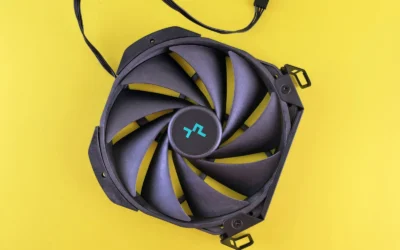
Fan diameter and placement matter more than sheer number. Larger fans, like 140mm models, can move similar air at lower RPM than 120mm fans, which often means less noise for the same cooling. Pay attention to how many fans are included out of the box, their control method, and whether the hub or controller lets you manage speed and lighting without extra splitters.
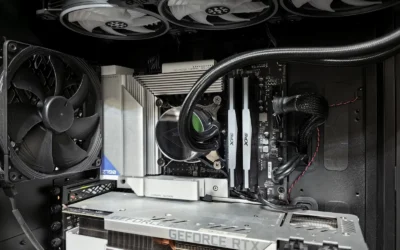
Also map your liquid cooling options. If you plan a 360mm AIO, confirm the case supports that size at both the front and the top, and note how top mounting affects RAM and motherboard heatsink clearance. According to owners and per the spec sheet, many modern airflow cases support 360mm radiators in both locations, which gives you choice between front intake cooling for the CPU and top exhaust for overall case temperature. If you stay on air cooling, prioritize unobstructed front intake and clear exhaust paths over extra radiator mounts you will not use.
GPU and CPU Cooler Clearance
Hot GPUs have grown longer, wider, and thicker, so clearance is a primary filter. Check maximum GPU length and width, and consider thickness if you use a vertical mount or have a front radiator that eats into interior depth. You also need to verify CPU cooler height, since a tall air cooler needs headroom to avoid pressing against the side panel or interfering with top fans.
For example, a case that offers 400mm of GPU length and 190mm of width can accommodate large cards including many NVIDIA GeForce RTX 40 series models, while 180mm of CPU cooler height covers most premium tower coolers. Always compare those figures to your specific card and cooler, and remember to check cooler height or radiator clearance against your case before you buy. Follow the manufacturer mounting instructions closely, handle components with anti-static precautions, and dry fit your GPU and cooler to confirm cable routing and airflow are not blocked.
Noise, Dust Management, and Build Experience
Cooling performance means little if the system is too loud or fills with dust in weeks. Look for PWM fan control, vibration dampening, and a fan curve you can tune in BIOS. Mesh fronts that double as filters are ideal when they are easy to remove, while bottom PSU filters should slide out without moving the case.
Build experience affects both thermals and your time. Features like generous cable routing space, removable brackets, and clear support for E-ATX, ATX, and smaller boards make installation cleaner and improve airflow behind the motherboard tray. If you value a quiet room or you place the PC on carpet, prioritize cases with elevated feet, bottom filters, and fan controllers that let you keep idle speeds low without sacrificing load performance. You can see how case choice interacts with other parts in this ryzen 5 7600 RX 7700 XT 1000 dollar gaming PC amazon build example.
To illustrate the range of what an airflow focused design can offer, here are a few options that show the range:
This article contains affiliate links. If you buy through one of our links, CustomPCGaming may earn a commission at no extra cost to you. Commissions never influence which products we recommend or how we rank them. Read our Affiliate Disclosure for details.
Quick Picks at a Glance

MONTECH AIR 903 MAX Mid-Tower Gaming PC Case
As an Amazon Associate we earn from qualifying purchases. Product prices and availability are accurate as of the date/time indicated.
Pros
- Outstanding cooling performance with high-airflow mesh and four powerful 140mm fans included
- Excellent component clearance for large GPUs, tall air coolers and 360mm AIO radiators
- Very easy to build in with removable HDD cage, magnetic dust filters and spacious cable routing
- Premium build touches like tempered glass, PSU shroud and tool-free captured thumb screws
- Supports full range of motherboards from Mini ITX to E-ATX with vertical GPU mounting option
Cons
- Fans can be loud at full speed and require a custom fan curve for quiet operation
- Large mid-tower footprint needs ample desk or floor space
- Limited storage with only two 3.5 inch drive bays for heavy storage builds
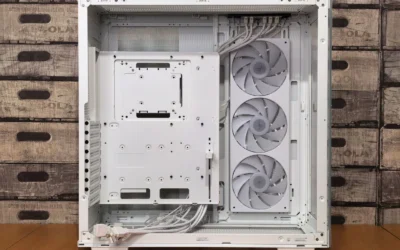
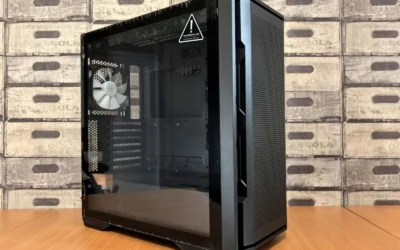
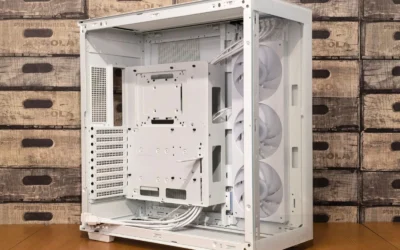
The MONTECH AIR 903 MAX is a high-airflow mid-tower case designed for gamers, enthusiasts and first-time builders who need serious cooling and space. It supports everything from Mini ITX to Extended ATX motherboards, making it a flexible foundation for both air and liquid cooled builds.
Cooling is its clear strength, thanks to a 51 percent ventilated metal mesh front panel and four included 140mm PWM fans. Real world builds stay cool and efficient with a custom fan curve, while support for 360mm radiators on the top and front plus 180mm tall air coolers gives you total thermal freedom.
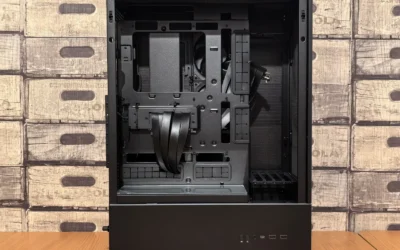
Build quality impresses for its class, with tempered glass and steel construction, magnetic dust filters and captured thumb screws that make assembly and cleaning effortless. The spacious interior fits GPUs up to 400mm long, including RTX 40 series cards, with clean cable routing behind a full PSU shroud and support for vertical GPU mounting.
There are a few tradeoffs to consider. The included fans can get loud at full speed, so tuning is recommended, and the large footprint needs ample desk space. Storage is also limited to two 3.5 inch bays, which may not suit users with many hard drives.
Overall, the AIR 903 MAX delivers outstanding airflow, generous compatibility and builder friendly features at an attractive value. If you want a cool, quiet and visually striking case that can handle flagship components without hassle, it is an excellent choice.
Case Type: Mid Tower, Motherboard Support: Extended ATX, ATX, Micro ATX, Mini ITX, Dimensions: 18.8 x 9 x 19.4 inches, Weight: 9.14 kg
GPU Clearance: Up to 400mm length and 190mm width, CPU Cooler Height: Up to 180mm, PSU Length: Up to 240mm, Expansion Slots: 7
Cooling Support: 360mm radiator support on front and top, Included Fans: 3x HP140 ARGB and 1x HP140 PWM with LED and PWM controller
Front I/O: USB Type-C, 2x USB 3.0, Materials: Tempered glass and steel mesh, Features: Magnetic dust filters, PSU shroud, vertical GPU mount support
Matching a Part to Your Build
Scenario 1: High power 1440p or 4K gaming with a large, hot GPU. If you run a wide, triple slot card and target high refresh rates, prioritize maximum intake and exhaust volume. The top RTX 5070 ti cards for 1440p gaming roundup shows how much heat modern high end cards can dump into a case, so a front panel with a 51% ventilation rate and support for up to four 140mm fans gives you the headroom to keep air moving without screaming fan speeds.
In this build, the MONTECH AIR 903 MAX High Airflow E-ATX PC Case is a strong illustration. It ships with 3x HP140 ARGB fans and 1x HP140 fan, all PWM controlled, and includes an LED and PWM controller with 21 lighting effects if you want visual control without extra hubs. The E-ATX mid tower layout with 400mm GPU length and 190mm GPU width support means you are less likely to fight fitment, and the mesh front that acts as a dust filter helps keep intake clean while maintaining flow.
Scenario 2: Air cooled CPU with a tall tower cooler and a hot GPU. If you prefer air cooling for reliability and lower maintenance, check CPU cooler height first. A case that offers 180mm of clearance lets you use most top class tower coolers without touching the side panel or top fans, which keeps CPU thermals strong while front intake feeds the GPU directly.
Here, look for a case that keeps the front fully open for intake and leaves the top free for optional exhaust rather than forcing a radiator. The MONTECH AIR 903 MAX High Airflow E-ATX PC Case fits this pattern because it supports 360mm radiators at the front and top but does not require you to use them, so you can run a tall air cooler and dedicate front fans to GPU cooling. Pair it with a thoughtful fan curve and you can keep noise down while still supplying fresh air to a hot card. For help balancing GPU choice with case airflow, see the Graphics Cards section.
Scenario 3: Compact room, noise sensitive, with plans to add an AIO later. If your PC sits on your desk and you want quiet operation today with an easy path to liquid cooling later, choose a case that is quiet at low RPM but ready for a 360mm AIO when you upgrade. Large 140mm PWM fans help here, since they can spin slower while moving enough air for a hot GPU at moderate loads.
The MONTECH AIR 903 MAX High Airflow E-ATX PC Case again shows the trade off well, with its four 140mm PWM fans and versatile radiator support. You can start with air cooling and later move a 360mm AIO to the top as exhaust or to the front as intake, depending on whether you want lower CPU temperatures or lower GPU temperatures. Just confirm your motherboard, RAM height, and top clearance before you commit, and plan cable routing so airflow to the GPU stays unobstructed.
Common Mistakes
Mistake 1: Choking a hot GPU with a solid front or insufficient intake. Many buyers choose a case for looks and end up with a glass front that starves the GPU. If your card already runs warm, you need a highly ventilated front and enough intake fan area to feed it. Otherwise you will raise fan speeds, increase noise, and still see thermal throttling in long gaming sessions.
Mistake 2: Forgetting to check cooler height and radiator clearance against the case. A tower cooler that is a few millimeters too tall or a 360mm radiator that conflicts with tall RAM or VRM heatsinks can force a return. Always compare your cooler height and radiator plus fan thickness to the case spec sheet, and follow the manufacturer mounting instructions. Remember that front mounted radiators reduce effective GPU length, so measure with the radiator and fans installed.
Mistake 3: Overspending on case size or features you will not use. An E-ATX compatible mid tower is great for large GPUs and future upgrades, but if you run a compact motherboard, a single GPU, and air cooling, you may not need every mount and bracket. Spend your budget where it improves thermals and noise for your actual parts, like better fans and filters, rather than extra radiator positions you will leave empty. You can stretch value further by aligning case choice with a balanced parts list, such as the options in Budget Build Guides.
Who Should Wait or Buy Differently
This style of high airflow mid tower is not ideal for everyone. If you need a small form factor case to fit a tight desk or media console, a compact ITX enclosure is a better match, even if it means choosing a smaller GPU or a different cooling strategy. It is also not a good fit if you want a silent, solid panel showcase with minimal mesh, or if you already own a case with strong ventilation and your temperatures are well controlled, in that situation you may see more benefit from tuning fan curves, adding quality PWM fans, or improving room ventilation before buying a new chassis.
Frequently Asked Questions
Is a mesh front really better for a hot GPU than tempered glass?
For hot GPUs, a mesh front with a high ventilation rate usually provides lower temperatures at the same noise level because it reduces intake restriction. Glass fronts look clean but often rely on narrow side vents, which force fans to work harder. If you prioritize cooling and lower fan speeds, choose mesh and use a light positive pressure setup to limit dust.
How many fans do I actually need for a hot GPU?
Focus on coverage and control rather than a fixed number. Three front intake fans plus one rear exhaust is a proven baseline, and larger 140mm PWM fans can keep noise down while feeding the GPU. From there, adjust curves based on GPU hotspot and memory temperatures, and add top exhaust only if heat still lingers after tuning.
Will the MONTECH AIR 903 MAX fit my large RTX 40 series card and tall air cooler?
Per the spec sheet, it supports graphics cards up to 400mm in length and 190mm in width, which covers many RTX 40 series models, and it offers 180mm of CPU cooler height for large tower coolers. It also supports 360mm radiators at the front and top if you prefer an AIO. Still, measure your exact card and cooler, check RAM and motherboard heatsink height for top mounts, and confirm fit with your power cables and front radiator if you use one.

Write Your Review
No reviews yet. Be the first to share your experience!