

Video credit: SpawnPoiint. Original video: https://www.youtube.com/watch?v=Iv24SIjPDmI. This is our own independent breakdown and is not affiliated with the video creator. As an Amazon Associate, CustomPCGaming earns from qualifying purchases. Product prices shown in the video may have changed.
Watch the build
Parts in this build
- ErGear Dual Monitor Arm
- Grovemade Wool Felt Desk Pad
- Steelcase Series 1
- Sweetcrispy Computer Desk
- Rockville RHTSB Desktop Stands
- VIVO Single Monitor Arm
- JOTO Cable Management Sleeve
- Philips Hue Play Light Bar
- HUANUO Single Monitor Arm
Parts list is our summary of the video for reference. Confirm current specs and price on the retailer page before buying.
Watch: The Setup Tour
This warm wood dual monitor style is about calm focus that still handles gaming after hours. You get two screens floated on arms, soft light behind them, and wood tones that keep the space welcoming. It tends to suit you if you work from home and want your battlestation to feel relaxed, not flashy.
What This Setup Is Going For
You are building a warm, inviting workstation where wood does most of the visual work. Think medium wood desk surface, black monitor frames and arms, a soft felt mat, and warm white plus amber bias light behind the screens. You coordinate the wood finish first, then the mat, then the light color, so everything feels matched without buying one brand for every part.
Your layout centers on two monitors on arms rather than stock stands. You pull the panels back to free the front edge for your keyboard, mouse, and a full width mat. Your PC can sit to the side or on the floor with a single sleeved run up to the desk, and your speakers sit angled toward your ears. If you prefer one panel, a single ultrawide on a sturdy arm gives you similar width with fewer cables to route.
This look fits a small apartment, dorm, spare bedroom, or basement corner where you want tech to blend with furniture. You do not need a huge wall, but you do need enough depth for arms to swing and for cables to drop behind the desk. Explore the Monitor Arms and Mounting hub if you are deciding between single and dual arms before you buy.
You trade some surface space and budget for comfort and order. Dual screens need a wider desk and stronger support than a single, and a good ergonomic chair plus quality arms add cost. Cable routing also takes more planning because two sets of power and video runs must drop together and stay out of sight when you stand or swivel.
This style does NOT suit you if you move often, share a very narrow desk, or need the lowest possible spend with no upgrades. Renters who cannot use even a clamp may struggle with thick, beveled, or glass edges. If you want wall mounted shelves or heavy panels, you must find a stud and get permission first, or skip that part and keep everything desk mounted.
The Gear Breakdown
These are our current 2026 picks for building how to mount monitors in a warm wood dual monitor setup in your own room. The list below holds every buyable pick, and the table explains where each piece fits in this style.
This article contains affiliate links. If you buy through one of our links, CustomPCGaming may earn a commission at no extra cost to you. Commissions never influence which products we recommend or how we rank them. Read our Affiliate Disclosure for details.
Quick Picks at a Glance

Sweetcrispy 47" Computer Desk with 6 Fabric

Prime JOTO Cable Management Sleeve 4 Pack 20 Inch

HUANUO FlowLift Single Monitor Mount for 13-32

Philips Hue Play Smart Light Bar 2-Pack White

Prime VIVO STAND-V001 Single Monitor Arm for 13 to 38

ErGear Dual Monitor Arm for 13-32 Inch Screens
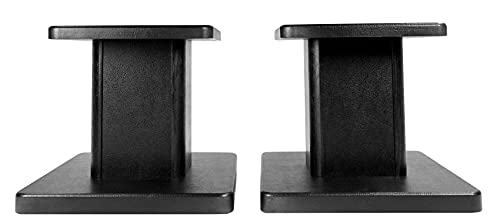
Rockville RHT8B Pair 8-Inch Desktop Studio Monitor

Steelcase Series 1 Ergonomic Office Chair
As an Amazon Associate we earn from qualifying purchases. Product prices and availability are accurate as of the date/time indicated.
Pros
- Spacious storage combo of drawers and shelves reduces desktop clutter
- Sturdy metal frame with reinforcement brackets for reliable daily use
- Adjustable shelf adds flexibility for larger equipment
- Versatile style fits home office, bedroom, dorm and living room
- Easy setup with included tools and adjustable leveling feet
Cons
- Fabric drawers hold less weight than solid wood drawers and need gentle handling
- 18 inch desktop depth feels tight for large dual monitor setups
- Assembly required, and the 39.6 pound frame is best moved with two people
The Sweetcrispy 47 inch Computer Desk is a storage focused workstation designed for home offices, bedrooms and dorms. With its wide desktop, 6 fabric drawers and side shelves, it targets students, remote workers and casual gamers who need function without bulk.
In daily use, the layout keeps essentials within reach while freeing up the main work surface. The 6 drawers are ideal for stationery, cables and accessories, while the open shelves handle books, bins and a printer or console. The adjustable middle shelf is especially useful for fitting a tall CPU tower or stacked storage boxes.
Design wise, the rustic brown top paired with a black metal frame gives a warm, modern industrial look that blends easily. Build quality feels solid thanks to the reinforced steel frame and rear triangular brackets that minimize wobble. Adjustable feet also help keep the desk level on uneven floors.
There are a few tradeoffs to consider. The fabric drawers are lightweight and convenient, but they will not match the rigidity of wood for heavy files. The 18 inch depth is efficient for small rooms, yet power users with deep monitors or dual screens may want more front to back space.
Overall, this is a practical and versatile pick for anyone who wants desk plus dresser style storage in one footprint. If you need an affordable, sturdy and easy to assemble workstation for study, work or play, the Sweetcrispy 47 inch desk is well worth considering.
Dimensions: 46.9 inches wide by 18 inches deep by 30 inches high, with a weight of 39.6 pounds. The 47 inch class desktop offers room for a computer setup plus workspace.
Storage: Includes 6 fabric drawers and 2 open storage shelves with an adjustable middle shelf for tall items. Color finish is Rustic Brown with a sturdy metal frame.
Category: Home Office Desks, suitable for use as a computer desk, writing desk, study desk, gaming desk or craft table. Assembly is required with tools and instructions included.
Pros
- Easy tool-free installation, just wrap around cables and zip up
- Roomy 1.2-inch diameter stretches to fit thick power and video cables
- Flexible neoprene moves smoothly with height-adjustable standing desks
- Versatile for TVs, monitors, USB hubs and creative fixes like covering gaps
- 4-pack value covers multiple setups in home and office
Cons
- 19-20 inch length may require joining sleeves for very long cable runs
- 1.2-inch diameter can look bulky when used for only one or two thin cords
- Designed for indoor use only, not for outdoor or in-wall installation
The JOTO 4 Pack Cable Management Sleeve is a zip-up cord organizer made for desks, computer monitors, and TV entertainment systems. It is best for home workers, gamers, and anyone who wants to hide tangled power, HDMI, and USB cables without tools.
Each sleeve holds up to 8 to 10 cables and stretches to fit thick power cords, HDMI, DP, and camera cables. Users report a clean look from raised desks, smooth movement with sit-stand setups, and easy access to add or reroute wires through the zipper.
The build uses flexible, form-fitting neoprene with a full-length zipper and a 1.2-inch diameter when closed. The soft black material looks modern, resists kinking in tight corners, and two sleeves can be zipped together for extra length.
Drawbacks are modest. A single sleeve covers about 19 to 20 inches, so long floor to desk runs need joined sleeves. It can also feel oversized for just one thin cable, and it is intended for indoor use only.
Overall, this is a practical, flexible, and beginner-friendly cable solution for most setups. If you need fast, neat cord concealment with room to grow, this 4-pack is an excellent choice.
Brand: JOTO, Model Number: JOTO-CS-ZIP-20, Color: Black, Style: Modern
Quantity: 4 pack, Length: 19 to 20 inches per sleeve, Diameter: 1.2 inches when zipped, Total coverage: 6.4 feet
Material: Flexible neoprene with zipper closure, Capacity: Up to 8 to 10 cables per sleeve, Joinable design to double capacity
Compatibility: TV entertainment systems, computer monitors, desks, USB hubs, home office setups, Indoor use
Pros
- Sturdy alloy steel build feels stable and holds position at any angle
- Smooth gas spring motion allows easy one handed adjustment for height, tilt and swivel
- Quick beginner friendly installation with both C-clamp and grommet mounting hardware included
- Wide range of motion including portrait rotation is great for work, study and gaming
- Built in cable management helps free up desk space for a cleaner setup
Cons
- 19.8 lbs weight limit means some heavier 32 inch monitors may not be supported
- Best suited for solid wood desks within thickness range with clear space underneath for clamp
- Small visible logos on arm and minor hardware variations reported between units
The HUANUO FlowLift HNSS6 is a single gas spring monitor arm designed for 13 to 32 inch LCD monitors. It is a great fit for home offices, students, gamers and anyone wanting to free up desk space and improve posture.
Real world performance is smooth and user friendly, with one handed control for height, tilt, swivel and rotation. The screen lifts up to 39.6cm and stays firmly in place, making it easy to switch between landscape and portrait or find a comfortable viewing angle.
Design and build quality stand out with automotive grade alloy steel, a clean black finish and integrated cable management. The arm feels hefty and stable, and the one piece structure inspires confidence for daily adjustments over long term use.
There are a few limitations to consider, including the 19.8 lbs capacity and support for only 75x75mm and 100x100mm VESA. It also needs a suitable wood desk with proper thickness and clearance, and some users note small logos and hardware differences.
Overall, this is a reliable, easy to install and highly adjustable monitor mount that delivers excellent value. If your monitor is within size and weight limits, it is a smart upgrade for comfort, flexibility and a tidier workspace.
Model HNSS6 supports 13 to 32 inch monitors weighing 4.4 to 19.8 lbs with VESA 75x75mm and 100x100mm. Movement includes tilt from -50 to +85 degrees, swivel 90 degrees each way and 360 degree rotation.
Construction is alloy steel in black with tabletop C-clamp and grommet mounting options. Compatible desk thickness is 0.59 to 3.54 inches, with wood desktops recommended and maximum lift height of 39.6cm.
Check your monitor size, weight without stand, and VESA pattern before buying to ensure compatibility. Larger 32 inch models should be weighed carefully since heavier displays may exceed the limit.
Measure desk thickness and confirm clear space under the desk for the clamp or a grommet hole. Choose grommet mounting for extra stability if your desk already has a hole or cable opening.
After install, adjust gas spring tension to match your screen weight for smooth one handed movement. Route cables through the management clips to keep motion free and your desk organized.
Pros
- Vibrant color output with bright, smooth dimming and warm to cool white range
- Versatile mounting with adjustable table stands and secure TV clips
- Excellent Hue Sync performance for gaming setups and movie nights
- Works with Alexa, Google Assistant, Apple HomeKit and Matter
Cons
- Requires Hue Bridge sold separately for full features, automations and voice control
- Higher cost than basic LED strips or standalone light bars
- Limited to three Play bars per power supply, larger setups need extra accessories
The Philips Hue Play Light Bar Base Kit includes two White and Color Ambiance LED bars, a power supply, table stands and TV mounts. It is designed for gamers, movie fans and smart home users who want responsive bias lighting behind a TV or around a setup.
With 16 million colors and tunable warm to cool white, you can create calm ambience or bold effects in seconds. Paired with the Hue Sync app, the bars react to music, movies and gameplay for a truly immersive wall wash of light.
Each bar has a compact rectangular design in white with a painted acrylic finish that blends into modern decor. The included stands allow angle adjustment, while the clips and tape provide secure TV mounting for a clean, cable managed look.
The main tradeoff is the Hue Bridge requirement, since you need it for remote control, automations and voice commands. Some users may also find the system pricey compared to basic LED strips, and expanding beyond three bars requires an additional power supply.
Overall, this 2-pack delivers premium brightness, color accuracy and reliability that Hue is known for. If you want polished, expandable smart lighting for entertainment, it is an excellent long term choice.
Set Includes: 2x Hue Play White and Color Ambiance light bars, 1x power supply, 2x table stands, 2x TV mounting supports
Light Performance: 16 million colors plus warm to cool white, dimmable, color changing with music sync
Power and Build: Corded electric, 6.6 watts, synthetic polymer housing with acrylic shade, 1.2 pounds total
Placement Options: Tabletop, floor mount or TV rear mount in vertical, horizontal or flat position
Smart Compatibility: Requires Hue Bridge, works with Hue app, Alexa, Google Assistant, Apple HomeKit and Matter
Model Details: Philips Hue model 7820231U7, 2-pack in White, 2 year manufacturer warranty
Start by deciding placement for the best glow, behind the TV for bias lighting, on a cabinet for ambience or on the floor for wall washing. Use the included stands for angled tabletop use or the clips with double sided tape for secure rear TV mounting.
Connect both bars to the power supply, plug in and add them in the Hue app through your Hue Bridge. Then assign them to an Entertainment area to enable Hue Sync for movies, music and games.
For the most immersive effect, use two or three bars per TV and fine tune brightness, color temperature and sync intensity in the app. Add automations or voice commands to switch scenes hands free.
Pros
- Wide compatibility with ultrawide and standard monitors up to 38 inches
- Full motion adjustability for ergonomic comfort and glare reduction
- Sturdy alloy steel and aluminum construction with secure mounting options
- Built-in cable management keeps power and AV cables organized
- Simple installation with detachable VESA plate and included hardware
Cons
- 22 lbs weight limit may not support heavier large monitors
- Pole style height adjustment requires manual repositioning rather than gas spring motion
- Requires VESA 75x75 or 100x100 mounting, so non VESA monitors need an adapter
The VIVO STAND-V001 is a single monitor desk mount designed for 13 to 32 inch screens and ultrawide monitors up to 38 inches. It is built for remote workers, students, gamers and anyone wanting to free up desk space while improving posture.
Real world performance centers on flexibility, with +90 to -90 degree tilt, 360 degree swivel and rotation, plus up to 16 inches of height adjustment. You can easily switch from landscape to portrait, raise the screen to eye level, and angle it to reduce glare and neck strain.
Construction uses alloy steel and aluminum for a stable, wobble free feel during daily use. The heavy duty C-clamp secures to desks up to 3.25 inches thick with hand tightening, while the included grommet mount offers a clean through desk option.
The main limits are the 22 lbs weight capacity and standard VESA 75x75 or 100x100 support, so check your monitor specs first. As a pole style mount, height changes require loosening the arm rather than the one touch motion of gas spring arms.
Overall, the STAND-V001 is a reliable, easy to install upgrade for ergonomic comfort and a cleaner setup. If you need full motion adjustability for a single ultrawide or standard monitor, it delivers strong value and everyday practicality.
Model: STAND-V001, Mounting: C-clamp for desks up to 3.25 inches thick plus grommet mount included
Compatibility: 13 to 32 inch monitors and ultrawide up to 38 inches, up to 22 lbs, VESA 75x75mm and 100x100mm
Adjustment: +90 to -90 degree tilt, 360 degree swivel, 360 degree rotation, up to 16 inch height adjustment, portrait and landscape orientation
Materials and Color: Alloy steel and aluminum construction in black with integrated cable management clips
Pros
- Very sturdy alloy steel construction holds monitors steady without shaking
- Smooth independent adjustment for height, tilt, swivel and rotation stays in place
- Fast tool-free VESA setup with flexible C-clamp or grommet mounting options
- Smart cable management and space saving design creates a cleaner desk
- Durable long term performance backed by a 5-year warranty
Cons
- Only fits wooden desks within specific thickness ranges, not ideal for glass desks or desks with blocking crossbeams
- Initial assembly and tension adjustment can take time to balance perfectly
- Limited to 19.8 lbs per screen and 75x75mm or 100x100mm VESA, so not for extra heavy or nonstandard monitors
The ErGear Dual Monitor Arm is built for remote workers, gamers and multitaskers who use two 13 to 32 inch monitors side by side or stacked. It replaces bulky stock stands to reclaim desk space while placing each screen at eye level. If you want independent control over height and angle for both displays, this mount is made for you.
Each arm moves independently with generous height adjustment, extension, tilt, swivel and full rotation for portrait or landscape use. Users report smooth repositioning for sharing screens or finding an ergonomic viewing angle, and monitors stay firmly in place once tension is set. It handles daily adjustments well without sagging or drifting.
The construction uses alloy steel with an upgraded VESA head that fits tighter with a smaller gap for added stability. Both the C-clamp and grommet mounts feel solid on compatible wooden desks, and the base includes a cable routing cutout. Tool-free VESA plates and clip-on cable management make setup and daily use faster and cleaner.
It is not universal for all setups, as it only supports up to 19.8 lbs per monitor and 75x75mm or 100x100mm VESA patterns. Installation works best on wooden desks within the specified thickness range and can be blocked by crossbeams or cable trays. Initial assembly and tension tuning can also take some patience to get perfectly balanced.
Overall, this is a sturdy, versatile and user friendly dual monitor solution for most home and office workstations. It delivers smooth ergonomics, reliable hold and smart cable control in a durable package. For anyone upgrading to a cleaner dual screen setup, it is a strong value backed by a 5-year warranty.
Brand: ErGear, Model: EGDMA70B-DS-UK, Color: Black, Material: Alloy Steel, Mounting Type: Tabletop Mount
Monitor Compatibility: 13 to 32 inch flat or curved screens, Max Load 19.8 lbs per arm, VESA 75x75mm and 100x100mm
Adjustment Range: Height up to 17.5 inch, Extension up to 18.1 inch, Tilt +80 to -50 degrees, Swivel +/- 90 degrees, 360 degree rotation
Mounting Options: C-clamp for desks 0.39 to 2.56 inch thick, Grommet mount for desks 0.39 to 2.95 inch thick, Wooden desk recommended
Pros
- Exceptional 66 lb weight capacity for large, heavy monitors
- Included EVA pads improve sound clarity by cutting vibration
- Sturdy MDF core with durable, chip resistant black finish
- Easy assembly with pre-drilled holes and cable management included
- Versatile fit for studio monitors, bookshelf and computer speakers
Cons
- Fixed 8-inch height with no tilt or height adjustment
- MDF construction is solid but not as premium as solid wood or metal
- 11.8 x 9 inch top plate may feel bulky on very small desks
The Rockville RHT8B is a pair of 8-inch desktop speaker stands designed for studio monitors, bookshelf speakers and computer speakers. They are ideal for producers, gamers and home listeners who mix, play or watch in a desktop or small studio space.
In real world use, the 8-inch lift puts tweeters closer to ear level for better imaging and detail. The included EVA pads help tighten the sound by reducing vibration and cabinet movement, which is noticeable for monitoring and critical listening.
Build quality centers on a medium density fiber core with a furniture grade black finish that resists chipping and peeling. Pre-drilled holes make assembly quick, while the included cable clips and ties help maintain a clean, professional desktop look.
The main limitation is flexibility, as height is fixed with no tilt or adjustment for fine tuning the sweet spot. The footprint is also fairly wide, so users with very compact desks should measure space before buying.
Overall, the RHT8B stands offer strong stability, smart isolation and tidy cable control in one affordable pair. If you want a simple upgrade to clarity and desk organization without floor stands, they are a practical and reliable choice.
Model: Rockville RHT8B, pair of 8-inch desktop monitor stands in black. Top plate size is 11.8 x 9 inches with overall dimensions of 11.4 x 10 x 13.8 inches.
Capacity: Supports up to 66 lbs per stand with medium density fiber core and furniture grade paint finish. Includes EVA acoustic isolation pads for vibration control and no-slip stability.
Compatibility: Designed for studio monitors, bookshelf speakers, computer speakers and hi-fi systems. Includes pre-drilled mounting holes plus four cable clips and ties for organized setup.
Pros
- Fast, tool-free assembly that most users complete in minutes
- Strong lumbar and back support praised for long workdays and sciatica comfort
- Sturdy, high quality build that holds up well to daily heavy use
- Smooth carpet casters and responsive weight-activated recline
- Compact and breathable design ideal for home offices
Cons
- Armrest pads feel firm and may need aftermarket covers for elbow comfort
- Upright lock position can feel too straight with only limited recline settings
- Seat size may feel compact for taller or larger users
The Steelcase Series 1 is a compact ergonomic task chair built for home offices and small workspaces. It suits adults who sit for long hours and want simple, responsive support without a complex setup.
Its weight-activated mechanism automatically balances recline tension as you move, while adjustable lumbar support keeps your lower back comfortable. Users report easy gliding on carpet, solid mesh back support, and noticeable relief during extended work sessions.
The chair features a breathable solid back, flexible seat edges, and adaptive bolstering to reduce pressure points. With a sturdy 300 pound capacity, tapered leg base, and quality polyester finish in Licorice, it feels durable and professional.
It is not perfect, as the arm pads feel firm and the upright lock position can seem too straight for some sitters. Recline options are also more limited than premium models with full tilt customization.
Overall, the Series 1 delivers trusted Steelcase ergonomics, fast tool-free assembly, and long term comfort in a space efficient design. It is a smart pick for remote workers and students who want reliable daily support.
Model: Steelcase Series 1 435A00 in Licorice with solid back, with-arms design, and carpet casters for indoor office use.
Ergonomics: Adjustable lumbar, Arm Rest, weight-activated controls, swivel movement, and multiple recline positions with 4D arm support option.
Dimensions and Build: 31 inch D x 28.5 inch W x 16 inch H, 21.5 inch back height, 29 pounds, 300 pound maximum capacity, upholstered polyester finish.
| Gear | Common in this style | Our 2026 pick | Why |
|---|---|---|---|
| Monitor arm | a monitor arm in this style | ErGear Dual Monitor Arm | a gas-spring dual arm with cable channels for a clean look |
| Desk mat | a desk mat in this style | Grovemade Wool Felt Desk Pad | a warm felt pad for a wood or Scandinavian look |
| Chair | a chair in this style | Steelcase Series 1 | a durable ergonomic chair with a long warranty |
| Desk | a desk in this style | Sweetcrispy Computer Desk | a narrow desk for a small apartment or dorm room |
| Speaker stands | a speaker stands in this style | Rockville RHTSB Desktop Stands | small isolation stands that aim bookshelf speakers at ear level |
| Monitor arm | a monitor arm in this style | VIVO Single Monitor Arm | a budget single arm that covers standard VESA monitors |
| Cable management | a cable management in this style | JOTO Cable Management Sleeve | a zip sleeve to bundle the run from the PC to the desk |
| Bias light | a bias light in this style | Philips Hue Play Light Bar | a color-accurate accent bar for a smart-home setup |
| Monitor arm | a monitor arm in this style | HUANUO Single Monitor Arm | a smooth gas-spring arm that clears the desk for most 27 to 32 inch monitors |
Your desk sets the tone. The Sweetcrispy 47″ Computer Desk with 6 Fabric brings a compact wood top with 6 fabric drawers and two storage shelves, plus an adjustable middle shelf for a tower or books. Its metal frame with rear triangular brackets feels steady for dual screens, and the narrow width suits a dorm or apartment. Follow the assembly instructions closely and keep your tower, monitors, and arm under the listed weight capacity.
Your arms decide how tidy the dual layout feels. The ErGear Dual Monitor Arm, Full Adjustable Monitor fits most 13 to 32 inch flat or curved monitors up to 19.8 lbs with VESA patterns of 75x75mm or 100x100mm, with tilt, swivel, and rotation for each panel. If you run one ultrawide, the VIVO Single 13 to 38 inch Ultrawide Monitor Arm covers screens up to 22 lbs and ultrawide panels up to 38 inches, while the HUANUO FlowLift™ Single Monitor Mount fits 13 to 32 inch monitors from 4.4 to 19.8 lbs. Confirm your monitor VESA pattern and weight, check your desk edge thickness for a clamp, and follow the mounting instructions.
Light and cable control finish the mood. The Philips Hue Smart Play Light Bar Base Kit, White includes two bars with millions of colors, voice control, and a required bridge for app and smart home use. You bundle the drop with the JOTO 4 Pack Cable Management Sleeve 19-20 Inches, where each sleeve measures 19 to 20 inches long with a 1.2 inch diameter and holds up to 8 to 10 cables. Add the Rockville RHT8B Pair 8″ Black Desktop stands to lift speakers to ear level and the Steelcase Series 1 Ergonomic Office Chair for long sessions. Do not overload a single outlet with lights and PC gear, and keep power supplies ventilated.
How To Adapt It To Your Room
How do you mount two monitors on a wood desk without losing all your desk depth for your keyboard and mat. You start by measuring your wall width and your usable depth, because a dual layout needs room behind the panels for the arms to pull back and for cables to drop. If your desk is shallow, you push the clamp to the rear edge and angle the arms so the screens float rather than sit on stands.
Measure the wall or basement for the desk width, a dual monitor layout needs more depth for a monitor arm to pull back. You want clearance behind the desk for the pole, the elbows, and a sleeved cable run, plus space in front for a full mat and wrist rest. If your tower lives on the desk, place it to one side so it does not fight the arm swing, or move it to the floor with a short, protected run. Owners commonly report that centered dual screens feel best when you can lean back and still read text without turning your neck.
Check your monitor for a VESA pattern before choosing an arm, and confirm the desk edge thickness for a clamp. Most picks here cover 75x75mm or 100x100mm, with the ErGear dual version supporting up to 19.8 lbs and the VIVO single version supporting up to 22 lbs. Read your monitor spec sheet for exact weight with the stock stand removed. Then check clamp range, since the VIVO single fits desks up to 3.25 inches thick and the HUANUO single lists support for 0.59 to 3.54 inches. A wood top with a clear underside works best, and you should avoid clamping over beams, drawers, or beveled edges. See how to check the VESA pattern on your monitor before you order.
If you rent, use no-drill cable trays and adhesive raceways rather than screwing into the desk or wall, and find a stud before any wall mount. You can hold a tray under the rear edge with clamps, then guide monitor power and video into a zip sleeve for one vertical drop. Keep low voltage and power runs separated where you can, and leave a little slack so arms can move without tugging. For height comfort, review how to set monitor height and distance with an arm and adjust tilt and swivel with one hand.
A standing desk lists a weight capacity, keep the tower, monitors and arm under it. You add up both panels, both arms or one dual arm, speakers, and anything stored on the desk, then stay comfortably under the limit through the full lift range. Follow the assembly instructions for frame bolts and control box wiring, and route cables with slack for up and down travel. If you are torn between mounts, compare wall mount versus a desk arm for a monitor to see which saves space and moves better in your room.
Match the warm wood look with the finish of the desk and mat first, then the lighting color, rather than buying every accessory in one brand. You pick a medium or honey wood top, add a wool felt or stitched cloth mat in cream, gray, or brown, then set bias light to warm white for work and soft amber for evening play. Black arms, black speaker stands, and dark cables recede against wood and keep focus on your screens. As of November 2026, this layered approach photographs well and is easier to expand than a single brand kit.
What Actually Changes The Feel
Your bias lighting does the most for evening mood and eye comfort. Two small bars behind your monitors wash the wall with soft color and reduce the harsh contrast between bright screens and a dark room. You can keep them warm white for documents and shift to amber or soft color for games and film without changing your whole room.
Cable management comes next because dual monitors double the hanging runs. A single sleeved drop from tray to floor or PC hides power and video at once and lets your arms move freely. When that spine is tidy, your wood top reads larger and your keyboard area stays usable even on a narrow desk.
A full desk mat ranks third for both feel and sound. Felt softens typing noise and warms the wood under your wrists, while a large cloth mat gives your mouse consistent glide across both screens. You notice this every time you sit down, which is why it beats small upgrades.
Lower priority for most people are speaker stands and a second premium arm. Stands help if your speakers sit flat and fire at your desk, but you can delay them if you use headphones. A chair upgrade matters for long days, yet you can start with an affordable ergonomic seat and move to a Steelcase class chair when you know you will keep the layout for years.
Build It At Three Budgets
You can build this warm wood dual look at three levels without changing the core idea. Pick the tier that matches how long you plan to keep the desk and how many hours you sit there each day.
Budget Warm Wood Build
You use a manual or single motor desk, an affordable ergonomic chair in the style of the SIHOO M57, a single VIVO Single 13 to 38 inch Ultrawide Monitor Arm, one Govee style light strip, a large cloth mat, and a no-drill cable tray. This suits you if you want a first warm wood setup on a tight budget in a dorm or shared room.
You start with one screen on an arm and add the second panel later when funds allow. Keep the sleeved run simple and use adhesive channels so you can take everything with you when you move.
Balanced Warm Wood Build, Our Recommended Path
You use a dual motor standing desk, a mid ergonomic chair, a gas spring arm such as the ErGear Dual Monitor Arm, Full Adjustable Monitor or the HUANUO FlowLift™ Single Monitor Mount for each panel, a monitor light bar plus one strip, a stitched XL mat, and a clamp-on tray with a JOTO 4 Pack Cable Management Sleeve 19-20 Inches. This suits most people who want it to last through work and play.
You get smooth height moves, independent screen angles, and enough cable slack for standing. Add the Philips Hue Smart Play Light Bar Base Kit, White when you want richer bias light that ties into your smart home.
Premium Warm Wood Build
You use a Herman Miller or Steelcase Series 1 Ergonomic Office Chair, an Ergotron class arm, a light bar plus wall panels, a felt or leather pad, and a fully sleeved cable run with Rockville RHT8B Pair 8″ Black Desktop stands for your speakers. This suits you if you plan to keep the setup for years in a dedicated office or basement.
You invest in support, motion, and light quality rather than more screens. The result feels quiet, steady, and easy to maintain, which pays off if you sit there full time.
FAQ
How do I mount two monitors on a narrow wood desk without wobble.
Use a dual arm with a wide clamp footprint and keep the pole centered on solid wood. Confirm each monitor weight against the arm rating, tighten to the desk edge thickness in the manual, and push the base to the rear edge for leverage. If the top flexes, you should move the tower off the desk and reduce overhang.
What VESA pattern and weight do I need to check before buying a monitor arm.
Look on your monitor spec sheet for 75x75mm or 100x100mm and for weight without the stock stand. Compare that weight to the arm limit, such as up to 19.8 lbs for many dual arms or up to 22 lbs for the VIVO single. When in doubt, choose the stronger arm and follow the mounting instructions for tension.
How do I hide cables in a rental warm wood setup without drilling.
Hang a no-drill tray under the rear edge, stick adhesive raceways along the back, and finish with a zip sleeve for the vertical drop. The JOTO sleeve set gives you four 19 to 20 inch runs that each hold up to 8 to 10 cables, so you can redo the bundle when you add a light or speaker. Leave slack for arm swing and standing height changes.
Final Verdict
You get the most from this style when you float two screens on arms, warm the wall with bias light, and hide every run in one sleeve. Start with desk fit and VESA checks, then layer mat and light to match your wood. That order keeps your room flexible and your station pleasant day and night.
Our pick: Balanced Warm Wood Build for most people who want a durable daily driver that still fits a rental, with room to grow toward premium seating and lighting later.










Write Your Review
No reviews yet. Be the first to share your experience!