

You are trying to decide how much load your electric desk must carry safely while it moves up and down every day. Your main variables are your monitor layout and PC placement, your desk size and room clearance, your power budget for smooth motor movement, and your current setup versus your next upgrade.
Getting standing desk weight capacity explained correctly saves you from wobble, motor strain, and a setup that feels fine while sitting but struggles when raised. This guide shows you how to read ratings, weigh frame design and desktop construction, and leave headroom for arms, audio gear, and cable accessories. You can also browse the full Gaming Desks & Chairs section for related sizing and comfort guides.
What Actually Matters
Rated Load Versus Real World Load
A rating tells you the most the maker says the desk should support in normal use, but your real load depends on how weight is spread and whether the desk is moving. A centered load is easier for the motor and frame than the same weight piled on one side or hung far forward. You should treat the rating as a ceiling, not a target, and keep your everyday load comfortably below it.
Think in terms of everything that rides on the top, including monitors, arms, speakers, your PC if it sits on the desk, plus small items that add up over time. Owners commonly report that motion feels smoother when you leave clear headroom instead of loading right to the limit. If you plan to add another display or move your tower onto the desk later, choose with that future total in mind.
Frame Construction and Stability
Frame design matters more than the headline rating for how stable your aim feels during play. Look for a dual-beam cross structure, sturdy legs, and wide feet that resist side to side sway when the desk is raised. A rigid frame minimizes wobble during height changes and keeps your monitors from shaking while you type or lean.
Assembly hardware also affects long term confidence. Pre-installed threaded metal inserts and metal connectors tend to hold up better through repeated moves than screws driven straight into particle board. Pay attention to how the legs bolt to the top and whether the frame allows even tightening, since a slightly racked frame will feel less stable even if the rating looks strong.
Desktop Size and Weight Distribution
A wider and deeper top gives you room to spread weight instead of stacking it, which helps both stability and daily comfort. Place your heaviest items near the center and over the legs when you can, and avoid hanging a heavy arm far off one edge. Balanced placement reduces twisting force on the frame and helps the motor lift evenly.
Remember that accessories add load you might forget, such as an under-desk cable tray, a power strip, a headphone hanger, and coiled cables. A top built from joined pieces can be perfectly serviceable, but you should check the seams, support them evenly on the frame, and avoid standing or kneeling on the surface. Even weight across the frame always feels more planted than a lopsided tower plus display cluster.
Height Range, Motor Behavior and Noise
Height range determines whether you can sit and stand with good posture, and memory presets make it easy to return to your preferred positions without hunting. The motor works hardest when starting a lift and when the desk is near its load limit, so a strained sound or slow movement is a sign you are carrying too much. Smooth, even motion is a better indicator of a good match than raw speed.
Noise matters if you share a room or take calls while adjusting. A quiet drive lets you change positions without distracting others, and it encourages you to actually use standing mode through the day. Leave slack in your cables so nothing pulls tight at full height, and route them so they move with the desk instead of snagging on the wall or floor.
To see how these ideas look in a real product, here are a few options that show the range of size, frame design, and adjustment features to compare:
This article contains affiliate links. If you buy through one of our links, CustomPCGaming may earn a commission at no extra cost to you. Commissions never influence which products we recommend or how we rank them. Read our Affiliate Disclosure for details.
Quick Picks at a Glance
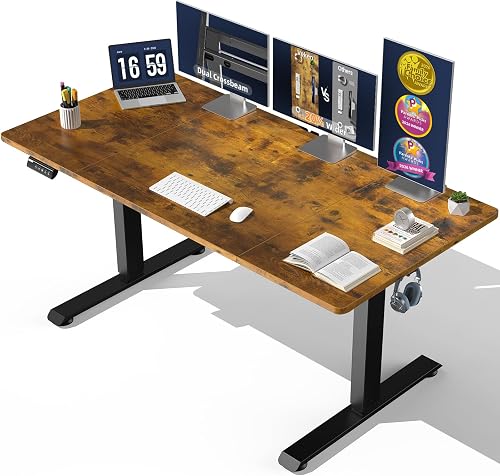
Veken 63×28 Electric Standing Desk
As an Amazon Associate we earn from qualifying purchases. Product prices and availability are accurate as of the date/time indicated.
Pros
- Very spacious desktop ideal for multi-monitor and home office setups
- Smooth and quiet electric lift with convenient memory presets
- Sturdy dual-beam metal frame reduces wobble
- Straightforward assembly with clear instructions and spare hardware
- Modern industrial brown finish looks sleek without feeling bulky
Cons
- Desktop ships as joined pieces, not one solid panel, which may bother some buyers
- Top is thinner than expected and made of engineered wood, not solid wood
- A few users reported misaligned screw holes and fit issues during assembly
The Veken 63x28 electric standing desk is a large sit to stand workstation designed for home offices, gaming setups and study spaces. It suits remote workers and students who need room for multiple monitors, laptops and daily essentials.
Its quiet motor adjusts height from 28.3 to 46.5 inches with smooth motion under 52 decibels. Memory presets let you save sitting and standing positions, so switching postures during the day takes one touch and helps reduce sedentary time.
The industrial style pairs a laminated brown engineered wood top with a black carbon steel dual beam frame. Reviewers praise the sturdy, low wobble feel, clean modern look and thoughtful extras like headphone hooks, cable clips and feet pads.
Note that the desktop arrives as joined pieces rather than one solid slab, and the top is thinner than some expect. A small number of buyers reported misaligned screw holes, though most found assembly quick with pre installed inserts and clear instructions.
Overall, this is a spacious, stable and user friendly adjustable desk for anyone wanting comfort and productivity. If you want a wide, quiet and easy to assemble sit stand desk, it is a strong value choice.
Desktop Size: 63 inches wide by 28 inches deep, rectangular shape with laminated brown finish.
Height Range: 28.3 to 46.5 inches electric adjustment with quiet motor and memory presets.
Materials: Engineered wood top with carbon steel dual beam frame and metal legs.
Included: Headphone hooks, cable clip, feet pads and user manual, model ODH5V3 for indoor use.
Matching a Part to Your Build
If you run dual displays on an arm with your tower on the desk, prioritize frame rigidity and centered placement. The Veken 63″x28″ Wider Large Standing Desk illustrates this approach with its generous 63″x28″ surface for spreading monitors and essentials, plus dual-beam construction meant to minimize wobble during use and adjustment. Keep the PC near the middle, clamp the arm over supported structure, and leave margin for speakers and charging gear.
If you prefer a lighter setup with a single display and your tower on the floor, you can focus more on comfort range and quiet operation. The same Veken 63″x28″ Wider Large Standing Desk adjusts from 28.3″ to 46.5″ with memory presets and a quiet motor rated under 52 decibels, which suits shared rooms and frequent sit to stand changes. Pair it with clean routing from our guide on how to do cable management for a dual monitor setup so your cables gain slack as the desk rises.
If you are planning a heavier streaming station with triple displays, a microphone arm, and control surfaces, buy headroom now rather than upgrading later. Look for a strong leg structure, thoughtful assembly with threaded inserts and metal connectors, and an environmentally certified engineered wood top that stays stable through daily cycles. Per the spec sheet this style of desk is reviewed around 4.2 out of 5 from owners, so read owner notes about wobble at full height and seam care on joined tops before you commit.
Common Mistakes
Mistake one is loading one side and forgetting hidden weight. A tower plus a clamped arm on the same edge creates twist that a centered rating does not reflect, and trays, bricks, and audio interfaces add more than you expect. Spread heavy gear, use a tray and routing plan from how to route cables for a clean desk setup, and recheck balance after every addition.
Mistake two is buying exactly for today with no margin for tomorrow. Gamers often add a second display, a larger arm, or a console and dock within a year, then wonder why motion feels labored. List your likely additions now, keep everyday load well under the stated ceiling, and choose a frame that will still feel planted when you are standing at full height.
Mistake three is ignoring clearance and assembly details. Cables that are tidy while sitting can pull tight or tip a power strip when raised, and uneven floors or loosely tightened bolts can mimic a capacity problem. Follow the manufacturer mounting instructions, tighten in stages, verify the top sits flat on the frame, and raise the empty desk through its full range once to confirm smooth travel.
Who Should Wait or Buy Differently
This type of electric desk with a joined engineered wood top is not ideal for you if you need workshop grade support for multiple towers, very heavy audio racks, or a single solid hardwood slab look. You should also buy differently if you cannot anchor cables with slack, if your floor is highly uneven and you need wider commercial feet, or if you plan to sit heavy equipment permanently near the edge. In those cases, consider a fixed frame with thicker support, a smaller span, or keeping the PC on the floor to protect stability and motor life.
Frequently Asked Questions
Does capacity change when the desk is moving?
Yes. Lifting places more stress on the motor and frame than simply holding weight while still. You will get smoother and quieter motion by staying well under the limit, balancing the load, and avoiding adjustments with someone leaning on the top.
Should your gaming PC sit on the standing desk?
It can, but only if you account for its weight in your total and place it centrally over support. Many gamers keep the tower on the floor or on a dedicated stand to preserve capacity for monitors and arms, then use a tray and flexible cable loop for clean travel.
Does a bigger desktop mean it holds more?
Not on its own. A larger top adds its own weight and leverage, so frame strength, leg design, and even support matter more. Use extra area to spread gear and improve balance rather than as permission to pile on more equipment.









Write Your Review
No reviews yet. Be the first to share your experience!