

Upgrading to a new CPU often means your motherboard needs a newer BIOS before it will even post, and that decision can feel risky if you have never done it before. You are balancing the need for compatibility with the real concern of interrupting power or flashing the wrong file and ending up with a board that will not boot.
This buying guide walks you through how to update motherboard BIOS safely for a new CPU by focusing on the method that fits your board, your comfort level, and your recovery options. You will learn what actually matters when choosing an approach, when a simple USB flash is enough, and when you should have a hardware programmer on hand, plus a few options that show the range of tools available in 2026. If you are still planning your platform, our Motherboards & Compatibility section can help you match socket and chipset before you worry about flashing.
What Actually Matters
1. Your Board’s Supported Update Methods
Not every motherboard updates the same way, so your first step is to check what your specific model supports. Many modern boards offer a BIOS Flashback or Q-Flash style feature that lets you update from a USB drive without a compatible CPU or memory installed, which is ideal when you are moving to a new generation chip. Others require you to enter the BIOS setup or use a Windows utility with a supported CPU already in place, which means you may need a loaner processor or an older chip to perform the update.
Read your motherboard manual carefully and look for the recommended file name, USB port, and file system, often FAT32, plus whether you need to rename the BIOS file. According to owners, boards that support USB flashback are far more forgiving for new CPU upgrades because you do not need to assemble the whole system first. If your board lacks that feature, plan your approach before you buy the new CPU, and consider whether borrowing a compatible processor or asking a local shop for assistance is more practical than buying extra hardware.
2. Power Stability and Recovery Safeguards
A BIOS flash is sensitive to power loss, so stability is more important than speed. Use a reliable power source, avoid flashing during storms or on an overloaded circuit, and if possible connect your system to an uninterruptible power supply. Never interrupt the process once it starts, even if the screen stays dark for several minutes, and follow the manufacturer mounting and handling instructions closely while using anti-static precautions.
Also note that BIOS updates and related tuning are done at your own risk and may void warranty depending on the manufacturer, so keep a copy of your current BIOS version and settings. Some boards include dual BIOS, crash-free recovery, or a clear CMOS button that can help if something goes wrong, while budget models may offer no fallback at all. Knowing your recovery options before you start helps you decide how cautious you need to be and whether you should have a backup plan, as explained in our guide on how to choose a CPU cooler for ryzen 7 9800X3D where compatibility checks are just as critical.
3. Chip Type, Voltage, and Connection Compatibility
If you need to recover a corrupted BIOS or your board does not support USB flashback, you may need a hardware programmer that talks directly to the flash chip. Most desktop motherboards use 24 or 25 series SPI EEPROM chips in SOIC8 or SOP8 packages, and the programmer must match that family. Per the spec sheet, many affordable programmers support 24CXX, 25CXX, and 93CXX chips in-circuit, which covers a wide range of boards, but you should confirm your exact chip model printed on the board.
Voltage is the other critical detail. Many modern flash chips run at 1.8V, while older programmers default to 3.3V or 5V switching, and applying the wrong voltage can damage the chip. Look for kits that include a 1.8V adapter and a SOIC8 to DIP8 adapter if your chip requires it, and verify the adapter supports your chip before you clamp it. Owners commonly report that peripheral circuits can interfere with in-circuit programming, so you may need to check the chip location on the motherboard and ensure the clip makes solid contact without bridging pins.
4. When You Need a Hardware Level Tool Versus a Simple USB Update
For most users, a USB based BIOS update from within the BIOS or via flashback is the safest and simplest path, and you do not need extra hardware. You download the correct BIOS for your exact motherboard revision, place it on a properly formatted USB drive, and follow the manual step by step. This method keeps you within the manufacturer supported workflow and avoids handling small chips directly.
A hardware programmer becomes relevant when the board will not post at all, the BIOS is corrupted, or you do not have a compatible CPU to boot with and no flashback option exists. These tools let you back up, erase, and program the flash chip directly, often without desoldering it, by clipping onto the chip in place. While powerful, this approach requires careful handling, correct software drivers for the CH341A family, and patience to verify the write, so it is best viewed as a recovery or enthusiast option rather than a first choice for every builder.
To illustrate the range of approaches, here are a few options that show the range from recovery programmers to diagnostic aids:
This article contains affiliate links. If you buy through one of our links, CustomPCGaming may earn a commission at no extra cost to you. Commissions never influence which products we recommend or how we rank them. Read our Affiliate Disclosure for details.
Quick Picks at a Glance

Prime Lingvetron V8 USB PCIe Motherboard Diagnostic

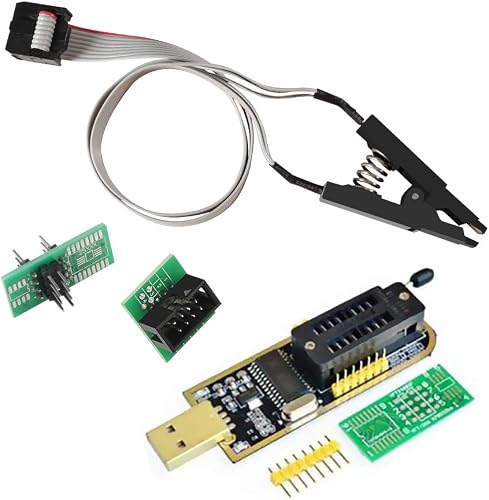
Prime AITRIP CH341A USB Programmer Kit with SOIC8 Clip
Prime ACEIRMC CH341A USB BIOS Programmer with Dual SOIC8

Prime ABSOK CH341A USB Programmer Kit with SOP8 Test

Prime WWZMDiB CH341A BIOS Programmer Kit with SOIC8 Clip

Prime ACEIRMC CH341A EEPROM Programmer Kit with SOIC8
As an Amazon Associate we earn from qualifying purchases. Product prices and availability are accurate as of the date/time indicated.
Pros
- Versatile diagnosis through both USB and multiport PCIe adapters for wide device coverage
- Android app eliminates tedious manual POST code lookup
- Comprehensive kit includes all adapters, cables and carrying case
- Strong seller support with detailed PDFs, videos and preemptive assistance
- Compact 3 ounce design built with quality PCB and components
Cons
- Requires sideloaded Android app that is not on Google Play and may not work on newer phones
- Steep learning curve with translated instructions that require careful study before use
- Must unplug USB between tests and follow precautions to avoid cached data and connectivity issues
The Lingvetron V8 KQCPET6 is a professional grade motherboard diagnostic kit designed to troubleshoot BIOS POST failures across desktops, laptops, servers, Macs and even Android devices. It is built for PC technicians, repair shops, IT students and serious DIY enthusiasts who need to quickly isolate hardware faults without guesswork.
Unlike traditional POST cards with small LED displays, this kit routes diagnostic data directly through USB ports and displays results in a dedicated Android app. In real world use, it can accurately pinpoint faulty CPU, RAM or motherboard components and even helped users revive non posting custom builds after other methods failed.
The kit comes in a compact plastic case and includes the master diagnostic board, multiple bus adapters, data and power cables, OTG dongles and an antistatic strap. Components are made with quality PCB, transistors and capacitors, and the multiport design ensures broad compatibility with both modern and legacy systems.
Setup is not plug and play and requires careful study of the PDF guides and videos before use. The required Android app must be sideloaded and may not work on newer Android versions, and users must unplug the USB cable between tests to clear cached data or risk unstable readings.
Despite its learning curve, the V8 kit is a powerful and cost effective tool that can save significant time and money on repairs when used correctly. If you are comfortable following technical instructions and have a compatible Android device, it is a highly valuable addition to any computer repair toolkit.
Brand: Lingvetron | Model Number: KQCPET6 v8 KQMET8 STC LMC6 | Manufacturer: Qiguan Electronics Co., Ltd.
Included Components: Master diagnostic board, multi computer ports connection adapters, data and power cables, OTG dongles, antistatic strap and plastic carrying case.
Power Source: Android USB adapter power | Operating System Compatibility: Android 6.0, Linux, Windows, Windows 10 | Connectivity: Standard USB, micro USB, Type C and PCIe bus adapters.
Item Weight: 3 ounces | Best Sellers Rank: Cleaning and Repair Category
Choose this kit if you regularly repair multiple PCs and need to diagnose no POST or no boot issues quickly. It is ideal for technicians who want app based clarity instead of decoding traditional POST cards.
Make sure you have a compatible Android device running Android 6.0 or later and are comfortable sideloading apps. You will need to study the Installation Manual and User Guide PDFs before first use for correct cable connections.
For best results, always follow the precaution to unplug the USB cable between tests on different machines and restart to clear cached data. If you prefer a simple plug and play display card, a traditional POST card may be easier to start with.
Pros
- Affordable all-in-one kit with everything needed to start flashing right away
- Saves time and prevents board damage by allowing in-circuit programming
- Supports both standard and low voltage chips with included adapters
- Compact, USB powered and easy to carry for field repairs
- Highly ranked in Semiconductor Products for proven utility
Cons
- User manual not included in box, must be requested from the seller
- Software and driver setup can be confusing for beginners and is Windows focused
- SOIC8 clip requires careful alignment to maintain a consistent connection
The AITRIP CH341A USB Programmer Kit is an entry level tool designed for reading, erasing, backing up and flashing 24 and 25 series EEPROM and SPI BIOS chips. It is aimed at DIY enthusiasts, PC repair technicians and electronics hobbyists who need to recover or update BIOS firmware on desktops, laptops and other devices.
In real world use, the standout feature is the SOIC8 test clip that allows in-circuit programming without desoldering the chip from the board. Combined with the included 1.8V adapter and SOIC8 adapter, it covers most common 3.3V, 5V and low voltage flash chips and supports USB to UART serial functions for added versatility.
Build quality is functional and practical for the price point, with a compact USB stick style programmer and beryllium copper clip needles that provide stable contact when properly aligned. The kit is lightweight, USB powered and highly portable, making it easy to carry to repair jobs or use on a workbench.
There are some drawbacks to consider. The user manual is not included in the box and must be requested from the seller, and the software and drivers can be confusing for beginners and are primarily Windows compatible. The clip also requires careful positioning to maintain a reliable connection, and users must manually confirm voltage selection to avoid damaging sensitive chips.
Overall, this AITRIP kit offers exceptional value as a complete starter solution for BIOS flashing and EEPROM programming. If you need an affordable, versatile programmer for occasional repairs, firmware backup or chip recovery, it is a smart and cost effective choice.
Brand: AITRIP
Model: CH341A USB Programmer Kit
Kit Contents: CH341A Programmer, SOIC8 SOP8 Test Clip, 1.8V Adapter, SOIC8 Adapter
Supported Chips: 24CXX and 25CXX Series EEPROM and 25 SPI BIOS Flash
Voltage Support: Switchable 3.3V and 5V, plus 1.8V via included adapter
Interface: USB, USB to UART serial support
Compatible Devices: Desktop, Television and other SPI flash devices
Operating System: Windows
Pros
- Proven to recover bricked devices like GPUs and laptops in real user cases
- In-circuit programming eliminates need for chip removal or soldering in many cases
- Broad support for 24 and 25 series BIOS and EEPROM chips
- Compatible with open-source tools and multiple operating systems
- Compact, portable and easy to integrate into a repair toolkit
Cons
- Does not include instructions or software, steep learning curve for beginners
- Reported voltage issue where board stays at 5V even when switched to 3.3V
- Peripheral circuits on some motherboards prevent direct clipping and require chip removal
The ACEIRMC CH341A kit is a USB based EEPROM and BIOS programmer bundled with dual SOIC8 SOP8 test clips for in-circuit flashing. It is designed for hobbyists, repair technicians and makers who need to recover or reprogram firmware on motherboards, graphics cards, routers and other embedded devices.
In practice, the kit excels at backing up, erasing and rewriting 24CXX, 25CXX and 93CXX series chips without removing them from the board. Users report successful unbricking of GPUs, ThinkPads and audio equipment when paired with the correct drivers and open source software.
The hardware is compact and lightweight, with a simple USB interface and a ZIF socket adapter plus two clip cables for direct board connection. Build quality is functional rather than premium, but the clips provide a firm grip when properly aligned and the module is easy to transport in a toolkit.
The main drawbacks are lack of instructions and inconsistent voltage regulation, with some units staying at 5V even in 3.3V mode which can risk sensitive chips. Beginners will need to research chip types, driver installation and flashing procedures, and some boards require desoldering due to interference from surrounding circuits.
Overall, this is a highly capable and cost effective solution for anyone comfortable with technical research and careful handling. If you need an affordable way to rescue bricked hardware and are willing to learn the workflow, it delivers excellent value and proven results.
Brand: ACEIRMC, Model Number: 2019042910503, Interface: USB
Supported Chips: 24CXX, 25CXX, 93CXX series, 24 and 25 Series EEPROM and BIOS, SOP8 and SOP16 packages. Note ESMT and SST 25 series chips can be read only due to CH341A limitations.
System Compatibility: Windows, macOS, Linux with open-source programming tools
Compatible Devices: Television, Router, Personal Computer, Laptop and other embedded boards
Package Contents: CH341A programmer module, SOIC8 SOP8 test clips with adapter board
Check your target chip model and package type before buying to confirm it is a supported 24CXX, 25CXX or 93CXX SOP8 or SOP16 device. Verify whether your board allows in-circuit clipping or if peripheral circuits will require desoldering.
Be prepared to install CH341A drivers and use third party software, as no instructions or software are included. Research guides for your specific device and always verify voltage settings with a multimeter before connecting to 3.3V chips.
This kit is best for intermediate to advanced users comfortable with electronics and firmware tools. Beginners can succeed with careful research, but should expect a learning curve and practice proper clip alignment to avoid connection errors.
Pros
- Enables in-circuit programming so you do not need to remove the chip from the board
- Complete bundle with clip and multiple adapters covers most SOIC8 and SOP8 jobs
- Faster erase and programming speed than older programmer models
- Proven in real use for unbricking motherboards and reflashing locked BIOS chips
Cons
- SOP8 test clip feels flimsy and requires careful alignment for a reliable connection
- No detailed documentation included and driver setup can be confusing for beginners
- ESMT SST 25 chips are read only and some boards need external 3.3V power due to CH341A limits
The ABSOK CH341A USB Programmer Kit is an affordable tool for backing up, erasing and reflashing BIOS and EEPROM chips in SOIC8 and SOP8 packages. It is designed for hobbyists, PC technicians and DIY repairers who work with 24 and 25 series FLASH chips and need to recover bricked hardware.
Its standout feature is online programming via the SOP8 test clip, which lets you flash chips without removing them from the circuit board. In real world use, owners have successfully unbricked Gigabyte motherboards, reset locked ThinkCentre BIOS and reflashed car radio EPROMs, with programming speeds of 2 to 3 Mbit per minute that outperform standard ATMEGA8 based programmers.
Design is compact and lightweight, centered on the USB powered CH341A board with USB 1.1 communication. The bundle includes the programmer, SOP8 clip, 8-pin to 8-pin converter, two SOP8 SOP16 adapters and pin headers, giving flexible options for different chip layouts.
Build quality is functional rather than premium, the SOP8 clip in particular feels delicate and needs gentle, precise placement to avoid bad contact. There is no manual in the box, so you will need to source drivers like CH341SER and software like NeoProgrammer or ASProgrammer, and some chips affected by peripheral circuits still require an external 3.3V supply.
Overall this kit offers excellent value for users comfortable with BIOS tools and willing to follow online guides. If you need a low cost, proven solution for emergency BIOS recovery and EEPROM work, it is a smart buy, but complete beginners should expect a learning curve.
Model: DQZSY-1 by DQZSY, CH341A USB Programmer Module with SOP8 Clip
Compatibility: Supports 24CXX, 25CXX, 93CXX series EEPROM and 24 and 25 series SPI FLASH in SOIC8 and SOP8 packages
Interface and Performance: USB 1.1 communication, dedicated CH341A chip, erase and programming speed about 2 to 3 Mbit per minute
Package Contents: 1 x CH341A Programmer, 1 x SOP8 Test Clip, 1 x 8-Pin to 8-Pin Converter, 2 x SOP8 SOP16 to 8-Pin Converters, 2 x 2.54mm 4-Pin Headers
Dimensions and Weight: Package size 5.04 x 3.46 x 1.18 inches, item weight 1.44 ounces
Pros
- Affordable all-in-one kit with clip and adapters included, no extra purchases needed
- No soldering required, clip-on design saves time and protects the board
- Broad chip support, even detects unlisted chips like Macronix MX25L12873F
- Works with popular tools like flashrom and supports both CH341A and CH341B
Cons
- No native 1.8V support, not compatible with newer low voltage chips without separate adapter
- SOIC8 clip retention bar can feel flimsy and requires careful alignment for good contact
- Requires technical knowledge and software setup, not ideal for beginners
The WWZMDiB CH341A Programmer is a budget friendly USB tool designed for backing up, erasing and reflashing 24 and 25 series SPI EEPROM and BIOS chips. It is aimed at PC technicians, repair hobbyists and advanced DIY users who need to recover bricked motherboards or unlock locked BIOS setups without replacing the board.
Its standout feature is true in-circuit programming via the included SOIC8 test clip, so no soldering is needed. Real world users report successful reads and writes on chips not even listed on the support chart, including the Macronix MX25L12873F and boards like the ASRock BC-250 and ThinkPad T480s, using tools like flashrom on Windows 10 and Linux.
The kit ships as a complete package with the CH341A USB programmer, SOIC8 SOP8 clip, SOP8 to SOP16 conversion plate and DuPont wires. The programmer supports both CH341A and CH341B protocols and offers 3.3V and 5V switching, while the clip generally provides firm contact when correctly aligned.
Build quality is functional for the price but not premium, with some users noting a flimsy retention bar on the clip that can fall out and requires careful handling. It also lacks native 1.8V support, so it will not work with newer low voltage chips without a separate adapter, and proper chip voltage must be confirmed to avoid damage.
Overall, this is a highly capable and affordable recovery tool that delivers proven results for its intended audience. If you are comfortable with technical software and careful clip placement, it offers excellent value for BIOS repair, though beginners or those needing 1.8V chips should look for a more advanced kit.
Model: WWZMDiB CH341A Programmer, Classic Style
Compatibility: 24, 25 series SOP8 and SOP16 EEPROM, supports CH341A and CH341B
Interface: USB, SPI and I2C support with 3.3V and 5V selectable voltage
Included in Box: USB programmer, SOIC8 test clip, SOP8 to SOP16 converter board, DuPont wires
System Support: Windows 10 and Linux with flashrom, multiple device compatibility
Pros
- All in one kit covers most common EEPROM flashing jobs with no extra parts to buy
- True plug and play setup works with popular tools like AsProgrammer and flashrom
- Proven to recover bricked laptop and desktop BIOS, saving costly motherboard replacement
- Compact USB powered design with fast read, write and verify speeds
Cons
- SOIC8 test clip feels fragile and can need several tries for a stable connection
- ZIF socket locking lever may feel loose and require holding down during use
- Requires third party software and basic electronics knowledge, not ideal for total beginners
The ACEIRMC CH341A Programmer Kit is an affordable toolkit for reading and writing 24, 25 and 93 series EEPROM and SPI Flash chips. It is aimed at DIY repair techs, hobbyists and IT troubleshooters who need BIOS recovery, firmware backup or chip cloning.
Standout value comes from the complete bundle, including the USB programmer, SOIC8 clip, 1.8V adapter and SOP8 to DIP8 converter. In real use, owners report successful BIOS recovery on laptops, desktops and routers, plus odometer and TV board reprogramming with tools like AsProgrammer and flashrom.
The CH341A board is compact, USB powered and connects over USB for broad compatibility. The clip on test lead allows in circuit flashing without soldering, while the 1.8V adapter adds safe support for low voltage chips in modern notebooks.
Build quality is functional rather than premium. The SOIC8 clip can be fragile and fiddly to seat, and the ZIF socket lever on some units does not lock firmly, so patience and careful alignment are needed.
Overall, this is a powerful and versatile EEPROM kit that has saved many boards from replacement. If you are comfortable with flashing software and careful clip placement, it is a must have for BIOS repair work.
Kit Includes: CH341A USB programmer, SOIC8 SOP8 test clip, 1.8V adapter, SOP8 to DIP8 150mil converter socket.
Supported Chips: 24CXX, 25CXX and 93CXX series EEPROM and SPI Flash BIOS, including 1.8V low voltage types with adapter.
Interface: USB to SPI via CH341A chip, works with AsProgrammer, flashrom and similar software for read, erase, burn, verify and backup.
Matching a Part to Your Build
Your ideal update method depends on your current hardware and how much risk you are willing to manage. The examples below map common situations to what to prioritize, with references to the sample products to show what each type of solution offers. For more step by step help, browse our Troubleshooting & Optimization archive for related recovery and stability guides.
If you have a new AM4, AM5, or LGA1700 board that explicitly supports USB BIOS Flashback and you are installing a newly released CPU, stick with the manufacturer USB method first. You will not need a programmer at all, just a correctly formatted drive and the right file. Keep a hardware programmer in mind only as a backup if you buy used boards or plan to flash many systems.
If you are reviving a corrupted board or working on a system that will not post after a failed flash, a direct programmer kit is more appropriate. The AiTrip EEPROM BIOS USB Programmer CH341A + SOIC8 and the WWZMDiB CH341A EEPROM BIOS Programmer SPI I2C both cover 24 and 25 series chips and include SOIC8 clip adapters for in-circuit work, with the AiTrip kit noting 3.3V and 5V switching and the WWZMDiB kit emphasizing no soldering with a direct clip. The SOIC8 SOP8 Flash Chip IC CH341A USB Programmer is another similar option that supports online programming of SOP8 chips without removing them, which owners find useful for quick backup and restore tasks when the clip can make clean contact.
If you are a hobbyist who repairs multiple desktops, laptops, or routers and wants broader coverage, look for a kit that adds a 1.8V adapter and multiple conversion plates. Kits that bundle a 1.8V adapter plus SOIC8 to DIP8 and SOP16 adapters give you more flexibility for low voltage SPI flash found on newer boards and small devices. This is overkill if you only need to update one modern gaming board with flashback, but it is valuable if you regularly work with varied hardware and want to back up existing firmware before you attempt any write.
Common Mistakes
Downloading the wrong BIOS file is the most frequent error. Motherboard makers release separate files for each board revision and sometimes for different memory or CPU support branches, so double check the full model name and revision printed on the board itself, not just the box. Flashing a file for a similar but incorrect revision can leave the board unbootable, and recovery may then require a hardware programmer.
Interrupting power or using an unstable USB drive during the flash is another common pitfall. Do not flash from a drive with other files, do not use a USB hub, and do not power off even if the progress indicator seems stuck. Use a freshly formatted drive as the manual specifies, keep the system on steady power, and allow several minutes for completion before you assume it has failed. For context on how case and power layout affect stability, see how to choose an airflow case for a hot GPU.
With hardware programmers, the classic mistake is mismatched voltage or poor clip contact. Applying 3.3V or 5V to a 1.8V chip can permanently damage it, so confirm your chip voltage before you connect anything. Also, some chips are affected by surrounding circuits and cannot be clipped reliably in place, which means you may need to desolder or use a different method, and the CH341A family has known limits where certain ESMT and SST 25 series chips can be read but not written reliably.
Who Should Wait or Buy Differently
A dedicated SPI programmer is not ideal for first time builders who have a modern board with USB flashback and a straightforward BIOS file available from the manufacturer. If your board posts with your current CPU, or supports flashing without a CPU, you are better off using the official USB method and saving the programmer for a true recovery scenario. This type of hardware tool is also not a good fit if you are uncomfortable handling small chips, installing driver software for the programmer, or verifying chip orientation and voltage, in which case asking a shop or a more experienced friend for help is a safer choice than attempting a direct chip write on your own.
Frequently Asked Questions
Do I need to update BIOS before installing a new CPU?
It depends on your motherboard and the CPU generation. Check the CPU support list for your exact board revision on the manufacturer site, which will list the minimum BIOS version required. If your current BIOS is older than that version, you will need to update before the new CPU will post, or use a flashback feature if available.
What is the safest way to update BIOS for a new CPU?
The safest method is the one your motherboard maker documents, usually a BIOS based updater or a USB flashback port with a FAT32 drive. Keep power stable, use anti-static handling, do not interrupt the process, and keep a backup of your current BIOS if the tool allows it. Remember that any flash is done at your own risk and may affect warranty, so follow the manual exactly.
When should I use a CH341A programmer with a SOIC8 clip?
Consider a CH341A based programmer with a SOIC8 clip when the board will not post, the BIOS is corrupted, or you have no supported CPU and no flashback option. These kits let you back up, erase, and program 24 and 25 series chips in-circuit when the clip can connect cleanly. Always confirm chip model and voltage, and use a 1.8V adapter if your chip requires it, since this method needs more care than a standard USB flash.





Write Your Review
No reviews yet. Be the first to share your experience!