

When your games crash to a black screen, your PC restarts under load, or you hear coil whine that was not there before, the power supply is often the last part you suspect. Learning how to tell if your PSU is too weak for your GPU, symptoms included, is really about deciding whether your current power budget matches your graphics card and whether your next PSU will give you stable headroom for the way you actually use your PC.
In this buying guide for September 2026, you will build a decision framework instead of just chasing a wattage number. You will weigh your resolution and refresh target, your CPU and platform power draw, your case size and clearance, your noise tolerance, and whether you are fixing a current build or planning your next GPU upgrade. That context matters more than any single spec, and it keeps you from overspending or underpowering your system. For more general fixes, browse the full Troubleshooting & Optimization archive.
What Actually Matters
Wattage Headroom and Transient Spikes
Your PSU needs to cover more than the average power your GPU and CPU pull. Modern graphics cards can create brief transient spikes that are much higher than their sustained draw, and an undersized or older design can shut down even if the average wattage looks fine on paper. Per the spec sheet, the units evaluated here are all ATX 3.1 and PCIe 5.1 compliant and are rated to withstand 2x transient power excursions from the GPU, which is exactly the kind of headroom you want when you diagnose instability.
To choose correctly, add your CPU and GPU recommended power together, then add headroom on top, and always follow the GPU maker recommended wattage for your specific card. Owners commonly report that a system that is stable in light games but shuts off in demanding titles is often hitting those spikes, not a driver bug. If you are close to the limit now, plan for extra capacity if you intend to upgrade to a more power hungry card in the next year or two.
The Symptoms That Point to Power, Not Software
Knowing how to tell if your PSU is too weak for your GPU, symptoms wise, helps you avoid wasting time on reinstalls. The classic signs are sudden shutdowns or restarts under load, black screens that require a hard power cycle, fans ramping to full then the system going dark, burning smells, or coil whine that changes sharply with load. You might also see performance that drops after a few minutes of gaming, or a PC that only crashes when you raise resolution, enable ray tracing, or run a stress load that pushes both CPU and GPU at once.
These symptoms overlap with driver or thermal issues, so you should rule out the simple causes first. Check that your GPU and CPU temperatures are in a normal range, that your power cables are fully seated, and that your wall outlet and power strip are reliable. If crashes happen only when the GPU is heavily loaded and disappear when you cap frame rate or lower power limit, that points more toward insufficient power delivery than software. Handle all internal checks with the system powered off, unplugged, and with anti-static precautions, and remember that any firmware changes are done at your own risk and may affect warranty.
Connectors, Standards, and Efficiency
The connector standard matters as much as wattage. ATX 3.1 with PCIe 5.1 and a native 12V-2×6 cable gives you a more secure connection for current high end cards and better handling of spikes compared to using multiple adapters. Efficiency ratings like 80 PLUS Gold and Cybenetics Gold indicate lower waste heat and often quieter operation under load, but they do not automatically mean a unit is correctly sized for your GPU. Look for 105°C rated capacitors and a clear fan strategy as signs of longer term stability, both of which are listed per the spec sheet for the examples below.
Modularity also affects your build experience. Fully modular cabling lets you connect only the cables your system needs, which improves airflow and makes cable management easier, especially in compact cases. That airflow benefit can indirectly help stability, as discussed in our guide on how to choose an airflow case for a hot GPU. If your case is tight, verify PSU dimensions against your case spec sheet before you buy, the 1000W unit here for example lists 150x150x86mm, so you can confirm fit.
Noise, Thermals, and Long Term Value
A PSU that is constantly near its limit will run hotter and louder. A 120mm rifle bearing fan with a tuned curve or a larger 140mm low noise fan can stay quieter at the same load, but only if the unit has enough headroom to begin with. If you value a quiet room, as covered in quiet gaming PC cases that stay cool without the noise, choose a wattage where your typical gaming load sits in the middle of the PSU range rather than at the top.
Long term value comes from choosing a platform that will support your next upgrade without forcing another PSU swap. ATX 3.1 compliance, native 12V-2×6 support, and a 10 year limited warranty where offered signal that the design is intended for current and near future cards. That does not mean any PSU can handle any card, you still need to match wattage to your GPU maker recommendation, but it does mean you can avoid buying twice if you plan ahead.
A few options that show the range:
This article contains affiliate links. If you buy through one of our links, CustomPCGaming may earn a commission at no extra cost to you. Commissions never influence which products we recommend or how we rank them. Read our Affiliate Disclosure for details.
Quick Picks at a Glance

Prime CORSAIR RM850e 850W Fully Modular ATX 3.1 PSU
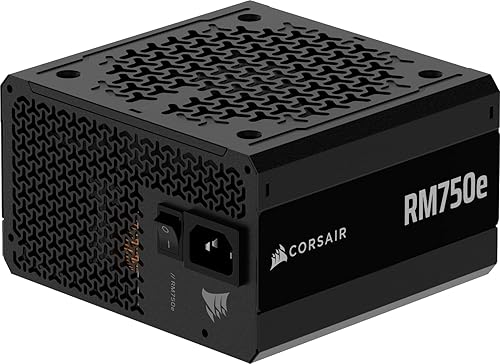
CORSAIR RM750e 750W ATX 3.1 Fully Modular PSU

Auotac 1000W Fully Modular 80+ Gold PSU
As an Amazon Associate we earn from qualifying purchases. Product prices and availability are accurate as of the date/time indicated.
Pros
- ATX 3.1 and PCIe 5.1 ready with included native 12V-2x6 cable and adapter
- Fully modular design greatly simplifies cable management and airflow
- Very quiet cooling with optimized 120mm rifle bearing fan curve
- High-quality 105C rated capacitors and Cybenetics Gold efficiency
- Compact 140mm length and strong 7-year warranty
Cons
- 850W may be more than needed for budget or mid-range builds
- Only one dedicated PCIe 8-pin cable included, relies on adapter for additional connectors
- No RGB lighting or advertised zero-RPM fan mode for silent idle operation
The CORSAIR RM850e (2025) is an 850W fully modular ATX power supply built for gamers, creators and anyone upgrading to RTX 40 series or newer GPUs. With ATX 3.1 and PCIe 5.1 compliance, it is ideal for high performance builds that need stable power and next generation connectors.
Its native 600W 12V-2x6 connector powers modern graphics cards without messy adapters, while support for 2x transient power excursions keeps your system stable during sudden GPU spikes. Cybenetics Gold efficiency and Modern Standby support improve low load efficiency and enable fast wake times, and the tuned 120mm rifle bearing fan stays quiet even under heavy load.
Design and build quality are standout strengths for this price class. At just 140mm long it fits easily in most mid tower and compact ATX cases, and fully modular cables keep builds tidy with better airflow. Industrial grade 105C rated capacitors ensure consistent electrical performance and long term reliability.
There are a few trade offs to consider. The included cable set is lean with only one native PCIe 8-pin cable plus a 12V-2x6 to dual 8-pin adapter, so users with multiple older GPUs may need extra cables. It also focuses on performance over aesthetics, with no RGB and no dedicated zero RPM mode for complete silence at idle.
Overall, the RM850e 850W hits an excellent balance of efficiency, compatibility and quiet operation for modern high end PCs. If you want a compact, future ready and dependable power supply that will handle demanding hardware for years, it is a smart and durable choice.
Model: CORSAIR RM850e (2025) CP-9020296-NA | Wattage: 850W | Form Factor: ATX | Modular: Fully Modular
Compliance: Intel ATX 3.1, PCIe 5.1 with native 12V-2x6 connector | Efficiency: Cybenetics Gold | Capacitors: Industrial-grade 105C rated
Cooling: 120mm rifle bearing fan with low-noise curve | Dimensions: 5.91 x 5.51 x 3.35 inches | Weight: 3.4 pounds
Connectors Included: 1x 24-pin ATX, 2x 8-pin EPS12V (4+4-pin), 1x PCIe 8-pin (6+2-pin), 1x 600W 12V-2x6, 1x 12V-2x6 to dual 8-pin adapter, 6x SATA, 2x PATA | Warranty: 7 Years
Pros
- Fully modular design makes installation and cable management much easier
- Very quiet operation praised by users even during gaming
- Handles GPU transient spikes reliably thanks to ATX 3.1 compliance
- Gold efficiency and high quality capacitors with 7 year warranty
- Includes both native 12V-2x6 and PCIe 8 pin cables for wide compatibility
Cons
- Audible click on power on is normal for this model but can alarm first time builders
- Only one dedicated PCIe 8 pin cable included, additional GPUs may need the included dual adapter
- Rifle bearing fan is reliable but not as durable as fluid dynamic bearing fans found on higher end units
The CORSAIR RM750e is a 750W fully modular power supply designed for modern gaming and creator PCs. Built to the latest ATX 3.1 and PCIe 5.1 standards, it is aimed at builders running mid-range to high-end GPUs who need reliable power and future ready connectivity.
In real world use it delivers quiet, stable performance with Cybenetics Gold efficiency and strong transient response for GPU power spikes. Users report silent operation, easy cable routing and dependable power for cards like the RTX 3060 and RTX 2070 Super, even under heavy load.
Build quality is a clear strength with industrial grade 105°C rated capacitors, a compact 140mm casing and a full set of modular cables. The included native 12V-2x6 cable, EPS and SATA cables are flexible and well made, and the 120mm rifle bearing fan keeps noise low.
Drawbacks are minor but worth noting. The unit produces a brief click at startup which is normal but can be confusing at first. Cable selection is generous but power users with multiple older PCIe devices may need to use the dual adapter.
Overall the RM750e offers excellent value for builders who want quiet, efficient and dependable power with modern standards. It is a smart pick for clean, future proof builds backed by a 7 year warranty.
Model: CORSAIR RM750e CP-9020295-NA/AM, Form Factor: ATX, Wattage: 750W, Efficiency: Cybenetics Gold
Compliance: Intel ATX 3.1, PCIe 5.1 with native 12V-2x6 600W connector, Modern Standby compatible
Design: Fully modular, 120mm rifle bearing fan, 105°C rated capacitors, 140mm compact depth
Connectors: 1x 24 pin ATX, 2x 8 pin EPS 4+4 pin, 1x PCIe 8 pin 6+2 pin, 1x 12V-2x6, 1x 12V-2x6 to dual 8 pin adapter, 6x SATA, 2x PATA
Dimensions: 5.91 x 5.51 x 3.35 inches, Weight: 3.3 pounds, Warranty: 7 Year Manufacturer
Pros
- Powerful 1000W output with Gold efficiency for high end gaming and creator rigs
- Future proof ATX 3.1 and PCIe 5.1 support with native 12V-2x6 cable
- Fully modular design simplifies installation and improves case airflow
- Quiet 140mm fan and durable 105C Japanese capacitors
- Helpful included tool kit and long 10 year warranty
Cons
- RGB lighting resets after power down and must be turned off again each boot unless internal connector is unplugged
- 150mm depth may be tight in compact ATX cases
- Lesser known brand compared to established PSU manufacturers
The Auotac 1000W Fully Modular PSU is an 80 PLUS Gold certified power supply built for gaming PCs and high performance workstations with demanding GPUs. It is ideal for builders upgrading to modern high end graphics cards who need reliable, future proof power in a standard ATX case.
In real world use, the ATX 3.1 and PCIe 5.1 compliance with a native 12V-2x6 cable provides stable delivery and resists GPU transient spikes up to 2x. The 92 percent efficiency keeps heat down and power delivery consistent, while the dual color connector helps ensure the GPU cable is fully seated.
Build quality stands out with 100 percent Japanese 105C rated capacitors for long term durability and a large 140mm low noise fan that cools more effectively and quietly than typical 120mm designs. The fully modular dragon pattern cables are flexible and reduce clutter, improving airflow and making cable management easier for beginners and enthusiasts.
There are a few drawbacks to consider. The RGB lighting does not retain the off setting after a full shutdown, so users who prefer no lighting need to toggle it each time or disconnect the internal header. The 150mm length can also be snug in smaller ATX cases, and Auotac is a newer brand which may give some buyers pause.
Overall, this PSU offers impressive value for a 1000W Gold rated, next gen ready unit with premium components, quiet cooling and a 10 year warranty. For gamers and creators who want dependable power, tidy aesthetics and headroom for future upgrades, it is a compelling choice.
Model: Auotac S-850MZ, 1000W, ATX Form Factor, 150 x 150 x 86mm
Efficiency: 80 PLUS Gold certified, up to 92% efficiency
Compliance: ATX 3.1 and PCIe 5.1 ready, supports 2x transient power excursions
Cables: Fully modular, dragon pattern design, native dual color 12V-2x6 16 pin cable
Cooling: Single 140mm low noise smart fan with RGB lighting modes
Capacitors: 100% Japanese 105C rated electrolytic capacitors
Extras: Includes PSU tester, cable combs, cable ties, 10 year limited warranty
Matching a Part to Your Build
If you are running a balanced 1440p build where your GPU maker recommends around 750W, the CORSAIR RM750e ATX 3.1 PCIe 5.1 Ready 750W Power shows what a focused, fully modular option looks like. It is ATX 3.1 and PCIe 5.1 compliant with a native 12V-2×6 connection, uses 105°C rated capacitors, and relies on a 120mm rifle bearing fan with a low noise curve. This type of unit is a sensible fit when your combined CPU plus GPU draw leaves comfortable headroom at 750W and you want tidy cabling without paying for capacity you will not use. Check your case PSU clearance and cable routing space before you commit.
If you are seeing shutdowns on a higher end card or you plan to move to a more demanding GPU soon, the CORSAIR RM850e (2025) ATX 3.1 PCIe 5.1 Ready 850W represents the middle step that many builders choose for extra headroom. It shares the same ATX 3.1 and PCIe 5.1 compliance, fully modular design, Cybenetics Gold efficiency, and 105°C rated capacitors, but gives you more breathing room for transient spikes and future upgrades. Owners commonly report that stepping from a borderline wattage to 850W resolves random restarts that only happened in heavy ray traced scenes. Follow your GPU maker wattage guidance and keep that 2x transient capability in mind when you evaluate.
If your build is centered on a flagship class card, or you want maximum headroom for overclocking and future upgrades, the 1000W Fully Modular Power Supply, 80+ Gold PSU illustrates the high capacity approach. Per the spec sheet it is 80 PLUS Gold certified at 92% efficiency, fully modular with a native dual color 12V-2×6 cable that helps you verify the connector is fully seated, and uses a 140mm low noise fan with an ARGB lighting mode plus 100% Japanese 105°C electrolytic capacitors. At 150x150x86mm it fits most mainstream ATX cases, but you should still confirm length against your specific case, especially if you saw our breakdown of the ryzen 5 7600 RX 7700 XT 1000 dollar gaming PC amazon build where case and PSU choice affect airflow and thermals.
Common Mistakes
Buying exactly the minimum wattage on the GPU box and assuming it is enough. That number assumes a typical system, but your CPU, fans, storage, and transient spikes all add up. Always add headroom over the combined draw and respect the GPU maker recommendation, otherwise you may see the exact symptoms you were trying to fix, restarts under load and black screens that look like driver faults.
Reusing old cables or using adapters instead of the native 12V-2×6 cable. Modular cables are not interchangeable between brands or even between series, and a loose or incorrect cable can cause overheating at the connector or unstable power delivery. Use only the cables included with your specific PSU, ensure the 12V-2×6 plug is fully seated until the indicator shows correct insertion, and route cables so they are not strained or sharply bent.
Ignoring case fit, airflow, and noise. A PSU that is too long for your case, or one that has to run near full load all the time, will run hotter and louder and may throttle or shut down. Verify dimensions, confirm your case airflow path, and choose a capacity where your typical gaming load is well below the unit maximum. That keeps fan noise down and leaves room for a hotter GPU in the future.
Who Should Wait or Buy Differently
If your current system is stable, your GPU maker recommended wattage is already met with headroom, and you are not planning a GPU upgrade in the next year, buying a larger PSU now is not ideal for your budget. It is also not a good fit to chase a 1000W unit for a compact small form factor case that cannot accommodate its length or needs an SFX form factor instead. In those situations, wait, save the funds for your next platform change, and focus on cable management, airflow, and verifying that your existing power delivery is correctly connected and clean.
Frequently Asked Questions
What are the most reliable signs my PSU is too weak for my GPU?
The most consistent signs are immediate shutdowns or restarts when the GPU is heavily loaded, black screens that need a hard power cycle, and crashes that stop when you lower power limit or cap frame rate. If the issue only appears in demanding games and not on the desktop, and temperatures and drivers have been ruled out, insufficient power or transient handling is a likely cause.
Can an 850W PSU handle any modern GPU if it is ATX 3.1?
No, ATX 3.1 and PCIe 5.1 compliance improves spike handling and connector security, but it does not make any wattage sufficient for any card. You still need to follow the GPU maker recommended wattage for your exact model and add headroom for your CPU and other components. When in doubt in 2026, choose the next capacity up if you are close to the limit or plan a future upgrade.
Should I replace my PSU before I know for sure it is the problem?
Start with the low risk checks first, reseat power cables, verify the 12V-2×6 connection is fully inserted, check thermals, and try a lower power limit to see if stability improves. If symptoms persist only under GPU load and you are near or below the recommended wattage, then a properly sized ATX 3.1 replacement with headroom is a logical next step. Always power down, unplug, and use anti-static handling when working inside the case.

Write Your Review
No reviews yet. Be the first to share your experience!