

Figuring out how to set up fan curves for a quiet gaming PC is less about chasing silence at all costs and more about making your fans respond intelligently to heat. You want your system to stay nearly inaudible when you are browsing or watching video, ramp smoothly when you start gaming, and only get loud when your CPU or GPU truly needs it.
Before you touch any sliders, think about your whole build context. Your target resolution and refresh rate determine how hard your CPU and GPU will work, your platform and socket dictate which coolers fit and how they mount, your case size and clearance limit cooler height or radiator length, your power budget affects how much heat you must exhaust, and your current versus next upgrade plans decide whether you should tune for headroom now or for maximum quiet today. A good fan curve respects all of those variables.
What Actually Matters
How a Fan Curve Actually Works
A fan curve is simply a map that tells each fan how fast to spin at a given temperature. Most modern motherboards use PWM control, which varies speed smoothly across a wide range, while older DC control is more stepped. You assign a temperature source, usually CPU temperature for the CPU cooler and motherboard or chipset temperature for case fans, and then set points that define idle, load, and maximum speeds.
What matters most is the shape of that curve, not just the endpoints. A flat line that stays low until a sudden jump will sound abrupt and can let heat build up. A gentle slope with a defined idle plateau, a gradual rise through gaming loads, and a steeper climb near thermal limits feels quieter because your ears notice changes in pitch more than steady airflow. Hysteresis, which is a small delay before fans ramp down, also prevents constant speeding up and slowing down when temperatures hover around a threshold.
If you are new to this, start in your BIOS. It is the most reliable place to set curves, it applies before Windows loads, and it avoids conflicts with multiple software tools. Remember that BIOS updates and tuning are done at your own risk and may void warranty, so follow your motherboard maker guidance and use anti-static handling when working inside the case. For a deeper look at quiet-focused enclosures, see quiet gaming PC cases that stay cool without the noise.
Noise Versus Cooling: Where Quiet Really Comes From
Quiet does not come from turning fans off, it comes from keeping them at low, consistent speeds for as long as possible. Fan noise rises quickly with RPM, and bearing type, blade design, and mounting all influence the tone. According to owners and per the spec sheet, designs with fluid-dynamic bearings and airflow-optimized blades tend to be perceived as smoother at moderate speeds, while cheaper fans can develop whine or hum even at similar RPM.
Thermal headroom is your best friend for quiet operation. A cooler with higher capacity, like one rated for 190W TDP, can dissipate the same gaming heat at lower fan speeds than a smaller cooler that must spin faster to keep up. That is why cooler choice and case airflow matter as much as the curve itself. A well-ventilated case lets you run case fans slower, while a restrictive case forces higher RPM to move the same amount of air. You can explore this tradeoff in how to choose an airflow case for a hot GPU.
Pay attention to which temperature you tie each fan to. CPU cooler fans should follow CPU temperature, but case fans often work better when tied to motherboard or system temperature, or to a dedicated case sensor if your board offers it. Tying every fan to the CPU will make the whole system pulse every time the CPU spikes for a second, which is noisy and unnecessary.
Where You Control the Curve: BIOS, Software, and Hubs
You have three common control points, and you should pick one master to avoid conflicts. BIOS or UEFI gives you persistent, software-free control and usually offers a visual curve editor with several points. Motherboard software in Windows can offer more granular tuning and per-profile switching, but running two tools at once can cause fans to fight each other. If you use a hardware hub, like an ARGB-PWM-Hub that can synchronize up to 6 PWM fans and 6 ARGB components from one header, remember that all fans on that hub will often share the same curve.
For a quiet gaming PC, assign your fans thoughtfully. Keep CPU and rear exhaust on separate headers if possible so you can tune them independently. Front intake fans can share a curve since they work together to feed cool air. If your cooler has a physical switch that changes its PWM behavior, such as a Speed Switch with Quiet Mode at up to 1500rpm and Performance Mode at up to 2000rpm, set the switch first and then build your curve around that ceiling. Owners commonly report that Quiet Mode at around 25.8dB(A) is virtually inaudible at regular speeds, which gives you a lower noise floor to tune from.
Always check cooler height or radiator clearance against your case before you finalize anything, and follow the manufacturer mounting instructions. An air cooler that is too tall for your case or a 360mm radiator that does not fit your front or top mount will force compromises that no fan curve can fix. More cooler-specific guidance is in our CPU Cooling archive.
Case Context and Real-World Airflow
Your fan curve does not operate in isolation, it works with your case. Mesh front panels, unobstructed intakes, and clear exhaust paths let you achieve the same cooling at lower RPM. If your case has solid panels or tight filters, you will need a slightly more aggressive curve to overcome restriction. Dust buildup also matters, a clogged filter makes fans work harder for the same result, so factor in easy cleaning when you plan your setup.
Think in zones. Intake fans set the baseline airflow, CPU cooler fans handle the hottest component, and exhaust fans remove the warmed air. For quiet builds, many people find that a slightly positive pressure setup, with intakes spinning a touch faster than exhaust, keeps dust out while staying quiet. You do not need many fans to be quiet, you need the right fans in the right places running at the right speeds. You can find more troubleshooting and tuning ideas in Troubleshooting & Optimization.
The examples below show the range of cooling hardware you might tune. They are not a ranked list, but they illustrate how different cooler designs affect the curve you will create, from compact single-fan air coolers to large dual-fan towers and 360mm liquid coolers with multiple fans and lighting control.
This article contains affiliate links. If you buy through one of our links, CustomPCGaming may earn a commission at no extra cost to you. Commissions never influence which products we recommend or how we rank them. Read our Affiliate Disclosure for details.
Quick Picks at a Glance

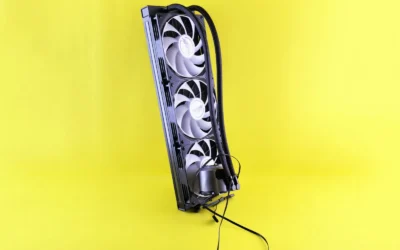
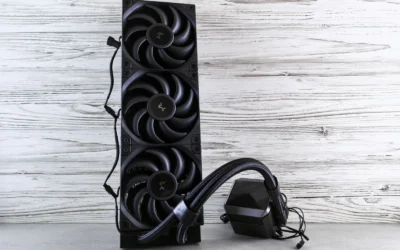
be quiet! Light Loop 360mm ARGB AIO Liquid CPU

Prime How to Build a Gaming PC for Beginners

Prime be quiet! Pure Rock 3 Black BK039 CPU Air Cooler

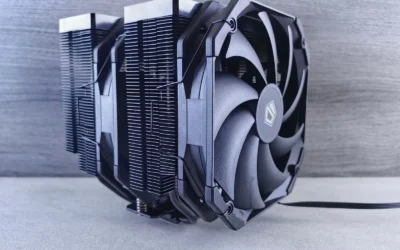
be quiet! Dark Rock Elite CPU Air Cooler
As an Amazon Associate we earn from qualifying purchases. Product prices and availability are accurate as of the date/time indicated.
Pros
- Excellent thermal performance even during extended gaming and peak CPU loads
- Near silent operation with no pump gurgling or fan turbulence
- Vibrant and evenly diffused ARGB lighting on fans and cooling block
- Easy installation with secure bracket and screw mounting system
- Refillable design with premium German engineering and durable build
Cons
- ARGB PWM Hub requires SATA power which adds extra cabling
- Large 360mm radiator needs a case with full 360mm support
- May be more cooling power than needed for stock or non overclocked CPUs
The be quiet! Light Loop 360mm Black is a premium 360mm AIO liquid cooler built for gamers, enthusiasts and overclockers who push their CPUs to the limit. It is designed for modern high end systems and supports a wide range of Intel and AMD sockets, making it a versatile choice for heavily overclocked builds.
In real world testing, it delivers exceptional cooling with users reporting temperatures below 65C during long gaming sessions on powerful CPUs like the Ryzen 7 9800X3D. The metal jet plate increases liquid flow speed while the high density fin cold plate and 61.8 CFM Light Wings LX fans keep performance high even under sustained loads.
Design and build quality are standout features, with 64 LEDs creating bright, customizable ARGB effects across the cooling block and three 120mm fans. The 9 blade fan design reduces turbulence, the pump runs quietly thanks to its progressive IC motor, and the metal and plastic construction feels premium and durable.
There are a few drawbacks to consider. The included ARGB PWM Hub needs SATA power, which can add cable clutter in compact builds. The 360mm radiator also requires a spacious case, so compact mid towers may not be compatible without checking clearance first.
Overall, the Light Loop 360mm Black is an excellent choice for anyone wanting top tier cooling, near silent operation and standout lighting in one package. It is especially well suited for high performance gaming PCs where thermal headroom and aesthetics both matter.
Model: BW022 | Cooling Method: 360mm Water Cooling | Fans: 3x Light Wings LX 120mm PWM high speed, 2100 RPM max, 61.8 CFM airflow, 36.8 dB noise
Lighting: 64 LEDs total, 16 LEDs per fan plus illuminated cooling block, fully addressable ARGB
Compatibility: Intel 1851, 1700, 1200, 1151, 1150, 1155 and AMD AM5, AM4 | Connector: 4-Pin PWM, 12V, 5.4W
Dimensions: 15.62 x 4.72 x 1.06 inches | Weight: 1.5 kg | Material: Metal and Plastic | Hub: ARGB PWM Hub for up to 6 fans and 6 ARGB devices
Pros
- Very clear and practical for complete beginners to follow during a real build
- Covers modern hardware standards including DDR5, NVMe and current CPUs/GPUs
- Empowers you to save money and customize versus buying a prebuilt PC
- Includes long-term guidance on maintenance, troubleshooting and upgrades
Cons
- Too basic for experienced builders wanting advanced techniques
- Text-only format lacks video demonstrations for visual learners
- Depth on streaming or editing specific optimizations is limited
This guide by Robert I. Grass is a complete, beginner-focused blueprint for building a modern gaming PC from scratch. It is tailored for first-time builders, gamers, streamers and creators who want a custom system without relying on expensive prebuilt options.
Its standout strength is practical, task-oriented instruction that you can follow during an actual build. It covers choosing compatible parts for your budget, step-by-step assembly, Windows and UEFI/BIOS setup, safe performance tuning, and troubleshooting common problems.
The book is well structured for real-world use, with clear sections that reflect current hardware standards. Coverage includes modern CPUs and GPUs, DDR5 memory, NVMe storage and current OS installation methods, making it relevant for today's builds.
As a text-based guide, it naturally lacks video walkthroughs that some visual learners may prefer. It is also intentionally entry level, so experienced builders looking for advanced overclocking or deep technical theory may find it too basic.
Overall, this is a highly accessible and practical starting point for anyone building their first gaming or streaming PC. If you want clarity, confidence and control over your next rig, this guide delivers excellent value as your build companion.
Pros
- Excellent 190W cooling capacity for a compact single tower cooler
- Very quiet operation at only 34.8 dB with PWM control up to 2000 RPM
- Slim design ensures full RAM and VRM cooler compatibility
- Simple and secure installation with preinstalled mounting bridge and AM5 offset
- Premium all black aluminum build with wide Intel and AMD socket support
Cons
- Air cooling design is not ideal for extreme overclocking compared to dual tower or liquid coolers
- Single 120mm fan may need strong case airflow for high end CPUs under sustained heavy loads
- Still requires checking case CPU cooler height clearance despite compact dimensions
The be quiet! Pure Rock 3 Black BK039 is a single tower CPU air cooler designed for consumer gaming, multimedia and mainstream PCs. With 190W TDP support and compatibility for Intel LGA 1851, 1700, 1200 series and AMD AM4 and AM5, it is ideal for users who want quiet, reliable cooling without liquid cooling complexity.
In real world performance, the four 6mm black heat pipes with HDT technology move heat efficiently to the aluminum fins with minimal bends and high bending radius. Paired with the Pure Wings 3 120mm PWM fan, it delivers strong air pressure and focused airflow through a funnel shaped outlet while staying quiet up to 2000 RPM.
Design and build quality are standout features, with a premium all black aluminum heatsink that looks great in any build. Its slim, compact 6.1 inch height significantly improves RAM and VRM cooler compatibility and allows full use of tall memory modules, even in cases with limited space.
As a compact air cooler, it is not intended for extreme overclocking or flagship CPUs with very high heat output where larger dual tower or AIO coolers excel. Buyers should also confirm case CPU cooler clearance to ensure a proper fit.
Overall, the Pure Rock 3 Black offers an outstanding balance of quiet performance, easy installation and broad compatibility. For gamers and mainstream builders seeking a stylish, dependable and affordable air cooler, it is a top recommendation in its class.
Model: be quiet! Pure Rock 3 Black BK039
Cooling Method: Air, Single Tower with 4x 6mm Heat Pipes and HDT Technology
Fan: Pure Wings 3 120mm PWM, 4-Pin, up to 2000 RPM, 34.8 dB Noise Level
TDP Rating: 190W
Socket Compatibility: Intel LGA 1851, 1700, 1200, 1150, 1151, 1155 and AMD AM5, AM4 with offset mounting for AM5
Dimensions: 5.4 x 4.88 x 6.1 inches
Material: Aluminum Heatsink with Black Finish
Voltage: 12V
Pros
- Excellent cooling capacity for heavily overclocked systems and demanding workloads
- Extremely quiet operation even under load, especially in Quiet Mode
- Adjustable front fan solves common RAM clearance problems
- Premium build quality with ceramic coating and CNC-machined copper base
- Flexible performance tuning with Quiet and Performance modes
Cons
- Large 6.61 inch height requires a spacious mid-tower or full-tower case
- Heavier dual-tower design is more complex to install than single-fan coolers
- Premium size and weight may limit options for compact builds
The be quiet! Dark Rock Elite is a flagship dual-tower air cooler designed for enthusiasts, gamers and workstation users who want top-tier cooling without liquid cooling. It is built to sustain peak CPU performance during overclocking and heavy multitasking while keeping noise to a minimum.
Real-world performance stands out thanks to 7 high-performance copper heat pipes and two 135mm Silent Wings PWM fans optimized for airflow and pressure. The Speed Switch is a highlight, offering a near-silent Quiet Mode at 1500 RPM and a Performance Mode up to 2000 RPM that unleashes full cooling power when thermals demand it.
Design and build quality are exceptional, with a CNC-machined copper contact surface, aluminum fins finished in a black ceramic particle coating for better heat transfer, and an ARGB illuminated top cover. The innovative 5-step rail system for the front fan is especially practical, allowing easy height adjustment for broad RAM and VRM compatibility.
The main drawback is its substantial footprint, as the tall and wide heatsink needs a large case with good clearance. Installation also requires more care and space than a compact single-tower cooler, so small form factor builders should verify fit before buying.
Verdict: The Dark Rock Elite delivers elite air cooling with whisper-quiet acoustics, smart compatibility features and premium looks. If you have the case space and want silent, overclock-ready performance with striking ARGB style, it is one of the best premium air coolers available.
Cooling Method: Air cooling with dual-tower heatsink and 7 copper heat pipes
Fans: 2x Silent Wings 135mm PWM fans, 1500 RPM Quiet Mode, 2000 RPM Performance Mode
Noise Level: 25.8 dB(A) in Quiet Mode with fluid-dynamic bearings
Dimensions: 5.7 x 5.35 x 6.61 inches and adjustable front fan with 5-step rail system
Socket Compatibility: Intel 1851, 1700, 1200, 1151, 1150, 1155 and AMD AM5, AM4
Material and Lighting: Aluminum fins, CNC machined copper base, ceramic coating, ARGB top cover
Matching a Part to Your Build
Use your build goals to decide how aggressive or relaxed your fan curve can be. The cooler you choose sets the ceiling for how low your fans can spin while still keeping temperatures comfortable.
For a compact or value-focused gaming PC where case space is tight and you want simple control, the be quiet! Pure Rock 3 Black CPU Air Cooler is a helpful reference. With 4 black 6mm heat pipes and a 120mm PWM fan plus a slim design that increases RAM and VRM compatibility, it offers 190W TDP capacity in a small footprint. That headroom lets you keep idle and light gaming speeds very low, with a gentle ramp that only climbs steeply when you approach sustained heavy loads. It is a good illustration of how a modest single-fan tower can be tuned for quiet daily use if your CPU power draw is moderate and your case has decent intake airflow.
For a mid to high-end air-cooled build where you want flexibility without going to liquid, the be quiet! Dark Rock Elite Air CPU Cooler shows how hardware features shape your curve. It uses 7 high-performance copper heat pipes and 2 Silent Wings 135mm PWM fans designed for high pressure and airflow, and it includes a Speed Switch that lets you choose Quiet Mode up to 1500rpm or Performance Mode up to 2000rpm. If quiet is your priority, set it to Quiet Mode first, then create a flat, low-speed plateau for desktop use, a smooth rise through typical gaming temperatures, and a final climb only near the top of its range. The rail system for adjusting front fan height also helps you maintain RAM clearance, so you do not have to compromise fan placement to fit tall memory.
For a heavily overclocked system or a build where you want maximum thermal headroom to keep fan speeds down under load, the be quiet! Light Loop 360mm Black CPU Liquid Cooler demonstrates the liquid cooling approach. It pairs a 360mm radiator with 3 Light Wings LX 120mm PWM high-speed fans that use 9 airflow-optimized blades and 16 LEDs per fan, plus a cooling block with a metal jet plate and high-density fin stack. The included ARGB-PWM-Hub that can handle up to 6 PWM fans and 6 ARGB components means you can run all radiator fans from one curve. With a large radiator, you can afford a very relaxed curve at idle and a slow, linear rise during gaming, since the liquid and radiator surface area absorb spikes before fans need to react. Just verify your case supports a 360mm radiator in your intended mount location before you plan this route.
If you are still learning fundamentals, the How to Build a Gaming PC for Beginners can help you understand mounting, airflow direction, and header connections before you start tuning. Good physical installation makes every fan curve more effective.
Common Mistakes
Mistake one is creating a curve that is too flat for too long and then jumps suddenly. If your fans stay at minimum until your CPU is already hot and then leap to high RPM, you will hear an abrupt whoosh and temperatures will swing. Build a gradual slope instead, with small steps that let fans anticipate load rather than chase it.
Mistake two is tying all case fans to CPU temperature. Your CPU can spike by many degrees for a second when opening a program, and if every case fan follows that spike, your whole system will pulse loudly. Keep CPU fans on CPU temperature and tie case fans to system or motherboard temperature so they respond to the slower, more stable rise of overall case heat.
Mistake three is ignoring physical limits. A common error is setting a silent curve without checking cooler height, radiator length, RAM clearance, or fan header power limits. No software setting can fix a cooler that does not clear your side panel or a radiator that blocks your memory. Always confirm clearance, follow the manufacturer mounting instructions, and use a hub correctly if you are splitting one header to multiple fans.
Who Should Wait or Buy Differently
Tuning fan curves is not ideal for every situation, and it is not a good fit if your system has an underlying airflow or hardware issue. If your case has severely restricted intake, your cooler is undersized for your CPU power draw, or your fans are old and developing bearing noise, a new curve will only mask the problem. In those cases you are better off addressing the root cause first, such as improving case ventilation, choosing a cooler with appropriate TDP headroom, or replacing a failing fan, and then returning to fine-tune the curve once the foundation is solid. Similarly, if you are about to change platforms, move to a larger case, or switch from air to a 360mm liquid cooler, wait until the new hardware is installed so you only tune once.
Frequently Asked Questions
Should I set fan curves in BIOS or in Windows software?
For most quiet gaming PCs, BIOS is the most reliable place because it applies consistently and avoids conflicts. Use Windows software only if you need per-game profiles or more visual control, and disable the other control method so fans are not receiving mixed signals.
What is a good starting point for a quiet curve?
Start with a low, steady speed at idle that you can barely hear, a gentle rise through typical gaming temperatures, and a more assertive climb only when temperatures approach the upper end of your normal gaming range. Listen for a few days and adjust in small increments, owners commonly report that small 5 to 10 percent changes are easier to evaluate than large jumps.
Do I need to change my fan curve after adding more fans or a new cooler?
Yes. Any change to cooler capacity, fan count, or case airflow changes how much speed you need for the same cooling. After installing new hardware, reset to a conservative default curve, check clearance and mounting, and then retune step by step while monitoring temperatures during your typical games.





Write Your Review
No reviews yet. Be the first to share your experience!