

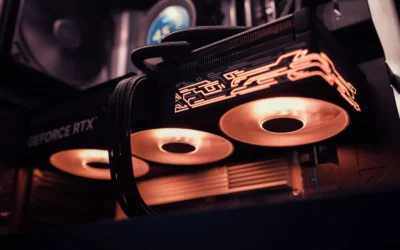
Choosing an RTX 5080 is not just about performance, it is about whether that long, tall card will actually fit and breathe in your case. If you are trying to sort out RTX 5080 length and clearance for a mid tower and SFF case, you need to compare the card spec sheet against your case GPU clearance, slot thickness, and the extra space needed for the power connector bend.
In this guide you will learn how to weigh the variables that matter most: your target resolution and refresh rate, your platform and socket, your case size and clearance, your power budget, and whether you are building for today or planning a next upgrade. You will also see how to apply those rules using a few example products, so you can shop with measurements instead of guesswork. For more context on airflow focused builds, browse the Cases & Airflow archive.
What Actually Matters
1. Length vs Usable Clearance, Not Just Advertised Clearance
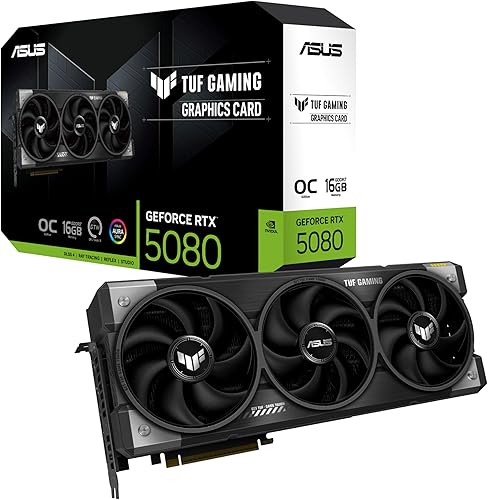
Start with the card length on the spec sheet and subtract obstructions. For example, per the spec sheet the ASUS TUF Gaming GeForce RTX 5080 16GB GDDR7 OC measures 348mm long, while a case like the RAIDMAX X606 AI PC Bundle lists support for GPUs up to 400mm. That looks comfortable on paper, but front fans, front radiators, and thick front panels can reduce usable depth.
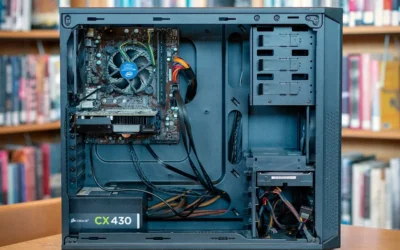
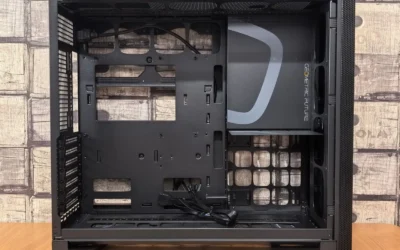
Measure from the rear PCIe bracket to the first obstruction in your case. If you plan a front-mounted 240mm or 280mm radiator, subtract its thickness plus fans from the advertised GPU length. In a mid tower you often have margin, in an SFF layout you may not. Always confirm clearance in the manual before you buy, and leave 10 to 15mm for cables at the front if your case routes power or front panel wiring there.
2. Thickness in Slots, Width, and Height
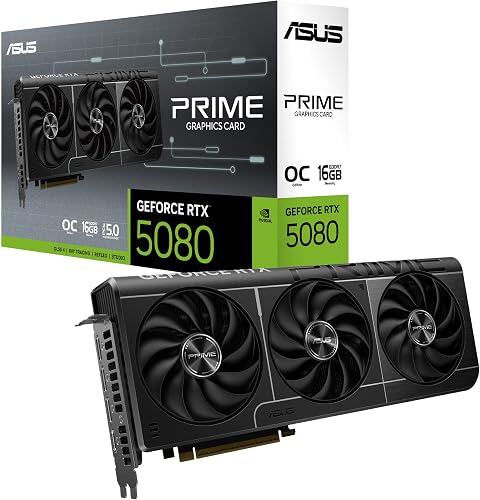
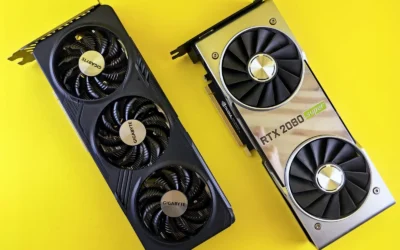
Length gets the attention, but thickness decides if the card fits between your side panel, your bottom fans, and your motherboard. The same ASUS TUF card is listed as a 3.6-slot design, while the ASUS Prime GeForce RTX 5080 EVO 16GB GDDR7 OC uses a 2.5-slot design and is marketed as an SFF-Ready Enthusiast GeForce Card. That slot difference changes whether you can keep a bottom fan, how close the fans sit to the shroud, and how much heat recirculates.
Check three numbers: slot thickness, card width from PCIe slot to side panel, and total height including backplate and power connector. Tall cards can press against side panels or vertical brackets, and wide cards can block access to front panel headers. If you use a riser for a vertical mount, remember the cable and bracket add depth. You can research more GPU form factors in our Graphics Cards section to compare slot specs side by side.
3. Power Connector Bend Allowance and Cable Routing
RTX 5080 cards use a 16-pin 12V-2×6 connector, often called 12VHPWR, and the maker spec for the ASUS TUF model calls for a minimum 850W PSU with that connector. The connector sits on top or at the end of the card, and the cable needs a gentle bend radius. If your side panel is close, a stiff bend can push against glass or prevent the panel from closing.
Look for cases that give you 30 to 35mm of space between the card edge and the side panel, or that offer a recessed cable channel. Non-modular direct cable layouts, like the one in the RAIDMAX bundle with its fixed 12VHPWR cable, can simplify routing but you still need to plan the bend. Follow the GPU and PSU maker instructions for seating the connector fully, and never force a sharp 90-degree bend right at the plug. Recommend wattage headroom over the combined GPU and CPU draw and follow the GPU maker recommended wattage, do not assume any PSU handles any card.
4. Airflow Path, Fan Support, and Anti-Sag Clearance
A long card splits your case into zones. You want cool intake air to reach the GPU fans without being blocked by a solid PSU shroud or a crowded drive cage. Cases such as the CORSAIR 3200D RS Mid-Tower PC Case – Black advertise room for up to 9x 120mm fans and include 3x RS120 fans, with one mount angled toward the GPU for improved cooling. That kind of focused intake helps when a 348mm card sits close to the front.
Also check cooler and radiator clearance against your case. If you use a top-mounted 360mm radiator, confirm the top clearance does not interfere with tall memory or the motherboard heatsinks, and verify the GPU anti-sag arm or bracket has room to install. For CPU cooling, always check cooler height or radiator length against your case spec and follow the manufacturer mounting instructions. Good clearance is not just about fitting, it is about keeping steady airflow around the card.
A few options that show the range:
This article contains affiliate links. If you buy through one of our links, CustomPCGaming may earn a commission at no extra cost to you. Commissions never influence which products we recommend or how we rank them. Read our Affiliate Disclosure for details.
Quick Picks at a Glance

STORMCRAFT Phantom RTX 5080 Gaming PC
Prime ASUS Prime GeForce RTX 5080 EVO OC 16GB GDDR7
ASUS TUF Gaming GeForce RTX 5080 OC Edition 16GB

Prime RGEEK PCIe 5.0 X16 Riser Cable 200mm Right Angle

RAIDMAX X606 AI PC Bundle

Prime CORSAIR 3200D RS Mid-Tower ATX PC Case with 3x
As an Amazon Associate we earn from qualifying purchases. Product prices and availability are accurate as of the date/time indicated.
Pros
- Outstanding 4K and 1440p 240Hz gaming performance in demanding titles
- Efficient thermal design with 360mm AIO and seven ARGB fans
- Clean, professional build quality with excellent cable management
- Secure packaging with GPU support bracket to prevent transit damage
- Strong warranty coverage and lifetime tech support
Cons
- Large tower footprint requires ample desk or floor space
- 850W PSU offers limited headroom for future upgrades to more power hungry GPUs
- Prebuilt cost is higher than sourcing and building the same parts yourself
The STORMCRAFT Phantom is a premium prebuilt gaming tower built around AMD's Ryzen 7 9800X3D and NVIDIA's RTX 5080 16GB. It is designed for serious gamers, streamers and creators who want flagship performance without sourcing and assembling components themselves.
With 32GB of DDR5 6000MHz memory and a 2TB Gen4 SSD, it handles demanding games and heavy multitasking with ease. Real world feedback shows 140 to 160 FPS at 1440p ultra in Destiny 2 and Warframe, and over 100 FPS at 4K ultra in titles like Gears 5.
The Phantom case pairs a 360mm AIO liquid cooler with seven adjustable ARGB fans for strong airflow and low temperatures. Owners highlight its clean cable management, solid GPU support bracket and professional packaging that keeps the system safe during shipping.
The tower has a fairly large footprint at 17 x 9.25 x 17 inches, so check your space before buying. The 850W Gold power supply is reliable for this configuration but leaves limited headroom if you plan to upgrade to a more power hungry GPU later.
For gamers seeking a ready to run 4K powerhouse with excellent cooling and a strong warranty, the Phantom delivers impressive value. It is a compelling choice for anyone who wants top tier performance with the convenience of a professionally assembled system.
Processor: AMD Ryzen 7 9800X3D, 8 cores 16 threads, up to 5.2GHz, AM5 socket
Graphics: NVIDIA GeForce RTX 5080 16GB GDDR7, 256-bit, PCI Express
Memory and Storage: 32GB DDR5 6000MHz RGB, 2TB NVMe Gen4 SSD
Motherboard and OS: AMD B850 chipset, Windows 11 Home
Cooling and Power: 360mm AIO liquid cooling, 7x ARGB fans, 850W 80 Plus Gold PSU
Case and Dimensions: STORMCRAFT Phantom, Black, 18.5 x 9 x 16.9 inches
Connectivity: HDMI, USB 2.0, USB 3.0, WiFi antenna included
Pros
- Outstanding 4K gaming and AI performance with Blackwell and DLSS 4
- Highly efficient cooling keeps temperatures low and noise minimal
- Compact SFF-Ready 2.5-slot form factor for wider build compatibility
- Quiet operation with 0dB tech and Dual BIOS flexibility
- Durable build with long-life fans and precise Auto-Extreme construction
Cons
- 12-inch length can still be tight for very small SFF cases
- Requires a strong power supply and good case airflow to reach full potential
- 2.5-slot triple-fan design takes more space than standard dual-slot cards
The ASUS Prime GeForce RTX 5080 EVO OC is a high-end gaming GPU built for enthusiasts, creators, and professionals who demand top-tier 4K performance. Built on NVIDIA Blackwell architecture with 16GB of GDDR7 memory, it is ideal for users who want flagship power in a more compact, SFF-Ready build.
Performance is a standout, with a factory overclock to 2685 MHz and DLSS 4 support for higher frame rates and AI-enhanced visuals. With 1801 AI TOPS, it handles demanding games, ray tracing, and creative AI workloads with ease while delivering smooth output to high refresh and 8K displays.
Design balances compatibility and cooling with a 2.5-slot layout that fits more cases than bulkier flagships. The triple Axial-tech fans, MaxContact heat spreader, and phase-change thermal pad work together to improve heat transfer and sustain boost clocks under load.
Build quality is premium, featuring dual-ball fan bearings for longer lifespan, 0dB technology for silent light gaming, and a Dual BIOS switch for Quiet or Performance modes. Auto-Extreme manufacturing ensures precision and reliability, while GPU Tweak III software makes tuning and monitoring intuitive.
While powerful, its 12-inch length and 2.5-slot width still require a roomy case and solid power delivery, and it is more than needed for casual 1080p gaming. Overall, it is an excellent choice for gamers and creators who want flagship Blackwell power with smarter sizing and superior cooling.
Model: ASUS PRIME-RTX5080-O16G-EVO, NVIDIA GeForce RTX 5080, Blackwell Architecture
Memory: 16GB GDDR7, 1801 AI TOPS, OC Mode 2685 MHz / Default 2655 MHz
Interface: PCI-Express x16, PCIe 5.0 support
Outputs: 1x HDMI 2.1b, 3x DisplayPort 2.1b, Max Resolution 7680 x 4320
Cooling: Triple Axial-tech fans, MaxContact, phase-change thermal pad, 0dB Technology, Dual BIOS
Design: 2.5-slot, SFF-Ready Enthusiast GeForce Card, 12 x 5 inches, 3 pounds, dual-ball bearings
Extras: GPU Tweak III software, Auto-Extreme manufacturing, 3 Year Warranty
Pros
- Exceptionally cool and quiet operation, even during demanding AAA gaming and sustained AI generation
- Excellent build quality with rugged TUF construction and included GPU support bracket to prevent sag
- Strong 4K gaming and local AI performance thanks to 16GB GDDR7 and DLSS 4
- Premium connectivity with DisplayPort 2.1a and HDMI 2.1b for high-refresh 4K and 8K displays
- Intuitive tuning and monitoring via GPU Tweak III software
Cons
- Massive 3.6-slot, 13.7-inch footprint requires a large case and may block adjacent PCIe slots
- Requires 850W PSU with 16-pin 12V-2x6 connector, so many upgraders will need a new power supply
- Minimal RGB lighting will disappoint builders seeking a flashy, highly customizable light show
The ASUS TUF Gaming GeForce RTX 5080 OC Edition is a flagship Blackwell graphics card built for serious gamers, creators and AI enthusiasts who demand uncompromising 4K performance. With 16GB of ultra-fast GDDR7 memory and DLSS 4, it is designed to handle the most demanding AAA titles and local AI workloads with ease.
In real-world use, owners report impressively low temperatures and near-silent operation, often staying under 60 degrees Celsius during extended Cyberpunk 2077 sessions and idling around 25 degrees. The factory overclock to 2730 MHz plus DLSS 4 delivers smooth, high-frame-rate 4K gaming, while 16GB GDDR7 proves excellent for ComfyUI video generation and other creative tasks.
Build quality is a true highlight, with a rugged TUF design featuring military-grade components, protective PCB coating and Auto-Extreme manufacturing for long-term reliability. The massive 3.6-slot fin array with three Axial-tech fans and a phase-change thermal pad ensures lasting cooling, and the included GPU holder helps prevent sag despite its 4.3-pound weight.
Its size is the main trade-off, as the 13.7-inch length and 3.6-slot width demand a large case with excellent clearance and slot spacing. You will also need an 850W power supply with a 16-pin 12V-2x6 connector, so many users upgrading from older 30-series cards should plan for a PSU upgrade as well.
Overall, the TUF RTX 5080 OC Edition delivers on its promise of durability, cool quiet power and next-gen features in a tank-like package. If you have the case space and power to support it, it is an outstanding choice for a high-end, future-proof gaming and creation rig that will stay reliable for years.
GPU: NVIDIA GeForce RTX 5080 Blackwell architecture, 16GB GDDR7, Boost Clock up to 2730 MHz in OC Mode and 2700 MHz in Default Mode, PCI-Express x16 interface.
Cooling and Power: Triple Axial-tech fans, 3.6-slot design with massive fin array, phase-change thermal pad, requires 850W PSU with 16-pin 12V-2x6 connector.
Connectivity and Build: 3x Native DisplayPort 2.1a, 2x Native HDMI 2.1b, max resolution 7680 x 4320, dimensions 13.7 x 5.7 inches, weight 5 pounds. Includes TUF graphics card holder, TUF magnet, Velcro hook and loop, and user manual. 3-year warranty.
Pros
- Full PCIe 5.0 x16 speed with validated 128GB/s bidirectional bandwidth
- Wide compatibility with latest gaming and professional GPUs including RTX 50 series
- High-quality build with 6-layer PCB, gold-plated contacts and EMI shielding
- Right-angle design optimizes airflow and aesthetics for vertical mounts
- Backward compatible with PCIe Gen4 and Gen3 for versatile builds
Cons
- Right-angle orientation only fits cases where motherboard and GPU face the same side
- Fixed 200mm length may be too short or too long for some custom layouts
- Flexible cable requires careful routing to avoid sharp bends or strain
The RGEEK PC137a is a PCIe 5.0 x16 riser cable with a 200mm right-angle design made for vertical GPU mounting. It is aimed at gamers, content creators and AI professionals building in ATX or MATX cases who want to showcase their GPU while maintaining full Gen5 performance.
In real-world use, its standout feature is validated 128GB/s bidirectional bandwidth, ensuring near-zero loss even under heavy loads. It supports the latest cards like RTX 5090/5080, RX 9070 and data center GPUs such as H100 and A100, and it remains backward compatible with Gen4 and Gen3 systems for added flexibility.
Build quality is a clear focus, with a 6-layer M7-grade low-loss PCB, 5U gold-plated fingers and a reliable SMT socket for strong retention. The PC+ABS housing with metal armor adds durability, while integrated aluminum foil shielding helps minimize EMI and the flexible cable allows clean bending without signal degradation.
The main drawback is its specialized 90-degree layout, which is ideal only for specific case configurations and not universal. The 20cm cable length (24cm total) also limits placement options, so careful measurement of your case and mount position is essential before buying.
Verdict: For vertical mount builds that demand uncompromised PCIe 5.0 speed, the RGEEK PC137a is a strong, future-proof choice. It combines workstation-grade stability with gamer-friendly aesthetics, making it a smart pick for high-performance RTX 50 series and professional GPU setups.
Model: RGEEK PC137a, PCIe 5.0 x16 Riser Cable, 200mm cable length (240mm total)
Performance: PCIe Gen5, up to 128GB/s bidirectional, backward compatible with Gen4/Gen3, validated with 3DMark bandwidth test
Compatibility: NVIDIA RTX 5090/5080, AMD RX 9070, Intel GPUs, plus professional A100/A800/H100/H800, Desktop ATX/MATX vertical mount
Construction: 6-layer M7 low-loss PCB, 5U gold-plated fingers, SMT socket, PC+ABS housing with metal armor, aluminum foil EMI shielding
In the Box: 1x PCIe 5.0 Riser Cable, 2-year warranty
Pros
- Excellent value and guaranteed compatibility as a three-in-one bundle
- Outstanding thermal performance from mesh front and large 140mm fans
- Gen 5 ATX 3.1 Gold PSU with native 12VHPWR ready for next-gen graphics cards
- Roomy interior with tempered glass panel and flexible expansion options
- Quiet AIO cooling with vibrant ARGB lighting included
Cons
- Non-modular PSU with fixed cables can make cable management more challenging
- Maximum radiator support is 280mm, not 360mm, limiting some cooling upgrades
- Only available in black with no alternative color options
The RAIDMAX X606 AI PC Bundle is a complete foundation kit that combines a mesh ATX mid-tower case, a 240mm AIO liquid cooler, and a 750W 80+ Gold ATX 3.1 power supply. It is purpose built for system integrators, AI builders, and gamers who want proven, compatible parts without sourcing each component separately.
In real world performance, the bundle prioritizes cooling and stable power delivery. The full mesh front and three 140mm ARGB fans provide strong intake airflow, while the 240mm AIO keeps multi-core CPUs cool and quiet during gaming and AI workloads. The 750W Gen 5 PSU with native 12VHPWR delivers clean power for demanding GPUs like the RTX 5080 and RX 9070.
Design and build quality focus on function and airflow over flash. The mid-tower layout offers generous space for GPUs up to 400mm and ATX motherboards, with a tempered glass side panel to showcase your build. The metal chassis feels solid, and the fixed cable PSU layout simplifies installation for streamlined integrator style builds.
There are a few tradeoffs to consider. The non-modular PSU improves stability but leaves extra cables to manage in smaller builds, and radiator support tops out at 280mm. The bundle is also limited to a black colorway, so builders wanting more customization may need to look elsewhere.
Overall, the X606 bundle is a smart, value driven choice for anyone building a modern AI or gaming PC. It delivers excellent thermals, next-gen power readiness, and OEM proven reliability in one convenient package. If you want a no fuss, airflow focused foundation for a high performance build, it is an easy recommendation.
Model: RAIDMAX CS-X606TBFP750C240 | Case Type: Mid Tower ATX
Motherboard Support: ATX, Micro ATX | GPU Clearance: Up to 400mm | Radiator Support: Up to 280mm
Cooling Included: 3x 140mm ARGB Fans (front) + 240mm AIO Liquid Cooler | Cooling Method: Air and Water
Power Supply: 750W 80+ Gold, ATX 3.1, PCIe Gen 5, Native 12VHPWR (12+4 pin), Non-Modular Direct Cable
Materials: Metal chassis with Tempered Glass side panel | Color: Black | Dimensions: 17.3 x 8.3 x 19 inches | Weight: 12 pounds
Pros
- Excellent airflow with 9 fan positions and 3 included ARGB fans
- Easy build experience with preinstalled standoffs, cable shroud and smart routing
- Supports reverse-connection motherboards for a clean, professional look
- Top-mounted 360mm radiator support for powerful CPU liquid cooling
- Built-in GPU anti-sag arm and spacious interior for large components
Cons
- Front I/O is limited to one USB Type-A 2.0 port and one USB Type-C port
- Plastic exterior feels less premium than steel or aluminum alternatives
- Limited space for a dedicated fan controller due to reverse-connection layout, fans can be noisy at full speed
The CORSAIR 3200D RS is a spacious mid-tower ATX case designed for gamers and DIY builders who want powerful cooling and a clean aesthetic. It is ideal for users building with large GPUs, liquid cooling, and modern reverse-connection motherboards.
In real world use, cooling is a major strength thanks to nine 120mm fan mounts and three included RS120 ARGB fans that provide strong, continuous airflow. The unique angled fan mount aimed at the GPU and room for a top-mounted 360mm radiator help maintain low temperatures during demanding games.
Design and build quality are impressive for the class, with a tempered glass side panel that attaches without stressing the glass and preinstalled motherboard standoffs. The integrated cable shroud, generous tie-down locations and single-connector front panel make cable management simple and fast.
There are a few drawbacks to note. Front connectivity is minimal with only one USB Type-A 2.0 and one USB Type-C port, which may feel limiting. The chassis uses plastic materials and offers little room for a separate fan controller, and the included fans can get loud at higher speeds.
Overall, the 3200D RS is a well rounded, builder friendly case that delivers excellent airflow, modern features and great ease of use. For anyone wanting a cool, tidy and future ready ATX gaming build, it is a highly recommended foundation.
Model: Corsair 3200D RS CC-9011334-WW, Mid Tower ATX
Motherboard Support: ATX, including reverse-connection motherboards
Cooling System: Up to 9x 120mm fan mounts, 3x RS120 ARGB fans included, top radiator support for 360mm, 280mm or 240mm
Front I/O: 1x USB Type-C, 1x USB Type-A
Special Features: Built-in GPU Anti-Sag Arm, cable shroud, tempered glass side panel
Materials and Dimensions: Plastic with glass panel, 19.49 x 8.62 x 18.03 inches, 6.9 kg, Bottom mount PSU
Matching a Part to Your Build
Scenario 1: Mid tower with front mesh and room to spare. If you have a spacious ATX mid tower like the RAIDMAX X606 AI PC Bundle with its listed 400mm GPU support and mesh front plus 3x 140mm ARGB fans, you can prioritize a larger, thicker card. The ASUS TUF Gaming GeForce RTX 5080 16GB GDDR7 OC at 348mm and 3.6 slots fits with margin, and the included 240mm liquid cooler leaves front depth free compared to a front-mounted 360mm radiator. This is a good match when you want maximum cooling mass and you have headroom for the 16-pin cable bend.
What to verify here: that your 750W or 850W PSU meets the GPU maker 850W minimum when required, that the 12VHPWR cable reaches without tension, and that your top radiator, if you add one later, does not reduce front clearance. This setup suits 4K or high refresh 1440p gaming where you want thermal headroom for long sessions.
Scenario 2: Compact or SFF-leaning build where every millimeter counts. If your case is tight on length or you need to preserve slot space for other devices, the ASUS Prime GeForce RTX 5080 EVO 16GB GDDR7 OC with its 2.5-slot design and SFF-Ready positioning is easier to place. The triple Axial-tech fan layout and phase-change thermal pad are designed to keep cooling performance while staying slimmer than a 3.6-slot card, which helps with side panel clearance and bottom fan placement.
What to verify here: exact GPU length against your case GPU limit, side panel to GPU fan gap, and whether the case needs a support bracket for a heavy card. If your SFF case lists a strict GPU length limit under 340mm, even a 2.5-slot card may still be too long, so measure first. This path is for builders who value compatibility and airflow in a smaller footprint over the largest possible heatsink.
Scenario 3: Vertical mount or sandwich layout using a riser. If you plan a vertical GPU mount to show the card or to improve intake in a narrow case, the RGEEK PCIe 5.0 Riser Cable X16 with its 200mm right-angle design and PCIe 5.0 X16 support can help. Per the spec sheet it is rated for 128GB/s bidirectional speed and is backward compatible with Gen5, Gen4, and Gen3, with a 20cm cable length and 24cm total length including connectors.
What to verify here: riser length versus case mount points, PCIe generation setting in BIOS, and that the right-angle exit does not press against the side panel. Vertical mounts add thickness in the depth axis, so check that your case has a dedicated vertical bracket and that the GPU fans have fresh intake rather than recirculating against glass. The CORSAIR 3200D RS Mid-Tower PC Case – Black example with its GPU anti-sag stabilization arm shows how cases address heavy cards, but you still need to confirm the arm works with a vertical position. The STORMCRAFT Phantom RTX 5080 Gaming PC Ryzen 7 with its 17 x 9.25 x 17 inch case and 360mm AIO plus 7x ARGB fans illustrates how a prebuilt balances radiator and fan count around a long RTX 5080, a useful reference when you plan your own fan layout.
Common Mistakes
Mistake 1: Ignoring the power connector bend. Many builders check length but forget the 16-pin plug needs space to curve. A card that technically fits at 348mm can still push the cable into the side panel, causing the panel to bulge or the connector to sit at an angle. Always add bend allowance to your length math and route the 12V-2×6 cable before you finalize the GPU seating. If you are comparing power budgets, see how other builds balance wattage in this ryzen 5 7600 RX 7700 XT 1000 dollar gaming PC amazon build breakdown.
Mistake 2: Pairing a long card with a front radiator without remeasuring. A 360mm radiator and fans in the front can eat 50 to 60mm of GPU length. Builders who buy a 348mm card and later add a front AIO discover the card no longer clears. If you need top cooling, choose a case that supports a top-mounted 360mm, 280mm, or 240mm radiator so the front stays open for GPU length. Check radiator clearance against your case and motherboard before you order.
Mistake 3: Undersizing the PSU or using the wrong cable. The spec sheet for the TUF card lists a minimum 850W PSU with a 16-pin 12V-2×6 connector. Using an older PSU without native support or daisy-chaining adapters can create fit and stability issues and may void warranty if you improvise. Choose a PSU that meets the GPU maker recommended wattage with native 12VHPWR or 12V-2×6 support, leave headroom for CPU peaks, and follow the maker instructions for installation. Handle components with anti-static precautions and update BIOS only at your own risk.
Who Should Wait or Buy Differently
If your current case has a hard GPU limit under 340mm, a solid front panel with weak intake, or no room for the power cable bend, an RTX 5080 is not ideal for that enclosure right now. This is also not a good fit if your PSU is well below the 850W recommendation or lacks a native 16-pin cable and you are not ready to replace it. In those situations you are better off choosing a more compact SFF-Ready card like the 2.5-slot Prime model, moving to a larger airflow mid tower such as the 3200D RS or X606, or waiting until you can upgrade case and power together in November 2026 so the card has both physical clearance and stable power.
Frequently Asked Questions
How do I know if a 348mm RTX 5080 will fit my mid tower? Compare the card length on the spec sheet to your case GPU clearance in the manual, then subtract any front radiator and fan thickness. For example, a case that supports up to 400mm gives comfortable margin for a 348mm card, but a front-mounted 360mm radiator can reduce that margin quickly, so measure to the first obstruction.
Is a 2.5-slot RTX 5080 better for SFF than a 3.6-slot model? For tight cases, yes, the slimmer 2.5-slot design often helps with side panel clearance, bottom fan placement, and overall airflow. The ASUS Prime GeForce RTX 5080 EVO 16GB GDDR7 OC is positioned as SFF-Ready for this reason, while a 3.6-slot card like the TUF model needs more width and may block adjacent slots.
Do I need a new PSU for an RTX 5080? Many RTX 5080 models list a minimum 850W PSU with a 16-pin 12V-2×6 connector, so check your PSU label and cables. If your unit is lower wattage or lacks native support, plan for a replacement that meets the GPU maker recommendation and provides headroom for your CPU and other parts, and follow the installation guide closely.

Write Your Review
No reviews yet. Be the first to share your experience!