

If you are planning around RTX 5070 length and clearance for a mid tower and SFF case, your first job is not picking the fastest model, it is making sure the card you want actually fits and stays cool in the case you own or plan to buy. Length, thickness, front radiator space, and your airflow path all decide whether you get a clean build or a tight squeeze with thermal compromises.
This buying guide gives you a decision framework you can reuse for any build. You will weigh your resolution and refresh target, your platform and socket, your case size and clearance, your power budget, and whether this is your current build or the next upgrade. We will use a couple of example products to show how the numbers work in practice, so you can compare any RTX 5070 and any case with confidence in November 2026.
What Actually Matters
Card Dimensions and Slot Thickness
Start with the three numbers that define fit: length, height, and thickness. For this generation, many RTX 5070 cards use a 2.5-slot design, which means the cooler extends well beyond two expansion slots. That thickness affects not only whether the card clears your side panel, but also how close it sits to your bottom fans, your PSU shroud, and your front intake.
SFF-Ready sizing is a helpful filter when you are building compact. An SFF-Ready enthusiast GeForce card is designed to meet small-form-factor limits for length and thickness so it aligns with cases that publish strict GPU clearance. Per the spec sheet, the example cards in this class offer 12GB GDDR7, PCIe 5.0, and HDMI and DP 2.1 outputs, but the physical envelope matters more than the interface for fit. Always check the card maker spec sheet for exact length and slot width and compare it to your case spec before you commit.
Case GPU Clearance and Front Mounted Cooling
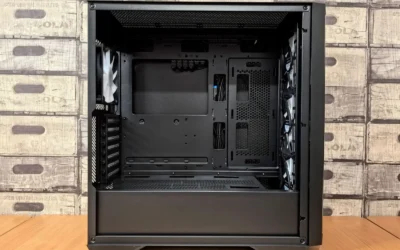
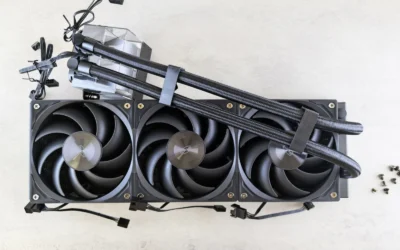
Your case spec sheet is your source of truth. Look for max GPU length, max CPU cooler height, and max radiator length and thickness in the front, top, and side positions. For example, per the spec sheet a mid tower like the one we evaluated lists max GPU length of 340 mm and support for up to a 360 mm liquid cooling radiator in front, plus support for up to 8 x 120 mm fans. If you plan a front-mounted radiator, subtract its thickness and fan depth from your usable GPU length, because that combination is where most clearance surprises happen.
Also check motherboard support and internal layout. A case that supports ATX, M-ATX, and ITX gives you flexibility, but the drive cage, front fan bracket, and cable bar can still intrude on GPU space. Look at the manual diagram for where the GPU sits relative to the front fans or radiator. If you are reusing a compact case, verify both length and width clearance, and follow the manufacturer mounting instructions for any radiator or bracket so you do not create pressure on the card or block its fans. For more context on case selection, browse the Cases & Airflow archive to compare airflow-focused layouts.
Airflow Path and Thermal Design
Clearance is only half the story, airflow is the other half. A card with three Axial-tech fans and a carefully arranged shroud, heatsink, and heat pipe layout is designed to leverage chassis side-panel ventilation and push air down through the heatsink. Features like a smaller fan hub for longer blades and a barrier ring that increases downward air pressure help move heat efficiently, while a premium phase-change GPU thermal pad helps ensure optimal heat transfer. In a mid tower with a mesh front panel, that design benefits from a straight front-to-back airflow path.
In an SFF case, the same cooler needs room to breathe. If the card sits too close to the side panel, the PSU shroud, or a solid front, it can recirculate warm air. Prioritize cases with a mesh front panel for maximum airflow, generous bottom or side ventilation, and enough fan mounts to keep pressure balanced. Owners commonly report lower temperatures when the GPU has at least a few millimeters of breathing room below the fans and an unobstructed intake in front. If you are pairing your GPU choice with a high refresh-rate target, see our related guide on top RTX 5070 ti cards for 1440p gaming to understand how thermal headroom relates to sustained performance.
Build Practicality: Cable Routing, Panels, and I/O
Fit is not just length, it is also how easily you can build around the card. Soft silicone cord grommets make cable management simpler and help you keep power cables from pressing against the GPU backplate or fans. A door opening design with 4mm thick tempered glass lets you see your components and lighting, and it makes interior access easier during assembly. These details sound small, but they decide whether you can route the 12V power cable with a gentle bend and maintain clearance for airflow.
Do not overlook front I/O and fan control. A modern I/O panel with a Type-C port, 2 x USB 3.0, and a microphone and headphone combo jack is convenient for daily use, and ARGB lighting that synchronizes via a 5V 3pin interface helps you unify fan and strip control through your motherboard. When you research, check that your motherboard has the matching headers and that your fan plan aligns with the case support, such as multiple 120 mm mounts. For broader platform planning, our Graphics Cards section can help you match power and platform choices to your case airflow.
To illustrate how these specs translate to real builds, here are a few options that show the range of card and case designs you will encounter:
This article contains affiliate links. If you buy through one of our links, CustomPCGaming may earn a commission at no extra cost to you. Commissions never influence which products we recommend or how we rank them. Read our Affiliate Disclosure for details.
Quick Picks at a Glance

ASUS Prime GeForce RTX 5070 12GB GDDR7 Graphics

Prime Vetroo AL800 Mid Tower ATX Gaming PC Case
As an Amazon Associate we earn from qualifying purchases. Product prices and availability are accurate as of the date/time indicated.
Pros
- Outstanding 1440p performance with strong 4K capability thanks to DLSS 4
- Exceptionally cool and quiet cooling even during intensive gaming sessions
- Premium lightweight construction prevents sag and looks great in dark builds
- Dual BIOS lets you prioritize quiet operation or maximum performance
- Broad compatibility for both small form factor and full size systems
Cons
- 12 inch length may still be too large for the most compact mini-ITX cases
- Best performance requires pairing with a modern CPU and adequate power supply
- 12GB VRAM may be limiting for future ultra texture 4K gaming compared to higher end models
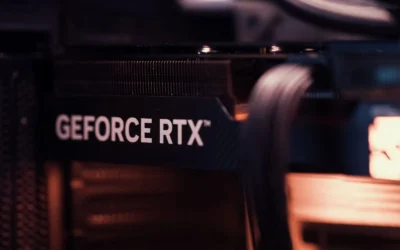
The ASUS Prime GeForce RTX 5070 12GB GDDR7 is a SFF-Ready enthusiast graphics card built on NVIDIA Blackwell architecture. It is designed for gamers and creators who want top tier 1440p performance and solid 4K capability in a more compact, versatile form factor.
Powered by DLSS 4 and 12GB of ultra fast GDDR7 memory, it delivers smooth high refresh rate gaming in competitive and AAA titles. Users report excellent results in demanding games like Metro and Escape from Tarkov, with quiet operation and low temperatures even under sustained loads.
Build quality is a clear highlight, with a sleek jet black design, premium Prime lettering, and a rigid 2.5-slot construction that avoids GPU sag. The triple Axial-tech fans with barrier rings and phase-change thermal pad provide efficient, quiet cooling while blending seamlessly with modern dark motherboards.
The card is not without compromises. At 12 inches long it can still be a tight fit in the smallest mini-ITX cases despite its SFF-Ready branding. As with any current gen GPU, you will need a capable CPU and power supply to get the most from its PCIe 5.0 performance.
Overall, the ASUS Prime RTX 5070 strikes an impressive balance of power, efficiency, and build compatibility. If you want a cool, quiet, and future ready GPU for high performance 1440p gaming with headroom for 4K, this is an outstanding choice that should serve you well for years.
GPU: NVIDIA GeForce RTX 5070, Blackwell architecture, 2542 MHz boost clock
Memory: 12GB GDDR7, 4000 MHz memory clock
Interface: PCIe 5.0 x16, 3x DisplayPort 2.1b, 1x HDMI 2.1b, up to 7680x4320 resolution
Cooling: Triple Axial-tech fans, 2.5-slot design, phase-change GPU thermal pad, Dual BIOS
Dimensions and Weight: 12 x 5 inches, 3.3 pounds, SFF-Ready compatible
Warranty: 3 Year ASUS Warranty
Pros
- Excellent airflow from mesh front panel keeps system cool
- Hinged tempered glass door simplifies building and upgrades
- Wide compatibility for large GPUs and 360mm liquid cooling
- Integrated ARGB strip with motherboard sync for cohesive lighting
- Modern front I/O includes Type-C and dual USB 3.0
Cons
- May need additional fans to reach full cooling potential
- Tempered glass door requires careful handling during assembly
- Mid tower size still needs ample desk or floor space
The Vetroo AL800 is a mid tower ATX gaming case built for gamers and first time builders who want strong airflow and a clean showcase look without complexity. It supports ATX, Micro ATX and Mini ITX boards, so it fits a wide range of gaming and productivity builds.
In real world use, the mesh front panel delivers excellent airflow to keep components cool during long gaming sessions. Support for up to eight 120mm fans and a 360mm front radiator gives you flexible air or liquid cooling options, while the 340mm GPU clearance easily handles large cards including RTX 50 series models.
Design wise, the AL800 feels youthful and modern with its integrated ARGB LED strip that syncs via a 5V 3pin header for unified lighting. The 4mm tempered glass side panel uses a convenient door opening design that swings open, making installations and upgrades faster and letting your lighting and hardware stay fully visible.
There are a few tradeoffs to consider. You will likely want to add extra fans to take full advantage of the cooling capacity, and the glass door requires careful handling. Cable management is helped by silicone grommets, but careful routing is still needed for a truly clean look in this airflow focused layout.
Overall, the AL800 stands out as a stylish, high airflow case that balances compatibility, ease of building and ARGB presentation. It is a smart pick for gamers who want a modern, cool running showcase build with room to grow.
Brand: Vetroo
Model: AL800
Case Type: Mid Tower
Color: Black
Material: Metal with 4mm tempered glass door
Motherboard Compatibility: ATX, M-ATX, ITX
GPU Clearance: Up to 340mm, fits RTX 50 series
Cooling Support: Up to 360mm radiator in front, up to 8x 120mm fans
Cooling Method: Air
Fan Size: 12cm
Power Supply Mount: Bottom mount
Front I/O: Type-C, 2x USB 3.0, microphone and headphone combo, power and reset
Lighting: ARGB LED strip, sync via 5V 3pin motherboard header
Cable Management: Soft silicone grommets
Choose the AL800 if you want maximum airflow, easy access for building, and synchronized ARGB lighting in a versatile mid tower. It is especially good for gaming builds with large GPUs or plans to add liquid cooling later.
For the best results, plan your fan layout early and use the silicone grommets to route cables behind the motherboard tray. If you want a synchronized light show, ensure your motherboard has a 5V 3pin ARGB header before you buy.
Matching a Part to Your Build
Scenario 1: Compact SFF build where every millimeter counts. If you are building in a small-form-factor chassis, prioritize an SFF-Ready card like the ASUS SFF-Ready Prime NVIDIA GeForce RTX 5070. Its 2.5-slot design is intended to maintain cooling performance while keeping greater build compatibility, and its three Axial-tech fans are tuned to leverage side-panel ventilation. Per the spec sheet it uses NVIDIA Blackwell architecture with DLSS 4 and includes Dual BIOS, which gives you a choice between performance and quiet operation. Your checklist here is simple: confirm the card length and 2.5-slot thickness against your case GPU clearance, confirm that the side panel has ventilation, and leave room for power cable bend so the cable does not press against the panel.
Scenario 2: Value mid tower ATX build with room to grow. If you are building in a mesh-front mid tower like the Vetroo Black AL800 Mid Tower ATX Gaming PC, you have more flexibility. That case lists max GPU length of 340 mm and explicitly notes it fits RTX 50 series graphics cards, plus support for up to a 360 mm radiator in front and up to 8 x 120 mm fans. This is a good match for a 2.5-slot RTX 5070 because you can run a front mesh intake for cool air, keep the GPU away from the front fans, and still have space for cable routing through soft silicone grommets. If you plan a front AIO, mount the radiator and fans first, then measure the remaining GPU length to the PCIe bracket to verify clearance.
Scenario 3: Platform upgrade on a budget. If you are carrying over a case and upgrading the GPU for higher resolution or higher refresh gaming, evaluate your current airflow before you buy. A case with solid front panel or limited fan mounts may need additional intake fans or a mesh upgrade to feed a triple-fan cooler. Check CPU cooler height and radiator clearance against your case spec, and verify your power supply has the recommended headroom for the combined GPU and CPU draw plus the correct PCIe power connectors. For ideas on balancing CPU, GPU, and case budget, our breakdown of the ryzen 5 7600 RX 7700 XT 1000 dollar gaming PC amazon build shows how case airflow and power choices affect overall value.
Common Mistakes
Mistake 1: Assuming any RTX 5070 fits any mid tower. Even mid towers vary widely in usable GPU length once you add front fans or a 360 mm radiator. Do not rely on the case marketing line alone, open the manual and check max GPU length with and without a front radiator, then compare it to the card spec sheet. Remember that a 2.5-slot cooler also needs vertical clearance so the fans are not choked by the PSU shroud or bottom panel.
Mistake 2: Forgetting cooler and radiator interference. A tall air cooler or a thick front radiator can steal space from the GPU or block its airflow path. Always check CPU cooler height and radiator thickness against your case limits, and follow the manufacturer mounting instructions for fan orientation and radiator placement. Use the soft grommets and tie points to keep cables away from the GPU fans, and avoid sharp bends in the power cable that press against the side panel.
Mistake 3: Overlooking airflow balance and power headroom. A powerful GPU in a case with limited intake will run warmer and louder, even if it physically fits. Plan for at least two front intakes with a mesh front panel, and consider how many 120 mm mounts you can populate. On the power side, do not undersize the PSU, follow the GPU maker recommended wattage and leave headroom over combined CPU and GPU draw, and handle BIOS updates and any overclocking at your own risk as they may void warranty. Use anti-static handling when you build.
Who Should Wait or Buy Differently
This approach is not ideal for you if your current case has a solid front panel with minimal ventilation, limited GPU length under 300 mm, or no room for additional intake fans, because even an SFF-Ready 2.5-slot RTX 5070 will be starved for air and may be louder than you expect. It is also not a good fit if you are planning a very compact sandwich-layout SFF case that requires a much thinner cooler or a shorter card than the models shown here. In those situations, wait and either choose a case with a mesh front and verified 340 mm GPU clearance or look for a more compact GPU variant that explicitly lists compatibility with your exact chassis before you buy.
Frequently Asked Questions
How do I know if an RTX 5070 will fit my mid tower or SFF case?
Compare the card spec sheet length and slot thickness to your case spec sheet max GPU length and slot clearance. If your case lists 340 mm max GPU length and support for RTX 50 series cards, a 2.5-slot card in that length class should fit, but recheck if you have a front-mounted 360 mm radiator or thick front fans that reduce usable depth.
Does a 2.5-slot cooler need special airflow?
A 2.5-slot cooler with three Axial-tech fans is designed to push air down through a dense heatsink, so it benefits from a mesh front panel and clear side-panel ventilation. Keep cables routed through grommets and away from the fan intakes, and maintain a front-to-back airflow path with balanced intake and exhaust.
What should I check besides length?
Check width and thickness clearance to the side panel, PSU shroud, and bottom fans, plus CPU cooler height and radiator support. Also verify your motherboard has a 5V 3pin header if you want ARGB sync, and that your I/O needs are met with features like Type-C and USB 3.0 on the case front panel.


Write Your Review
No reviews yet. Be the first to share your experience!