

If you are sorting out the best way to bundle desk cables for your gaming build, you need to decide how to group, route, and secure every cord without making future changes painful. Your resolution and refresh target will shape how many display cords you run, while your platform and PC placement, your desk size and under-desk clearance, your power budget for bricks and chargers, and your plan for current versus next upgrades will decide how thick that bundle becomes.
In this buying guide you will learn what to weigh before you buy, from sleeve diameter and strap capacity to mounting style and access. For broader ideas on keeping your space tidy, browse the Cable Management and Under-Desk guides alongside this framework so your power, USB, audio, and network runs all have a clear path.
What Actually Matters
Bundle Size, Length, and Capacity
Start with how many cords you need to group and how far they travel. A split tube with a Diameter of 1/2 inch and Length of 10 Feet suits one long run from your desk to a wall outlet or PC, while shorter sleeves that measure 20 in L x 0.4 in w work better for grouping a few USB and audio cords together behind a monitor. If you use straps, look at rated capacity such as holds up to 15 cables, and remember that thick power cords fill space much faster than slim charging cords.
You want a bundle that closes easily without pinching. If you have to force cords inside or the wrap keeps springing open, you need a wider diameter, a second parallel run, or an extra strap point. Leave a little service slack near your PC and monitor so you can pull your case out or adjust height without tugging connectors.
Sleeve Versus Strap Versus Full Kit
Your bundling style decides how clean the result looks and how fast you can change it. A split wire loom that closes on itself hides a long run in one tidy tube and helps keep pets from chewing cables, which is ideal when you want a single visual line. Braided sleeves offer a similar grouped look with more flex around corners, while reusable hook-and-loop straps let you open, add, or remove one cord at a time.
If your setup is chaotic, a multi-piece kit gives you more tools in one purchase. Look for combinations that include sleeves plus reusable wire ties, cable clips and cord holders, self adhesive tie rolls with a length such as 118 in per roll, tie mounts, and fastening ties sized around 7.87in L x 0.12in W. That mix lets you bundle long runs, anchor drops to the desk edge, and park spare slack where you can reach it, a useful approach if you follow a minimalist RGB desk setup and want lighting cords hidden too.
Mounting Method and Desk Surface
Under-desk control lives or dies by adhesion and placement. Many straps and holders use peel-and-stick pads rated for clean, dry, smooth surfaces such as wood, glass, tile, metal, and plastic, with removable designs that lift away cleanly when used properly. You should clean the surface, press firmly, and wait about 2 hours before loading heavier bundles so the bond can set, and avoid textured, dusty, or oiled wood where pads struggle to grip.
Plan your route before you stick anything down. Map power on one side and low-voltage USB, HDMI, Ethernet, and audio on the other where possible, keep power bricks supported rather than hanging from cords, and follow the manufacturer mounting instructions for weight limits. If you rent or use a standing desk, favor no-drill straps and clips that you can reposition, and pair them with the ideas in the LED desk lighting guide so light strips and power runs do not fight for the same edge.
Access, Protection, and Heat Tolerance
Think about how often you will open the bundle. Hook-and-loop cold holders sized around 120x40mm with reinforced fasteners are easy to reopen for headset, controller, or drive swaps, while a closed loom looks tidier but takes longer to reload. If you change gear often, you will appreciate straps or segmented designs that allow adjustments without removing the entire unit.
Protection matters if you have pets, tight bends, or warm gear nearby. Look for insulated, UL Recognized sleeving with a stated Operating temp such as -103 to 257 degrees F and Melt temp around 446, which per the spec sheet suits home and office routing for Hifi speaker, HDMI, and automotive style low-voltage runs. You should still keep bundles off hot exhaust vents, avoid sharp kinks in power cords, and give your power supply and monitor bricks room to breathe rather than wrapping them tight.
A few options that show the range are listed below, from a single long sleeve to strap packs and a full kit. Use them to compare capacity, length, and mounting style against your own desk:
This article contains affiliate links. If you buy through one of our links, CustomPCGaming may earn a commission at no extra cost to you. Commissions never influence which products we recommend or how we rank them. Read our Affiliate Disclosure for details.
Quick Picks at a Glance

Prime AlexTech 10ft 1/2 Inch Split Wire Loom Tubing

Prime Silcpall Under Desk Cable Management Straps 20
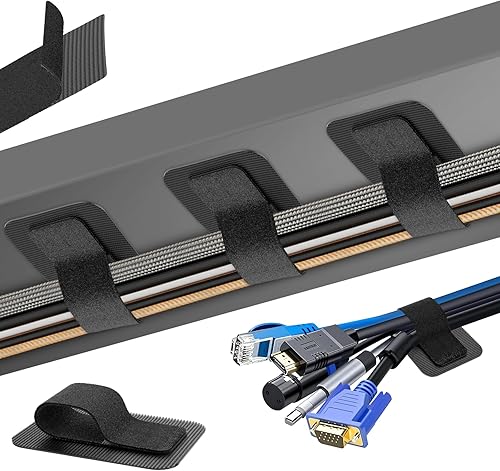
Prime Fansto Under Desk Cable Management 20 Pack

Prime N NOROCME 192 PCS Cable Management Kit with Wire
As an Amazon Associate we earn from qualifying purchases. Product prices and availability are accurate as of the date/time indicated.
Pros
- Quick split design makes installation fast and holds cables securely
- Tough polyethylene resists chewing, rubbing and heat
- Versatile 1/2-inch size fits most single cables and small bundles
- UL Recognized material for added safety and peace of mind
- Lightweight and flexible for clean routing behind desks and TVs
Cons
- 1/2-inch diameter can be snug for thick power bricks or large cable bundles
- Split seam may open slightly on tight bends if overfilled
- Industrial black finish may stand out in light colored living spaces
The AlexTech 10ft Split Wire Loom is a 1/2-inch polyethylene tubing designed to bundle and protect everyday cables. It is a smart pick for cat owners, remote workers, gamers and DIY installers who want to tame messy cords behind TVs, desks and in cars.
In real world use, loading wires is fast. Just open the split, press cables inside and the sleeve closes on itself for a tidy hold. It keeps USB, power, HDMI, speaker and automotive wires grouped, guarded from chewing and abrasion, and looking clean.
Build quality is solid for the category. The corrugated polyethylene feels tough yet flexible, resists kinking around corners and handles wide temperature swings for indoor and automotive routing. The UL Recognized construction adds confidence for long term use around power cords.
There are limits to consider. The 1/2-inch size suits single cables and small bundles, but thick groups or bulky connectors will need a larger diameter or multiple runs. Overstuffing can also cause the split to gap on sharp bends.
Overall, this is one of the simplest and most effective cable management upgrades you can buy. If you need affordable, pet proof protection with a clean, professional look, the AlexTech 10ft loom is an easy recommendation.
Brand: AlexTech, Model: sr1/2inblack10ft, Color: Black, Style: Industrial
Size: 1/2 inch diameter by 10 feet long, 120 inch length, trimmable to custom sizes
Material: Polyethylene wire loom, split self closing design, lightweight at 0.13 kg
Performance: Operating temp minus 103 to 257F, melt temp 446F, UL Recognized, insulated protection
Use: USB cable, power cord, HDMI, HiFi speaker, audio video and automotive wiring, pet chew protection
Pros
- 20 pack covers a full desk setup with spares left for future changes
- Reusable design is more flexible and economical than single-use zip ties
- No tools or drilling needed, renter friendly and safe for desks and walls
- Soft nylon straps feel durable while staying gentle on cable jackets
Cons
- Adhesive needs a clean, smooth surface plus 2-hour wait for maximum hold
- Capacity drops with thick power cords, 15 cables applies to thin wires only
- Simple black nylon look is functional rather than premium for visible setups
The Silcpall Under Desk Cable Management set includes 20 pairs of adhesive hook and loop straps designed for desks, gaming stations, TV cabinets and home offices. It is built for anyone tired of tangled cords who wants a clean, drill-free routing solution.
In real use, the reusable wrap design stands out because you can open, add cables and reclose in seconds without cutting ties. The extended length comfortably groups USB, HDMI, Ethernet and charging cables together, keeping bundles routed neatly under the desk.
Each strap pairs soft nylon hook and loop with an upgraded adhesive base that sticks to wood, glass, tile, metal and plastic. The 6.3-inch black straps feel flexible yet sturdy, and the low-profile mount keeps cables close to the surface for a tidy look.
There are limits to note. The adhesive works best on clean, dry, smooth surfaces and needs about two hours to cure before holding heavier loads. Very thick power bricks and cables will also reduce capacity, so plan for fewer than 15 cables with bulky setups.
Overall, this is a practical, renter-friendly kit for organizing a full workstation without tools. If you want affordable, adjustable and removable cable control for office or gaming use, this 20-pack is an easy recommendation.
Brand: Silcpall, Model: M1, Color: Black, Material: Nylon hook and loop.
Unit Count: 20 straps, Length: 6.3 inches, Capacity: Up to 15 thin cables per strap.
Mounting: Peel-and-stick removable adhesive for wood, glass, tile, metal and plastic.
Pros
- Strong, stable hold when surface is cleaned and adhesive is allowed to cure
- High capacity straps prevent slipping and sliding even with thick cable bundles
- No tools, no drilling and no technical skills needed for installation
- Compact, reusable and easy to reorganize as your setup changes
Cons
- Adhesive base pads are single use and cannot be reused after removal
- Requires a smooth clean surface plus 2 hour wait time for best adhesion
- Very strong grip can make initial repositioning difficult
This 20 pair under desk cable organizer kit is designed for anyone tired of tangled cords under a home office, gaming or work desk. It is especially useful for setups with monitors, chargers, power strips and PC cables that need to stay hidden but accessible.
Each extended strap holds up to 15 cables securely with reinforced hook and loop fastening that resists slipping. In real use, users report a strong and stable hold when you clean the surface first and allow the adhesive to cure before loading cables.
The design is low profile and flexible, so it fits tight corners and narrow spaces without tools or drilling. The combination of plastic and rubber straps with acrylic adhesive pads feels sturdy yet compact enough to tuck neatly out of sight.
There are a couple of tradeoffs to know. The adhesive base pads are single use, so you cannot reuse them once removed, and readjusting can take real effort due to the strong grip. You also need a smooth, clean surface for best results.
Overall, this is a practical, non invasive solution for clean and safe cable control under any desk. If you want affordable, reusable straps with strong adhesion and high capacity, this kit is an easy recommendation.
This kit includes 20 hook and loop cable straps plus 20 adhesive hook pads for under desk mounting. Straps measure 120 x 40mm with additional mounting pads for flexible placement options.
It is made from durable plastic and rubber with upgraded acrylic adhesive for indoor use. The black compact style blends neatly under desks, tables and workstations.
Installation is self adhesive with no drilling required. The adjustable, self locking design is reusable, residue free and suitable for wood, glass, tile and other smooth surfaces.
Clean the mounting surface thoroughly and let it dry completely before applying the adhesive pads. Press firmly and wait 2 hours before loading cables for maximum holding strength.
Plan your cable routes first, then mount pads in corners or along the back edge of the desk for best concealment. Use one strap per bundle and leave a little slack for easy future adjustments.
To reorganize, open the hook and loop strap without removing the base pad. If you need to relocate, use a new adhesive pad since the original base is not reusable after removal.
Pros
- Huge variety covers almost any cable routing need in one purchase
- Split braided sleeves are easy to load and self close for a tidy finish
- Strong self-adhesive pads hold well on clean desks, walls and wood
- Reusable ties and cut to length rolls allow easy adjustments and reuse
- Two color clips blend with black cables or light furniture
Cons
- Adhesive clips need clean flat surfaces and may loosen on textured walls or with heavy cables
- 20 inch sleeves work best for short desk runs, longer TV setups may need linking multiple sleeves
- 192 small pieces take time to sort and plan for first time installation
The N NOROCME 192 PCS Cable Management Kit is an all in one organizer for desks, PCs, TVs and gaming setups. It is built for anyone tired of tangled cords behind monitors, entertainment centers or home offices.
The standout is the combination of 4 split self-closing sleeves with 46 clips, 11 cord holders, reusable ties and adhesive mounts. In real use, you can bundle monitor and charger cables in the sleeve, then route drops along desk edges with clips for a clean, snag free workspace.
Build quality centers on sturdy polycarbonate parts and eco-friendly Polyamide66 clips in black and transparent finishes. The self-adhesive pads grip well on clean wood, desks, baseboards and ceramic, and the braided sleeves stay closed while still allowing easy cable entry.
The main limitation is surface prep and sizing, since dusty or textured walls can weaken adhesion and the 20 inch sleeves suit short runs best. Sorting nearly 200 pieces also takes a little planning on first setup.
Overall, this kit delivers complete, tool-free cable control with strong materials and flexible options for future changes. If you want one box to tame a full desk or TV area and deter pet chewing, it is an excellent pick.
Brand: N NOROCME, Color: Black, Material: Polycarbonate and Polyamide66, Style: Modern.
Includes 4 cable sleeves 20 inch by 0.4 inch, 46 cable clips in black and transparent, 11 cord holders, 20 reusable ties, 2 self-adhesive rolls 118 inch each, 20 zip tie mounts and 100 fastening ties.
Compatible with clean surfaces such as desks, walls, baseboards, cabinets, wood and ceramic. No drilling or tools required for installation.
Matching a Part to Your Build
Your best pick depends on desk layout, cord count, and how settled your gear is. These common gaming scenarios show how to apply the framework using the example products.
For a single PC and monitor with a long drop to the wall, you want one clean tube. The Alex Tech 10ft – 1/2 inch Cord Protector Wire Loom gives you 10 Feet of split sleeving in Black with a 1/2 inch diameter that closes on itself once loaded, which helps you combine power, display, and USB runs into one line. Owners rate it highly at 4.7/5 from a very large review base, and its insulated, UL Recognized build is a sensible fit if you also want help to keep cats from chewing cables along that exposed run.
For a full battlestation reset with cords everywhere, you want variety rather than one sleeve. The N NOROCME 192 PCS Cable Management Kit 4 Wire is the higher-end pick for coverage because it combines 4 cable sleeves with reusable ties, clips, cord holders, two self adhesive rolls, mounts, and many fastening ties. Use the sleeves for visible spans, the rolls and ties for custom-length wraps, and the clips and mounts to anchor drops behind legs or along a cable tray, which keeps your RGB LED strips for a corner desk and main power runs separated and tidy.
For a rental, standing desk, or setup you tweak often, you want removable under-desk straps. The Cable Management Under Desk from Liveabetterlife and the Cable Management Under Desk from Silcpall both provide 20 pairs of reusable hook-and-loop straps that each help manage multiple cords, with capacity described as up to 15 cables depending on thickness. You can stick the bases under wood, glass, or metal, route USB, HDMI, Ethernet, and charging cords in separate loops, and reopen any loop when you swap gear. Just clean first, press well, and wait before loading so the acrylic adhesive holds.
Common Mistakes
Stuffing too much into one sleeve. When you overfill a narrow loom, the split gapes open, edges press into jackets, and heat has nowhere to go. You should split power and signal into two slimmer bundles or add a second strap point rather than forcing one thick tube closed.
Loading adhesive mounts too soon. Many under-desk straps need time to bond, often around 2 hours, and dusty or damp surfaces weaken the hold. You should wipe the spot with a dry cloth, press firmly, wait as directed, then load gradually, or your bundle will sag and pull paint or veneer with it.
Locking everything with single-use ties. Permanent zip ties look neat until you need to add a headset dock or swap a display cord, then you cut and redo the whole run. You should use reusable hook-and-loop ties for active zones, save fixed ties for settled spans, and leave a small loop of slack so height adjustment or PC pull-out does not strain plugs.
Who Should Wait or Buy Differently
If your cords are mostly thick, shielded theater power runs, in-wall runs that require specific fire ratings, or high-heat engine bay wiring beyond the stated melt point, a basic desk sleeve and strap set is not ideal for you and not a good fit for that job. You should not buy until you have measured your thickest bundle, checked your desk material and clearance, and confirmed whether you need in-wall rated raceway, a metal tray for heavy bricks, or a wider loom, since the wrong size will gap, sag, or block access rather than clean up your space.
Frequently Asked Questions
How do I choose between a wire loom and under-desk straps?
Choose a split loom when you want one hidden line for a long, settled run to your PC or wall. Choose reusable straps when you add or move cords often, since you can open one loop without rebuilding the whole bundle.
Will adhesive holders damage my desk?
On clean, smooth surfaces they are designed to hold firmly and remove cleanly when used properly, but results vary by finish. You should clean first, allow set time before loading, and pull slowly at a low angle when removing to reduce residue or lift.
How much slack should I leave for a standing desk?
Leave enough slack for full up and down travel plus a gentle curve at each end, with bricks supported under the top rather than dangling. You should raise and lower the desk slowly while watching the bundle, then add or move a strap so no plug feels tension at the top of travel.




Write Your Review
No reviews yet. Be the first to share your experience!