

If you are learning how to route cables for a clean desk setup, your real decision is where power will live and how each cable will travel from your devices to the outlet without hanging in view. You want a plan that fits your desk thickness, your power strip size, and whether your desk stays fixed or moves up and down during the day.
You also need to think about your current gear versus what you will add next, such as a second monitor, a dock, or lighting that needs USB power. A tidy route today should still have room for one more brick and two more cables tomorrow. For background on parts in this space, browse the Cable Management & Under-Desk archive to see how trays, sleeves, and clips work together.
What Actually Matters
Tray Size, Load Capacity and Desk Clearance
Start with length and depth because they decide what you can hide. A compact metal tray around 25.3 inches long suits a single power strip plus two or three bricks, while a long fabric channel around 36 inches long by 5.5 inches wide by 5.5 inches high gives you room for a full battlestation with adapters, hubs, and extension cords. Measure the underside of your desk first, then leave an extra inch on each end so you can reach plugs without pulling the tray.
Check load guidance and bottom support before you load heavy bricks. Per the spec sheet, several steel mesh models support up to 15 lbs when clamped correctly, which is enough for a strip plus chargers if you center the weight. If your desk has drawers, a crossbar, or a modesty panel, confirm you have at least 5.3 inches of clear space along the edge, since some clamp trays cannot seat properly when that zone is blocked.
Mounting Method and Desk Protection
Your mounting choice decides whether you can install without marks and whether the tray stays put on a standing desk. No-drill clamp mounts are popular because you tighten them to the edge, and many fit tops from 0.4 inch to 2 inches thick, with some fabric models extending to 2.4 inches. Look for soft rubber pads on the clamp faces, since they protect wood and laminate from scratches while adding grip when you raise and lower the desk.
Adhesive and screw options fill the gaps where clamps do not work. Hook-and-loop straps with acrylic pads stick well to smooth wood, glass, and tile and can lift clean when you move, but you should wait about 2 hours after applying the pads before you load cables so the bond can set. If you have a glass or metal top, or you need maximum hold for a heavy strip, choose a model that also allows screw fixing and follow the manufacturer mounting instructions closely. For ideas on adding glow without harming finishes, see how to choose LED desk lighting for eye comfort.
Routing Paths, Access Holes and Airflow
Think of routing as three zones: into the tray from the wall, inside the tray between bricks, and out to your PC and monitors. Trays with two large access holes or two holes on each side make this easier because you can drop the monitor power one way and bring the PC power another way without crossing everything. An open mesh basket also helps airflow around warm bricks and reduces dust buildup compared with a closed box, plus it lets you see which plug feeds which device.
Access for changes matters as much as the first install. A tray that unfolds or opens lets you add or remove a charger without unloading everything, and built-in ties plus included cable ties help you anchor each brick so plugs do not creep out. On a standing desk, leave a soft service loop below the tray and route the main downline through a flexible sleeve or fiber tube, so the bundle bends in one controlled place instead of tugging at your PC when you stand.
Bundling, Sleeves and Clips for the Visible Runs
Even with a good tray, you still need small parts to guide cables along legs and edges. A full kit approach often includes four cable sleeves around 20 in long by 0.4 in wide, two self adhesive tie rolls around 118 in long each, plus mounts and fastening ties around 7.87 in long by 0.12 in wide. Use sleeves for the long vertical drop to the floor, use tie rolls to cinch thick bundles under the top, and use small mounts to pin the bundle where it turns a corner.
Match the clip to the surface and the cable count. Polyamide clips in black and transparent finishes hold well on clean desks, walls, baseboards, cabinets, wood, and ceramics, and a split braided sleeve will close on itself after you press wires inside, which also helps keep pets from chewing. For under-top runs, extended hook-and-loop straps around 120 by 40 mm are useful because each strap can hold up to 15 cables and you can reopen one section without undoing the whole run when you swap a display cable.
To see how these tradeoffs look in real products, here are a few options that show the range from clamp-on steel trays to long fabric channels to full bundling kits. Compare mounting style, length, and what is included before you pick a direction for your own desk.
This article contains affiliate links. If you buy through one of our links, CustomPCGaming may earn a commission at no extra cost to you. Commissions never influence which products we recommend or how we rank them. Read our Affiliate Disclosure for details.
Quick Picks at a Glance
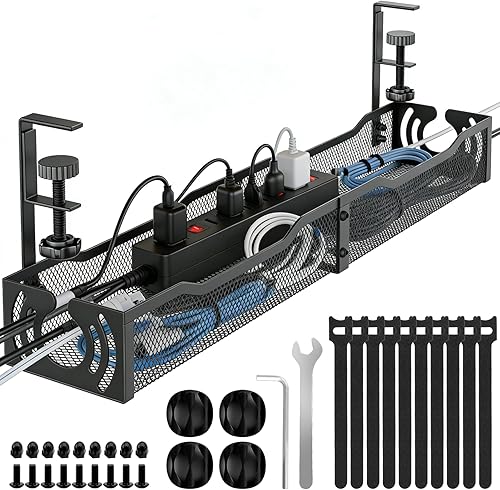
Prime LOVJOYSE 25.3 Inch Under Desk Cable Management
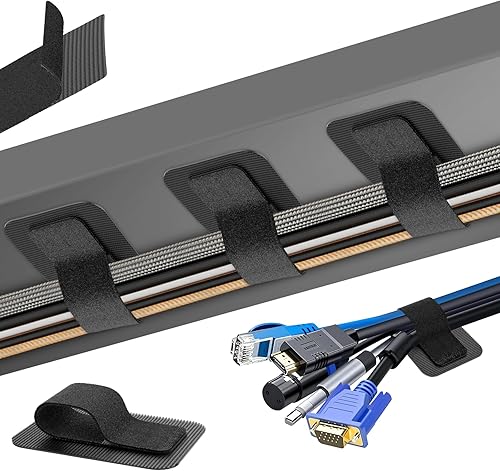
Prime Fansto Under Desk Cable Management 20 Pack

Prime N NOROCME 192 PCS Cable Management Kit with Wire

Prime Litwaro No Drill Under Desk Cable Management Tray

Prime Cotohim Under Desk Cable Management Tray 35.8
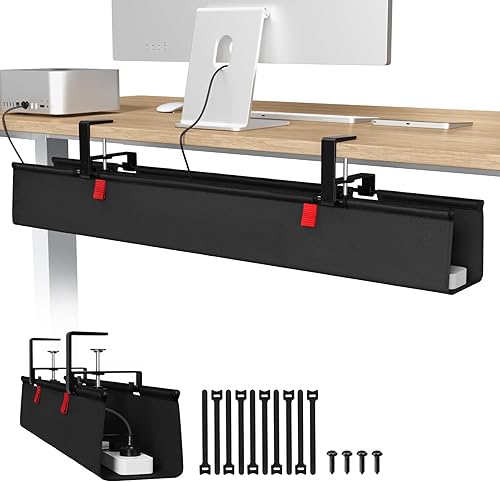
Prime Univivi 36 Inch No Drill Under Desk Cable
As an Amazon Associate we earn from qualifying purchases. Product prices and availability are accurate as of the date/time indicated.
Pros
- Sturdy stainless steel construction feels far stronger than plastic trays
- Truly no-drill install with rubber padded clamps that prevent scratches
- Extra long size holds large power strips plus bulky monitor adapters
- Open design makes it easy to plug, unplug and reroute cables
Cons
- Clamp mount requires an accessible desk edge up to 2 inches thick, not ideal for very thick tops
- Large multi-monitor office setups may feel crowded and need two trays for full coverage
- Black only finish offers limited color matching options
The LOVJOYSE 25.3 inch Under Desk Cable Management Tray is a clamp-on organizer designed for anyone tired of tangled cords underfoot. It is a strong fit for home offices, gaming stations and sit stand desks where clean routing matters.
In real use, it easily swallows a large surge protector plus monitor bricks, chargers and excess cable length. Users report fast five to ten minute installation and a stable hold with no sagging, even when fully loaded for multi monitor setups.
Built from stainless steel with an open mesh base, it feels far sturdier than plastic trays while promoting airflow around power adapters. The rubber padded clamps grip firmly without scratching, and dual access holes make routing and unplugging simple.
The clamp design does limit compatibility, since it needs an accessible desk edge up to 2 inches thick. Very large office setups with multiple workstations may also find one tray crowded and prefer two units for full coverage.
Overall, this is one of the easiest damage free ways to lift cables off the floor and create a safer, cleaner workspace. For its strength, length and tool free setup, it is an excellent upgrade for most desks.
Brand: LOVJOYSE, Material: Stainless Steel, Color: Black, Style: Modern for home and office use.
Size: 25.3L x 4.72W inches, Load Capacity: Up to 15 lbs, Installation: Clamp mount for desks up to 2 inches thick.
Use: Indoor cord organization for home office, gaming desk, standing desk and kitchen workstation setups.
Pros
- Strong, stable hold when surface is cleaned and adhesive is allowed to cure
- High capacity straps prevent slipping and sliding even with thick cable bundles
- No tools, no drilling and no technical skills needed for installation
- Compact, reusable and easy to reorganize as your setup changes
Cons
- Adhesive base pads are single use and cannot be reused after removal
- Requires a smooth clean surface plus 2 hour wait time for best adhesion
- Very strong grip can make initial repositioning difficult
This 20 pair under desk cable organizer kit is designed for anyone tired of tangled cords under a home office, gaming or work desk. It is especially useful for setups with monitors, chargers, power strips and PC cables that need to stay hidden but accessible.
Each extended strap holds up to 15 cables securely with reinforced hook and loop fastening that resists slipping. In real use, users report a strong and stable hold when you clean the surface first and allow the adhesive to cure before loading cables.
The design is low profile and flexible, so it fits tight corners and narrow spaces without tools or drilling. The combination of plastic and rubber straps with acrylic adhesive pads feels sturdy yet compact enough to tuck neatly out of sight.
There are a couple of tradeoffs to know. The adhesive base pads are single use, so you cannot reuse them once removed, and readjusting can take real effort due to the strong grip. You also need a smooth, clean surface for best results.
Overall, this is a practical, non invasive solution for clean and safe cable control under any desk. If you want affordable, reusable straps with strong adhesion and high capacity, this kit is an easy recommendation.
This kit includes 20 hook and loop cable straps plus 20 adhesive hook pads for under desk mounting. Straps measure 120 x 40mm with additional mounting pads for flexible placement options.
It is made from durable plastic and rubber with upgraded acrylic adhesive for indoor use. The black compact style blends neatly under desks, tables and workstations.
Installation is self adhesive with no drilling required. The adjustable, self locking design is reusable, residue free and suitable for wood, glass, tile and other smooth surfaces.
Clean the mounting surface thoroughly and let it dry completely before applying the adhesive pads. Press firmly and wait 2 hours before loading cables for maximum holding strength.
Plan your cable routes first, then mount pads in corners or along the back edge of the desk for best concealment. Use one strap per bundle and leave a little slack for easy future adjustments.
To reorganize, open the hook and loop strap without removing the base pad. If you need to relocate, use a new adhesive pad since the original base is not reusable after removal.
Pros
- Huge variety covers almost any cable routing need in one purchase
- Split braided sleeves are easy to load and self close for a tidy finish
- Strong self-adhesive pads hold well on clean desks, walls and wood
- Reusable ties and cut to length rolls allow easy adjustments and reuse
- Two color clips blend with black cables or light furniture
Cons
- Adhesive clips need clean flat surfaces and may loosen on textured walls or with heavy cables
- 20 inch sleeves work best for short desk runs, longer TV setups may need linking multiple sleeves
- 192 small pieces take time to sort and plan for first time installation
The N NOROCME 192 PCS Cable Management Kit is an all in one organizer for desks, PCs, TVs and gaming setups. It is built for anyone tired of tangled cords behind monitors, entertainment centers or home offices.
The standout is the combination of 4 split self-closing sleeves with 46 clips, 11 cord holders, reusable ties and adhesive mounts. In real use, you can bundle monitor and charger cables in the sleeve, then route drops along desk edges with clips for a clean, snag free workspace.
Build quality centers on sturdy polycarbonate parts and eco-friendly Polyamide66 clips in black and transparent finishes. The self-adhesive pads grip well on clean wood, desks, baseboards and ceramic, and the braided sleeves stay closed while still allowing easy cable entry.
The main limitation is surface prep and sizing, since dusty or textured walls can weaken adhesion and the 20 inch sleeves suit short runs best. Sorting nearly 200 pieces also takes a little planning on first setup.
Overall, this kit delivers complete, tool-free cable control with strong materials and flexible options for future changes. If you want one box to tame a full desk or TV area and deter pet chewing, it is an excellent pick.
Brand: N NOROCME, Color: Black, Material: Polycarbonate and Polyamide66, Style: Modern.
Includes 4 cable sleeves 20 inch by 0.4 inch, 46 cable clips in black and transparent, 11 cord holders, 20 reusable ties, 2 self-adhesive rolls 118 inch each, 20 zip tie mounts and 100 fastening ties.
Compatible with clean surfaces such as desks, walls, baseboards, cabinets, wood and ceramic. No drilling or tools required for installation.
Pros
- Easy clamp installation requires no drilling or screws
- Sturdy carbon steel construction feels stable under load
- Spacious enough for a full size power strip plus extra cables
- Mesh design keeps setup tidy, ventilated and easy to access
Cons
- Only fits flat edge desks between 0.4 and 2 inches thick
- Can be a tight fit for very thick or oversized power strips
- Stored devices like docks can be slightly awkward to reach once mounted
The Litwaro Under Desk Cable Management Tray is a no drill clamp mount basket designed for home office users, gamers and standing desk owners who want hidden cables without damaging furniture. It is especially useful for anyone with a power strip, chargers and USB hubs cluttering the floor.
In real world use, installation takes just a few minutes by clamping to the desk edge and routing cords through the side holes. Reviewers note it holds a full size power strip with room left for extra cables, keeping feet clear and making vacuuming easier while supporting inward or outward mounting.
Built from carbon steel with a black mesh finish, the tray feels sturdy and supports up to 15 lbs without sagging. Soft rubber pads on the clamps protect wood surfaces from scratches, and the open mesh promotes airflow around adapters to reduce heat buildup and dust.
It is not perfect for every setup, as it only fits flat edge desks from 0.4 to 2 inches thick and can feel tight with oversized power strips. Accessing devices stored deep inside the basket can also be slightly awkward, so plan placement toward the back for best legroom.
Overall, this is a simple, sturdy and renter friendly solution for a cleaner desk. If you want fast, tool free cable organization with solid build quality, the Litwaro tray is an easy recommendation for most standard desks.
Pros
- Large capacity holds multiple power strips and bulky adapters
- Two flexible install options, clamp on or screw in
- Flame-retardant fabric improves safety over basic organizers
- Lightweight Oxford material resists dust and is easy to clean
- Highly rated for simple installation and neat, hidden results
Cons
- Fabric design offers less rigid support than metal trays for very heavy gear
- Clamp mount may not fit desks outside the 0.4 to 2.4 inch thickness range
- Only available in black, with no light color option to match white desks
The Cotohim Under Desk Cable Management Tray is a long fabric organizer designed to clear cord clutter under office, home and standing desks. It is ideal for remote workers, gamers and anyone tired of tangled power strips hanging or piling on the floor.
In daily use, the extra long tray easily holds power strips, extension cords, chargers and bulky adapters in one hidden spot. The included fiber tubes and 12 cable ties help route cables cleanly to your PC, monitor and desk accessories for a tidy workspace.
Built from thickened flame retardant Oxford cloth, the tray feels sturdy yet lightweight and resists dust buildup. The soft fabric design protects cables from scratches while promoting airflow, and the black modern finish blends well under most desks.
Installation offers clamp on or screw in brackets to fit desktops from 0.4 to 2.4 inches thick, so no drilling is required for most setups. Keep in mind fabric holds less rigid weight than steel trays, and very thick or unusually shaped desks may need the screw option.
Overall, this is a practical, safety conscious solution for creating a clean and family friendly workspace. If you want large capacity storage with fast, flexible installation, the Cotohim tray is a smart pick for home and office use.
Brand: Cotohim
Color: Black
Material: Flame retardant Oxford fabric
Size: 35.8 inch long by 5.6 inch wide tray
Compatibility: Fits desktops 0.4 to 2.4 inches thick
Installation: Clamp on or screw in mount
Included: Tray, 2 brackets, 2 fiber tubes, 12 cable ties
Use: Indoor office, home and standing desk setups
Pros
- Very large 36L x 5.5W x 5.5H capacity fits all sizes of sockets and adapters
- Two installation options provide flexibility for renters and different desk materials
- Unfolding tray and built-in ties make cable changes fast and tidy
- Durable Oxford fabric with flame-retardant treatment and bottom support
- Top ranked performance in Computer Racks and Cabinets with strong user ratings
Cons
- Requires at least 5.3 inches of clear space, not compatible with desks that have drawers or back rods in the way
- Mounting clips sit on the tabletop so the install is not completely invisible from above
- Soft fabric construction provides less rigid impact protection than solid metal trays
The Univivi 36 Inch No Drill Under Desk Cable Management Tray is a full-length organizer made to hide power strips, adapters and loose cords beneath your desk. It is ideal for home offices, gaming stations and work desks where multiple devices create constant cable clutter.
Standout features include dual installation with tool-free clamps or screws, plus compatibility with wood, glass and metal tops. In daily use, the fold-open tray makes it simple to plug in new gear, while built-in ties keep every brick and cable locked neatly in place.
Design and build quality feel premium for a fabric solution. The 36L x 5.5W x 5.5H tray uses thick 600D flame-retardant Oxford fabric with bottom support to carry heavy loads without sagging, and the heavy-duty clamps hold firmly for long-term use.
The main drawback is fitment. You need clear edge space for the clips, and desks with built-in drawers or rear support bars may not work. The clips also rest on the desktop surface, so minimal hardware will be visible from above.
Overall, this is an excellent pick if you want maximum capacity without drilling. For large setups that need easy access, flexible mounting and a clean modern look, the Univivi 36-inch tray is a smart and practical upgrade.
Brand: Univivi, Model Number UN1174, Color Black, Style Modern.
Dimensions: 36L x 5.5W x 5.5H inches, Weight 3.1 pounds, Material 600D Oxford Fabric with flame-retardant treatment.
Installation Type: Clamp-on with no drill plus optional screw-in mount for wood, glass and metal desks.
Capacity: Holds full-size power strips, adapters, sockets and excess cords with built-in ties and bottom support.
Matching a Part to Your Build
If you run a standing-desk gaming PC with two monitors and a power-hungry rig, prioritize a rigid clamp tray with simple access. The Cable Management, 25.3” Under Desk Cable shows this style well with its 25.3 inch steel mesh body, support for up to 15 lbs, and clamp fit for tops up to 2 inches thick with rubber pads to guard the finish. The Under Desk Cable Management Tray No Drill follows a similar idea with carbon steel construction, fit for 0.4 inch to 2 inch tops, side holes for routing, and inward or outward mounting so you can face the opening toward you for quick swaps.
If you have a wide desk, a dock, speakers, chargers, and a printer brick, go longer and softer to swallow it all. The Univivi No Drill Under Desk Cable Management Tray offers a 36 inch long by 5.5 inch wide by 5.5 inch high fabric channel with both clamp-on and screw fixing, thick 600D Oxford fabric, bottom support, and built-in ties to pin each item. The Under Desk Cable Management Tray is another fabric route with flame-retardant Oxford cloth, fit for 0.4 inch to 2.4 inch tops, plus brackets, fiber tubes, and 12 cable ties to guide the drop to the floor. Do not buy a long channel if your desk has center drawers or a rear bar without that 5.3 inches of edge clearance, since you will not be able to seat the clips.
If you run a minimalist laptop plus monitor setup and hate visible lines, focus on straps, sleeves, and clips instead of a big tray. The Cable Management Under Desk centers on 20 pairs of 120 by 40 mm hook-and-loop holders where each extended strap can hold up to 15 cables, with adhesive pads for wood, glass, and tile that stay clean on removal after the recommended wait. Pair that with the N NOROCME 192 PCS Cable Management Kit 4 Wire when you need sleeves, reusable ties, cord holders, tie rolls, mounts, and fastening ties in one box to dress the leg and baseboard. You can learn how others keep the top visually quiet in minimalist RGB desk setup.
Common Mistakes
• You buy before you measure thickness and rear clearance. Many clamp trays only fit flat edges from 0.4 inch to 2 inches, and some need open space for clips on top, so a beveled edge, thick butcher block, or drawer box can block the mount. Measure thickness with a ruler and check for drawers or bars before you order.
• You overload one small tray and pull every cable tight. Even when the spec sheet lists support for up to 15 lbs, piling bricks on one side can tilt the basket and stress plugs, and a tight run will tug your PC when a standing desk rises. Center heavy bricks, anchor them with built-in ties, and leave a gentle loop for lift travel.
• You trust adhesive alone for a heavy power strip on a dusty or textured surface. Self adhesive pads need a clean, smooth area and time to cure, often about 2 hours before loading, and they are not a good fit for rough wood or fabric panels. Use clamps or screws for the main tray and save adhesive clips and straps for light signal cables along smooth edges.
Who Should Wait or Buy Differently
If your desk has an irregular edge, a thick live-edge slab over 2.4 inches, built-in drawers with no rear gap, or a glass top you are not allowed to clamp, a standard under-desk tray is not ideal for you until you confirm fit or choose a different path. Renters who cannot use screws, owners of tiny folding tables with no underside depth, and anyone who only has one laptop charger may do better with a small adhesive strap set and a single sleeve rather than a full 36 inch channel that will crowd knee space.
Frequently Asked Questions
Do I need to drill to mount an under-desk tray?
In most cases you do not. Many steel and fabric trays use edge clamps with rubber pads that suit tops from 0.4 inch to 2 inches, and some add an optional screw mount for glass, metal, or heavy loads. Choose clamp-only if you rent, and pick a dual-mount model only if you are comfortable following the maker guide for screws.
How do I keep cables from sagging on a standing desk?
Put the power strip and bricks inside the tray so only one main cord drops to the wall, then secure that drop with a sleeve or hook-and-loop straps that allow flex. Leave a loose loop under the desk for travel and anchor each brick with ties so plugs stay seated. You can pair this with soft glow ideas from Bias Lighting & Ambient RGB without adding new hanging wires.
What is the cleanest way to hide monitor and charger cords?
Route short device cords sideways into the tray through side holes, then bundle the long vertical run in a split sleeve around 20 in long that you can link end to end. Use small clips or adhesive mounts to pin the sleeve to the leg or rear edge, and finish with a reusable tie at each end. According to owners, this two-step method keeps the desktop clear while still letting you open one section to swap a cable.




Write Your Review
No reviews yet. Be the first to share your experience!