

Choosing an RTX 5070 Ti is not just about performance, it is about whether the card actually fits and breathes in your case. If you are weighing RTX 5070 Ti length and clearance for a mid tower and SFF case, your decision comes down to a few physical limits that are easy to overlook until the card is in your hands.
In this guide you will learn how to evaluate that fit before you buy. We will cover what SFF-Ready really means, how length and thickness interact with your case layout, how cooler design affects temperatures, and how power cable clearance can make or break a compact build. You will see the same framework apply whether you are planning a spacious mid tower for 2026 or a tight small form factor system where every millimeter counts.
What Actually Matters
SFF-Ready Is a Standard, Not Just Marketing
When you see SFF-Ready on an RTX 5070 Ti, it refers to NVIDIA guidance for cards that are designed to fit a wider range of compact cases. Per the spec sheet, both example cards in this guide carry that designation, which helps you narrow your search if you are building in a small form factor chassis. It does not mean every SFF case will fit every SFF-Ready card, you still need to compare the card spec against your case spec.
Think of SFF-Ready as a starting filter. If your case manufacturer lists SFF-Ready support or a maximum GPU length and thickness, start there and then verify the exact card dimensions on the official product page. For more context on how case design affects component choice, browse the Cases & Airflow archive to see how different layouts handle GPU clearance.
Length, Thickness, and How They Interact With Your Case
Length is the first number most builders check, but thickness matters just as much. A card that is listed as 2-slot, like the ZOTAC Gaming GeForce RTX 5070 Ti Solid SFF OC DLSS example, will occupy two expansion slots in width, which leaves more room for airflow and for other components below it. A thicker card can block front radiator mounts, interfere with bottom fans, or press against a side panel in a sandwich layout SFF case.
You should compare three case specs before you decide: maximum GPU length, maximum GPU thickness or slot count, and clearance to front-mounted radiators or fans. In a mid tower you often have extra length to spare, so you can prioritize cooling or noise. In an SFF case you should measure from the rear bracket to the front panel, shroud, or radiator, and also check whether the case uses a riser cable that changes how the card sits. Always follow the manufacturer mounting instructions and check cooler height or radiator clearance against your case manual.
Also consider what sits around the GPU. Tall RAM, thick radiator tubing, or a front panel USB header can reduce usable length by a small but critical amount. Owners commonly report that a card fits on paper but fouls on a cable header or case strut, so look at build photos for your exact case and card combination and leave a little headroom for installation angle.
Airflow Design and Fan Layout
Cooler design determines how well your case can exhaust heat. The ZOTAC Gaming GeForce RTX 5070 Ti Solid SFF OC DLSS uses IceStorm 2.0 Advanced Cooling with 3x 90mm BladeLink fans, composite heatpipes, and a pass-thru airflow design, plus features like FREEZE Fan Stop and Active Fan Control. That pass-thru section lets air flow straight through the heatsink and out toward your case exhaust, which is especially helpful when the card sits close to the side panel or PSU shroud.
The GIGABYTE NVIDIA GeForce RTX 5070 Ti SFF 16G uses a WINDFORCE Cooling System with a similar goal, moving heat off the 16GB GDDR7 256-bit memory interface and Blackwell GPU and into the case airflow path. In a mid tower with multiple intake and exhaust fans, either approach can work well if you maintain a clear front to back path. In an SFF case, a card that vents efficiently and stops its fans at idle can keep noise down when you are not gaming.
When you evaluate airflow, match the card to your case fan plan. If you have a mesh front and strong exhaust, a flow-through cooler shines. If your SFF case is more enclosed, look for a cooler that does not recirculate hot air around the card and make sure your case fans can actually pull that hot air out. You can learn how GPU choice interacts with other parts in our Graphics Cards section, which covers pairing and airflow in more detail.
Power, Cables, and Physical Headroom You Often Overlook
Modern GPUs need solid power delivery and space for the power connector and bend radius. Both example cards use PCIe 5.0 and a 16GB GDDR7 256-bit 28 Gbps memory configuration on the ZOTAC model, so you should plan your PSU and cable routing with headroom in mind. Choose a PSU that meets the GPU maker recommended wattage and leaves extra capacity over your combined CPU and GPU draw, and never assume any PSU can handle any card.
In compact cases, the power cable can add 15 to 25 mm of effective height or length if it sticks straight out from the card. Check whether your case has a recess or cutout for the 12VHPWR or 8-pin cable, and whether a right-angle adapter is supported by the card maker. The ZOTAC card includes a bundled GPU Support Stand and a metal backplate, which helps with sag in a mid tower but may not be usable in a very tight SFF layout where a support bracket does not fit. Always check the support accessory against your case interior before you count on it.
Finally, confirm display outputs for your monitor plan. The ZOTAC model lists 3 x DisplayPort 2.1b and 1 x HDMI 2.1b with 8K Ready and 4 Display Ready support, which gives you flexibility for multiple high refresh monitors. If you run several displays, verify that your case rear clearance lets you seat cables without sharp bends.
To see a few options that show the range, here are two SFF-Ready RTX 5070 Ti cards with different cooler approaches and the same core memory spec:
This article contains affiliate links. If you buy through one of our links, CustomPCGaming may earn a commission at no extra cost to you. Commissions never influence which products we recommend or how we rank them. Read our Affiliate Disclosure for details.
Quick Picks at a Glance

ZOTAC GeForce RTX 5070 Ti Solid SFF OC 16GB GDDR7
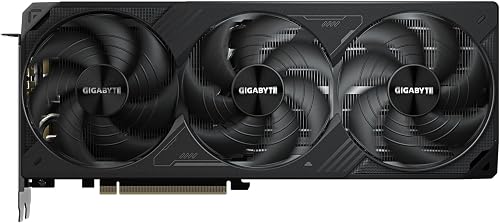
GIGABYTE GeForce RTX 5070 Ti WINDFORCE SFF 16GB
As an Amazon Associate we earn from qualifying purchases. Product prices and availability are accurate as of the date/time indicated.
Pros
- Excellent 4K and ray tracing performance with DLSS 4 and 16GB GDDR7
- Efficient SFF-friendly 2-slot design fits most compact builds
- Advanced IceStorm 2.0 cooling stays quiet with FREEZE Fan Stop at idle
- Future ready with PCIe 5.0 and full 8K, VR and quad display support
- Durable construction with metal backplate and bundled support stand
Cons
- 12-inch length may still be tight for ultra-compact ITX cases
- 2-slot cooler offers less overclocking headroom than larger triple-slot models
- Requires a modern PSU with 16-pin connector and good case airflow
The ZOTAC Gaming GeForce RTX 5070 Ti Solid SFF OC is a Blackwell powered enthusiast card designed for gamers who need flagship performance in a compact footprint. With 16GB of ultra fast GDDR7 and DLSS 4, it is built for high refresh 1440p, smooth 4K gaming and demanding creative workloads.
In real world use, the 28 Gbps memory on a 256-bit bus and PCIe 5.0 interface provide outstanding bandwidth for ray tracing and high resolution textures. DLSS 4 boosts frame rates while preserving image quality, and the card easily drives VR and 8K displays via its three DisplayPort 2.1b and one HDMI 2.1b outputs.
Design and build quality are standout features for this SFF model. The stealthy 2-slot profile fits a wide range of cases, while IceStorm 2.0 cooling with three 90mm BladeLink fans, composite heatpipes and pass-through airflow manages heat efficiently. FREEZE Fan Stop keeps it silent at idle, and the metal backplate adds rigidity.
There are a few tradeoffs to consider. At 12 inches long it can still be a tight fit in the smallest ITX enclosures, and the compact cooler has less thermal headroom than massive triple slot designs for extreme overclocking. Proper case airflow and a capable PSU with 16-pin power are essential.
Overall, this is an excellent choice for enthusiasts who want RTX 5070 Ti power without a bulky card. If you value compact efficiency, quiet cooling and modern connectivity for a clean, high performance build, the Solid SFF OC is a compelling and future ready option.
Model: ZOTAC ZT-B50710J3-10A GeForce RTX 5070 Ti Solid SFF OC
Architecture: NVIDIA Blackwell with DLSS 4, 16GB GDDR7 256-bit at 28 Gbps
Interface: PCI Express 5.0 x16, 3x DisplayPort 2.1b, 1x HDMI 2.1b, 8K and VR Ready
Cooling: IceStorm 2.0 with 3x 90mm BladeLink fans, composite heatpipes, pass-through airflow, FREEZE Fan Stop
Design: 2-slot SFF-ready, metal backplate, white LED lighting, dimensions 12 x 1.6 inches, 4.7 pounds, includes GPU support stand
Choose the Solid SFF OC if you are building in a mid-tower or compact case and want top tier 1440p and 4K performance without a thick triple slot card. It is perfect for gamers who prioritize efficient cooling, quiet operation and a clean aesthetic.
Make sure your case supports a 12-inch long GPU and has good airflow, and that your PSU can handle the included 2x 8-pin to 16-pin adapter. For ultra small ITX or maximum overclocking headroom, consider a larger cooled model instead.
Pros
- Excellent 1440p and 4K performance with ray tracing on ultra settings
- Very cool and quiet operation, reported to stay around 60 degrees under load
- Compact SFF Ready form factor leaves more room for other components
- Large 16GB GDDR7 memory is ideal for future games and creative workloads
- DLSS 4 with enhanced RT and Tensor Cores improves visuals and frame rates
Cons
- Premium enthusiast card that may be costly for budget builds
- Requires 16-pin power connector which may need an adapter or compatible PSU
- Nearly 12-inch length can still be tight for very small mini ITX cases
The GIGABYTE GeForce RTX 5070 Ti WINDFORCE SFF 16G is a high performance graphics card built on NVIDIA Blackwell architecture. It is aimed at gamers and creators who want top tier 1440p and 4K performance without needing an oversized chassis.
Standout features include 16GB of GDDR7 memory, DLSS 4, and enhanced RT and Tensor Cores for AI acceleration. In real world use, owners report very high frame rates at ultra settings, smooth path tracing, and excellent 2K gaming results.
Design and build quality focus on efficient cooling and compact size. The WINDFORCE triple-fan system keeps the card cool and remarkably quiet, while the SFF Ready footprint makes it easier to fit in a wider range of cases. Build includes a versatile VGA holder for added support.
Drawbacks are typical for this class of card. It requires a 16-pin power connection and a capable power supply, and its length may still challenge the smallest compact builds. Availability at retail pricing can also be limited.
Verdict: This is a powerful, efficient and surprisingly compact RTX 5070 Ti that delivers cool, quiet and future ready performance. It is an excellent choice for gamers wanting high refresh 1440p or entry 4K gaming and for creators needing serious GPU acceleration.
Model: GIGABYTE GV-N507TWF3-16GD, GeForce RTX 5070 Ti WINDFORCE SFF 16G
Architecture: NVIDIA Blackwell with DLSS 4, enhanced RT Cores and Tensor Cores
Memory: 16GB GDDR7, 256-bit interface, 28000 MHz memory clock
Interface: PCI-Express x16, PCIe 5.0 ready, NVIDIA SFF Ready
Clock Speed: 2452 MHz GPU clock
Cooling: WINDFORCE triple-fan cooling system
Outputs: DisplayPort and HDMI, maximum resolution 7680 x 4320
Dimensions: 11.97 inches L x 4.96 inches W, 1.2 pounds
Included: 16-pin power cable x1, Versatile VGA Holder, 3 Year Manufacturer Warranty
Matching a Part to Your Build
If you are building in a mid tower with good front to back airflow, you have the most flexibility. You can prioritize a cooler with three fans and a flow-through design, since length is rarely the limit and a 2-slot card will leave room for bottom intake or a front radiator. The top RTX 5070 ti cards for 1440p gaming guide is a useful cross-reference if your main goal is high refresh 1440p and you want to see how different coolers are positioned for that use case.
For example, the ZOTAC Gaming GeForce RTX 5070 Ti Solid SFF OC DLSS is a strong illustration for a mid tower where you want quiet operation and a support stand to prevent sag. Its 3x 90mm BladeLink fans and FREEZE Fan Stop let the card idle quietly, and the metal backplate adds rigidity. You still need to verify that your case has enough length to the front fans and that the support stand has a place to mount without blocking airflow.
If you are building in an SFF case, start with the case manual and work backward. Look for the maximum GPU length, slot thickness, and any notes about SFF-Ready support. The GIGABYTE NVIDIA GeForce RTX 5070 Ti SFF 16G is a clear example of a card designed around that constraint, with its SFF-Ready design, WINDFORCE cooling, and 16GB GDDR7 on a 256-bit bus. In a compact chassis you should also check PSU form factor, riser orientation, and whether the side panel will sit flush with the power cable connected.
If you are reusing a case from a previous build, like the system in our ryzen 5 7600 RX 7700 XT 1000 dollar gaming PC amazon build, do not assume the old GPU clearance still applies. Newer Blackwell cards can be longer or use different cooler shrouds, so re-measure and compare the new card spec sheet to your case spec sheet, and leave room for cable bends and dust filters.
Common Mistakes
Assuming length is the only limit. Many builders check length and forget thickness and cable headroom. A 2-slot card may fit where a thicker card would choke, and a card that fits without cables may not fit once the power connector is plugged in. Always add the connector and bend radius to your mental model and check the case manual for both length and slot clearance.
Ignoring case airflow direction. A powerful cooler cannot compensate for a case that recirculates hot air. If your SFF case has limited exhaust, a pass-thru design that pushes air toward the exhaust fans will perform better than a cooler that dumps heat inside. Plan your intake and exhaust first, then pick the cooler that works with that path, and keep filters clean so airflow does not drop over time.
Undersizing the PSU or forgetting headroom. An RTX 5070 Ti with 16GB GDDR7 and PCIe 5.0 deserves a PSU that meets the GPU maker recommendation with extra headroom over your CPU plus GPU draw. Do not size the PSU to the bare minimum, and do not reuse old cables with a new standard. Follow the PSU and GPU maker instructions for the correct cable and connector, and handle components with anti-static precautions.
Who Should Wait or Buy Differently
This category is not ideal for you if your case cannot meet the basic clearance for an SFF-Ready RTX 5070 Ti, or if your PSU, case airflow, or monitor setup would force you to compromise heavily. If you have a very small console-style case with no GPU length headroom, a low wattage PSU with no recommended headroom, or you only play at modest settings where a smaller GPU would already meet your refresh target, you are not a good fit for a large Blackwell card right now. In that situation it is wiser to wait for a more compact option, upgrade your case and PSU first, or choose a card that matches your current chassis and power budget. That approach saves you from returns and from running a card in a thermally constrained space.
Frequently Asked Questions
How do I check if an RTX 5070 Ti will fit my mid tower or SFF case?
Start with the official spec sheets for both the card and the case. Compare the card length and slot thickness to the case maximum GPU length and supported slot count, then add space for the power cable bend and any front radiator or fans. Owners commonly report that checking the manual plus looking at photos of the exact case and card combo prevents surprises.
What does SFF-Ready mean for an RTX 5070 Ti?
SFF-Ready indicates the card was designed to meet NVIDIA guidance for fitting more compact cases, but it is not a guarantee for every SFF chassis. You still need to verify your case clearance, riser layout, and PSU placement. Both the ZOTAC Gaming GeForce RTX 5070 Ti Solid SFF OC DLSS and the GIGABYTE NVIDIA GeForce RTX 5070 Ti SFF 16G are listed as SFF-Ready, which makes them useful examples when you compare how different coolers handle the same size class.
Do I need extra cooling or a support bracket for these cards?
You should ensure your case has a clear intake to exhaust path and that your fans can move the heat the GPU produces. A support stand, like the one bundled with the ZOTAC model, helps prevent sag in a mid tower, but it may not fit in a tight SFF case, so check interior space first. As of November 2026, the best practice remains to follow the case and GPU maker instructions for mounting, fan curves, and cable routing.



Write Your Review
No reviews yet. Be the first to share your experience!