

Learning how to organize charging cables on a desk starts with one decision: will you guide each daily-use cord with its own small holder, or will you bundle everything out of sight? For most gaming desks, the first option works better for charging cables because you grab your phone cord, headset cord and controller cord many times per day and you want each one to stay within reach.
The main variables are cable thickness, desk surface, number of cords you touch daily and whether you want a fixed route or a movable grab-and-go holder. This guide walks through that decision framework so you can match clip size, opening style and adhesive to your build. You can also browse more ideas in our Cable Management & Under-Desk guides if you plan a full tidy-up in November 2026.
What Actually Matters
Slot Size and Cable Fit
Slot diameter decides which cords will stay put and which will slip out. A slot around 0.3 inches, which is about 7.5 mm, is a practical middle ground because per the spec sheet it can hold most phone charging cables, USB cords, thicker HDMI cords and computer power cords. You want your thickest cord to fit with light friction, while your thinnest silicone cord should still catch enough that it does not fall to the floor when you unplug your phone.
To weigh this, gather the cords you actually charge with and compare thick versus thin. If you use an original silicone iPhone cord or a similar slim cord, look for a holder that is described as able to hold that small head without dropping it, yet still lets you pull the cable out smoothly for use. If a clip is too tight, you will fight it every night, and if it is too loose, owners commonly report that thin cords slide out when you move your desk.
Opening Style: Fixed Push-In Versus Magnetic
Fixed push-in clips are simple grooves that you press a cable into, which is fine for cords you rarely move like a keyboard cord or an ethernet run. Magnetic clamp designs use a small rotating shaft and a magnetic lock, often described with a 60 degree rotating action, so you can place and remove cables with only one hand. That difference matters a lot when you are holding a phone in one hand and trying to dock its cord with the other.
Choose fixed clips when you want a permanent trace along a desk edge and you do not unplug often. Choose a magnetic opening style when you grab and return the same charging cord several times per day. Owners commonly report that one-hand access keeps headset and controller cords on the desk instead of on the floor, but the trade-off is that a movable lid has more parts and you should keep it away from very dusty areas where grit can affect the close.
Adhesive Strength, Surface Fit and Removal
Adhesive determines where you can mount and whether you will damage a desk. Upgraded acrylic adhesive pads are made to stick to flat and clean surfaces such as wooden tables, glass, ceramic tile, plastic, metal, wall paint and rubber, and transparent removable versions are designed to leave no residue after removal. Your job is to match the pad to your surface, clean off dust first, press firmly for about 30 seconds and then allow bonding time before you load cords.
Do not skip cure time, because per the spec sheet many designs ask you to wait 12~24 hours or allow 24 hours of bonding time for best hold. If you rent or you have a glass top, favor a removable acrylic pad and keep a replacement stick pad on hand so you can reuse or reposition the holder. For more ideas on damage-free mounting, see our notes on how to run LED strips around a desk without damage, which covers the same clean, press and wait approach.
Pack Count, Footprint and Placement Plan
Pack count should follow your route, not the other way around. A smaller multipack is enough if you only need to tame a charging corner with a phone cord, a watch puck and a controller cord. A larger multipack makes sense when you want to create neat traces across an office desktop, along a tableside, around a table corner, up a wall or near a bedside, with one holder every short span so cords do not sag between points.
Footprint matters in tight spots. A narrow holder around 0.87 inch wide can hide in a small corner and does not need much sticking area, while a slightly larger body around 1.14 inch long by 0.6 inch high gives a bit more stability for thicker cords. Sketch your path before you stick anything, from charger or power strip to desk edge to where you sit, and place holders where your hand naturally reaches rather than where they look tidy in photos.
Here are a few options that show the range, from magnetic one-hand clips to simple high-count adhesive clips:
This article contains affiliate links. If you buy through one of our links, CustomPCGaming may earn a commission at no extra cost to you. Commissions never influence which products we recommend or how we rank them. Read our Affiliate Disclosure for details.
Quick Picks at a Glance

Prime JOYROOM 9 Pack Magnetic Cable Clips
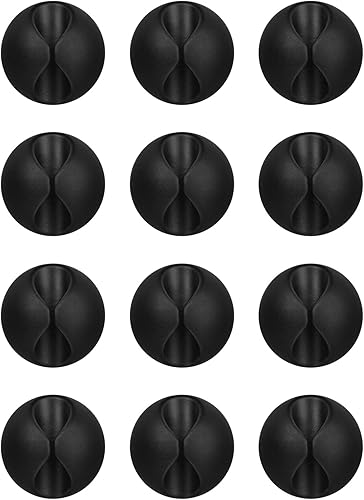
Prime Flezoo 12 Pack Adhesive Cable Clips Cord Organizer
As an Amazon Associate we earn from qualifying purchases. Product prices and availability are accurate as of the date/time indicated.
Pros
- One-handed magnetic open and close is faster than traditional push-in clips
- Versatile 7.5mm size holds both thin and thick cables securely without slipping
- Strong no-residue adhesive works on multiple flat surfaces and removes cleanly
- Nine clips per pack covers a full desk setup plus bedroom and car use
Cons
- Adhesive requires a clean flat surface and 12 to 24 hour cure time for best hold
- Indoor use only, not suited for outdoor or textured and uneven surfaces
- Small 0.87-inch size may feel tight for bundling multiple thick cables in one clip
The JOYROOM 9 Pack Magnetic Cable Clips is a simple cord management set designed for desks, nightstands, walls and cars. It is ideal for remote workers, students and families tired of charging cables slipping behind furniture or onto the floor.
The standout feature is the magnetic clamp with 60 degree rotating shaft that opens and closes for true one handed use. The 7.5mm slot grips everything from slim iPhone silicone cables to USB, HDMI and computer power cords, yet lets you pull the cable out smoothly when needed.
Each clip measures just 0.87 inches square in a clean modern white finish made from ABS with an acrylic base. The compact size tucks neatly into corners and along desk edges without taking up much space, while the white color blends with most setups.
Installation uses upgraded acrylic adhesive that bonds well to wood, glass and ceramic tile and removes without residue. You will need a clean flat surface and a firm 30 second press plus a 12 to 24 hour wait for maximum hold, and it is intended for indoor use only.
For organizing multiple devices without drilling or bulky channels, this 9 pack is a practical and reusable solution. If you want fast cable access, clean routing and discreet holders, the JOYROOM magnetic clips are easy to recommend.
Brand: JOYROOM, Model: JR-ZS368, Color: White 9-Pack, Style: Modern. Material: Acrylic adhesive base with Acrylonitrile Butadiene Styrene clip body for everyday durability.
Dimensions: 0.87 inch L x 0.87 inch W with 7.5mm cable slot. The slot fits phone charging cables, USB cords, HDMI cables and computer power cords.
Installation: Self-adhesive pad for flat clean surfaces including wood, glass and ceramic tile. Includes replacement adhesive pad for reuse. Indoor use only.
Pros
- Firm adhesive works on multiple household and office surfaces
- Quick no tools installation ideal for renters and office setups
- Fits a wide range of cable thicknesses from thin USB C to thicker braided cords
- Durable soft rubber construction feels sturdy and long lasting
- 12 clips provide enough units for multiple rooms and devices
Cons
- Snug rubber opening can feel stiff when frequently inserting and removing cables
- Needs a clean surface and 24 hour bonding time for maximum hold
- Single slot design holds one cable comfortably, tight for multiple thick cords
The Flezoo 12PCS Black Adhesive Cable Clips are small self-adhesive cord organizers designed to tame loose cables at home, in the office and in the car. They are ideal for desk workers, students and anyone tired of chargers slipping behind nightstands or tangling on the floor.
In real world use, they excel at keeping charging cables, headset wires, mouse cords and ethernet cables exactly where you leave them. Once bonded, the adhesive holds firmly on wood, walls, plastic, glass and metal, preventing everyday tugs from pulling cables loose.
Each clip measures 1.14 inches long and uses a soft yet sturdy plastic and rubber build in a discreet black compact style. The slot grips cables from thin USB C to thicker braided cords securely without looking bulky on your desk or wall.
The main tradeoff is the snug fit, which is great for security but makes frequent cable swapping a little stiff. You will also need to clean the surface first and allow 24 hours for full bonding, so plan ahead before loading cables.
Overall, these are a simple, practical and highly effective wire management fix for cluttered desks, bedside tables and car consoles. If you want no drill organization that stays put, this 12 pack is an easy recommendation.
Brand: Flezoo, Model: Cable Cord Organizer, Color: Black, Style: Compact
Quantity: 12 clips, Size: 1.14 inch L x 0.6 inch W per clip
Material: Plastic and rubber with self-adhesive backing, Installation: Self-Adhesive, no drill required
Compatibility: Phone chargers, USB C, headsets, power cords, mouse, keyboard and ethernet cables
Best for: Indoor use on wood, wall, plastic, glass, metal and rubber surfaces
Start by cleaning the surface with a dry cloth to remove dust and oil for stronger adhesion.
Peel off the protective film, press the clip firmly in place and leave it untouched for 24 hours to fully bond.
Once set, press cables into the rubber slot and route chargers along desks, nightstands or car consoles.
To remove, gently twist the clip off the surface to minimize residue and reposition as needed.
Matching a Part to Your Build
If your desk is mainly for daily charging and gaming, with a phone, headset and controller that you pick up constantly, prioritize easy access over sheer count. JOYROOM 9 Pack Magnetic Cable Clips shows this approach with its 7.5 mm slot diameter that fits most charging, USB, HDMI and power cords, plus a magnetic clamp with 60 degree rotating shaft action for one-hand placement and removal. Its narrow 0.87 inch width also helps you tuck holders along a desk edge, table corner or monitor stand where your hand already goes.
If you manage a busy family desk, office desk or student setup with many static cords for chargers, headsets, mice, keyboards and ethernet, prioritize coverage and simplicity. Flezoo 12PCS Black Adhesive Cable Clips Cord illustrates that style with a 12-pack count, a compact 1.14 inch by 0.6 inch holder size and adhesive made for wood, wall, plastic, glass, metal or rubber. You can space them to stop cords from slipping to the ground, and if you need to remove one you twist the holder after cleaning the surface and allowing 24 hours of bonding time during install.
If you care most about a clean look in a rental, a white desk or a glass top, prioritize removable adhesive and discreet placement. Look for transparent removable acrylic pads that will not damage your desktop or wall, plus a replacement pad so you can reposition without buying a whole new set. Pair that plan with the layout tips in our minimalist RGB desk setup so your charging route stays hidden but still reachable in November 2026.
Common Mistakes
Mistake 1: Sticking to a dusty desk and loading cords right away. If you skip cleaning, skip the 30 second press or skip the 12~24 hour wait, even good acrylic adhesive can peel. You should wipe the spot, press firmly, then leave holders empty overnight before you route phone and power cords through them.
Mistake 2: Buying one slot size for every cord. A groove that grips a thick computer power cord may let a slim silicone charging cord fall straight through, while a snug phone slot can pinch a thick HDMI cord. You should sort cords by thickness first and use tighter spots for slim daily cords and roomier spots for thick, rarely moved runs.
Mistake 3: Placing clips where you cannot reach or where heat and texture defeat adhesive. Holders stuck far behind a PC, on rough wood or above a warm power brick tend to fail or go unused. You should keep daily charging clips within arm reach, keep adhesive on flat and clean areas and use an under-desk tray for bricks and strips instead of hanging weight from small clips. For corner glow that pairs well with tidy cords, see RGB LED strips for a corner desk glow.
Who Should Wait or Buy Differently
Small adhesive clips are not ideal for builders who need to hide heavy power bricks, thick surge strips or a full PC cable bundle under a desk, and that setup is not a good fit for stick-on holders alone. If that is your goal, you should start with an under-desk tray, screw-mounted channel or hook-and-loop ties for weight support, then add only a few adhesive clips at the desk edge for the phone and headset cords you touch daily. You should also skip this category if you cannot use adhesive on your surface at all, in which case weighted desktop docks or clamp-on hubs are the more premium choice.
Frequently Asked Questions
Will these clips damage my desk when I remove them?
Removable acrylic pads are designed to come off cleanly without residue when you prep and remove them correctly. You should clean before sticking, allow full bonding time and twist gently to release, and keep a spare pad if you plan to reposition in 2026.
Can one clip type hold both thin phone cords and thick HDMI cords?
A mid-size slot around 7.5 mm or 0.3 inches covers most phone, USB, HDMI and power cords per the spec sheet. You should still separate very slim silicone cords from very thick cords in your layout so each holder keeps light friction without forcing.
How many clips do I need for a typical charging corner?
Most users need one holder per cord at the grab point plus one or two more to guide the slack back to the charger. A 9-pack set suits a focused phone plus controller zone, while a 12-pack set suits a wider desk with mouse, keyboard and ethernet mixed in.



Write Your Review
No reviews yet. Be the first to share your experience!